
All apps · 0 apps

pixel-peeker
Docker app from Stoatworks Labs' Repository
Overview
Readme
View on GitHubPixel Peeker
AI-assisted project. This codebase was created with Claude Code (Anthropic), directed and reviewed by a human author. The capacity model is verified numerically: it reproduces NovaStar's three published MX40 Pro per-port figures to the pixel and Brompton's published SX40 headline, and those are pinned as tests. The cabinet library was parsed from manufacturer datasheet PDFs, each record carrying its source. The Resolume export uses a schema read off real Arena 7.27.0 files. It has not been used to design a wall that was then built; no processor, receiving card or panel has been connected to it, and the Resolume file has not been opened in a running Arena.
A browser tool for designing LED video walls: lay out cabinets on a canvas, add processors, wire the ports, and find out whether it actually fits — before you find out on site.
Runs entirely in the browser. No account, no server, nothing uploaded. Deploys to Cloudflare as a static site.
Status: alpha. The maths is tested against published manufacturer figures; the cabinet library covers 150 cabinets across five manufacturers and 15 processors, each from its maker's own datasheet; one export format is unverified. See below — the honesty is the point.
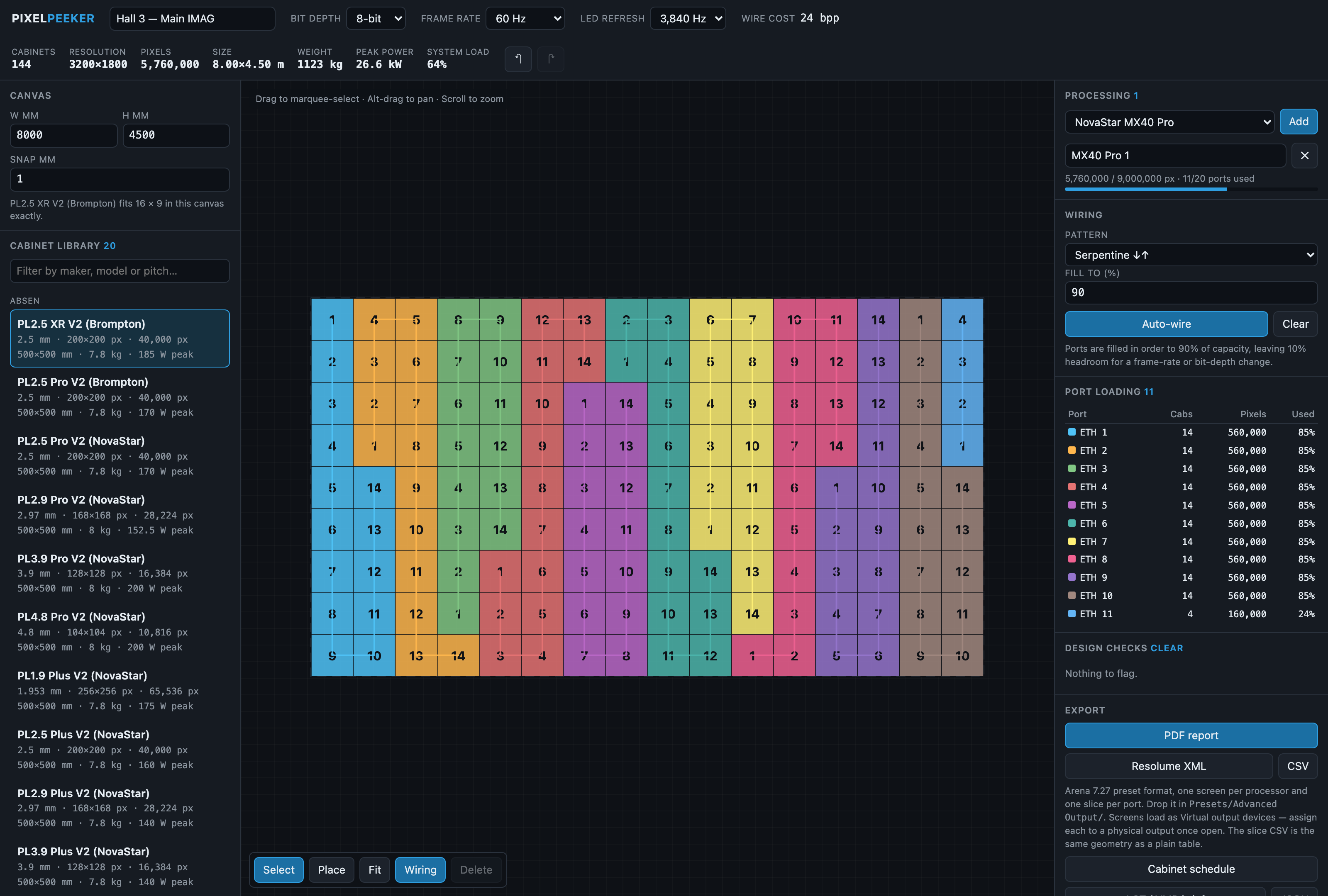
An 8 m × 4.5 m wall of Absen PL2.5 XR V2: 144 cabinets, 3200×1800, 26.6 kW peak, serpentine-wired to 90% fill. The MX40 Pro carries it on 11 of 20 ports at 64% device load — each colour on the canvas is one port.
What it does
- Lay out a wall. Pick a cabinet from the library or define a custom panel by resolution and receiving card. Fill a canvas, build blocks, or place tiles by hand. New and dragged cabinets snap flush against the ones already up, arrow keys extend a run one cabinet at a time, and holding Shift locks a drag to 45°.
- Add processing. NovaStar and Brompton controllers with their real port counts, input connectors and device capacity limits.
- Wire it up. Auto-wire in serpentine or column order to a chosen fill limit, or patch ports by hand. Every port shows its load, its headroom, and the highest frame rate it could sustain at that load.
- Check it. Overlapping cabinets, unpatched tiles, over-capacity ports, a device that runs out before its ports do, an input too small to carry the wall, panels that cannot reach the wanted refresh rate, chains that jump around the wall.
- Export. PDF report, Resolume Advanced Output XML, cabinet schedule CSV, a screen-configuration brief for LCT/VMP, and a versioned JSON interchange file.
The bit that matters: port capacity
Most LED capacity spreadsheets compute pixels = link rate ÷ (3 × bit depth) ÷ frame rate. That is wrong at 10-bit, and wrong in the direction that gets you into trouble —
it overstates capacity by about 7%.
Controllers pack each colour component into a power-of-two container so the DMA engine stays word-aligned:
| Bit depth | Naive (3 × depth) | Actual container |
|---|---|---|
| 8-bit | 24 bits/px | 24 bits/px |
| 10-bit | 30 bits/px | 32 bits/px |
| 12-bit | 36 bits/px | 48 bits/px |
With those containers, a single link efficiency of 0.9500 reproduces NovaStar's three published MX40 Pro per-port figures exactly:
| Signal | NovaStar publishes | Pixel Peeker computes |
|---|---|---|
| 8-bit @ 60 Hz | 659,722 px | 659,722 px |
| 10-bit @ 60 Hz | 494,791 px | 494,791 px |
| 12-bit @ 60 Hz | 329,861 px | 329,861 px |
With naive packing no single efficiency constant fits all three. The published ratios
(1.00 / 0.75 / 0.50) are exactly 24/24, 24/32 and 24/48. These are pinned in
src/domain/capacity.test.ts: if they fail, the model has drifted and every number the
app prints is suspect.
Two other things it gets right:
- LED refresh rate does not consume link bandwidth. The frame arrives once per frame period and the receiving card re-scans it locally at 3840 Hz or whatever else. Refresh is checked separately, against the panel's quoted figure, and it is not reduced by input bit depth — the card drives the LEDs at its own internal greyscale depth (14–16 bit) regardless.
- The device cap is often the real limit, not the ports. An MX40 Pro's twenty gigabit ports could carry 13.2 Mpx between them. The box is rated 9 Mpx.
Brompton is modelled separately, from their published per-port capacity table rather than a headline: a Tessera gigabit output carries 525,000 / 420,000 / 350,000 px at 8 / 10 / 12-bit and 60 Hz. Those are exactly 24 : 30 : 36 bits — Brompton pack naively, unlike NovaStar — and one constant of 756 Mbps of payload reproduces every row of the table. The processor caps (9 Mpx for an SX40, 4.5 for an S8) are a different shape again: the same at every bit depth up to 60 Hz, then halving as the frame rate doubles. Both shapes are pinned by tests.
NovaStar's 5G ports (CX40 Pro, and the 5G output cards in the MX2000/MX6000 Pro) are a third calibration — containers at 0.85, and 0.88 at 10-bit — taken from the V1.5.1 specifications, which re-rated the 5G solution in September 2025.
Data provenance
Every cabinet and processor record carries a verified flag and a source. Verified
records were parsed out of the manufacturer datasheet named in source — not typed
from memory, and not taken from a rental house's listing page (those are frequently a
different revision of the same product name). Unverified records are badged in the UI
and called out in the PDF report.
| Manufacturer | Models | Verified |
|---|---|---|
| Absen | 29 — Polaris PL V2, PL V3, PL Plus V2X; Jupiter JP Pro; Aries AX Pro | ✅ datasheet |
| Aluvision | 6 — Hi-LED 55 (four pitches), Hi-LED pro / Hi-LED+ pro P1.9 | ✅ datasheet |
| Gloshine | 51 — Carbon, Curface Pro, Dawn, Column, AR floor, Legend, Vanish / Vanish Max | ✅ datasheet |
| ROE Visual | 44 — Black Pearl, Black Quartz, Carbon, CB MarkII, Diamond, Graphite, Meru, Topaz, Ruby, Vanish (MKII / V8T / ST / Air / Acoustics), Black Marble | ✅ datasheet |
| Unilumin | 20 — Upad IV (8), URM III (11), Upad III | ✅ datasheet, except the Upad III (rental-house cut sheet, power confirmed by Unilumin's manual) |
| NovaStar | 12 — COEX MX40 Pro, CX40 Pro, MX30, MX20, KU20, MX2000 Pro and MX6000 Pro (1G and 5G); MCTRL4K, MCTRL660 PRO, MCTRL660 | ✅ datasheet |
| Brompton | 3 — Tessera SX40, S8, SQ200 (with QD-S) | ✅ datasheet |
Receiving-card pixel limits (NovaStar A10s Pro, A8s Pro, A8s, A5s Plus, A4s; Brompton R2) are verified against the card datasheets.
Adding data: take it from the manufacturer's own datasheet. Do not copy records out of another tool's curated database — the individual specs are facts, but a compiled database is a protected work in its own right under UK/EU database right.
Export honesty
PDF report — complete and reliable.
Cabinet schedule CSV, config brief, JSON interchange — complete and reliable. These carry the full pixel map, port assignments and sending order.
Resolume Advanced Output XML — schema verified. Element names, nesting and number formatting were read off real files written by Arena 7.27.0 (rev 14395), not guessed from documentation (the schema was reverse-engineered for the sibling project
blend-calc). Writes one<Screen>per processor and one<Slice>per output port, with identity Bezier warpers and Virtual output devices — assign each screen to a physical output once loaded. ⚠️ The schema is verified but this particular arrangement has not itself been loaded into a running Arena, and Resolume change the format between releases. A slice CSV with identical geometry ships alongside as a no-risk fallback.NovaStar LCT
.scr— genuinely proprietary and partly binary. Not generated.NovaStar VMP
.nprj— not generated yet, but no longer a dead end. A.nprjturns out to be a zip of per-device zips of plain JSON, andcabinetIDis a derivable packed field rather than an opaque handle. The container, manifest and geometry are all mapped indocs/novastar-vmp-format.md, written from a real VMP V1.5.1 export. One thing blocks a writer, and it is a gap in the sample rather than the format: every cabinet sat on a single Ethernet port, soconnectIDcannot be told apart from a port index and nothing else in the tree names a port. That doc states the experiment that settles it. Guessing would produce a file that loads and looks right but drives the wrong cabinets — far more damaging on site than no file at all.In the meantime the cabinet schedule and config brief carry the same information in a form you can type in or script against.
Develop
npm install
npm run dev
npm test
Two builds
The full build has everything described above. The lite build drops the NovaStar exports (cabinet schedule, LCT/VMP brief, JSON interchange) and ships just the design tool, the PDF report and the Resolume export — the parts with no caveats attached.
npm run build # full -> dist/
npm run build:lite # lite -> dist-lite/
build:lite runs scripts/check-lite.mjs, which fails the build if the NovaStar code
is still in the bundle. That check exists because the first attempt at the flag silently
did not strip anything and the build log looked identical either way.
Deploy to Cloudflare
Deployed as a Worker serving static assets, not a Pages project. There is still no
server code — the Worker's only job is to serve dist/. This is the shape Cloudflare's
"Import a repository" flow creates, and what the rest of the fleet uses.
The normal route is to connect the repo once in the Cloudflare dashboard, after which
every push to main builds and deploys itself:
| Setting | Full | Lite |
|---|---|---|
| Worker name | pixel-peeker |
pixel-peeker-lite |
| Build command | npm ci && npm run build |
npm ci && npm run build:lite |
| Deploy command | npx wrangler deploy |
npx wrangler deploy -c wrangler.lite.toml |
| Output directory | dist |
dist-lite |
Two repos-worth of config in one repo, so the two Workers are created separately from the same source and differ only in build and deploy command.
To publish from this machine instead — one-off, or without pushing:
npm run deploy       # full
npm run deploy:lite  # lite
wrangler.toml, wrangler.lite.toml, public/_headers and public/_redirects are all
already in place. _redirects is what makes the client-side routes resolve rather
than 404.
Run your own copy
Pixel Peeker is a static page, so hosting it yourself is one container serving the built files — the same files the hosted copy serves, running somewhere that still works when the venue has no internet.
Docker. The image is built by this repo's docker.yml workflow on every
push and published as ghcr.io/stoatworks-labs/pixel-peeker:
docker run -d --name pixel-peeker --restart unless-stopped -p 8526:80 ghcr.io/stoatworks-labs/pixel-peeker:latest
Or docker compose up -d with the docker-compose.yml
in this repo, which maps the same port. Either way it is then at
http://localhost:8526/.
A second image, ghcr.io/stoatworks-labs/pixel-peeker-lite (Pixel Peeker without the NovaStar export path), is built from the same repo.
Unraid. Search Community Applications for Pixel Peeker — the template is
templates/pixel-peeker.xml
in stoatworks-unraid, which is what the CA feed reads.
Stoatworks Burrow lists it under Self-hosted, with the compose file a click away.
The Dockerfile, docker-compose.yml, docker/ and the workflow are
generated from fleet.json in stoatworks-unraid. Change them there and
regenerate rather than editing them here.
This project is built on other people's work — see ATTRIBUTIONS.md.
Licence
MIT.
All figures are calculated, not measured. Verify against the controller before the wall goes live.
Install pixel-peeker on Unraid in a few clicks.
Find pixel-peeker in Community Apps on your Unraid server, review the template, and click Install. Unraid handles the Docker app or plugin setup from the published template.
Categories
Related apps
Explore more like this
Explore allDetails
ghcr.io/stoatworks-labs/pixel-peeker:latestRuntime arguments
- Web UI
http://[IP]:[PORT:80]/- Network
bridge- Shell
sh- Privileged
- false
Template configuration
Host port for the web interface.
- Target
- 80
- Default
- 8526
- Value
- 8526