

pinebridge-mt5
Docker app from jakeshake's Repository
Overview
Readme
View on GitHub
Pinebridge
Your TradingView strategy alerts, executed in MetaTrader 5 on your own server.
Unraid · Docker · Proxmox
Tired of paying a monthly fee just to get your TradingView alerts into MetaTrader 5? Or renting a VPS only so MT5 stays online around the clock? If you have a home server, you already own the hardware for both. Pinebridge receives your TradingView strategy alerts and places the trades in MT5, which runs in a Windows VM on your own machine. No signal-relay subscription, no VPS bill, and your broker login stays on your server instead of with a third-party service.
[!WARNING] Pinebridge places real trades automatically, with no human confirmation. Read the risk notice and run it on a demo account first.
How it works
flowchart TD
    TV["TradingView<br/>strategy alert"] -- "HTTPS webhook" --> CF["Cloudflare Tunnel<br/>(or your reverse proxy)"]
    CF --> BR["pinebridge-bridge<br/>checks the secret,<br/>translates the alert"]
    BR -- "ZeroMQ" --> EA["pinebridge-mt5<br/>Windows VM · MT5 · Pinebridge EA"]
    EA -- "order" --> BK["Your broker"]
    EA -. "fills, PnL, equity" .-> BR
    BR --> DB["Dashboard<br/>(your LAN only)"]
- Your Pine strategy fires an alert. Its message says what to do, for
example
signal=long,symbol=EURUSD,qty=1000,sl_price=...,tp_price=.... - TradingView posts it to your webhook URL. A Cloudflare Tunnel (or your own HTTPS reverse proxy) carries it to your server without opening router ports.
- pinebridge-bridge rejects anything without your secret, translates the alert, and sends it to the Expert Advisor over ZeroMQ in about a millisecond.
- pinebridge-mt5 is a Windows 11 VM that installs MetaTrader 5 and the Pinebridge EA by itself. The EA places the order with your broker: market entries and exits, resting limit orders, SL/TP moves and double-down adds, with oldest-first closing for US (FIFO) accounts.
- The EA reports every fill, close and account update back to the bridge, and the Pinebridge Dashboard shows them.
Screenshots
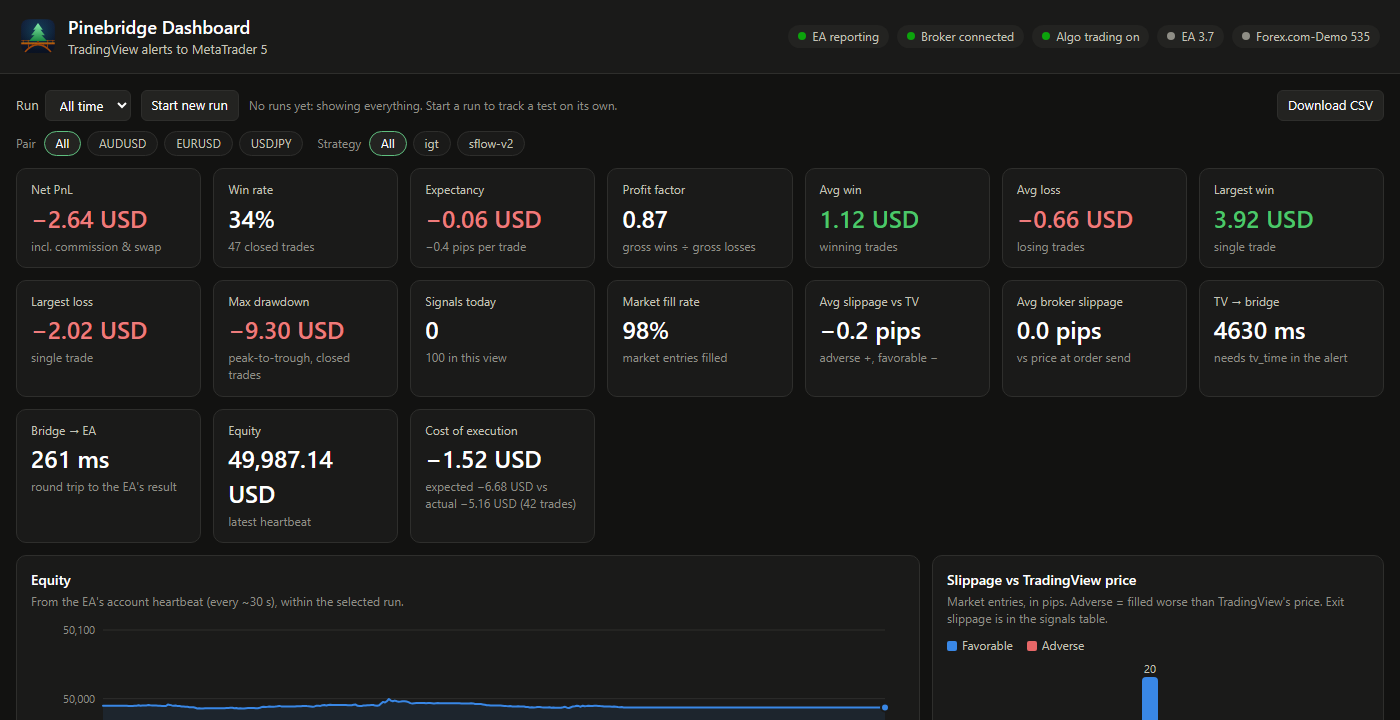
The dashboard (http://<server>:8081, LAN only): every signal and what
happened to it, and every closed trade from MT5's deal history (including
broker SL/TP closes) with its pips and net PnL. Stats per run, pair and
strategy: win rate, expectancy, profit factor, average win/loss, max
drawdown, slippage against TradingView's price and the broker's quote,
latency, cost of execution and the equity curve. Start a named run to test
a strategy on its own (nothing is deleted), filter by pair or strategy, and
download the trades and signal log as CSV.
More about the dashboard.
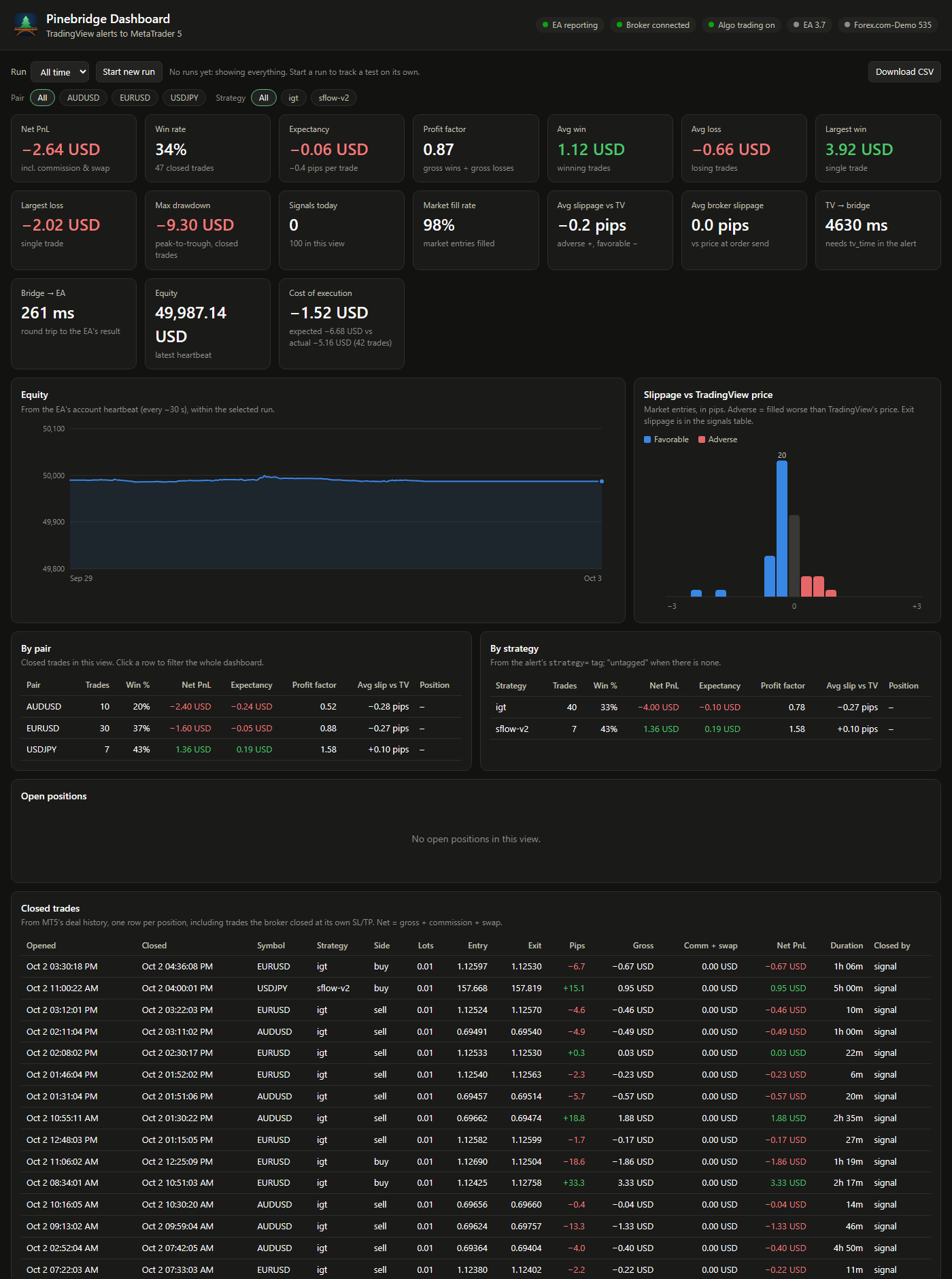
MetaTrader 5 in the VM, running the Pinebridge EA. Its Experts tab
logs each signal as it arrives (here a CLOSELONG, closed in 172 ms).
You can watch and control it from a browser on port 8006.
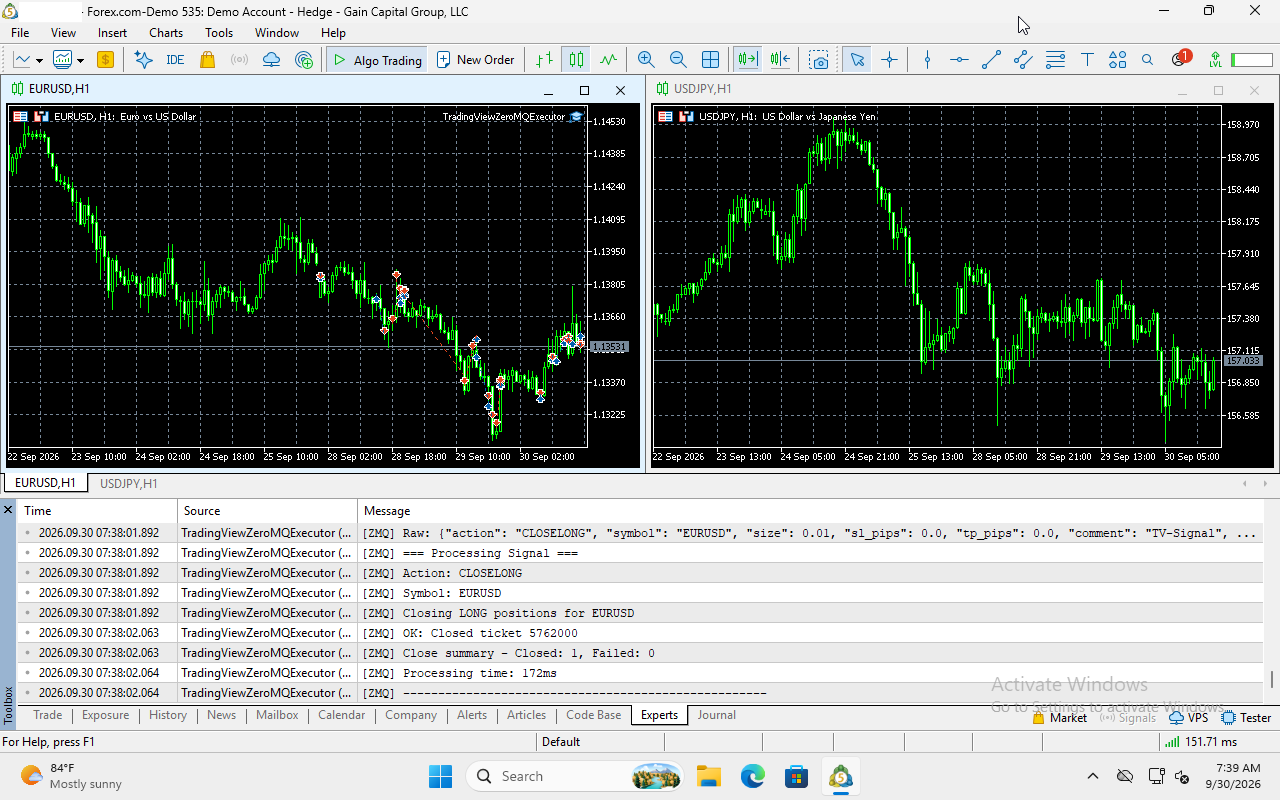
A TradingView strategy whose orders become Pinebridge alerts. Each fill
(here the IML +1000 long entry, which the bridge turns into a 0.01-lot
market order) fires an alert with the message Pinebridge executes.
What you need
| You need | Details |
|---|---|
| TradingView | A paid plan that includes webhook alerts, with two-factor authentication turned on (TradingView requires it for webhooks). |
| A Pine strategy | One that builds its alert messages in the Pinebridge alert format. An indicator or someone else's script that sends other text won't work as-is. |
| An MT5 broker account | Any broker that offers MetaTrader 5. Use a demo account first. Your TradingView symbol has to match the MT5 symbol exactly (EURUSD, not EURUSD.a). |
| A public HTTPS address | TradingView only sends webhooks to https://. A free Cloudflare account with a domain on it (for the tunnel), or a reverse proxy you already run. |
| A Windows licence | The VM installs Windows 11 from Microsoft's evaluation image. You're responsible for licensing it properly. |
| A server that stays on | Trades only happen while the server, the VM and MT5 are running. |
Hardware
The Windows VM is what needs resources. The bridge itself uses about 50 MB of RAM.
| Minimum | Recommended (tested) | |
|---|---|---|
| CPU | x86-64 with virtualization (Intel VT-x or AMD-V) enabled in BIOS, so /dev/kvm exists |
4+ cores; the VM gets 2 |
| RAM | 6 GB free (4 GB for the VM, Windows 11's minimum) | 10 GB free (8 GB for the VM) |
| Disk | 30 GB free | 64 GB free. The VM's disk grows as it's used: about 17 GB after install, plus a ~6 GB Windows download during setup |
| Network | Always-on internet | Wired |
Measured on the test server (Intel i7-12700K, VM with 8 GB and 2 cores): the running VM uses about 5% CPU. ARM machines (Raspberry Pi, Apple Silicon) can't run the Windows VM, but can run the bridge with your own MT5.
Install
| Platform | Guide |
|---|---|
| Unraid | Open Apps, search Pinebridge, install pinebridge-mt5 and pinebridge-bridge. Details: docs/unraid-install.md |
| Linux + Docker | docker-compose.yml with the published images: docs/docker-install.md |
| Proxmox VE | Docker in a VM with nested virtualization, or in an LXC: docs/docker-install.md#proxmox-ve |
| Windows PC, Docker Desktop, ARM, or your existing MT5 | Bridge in Docker, EA on your Windows machine: Bring your own MT5 |
Quick look at the Docker route:
mkdir pinebridge && cd pinebridge
curl -fsSLO https://raw.githubusercontent.com/jakeshake/pinebridge/main/docker-compose.yml
curl -fsSL -o .env https://raw.githubusercontent.com/jakeshake/pinebridge/main/.env.example
nano .env                  # your MT5 demo login and a Windows password
docker compose up -d       # add --profile tunnel for the Cloudflare Tunnel
What's automated and what you do yourself
Pinebridge does:
- the Windows install, MetaTrader 5, the ZeroMQ library, compiling the EA, attaching it to a chart, and the firewall rule, all on the first boot
- a webhook secret, generated on first start. The bridge log prints your exact webhook URL and alert Message.
- close retries after broker disconnects, FIFO-compliant closing, and a readable reason for every broker error in the dashboard
You do:
- Enter your broker login in the template or
.envbefore the first boot. - Create the tunnel or HTTPS hostname. It happens in your Cloudflare account (guide) or your reverse proxy. Point it at the webhook port only.
- Watch the first boot at
http://<server>:8006. It takes about 15-70 minutes. Leave the VM alone until MT5 shows the EA on a chart. - Create the TradingView alert on your strategy, with the webhook URL (including your secret) and the Message from the bridge log. Condition: Order fills and alert() function calls.
- Test on a demo account, and check the dashboard shows each signal as executed before you think about a live account.
Things to know
- Alert delay. TradingView usually takes 1-6 seconds to deliver a webhook. The dashboard shows it as "TV → bridge". Pinebridge suits strategies on minute-and-up timeframes, not scalping on ticks.
- Start alerts while the strategy is flat. If you create an alert while TradingView's strategy is already in a trade, MT5 never saw that entry, and the exits and SL/TP moves that follow are skipped ("no open position"). They sort themselves out at the next fresh entry.
- Your broker login is read once, at the first boot. To change accounts
later, log in again inside MT5. After switching accounts or re-attaching
the EA, re-tick Allow Algo Trading and Allow DLL imports
(otherwise you get
10027 - auto trading disabled by client). - US (FIFO) accounts don't allow opposite positions. Have your strategy close a position before reversing it.
- EA updates in a new image don't reach an already-installed VM on their own. Copy the new EA in, recompile it, and re-attach it on the chart: see Updating the EA.
- Slippage vs TradingView compares the MT5 fill with TradingView's price, which comes from TradingView's data feed, so it includes the difference between the two feeds as well as real slippage.
- Keep the dashboard private. It shows your balance and positions.
Never add port 8081 to your tunnel, and set
DASHBOARD_PASSWORDif others use your network.
Security
- The webhook needs your secret (
?secret=...in the URL; TradingView can't send custom headers). Anything without it gets401. - Public traffic goes through a Cloudflare Tunnel or your reverse proxy, never a forwarded port, and only ever reaches the webhook.
- Broker and Windows credentials are never baked into the images. You supply them at runtime.
Documentation
- Unraid install · Docker, Proxmox and bring-your-own-MT5
- Cloudflare Tunnel setup
- TradingView alert format (what your Pine strategy should send)
- MT5 and EA setup, troubleshooting · Dashboard · Architecture
Support
- Questions and help: the Unraid forum support thread
- Bugs and feature requests: GitHub issues
When asking for help, include the bridge log (docker logs pinebridge-bridge,
with your secret removed), MT5's Experts tab, and your broker and
account type (demo or live, hedging or netting).
Status
Running on Unraid with a Forex.com demo account: automatic first-boot install; live TradingView alerts end to end (market entries and exits, resting limit orders, double-down adds, SL/TP moves); close retries after a broker disconnect; FIFO-compliant closing on a US account; and the dashboard's fills, slippage and latency from real alerts. Docker Compose uses the same images. Proxmox and bring-your-own-MT5 reports are welcome.
Repo layout
signal-bridge/: thepinebridge-bridgeimage (Flask webhook, ZeroMQ, dashboard)mt5-windows/: thepinebridge-mt5image, built on dockur/windows;oem/holds the provisioning scripts and the EA sourceunraid-templates/: the Unraid templates listed in Community Applicationsextras/: the optionalpinebridge-tunnelUnraid template (.template, not.xml, so Community Applications doesn't list a second cloudflared)docs/: setup guides
Support the project
If Pinebridge saves you a VPS or a signal subscription, consider buying me a coffee.
Supporter perks:
- Any donation: a ready-to-use Pine strategy that sends Pinebridge-formatted alerts.
- $20 or more: a premium Pine strategy.
After donating, message me on Buy Me a Coffee with your TradingView username, and I'll give you access to the invite-only script on TradingView. The scripts are tools, not trading advice: backtests and past results don't predict future returns. Run them on a demo account first.
License
MIT. Please also read the automated trading risk notice.
Requirements
Categories
Related apps
Explore more like this
Explore allDetails
ghcr.io/jakeshake/pinebridge-mt5:latestRuntime arguments
- Web UI
http://[IP]:[PORT:8006]- Network
bridge- Shell
sh- Privileged
- false
- Extra Params
--device=/dev/kvm --device=/dev/net/tun --cap-add=NET_ADMIN --stop-timeout 120
Template configuration
noVNC web viewer -- watch/control the Windows desktop in a browser
- Target
- 8006
- Default
- 8006
- Value
- 8006
Optional RDP access
- Target
- 3389
- Default
- 3389
- Value
- 3389
ZeroMQ port the EA listens on -- pinebridge-bridge connects to 172.17.0.1 (this server, from Docker) or [Unraid IP]:this port
- Target
- 5555
- Default
- 5555
- Value
- 5555
Your MT5 broker account number
Your MT5 broker account password
Your broker's MT5 server name, exactly as shown in MT5 (e.g. MetaQuotes-Demo)
Chart symbol the EA attaches to on startup (the EA trades whatever symbol each signal names)
- Default
- EURUSD
- Value
- EURUSD
RAM allocated to the VM
- Default
- 8G
- Value
- 8G
CPU cores allocated to the VM
- Default
- 2
- Value
- 2
Virtual disk size
- Default
- 64G
- Value
- 64G
Windows account username (not your broker login)
- Default
- Docker
- Value
- Docker
Windows account password (not your broker login) -- change this
- Default
- admin
- Value
- admin
Persistent Windows VM disk image (keep this on cache/SSD if you can)
- Target
- /storage
- Default
- /mnt/user/appdata/pinebridge-mt5/storage
- Value
- /mnt/user/appdata/pinebridge-mt5/storage