
All apps · 0 apps

pinebridge-bridge
Docker app from Pinebridge's Repository
Overview
Readme
View on GitHub
Pinebridge
Your TradingView strategy alerts, executed in MetaTrader 5 on your own server.
Unraid · Docker · Proxmox

Tired of paying a monthly fee just to get your TradingView alerts into MetaTrader 5? Or renting a VPS only so MT5 stays online around the clock? If you have a home server, you already own the hardware for both. Pinebridge receives your TradingView strategy alerts and places the trades in MT5, which runs in a Windows VM on your own machine. No signal-relay subscription, no VPS bill, and your broker login stays on your server instead of with a third-party service.
[!WARNING] Pinebridge places real trades automatically, with no human confirmation. Read the risk notice and run it on a demo account first.
How it works
flowchart TD
    TV["TradingView<br/>strategy alert"] -- "HTTPS webhook" --> CF["Cloudflare Tunnel<br/>(or your reverse proxy)"]
    CF --> BR["pinebridge-bridge<br/>checks the secret,<br/>translates the alert"]
    BR -- "ZeroMQ" --> EA["pinebridge-mt5<br/>Windows VM · MT5 · Pinebridge EA"]
    EA -- "order" --> BK["Your broker"]
    EA -. "fills, PnL, equity" .-> BR
    BR --> DB["Dashboard<br/>(your LAN only)"]
- Your Pine strategy fires an alert. Its message says what to do, for
example
signal=long,symbol=EURUSD,qty=1000,sl_price=...,tp_price=.... - TradingView posts it to your webhook URL. A Cloudflare Tunnel (or your own HTTPS reverse proxy) carries it to your server without opening router ports.
- pinebridge-bridge rejects anything without your secret, translates the alert, and sends it to the Expert Advisor over ZeroMQ in about a millisecond.
- pinebridge-mt5 is a Windows 11 VM that installs MetaTrader 5 and the Pinebridge EA by itself. The EA places the order with your broker: market entries and exits, resting limit orders, SL/TP moves and double-down adds, with oldest-first closing for US (FIFO) accounts.
- The EA reports every fill, close and account update back to the bridge, and the Pinebridge Dashboard shows them.
Screenshots
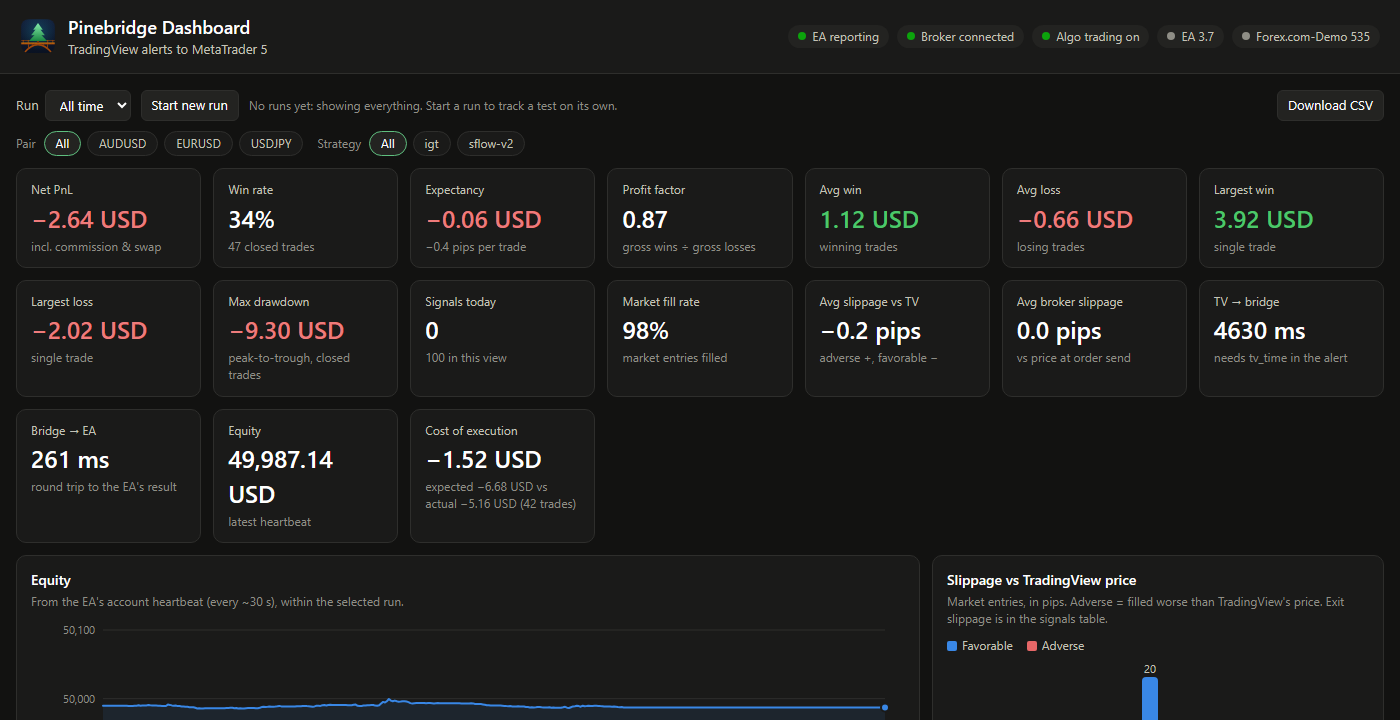
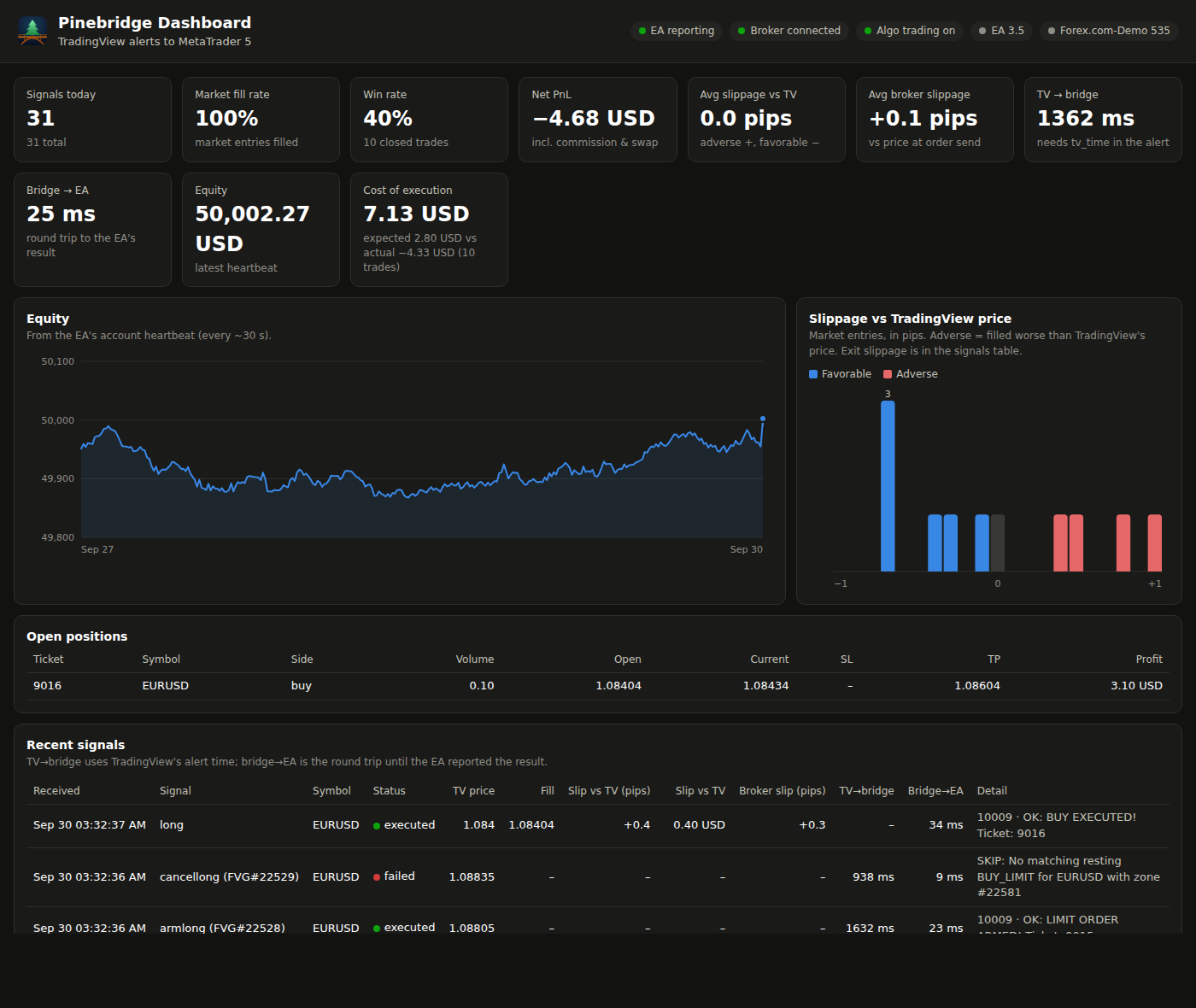
The dashboard (http://<server>:8081, LAN only): every signal and what
happened to it, and every closed trade from MT5's deal history (including
broker SL/TP closes) with its pips and net PnL. Stats per run, pair and
strategy: win rate, expectancy, profit factor, average win/loss, max
drawdown, slippage against TradingView's price and the broker's quote,
latency, cost of execution and the equity curve. Start a named run to test
a strategy on its own (nothing is deleted), filter by pair or strategy, and
download the trades and signal log as CSV.
More about the dashboard.
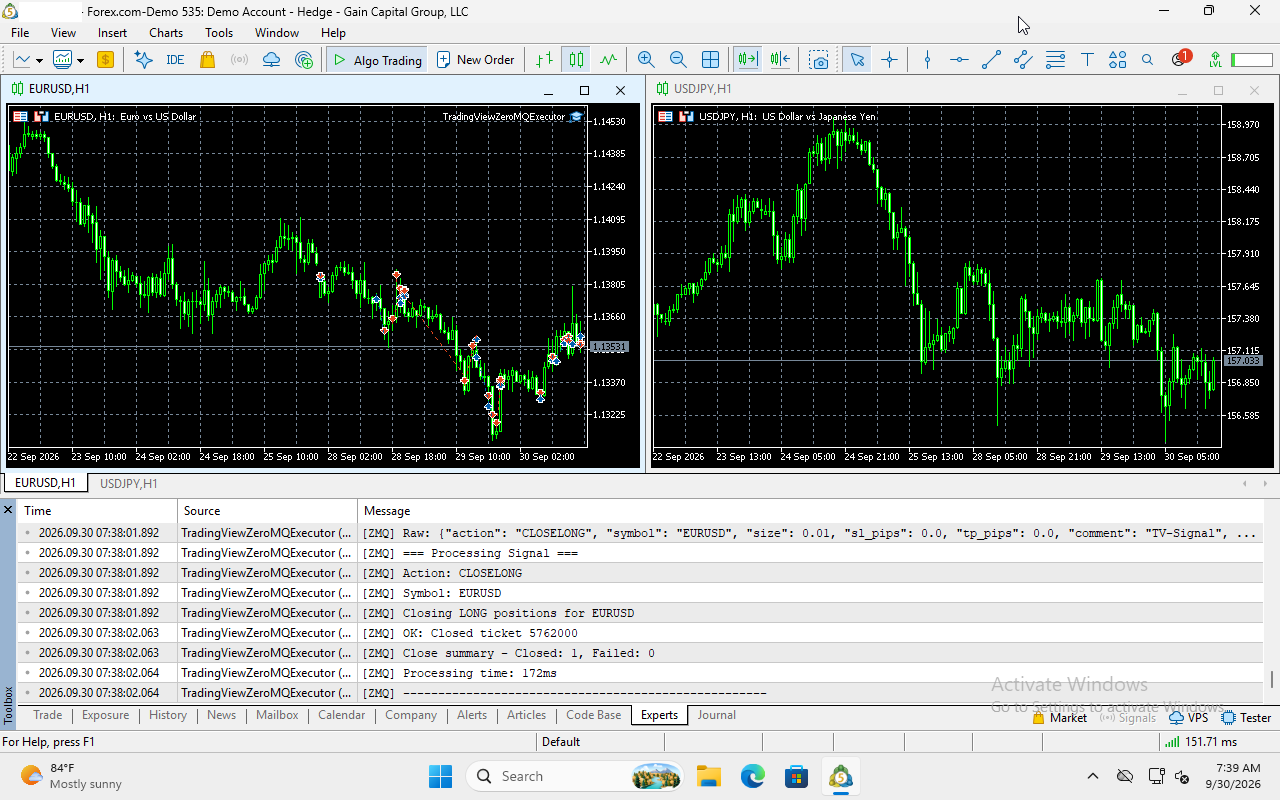
MetaTrader 5 in the VM, running the Pinebridge EA. Its Experts tab
logs each signal as it arrives (here a CLOSELONG, closed in 172 ms).
You can watch and control it from a browser on port 8006.
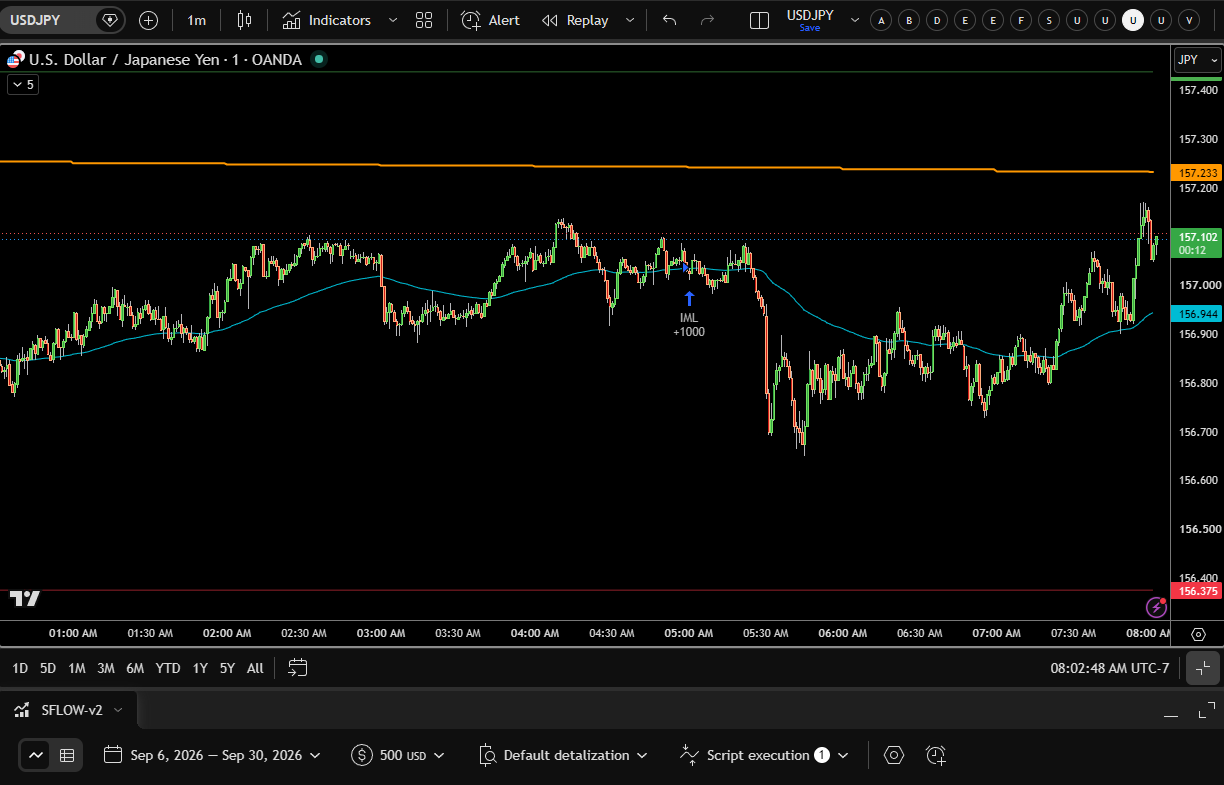
A TradingView strategy whose orders become Pinebridge alerts. Each fill
(here the IML +1000 long entry, which the bridge turns into a 0.01-lot
market order) fires an alert with the message Pinebridge executes.
What you need
| You need | Details |
|---|---|
| TradingView | A paid plan that includes webhook alerts, with two-factor authentication turned on (TradingView requires it for webhooks). |
| A Pine strategy | One that builds its alert messages in the Pinebridge alert format. An indicator or someone else's script that sends other text won't work as-is. |
| An MT5 broker account | Any broker that offers MetaTrader 5. Use a demo account first. Your TradingView symbol has to match the MT5 symbol exactly (EURUSD, not EURUSD.a). |
| A public HTTPS address | TradingView only sends webhooks to https://. A free Cloudflare account with a domain on it (for the tunnel), or a reverse proxy you already run. |
| A Windows licence | The VM installs Windows 11 from Microsoft's evaluation image. You're responsible for licensing it properly. |
| A server that stays on | Trades only happen while the server, the VM and MT5 are running. |
Hardware
The Windows VM is what needs resources. The bridge itself uses about 50 MB of RAM.
| Minimum | Recommended (tested) | |
|---|---|---|
| CPU | x86-64 with virtualization (Intel VT-x or AMD-V) enabled in BIOS, so /dev/kvm exists |
4+ cores; the VM gets 2 |
| RAM | 6 GB free (4 GB for the VM, Windows 11's minimum) | 10 GB free (8 GB for the VM) |
| Disk | 30 GB free | 64 GB free. The VM's disk grows as it's used: about 17 GB after install, plus a ~6 GB Windows download during setup |
| Network | Always-on internet | Wired |
Measured on the test server (Intel i7-12700K, VM with 8 GB and 2 cores): the running VM uses about 5% CPU. ARM machines (Raspberry Pi, Apple Silicon) can't run the Windows VM, but can run the bridge with your own MT5.
Install
| Platform | Guide |
|---|---|
| Unraid | Open Apps, search Pinebridge, install pinebridge-mt5 and pinebridge-bridge. Details: docs/unraid-install.md |
| Linux + Docker | docker-compose.yml with the published images: docs/docker-install.md |
| Proxmox VE | Docker in a VM with nested virtualization, or in an LXC: docs/docker-install.md#proxmox-ve |
| Windows PC, Docker Desktop, ARM, or your existing MT5 | Bridge in Docker, EA on your Windows machine: Bring your own MT5 |
Quick look at the Docker route:
mkdir pinebridge && cd pinebridge
curl -fsSLO https://raw.githubusercontent.com/jakeshake/pinebridge/main/docker-compose.yml
curl -fsSL -o .env https://raw.githubusercontent.com/jakeshake/pinebridge/main/.env.example
nano .env                  # your MT5 demo login and a Windows password
docker compose up -d       # add --profile tunnel for the Cloudflare Tunnel
What's automated and what you do yourself
Pinebridge does:
- the Windows install, MetaTrader 5, the ZeroMQ library, compiling the EA, attaching it to a chart, and the firewall rule, all on the first boot
- a webhook secret, generated on first start. The bridge log prints your exact webhook URL and alert Message.
- close retries after broker disconnects, FIFO-compliant closing, and a readable reason for every broker error in the dashboard
You do:
- Enter your broker login in the template or
.envbefore the first boot. - Create the tunnel or HTTPS hostname. It happens in your Cloudflare account (guide) or your reverse proxy. Point it at the webhook port only.
- Watch the first boot at
http://<server>:8006. It takes about 15-70 minutes. Leave the VM alone until MT5 shows the EA on a chart. - Create the TradingView alert on your strategy, with the webhook URL (including your secret) and the Message from the bridge log. Condition: Order fills and alert() function calls.
- Test on a demo account, and check the dashboard shows each signal as executed before you think about a live account.
Things to know
- Alert delay. TradingView usually takes 1-6 seconds to deliver a webhook. The dashboard shows it as "TV → bridge". Pinebridge suits strategies on minute-and-up timeframes, not scalping on ticks.
- Start alerts while the strategy is flat. If you create an alert while TradingView's strategy is already in a trade, MT5 never saw that entry, and the exits and SL/TP moves that follow are skipped ("no open position"). They sort themselves out at the next fresh entry.
- Your broker login is read once, at the first boot. To change accounts
later, log in again inside MT5. After switching accounts or re-attaching
the EA, re-tick Allow Algo Trading and Allow DLL imports
(otherwise you get
10027 - auto trading disabled by client). - US (FIFO) accounts don't allow opposite positions. Have your strategy close a position before reversing it.
- EA updates in a new image don't reach an already-installed VM on their own. Copy the new EA in, recompile it, and re-attach it on the chart: see Updating the EA.
- Slippage vs TradingView compares the MT5 fill with TradingView's price, which comes from TradingView's data feed, so it includes the difference between the two feeds as well as real slippage.
- Keep the dashboard private. It shows your balance and positions.
Never add port 8081 to your tunnel, and set
DASHBOARD_PASSWORDif others use your network.
Security
- The webhook needs your secret (
?secret=...in the URL; TradingView can't send custom headers). Anything without it gets401. - Public traffic goes through a Cloudflare Tunnel or your reverse proxy, never a forwarded port, and only ever reaches the webhook.
- Broker and Windows credentials are never baked into the images. You supply them at runtime.
Documentation
- Unraid install · Docker, Proxmox and bring-your-own-MT5
- Cloudflare Tunnel setup
- TradingView alert format (what your Pine strategy should send)
- MT5 and EA setup, troubleshooting · Dashboard · Architecture
Support
- Questions and help: the Unraid forum support thread
- Bugs and feature requests: GitHub issues
When asking for help, include the bridge log (docker logs pinebridge-bridge,
with your secret removed), MT5's Experts tab, and your broker and
account type (demo or live, hedging or netting).
Status
Running on Unraid with a Forex.com demo account: automatic first-boot install; live TradingView alerts end to end (market entries and exits, resting limit orders, double-down adds, SL/TP moves); close retries after a broker disconnect; FIFO-compliant closing on a US account; and the dashboard's fills, slippage and latency from real alerts. Docker Compose uses the same images. Proxmox and bring-your-own-MT5 reports are welcome.
Repo layout
signal-bridge/: thepinebridge-bridgeimage (Flask webhook, ZeroMQ, dashboard)mt5-windows/: thepinebridge-mt5image, built on dockur/windows;oem/holds the provisioning scripts and the EA sourceunraid-templates/: the Unraid templates listed in Community Applicationsextras/: the optionalpinebridge-tunnelUnraid template (.template, not.xml, so Community Applications doesn't list a second cloudflared)docs/: setup guides
Support the project
If Pinebridge saves you a VPS or a signal subscription, consider buying me a coffee.
Supporter perks:
- Any donation: a ready-to-use Pine strategy that sends Pinebridge-formatted alerts.
- $20 or more: a premium Pine strategy.
After donating, message me on Buy Me a Coffee with your TradingView username, and I'll give you access to the invite-only script on TradingView. The scripts are tools, not trading advice: backtests and past results don't predict future returns. Run them on a demo account first.
License
MIT. Please also read the automated trading risk notice.
Media gallery
Install pinebridge-bridge on Unraid in a few clicks.
Find pinebridge-bridge in Community Apps on your Unraid server, review the template, and click Install. Unraid handles the Docker app or plugin setup from the published template.
Requirements
Categories
Related apps
Explore more like this
Explore allDetails
ghcr.io/jakeshake/pinebridge-bridge:latestRuntime arguments
- Web UI
http://[IP]:[PORT:8081]/- Network
bridge- Shell
sh- Privileged
- false
Template configuration
Host port for the webhook. Point your Cloudflare tunnel at http://[your Unraid IP]:[this port].
- Target
- 5000
- Default
- 5080
- Value
- 5080
Pinebridge Dashboard (opens from WebUI). Shows account data: keep it on your LAN and never add it to your Cloudflare tunnel.
- Target
- 8081
- Default
- 8081
- Value
- 8081
The EA sends execution reports here (its ReportAddress input, default tcp://172.17.0.1:5556). LAN only.
- Target
- 5556
- Default
- 5556
- Value
- 5556
Optional: password for the dashboard (any username). Recommended if others use your LAN.
Days of dashboard history to keep (0 = forever)
- Default
- 90
- Value
- 90
Where the EA's ZeroMQ port is reachable. 172.17.0.1 (the Docker host on the default bridge network) works when pinebridge-mt5 runs on this server; otherwise use that server's LAN IP.
- Default
- 172.17.0.1
- Value
- 172.17.0.1
ZeroMQ PULL port the EA listens on
- Default
- 5555
- Value
- 5555
Leave blank to generate one on first start (saved in the Config path as webhook_secret, and the full webhook URL is printed in the log). Or set your own long random string.
Optional: your tunnel's https address (e.g. https://tv-webhook.example.com), so the log prints the exact TradingView webhook URL.
Leave true for anything reachable from the internet. Only set false for local-only testing.
- Default
- true
- Value
- true
Keeps the generated webhook secret and the dashboard database (pinebridge.db) across restarts and updates
- Target
- /config
- Default
- /mnt/user/appdata/pinebridge-bridge/config
- Value
- /mnt/user/appdata/pinebridge-bridge/config
Webhook log storage
- Target
- /logs
- Default
- /mnt/user/appdata/pinebridge-bridge/logs
- Value
- /mnt/user/appdata/pinebridge-bridge/logs