
All apps · 0 apps
peptide-pitstop
Docker app from kavo's Repository
Overview
Readme
View on GitHubPeptide Pitstop






Self-hosted peptide therapy tracking that runs on your hardware, under your control.
Your data never leaves your server. Handing your weight, hormone, and dosing history to someone else's startup is a leap of faith — Peptide Pitstop removes the leap. No accounts in someone else's cloud. No telemetry. No third party between you and your health record. You host it, you back it up, you export it, you delete it — on your terms.
Peptide Pitstop is a private, self-hosted web app for managing peptide and GLP-1 therapy — reconstitution math, dose logging for injections, oral peptides and nasal sprays, prescriptions, bloodwork, plasma-level modelling, DEXA body composition, Garmin training metrics and Garmin ECG import — installable as an offline PWA on your phone and living entirely on infrastructure you own. The dosing engine, the highest-stakes part, is exhaustively tested — pure decimal math, no floating-point drift.
ℹ️ Single-user today, with the data model already scoped for multi-user.
📑 Table of Contents
- 🔒 Own your own data
- 📸 Screenshots
- ✨ Features
- 🧱 Stack
- ✅ Prerequisites
- 🚀 Quickstart (local dev)
- 🐳 Deploy (self-hosted)
- 🔔 Push notifications
- 🔐 Locked out?
- 📚 Further documentation
- 🛠️ Project status & contributing
- ☕ Support
- 📄 License
- ⚠️ Disclaimer
🔒 Own your own data
This is the whole point. Health data this sensitive shouldn't live in a vendor's database you can't see.
- Runs on your own machine. A single Docker container on your own server (any Docker host — Linux, NAS, Raspberry Pi, etc.). No SaaS, no managed backend, no account on a service that can change its terms, get breached, or shut down.
- Local-only accounts. There is no public sign-up. The owner provisions the account locally; first run forces a
/setupflow to set a password and enrol TOTP. Login requires password + TOTP, with signed httpOnly session cookies. - Encryption in depth. Identifying free-text and lab values are encrypted at the application layer with AES-256-GCM before they ever touch disk; ideally the database file itself sits on an encrypted disk too. Encrypted columns are opaque — they're never used in query filters.
- No tracking, no analytics SDKs, no CDN. There is no Google Analytics, Sentry, PostHog, or any usage telemetry — nothing reports your behaviour to anyone. The app's analytics are computed locally from your database, and fonts are self-hosted (served from your own server, not Google Fonts or any CDN). The only outbound traffic is the services you configure — your Cloudflare Tunnel, your Home Assistant webhook, your Garmin sync — plus an optional dosage-reference lookup that runs only when you explicitly trigger it.
- You hold the backups. Continuous SQLite replication via Litestream to a backup location you own — plus your normal server backup routine.
- Export everything, any time. One-click CSV export for doses, lab panels, journal entries, and wearable data, plus a formatted PDF report. Your record is portable by design — never locked in.
- No open ports, no public surface. Reach it from your phone anywhere via your own Cloudflare Tunnel + Cloudflare Access policy — nothing is exposed to the open internet.
If you stop using Peptide Pitstop tomorrow, you walk away with a complete, readable copy of your data and an encryption key only you hold. That's the deal.
📸 Screenshots
Screenshots use demo seed data only (BPC-157, TB-500, Ipamorelin, Thymosin Alpha-1 and a nasal Oxytocin protocol, plus made-up DEXA, RMR and Garmin training values). The one exception is the ECG: those strips are the maintainer's own recording, imported from the Garmin PDF. The app never reads the printed name or date of birth, so neither appears.
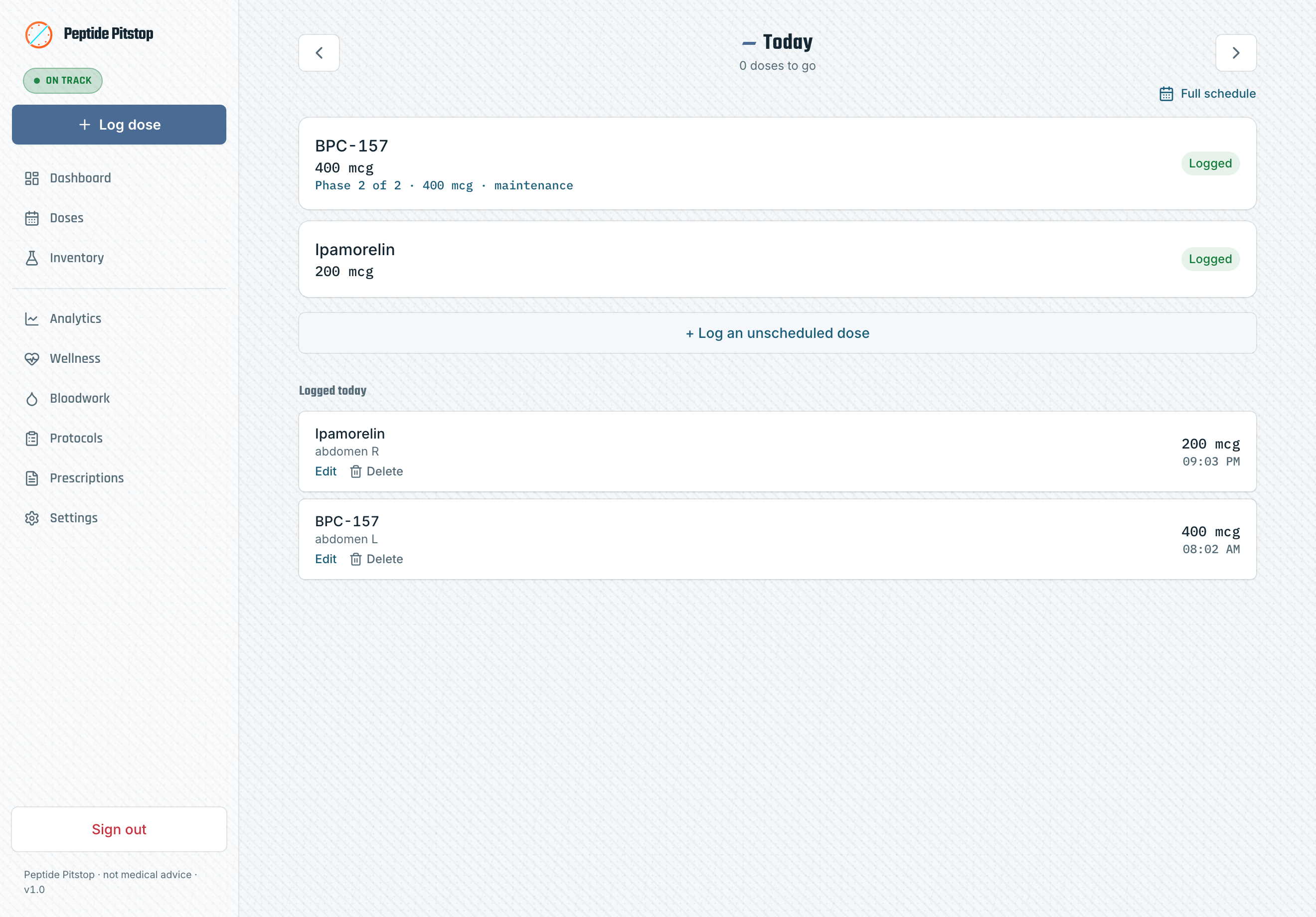
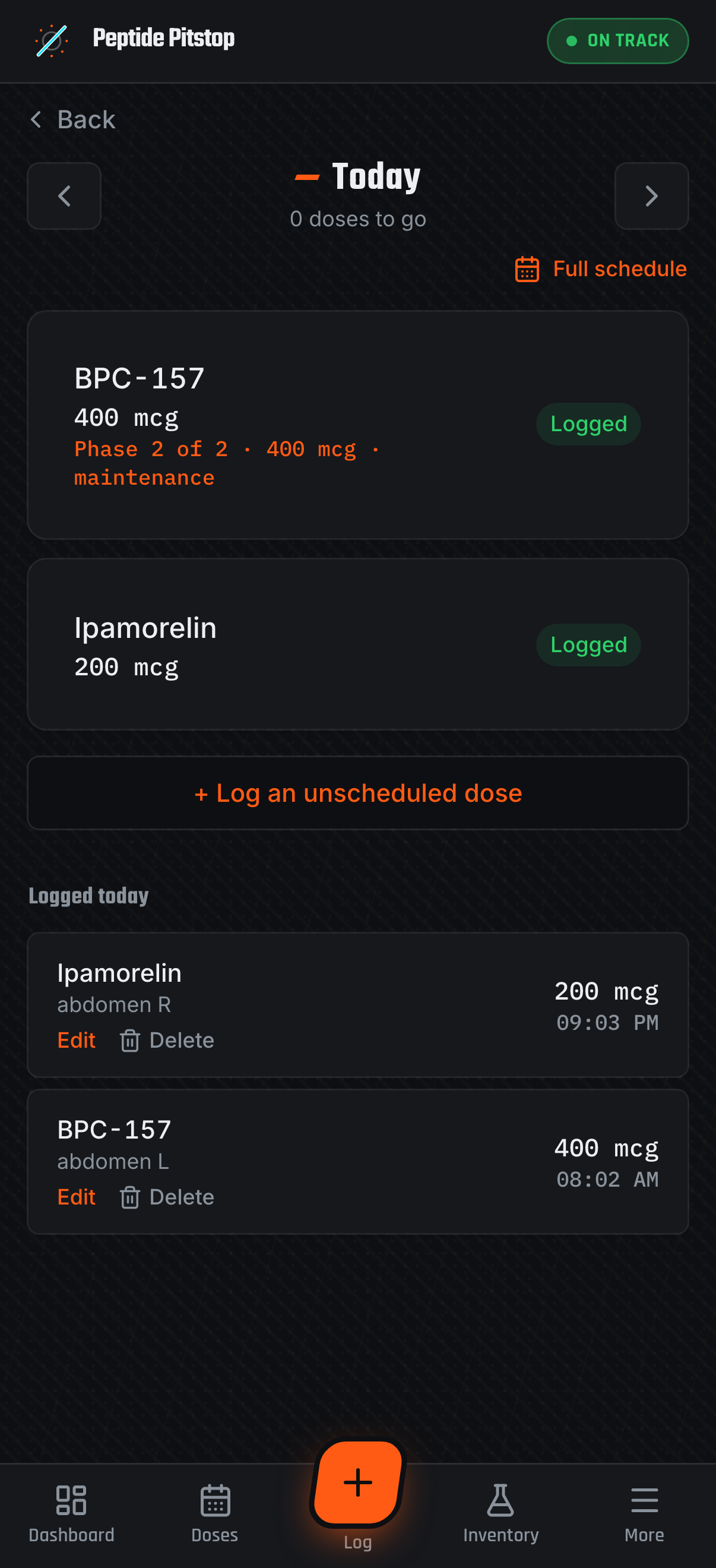
Today — what's due and what's been logged, with one-tap actions
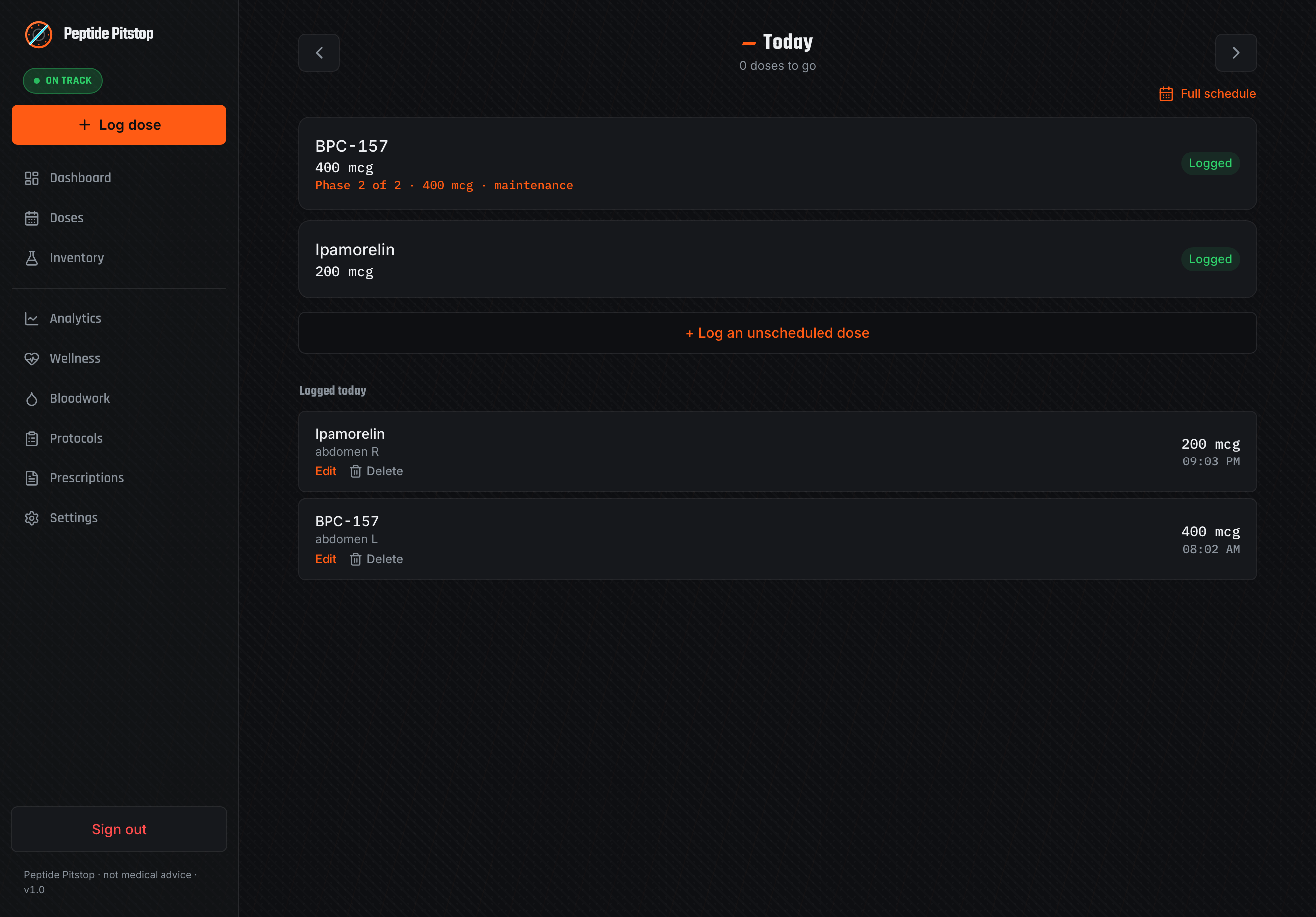
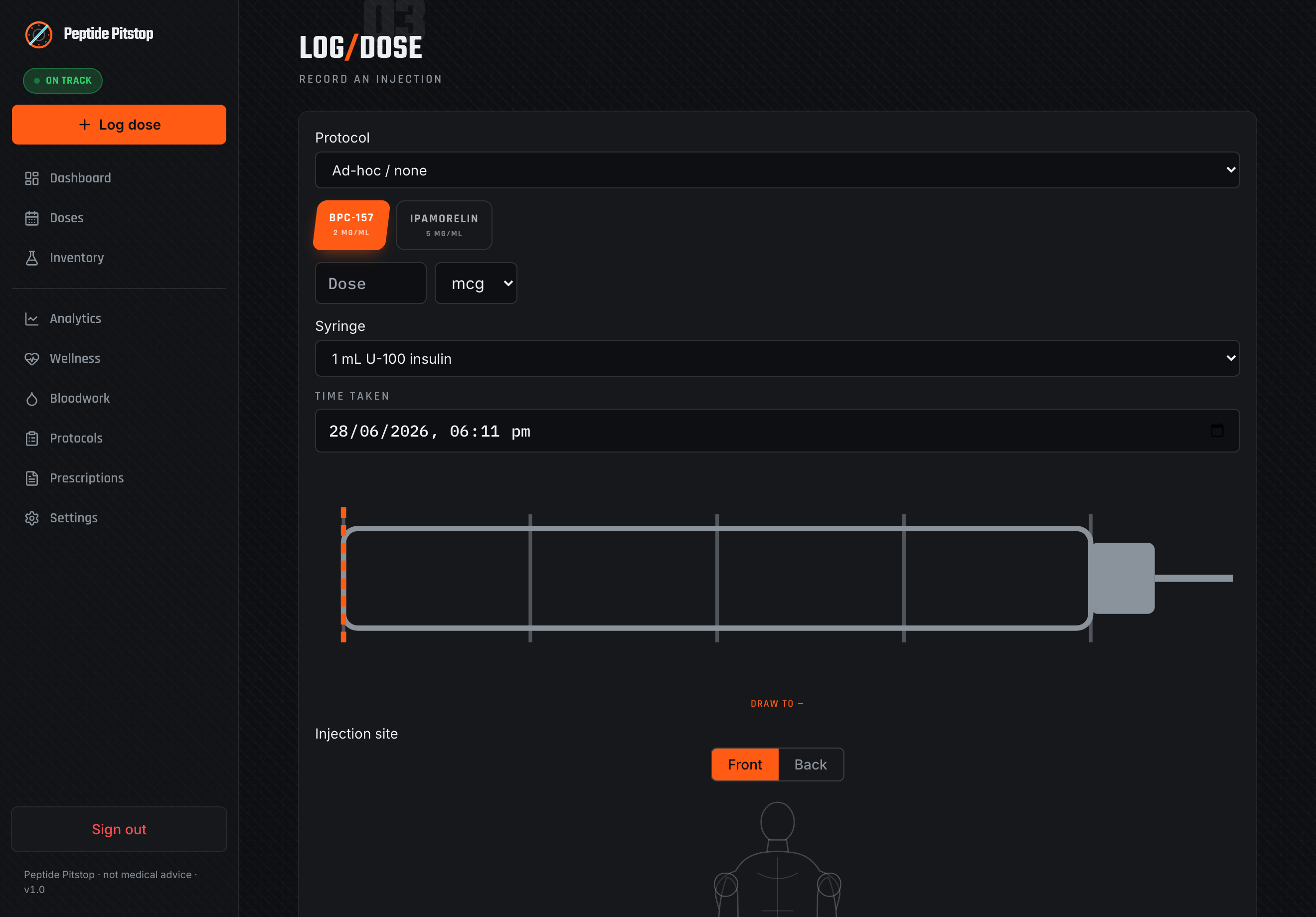
Log a dose — draw volume, syringe markings, and an injection-site map
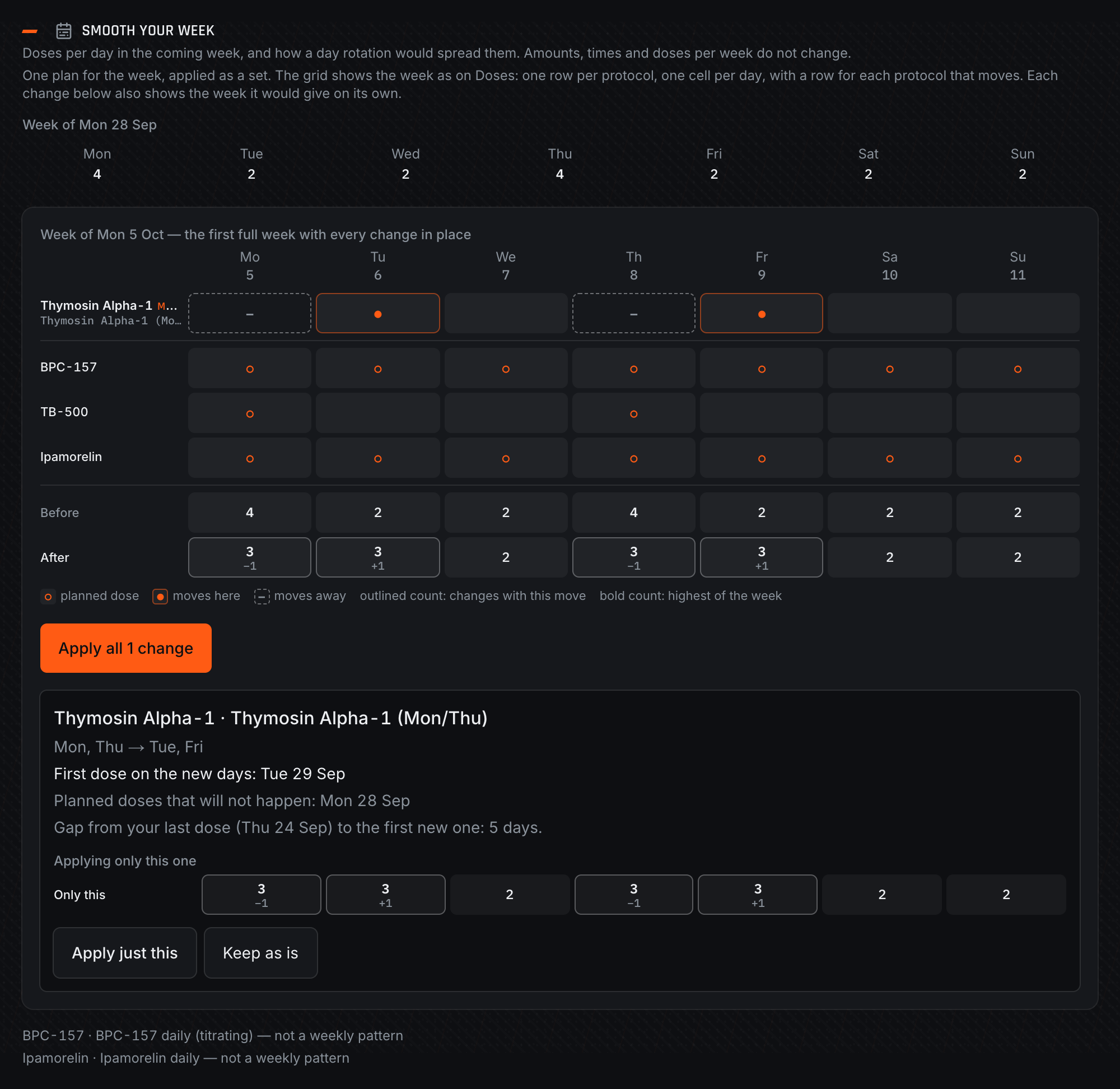
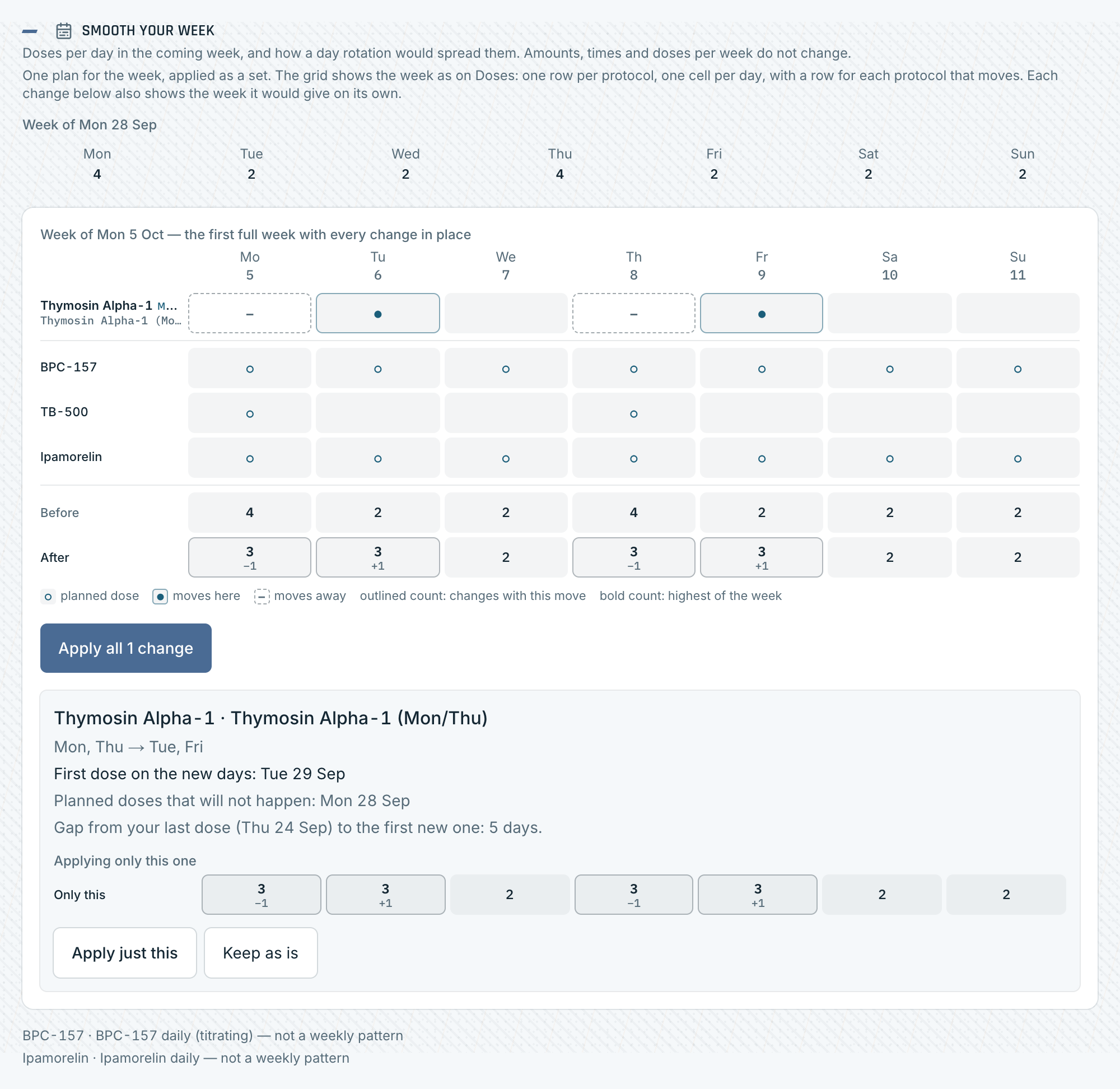
Smooth your week. Doses per day for the coming week, and a suggested day rotation that spreads them out without changing amounts, times or doses per week
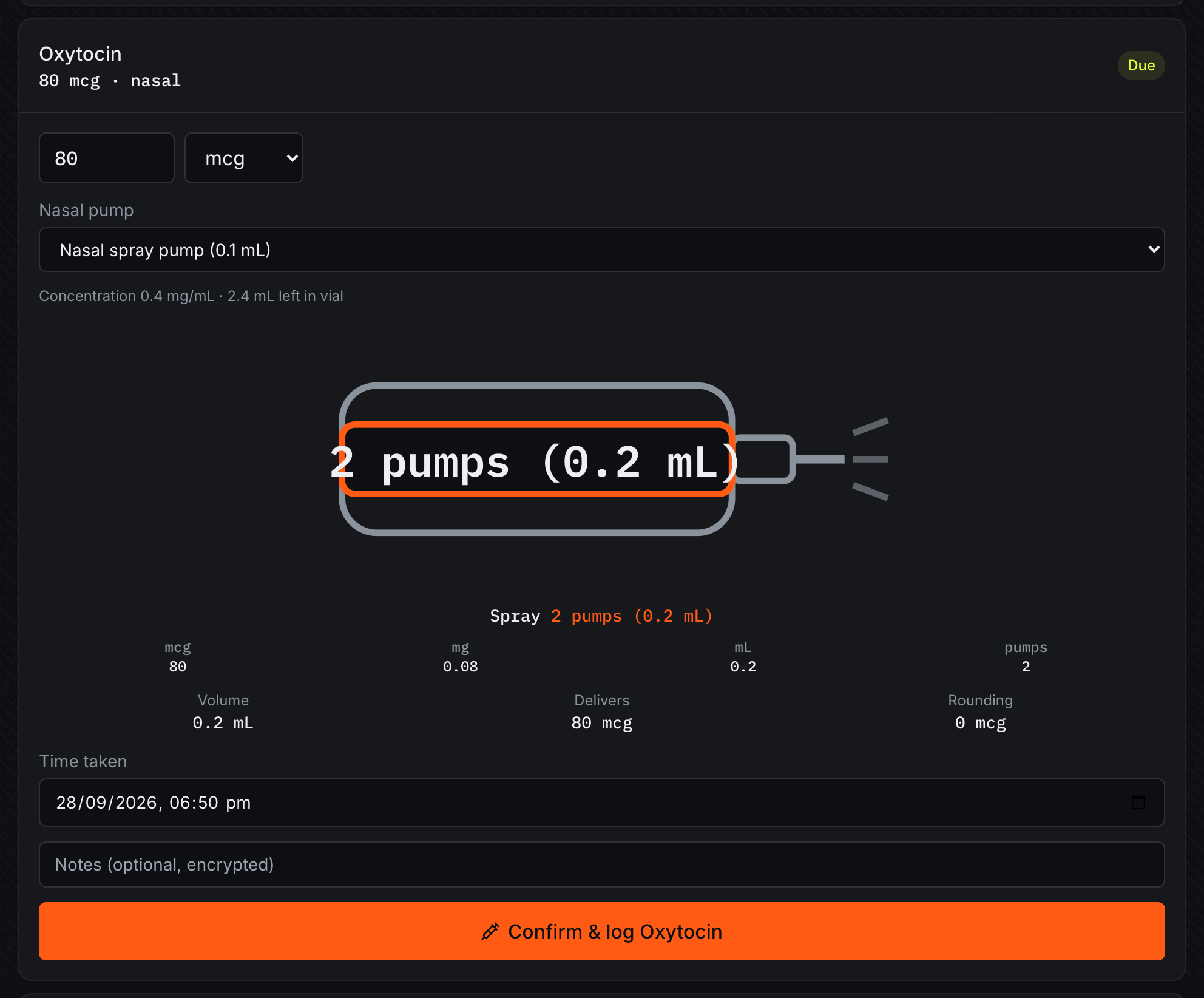
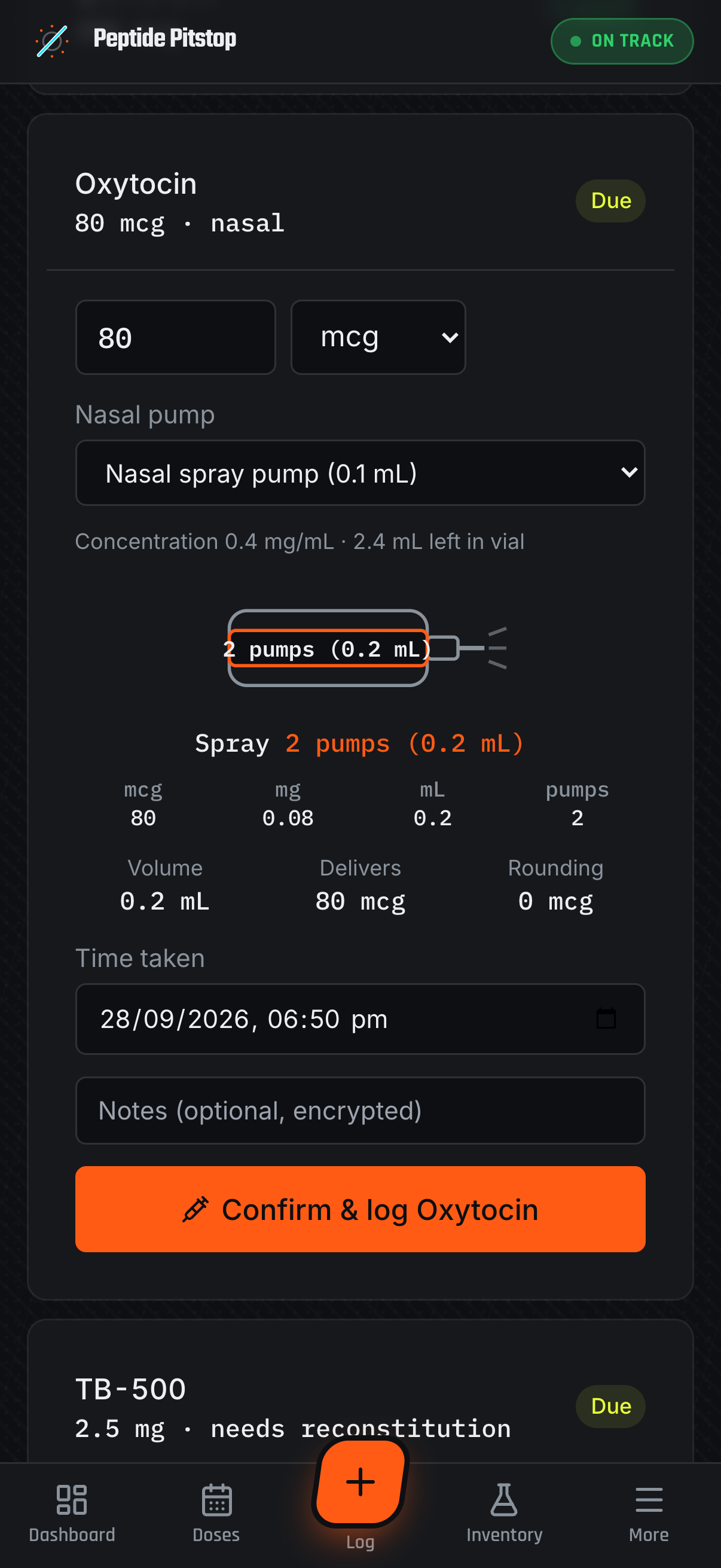
Nasal sprays. A nasal dose shown as a pump count on its spray pump, with the millilitres beside it and no injection site
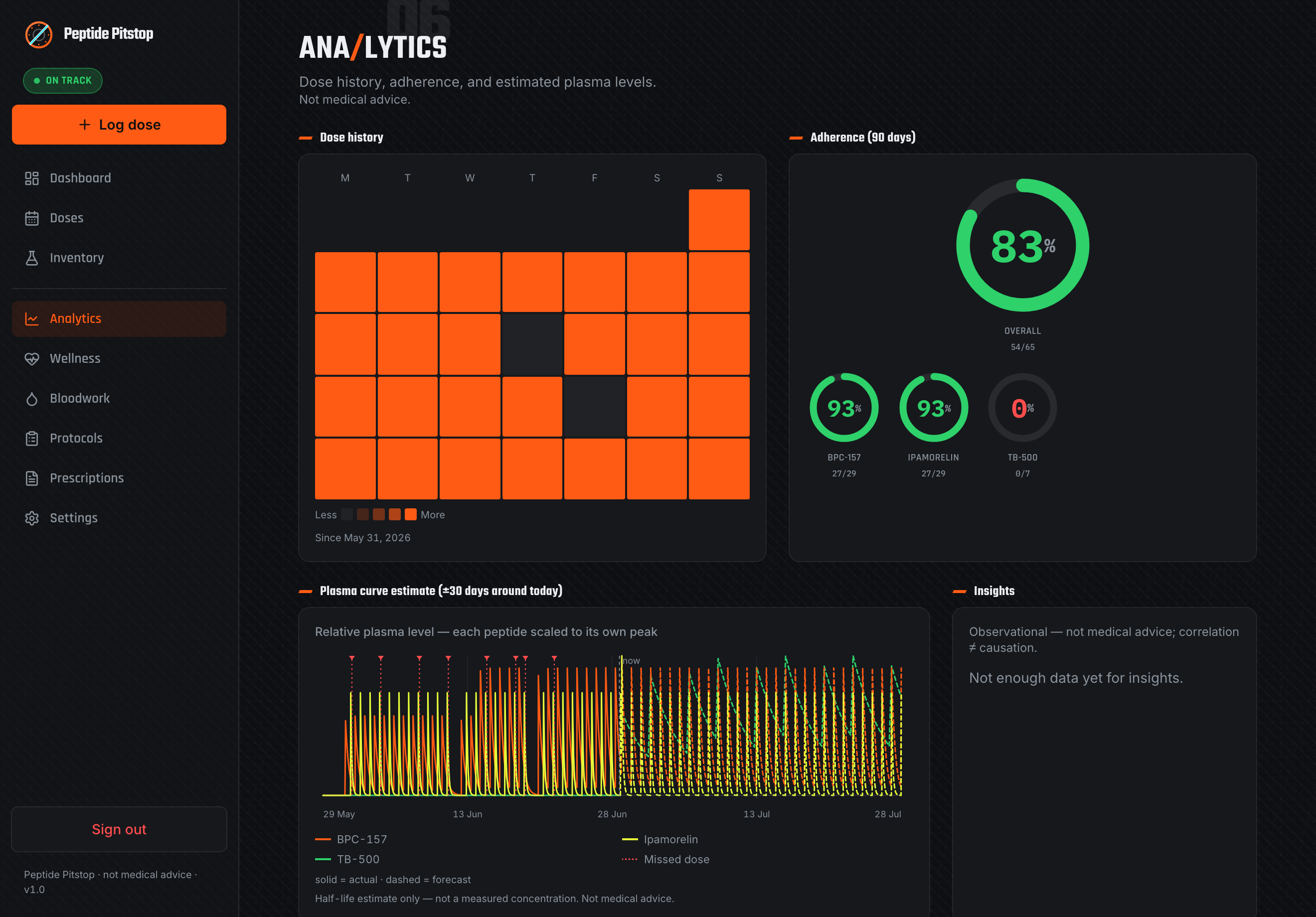
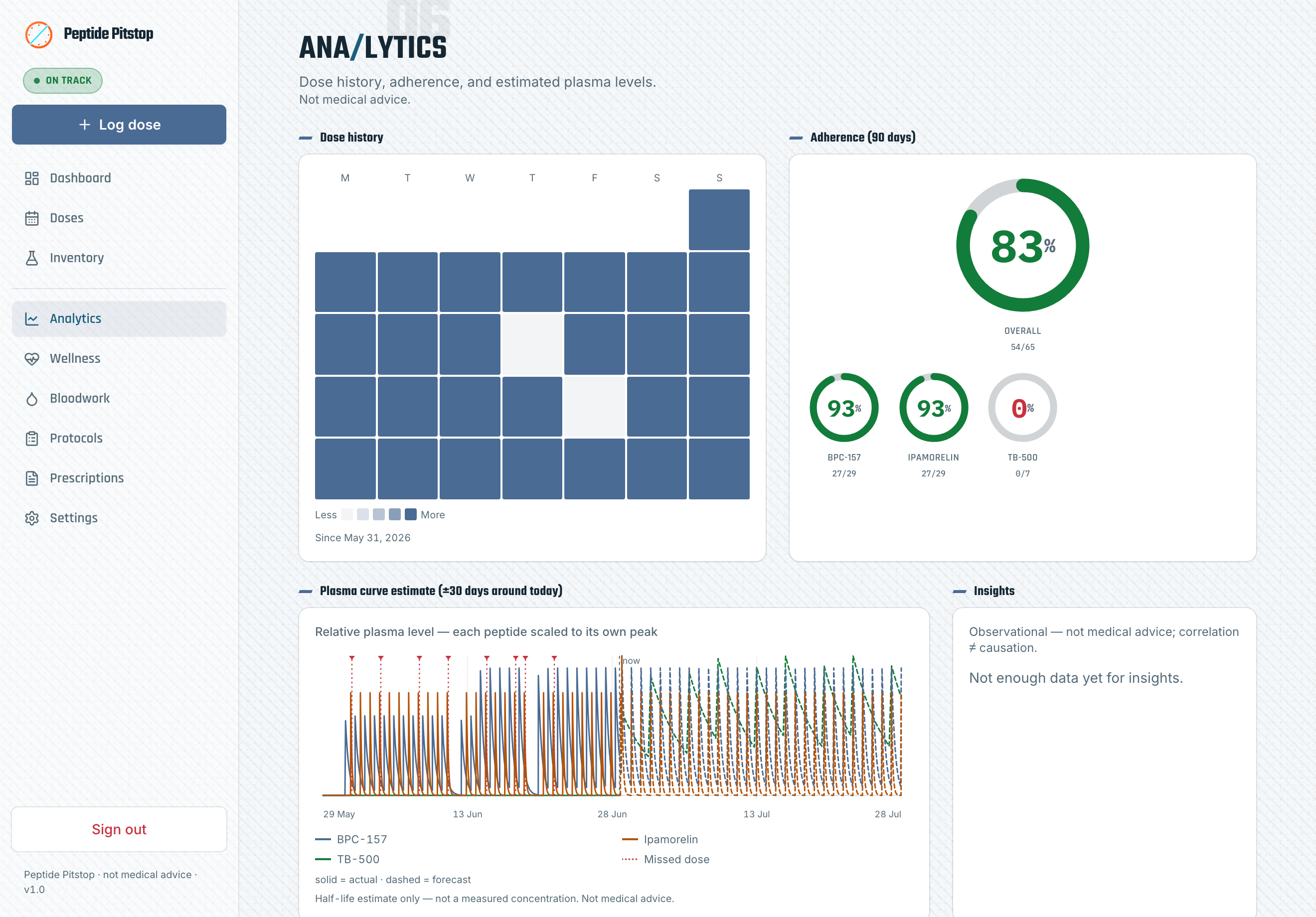
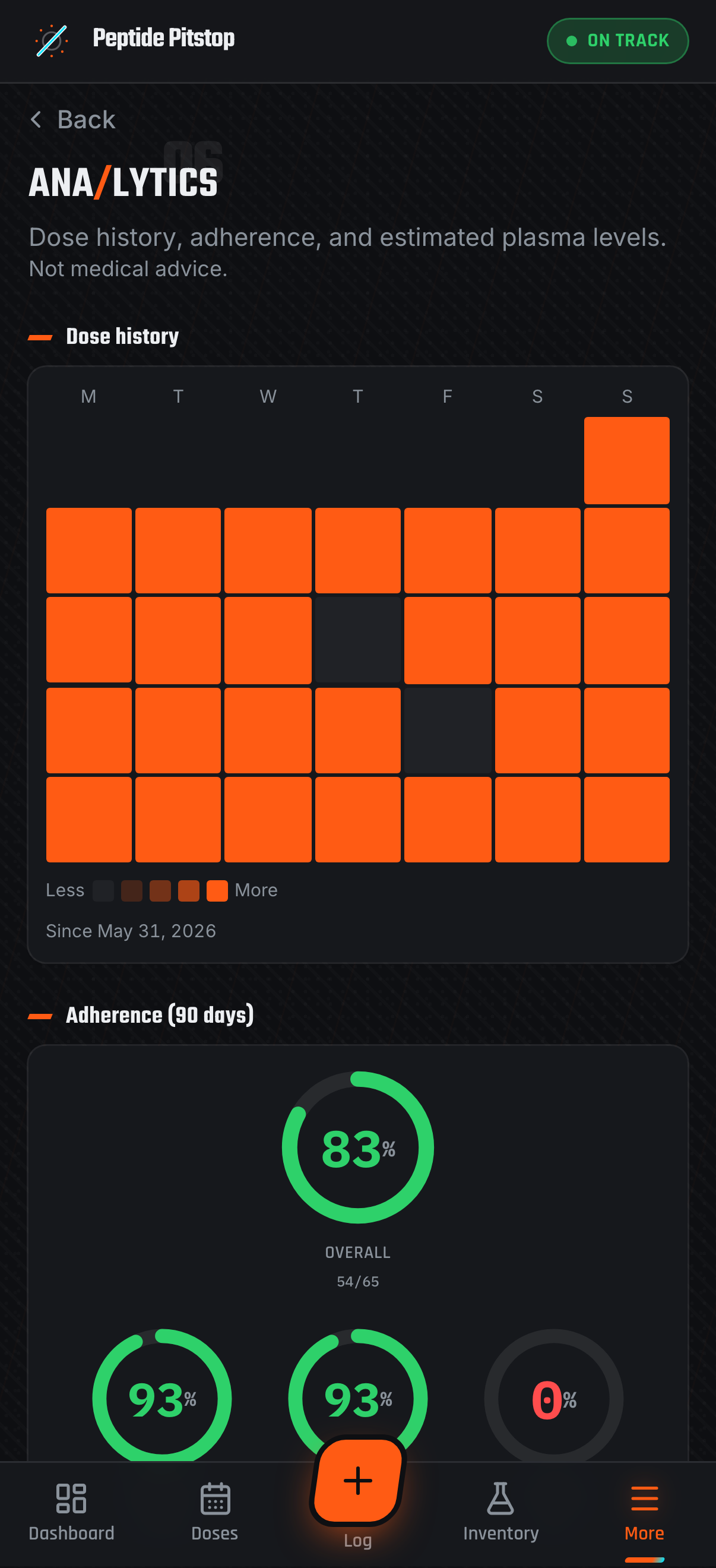
Analytics & plasma — adherence, a dose-history heatmap, and plasma-level estimates
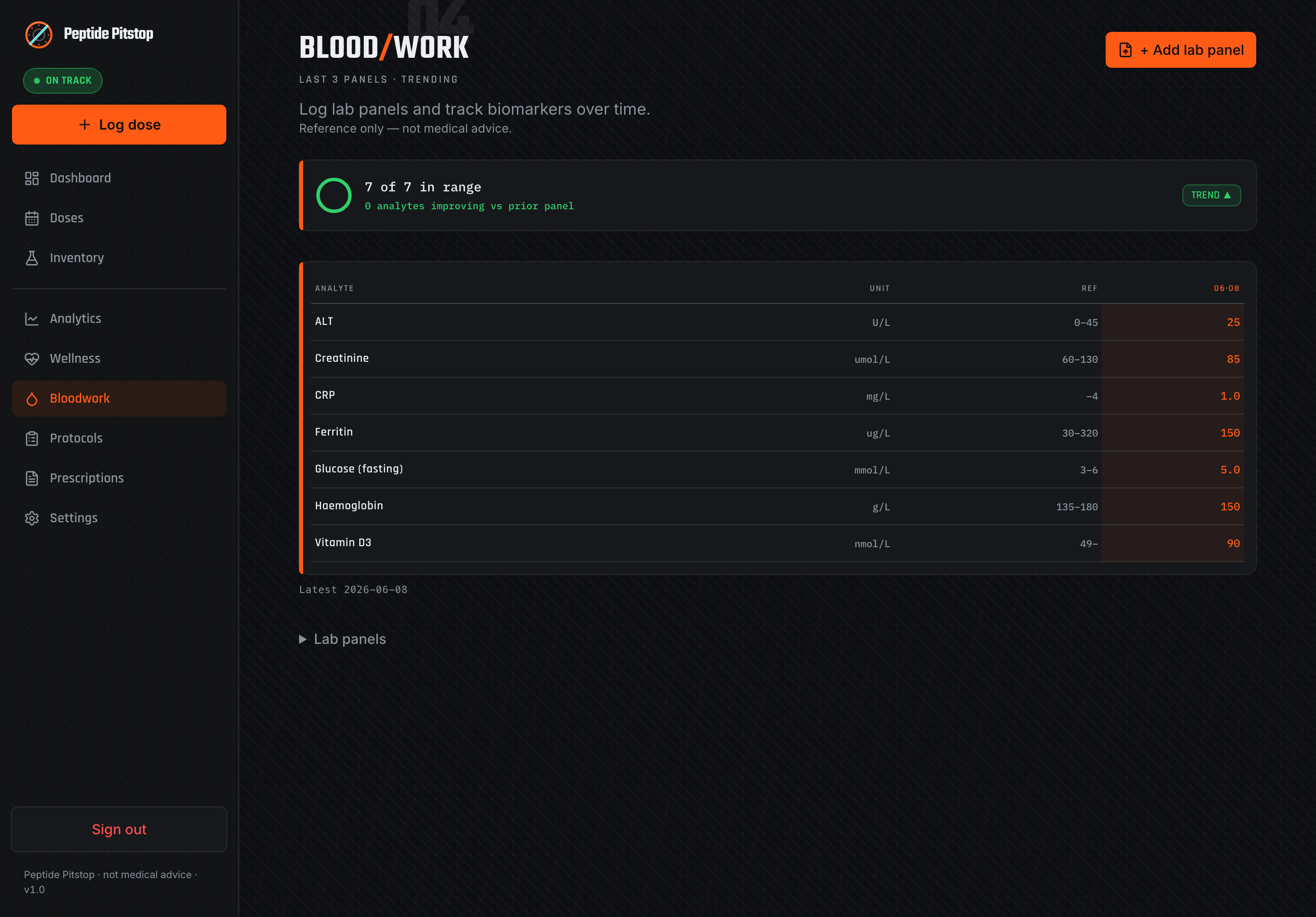
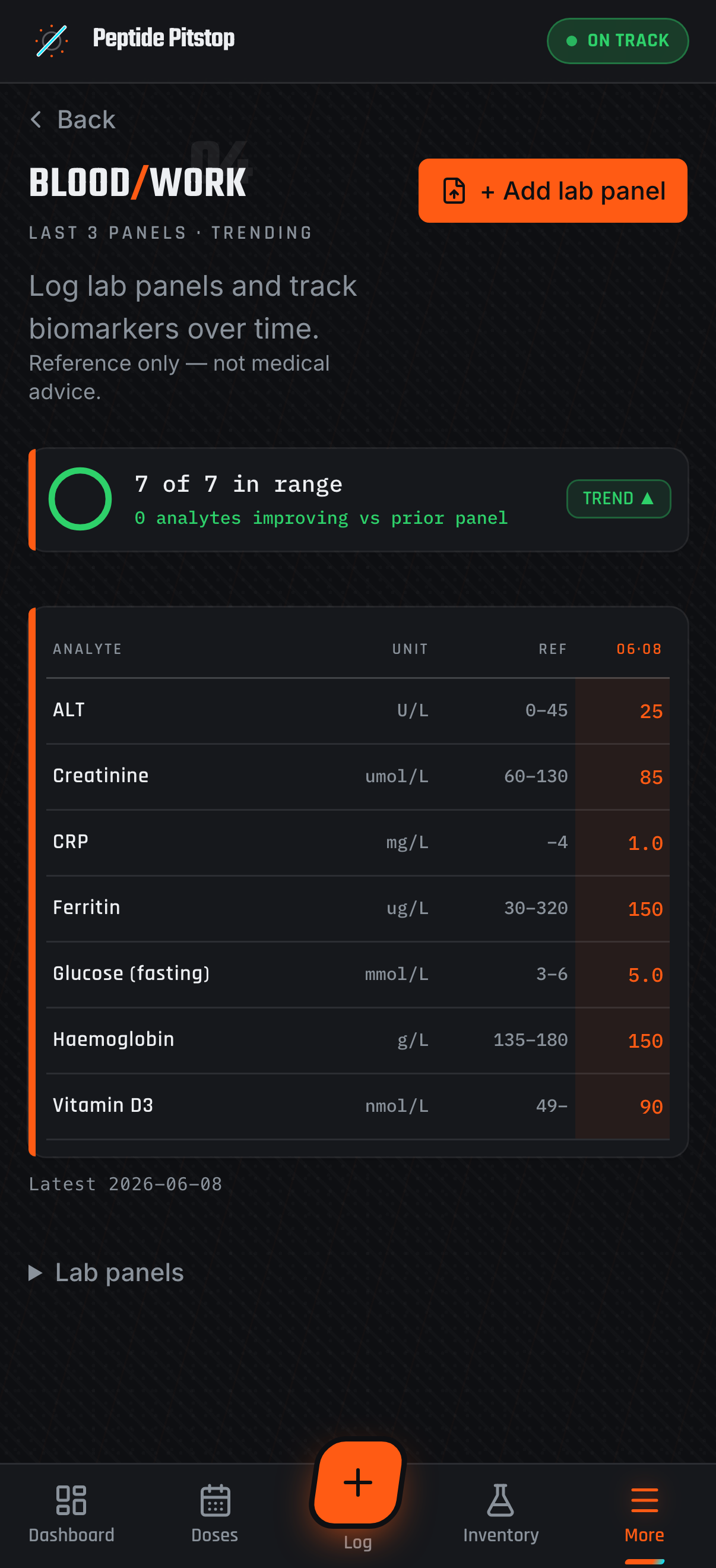
Bloodwork — biomarker panels, an in-range summary, and the comparison matrix
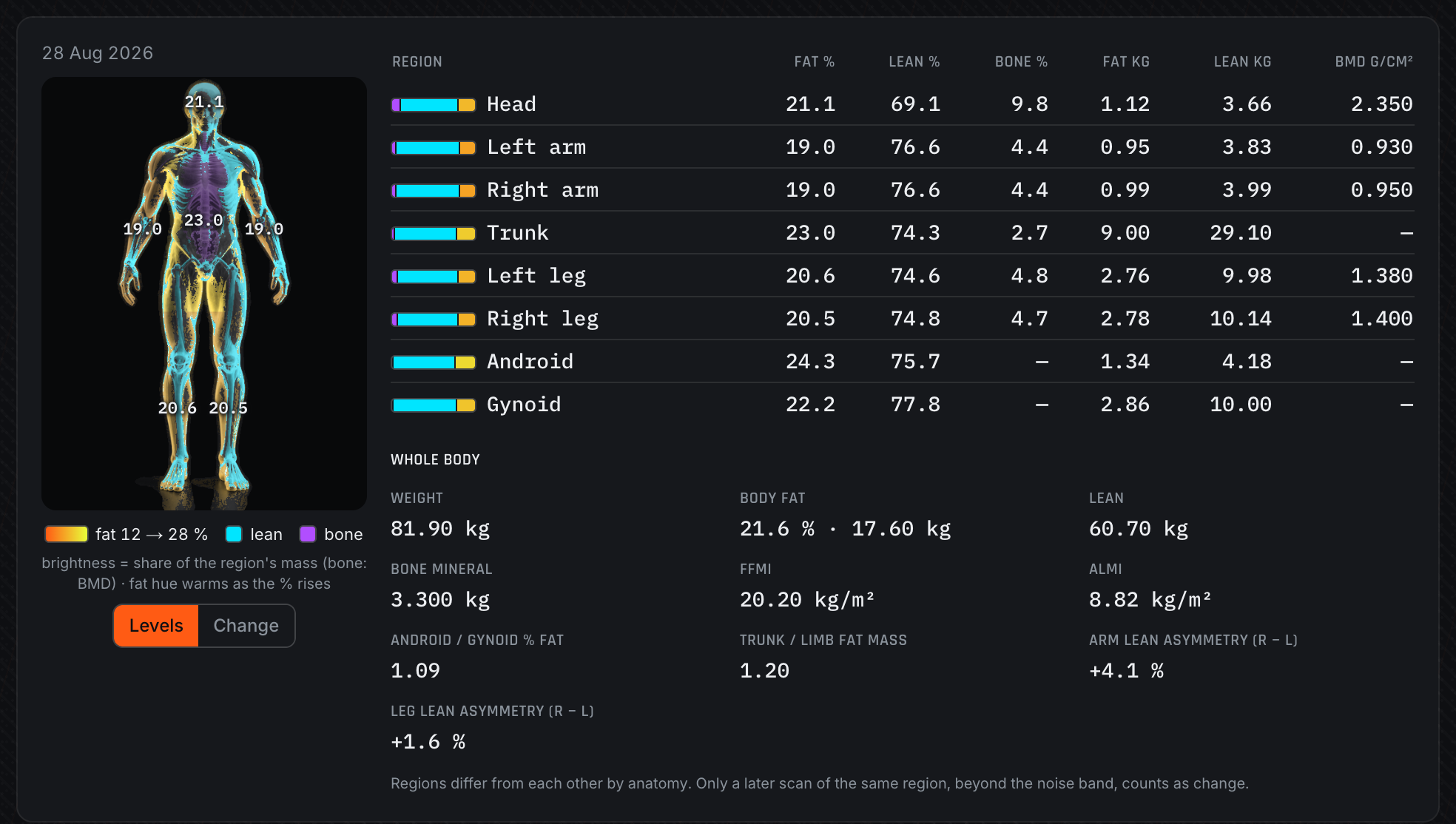
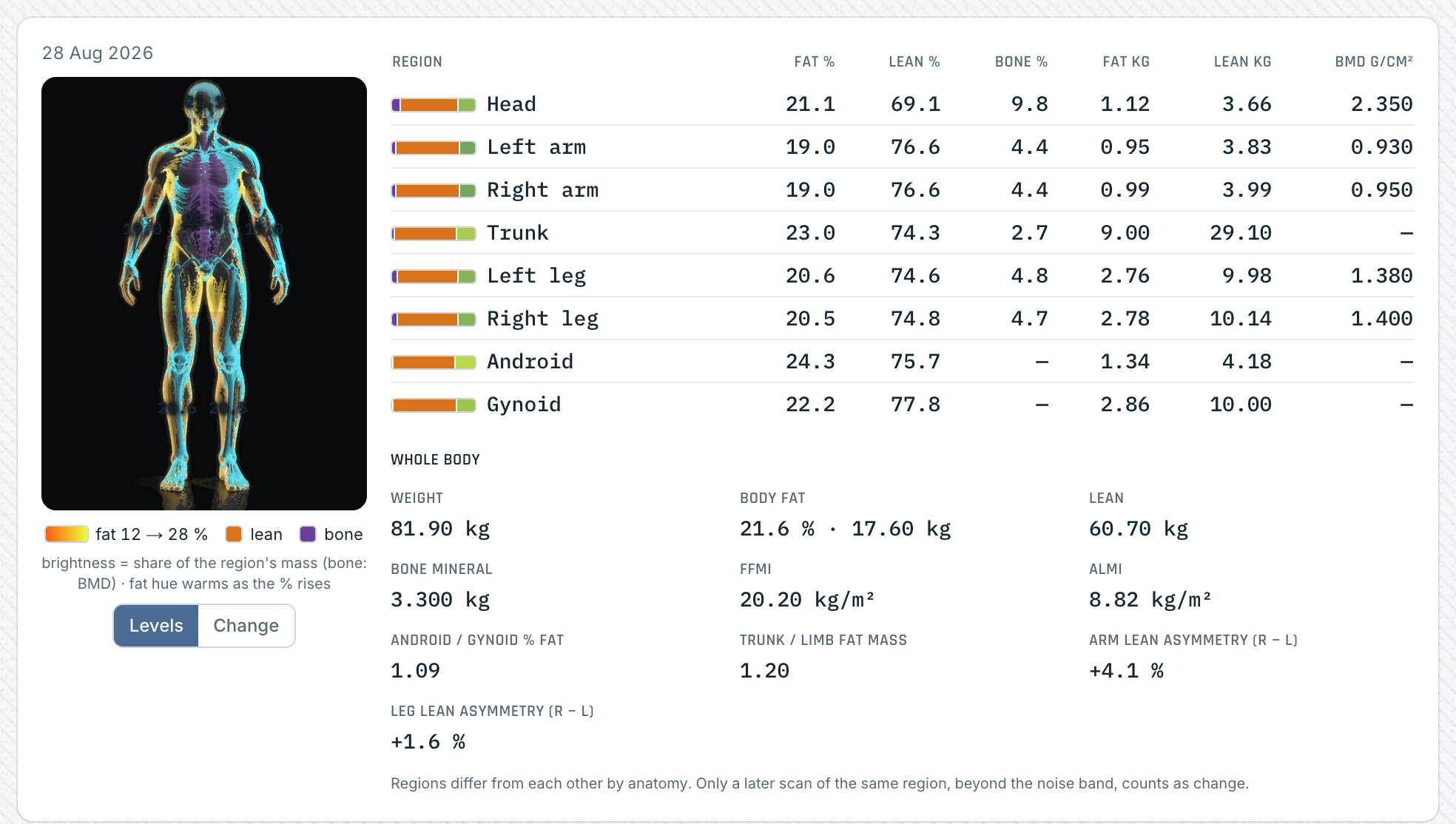
Body composition. The regional body figure from a DEXA scan, with the eight-region fat, lean and bone table beside it
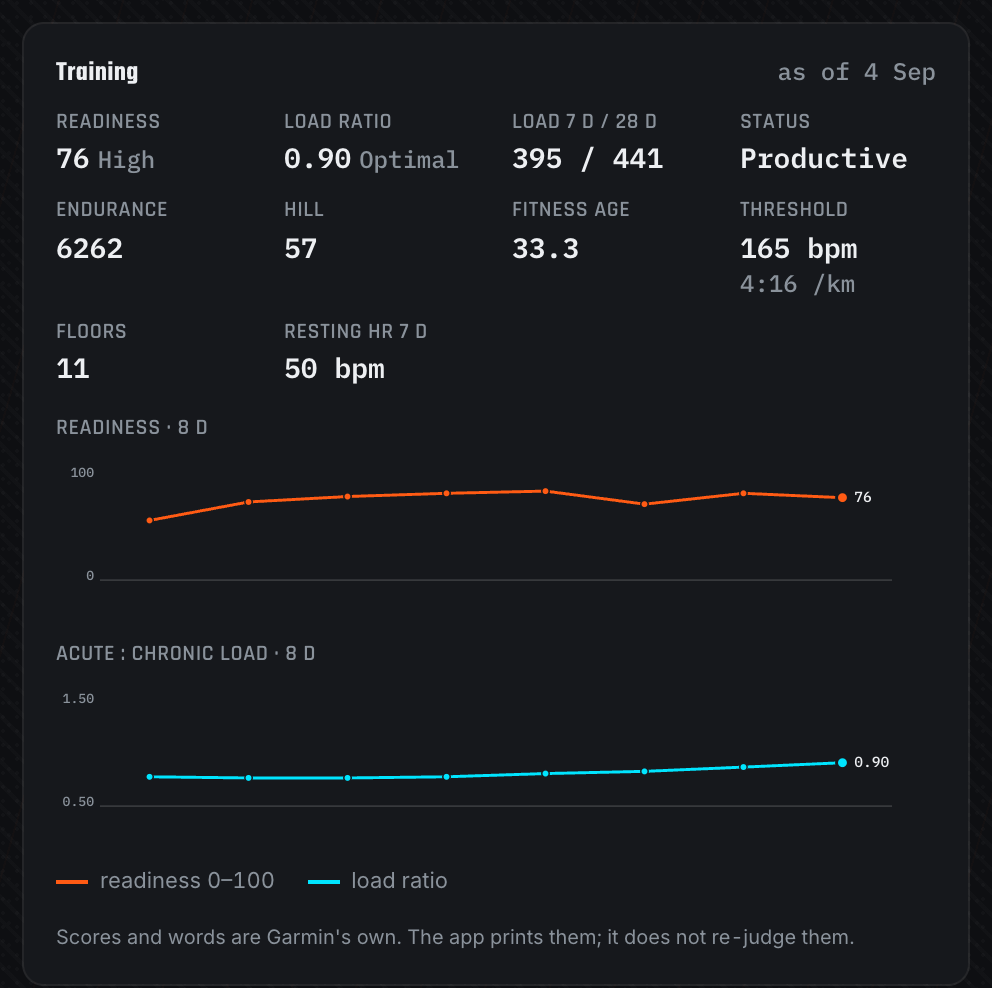
Training. Garmin training readiness, load ratio, endurance and hill scores, fitness age and lactate threshold, charted beside the wellness series
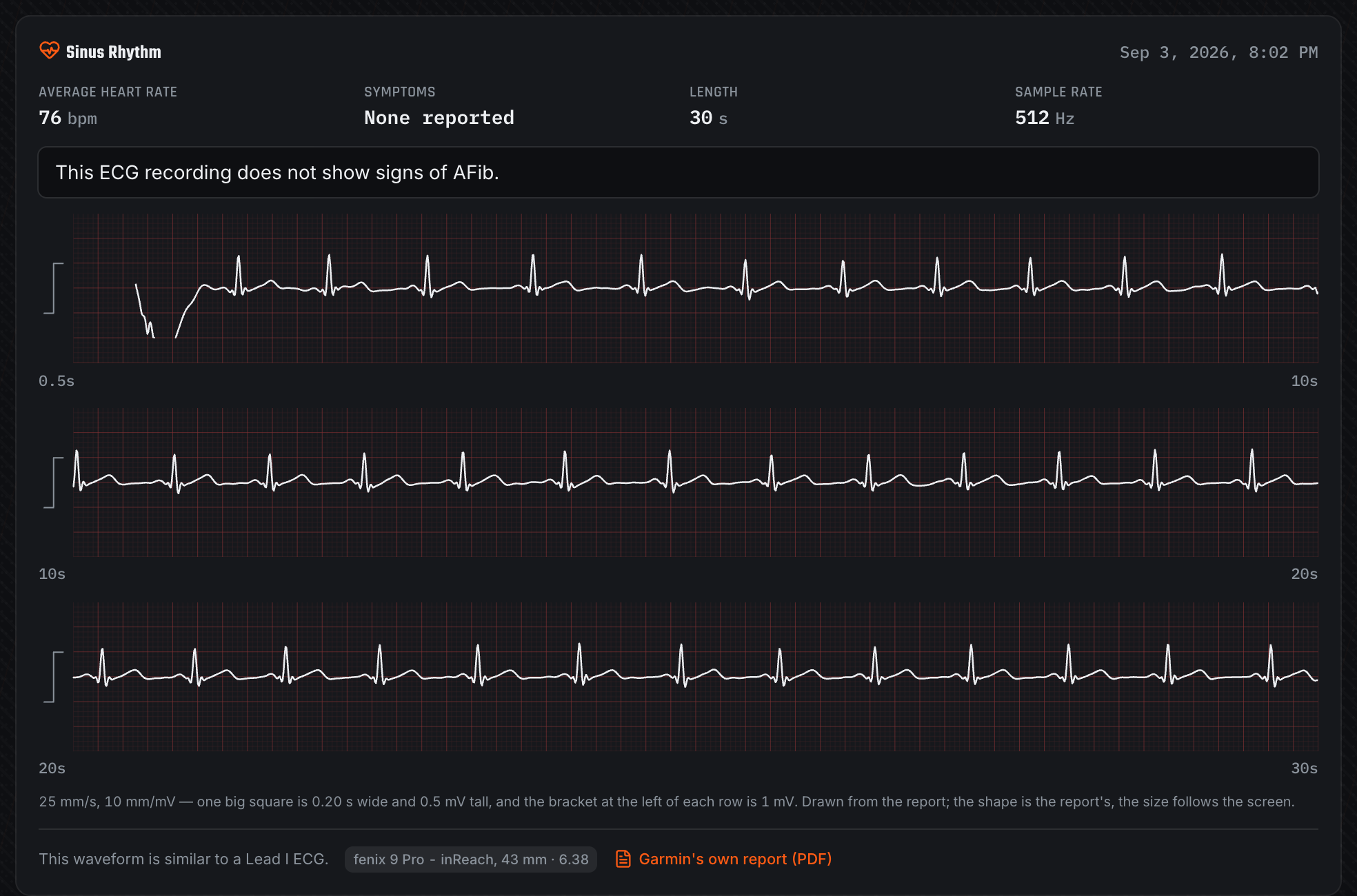
ECG. Three strips redrawn from the PDF the Garmin ECG app exports, with the classification and average heart rate above them
Light theme & mobile
The motorsport "pit-wall" dark theme ships alongside a clean light theme, and the whole app is self-hosted on your hardware — and on your phone.
| Light theme (Gulf) | On your phone |
|---|---|
 |
 |
 |
 |
 |
 |
 |
 |
✨ Features
Dosing — the safety-critical core
- Reconstitution engine. Concentration, draw volume, and syringe markings computed with
decimal.js— pure decimal maths, no floating-point drift. Handles reconstituted and premixed vials. - Exhaustively tested. The dosing and schedule logic is covered by an extensive vitest suite including property tests, real-world regression cases, unit-equivalence checks, and syringe-bound guardrails.
- Quick logging. Log a dose in seconds — on your phone — with a visual syringe picker and injection-site body map. Supports injections, oral peptides, nasal sprays, and ad-hoc doses.
- Syringes and pens. A device can be a barrel syringe or a dial-a-dose pen. Pens get a dose-window graphic and pen wording instead of a drawn barrel — presentation only, never a change to the dose maths. Set one device as your default and it is preselected wherever a protocol hasn't pinned its own.
- Nasal sprays, counted in pumps. Set a peptide's route to nasal and add your spray pump by its volume per spray and its bottle fill. The log form shows the dose as a pump count with the millilitres beside it and asks for no injection site; a nasal peptide is only ever offered a pump, and an injection is never offered one. The bottle is filled from a reconstituted vial, so the remaining volume is tracked like any other preparation.
Protocols, prescriptions & inventory
- Protocols with titration & stacks. Multi-peptide schedules, ramping/titration steps, and stacked protocols with human-readable cadence and half-life shown inline. Protocols are grouped by lifecycle — active, scheduled to start later, paused, past their end date, and completed — so a protocol queued for next month never sits indistinguishable from one running today.
- Revise a protocol instead of editing it. Changing a live protocol's dosing schedule — 4× weekly to daily, or the shape of a titration ramp — completes the current course and starts a linked replacement, rather than rewriting the one your doses were logged against. The replacement resumes at the dose you are actually on, with the rest of the ladder carried across and editable before you confirm; your logged doses stay with the protocol they were taken under, and the two are linked as one course so adherence doesn't reset. Editing in place is refused, because it silently re-times every step: step lengths are stored in days but the ladder advances on a dose count derived from your injection frequency, so changing that frequency re-derives every past step's target and moves you up or down your own ramp with no warning.
- Cycle planning. Give a protocol a course-level on/off plan in weeks — run for eight, break for four — and the app tracks where you are in it: a day-of-cycle chip on the list, a banner as the planned last dose approaches and once a break is over, and notifications on the same exactly-once ledger as dose reminders. Distinct from an intra-week dosing rhythm: this governs whether the protocol should be running at all. The suggested length is drawn from the peptide's own literature and shown with its source quote, as reference only.
- Titration inside a stack. A stack's components can each carry their own ramp, built at creation time and optionally moved in lockstep. Every stack surface resolves the dose you are actually on rather than the protocol's headline target, and schedule rewrites are refused on a stack that is mid-ladder — the same guard that protects a standalone protocol.
- Gantt view. A timeline of concurrent courses, with cycle boundaries and end dates editable in place, for seeing how overlapping protocols actually line up.
- Smooth your week. Weekly protocols tend to land on the same days. The Protocols page counts doses per day for the coming week and suggests moving a protocol to other weekdays so the load spreads out. Amounts, times and doses per week never change: the only move is rotating a weekly pattern. One combined plan covers every weekly protocol that can move, and each change also shows the week it would give on its own, the first dose on the new days, and any planned dose that will not happen. Apply the whole plan or one protocol at a time, or choose Keep as is to leave a protocol out of future suggestions. Today shows a short note only when there is something to suggest. Oral and nasal protocols, protocols in a stack, and courses that end within a week are never moved.
- Prescriptions & vials. Full CRUD for prescriptions, vials, and preparations, with per-dose vial-volume accounting.
- Guided prescription wizard (opt-in). A step-by-step flow for entering a prescription and its protocol, reachable from Prescriptions. Off by default — set
ENABLE_PRESCRIPTION_WIZARD=1to switch it on. - Inventory & reorder. Depletion forecasting (doses remaining / days of supply) and lead-time-aware reorder status so you restock before you run dry. A repeating course projects its next on-cycle as provisional demand, so the reorder date keys to the restart rather than going quiet through the off-weeks and flipping to order now after the shipping window has closed.
Cost tracking
- Landed cost, not sticker price. Shipping, tax, fees and discounts belong to the order, not to any one item, so they are recorded once on the invoice and shared across its lines — pro-rata by value, equally per unit, or left unallocated. The split is exact: the rounding residual lands on the largest line, so three lines sharing $10 still sum to $10.00 and the invoice reconciles.
- One line can cover several vials. A "3 × 10mg" line divides its landed cost across all three, so every vial carries its honest share of the courier fee whether or not you have created all three vial records yet.
- Cost per dose, by delivered mass. Not invoice ÷ dose count — that goes wrong the moment a vial is half-used or a titration changes the dose. Each vial gets a cost per mcg, and every logged dose is charged its own mass. Stays correct through partial vials and dose ramps.
- Consumables counted in. Needles, syringes, swabs, sharps containers, pen tips and bacteriostatic water are invoice lines too, with pack sizes and an optional units-per-dose. Declare the usage and you get a modelled per-injection cost; leave it blank and the spend amortises instead of inventing a burn rate.
- Wasted product, quantified. Mass never delivered from a finished or discarded vial is valued and reported separately, so it never quietly inflates the cost of the doses you actually took. Vials that delivered more than 70% are not counted — ordinary end-of-vial residue is not waste, and treating it as such buries the losses that matter.
- Honest about what it does not know. A vial with no invoice line is uncosted, never free: its doses are excluded from the averages and the screen tells you how many. A peptide you have not invoiced shows "—", not "$0.00". A prescription's recorded cost fills the gap only when no invoice is matched, so the same money is never counted twice. Mixed currencies warn rather than inventing a conversion rate.
Tracking & insight
- Today. A single screen of what's due and what's been logged today, with one-tap actions. Stays live on its own: the view refreshes when the app returns to the foreground, at the phone-local 02:00 tracking-day boundary, and when your device's timezone changes.
- Doses timeline. Week swimlanes, a month calendar, and day detail — with schedule rebasing (log off-schedule and snap the rest of the week back into line) and catch-up rolling for interval protocols. A twice-daily peptide shows both of its doses in a week cell.
- Timezones & travel. “Log now” stores the server's authoritative UTC instant while the UI renders the logging phone's local time. Every dose freezes its phone-local tracking day and timezone; 00:00–01:59 remains on the preceding tracking day and 02:00 starts the next one. Reminders and schedule slots stay anchored to the server's configured home timezone. Protocol start and end dates are calendar days: a protocol runs from the first minute of the day you picked to the last minute of its end day, whatever time zone the server is set to.
- Bloodwork. Biomarker panels with trends and a comparison matrix, backed by a curated biomarker library. Different spellings of the same test on a lab report ("Gamma GT", "GGT") are filed on one biomarker when you import, and units are stored in one spelling. Standard CRP and hs-CRP keep their own results but trend as one CRP row, with hs-CRP points marked.
- Analytics & insights. Adherence tracking, streaks, heatmaps, and derived insights.
- Plasma modelling. Single-compartment, first-order-elimination plasma-level projections — quiet telemetry for your own regimen — from your dose history and each peptide's half-life (relative units — clearly labelled, not clinical serum levels). Blends whose composition is known are charted per component, each decaying on its own half-life, because a blend has no meaningful single half-life: KLOW's GHK-Cu clears in about an hour while its TB-500 persists for days. Anything with no half-life on record is named beneath the chart rather than silently omitted.
- Blend composition. Record what a vendor blend actually contains — each component and its mass in one labelled vial — and every dose of that blend is split into the compounds it delivers. Blend-delivered mass then aggregates with any standalone protocol for the same compound, so cumulative exposure stops understating itself and a component with no protocol of its own stops being invisible. The split is derived, never entered twice: it flows through the dose CSV, the doctor-report PDF, per-component cost, the cumulative-exposure table, the plasma chart, and the prospective split shown on Today and in the log form. Components carry their provenance (label, CoA, or assumed) and every derived figure is badged as derived. Two compounds that share a family name stay separate identities, so neither inherits the other's exposure.
- Journal & wellness. Free-text journal plus wellness logging, charted over time.
- Body composition. Record whole-body DEXA scans (totals, eight regions, VAT, BMD, prep conditions) and resting-metabolic-rate tests, or upload a Hologic report PDF and confirm the parsed values. Changes between scans are judged against the scanner's least-significant-change bands, so a 0.3 kg lean-mass move is called within noise rather than a result. A regional body figure lights bone, lean and fat per region; illness and travel windows shade the series and are excluded from intervals; both tables export to CSV and appear in the doctor report.
Integrations
- Push dose reminders. Native Web Push notifications from the installed PWA — per-slot reminders for multi-time schedules plus a configurable evening catch-up nag; tapping opens the app (iOS 16.4+). Optional Home Assistant webhook fallback for devices without a subscription. Free, no third-party notification service, and no dose amounts in the payload.
- Garmin wellness & training. A bundled sync sidecar pulls daily Garmin wellness data (steps, sleep, resting HR, HRV) and, on watches that report them, the training metrics — readiness, acute:chronic load ratio, endurance and hill scores, fitness age, lactate threshold — into the app using your own credentials, on your own schedule. A Training card charts them beside the wellness series.
- Garmin ECG import. Drop the PDF that the Garmin ECG app exports onto the journal page and the app reads the classification, heart rate and the traced waveform, then draws the strips in the app. It deliberately skips the patient name and date of birth printed on the report; clinical fields are encrypted at rest.
- Curated peptide library + enrichment. Built-in peptide reference data with an enrichment calculator.
Experience
- Installable PWA. Add to your home screen; works offline for the things that matter on the go.
- Pit-wall design language. A motorsport-inspired theme — carbon + race-orange, radial gauges, split headings — with light and dark modes.
🧱 Stack
Next.js (App Router) · TypeScript · Tailwind + design tokens · Prisma + SQLite · decimal.js dosing engine · otplib TOTP + jose sessions · Litestream backup · Docker + Cloudflare Tunnel.
The production deployment runs as one container bundling four services — the Next.js app, the Cloudflare tunnel, Litestream backup, and the Garmin sync sidecar — talking to each other over localhost.
✅ Prerequisites
- Node.js 22 and npm (for local development).
- Docker + Docker Compose (for self-hosting).
- A Cloudflare account with Zero Trust enabled (for secure external access — optional if you only run it on your LAN).
🚀 Quickstart (local dev)
npm install
cp .env.example .env        # then fill PT_FIELD_KEY and AUTH_SECRET
npx prisma migrate dev --name init
npm run db:seed             # optional: loads a sample regimen
npm run dev                 # http://localhost:3009
Generate the two required secrets:
node -e "console.log(require('crypto').randomBytes(32).toString('base64'))"   # PT_FIELD_KEY
node -e "console.log(require('crypto').randomBytes(32).toString('base64'))"   # AUTH_SECRET
On first visit, /setup walks you through setting a password and enrolling TOTP.
Tests
npm test          # vitest — dosing engine, schedule, analytics, auth, …
npm run typecheck
1452 tests across 127 files, plus a TypeScript typecheck, run against every release.
🐳 Deploy (self-hosted)
Easiest — prebuilt image (recommended, no building)
You only need Docker: install Docker Desktop on Mac/Windows (a normal point-and-click installer) or Docker Engine on Linux. Then:
- Make a folder for the app (e.g.
peptide-pitstop) and open a terminal in it. - Generate the two required secrets — run each command and copy the output:
# macOS / Linux / Git Bash — run twice
openssl rand -base64 32
# Windows PowerShell — run twice $b = New-Object byte[] 32; [Security.Cryptography.RandomNumberGenerator]::Create().GetBytes($b); [Convert]::ToBase64String($b) - Create a file named
docker-compose.ymlin that folder, pasting your two secrets in:services: app: image: ghcr.io/kavo91/peptide-pitstop:latest container_name: peptide-pitstop restart: unless-stopped ports: - "3000:3000" volumes: - ./data:/data # your database lives here — back this folder up environment: - PT_FIELD_KEY=paste-your-first-secret-here - AUTH_SECRET=paste-your-second-secret-here - Start it:
docker compose up -d - Open http://localhost:3000 — the first visit runs a
/setupwizard (set a password + scan a QR code into an authenticator app).
Update later with docker compose pull && docker compose up -d. ⚠️ Keep PT_FIELD_KEY safe — if you lose it, encrypted fields can't be recovered.
Want it reachable from your phone outside home? Add the optional Cloudflare Tunnel (see Cloudflare Tunnel + Access below) instead of forwarding ports.
On a NAS (Unraid · CasaOS · Synology)
Ready-made templates live in deploy/ — all use the prebuilt image, default to port 3000 and a dedicated app-data volume, so they run happily alongside anything else on the box.
- Unraid —
deploy/unraid/peptide-pitstop.xml. Docker tab → Add Container → paste the template's raw URL, or install from Community Applications once it's listed. Maps/datato/mnt/user/appdata/peptide-pitstop. - CasaOS —
deploy/casaos/peptide-pitstop/docker-compose.yml. App Store → Custom Install → import the compose (includes thex-casaosmetadata so it shows an icon, description, and env prompts). - Synology (DSM 7.2+) —
deploy/synology/docker-compose.yml+ a step-by-step guide. Container Manager → Project → create from the compose. Maps/datato/volume1/docker/peptide-pitstop.
In every case: set PT_FIELD_KEY and AUTH_SECRET before first start (openssl rand -base64 32), and if you browse over plain http://<nas-ip>:3000 keep COOKIE_SECURE=false. First load runs the /setup wizard.
Build from source
Prefer to build it yourself? Two compose variants ship in this repo:
1. Simple (the default docker-compose.yml) — just the Next.js app:
# On your server, in this directory, with a populated .env:
docker compose up -d --build
- Serves on http://localhost:3000 by default.
- An optional Cloudflare Tunnel sidecar is included (commented out) to expose it publicly with no open ports — uncomment it and set
CLOUDFLARE_TUNNEL_TOKEN. - Your SQLite database lives in the
./datavolume you control (back it up; ideally keep it on an encrypted disk).
2. All-in-one (deploy/bundled/) — one "batteries-included" container running every service: the app, the Cloudflare tunnel, Litestream backup, and the Garmin sync sidecar, talking to each other over localhost. A supervisor starts them; the app is the critical process and the optional services (tunnel, Garmin) start only when their env is configured.
# Build + run the bundled image:
docker compose -f deploy/bundled/docker-compose.yml up -d --build
Set TZ to your home timezone (e.g. TZ=America/New_York) — it anchors schedule slots and reminders. Which day a dose is filed under no longer depends on it: each dose freezes its phone-local tracking day and timezone, with a 02:00 rollover, while elapsed-time calculations retain the authoritative UTC instant. If you use Garmin sync, make sure ./garmin-tokens is owned by uid 1001 (the in-container user).
Cloudflare Tunnel + Access
- Cloudflare Zero Trust → Networks → Tunnels → create a tunnel; put its token in
CLOUDFLARE_TUNNEL_TOKEN. - Public hostname →
http://app:3000. - Access → Applications → protect the hostname; policy = allow your email (one-time PIN) or your IdP.
Configuration
| Variable | Purpose |
|---|---|
PT_FIELD_KEY |
32-byte base64 key for AES-256-GCM field encryption |
AUTH_SECRET |
Session signing secret |
DATABASE_URL |
SQLite path (maps to the /data volume) |
TZ |
Home timezone — anchors schedule slots and reminders (dose-day filing follows the phone-local 02:00 tracking-day boundary) |
OWNER_EMAIL |
Optional authenticator label for the first-run owner bootstrap (defaults to owner@example.com) |
VAPID_PUBLIC_KEY / VAPID_PRIVATE_KEY / VAPID_SUBJECT |
Web Push keys (npx web-push generate-vapid-keys) |
PUBLIC_APP_URL |
Absolute app URL used in relayed notification deep-links |
HA_WEBHOOK_URL |
Home Assistant webhook — fallback relay for dose reminders |
WELLNESS_IMPORT_TOKEN |
Bearer token the Garmin sidecar presents (fails closed if unset) |
ENABLE_PRESCRIPTION_WIZARD |
Set to 1 to enable the guided prescription wizard (off by default) |
CLOUDFLARE_TUNNEL_TOKEN |
Your Cloudflare Tunnel token |
GARMIN_EMAIL / GARMIN_PASSWORD |
Consumed only by the Garmin sync sidecar |
See .env.example for the full, commented list.
🔔 Push notifications
Dose reminders arrive as native push notifications from the installed app — no third-party notification service, no account, nothing leaves your server except the (amount-free) push payload. Tapping opens Peptide Pitstop directly.
What you get:
- Per-slot reminders — each scheduled time on a protocol reminds ±30 min
around its own slot, including multi-time schedules (e.g. 08:00 + 20:00).
Reminder times follow the server's
TZ(your home zone), not the device — travelling doesn't shift when they fire. - Doses without a set time remind once at your chosen hour (default 08:00).
- Evening catch-up nag — one summary of anything still unlogged (default 18:00, or turn it off). Doses you've already logged never notify.
- Exactly-once — a claim ledger guarantees no double-sends, ever.
Setup (once per server):
npx web-push generate-vapid-keys
# Put the output in .env, then restart:
#   VAPID_PUBLIC_KEY=…  VAPID_PRIVATE_KEY=…  VAPID_SUBJECT=mailto:you@example.com
Then on each device: install the PWA (iOS: Share → Add to Home Screen, iOS 16.4+), open it from the home-screen icon, and go to Settings → Notifications → Enable on this device → Send test. Reminder times and the nag toggle live in the same place.
Notes:
- Web Push needs HTTPS (a Cloudflare Tunnel works fine).
- Use a separate VAPID keypair per environment — push services authorise by key, not domain, so a staging box holding your production key and a copied database will push to your real phone.
- Run Home Assistant? An optional webhook relay covers devices without a subscription — see docs/ha-reminder-automation.md.
🔐 Locked out?
Single owner, no recovery email by design. Re-provision by clearing the password directly in the DB, then revisit /setup:
sqlite3 /path/to/peptides.db \
  "UPDATE User SET passwordHash='', totpSecret=NULL WHERE role='owner';"
📚 Further documentation
- Dose reminder notifications — Web Push setup (VAPID + device enrolment) and the optional Home Assistant fallback relay.
- Dose timestamps, tracking days, and timezones — authoritative instants, phone-local display, the 02:00 rollover, manual entries, and offline replay.
- Demo seed, what
npm run db:seedloads: five example peptides (one of them a nasal spray on a pump device), four weeks of doses, two weekly protocols on the same days for Smooth your week, a lab panel, two made-up DEXA scans with an RMR test, an illness window, and four weeks of made-up Garmin wellness and training rows. The ECG import has no seed; drop your own Garmin PDF onto the journal page.
Apple Health is intentionally not a built-in integration: HealthKit is device-only and a self-hosted web app cannot write to it.
🛠️ Project status & contributing
Peptide Pitstop is an actively developed, single-owner self-hosted project. Issues and discussion are welcome — please open an issue before submitting a large PR, as contributions may require a contributor agreement (see License below).
☕ Support
Peptide Pitstop is built and maintained by one person, for people who'd rather keep their health data on their own hardware than hand it to someone else's cloud (Yes, slightly hypocritical with the garmin pull).
If it's saved you from a spreadsheet — or from a subscription that wanted your bloodwork — a coffee goes a long way toward keeping an indie, self-hosted health tool alive and improving.

No pressure, and no paywalled features — every line of code stays open. Thank you. ☕
📄 License
GNU AGPL-3.0. You're free to self-host, study, modify, and redistribute — but if you run a modified version as a network service, you must make your source available under the same license. Copyright is retained by the project owner.
⚠️ Disclaimer
Peptide Pitstop is a personal tracking tool, not a medical device and not a substitute for professional medical advice. It does not diagnose, treat, or make dosing recommendations. You are responsible for your own therapy decisions. Dosing maths is provided to help you record and check your own calculations — always verify independently.
Requirements
Categories
Related apps
Explore more like this
Explore allDetails
ghcr.io/kavo91/peptide-pitstop:latestRuntime arguments
- Web UI
http://[IP]:[PORT:3000]- Network
bridge- Shell
sh- Privileged
- false
Template configuration
HTTP port for the Peptide Pitstop web UI.
- Target
- 3000
- Default
- 3000
- Value
- 3000
Persistent storage for the SQLite database and app data. Keep this on appdata and back it up.
- Target
- /data
- Default
- /mnt/user/appdata/peptide-pitstop
- Value
- /mnt/user/appdata/peptide-pitstop
REQUIRED. Base64-encoded 32-byte AES-256-GCM field-encryption key. Generate with: openssl rand -base64 32 -- Back this up; losing it makes encrypted fields unrecoverable. Never change it after first run.
REQUIRED. Secret used to sign login sessions. Generate with: openssl rand -hex 32 -- Changing it logs out all sessions.
REQUIRED. SQLite database location. Leave as the default so the DB lives on the persistent /data volume.
- Default
- file:/data/peptides.db
- Value
- file:/data/peptides.db
OPTIONAL. Set to false for plain-HTTP LAN access (e.g. http://tower-ip:3000) or login cookies will be rejected. Set to true only when serving over HTTPS via a reverse proxy / tunnel.
- Default
- false
- Value
- false
OPTIONAL. IANA timezone for correct dose/log timestamps, e.g. America/New_York or Australia/Brisbane.
- Target
- TZ
OPTIONAL. Home Assistant webhook URL to push dose/log events for automations. Leave blank to disable.
OPTIONAL. Bearer token that authorizes the external wellness/Garmin import endpoint. Leave blank to disable that endpoint.
OPTIONAL. Cloudflare Tunnel token to expose the app via a named tunnel from inside the container. Leave blank if you use Unraid/your own reverse proxy instead.