

Peach
Docker app from josywong's Repository
Peach is a local-first video metadata scraper and media manager for self-hosted VPS and NAS deployments, with a browser-based web UI.
Overview
Readme
View on GitHub
Peach
A local-first video metadata scraper and media manager.
Website · Download · Live demo · Documentation · 简体中文
Release CI pipelines License Translation status Windows x64 macOS DMG Age restrictions
Screenshots
Video library with search, filters and posters
Movie demo data; see asset credits and licenses.
More screenshots
People and works
Charlie Chaplin's profile and films
Creator updates
Library statistics
Library, storage and viewing statistics
Player
Features
- Metadata scraping: recognize video codes, read NFO files and fill titles, performers, studios and covers from multiple sources while keeping your edits.
- Local and cloud libraries: browse local drives, SMB, mounted cloud storage and PikPak libraries together.
- Playback and history: web and external players, subtitles, playback speed, rotation, resume and timeline previews.
- Follows and discovery: track performer and creator updates, discover titles and manage a want list.
- Cloud download: search by video code or submit a magnet link, then organize completed downloads into your library.
- Library management: manage tags, duplicates, versions and parts; permanently delete videos by performer while keeping profiles and photos. Metadata and watch history are stored locally.
- Task center: pause, resume or cancel local background tasks and view their CPU, GPU and download activity where available.
Download and use
| Method | Get started |
|---|---|
| Windows x64 | Installer · Portable |
| macOS | Apple Silicon / ARM64 · Intel / x86_64 |
| Docker / NAS | Deployment guide |
| Source | Setup instructions; requires Git, uv and Python 3.14+ |
Choose your media folders after installation, then scan to start browsing and playing. Desktop test builds are unsigned, and macOS builds are not notarized. See the Windows and macOS guides.
Documentation
Operations · Sources · External players · Diagnostics and data sharing · Changelog
Development: Contributing · Development guide · Testing
Reporting problems
Report a bug or suggest a feature with your version, steps and error message. Use demo data in public screenshots and redact private information; do not upload videos or databases. Report vulnerabilities privately through the security policy.
Translation
Peach is translated on Hosted Weblate. The current English is an AI draft, so suggestions and votes are welcome. See Contributing for the details.
Related projects
Thanks to amane, Gfriends and CloudDrive2. See the reuse inventory for full credits.
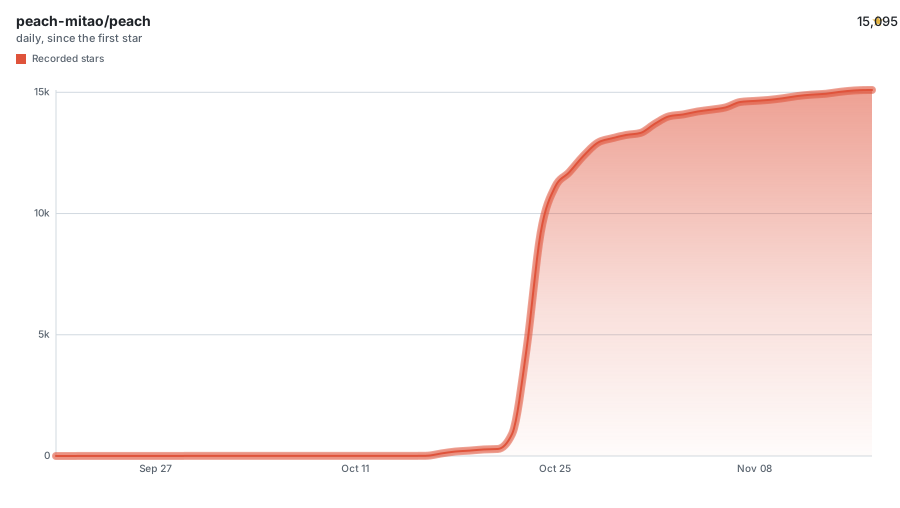
Star History
License
AGPL-3.0-or-later · Copyright (C) 2026 The Peach contributors. Third-party components retain their own licenses. Use of the Peach name and logo follows the name and logo policy.
Manage only media you own or are authorized to use, subject to laws, copyright and source-platform access, age and regional restrictions. Peach does not provide video resources or access to paid content.
Categories
Download Statistics
Related apps
Explore more like this
Explore allLinks
Details
longmeidao/peach:edgeRuntime arguments
- Web UI
http://[IP]:[PORT:8900]- Network
bridge- Privileged
- false
- Extra Params
--init --stop-timeout 75 --hostname peach --user 99:100 --env HOME=/data
Template configuration
Peach configuration, SQLite database, credentials and image cache. Must be persistent.
- Target
- /data
- Default
- /mnt/user/appdata/peach
Media files. Read-only by default; change to read-write only when organizing or deleting media.
- Target
- /media
- Default
- /mnt/user/media
ID of the user the application runs as.
- Target
- PEACH_UID
- Default
- 99
ID of the group the application runs as.
- Target
- PEACH_GID
- Default
- 100
Optional access password, 8-256 characters. If empty, the first-run page asks for one.
- Target
- PEACH_ACCESS_PASSWORD
Port for the Peach web UI.
- Target
- 8900
- Default
- 8900