
All apps · 0 apps

PdfDing
Docker app from grtgbln's Repository
Overview
Readme
View on GitHub
PdfDing
NOW MANAGED ON CODEBERG
Selfhosted PDF manager, viewer and editor offering a seamless user experience on multiple devices.
Website • Demo • Docs • Get Started
Introduction
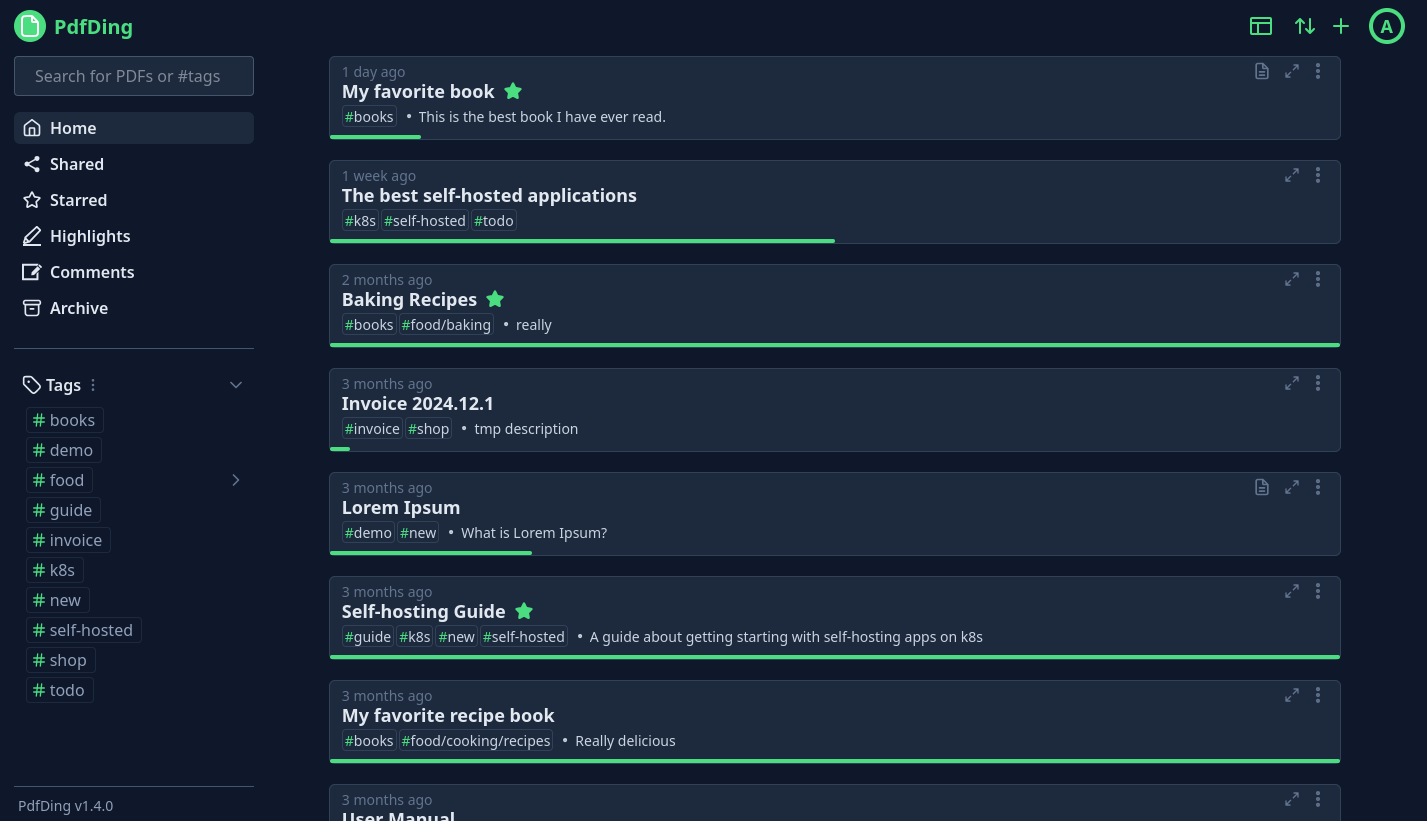
PdfDing is a PDF manager, viewer and editor that you can host yourself. It offers a seamless user experience on multiple devices. It's designed be to be minimal, fast, and easy to set up using Docker.
The name is a combination of PDF and ding. Ding is the German word for thing. Thus, PdfDing is a thing for your PDFs.
A live demo is available at demo.pdfding.com.
Features
- Seamless browser based PDF viewing on multiple devices. Remembers current position - continue where you stopped reading
- Stay on top of your PDF collection with workspaces, collections, multi-level tagging, starring and archiving functionalities
- Edit PDFs by adding text, highlighting and drawings
- Add signatures to PDFs and access them on all devices
- Manage and export PDF highlights and comments in dedicated sections
- Clean, intuitive UI with dark mode, inverted color mode and multiple layouts
- SSO support via OIDC
- Use bulk actions to manage multiple PDFs at once
- Share collections and PDFs with an external audience via a link or a QR Code with optional access control
- Protect accounts with two-factor authentication (TOTP + WebAuthn)
- Markdown Notes
- Progress bars show the reading progress of each PDF at a quick glance
Getting started
Self-Host
Ready to dive into PdfDing? Then head over to the Getting Started pages of the documentation and find instructions for setting up PdfDing via Docker, Docker Compose and Helm. Configuration options can be found here.
PikaPods
You can deploy PdfDing via PikaPods (~2.70 $/month) and get started in less than two minutes. Ideal for non-technical users that want to use PdfDing.
PikaPods donates 20% of the fees people like you pay to run PdfDing on their servers to PdfDing.
Contributing
Small improvements, bugfixes and documentation improvements are always welcome. If you want to contribute a larger feature, consider opening an issue first to discuss it. I may choose to ignore PRs for features that don't align with the project's goals or that I don't want to maintain.
If you are interested in contributing more information can be found in the Contributing pages of the docs. There are also ways to contribute if you are not a developer.
Website & Docs
The repository, which contains the source code for the project website and the documentation, can be found on Codeberg.
Acknowledgements
This project was funded through the NGI0 Commons Fund, a fund established by NLnet with financial support from the European Commission's Next Generation Internet programme, under the aegis of DG Communications Networks, Content and Technology under grant agreement No 101135429.


Media gallery
Requirements
Optionally can use a separate Postgres database container, or a built-in SQLite database.
Download Statistics
Total Downloads Over Time
Related apps
Explore more like this
Explore allDetails
mrmn/pdfding:latestRuntime arguments
- Web UI
http://[IP]:[PORT:8000]/- Network
bridge- Privileged
- false
Template configuration
Container Port: 8000
- Target
- 8000
- Default
- 8000
- Value
- 8000
Path to the media folder
- Target
- /home/nonroot/pdfding/media
Theme
- Target
- DEFAULT_THEME
- Default
- dark|light
Theme color
- Target
- DEFAULT_THEME_COLOR
- Default
- green|blue|red|pink|orange|gray
Used for securing signed data. Should be to a large random value.
- Target
- SECRET_KEY
The host/domain name where PdfDing will be reachable.
- Target
- HOST_NAME
- Default
- 127.0.0.1
- Value
- 127.0.0.1
Block users until they have verified their email address.
- Target
- ACCOUNT_EMAIL_VERIFICATION
- Default
- TRUE|FALSE
Disable user signups
- Target
- DISABLE_USER_SIGNUPS
- Default
- FALSE|TRUE
Database type
- Target
- DATABASE_TYPE
- Default
- SQLITE|POSTGRES
Postgres database host. Remove if using SQLite.
- Target
- POSTGRES_HOST
Postgres database port. Remove if using SQLite.
- Target
- POSTGRES_PORT
- Default
- 5432
Postgres database password. Remove if using SQLite.
- Target
- POSTGRES_PASSWORD
Enable OpenID Connect
- Target
- OIDC_ENABLE
- Default
- FALSE|TRUE
OpenID Connect provider name
- Target
- OIDC_PROVIDER_NAME
OpenID Connect client ID
- Target
- OIDC_CLIENT_ID
OpenID Connect client secret
- Target
- OIDC_CLIENT_SECRET
OpenID Connect authorization URL
- Target
- OIDC_AUTH_URL
Require users to use OIDC
- Target
- OIDC_ONLY
- Default
- FALSE|TRUE
Whether to send account related emails, e.g a password reset or account verification, to the console or via an SMTP server.
- Target
- EMAIL_BACKEND
- Default
- CONSOLE|SMTP
SMTP server host. Remove if using the console backend.
- Target
- SMTP_HOST
SMTP server port. Remove if using the console backend.
- Target
- SMTP_PORT
- Default
- 25
SMTP server user. Remove if using the console backend.
- Target
- SMTP_USER
SMTP server password. Remove if using the console backend.
- Target
- SMTP_PASSWORD
Secure the connection to the SMTP server with TLS. Remove if using the console backend.
- Target
- SMTP_USE_TLS
- Default
- FALSE|TRUE
Secure the connection to the SMTP server with SSL. Remove if using the console backend.
- Target
- SMTP_USE_SSL
- Default
- FALSE|TRUE
Enable the consumption folder as an alternative way for adding PDFs.
- Target
- CONSUME_ENABLE
- Default
- FALSE|TRUE
Skip the addition PDF files if the user already has PDF with the same name and file size.
- Target
- CONSUME_SKIP_EXISTING
- Default
- TRUE|FALSE
Comma separated list of tags to add to the PDFs added via the consumption folder.
- Target
- CONSUME_TAGS
Enable periodic backups to S3 compatible storage.
- Target
- BACKUP_ENABLE
- Default
- FALSE|TRUE
S3 compatible storage endpoint. Remove if not using backups.
- Target
- BACKUP_ENDPOINT
S3 compatible storage access key. Remove if not using backups.
- Target
- BACKUP_ACCESS_KEY
S3 compatible storage secret key. Remove if not using backups.
- Target
- BACKUP_SECRET_KEY
S3 compatible storage bucket. Remove if not using backups.
- Target
- BACKUP_BUCKET_NAME
Cron schedule for the backups. Default is midnight every day.
- Target
- BACKUP_SCHEDULE
- Default
- 0 0 * * *
Secure the connection to the S3 compatible storage with TLS.
- Target
- BACKUP_SECURE
- Default
- FALSE|TRUE
Encrypt the backups before uploading them to the S3 compatible storage.
- Target
- BACKUP_ENCRYPTION_ENABLE
- Default
- FALSE|TRUE
Password to encrypt the backups. Remove if not using encryption.
- Target
- BACKUP_ENCRYPTION_PASSWORD
Salt to encrypt the backups. Remove if not using encryption.
- Target
- BACKUP_ENCRYPTION_SALT
Path to the SQLite database folder. Remove if using Postgres. May need to update write permissions.
- Target
- /home/nonroot/pdfding/db
- Default
- /mnt/user/appdata/pdfding/db
- Value
- /mnt/user/appdata/pdfding/db
- Default
- 1000
- Value
- 1000
- Default
- 1000
- Value
- 1000
Log level
- Target
- LOG_LEVEL
- Default
- ERROR|WARN|INFO|DEBUG
Set this to TRUE to avoid transmitting the CSRF cookie over HTTP accidentally.
- Target
- CSRF_COOKIE_SECURE
- Default
- TRUE|FALSE
Set this to TRUE to avoid transmitting the session cookie over HTTP accidentally.
- Target
- SESSION_COOKIE_SECURE
- Default
- TRUE|FALSE
Redirects all non-HTTPS requests to HTTPS. If PdfDing is running behind a reverse proxy this can cause infinite redirects.
- Target
- SECURE_SSL_REDIRECT
- Default
- FALSE|TRUE
See details: https://github.com/mrmn2/PdfDing/blob/master/docs/configuration.md#secure_hsts_seconds
- Target
- SECURE_HSTS_SECONDS
The default protocol for account related URLs, e.g. for the password forgotten procedure.
- Target
- ACCOUNT_DEFAULT_HTTP_PROTOCOL
- Default
- https|http
The port where the internal server is reachable. Not recommended to change.
- Target
- HOST_PORT
- Default
- 8000
- Value
- 8000