
All apps · 0 apps

PatreonCredits
Docker app from Selfhosters
Overview
Readme
View on GitHub

Patreon Credits Generator
A standalone desktop app to generate scrolling end-credits videos for YouTube content creators, featuring their Patreon supporters.





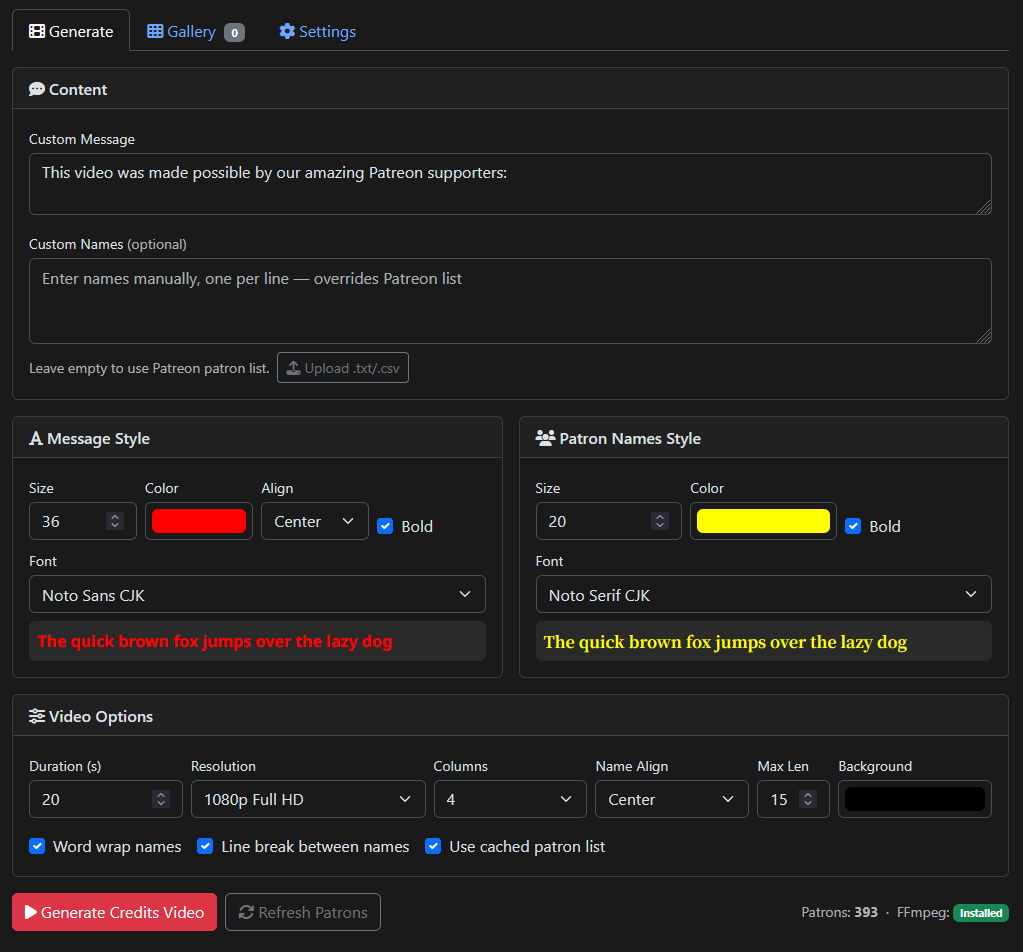
Configure styling, fonts, colors, and layout
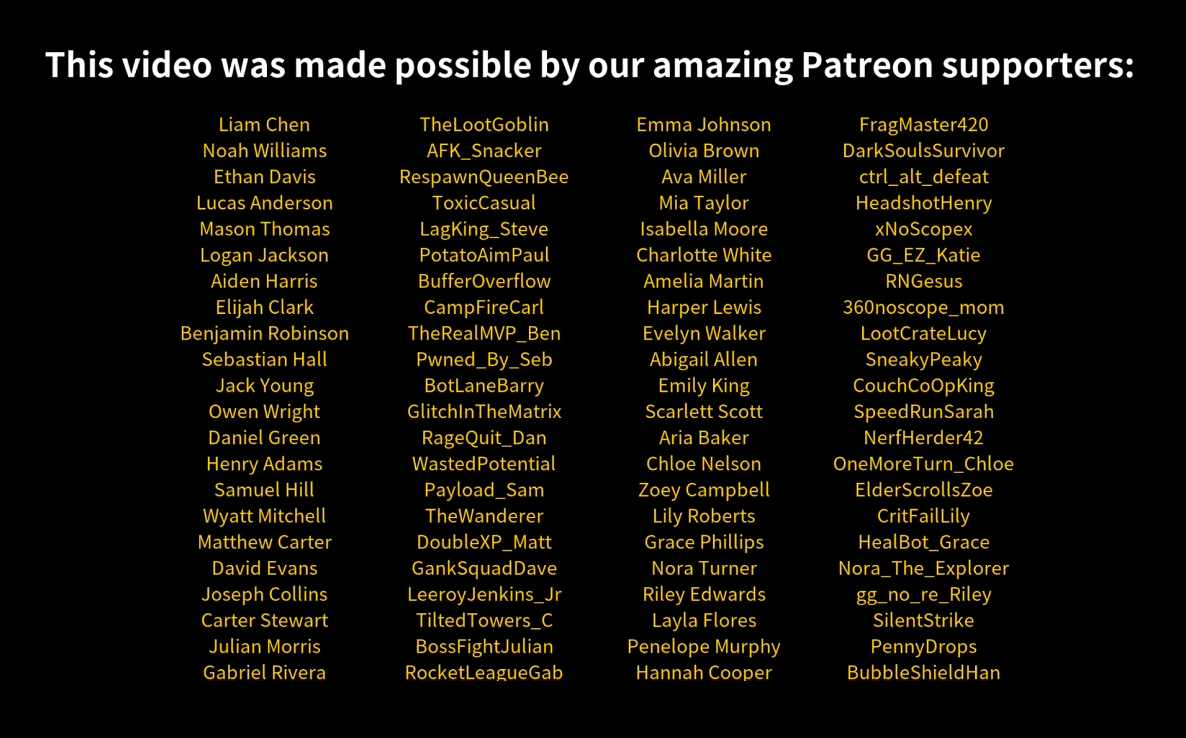
Generated scrolling credits video
Table of Contents
- Download
- Features
- Quick Start (Desktop App)
- Docker
- Development Setup
- Getting Patreon Credentials
- Bundled Fonts
- Building from Source
- Project Structure
- Video Specifications
- API Endpoints
- Adobe Premiere Pro Plugin
- Troubleshooting
- Tech Stack
- Support
Download
Grab the latest release for your platform from the Releases page:
| Platform | File | Notes |
|---|---|---|
| Windows | PatreonCredits.exe |
Standalone executable |
| Windows | PatreonCredits_Setup_*.exe |
Installer (adds Start Menu shortcut) |
| macOS | PatreonCredits_*.dmg |
Drag to Applications |
| Linux | PatreonCredits_*.AppImage |
chmod +x and run |
Features
- Professional scrolling credits videos (MP4)
- Fetch active patrons from Patreon API
- Custom names input — paste or upload a
.txt/.csvfile (no Patreon required) - Customizable duration (5-60 seconds)
- Custom header with alignment options (left, center, right, justified)
- 35 bundled font families (CJK + international character fallback)
- Customizable text colors, sizes, and bold
- Customizable background color
- 1-5 column layout with configurable alignment
- Name truncation or word wrap with hyphenation
- Optional separator lines between name rows
- 720p, 1080p, and 4K resolution
- Tabbed UI with Generate, Gallery, and Settings tabs
- Video gallery with thumbnails, preview, download, and delete
- Light and dark theme toggle (persists across sessions)
- In-app settings page for Patreon credentials
- Dummy data mode for testing
- Adobe Premiere Pro plugin for direct timeline integration
- Docker support for server/headless deployments
Quick Start (Desktop App)
- Download and run the app for your platform (see above)
- On first launch, a setup wizard helps you configure Patreon credentials (or skip to use dummy data / manual names)
- Configure your video options and click Generate Credits Video
- Preview and download the result
Settings, cache, and output videos are stored in a data directory you choose during setup:
- Windows default:
Documents\PatreonCredits - macOS default:
Documents/PatreonCredits - Linux default:
~/PatreonCredits
You can change the data directory at any time in Settings.
Headless / API-Only Mode
To run just the server (for the Premiere plugin or API access) without opening a window:
PatreonCredits --headless
PatreonCredits --headless -p 9000   # custom port (default: 8787)
Docker
The image is available from both registries:
# Docker Hub
docker pull mscrnt/patreon-credits

# GitHub Container Registry
docker pull ghcr.io/mscrnt/patreon-credits
Quick Start
docker run -d \
  -p 8787:8787 \
  -e USE_DUMMY_DATA=true \
  -v patreon-output:/app/output \
  mscrnt/patreon-credits
Open http://localhost:8787.
With Patreon Credentials
docker run -d \
  -p 8787:8787 \
  -e PATREON_TOKEN=your_token \
  -e PATREON_CAMPAIGN_ID=your_campaign_id \
  -v patreon-output:/app/output \
  mscrnt/patreon-credits
Docker Compose
# Production (port 8787)
docker compose --profile prod up -d --build

# Development with hot reload (port 5000)
docker compose --profile dev up --build
Makefile Shortcuts
make dev      # Dev container with hot reload (port 5000)
make prod     # Production container, detached (port 8787)
make down     # Stop all containers
make build    # Build images without starting
make logs     # Tail production container logs
make health   # Quick health check
Environment Variables
| Variable | Default | Description |
|---|---|---|
PATREON_TOKEN |
Patreon Creator Access Token | |
PATREON_CAMPAIGN_ID |
Patreon campaign ID | |
USE_DUMMY_DATA |
false |
Use dummy patron names for testing |
PORT |
8787 |
Server port |
Volumes
| Volume | Purpose |
|---|---|
/app/output |
Generated video files |
Development Setup
For contributors or running from source:
Prerequisites
- Python 3.10+
- FFmpeg installed and in PATH
Install
git clone https://github.com/mscrnt/patreon-credits.git
cd patreon-credits
python -m venv venv
source venv/bin/activate        # Linux/macOS
venv\Scripts\activate           # Windows
pip install -r requirements.txt
cp .env.example .env
Edit .env with your Patreon credentials (or set USE_DUMMY_DATA=true):
PATREON_TOKEN=your_creator_access_token
PATREON_CAMPAIGN_ID=your_campaign_id
USE_DUMMY_DATA=false
Run
# Desktop mode (native window via pywebview)
python launcher.py

# Headless / API-only mode (no GUI window)
python launcher.py --headless
python launcher.py --headless -p 9000   # custom port

# Dev server (browser at http://localhost:5000, debug mode)
python app.py
Getting Patreon Credentials
You need two values (configurable in the app's Settings page or .env file):
1. Creator Access Token (PATREON_TOKEN)
- Go to Patreon Platform
- Create a new client/app (or use an existing one)
- Copy your Creator Access Token
2. Campaign ID (PATREON_CAMPAIGN_ID)
Run this with your token from step 1:
curl -s -H "Authorization: Bearer YOUR_TOKEN_HERE" \
  "https://www.patreon.com/api/oauth2/v2/campaigns"
The campaign ID is in the data[0].id field.
Bundled Fonts
35 font families are included in the fonts/ directory, so no system font dependencies are needed:
CJK + Latin: Noto Sans CJK, Noto Serif CJK, LXGW WenKai, Zen Maru Gothic, M PLUS Rounded 1c, Shippori Mincho
Sans-serif: Inter, Roboto, Open Sans, Poppins, Montserrat, Raleway, Quicksand, Source Sans 3, Lato, Nunito, Rubik, DM Sans, Josefin Sans, Ubuntu, Oswald, Bebas Neue
Serif: Cinzel, Playfair Display, Merriweather, Crimson Text, Lora, Libre Baskerville, Arvo, Neuton
Display: Alfa Slab One, Bangers
Handwriting/Script: Permanent Marker, Pacifico, Playwrite DE Grund
Noto Sans CJK is the default and supports Latin, Chinese, Japanese, and Korean characters.
Building from Source
Platform build scripts
# Windows (run from cmd)
scripts\build_windows.bat

# macOS
./scripts/build_macos.sh

# Linux
./scripts/build_linux.sh
Each script runs PyInstaller and creates the platform-specific package (Inno Setup installer, DMG, or AppImage). Builds must run on the target platform — PyInstaller cannot cross-compile.
CI/CD
Pushing a v* tag triggers GitHub Actions to:
- Build desktop apps for all three platforms and create a GitHub Release with artifacts
- Build and push the Docker image to Docker Hub and GHCR
Project Structure
patreon-credits/
├── app.py                  # Flask server + routes
├── launcher.py             # Desktop app entry point (pywebview)
├── path_utils.py           # Path resolution (dev vs frozen)
├── patreon.py              # Patreon API client
├── ffmpeg_renderer.py      # Pillow + FFmpeg video rendering
├── patreon_credits.spec    # PyInstaller build spec
├── Dockerfile              # Multi-stage Docker build (dev + prod)
├── docker-compose.yml      # Dev and prod profiles
├── Makefile                # Common dev/docker commands
├── fonts/                  # Bundled font files (35 families)
├── templates/
│   ├── index.html          # Main UI (tabbed: Generate, Gallery, Settings)
│   ├── setup.html          # First-run setup wizard
│   └── swagger.html        # API docs
├── static/
│   ├── css/                # Theme and app stylesheets
│   ├── js/                 # App, gallery, settings, theme scripts
│   └── img/                # Placeholder images
├── installer/
│   └── patreon_credits.iss # Inno Setup script (Windows)
├── scripts/
│   ├── build_windows.bat   # Windows build script
│   ├── build_macos.sh      # macOS build script
│   └── build_linux.sh      # Linux build script
├── plugins/
│   └── adobe-premiere/     # Premiere Pro CEP panel plugin
├── .github/workflows/
│   ├── build.yml           # CI/CD (cross-platform desktop builds)
│   └── docker.yml          # Docker build + push (DockerHub + GHCR)
├── .env.example            # Configuration template
├── requirements.txt        # Python dependencies
└── requirements.docker.txt # Docker dependencies (no pywebview/pyinstaller)
Video Specifications
- Resolutions: 720p HD, 1080p Full HD, 4K UHD
- Format: MP4 (H.264)
- Background: Customizable color (default: black)
- Header: Static at top, customizable font/color/size/alignment
- Names: Scrolling bottom-to-top, gold (#FFD700) by default
- Layout: 1-5 columns with left/center/right alignment
- Name options: Truncation with max length, word wrap with hyphenation, separator lines between rows
- CJK support: Proper character width handling via Pillow's
font.getlength()
API Endpoints
| Method | Path | Description |
|---|---|---|
GET |
/ |
Main web interface |
POST |
/generate |
Generate credits video (accepts custom_names for manual input) |
GET |
/download/<filename> |
Download generated video |
GET |
/api/videos |
List all generated videos with metadata |
GET |
/api/thumbnail/<filename> |
Get video thumbnail (auto-generated, cached) |
DELETE |
/api/videos/<filename> |
Delete a generated video and its thumbnail |
GET |
/patron-count |
Get current patron count |
POST |
/refresh-patrons |
Force-refresh patron list from Patreon API |
GET |
/check-ffmpeg |
Check FFmpeg installation |
GET |
/health |
Health check (Docker/orchestration) |
GET |
/settings |
Settings (JSON) |
POST |
/settings |
Save settings to .env |
GET |
/api/docs |
Swagger UI documentation |
GET |
/api/spec |
OpenAPI 3.0 JSON specification |
Adobe Premiere Pro Plugin
An Adobe Premiere Pro panel plugin is included in plugins/adobe-premiere/. It lets you generate and insert credits videos directly from within Premiere Pro.
See the plugin README for installation and usage instructions.
Troubleshooting
FFmpeg not found
Click the Install button next to the FFmpeg status indicator, or go to Settings and click Download & Install FFmpeg. The app downloads a portable FFmpeg binary to its data directory — no admin privileges or system PATH changes needed.
No patrons showing
- Check credentials in Settings or
.env - Try the Refresh Patron List button
- Or paste names directly in the Custom Names textarea
Video generation fails
- Check FFmpeg status indicator
- Ensure sufficient disk space
- Check the console/terminal for error messages
Tech Stack
- Flask — web server
- pywebview — native desktop window (WebView2 on Windows, WebKit on macOS/Linux)
- PyInstaller — standalone packaging
- Docker — containerized server deployments
- Pillow — text rendering with font fallback (fontTools cmap)
- FFmpeg — video compositing (H.264 MP4)
- Patreon API v2 — patron data
- Bootstrap 5.3 — responsive UI with dark/light theme support
- Font Awesome 6 — icons
- Vanilla JavaScript frontend with localStorage persistence
Support
If you find this tool useful, consider supporting development:

License
MIT License - feel free to use this tool for your content creation needs!
Categories
Download Statistics
Related apps
Explore more like this
Explore allDetails
mscrnt/patreon-credits:latestRuntime arguments
- Web UI
http://[IP]:[PORT:8787]- Network
bridge- Privileged
- false
Template configuration
Port for the web interface.
- Target
- 8787
- Default
- 8787
Directory where generated videos are saved.
- Target
- /app/output
- Default
- /mnt/user/appdata/patreon-credits/output
Patreon Creator Access Token. Leave empty to configure in the web UI or use dummy data.
- Target
- PATREON_TOKEN
Patreon Campaign ID. Leave empty to configure in the web UI.
- Target
- PATREON_CAMPAIGN_ID
Use dummy patron names for testing without Patreon credentials.
- Target
- USE_DUMMY_DATA
- Default
- false|true