

patchferret
Docker app from Stoatworks Labs' Repository
Overview
Readme
View on GitHubPatchFerret
AI-assisted project. This codebase was created with Claude Code (Anthropic), directed and reviewed by a human author. The X32 adapter is tested in CI against a real scene file saved by an actual console, and the generated PDFs are produced and checked by eye. No output has ever been loaded back into a console, no conversion between consoles exists yet, and it can't read DiGiCo or Avid VENUE files. The per-format details are under What it does today, below.
PatchFerret turns a mixing console show file into paperwork an engineer can actually use: a patch list, a specification sheet and a wiring topology diagram, as PDFs.
Try it: https://patchferret.stoatworks-labs.com. It's an early preview, and still very much in development.
It runs in the browser or on the command line. The browser build parses and renders entirely in WebAssembly, so a show file never leaves the machine. There's no upload and no server.
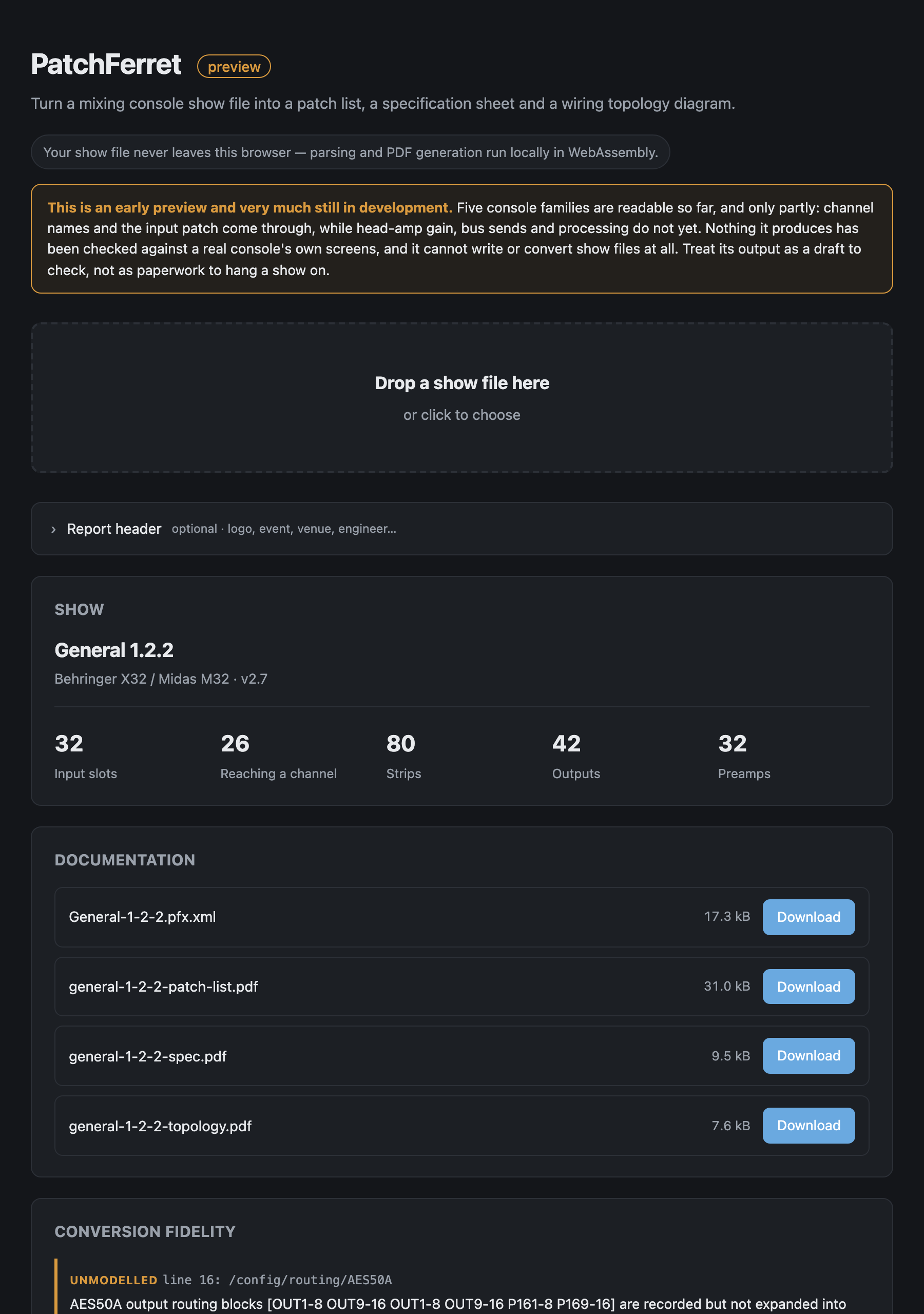
The hosted tool with the repo's own X32 fixture (tests/fixtures/x32-soundboard.scn) loaded. It's identified the show as a Behringer X32 / Midas M32 scene, counted its 32 input slots, 80 strips and 42 outputs, and lined up the four documents it makes ready to download, along with the conversion-fidelity list naming the lines of the file it didn't model. Parsed in the browser, and nothing was uploaded.
What it does today
show file  →  format adapter  →  PFX model  →  ├─ patch list PDF
                                               ├─ specification PDF
                                               ├─ topology PDF
                                               └─ PFX interchange XML
| Console | File | Status |
|---|---|---|
| Behringer X32 / Midas M32 / X-Air | .scn |
Supported on X32 / M32. An X-Air file opens through the same adapter, but none has ever been tested and the I/O differs, so it's read as an X32 and may be quietly wrong |
| Yamaha DM3 / DM7 / TF | .dm3s .tfs .dm7s (+ presets) |
Supported — names and input patch; head amps and sends not yet |
| Yamaha CL / QL | .CLF |
Supported — input patch and channel names |
| Allen & Heath Avantis / dLive | .tar.gz |
Supported — input patch and strip inventory; names and preamps not yet |
| Allen & Heath SQ | NVDATA.DAT |
Supported — input patch; names and socket class not yet identified |
| DiGiCo, Avid VENUE | — | Planned |
How far each adapter has been checked:
- X32. Written against a real 2,104-line scene file saved by an actual console, and asserted against it in CI. There are 153 tests across the workspace, and 17 of them cover the X32 adapter: the connector→slot→channel composition, the head-amp index split across the local and both AES50 links, and the output-source enumeration. The X32 signal-source enumerations come from community documentation and are corroborated against real files, not from a running desk; see Provenance.
- CL/QL and SQ. Built from controlled diffs in the manufacturers' own offline editors, and checked against those files. The CL/QL patch table is found at an absolute offset established on a single QL5, and it's validated before use rather than trusted.
- Yamaha MMS. Checked against the 41 factory scenes shipped inside DM3 and TF Editor, but its patch-source encoding has never been confirmed against a console's patch screen, and on TF no connector resolves at all. The tool tells you so rather than guessing.
Format research for the consoles it can't read yet lives in the private patchferret-research
repository, along with sample show files, which are client data and don't belong in a public
repo.
Use it
Command line
cargo build --release
./target/release/patchferret info   myshow.scn
./target/release/patchferret report myshow.scn -o ./docs
./target/release/patchferret xml    myshow.scn -o myshow.pfx.xml
info prints a summary and, more importantly, the fidelity list: everything the adapter
read but couldn't carry into the model, which would therefore be lost in a conversion.
The report header
Reports carry a header with your logo, the event, the venue, the engineer and so on. None of that is in a show file (a console stores a mixer state, not the job it was built for), so it comes from a job sheet you supply:
patchferret job-template -o job.txt   # a starting point
patchferret report myshow.scn -j job.txt -o ./docs
The sheet is key: value lines, and any key it doesn't recognise becomes an extra header
field, so "Truck call" or "Rider rev" work without the tool knowing about them:
Event: Summer Live 2026
Date: 12-14 September
Artist: The Something Band
Venue: Old Granada Studios
Engineer: A. Sargeant
Contact: 07700 900000
Truck call: 06:00
logo: ./logo.jpg
The browser version has the same fields as a form and accepts any image for the logo, converting it on a canvas before handing the bytes over. The CLI takes JPEG, or PNG without transparency. Embedding a transparent PNG would mean decoding pixels, which the dependency-free PDF writer doesn't do on purpose, and it tells you so rather than silently dropping the logo.
Browser
rustup target add wasm32-unknown-unknown
./scripts/build-web.sh
python3 -m http.server 8731 --directory web
Then open http://localhost:8731. Module scripts and WASM won't load from file://, so it
has to be served over HTTP.
Why the patch list is not obvious
On an X32, getting from an XLR to a fader takes three hops, and all three have to be composed:
/config/routing/INmaps blocks of eight physical connectors onto the 32 input slots./ch/NN/configselects which input slot feeds channelNN(a free mapping)./headamp/NNNholds the gain for a connector, in a flat index across local and both AES50 links.
Assume channel N is fed by XLR N and you get a patch list that's confident and wrong. In the test fixture, slots 25–32 are AES50-B connectors 1–8 while channels 25–32 carry them, and six channels reach no connector at all. PatchFerret composes the chain and marks the dead rows.
The PFX model
patchferret-model defines a console-neutral show model and its XML serialisation. The rule
is that the model is lossy in a declared way: anything an adapter understood but the model
can't express becomes a Diagnostic, which the spec sheet prints. A show that converts with no
diagnostics is one I can claim to have fully understood, and anything else says so.
Two choices worth knowing about:
- Head amps hang off the socket, not the channel. On a shared stage box the gain belongs to the connector, and every console listening to it shares that gain. Modelling it per-channel is the usual way to end up with a patch list that lies about gain sharing.
- The input-slot indirection is preserved. Resolving it away at parse time would turn the connector column into a guess and make re-patching impossible to express later.
ConsoleProfile describes what a desk has: channel counts, bus counts, EQ bands, physical
I/O. The conform work below needs it, and it's populated now so its shape is settled before
adapters depend on it.
Provenance of the X32 enumerations
The vendor doesn't publish the signal-source numbering. It's derived from community documentation and corroborated against real scene files. Two internal checks back it up, and both are asserted in CI:
- No value in the decoded range resolves to a matrix above 6. The X32 has six, so the competing "1–16 are the mix buses" reading is ruled out, since it would need matrix 7 and 8.
/outputs/p16/01 26 <-EQdecodes to "direct out of channel 1, pre-EQ", which is what an Ultranet port 1 conventionally carries.
Every output row in the test fixture decodes cleanly, and a test asserts that. Values outside the mapped ranges are reported as diagnostics rather than guessed.
Not built yet
The longer-term goals, in dependency order:
- Editing the patch: re-assign connector→channel and write the show file back out. The model already keeps the slot indirection this needs; no adapter can write yet.
- Console-to-console conversion: read one format, write another via PFX.
- Conform: reconcile a show against a target
ConsoleProfileand report what doesn't fit, with intelligent mapping where a straight copy is impossible.
Each of these needs a writing adapter, which is a good deal harder than reading, and needs hardware to check against. Don't trust any of it until a converted show has been loaded into a real console.
Layout
crates/patchferret-model     PFX model, XML, console profiles
crates/patchferret-formats   adapter trait, registry, X32 / Yamaha / A&H adapters
crates/patchferret-report    dependency-free PDF writer and the three reports
crates/patchferret-cli       the local tool
crates/patchferret-wasm      C-ABI entry point for the browser
web/                         browser front end
See AGENTS.md for the onboarding detail.
Run your own copy
PatchFerret is a static page, so hosting it yourself is one container serving the built files — the same files the hosted copy serves, running somewhere that still works when the venue has no internet.
Docker. The image is built by this repo's docker.yml workflow on every
push and published as ghcr.io/stoatworks-labs/patchferret:
docker run -d --name patchferret --restart unless-stopped -p 8544:80 ghcr.io/stoatworks-labs/patchferret:latest
Or docker compose up -d with the docker-compose.yml
in this repo, which maps the same port. Either way it is then at
http://localhost:8544/.
Unraid. Search Community Applications for PatchFerret — the template is
templates/patchferret.xml
in stoatworks-unraid, which is what the CA feed reads.
Stoatworks Burrow lists it under Self-hosted, with the compose file a click away.
The Dockerfile, docker-compose.yml, docker/ and the workflow are
generated from fleet.json in stoatworks-unraid. Change them there and
regenerate rather than editing them here.
This project is built on other people's work — see ATTRIBUTIONS.md.
Licence
MIT.
X32, M32, and the console names in this repository are trademarks of their respective owners. PatchFerret contains no vendor code and is not affiliated with or endorsed by any console manufacturer.
Categories
Related apps
Explore more like this
Explore allDetails
ghcr.io/stoatworks-labs/patchferret:latestRuntime arguments
- Web UI
http://[IP]:[PORT:80]/- Network
bridge- Shell
sh- Privileged
- false
Template configuration
Host port for the web interface.
- Target
- 80
- Default
- 8544
- Value
- 8544