
PartScout
Docker app from ZappyZap's Repository
PartScout searches several electronic component suppliers at once from a web interface: prices, stock, photos and BOMs, with multiple users and a French or English interface.
Overview
Readme
View on GitHub
PartScout
English · Français
Search for an electronic part at several suppliers at once, and compare stock, prices, price breaks, MOQ, lifecycle and datasheets. A web app that runs in Docker, for personal, non-commercial use.
A web version derived from Win-PartsFinder, © 2026 Ian Johnston. Terms: LICENSE and NOTICE.md.
Built with AI
In the interest of transparency: most of PartScout's code, tests and documentation were written by an AI assistant (Claude, by Anthropic), under my direction. I decided what to build, reviewed the results, and tested the app against the real supplier APIs before publishing it. If AI-assisted software is not for you, that is perfectly fine: feel free to pass on this one. Bug reports are welcome either way.
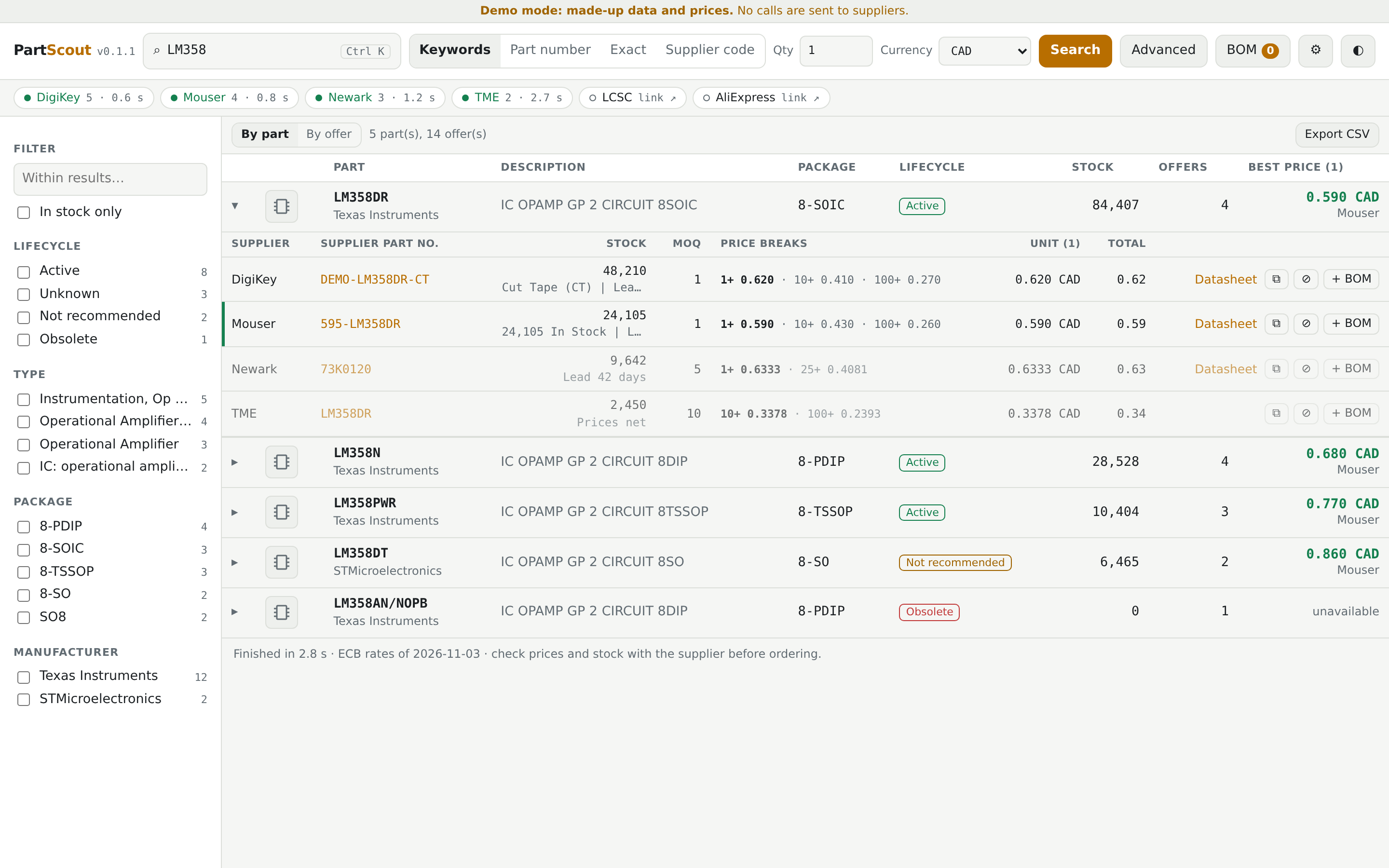 Grouped by part, with every offer for the part and its price breaks. Demo data.
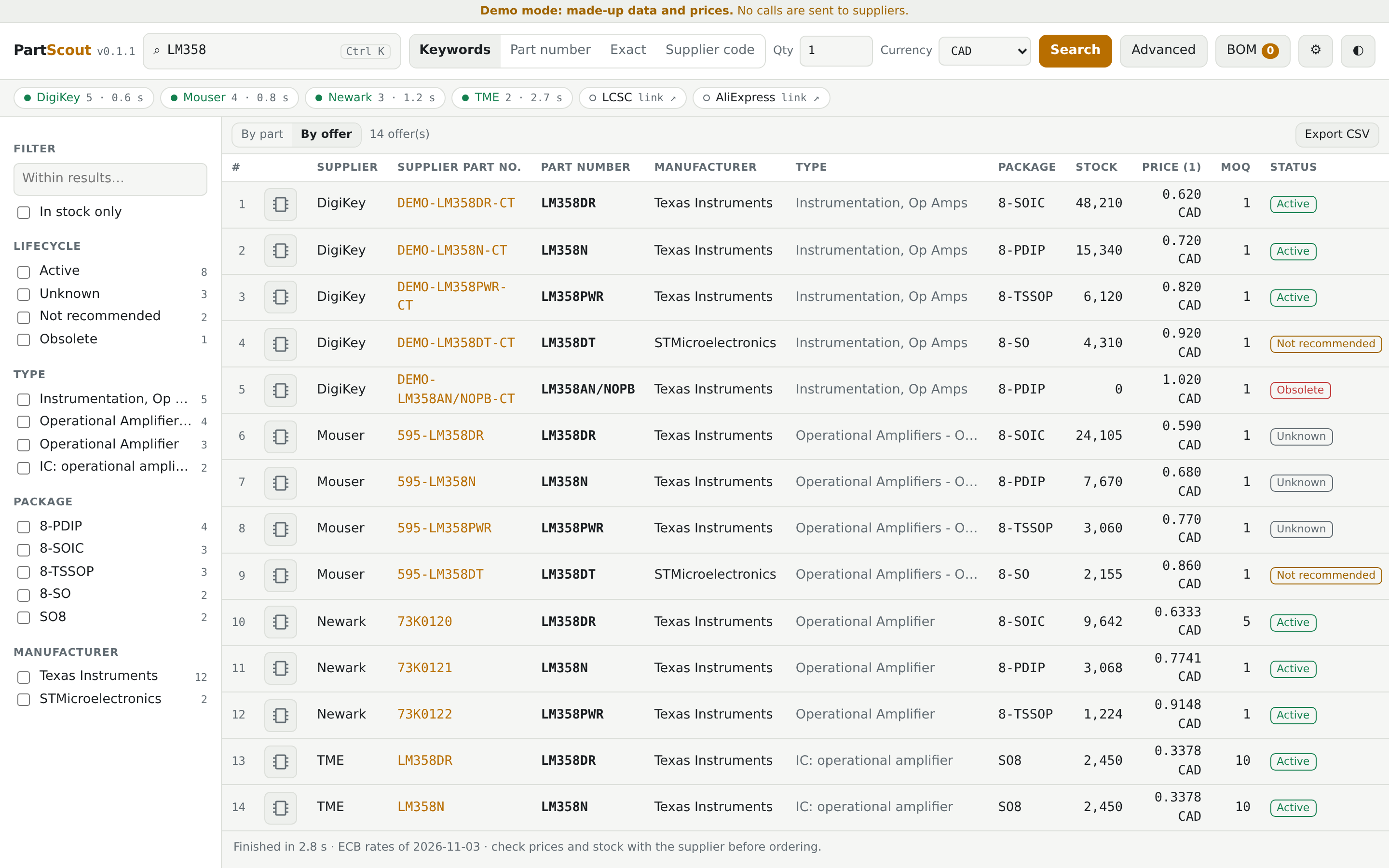 One line per offer, sortable on several columns, with movable columns. Demo data.
The interface is in English and French: use the FR/EN button at the top. The language belongs to the account, on all its devices; the browser's language only decides the very first visit. The default suppliers, currency and DigiKey site are set for Canada; change them in Settings too.
Getting started
You need Docker with the compose plugin.
mkdir partscout && cd partscout
curl -fsSLO https://raw.githubusercontent.com/devzwf/partscout/main/docker-compose.yml
curl -fsSL -o .env https://raw.githubusercontent.com/devzwf/partscout/main/.env.example
chmod 600 .env    # then replace both change-me values: openssl rand -base64 32
docker compose up -d                       # http://host:5070
docker compose --profile demo up -d demo   # optional demo with made-up data: http://host:5071
On first access, the app asks for the setup token (PARTSCOUT_SETUP_TOKEN) and has you choose a password. Then add your API keys in Settings. A supplier without a key stays available as a link to its website. Each user needs their own keys, so do not share an instance publicly on yours.
Supplier API keys: each supplier has its own developer portal (DigiKey, Mouser, element14, TME). Create an account there and follow their terms of use.
Several users: the first account is the administrator, who creates the others in Settings; there is no public sign-up. Each person has their own language, API keys, settings, BOMs and history. Use HTTPS (a reverse proxy) as soon as several people sign in: otherwise passwords and API keys travel in clear text over the network.
Not for the Internet: PartScout is meant for a home network or a private VPN. See SECURITY.md.
Back up the data folder and the .env file: without the master key, you have to re-enter your API keys. Every hour the app writes a consistent copy of its database to backups/, one per day, kept for 14 days.
Restoring: stop the container, remove partscout.db, partscout.db-wal and partscout.db-shm, copy backups/partscout-YYYY-MM-DD.db to partscout.db (owner uid 1654), then start it again. Do not use ports 5060 and 5061: browsers block them.
HTTPS: docker compose --profile https up -d adds Caddy in front of the app. It serves the certificate files found in PARTSCOUT_CERT_DIR and does not request certificates itself, so renew them with your own tool and restart partscout-caddy afterwards. See .env.example. Then set PARTSCOUT_PUBLISH=127.0.0.1:5070 and PARTSCOUT_COOKIE_SECURE=always, so the session cookie is never sent over plain HTTP. Keep the default (auto) only for plain HTTP on a local network.
Upgrading
Put the new version in PARTSCOUT_VERSION (.env), then docker compose up -d. To go back, restore the old value. Changes are listed in CHANGELOG.md.
Building it yourself
git clone https://github.com/devzwf/partscout.git && cd partscout
tools/build-image.sh    # local image partscout:<VERSION>, nothing is pushed
Then set PARTSCOUT_IMAGE=partscout and PARTSCOUT_PULL_POLICY=never in .env. To release a new version: change VERSION, commit, run tools/build-image.sh.
Layout
| Folder | Contents |
|---|---|
backend/src/PartScout.Suppliers |
Supplier code taken from Linux-PartsFinder, changed as little as possible |
backend/src/PartScout.Api |
ASP.NET Core API: sign-in, key vault, streaming search, BOM, demo mode |
backend/tests |
API tests |
frontend |
React interface; business logic in src/lib/parts.ts, translations in src/i18n.ts |
tests/e2e |
Full journey in Chromium |
upstream |
Untouched copy of the files taken, and the original commit |
tools |
upstream-diff.sh (the author's changes), ci-e2e.sh (browser journey in Docker), build-image.sh |
Tests
docker build --target backend-test .   # API tests
(cd frontend && npm test)              # interface logic
docker build -t partscout:test . && tools/ci-e2e.sh partscout:test   # browser journey, on a throwaway demo
Demo mode (PARTSCOUT_DEMO=1) simulates API responses based on the parser code. It does not replace a test against the real APIs.
Contributing
Issues and pull requests are welcome, in English or French; please use the templates. Code comments are in French. Contributions are distributed under the project's terms (see LICENSE), including the non-commercial restriction.
Categories
Download Statistics
Related apps
Explore more like this
Explore allLinks
Details
devzwf/partscout:latestRuntime arguments
- Web UI
http://[IP]:[PORT:8080]/- Network
bridge- Shell
sh- Privileged
- false
- Extra Params
--user 99:100 --restart=unless-stopped --read-only --tmpfs /tmp --cap-drop=ALL --security-opt=no-new-privileges
Template configuration
Web interface. Avoid 5060 and 5061, which browsers block.
- Target
- 8080
- Default
- 5070
- Value
- 5070
Database, settings and daily backups. Unraid creates this folder. If you choose an existing one, it must belong to nobody:users (99:100).
- Target
- /data
- Default
- /mnt/user/appdata/partscout/data
- Value
- /mnt/user/appdata/partscout/data
Encrypts your supplier API keys. Generate it with: openssl rand -base64 32. If you lose it, you will have to enter your API keys again.
- Target
- PARTSCOUT_MASTER_KEY
Asked for once, when the password is created. Generate it with: openssl rand -base64 32
- Target
- PARTSCOUT_SETUP_TOKEN
Behind a reverse proxy: its IP address, the only source trusted for X-Forwarded-* headers. Leave empty otherwise.
- Target
- PARTSCOUT_TRUSTED_PROXY
always: the session cookie is only ever sent over HTTPS. Set it when PartScout is reached through HTTPS (reverse proxy). auto: Secure only when the request is HTTPS, so plain HTTP keeps working on your LAN.
- Target
- PARTSCOUT_COOKIE_SECURE
- Default
- auto