
All apps · 0 apps

Parenthese
Docker app from IliesAllali's Repository
Overview
Readme
View on GitHubParenthèse

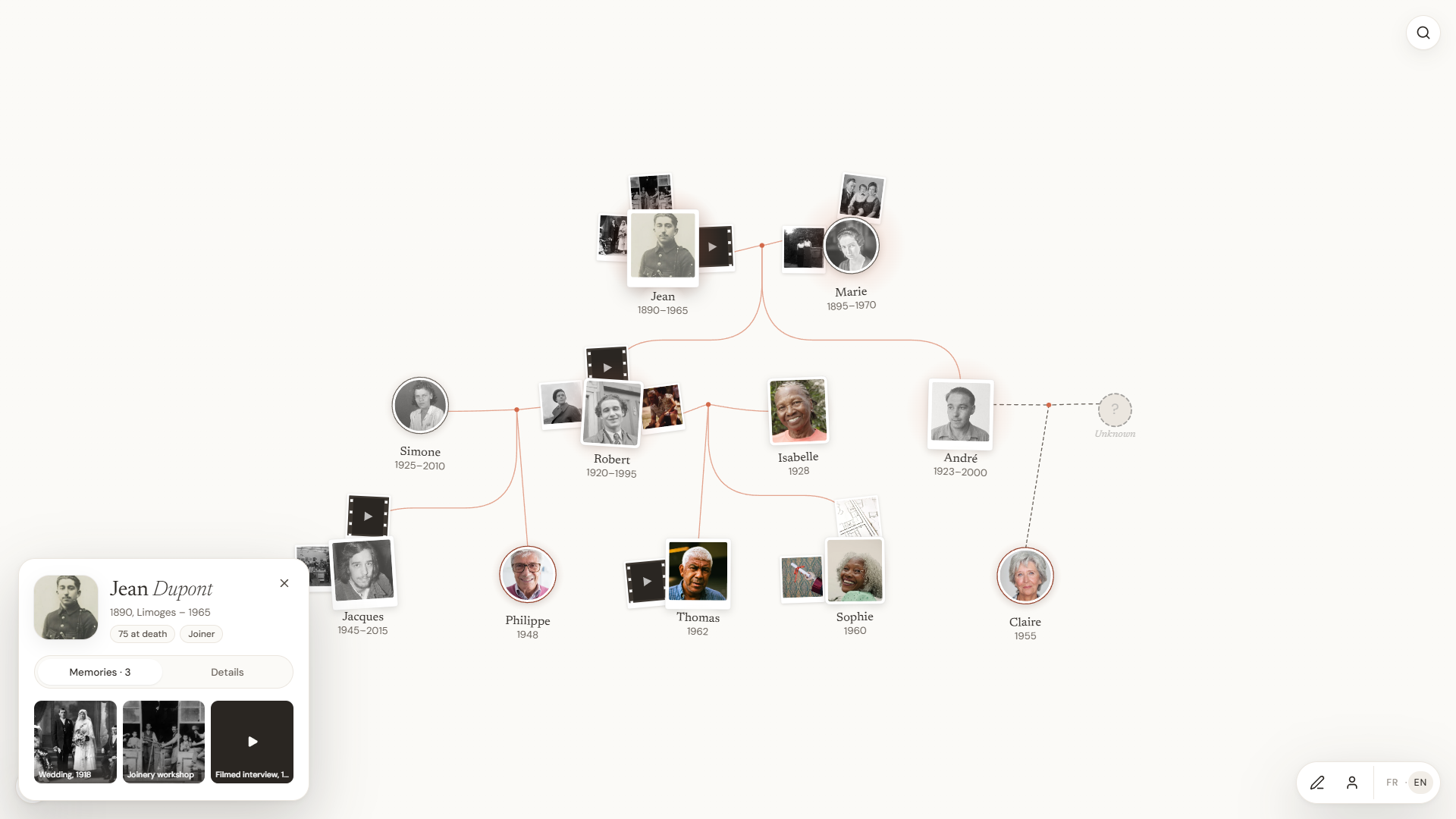
A family tree you explore like a map, with the photos, videos and voices of each person. Share it with one link and a password: relatives look around without an account and add what they know.
Website: parenthese.io/en · Demo, no account needed: app.parenthese.io · Version française
- License: source-available under PolyForm Noncommercial 1.0.0. Free to read, modify and self-host for non-commercial use. Not an OSI open source license, see License.
- How it was made: designed and directed by Ilies Allali. Most of the code was written with Claude Code (Anthropic), then reviewed and tested before being published.
What it does
- One tree per family: people, couples, parent-child links, laid out automatically.
- Memories on each person: photos, videos (a file or a YouTube link), audio recordings to keep a voice, documents, GPS tracks.
- Free annotations on the tree: drawings, stickers, text, photos placed anywhere.
- Sharing by link: each tree has an address
/arbre/<name>protected by a sharing password. With it, relatives can look around and suggest additions. - No account needed to visit: someone who receives the link and the password opens the tree directly.
- Reviewed contributions: the owner chooses whether the family's changes apply right away or go through a review queue, where each change is approved or declined.
- GEDCOM import and export, to come from another program or leave for one (the export holds the people and their links, not the media files).
- English and French interface. It follows the browser's language, with a switch in the app, and
?lang=enor?lang=frin the address forces one.
The promise
- Free, and it will stay free.
- Your data stays yours: no ads, nothing sold. What the app records and why is on the Data and privacy page.
- Self-hostable: the code is public, and a family can run its own instance on a server or a NAS without depending on anyone.
Self-hosting
Requirement: Docker with the Compose plugin (docker compose version must answer).
git clone https://github.com/IliesAllali/parenthese.git
cd parenthese
cp .env.example .env
You can also skip the clone. The API and front-end images are published on GitHub's registry (ghcr.io/iliesallali/parenthese-api and ghcr.io/iliesallali/parenthese-web, for amd64 and arm64), so two files are enough:
mkdir parenthese && cd parenthese
curl -fsSLO https://raw.githubusercontent.com/IliesAllali/parenthese/main/docker-compose.yml
curl -fsSL https://raw.githubusercontent.com/IliesAllali/parenthese/main/.env.example -o .env
Open .env and fill in the two empty values:
POSTGRES_PASSWORD: a password for the database (letters and digits only).JWT_SECRET: a long random key. To generate one:openssl rand -base64 48ornode -e "console.log(require('crypto').randomBytes(48).toString('base64'))".
Then:
docker compose up -d
The first start downloads the images (or builds them from the source when they can't be pulled), applies the database migrations, then serves the app on http://localhost. Create your account from the home screen. The first account is an account like any other, there is no global administrator.
Three containers run: db (PostgreSQL 16), api (the Node API) and web (nginx, which serves the front end and proxies the API). Only web is exposed, on the port set by WEB_PORT (80 by default). If that port is taken, change WEB_PORT in .env and update CORS_ORIGIN to match. The web container finds the API at api:4000; if you run the images under other service names, set API_UPSTREAM on web (for example API_UPSTREAM=myapi:4000).
To open the instance to your family over the Internet, put an HTTPS reverse proxy in front of the web port (Caddy, Traefik, nginx) and set the public address in CORS_ORIGIN, for example https://tree.your-domain.com.
A self-hosted instance sends no analytics. Usage tracking on parenthese.io only turns on when a PostHog key is provided at build time, which this setup does not do.
The help and privacy links in the app point to parenthese.io. To use your own pages, set VITE_HELP_URL and VITE_PRIVACY_URL when you build the front end yourself (see frontend/.env.example).
Useful commands:
docker compose logs -f api     # API log
docker compose ps              # container status
docker compose down            # stop, data is kept
To check that an installation works end to end, run bash tools/docker-smoke.sh http://localhost (add the port if WEB_PORT is not 80). The script needs curl and jq. It goes through the web port like a browser: home page, API health, account creation, sign-in, creating then deleting a test tree. The test account (smoke-...@example.com) stays in the database.
Single container (Unraid, NAS)
For systems that install one container per app, ghcr.io/iliesallali/parenthese-aio runs the database, the API and the front end together:
docker run -d --name parenthese --restart unless-stopped -p 8080:80 -v /path/to/appdata/parenthese:/data ghcr.io/iliesallali/parenthese-aio
There is nothing to fill in. On first start the container creates the database, its password and the session key in /data, and reuses them afterwards. Photos and videos go to /data/media. Back up the whole /data folder with the container stopped, or dump the database while it runs with docker exec parenthese runuser -u postgres -- pg_dump parenthese > parenthese.sql. The database is PostgreSQL 15 here, the compose setup uses 16.
Where the data lives
Two Docker volumes, kept across restarts and updates:
parenthese_db-data: the PostgreSQL database (people, links, accounts, contributions).parenthese_media: the uploaded files (photos, videos, audio, documents).
Backups
With Docker, a backup takes two commands, run from the repository folder:
docker compose exec -T db pg_dump -U parenthese -Fc parenthese > parenthese-db-$(date +%F).dump
docker run --rm -v parenthese_media:/data -v "$PWD":/backup alpine tar -czf /backup/parenthese-media-$(date +%F).tar.gz -C /data .
The first command saves the database. It holds the people, their links, the accounts and the contributions, plus the record of which photo, video or recording belongs to whom. The second saves the files themselves. You need both. Restore only the database and the memories point to files that are gone. Restore only the archive and you get a folder of files with no names attached. The GEDCOM export is not a backup either. It moves the tree to another genealogy program and leaves the media and the annotations behind.
Adjust -U parenthese and the database name if you changed POSTGRES_USER or POSTGRES_DB. To restore the database, run docker compose exec -T db pg_restore -U parenthese -d parenthese --clean < parenthese-db-YYYY-MM-DD.dump, then extract the media archive into the volume with the same docker run command, using tar -xzf instead of -czf.
The deploy/backup.sh script does the same (PostgreSQL dump, media archive, checksums, rotation, optional S3 upload) for an installation without Docker. It reads backend/.env and needs pg_dump on the machine. It is configured through the BACKUP_ROOT, BACKUP_RETENTION_DAYS and BACKUP_S3_BUCKET variables.
Updating
docker compose pull && docker compose up -d
latest follows the main branch. To stay on a version, set PARENTHESE_VERSION in .env (for example 1.0). From a clone, git pull && docker compose up -d --build builds from the source instead.
Database migrations apply on their own when the API starts. Make a backup first, as a habit.
Development
The repository holds three Node projects: backend/ (Fastify, Prisma, PostgreSQL, TypeScript), frontend/ (React, Vite) and landing/ (the marketing site, not needed to run the app). The Docker images use Node 24.
Backend
npm --prefix backend install
npm --prefix backend run db:bootstrap
npm --prefix backend run dev
db:bootstrap starts a portable PostgreSQL on Windows (database genealogy, user postgres, port 5432). The binaries must already be extracted in backend/.local/postgresql_full/pgsql, the script does not download them. On other systems any local PostgreSQL works: set DATABASE_URL in backend/.env (template in backend/.env.example) and create the schema with npm --prefix backend run prisma:migrate.
On any system with Docker, a throwaway database replaces db:bootstrap:
docker run -d --name parenthese-dev-db -p 5432:5432 -e POSTGRES_USER=postgres -e POSTGRES_PASSWORD=postgres -e POSTGRES_DB=genealogy postgres:16
npm --prefix backend run prisma:deploy
npm --prefix backend run dev
Before prisma:deploy, backend/.env must exist (a copy of backend/.env.example) with DATABASE_URL="postgresql://postgres:postgres@localhost:5432/genealogy", matching those credentials. docker stop parenthese-dev-db stops the database, docker start parenthese-dev-db restarts it with its data.
The API listens on http://localhost:4000 and answers { "ok": true } on /health.
Frontend
Create frontend/.env.development.local:
VITE_API_BASE_URL=
VITE_DEV_PROXY_TARGET=http://127.0.0.1:4000
VITE_DEV_PROXY_STRIP_API=1
Then:
npm --prefix frontend install
npm --prefix frontend run dev
The Vite server proxies /api, /trees, /auth and /health to the local API and strips the /api prefix, as nginx does in production. Without this file, the front end calls http://localhost:4000 directly and shared links under /api/arbre/... return 404.
Translations
Interface text goes through t() from frontend/src/i18n/index.js. The French text is the key, and the English lives in frontend/src/i18n/en/*.js. A missing English entry falls back to French, and a test fails if any text passed to t() has no English entry.
Tests
npm --prefix frontend test
npm --prefix backend test
Contributing
Issues and small, focused pull requests are welcome. The steps, the tests to pass and the conventions are in CONTRIBUTING.md. For a security issue, no public issue please, see SECURITY.md.
License
The code is published under PolyForm Noncommercial 1.0.0. In plain words:
- You can read the code, change it and self-host it for non-commercial use, for your family or a nonprofit for example.
- You cannot build a paid service from this code.
- The Parenthèse name and logo remain the property of Ilies Allali.
The license text is what counts.
Categories
Related apps
Explore more like this
Explore allDetails
ghcr.io/iliesallali/parenthese-aio:latestRuntime arguments
- Web UI
http://[IP]:[PORT:80]- Network
bridge- Shell
bash- Privileged
- false
Template configuration
Port where Parenthese opens in the browser
- Target
- 80
- Default
- 8080
- Value
- 8080
Database, photos, videos and generated keys. Back up this folder.
- Target
- /data
- Default
- /mnt/user/appdata/parenthese
- Value
- /mnt/user/appdata/parenthese