
Watch paperless-ngx video
Watch paperless-ngx video
paperless-ngx

paperless-ngx
OfficialDocker app from Selfhosters
Overview
Requirements: Paperless-ngx requires Redis or Valkey as external service. You can install it from the CA store. Make sure to adjust the configuration in the template accordingly. Setup: Create a user account after this container is created i.e. from Unraids Docker UI, click the paperless-ngx icon and choose Console. Then enter "python manage.py createsuperuser" in the prompt and follow the instructions. Paperless-ngx Documentation: https://docs.paperless-ngx.com/ Additional Template Variables: https://docs.paperless-ngx.com/configuration/ Demo: https://demo.paperless-ngx.com/
Readme
View on GitHub





Paperless-ngx
Paperless-ngx is a document management system that transforms your physical documents into a searchable online archive so you can keep, well, less paper.
Paperless-ngx is the official successor to the original Paperless & Paperless-ng projects and is designed to distribute the responsibility of advancing and supporting the project among a team of people. Consider joining us!
Thanks to the generous folks at DigitalOcean, a demo is available at demo.paperless-ngx.com using login demo / demo. Note: demo content is reset frequently and confidential information should not be uploaded.
This project is supported by:

Features
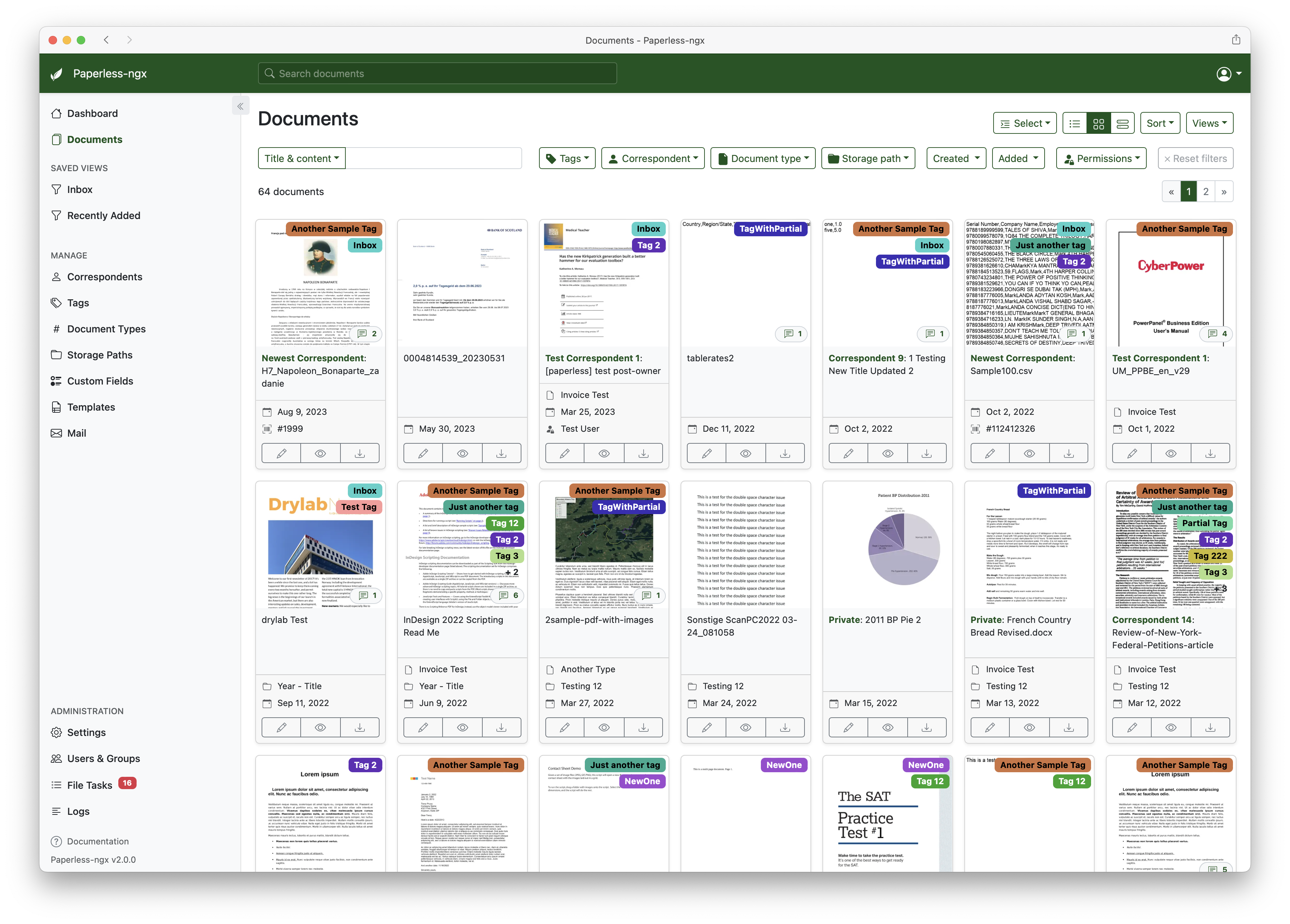
A full list of features and screenshots are available in the documentation.
Getting started
The easiest way to deploy paperless is docker compose. The files in the /docker/compose directory are configured to pull the image from the GitHub container registry.
If you'd like to jump right in, you can configure a docker compose environment with our install script:
bash -c "$(curl -L https://raw.githubusercontent.com/paperless-ngx/paperless-ngx/main/install-paperless-ngx.sh)"
More details and step-by-step guides for alternative installation methods can be found in the documentation.
Migrating from Paperless-ng is easy, just drop in the new docker image! See the documentation on migrating for more details.
Documentation
The documentation for Paperless-ngx is available at https://docs.paperless-ngx.com.
Contributing
If you feel like contributing to the project, please do! Bug fixes, enhancements, visual fixes etc. are always welcome. If you want to implement something big: Please start a discussion about that! The documentation has some basic information on how to get started.
Community Support
People interested in continuing the work on paperless-ngx are encouraged to reach out here on github and in the Matrix Room. If you would like to contribute to the project on an ongoing basis there are multiple teams (frontend, ci/cd, etc) that could use your help so please reach out!
Translation
Paperless-ngx is available in many languages that are coordinated on Crowdin. If you want to help out by translating paperless-ngx into your language, please head over to https://crowdin.com/project/paperless-ngx, and thank you! More details can be found in CONTRIBUTING.md.
Feature Requests
Feature requests can be submitted via GitHub Discussions, you can search for existing ideas, add your own and vote for the ones you care about.
Bugs
For bugs please open an issue or start a discussion if you have questions.
Related Projects
Please see the wiki for a user-maintained list of related projects and software that is compatible with Paperless-ngx.
Important Note
Document scanners are typically used to scan sensitive documents like your social insurance number, tax records, invoices, etc. Paperless-ngx should never be run on an untrusted host because information is stored in clear text without encryption. No guarantees are made regarding security (but we do try!) and you use the app at your own risk. The safest way to run Paperless-ngx is on a local server in your own home with backups in place.
Install paperless-ngx on Unraid in a few clicks.
Find paperless-ngx in Community Apps on your Unraid server, review the template, and click Install. Unraid handles the Docker app or plugin setup from the published template.
Requirements
Categories
Related apps
Explore more like this
Explore allDetails
ghcr.io/paperless-ngx/paperless-ngxRuntime arguments
- Web UI
http://[IP]:[PORT:8000]- Network
bridge- Shell
bash- Privileged
- false
Template configuration
Container Port: 8000
- Target
- 8000
- Default
- 8000
Container Path: /usr/src/paperless/data . This contains the paperless database. Should be in appdata.
- Target
- /usr/src/paperless/data
- Default
- /mnt/user/appdata/paperless-ngx/data
Container Path: /usr/src/paperless/media . This is where your consumed documents and thumbnails are stored.
- Target
- /usr/src/paperless/media
Container Path: /usr/src/paperless/consume . Files placed here will be consumed by paperless.
- Target
- /usr/src/paperless/consume
Container Path: /usr/src/paperless/export . Location for files used by the exporter utility. See https://paperless-ngx.readthedocs.io/en/latest/administration.html#document-exporter
- Target
- /usr/src/paperless/export
Container Variable: PAPERLESS_REDIS . This is required for processing scheduled tasks such as email fetching, index optimization and for training the automatic document matcher.
- Default
- redis://[REPLACE-WITH-IP]:6379
Container Variable: PAPERLESS_OCR_LANGUAGE . The default language to use for OCR. Set this to the language most of your documents are written in. Use a 3-letter language code consistent with ISO 639: https://www.loc.gov/standards/iso639-2/php/code_list.php. This can be a combination of multiple languages such as deu+eng, in which case tesseract will use whatever language matches best.
- Default
- eng
Container Variable: PAPERLESS_OCR_LANGUAGES . Additional languages to install for text recognition. The container installs English, German, Italian, Spanish and French by default. Use a space separated list of 3-letter language codes consistent with ISO 639: https://www.loc.gov/standards/iso639-2/php/code_list.php
Container Variable: PAPERLESS_FILENAME_FORMAT . Changes the filenames paperless uses to store documents in the media directory. Setting none disables this feature. Uniqueness of filenames is ensured, as an incrementing counter is attached. See https://paperless-ngx.readthedocs.io/en/latest/advanced_usage.html#file-name-handling for placeholders.
- Default
- {{ created }}-{{ correspondent }}-{{ title }}
Container Variable: PAPERLESS_TIME_ZONE . Use this variable to set a timezone for the Paperless Docker containers. If not specified, defaults to UTC.
- Default
- America/Los_Angeles
Container Variable: PAPERLESS_IGNORE_DATES . Comma separated list of dates supported by dateparser that should be ignored when extracting the creation date. Example: 2020-12-02,22.04.1999
Container Variable: PAPERLESS_CONSUMER_POLLING_INTERVAL . If set to a value n greater than 0, inotify is disabled and the directory is polled every n seconds. This option is useful when inotify doesn't fire events like when the consume folder is a NFS share
- Default
- 0
Container Variable: PAPERLESS_SECRET_KEY . Paperless uses this to make session tokens. If you expose paperless on the internet, you need to change this, since the default secret is well known
- Default
- e11fl1oa-*ytql8p)(06fbj4ukrlo+n7k&q5+$1md7i+mge=ee
Container Variable: USERMAP_UID
- Target
- USERMAP_UID
- Default
- 99
Container Variable: USERMAP_GID
- Target
- USERMAP_GID
- Default
- 100