
All apps · 0 apps

Paperless-AI
Docker app from grtgbln's Repository
Overview
Readme
View on GitHub📄 Paperless-AI




⚠️ IMPORTANT NOTICE:
This repo is currently not maintained. I appreciate all the efforts from the community pushing PRs and creating issues. I'm currently rewriting the entire codebase with a more stable, up-to-date architecture. But I'm limited to evenings, and doing support here while also working on the rewrite just isn't feasible for me. With the upcoming official AI integration in Paperless-ngx itself, I'm also not sure if I'll complete the rewrite or continue maintaining this repo at all.
Paperless-AI is an AI-powered extension for Paperless-ngx that brings automatic document classification, smart tagging, and semantic search using OpenAI-compatible APIs and Ollama.
It enables fully automated document workflows, contextual chat, and powerful customization — all via an intuitive web interface.
💡 Just ask:
“When did I sign my rental agreement?”
“What was the amount of the last electricity bill?”
“Which documents mention my health insurance?”
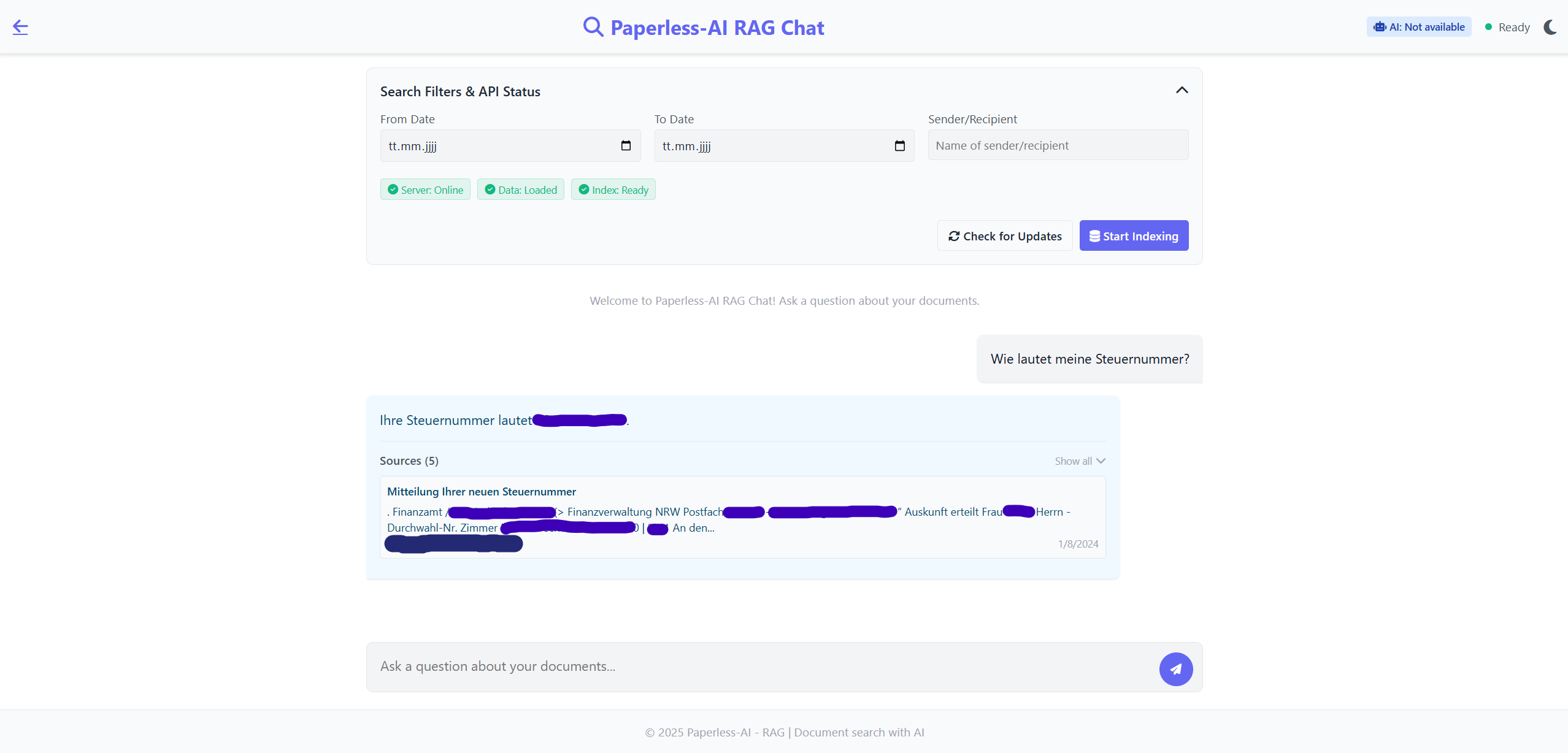
Powered by Retrieval-Augmented Generation (RAG), you can now search semantically across your full archive and get precise, natural language answers.
✨ Features
🔄 Automated Document Processing
- Detects new documents in Paperless-ngx automatically
- Analyzes content using OpenAI API, Ollama, and other compatible backends
- Assigns title, tags, document type, and correspondent
- Built-in support for:
- Ollama (Mistral, Llama, Phi-3, Gemma-2)
- OpenAI
- DeepSeek.ai
- OpenRouter.ai
- Perplexity.ai
- Together.ai
- LiteLLM
- VLLM
- Fastchat
- Gemini (Google)
- ...and more!
🧠 RAG-Based AI Chat
- Natural language document search and Q&A
- Understands full document context (not just keywords)
- Semantic memory powered by your own data
- Fast, intelligent, privacy-friendly document queries
⚙️ Manual Processing
- Web interface for manual AI tagging
- Useful when reviewing sensitive documents
- Accessible via
/manual
🧩 Smart Tagging & Rules
- Define rules to limit which documents are processed
- Disable prompts and apply tags automatically
- Set custom output tags for tracked classification
🚀 Installation
⚠️ First-time install: Restart the container after completing setup (API keys, preferences) to build RAG index.
🔁 Not required for updates.
🐳 Docker Support
- Health monitoring and auto-restart
- Persistent volumes and graceful shutdown
- Works out of the box with minimal setup
🔧 Local Development
# Install dependencies
npm install

# Start development/test mode
npm run test
🧭 Roadmap Highlights
- ✅ Multi-AI model support
- ✅ Multilingual document analysis
- ✅ Tag rules and filters
- ✅ Integrated document chat with RAG
- ✅ Responsive web interface
🤝 Contributing
We welcome PRs and contributions!
# Fork, clone, then:
git checkout -b feature/YourFeature
# After changes:
git commit -m "Add YourFeature"
git push origin feature/YourFeature
Then open a Pull Request via GitHub.
🆘 Support & Community
📄 License
This project is licensed under the MIT License. See LICENSE for details.
🙏 Support Development




Media gallery
1 / 2Requirements
Requires a separate Paperless-ngx instance (and optional Ollama) to function.
Download Statistics
Total Downloads Over Time
Related apps
Explore more like this
Explore allDetails
clusterzx/paperless-ai:latestRuntime arguments
- Web UI
http://[IP]:[PORT:3000]/- Network
bridge- Privileged
- false
Template configuration
Container Port: 3000
- Target
- 3000
- Default
- 3000
- Value
- 3000
Path to app data
- Target
- /app/data
- Default
- /mnt/user/appdata/paperless-ai
- Value
- /mnt/user/appdata/paperless-ai