
PalCenter
Docker app from denalb's Repository
Overview
Readme
View on GitHubPalCenter

Palworld Server Command Center
PalCenter is a self-hosted web console for administering existing Palworld dedicated servers. It connects to each server through the official Palworld REST API; it does not install Palworld, manage containers, or access save files.
What PalCenter provides
- Multi-server status, health, configuration, and connection management
- Connected-player visibility with level data and kick/ban operations
- Player workspace: view and manage inventory, Pals, technology, and progression
- Player moderation: kick, ban with IP ban, and unban
- Resource grants: items, Pals, Pal templates, Pal eggs, and progression
- Guild and base camp browsing, inspection, and deletion
- Server messaging: alerts, targeted messages, and broadcasts
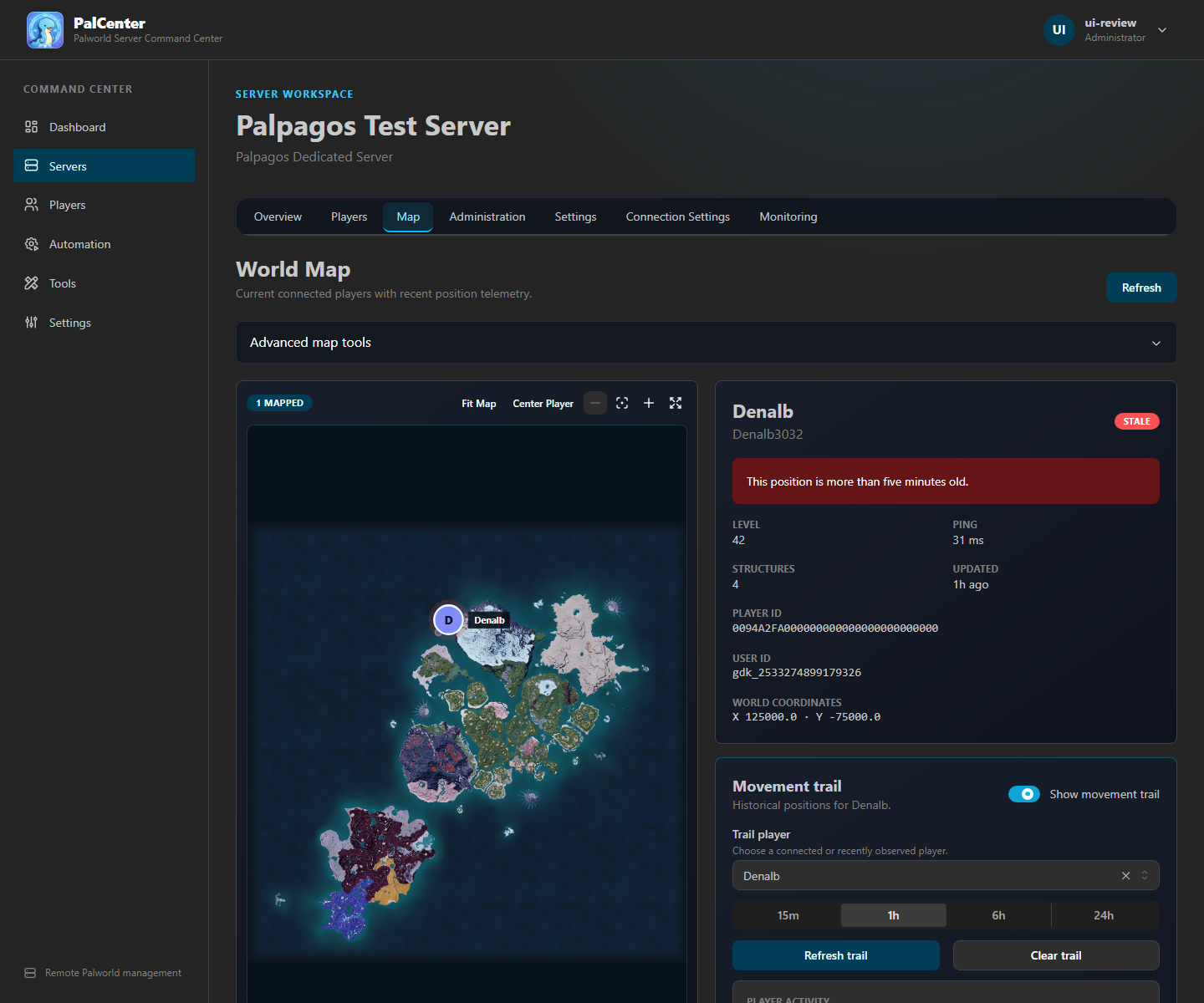
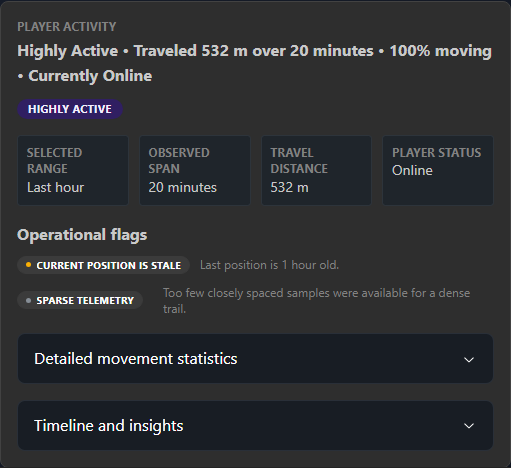
- World Intelligence: live Palpagos map, interactive base camp markers, map layer controls, movement trails, and activity summaries
- Broadcast, Save World, and Graceful Shutdown operations
- Scheduled automation with immutable execution history
- Discord webhook and ntfy notifications
- Administrator, Moderator, and Visitor accounts
- Portable backup and restore
- A standalone
PalWorldSettings.iniconfiguration generator
Player workspace, moderation, resource grants, guild and base management, map base camp markers, and enhanced messaging require PalDefender. All other features work through the native Palworld REST API.
Supported environments
PalCenter is distributed as a Linux container for linux/amd64 and
linux/arm64. It runs with Docker Engine, Docker Desktop, Docker Compose,
Unraid Community Applications, and compatible NAS or VPS container platforms.
Requirements
- Docker 24 or newer, or a current Unraid release
- Persistent storage for
/app/data - Network access from PalCenter to each Palworld REST API
- An existing Palworld dedicated server with its REST API enabled
- A modern browser
For PalDefender features (optional):
- PalDefender installed on the Palworld server
- PalDefender REST API accessible from the PalCenter container
- A PalDefender Bearer token
PalCenter itself does not require the Palworld host, save directory, SteamCMD, Docker socket, or privileged container access.
PalDefender integration
PalDefender is an optional anti-cheat and server administration plugin for Palworld dedicated servers. It provides its own in-game commands, administration features, and a REST API for external tools.
PalCenter integrates with PalDefender's REST API to bring supported PalDefender administration features into the PalCenter web interface:
- View and modify player inventory, Pals, technology, and progression
- Grant items, Pals, Pal templates, and Pal eggs
- Teach or remove technology
- Grant progression levels and points
- Kick and ban players, including IP bans
- Browse guilds and base camps, inspect members, delete bases
- Send server-wide alerts and targeted player messages
- Reload PalDefender's configuration without restarting the server
PalCenter connects to PalDefender on a per-server basis. After adding a
Palworld server, open its Connection Settings and enter the PalDefender
REST API URL and Bearer token. The URL must be reachable from the PalCenter
container — when PalCenter runs in Docker, 127.0.0.1 refers to the
container itself, not the Palworld server.
All standard Palworld features — server status, player lists, World Intelligence, broadcast, save, shutdown, and automation — work through the native Palworld REST API without PalDefender.
For PalDefender installation and configuration, see the official PalDefender project at github.com/Ultimeit/PalDefender.
Quick start
Save the repository's
docker-compose.ymland.env.examplein a new directory.Rename
.env.exampleto.env.Start PalCenter:
docker compose up -dOpen
http://YOUR-Docker-HOST:3000.Create the initial Administrator when prompted.
Open the Servers page, select Add Server, enter the Palworld REST URL and administrator password, then test and save the connection.
The default Compose deployment uses a Docker-managed volume and runs as the
non-root 1000:1000 user.
Installation options
Docker Compose
The supplied docker-compose.yml uses:
services:
  palcenter:
    image: ghcr.io/shanebionic/palcenter:latest
    user: "${PALCENTER_UID:-1000}:${PALCENTER_GID:-1000}"
    ports:
      - "${PALCENTER_WEB_PORT:-3000}:3000"
      - "${PALCENTER_API_PORT:-3001}:3001"
    volumes:
      - palcenter-data:/app/data
Port 3000 serves the web application. Port 3001 is the direct API and is
not needed by browsers using the normal same-origin web interface. Restrict or
remove the host mapping for port 3001 unless an advanced integration needs
it.
See the installation guide for environment variables, bind mounts, initial startup, and Palworld REST configuration.
Unraid
Install PalCenter from Apps → Community Applications. The official
template maps /app/data to /mnt/user/appdata/palcenter and runs as Unraid's
non-root nobody:users identity (99:100).
See the Unraid guide for template settings, networking, permissions, reverse proxies, backups, and upgrades.
Production deployment
Place PalCenter on a trusted management network. For remote access, proxy the web port through HTTPS, enable secure session cookies, and leave the direct API private. PalCenter currently uses normal HTTP requests; no WebSocket forwarding rule is required.
Examples for Nginx Proxy Manager, Traefik, and Caddy are in the reverse proxy guide.
Authentication and access
There is no default account. The first-run wizard creates the initial Administrator. Passwords are stored as scrypt hashes, and authenticated sessions use signed HttpOnly cookies.
| Role | Access |
|---|---|
| Administrator | Full configuration, user, backup, notification, and automation access |
| Moderator | Read access plus supported server and player operations |
| Visitor | Read-only access |
See Security and the feature guide.
Major workflows
- Player workspace: Select a server, open Players, click a player, and view inventory, Pals, technology, and progression. Grant items, Pals, eggs, and progression or moderate with kick and ban. Requires PalDefender. Feature guide
- Guilds and bases: Browse guilds and base camps, inspect members, and delete bases. Requires PalDefender. Feature guide
- Server messaging: Send alerts, targeted player messages, or broadcasts from the Administration panel. Requires PalDefender. Feature guide
- World Intelligence: Select a server, open Map, and select a player or a PalDefender base camp marker. Enable a movement trail for a player; the summary distinguishes selected range from observed telemetry. World Map guide
- Automation: Schedule Broadcast Message, Save World, or Graceful Shutdown. Run Now records history without changing the recurring schedule. Automation guide
- Backup and Restore: Download an authenticated archive containing server connections, notifications, history, users, automation data, and system configuration. Treat archives as sensitive. Backup and upgrade guide
- Notifications: Configure Discord webhook or ntfy destinations and select server/player events. Stored Discord webhook URLs are never returned to the browser. Feature guide
- Multi-server management: Add each remote REST connection independently;
live state is fetched from Palworld and is not written to
servers.json. Server management guide
Troubleshooting
Start with:
docker compose ps
docker compose logs --tail=200 palcenter
curl http://127.0.0.1:3001/api/health
Common causes are an unwritable /app/data mount, a host port conflict, an
incorrect Palworld REST URL, or container networking that cannot reach the
Palworld host. See the troubleshooting guide and
FAQ.
Documentation
- Installation
- First run
- Features and permissions
- Unraid
- Reverse proxy
- Upgrading and rollback
- Troubleshooting
- FAQ
- Server management
- Automation
- Telemetry
- World Map and Player Activity Summary
- Configuration generator
- Security
- PalCenter Wiki
The PalCenter Wiki provides an additional administrator-oriented copy of the deployment documentation.
Development builds
Production:
ghcr.io/shanebionic/palcenter:latest
Testing channel:
ghcr.io/shanebionic/palcenter:dev
Development builds may contain unfinished work and change without notice. Use them only for testing and create a backup before switching channels.
Support and license
Report bugs and request features through the issue tracker. Report security vulnerabilities according to SECURITY.md.
PalCenter code and documentation are MIT licensed. Separately identified third-party assets are excluded; the bundled Palpagos map remains copyright Pocketpair, Inc. See LICENSE and THIRD_PARTY_ASSETS.md.

Categories
Related apps
Explore more like this
Explore allDetails
ghcr.io/shanebionic/palcenter:latestRuntime arguments
- Web UI
http://[IP]:[PORT:3000]- Network
bridge- Shell
bash- Privileged
- false
- Extra Params
--user 99:100
Template configuration
Persistent PalCenter application data.
- Target
- /app/data
- Default
- /mnt/user/appdata/palcenter
PalCenter web interface.
- Target
- 3000
- Default
- 3000
PalCenter API port.
- Target
- 3001
- Default
- 3001
Container user ID. Default matches Unraid nobody user.
- Target
- PALCENTER_UID
- Default
- 99
Container group ID. Default matches Unraid users group.
- Target
- PALCENTER_GID
- Default
- 100