

paddock
Docker app from nordada's Repository
Overview
Readme
View on GitHubPaddock
Paddock is a boutique PVR for racing events: the same idea as a DVR, or
tools like Sonarr/Radarr if you know those, but built specifically for how
race footage actually gets released, with multi-part stages or sessions,
the same event re-released by different broadcasters, and trackers that
name every file slightly differently. It watches a downloads folder for
finished race torrents and automatically files them into a clean,
Plex-ready library, renamed out of whatever name the tracker gave them and
into a consistent Show Name - SYYYYEnn - Title - ptNN.ext scheme, sorted
into the right show and season folder, so your library looks the same
whether a file came from this year's Tour de France or a decades-old
Formula 1 Grand Prix.
Different motorsports name and release their footage differently, so Paddock's matching/naming vocabulary is driven by an event profile (Settings tab) rather than hardcoded to one sport - cycling and Formula 1 ship built in today, with the underlying engine general enough to add more.
What it does:
- Picks up completed downloads via a Transmission webhook, a watched hot folder, or a direct upload through its own web UI
- Parses the release name for year, stage/part number, category, and broadcaster
- Matches it against a configurable list of races/shows - auto-creating a best-guess entry if nothing matches, so nothing silently falls on the floor
- Files it into place without ever moving or deleting the original - by default a real copy (so Transmission's seeding is completely decoupled from the library), with an optional hardlink mode that saves the doubled disk space instead (see "Library filing" in Settings)
- Recognizes duplicate, upgraded-resolution, and alternate-broadcaster releases of the same race, filing them alongside the original instead of overwriting or guessing wrong
- Optionally tells Plex to rescan just the folder that changed, and posts a summary of what happened to Discord
- Also works backwards: the Torrent Index tab gives you one unified, filterable view of every torrent it knows about (whether staged through it or already seeding in Transmission), cross-referenced live against your Plex library, with bulk actions to reseed, verify, dedupe, or archive clutter without deleting anything
Runs anywhere Docker does - Unraid, Synology, a bare Linux box, or macOS (via Docker Desktop or Colima) - the setup below is written generically, with Unraid called out only where its UI gives you a shortcut a plain Docker host doesn't. If you're building a server from scratch just to run this (Paddock plus Plex and Transmission, on a machine with a stack of drives for storage), Unraid is the most approachable starting point of that list: it has a graphical installer for all three, and the Unraid-specific notes throughout this README exist for exactly that path.
Web UI tour
Most day-to-day use happens through the web UI, not the command line or a config file. This section walks through every screen in it, what each control actually does, and (for anyone who wants to know) exactly what it touches on your system to do it. It's optional (see step 8 to enable it) but recommended; without it you'd be hand-editing JSON files instead.
Header: status at a glance
The header sits at the top of every tab.


Four circular icons, left to right, each dim/gray when that integration isn't configured at all:
- Hot folder: lit whenever the downloads share itself is reachable (regardless of whether hot-folder ingestion is turned on); the ring glows green once hot-folder ingestion is enabled and you've acknowledged its one tradeoff in Settings (see below), red if you've enabled it but not yet acknowledged that.
- Transmission: green when Transmission's RPC is reachable and every torrent is idle/seeding with no errors, amber while something's actively downloading, red if any torrent has a tracker or local error. Click it to open Transmission's own web UI in a new tab.
- Plex: green when Plex responds to a lightweight identity check. Click it to jump straight to the configured library section in Plex Web.
- External indexer: bookmarks whatever race indexer/tracker site you source torrents from; shows that site's own favicon (falling back to a generic icon if the site doesn't serve one). Green/red reflects a reachability check that runs on its own timer (see Settings below), not on every page load, so a slow response from that site doesn't flicker the icon.
Clicking a dim/unconfigured icon, or Transmission/Plex before they're reachable, jumps to the Settings tab instead of a dead link. Next to the icons: a pause switch (stops the Transmission webhook and hot-folder watcher without touching manual upload or the match tester, handy if you're about to bulk-reorganize your library by hand and don't want the automation fighting you), and a Dark/Auto/Light theme toggle, both remembered per-browser across reloads.
Activity tab
The tab you land on by default, and where you'd actually watch things happen.
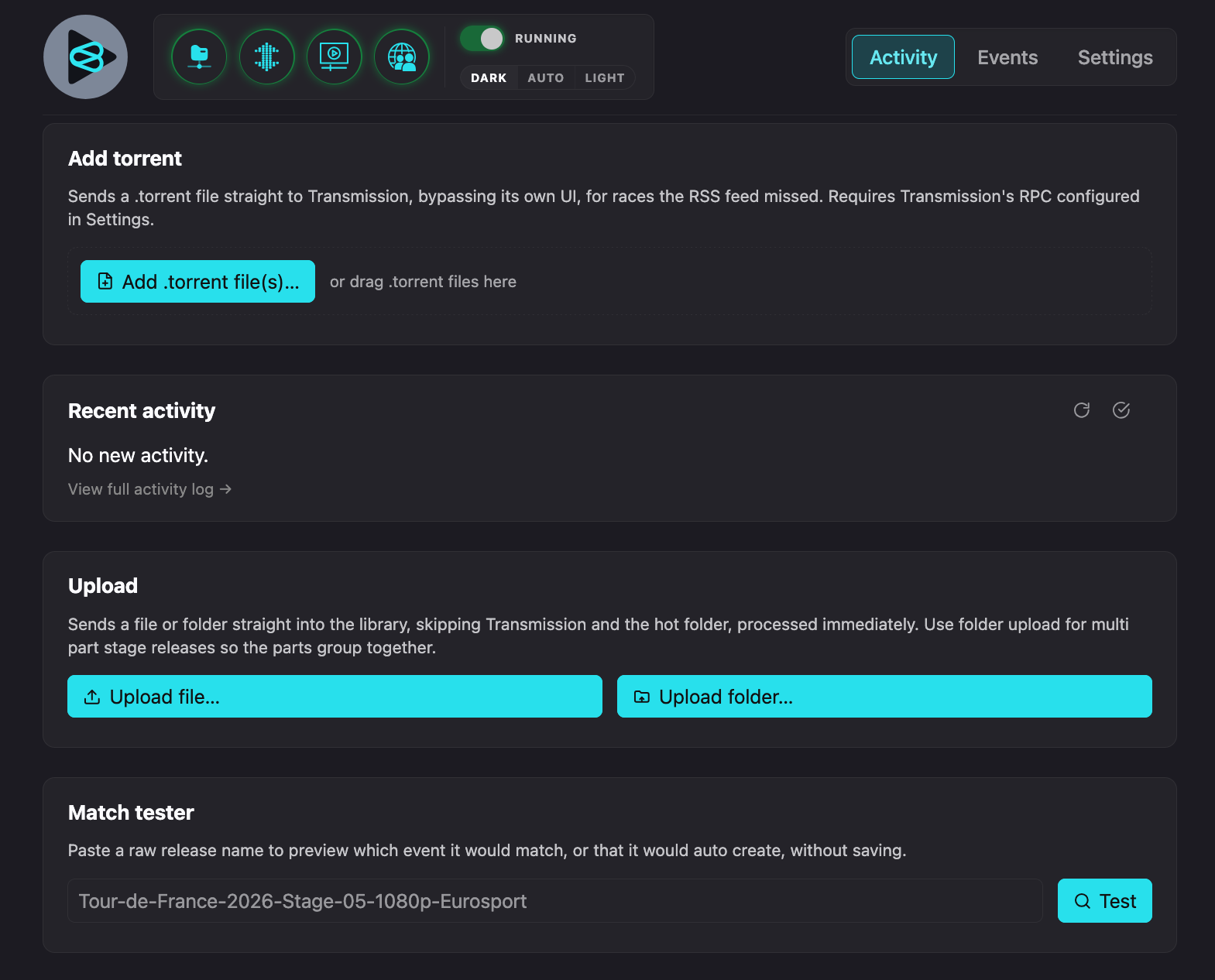 Dark (default) |
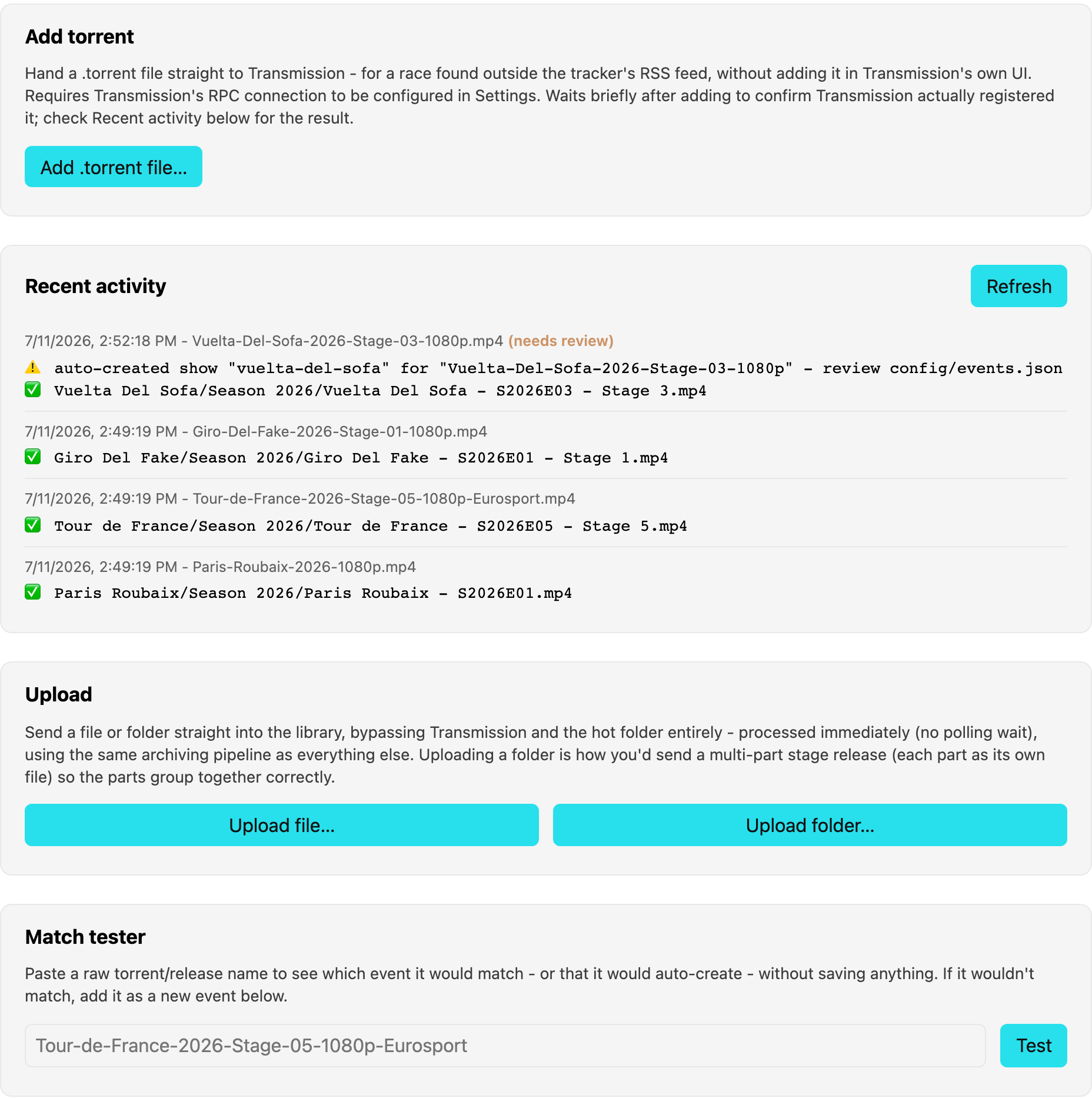 Light mode |
Add torrent: hands a .torrent file straight to Transmission via its
RPC API, for a race you found outside your tracker's own RSS feed, without
opening Transmission's own UI at all. Nothing is written to your library by
this step; it only tells Transmission to start downloading. Requires the
Transmission connection under Settings.

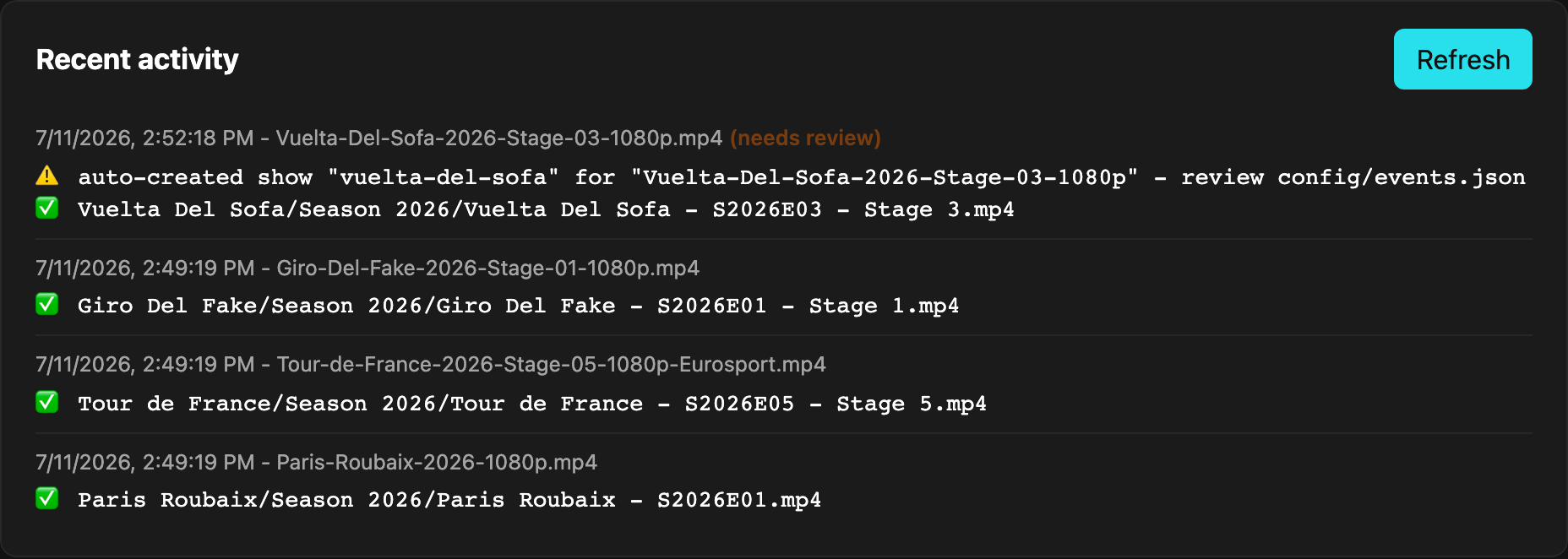
Recent activity: the last ~100 completed-download events, whether they
came from the Transmission webhook, the hot folder, or a manual upload.
Persisted to config/activity.json (bind-mounted, same as events.json/
settings.json) so it survives a container restart, not just process
memory; it's a log for your own peace of mind, not a database anything else
depends on. A
✅ line means a file was copied into the library, and a ⚠️ means something
worth a look (an auto-created show, a possible resolution upgrade filed
alongside an existing one, a failed Plex refresh); those get an orange
(needs review) tag next to the timestamp, same wording used in Discord
notifications if you have those on.
Upload: drag a file (or a whole folder, for a multi-part release) from your own computer straight into the library through the browser, bypassing Transmission and the hot folder entirely. This is a real HTTP upload: the file's bytes travel from your browser to wherever Paddock is running, staged in a temporary folder under the library path, then processed through the exact same parse/match/rename/copy pipeline as everything else, then the staged copy is deleted. Your original file on your own machine is never touched.

Match tester: paste a raw filename and see which show it would match
(or that it would auto-create, and what the guessed name would be), without
touching your config or copying anything; purely a dry run. Useful for
checking a tricky name, or a new matchKeywords phrase, before a real
download exercises it for real.

Events tab
"Events" here means races/shows, every entry your tracker's releases need
to match against to file correctly. This tab edits the same
config/events.json file the app itself reads, through the browser instead
of a text editor.
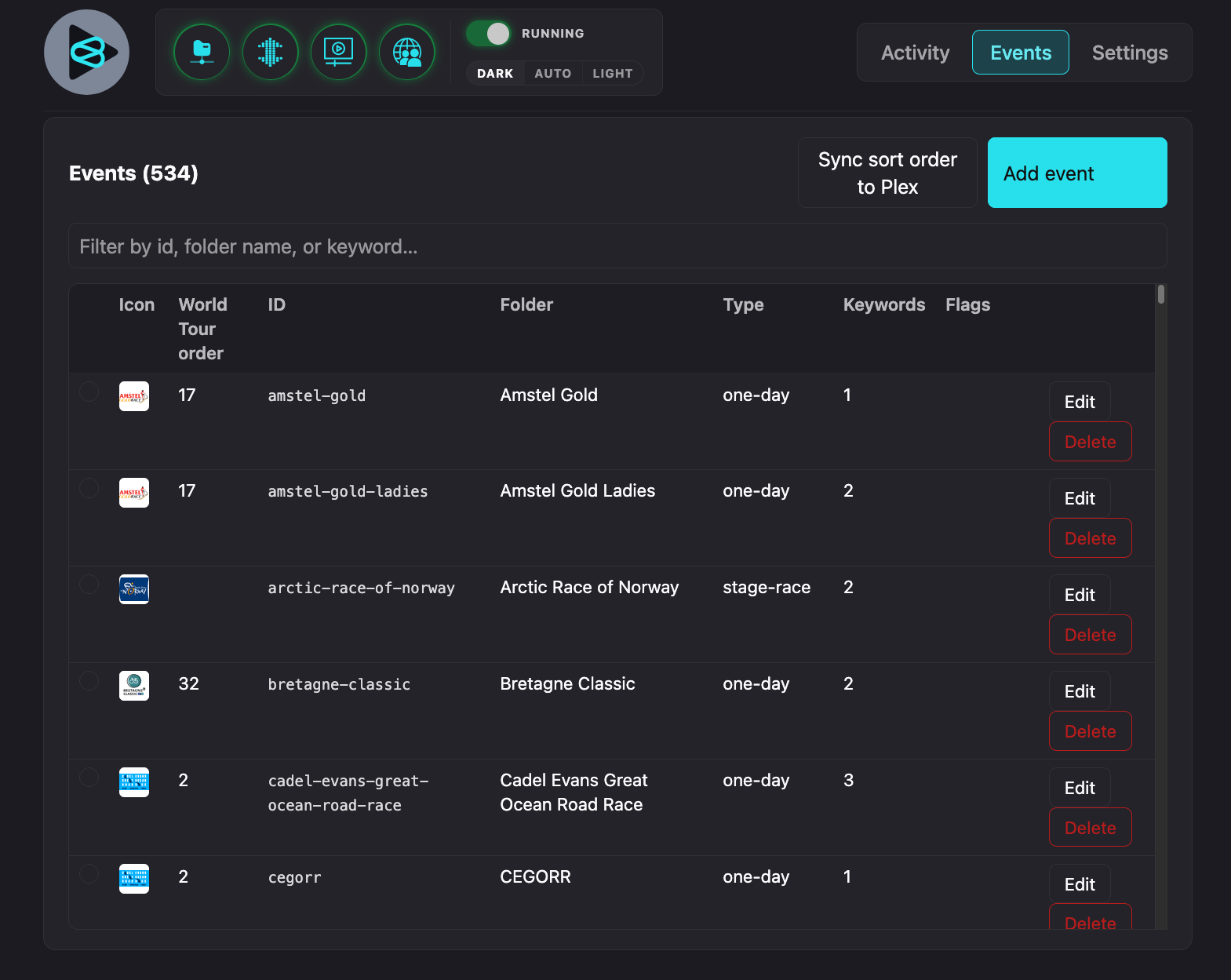
The filter box searches id, folder name, and keywords at once, handy once you have a few hundred entries, which happens fast if your tracker covers more than a handful of race series. Add event opens the same form used for editing an existing one:
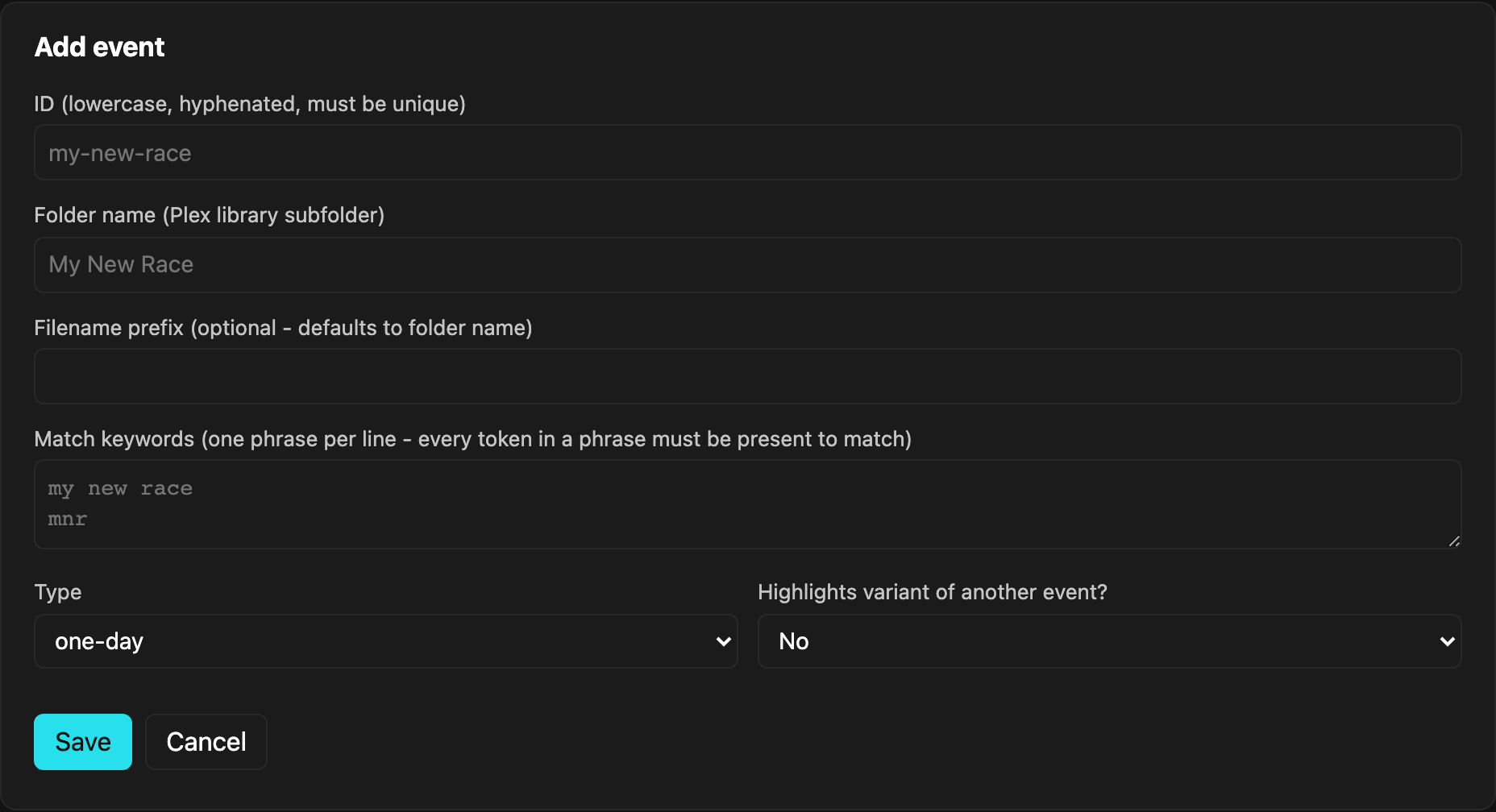
Saves are validated the same way a hand-edit of the JSON file would be (unique ids, required fields); an invalid save is rejected with an error instead of corrupting the file. See Add a new show below for what each field actually means.
Cover art: once a show's been saved (reopen it to see this - it's not on the initial Add form), a Logo section lets you set the image Paddock composites into that show's generated Plex poster. Three ways to provide one: Upload logo (any image file from your own computer), Search Wikipedia (looks up the race name, falling back to a broader Wikimedia Commons search if no Wikipedia article has a usable image - see Settings below for the global defaults this composites onto), or Add from URL (any direct image link). Each show can also override the global background color/gradient/logo-size defaults for just that one poster, via a checkbox in the same section.
Torrent Index tab
One unified table of every torrent Paddock has a saved .torrent for -
whether it got there by staging a reseed here, or by syncing in
automatically from Transmission's own torrents directory (see step
6
below for enabling that and the underlying staging/hardlink mechanics).
Every entry is cross-referenced live, on every load against both your
Plex library (matched by exact file size) and Transmission (live seeding
status) - neither is authoritative over the other, so a torrent found in
only one, both, or neither is all real, meaningful state.
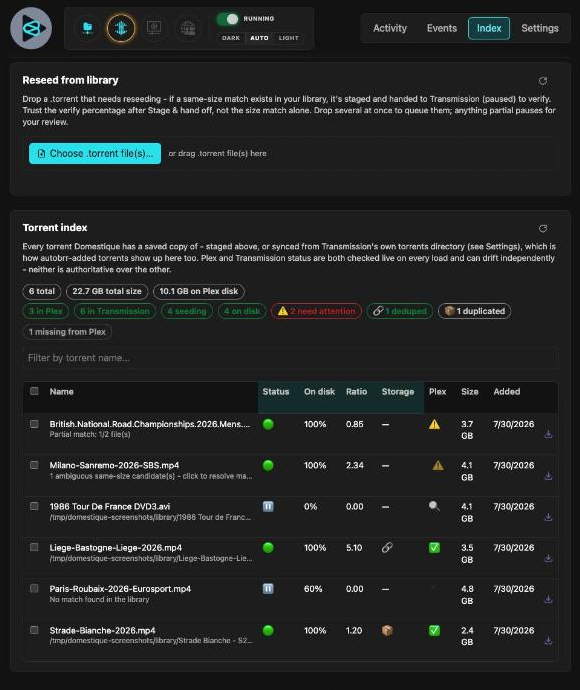
Stat/filter pills above the table summarize the whole set at a glance -
total, in Plex, in Transmission, seeding, on disk, ⚠️ need attention,
🔗 deduped, 📦 duplicated, and a deliberately muted missing from Plex
pill last (expected/normal at scale on a large library, not worth the same
visual weight as the others). Each is clickable and they AND-combine - click
"in Plex" and "seeding" together to see only torrents that are both: click
"total" to reset. A row only counts toward needs attention when there's
something actually actionable right now - a partial or ambiguous Plex
match, a live/on-disk percentage mismatch, an unreclaimed dedupe leftover,
or a flagged-dirty integrity check; a torrent that's simply never been
filed into Plex at all is its own separate, calmer category (missing from
Plex), since on a large library that can genuinely be true for hundreds
of entries at once. A "partial match" also only counts as actionable once
the torrent has actually been downloaded (percentComplete > 0) - a
same-size coincidence against a torrent that's never touched disk isn't
something you can do anything about yet, so it's excluded from the count
and its "Add to Plex library" button eligibility both, rather than pointing
at an action that would just fail. The search box filters by torrent name;
click any column header to sort.
Selection is checkbox-based: check individual rows (or the header checkbox for every currently-filtered row), and a bulk action bar appears showing how many of your selection are eligible for each action - clicking one only ever touches the eligible subset, skipping the rest silently rather than erroring. The actions:
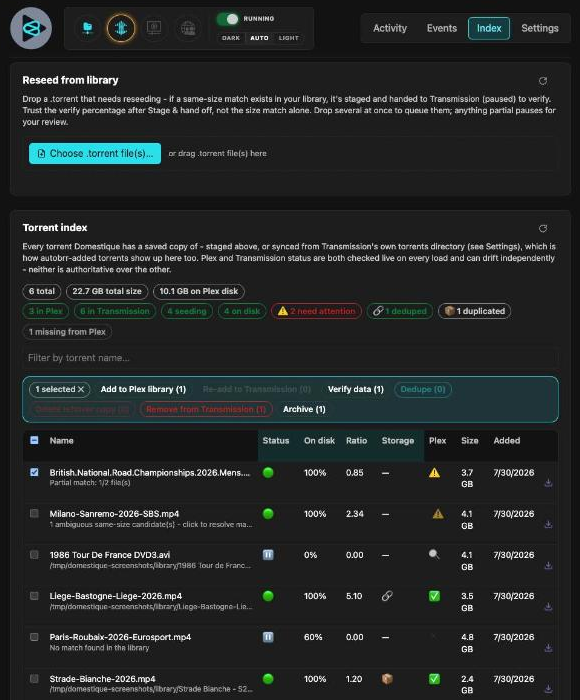
- Add to Plex library - runs each eligible torrent through the normal
parse/match/copy pipeline, for torrents whose data was never filed into
Plex at all, or whose filed copy is gone. A Force checkbox (revealed
on first click, checked by default, confirm on the second) bypasses the
"I already have this release" check and files a distinctly-tagged
(
REVIEW - forced) copy alongside the existing file instead of skipping - it never overwrites anything, but forcing a whole batch forces every file in each selected torrent, so a torrent that's already partly correct can end up with an unwanted duplicate of the part that was already fine; worth checking the result and deleting any stray duplicate by hand. - Re-add to Transmission - for torrents Paddock still has registered
but Transmission no longer reports (removed after seeding, cleaned up).
Re-adds using the saved
.torrent, staging whatever's already matched in your Plex library first - a fully-filed torrent should come back up verified and seeding with nothing re-downloaded. - Verify data - forces Transmission to re-check an already-seeding
torrent's on-disk data against its real piece hashes, something
Transmission never does again on its own once a torrent first verifies
clean. A clean result resumes automatically; anything less is left paused
for review, logged to Activity as review-worthy, and (if configured)
posts a Discord mention - never auto-redownloaded. The result persists
(
config/verify-state.json) and stays visible on that entry until the next check, even after the torrent drops out of Transmission entirely. - Dedupe - for a fully-matched torrent whose data is still a separate physical copy from its Plex library file (📦 Duplicated): hardlinks the library copy into the same staging directory the reseed feature uses, repoints Transmission there, and forces a real re-verify. A clean result flips the chip to 🔗 Deduped and reveals Delete leftover copy to reclaim the now-orphaned downloads-share original; anything less than clean automatically reverts Transmission back to its original location and re-verifies there too, so a torrent that was seeding fine before Dedupe can never end up broken by it.
- Delete leftover copy - the explicit, separate follow-up after a successful Dedupe. Permanently deletes the original download-folder copy, safe since Transmission now seeds from the hardlinked Plex copy instead; never touches anything in your Plex library.
- Remove from Transmission - removes the torrent from Transmission and deletes its downloaded data. Never touches anything already filed in your Plex library (a completely separate tree it doesn't know the path to). Irreversible - gated behind a confirmation dialog.
- Archive - for clutter that isn't worth actually throwing away (e.g. a
torrent whose own name carries no real identifying text, so a same-size
byte collision can never resolve past "ambiguous" no matter what you pick).
Unlike Remove, this is fully reversible: hides the torrent from this list
and best-effort removes it from Transmission, but explicitly does not
delete its downloaded data, its registered
.torrent, or anything filed in Plex. Every archived torrent is listed in the Settings tab's Archive panel with an Unarchive button that brings it straight back - see the Settings tab section below.
A row whose Plex match is still ambiguous after auto-guessing shows a clickable ⚠️ in the Plex column - opens a Resolve dialog listing every same-size candidate for each ambiguous file (best guess first), so you can pick the right one by hand instead of renaming/moving files in the library. The pick is remembered (keyed by the torrent's own info-hash) and applied on every future preview, stage, dedupe, and Index-tab load of that torrent, not just this one screen.
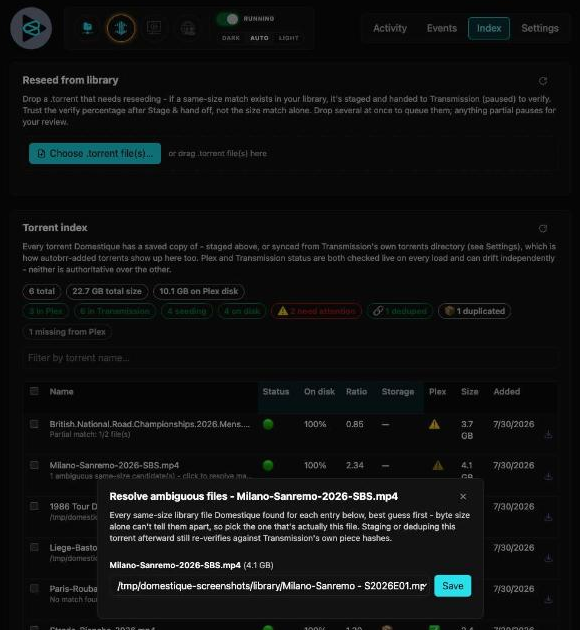
The percentage shown is deliberately not Transmission's own
percentDone - Transmission only counts files it considers "wanted"
toward that figure, so a torrent with some files deselected can report
100% done while having nothing actually on disk for them. This tab
computes its own figure straight from each file's actual bytes-on-disk
versus its full size instead, labeled "on disk" to be unambiguous; if the
two disagree, both are shown side by side rather than silently picking one.
Settings tab
Everything here is live: saved straight to config/settings.json and
picked up immediately, no container restart needed. Each field maps to an
environment variable described later in this README; think of those env
vars as a one-time seed for a fresh install, and this tab as how you'd
actually change any of it afterward.
Appearance: override the accent color used by primary buttons and "on" status icons (any 6-digit hex, previewed live as you type). Purely cosmetic, stored per-server (not per-browser like the theme toggle).

Cover art: generates an actual Plex poster (poster.jpg) for a show
once it has an uploaded logo (see the Events tab above) - most niche race
series aren't recognized by Plex's own metadata agents, so this is how
they get real artwork instead of a blank placeholder. Purely opt-in per
show: nothing is generated for a show with no logo. Sets the global
background color (plus an optional gradient end color - blank uses a
solid fill) and logo scale every poster uses by default, unless a specific
show overrides them from its own Events-tab entry. Regenerate all
posters rebuilds every existing poster from these settings - useful
after changing a color scheme, without re-uploading every logo. These
colors are independent of the Appearance accent color above (that's this
web UI's own theme; this is what shows up inside Plex itself).
Status polling: how often the header's status icons refresh in the background. Lower means more current information, but also more frequent requests to Transmission/Plex/your indexer site; the default (20s) is a reasonable middle ground for a home server.

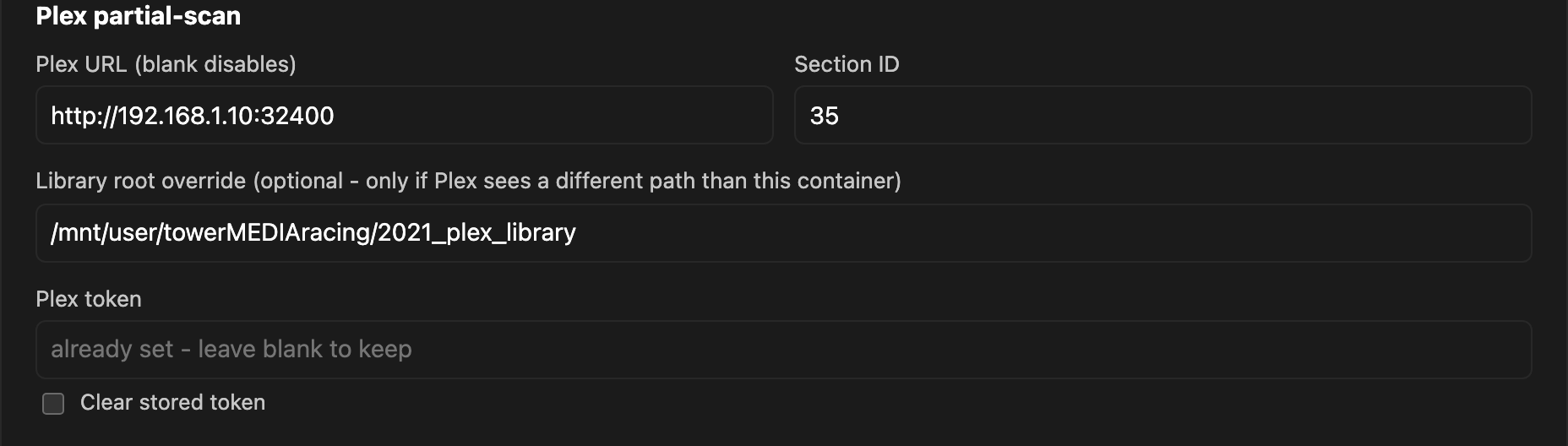
Plex partial-scan: tells Plex to rescan just the one folder that changed, right after a file's copied in, instead of waiting for Plex's own scan schedule. Nothing here affects whether a file gets filed; a failed Plex refresh only ever shows up as a ⚠️ warning in Recent activity, never blocks the copy.
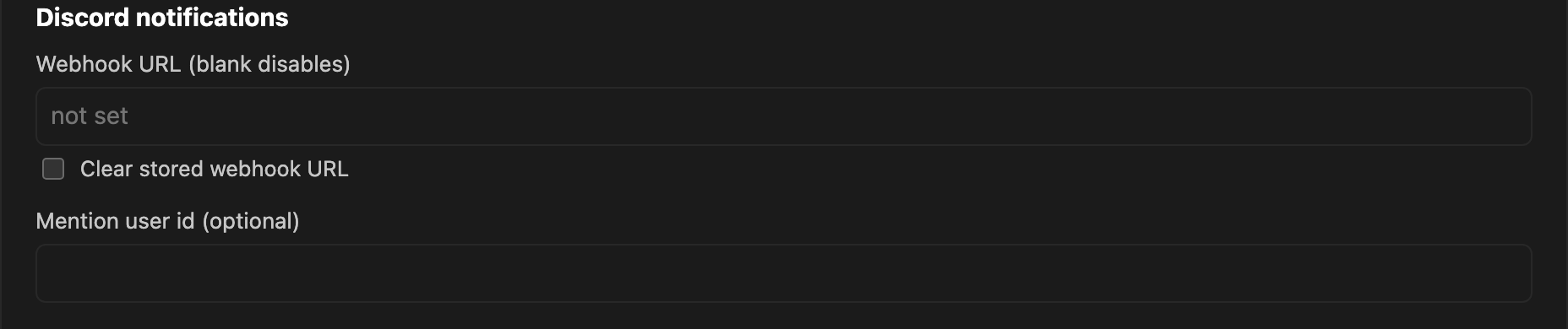
Discord notifications: posts a summary to a Discord channel after every completed-download event, success and warnings alike, with a mention only on the review-worthy ones if you set a user id. Also used for one other thing entirely: a mention-tagged alert the moment the login lockout below actually triggers (see Login lockout).
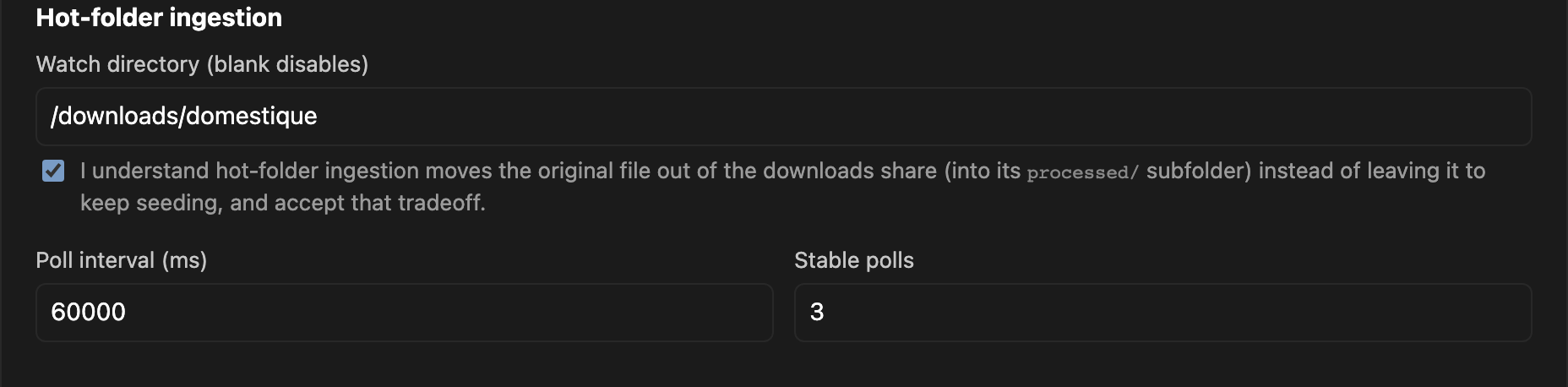
Hot-folder ingestion: for files that arrive some way other than
Transmission's webhook (a manual download, something copied over from
another machine), drop it in the watched directory and it goes through the
same pipeline. The one tradeoff worth understanding before turning this on:
unlike the webhook path (which only ever copies, so Transmission keeps
seeding untouched), hot-folder ingestion moves the original file out of
the downloads share, into a processed/ subfolder, trading seedback for
automation on anything dropped this way. The checkbox exists specifically
to make sure you've seen that tradeoff before it's live.
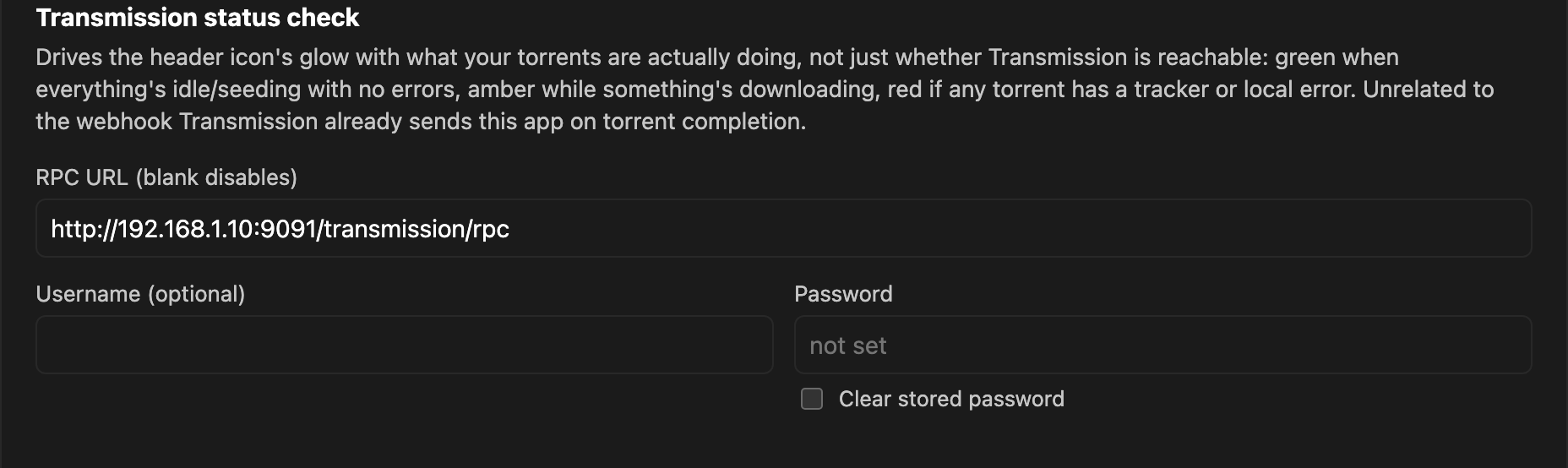
Transmission status check: a separate RPC connection purely for the
header gauge's live status (and the Add-torrent feature above), unrelated
to the webhook Transmission itself sends this app on completion. Leaving
this unset doesn't break anything else; the gauge just stays dim. Unlike
Plex/Discord/hot-folder, there's no .env equivalent for this one: it's
Settings-only, entered here or not at all.
External indexer: see the header section above; this is where you set
the URL and how often it's health-checked. Also Settings-only, no .env
equivalent.
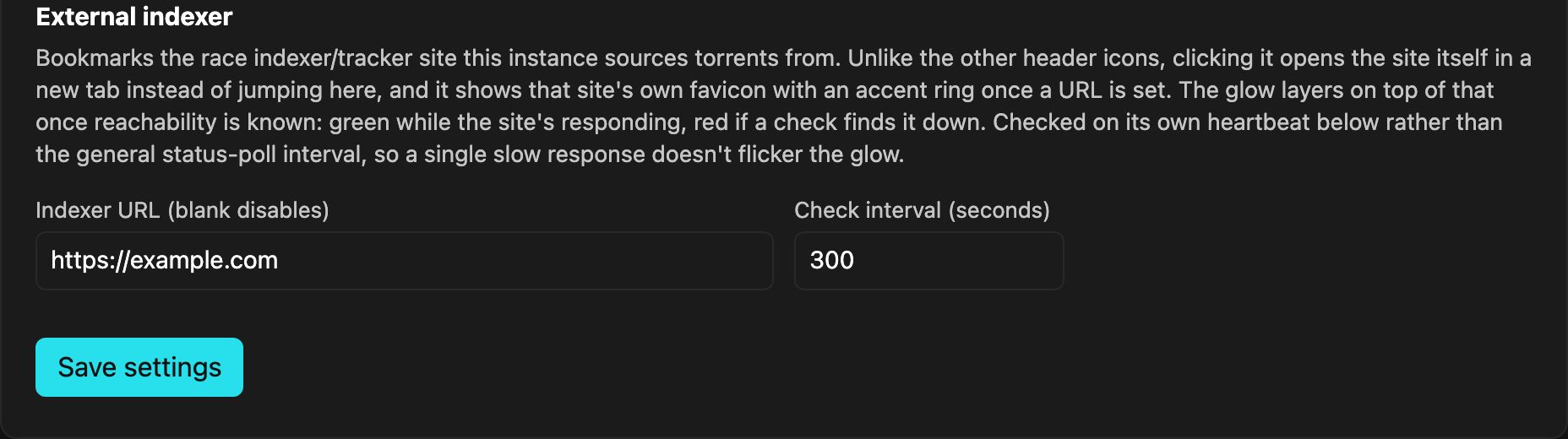
Reseed from library (also where Library filing lives): two
related settings, both Settings-only with no .env equivalent. File
mode controls how a normal completed download gets filed - the
Transmission webhook, hot-folder, upload, and "Add to Plex library" all go
through this, not just the Reseed tab. "Dual copies" (the default) keeps
the downloads-share and library files genuinely separate, at the cost of
double disk space per torrent - the reason the Torrent Index tab's Dedupe
action exists. "Hardlink" saves that space from the start instead, falling
back to a real copy (logged, not silent) when the downloads share and
library are on different filesystems. Below that, the staging directory
override is where the Torrent Index tab's own reseed-from-library
feature stages files before handing them to Transmission - see step
6
for the full hardlink-staging mechanics and why the default (a hidden
folder inside your library root) matters.
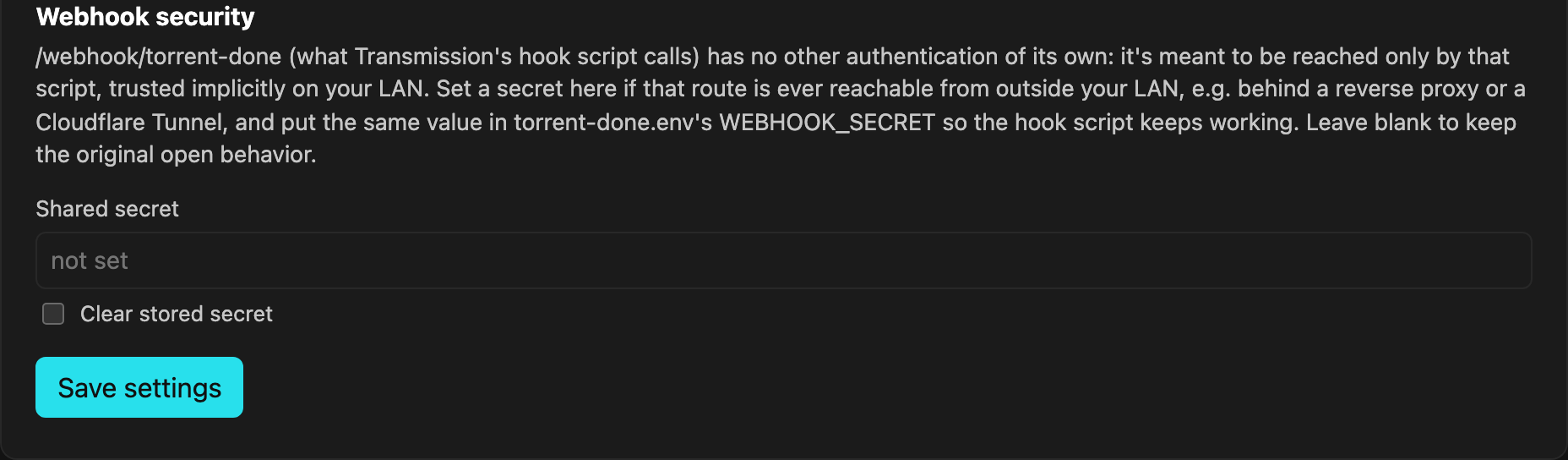
Webhook security and Login lockout below live together under one Security subtab in the actual UI - same content as documented here, just grouped under one heading.
Webhook security: /webhook/torrent-done (what Transmission's hook
script calls) has no authentication of its own; it's meant to be reached
only by that script, trusted implicitly on a LAN. If you ever expose this
app past your LAN (a reverse proxy, a Cloudflare Tunnel), set a secret
here and the matching WEBHOOK_SECRET in torrent-done.env, and the
webhook will reject any request missing a correct X-Webhook-Secret
header. Leave blank to keep the original open behavior.
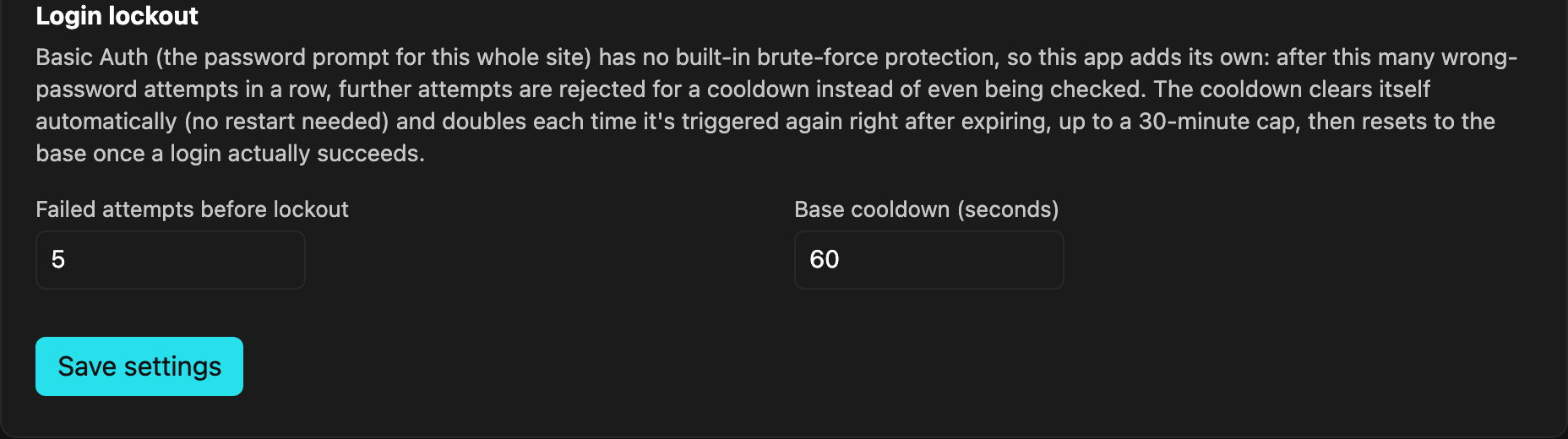
Login lockout: HTTP Basic Auth (the password prompt for /ui) has no
brute-force protection of its own, so this is the retrofit for that too.
After this many consecutive wrong-password attempts, further attempts are
rejected with a cooldown instead of even being checked. The cooldown
auto-expires (no restart needed), doubling each time it's triggered again
right after the previous one expires, up to a fixed 30-minute cap, and
resetting back to the base once a login actually succeeds. If Discord
notifications above are configured, the moment a lockout triggers also
posts a mention-tagged alert, once per trigger, not on every request
rejected while still locked out.
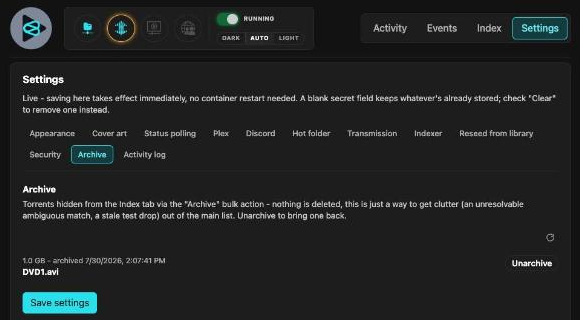
Archive: every torrent currently hidden from the Torrent Index tab via its Archive action (see above) - name, size, and when it was archived, each with an Unarchive button that brings it straight back into the Index. Nothing here was ever deleted; archiving only ever hides an entry from the main list.
Activity log: the complete activity history (up to the last 100 events), including ones already marked as read on the Activity tab - nothing gets deleted when you clear or mark an entry read there. The same underlying data as the Activity tab's own list, just the full history instead of only what's unread.
Requirements
- Docker with the Compose v2 plugin (
docker compose, not the older hyphenateddocker-composebinary). - Transmission (or another downloader) that can call a webhook via
script-torrent-done- or skip that entirely and use hot-folder ingestion instead. - Node.js 20+ - only needed if you're running tests or
npm run devoutside Docker; the container image builds and runs everything itself. - Optional: a Plex server, if you want partial-scan integration.
Contents
- Web UI tour
- How it works
- Handling re-releases of the same race
- Alternate versions (different commentary/broadcaster)
- Filename convention
- Setup
- Frequently Asked Questions
- Known limitations / assumptions
- Security posture
- Testing
- Development
- License
- Why "Paddock"?
How it works
- Transmission finishes a download and runs
scripts/torrent-done.sh(installed wherever Transmission itself runs), which POSTs the torrent's dir/name/id/hash as JSON to this app's/webhook/torrent-doneendpoint. - For a multi-file download, it walks the torrent's folder recursively
(arbitrarily nested subfolders, not just a single level), skipping known
non-content files as it goes - DVD navigation/recorder metadata, and
generic scene-release companions like
.nfo/.srt/.sfv(seesrc/fileops.ts'sisNonContentFile) - so they never get archived as bogus episodes or counted against a match. Each real file's name is parsed (src/parser.ts) merged with every ancestor folder's name (most specific wins) to pull out year, stage/part number, category hints, and highlights/presentation flags - useful when that signal lives on a folder name rather than the leaf filename itself (e.g. a year-per-folder archive). - It matches those tokens against
config/events.json(src/matcher.ts) to find the right show. If nothing matches, it auto-creates a best-effort entry (title-cased from the leftover tokens, filed as a one-day race) and persists it back toconfig/events.jsonso it's reused next time - but this is a guess; check the log and clean up the entry by hand. - It computes the destination folder/filename (
src/namer.ts) and copies the file in (src/fileops.ts), writing to a.tmpsibling and renaming into place so Plex never sees a half-copied file.
Handling re-releases of the same race
Private trackers often ship the same event more than once - a low-quality
grab that beats the RSS feed, followed by a proper release, or just a
different group's version. Since destination filenames don't encode
resolution (they stay clean, matching your existing convention), each
season folder gets a hidden .archiver-meta.json sidecar (invisible to
Plex) that remembers what resolution was archived per episode, parsed from
the source torrent name (e.g. 720p, 1080p) - not measured from the
actual video.
When a new file arrives for an episode that's already archived:
- Lower resolution than what's already archived → skipped, logged as a warning.
- Higher resolution → filed alongside the existing file(s) with a
- REVIEW - possible 1080p upgradetag inserted into the filename (before any part suffix), plus a logged warning. Nothing is ever auto-deleted- you decide whether to keep the upgrade and manually remove the old lower-res file(s). The sidecar keeps remembering the original resolution (not the reviewed one) until you clean up, so repeated arrivals keep getting flagged rather than silently drifting.
- Same (or unknown) resolution on both sides → see "Alternate versions" below - this is where broadcaster/commentary is used to tell a genuine re-release apart from just the next part of the same release still trickling in.
This only works when the source name actually carries a resolution tag - if it doesn't, comparison is skipped and the file is copied without any quality judgment (see Known limitations below).
Alternate versions (different commentary/broadcaster)
Sometimes the same race gets released more than once at the same
resolution, just from a different broadcaster or with different commentary
(Eurosport vs SBS vs RCS, etc - src/parser.ts recognizes a curated list of
these and extend it there as new ones show up). Rather than treating that
as either a duplicate (and skipping it) or blindly overwriting, it's filed
as a selectable alternate version:
- The first broadcaster seen for an episode is the "primary" and always gets the clean, untagged filename, same as before this feature existed.
- A different broadcaster arriving for the same episode at the same
resolution is filed alongside it with the broadcaster's name inserted
into the filename before any part suffix, e.g.:
Tour de France - S2026E01 - Stage 1 - Eurosport - pt01.mp4next to the primaryTour de France - S2026E01 - Stage 1 - pt01.mp4. All of that alternate's own parts (pt02,pt03, ...) keep the same tag consistently, so a multi-part alternate version stays grouped together under its own numbering. - Since both filenames still contain the same
S2026E01episode marker, Plex should recognize them as alternate versions of the same episode and let you pick which to play, the same way it handles multiple versions of a movie. - A matching broadcaster (or unknown broadcaster on either side) is treated as a normal continuation of the same release - e.g. the next part of a multi-part download still arriving - and copied under the clean filename, exactly as before.
This is tracked in the same .archiver-meta.json sidecar as resolution, so
it only kicks in for releases the source name actually identifies a
broadcaster for.
Filename convention (new downloads only - existing seasons are untouched)
- Stage race:
Show - SYYYYEnn - Stage n.ext(or- pt01.extper part).E00is reserved for Team/Route Presentation specials. - One-day race:
Show - SYYYYE01.ext(no title segment - the show + season already say what it is). - Multi-category, fixed order (Worlds, Olympics):
Show - SYYYYEnn - Category Title.ext, where the episode number for each category is defined inconfig/events.jsonso it's stable across years. - Multi-category, dynamic order (Nationals - the category set is open-ended
across countries):
Show - SYYYYEnn - Country Gender Discipline.ext, episode number assigned by scanning what's already in that season's folder (reuses the number if that exact title is already there, otherwise next-available). - Highlights: filed under a separate show folder (e.g.
Tour de France HIGHLIGHTS), but the filename keeps the base show's name, e.g.Tour de France - S2026E01 - Stage 1 Highlights.mp4- matches what's already in the library.
Setup
On Unraid, the easiest path is Community Applications rather than the
manual steps below: open the Apps tab, search for "paddock", and
install it like any other CA app. It pulls the prebuilt image from GHCR
(ghcr.io/nordada/paddock, published by this repo's GitHub Actions
workflow) instead of building from source, and its config fields map
directly to the steps below - the descriptions in the Unraid UI point back
to the relevant sections here for anything that needs more explanation
than fits in a form field. The rest of this section is for everyone else
(or if you'd rather build from source yourself).
All host-specific values (paths, IPs, port) live in two .env files, never
committed to git - copy the .example versions and fill them in.
1. Configure the archiver itself
cp .env.example .env
Edit .env and set LIBRARY_ROOT, DOWNLOADS_DIR, and PORT to match your
setup. DOWNLOADS_DIR must be the host path to the same share
Transmission's own container maps to /downloads internally - find that
path from Transmission's own volume mapping:
- Unraid: Docker tab → the Transmission container → its path mappings.
- Plain Docker: check your own compose file/run command for
Transmission, or run
docker inspect <transmission-container> --format '{{json .Mounts}}'. - Running everything on one macOS/Linux box for local testing: just
point
LIBRARY_ROOT/DOWNLOADS_DIRat ordinary local folders, e.g.~/Movies/bike-racingand~/Downloads.
(.env.example's defaults are just illustrative Unraid /mnt/user/...
paths - swap in your own paths regardless of platform.) Then:
docker compose up -d --build
docker-compose.yml reads .env automatically - nothing else to edit there.
Verify it's up: curl http://localhost:8420/health should return
{"status":"ok"}.
2. Configure Transmission's hook script
In Transmission's settings.json:
"script-torrent-done-enabled": true,
"script-torrent-done-filename": "/path/to/torrent-done.sh"
Copy scripts/torrent-done.sh and scripts/torrent-done.env.example
to wherever Transmission can read them (inside its own container if that's
where it runs), then:
cp torrent-done.env.example torrent-done.env
chmod +x torrent-done.sh
Edit torrent-done.env and set ARCHIVER_URL - since Transmission and
Paddock are separate containers not on the same Docker network, this
needs to be your Docker host's LAN IP (not a container name), e.g.
http://192.168.1.10:8420/webhook/torrent-done (that's a stand-in - use
whatever IP your host actually has, e.g. TOWER's if you're on Unraid),
using the same PORT you set in Paddock's .env.
Path consistency matters: the dir Transmission reports (TR_TORRENT_DIR)
has to resolve to the same file both inside Transmission's container and
inside this one. This project mounts DOWNLOADS_DIR at the fixed container
path /downloads specifically to match Transmission's own convention - if
your Transmission container maps its share to something other than
/downloads internally, change the mount in docker-compose.yml to match
it instead. Get this wrong and the hook will fire successfully but the
archiver will fail to find the file (a ENOENT-style error in its logs).
If this webhook is ever reachable from outside your LAN (behind a
reverse proxy, a Cloudflare Tunnel, etc), also set WEBHOOK_SECRET in
both Paddock's .env (or the web UI's Settings tab) and this same
torrent-done.env, matching exactly. See Webhook
security in the Web UI tour above for what this actually
does. By default, with neither set, the webhook accepts any request with
no authentication at all, which is fine on a trusted LAN but not once
it's internet-reachable.
3. Add a new show
Every show your tracker feed covers needs an entry in config/events.json.
The file is bind-mounted, so edits take effect on the next webhook call - no
rebuild needed. Minimal example:
{
  "id": "my-new-race",
  "folderName": "My New Race",
  "matchKeywords": ["my new race", "mnr"],
  "type": "one-day"
}
typeis one ofstage-race,one-day,multi-category-fixed,multi-category-dynamic- see the Filename convention section above.matchKeywordsentries are space-separated phrases; a show matches if every token in one of its phrases is present in the parsed name. List multiple phrases (e.g. both"tour de france"and"tdf") to catch abbreviations. More specific phrases (more tokens) win over vaguer ones when several shows could match.- For
multi-category-fixed, add acategoriesarray - seeNationalsvsWorld Championshipsinconfig/events.jsonfor a worked dynamic vs. fixed example. filenamePrefixis optional and only needed when the filename should say something different from the folder name (this is how the HIGHLIGHTS shows keep the base show's name in the file itself).
4. Optional: Plex partial-scan
Everything in this section and the next two env-var-configurable ones
(hot-folder, Discord) is also editable live afterward via the web UI's
Settings panel (see step 8) - no container restart needed. (The reseed
feature in between, step 6, has no .env equivalent at all - it's
Settings-only, same as Transmission/indexer/Cover art below.) The env vars
below are a one-time seed only: the first time config/settings.json doesn't
exist yet, it's created from whatever's set in .env; after that the file
is authoritative
and these env vars are ignored on every later boot. Delete
config/settings.json if you want .env to reseed it fresh.
Before your very first docker compose up here, run touch config/settings.json config/activity.json config/dedupe-state.json config/verify-state.json config/match-overrides.json config/archive-state.json
(unlike config/events.json, none of these ship in the repo). Skipping
this is harmless on most setups, but if nothing exists at that path on the
host yet, Docker creates an empty directory there instead of a file - a
well-known bind-mount gotcha the app can't clean up on its own, since by
then it's the container's actual mount point. If you hit this
(crash-looping with an EBUSY-related error mentioning settings.json,
activity.json, dedupe-state.json, verify-state.json,
match-overrides.json, or archive-state.json), stop the container, rmdir
the affected path on the host, touch an empty file in its place, then
start it again.
By default Plex only notices new files on its own scan schedule. Set these
in .env to have the archiver tell Plex to rescan just the one season
folder that changed, right after each successful copy - not the whole
racing library, and not any of your other Plex libraries:
PLEX_URL=http://192.168.1.10:32400
PLEX_TOKEN=<your token>
PLEX_SECTION_ID=<the racing library's section id>
Finding your Plex token: sign into the Plex web app, open any item's
"..." menu → "Get Info" → "View XML" - the URL that opens contains
X-Plex-Token=... in its query string; copy that value. (Plex's own
support site documents a couple of other ways to find this too, if that
one doesn't work for your Plex version.)
Finding your section id, once you have the token:
curl "http://192.168.1.10:32400/library/sections?X-Plex-Token=<your token>"
This returns XML listing every library; find the racing one and use its
key attribute as PLEX_SECTION_ID.
If Plex runs in its own Docker container, it may mount the same host
share at a different internal path than this container does - the exact
same category of issue as Transmission's /downloads mapping earlier in
this README. If so, also set PLEX_LIBRARY_ROOT in .env to the library
root as Plex's own container sees it (on Unraid, check Plex's path mappings
in the Docker tab; on plain Docker, check Plex's own compose file/run
command). Leave it unset if Plex sees the identical path - e.g. if Plex
runs directly on the same host filesystem, not in its own container.
Leaving PLEX_URL/PLEX_TOKEN/PLEX_SECTION_ID unset disables this
entirely - nothing else about the archiver changes, and startup logs will
say plex refresh: disabled. A failed Plex refresh is only ever logged as
a warning; it never affects whether a file gets archived.
5. Optional: hot-folder ingestion (bypass Transmission)
For files that didn't come through Transmission at all (a manual download,
something copied over from elsewhere) - drop the file or folder directly
into a watched directory and it goes through the exact same
parse/match/rename/copy/Plex-refresh pipeline as a completed torrent, no
webhook involved. Once a drop's size and modified-time have stopped
changing for a few consecutive checks (so a still-copying file is never
touched mid-transfer), it's processed and the original is moved - never
deleted - into that folder's own processed/ subfolder.
Set in .env:
HOTFOLDER_DIR=/downloads/paddock
This is a subfolder of DOWNLOADS_DIR, sibling to Transmission's own
complete folder on the host (e.g.
/mnt/user/downloads/paddock) - created automatically on
first use if it doesn't already exist. Leave HOTFOLDER_DIR unset to
disable the feature entirely; startup logs will say hot folder: disabled.
Two more optional tuning knobs, shown here at their defaults:
HOTFOLDER_POLL_INTERVAL_MS=60000
HOTFOLDER_STABLE_POLLS=3
A drop is considered done once its size/mtime haven't changed across
HOTFOLDER_STABLE_POLLS consecutive polls, HOTFOLDER_POLL_INTERVAL_MS
apart - the defaults wait roughly three quiet minutes, which is intended to
be safe for large or slow manual copies. If something goes wrong while
processing a drop (e.g. an unexpected error, as opposed to a normal
"skipped: already archived" outcome), it's left in place and logged loudly
rather than moved - the same idempotency that makes the Transmission
webhook safe to fire twice means it's safe to just retry it on the next
poll.
Why this needs its own volume mount: DOWNLOADS_DIR is bind-mounted
read-write in docker-compose.yml (see "Dedupe" under the Torrent index,
below, for why - it wasn't always). The hot folder specifically needs to
move files (into its own processed/ subfolder), so docker-compose.yml
still layers a second, more specific mount for just
${DOWNLOADS_DIR}/paddock on top of the main one, kept for its own
isolation even though both are read-write now.
6. Optional: the Index tab (reseed from your Plex library, and a unified torrent view)
Private trackers often need seeds long after a race first aired, and by
then the file's usually been renamed away from whatever the tracker's own
.torrent expected - by this app, or by hand. This feature closes that
loop: drop the .torrent file for something your tracker says needs seeds
into the Index tab, and it checks whether that content already exists
somewhere in your library (matched by exact file size), then - once you
confirm - stages it into the exact layout the torrent expects and hands it
to Transmission, paused, to verify. Nothing is guessed: matching here is
size-only, so a same-size coincidence is possible; Transmission's own
piece-hash verify (its normal behavior when a torrent is added against a
directory with existing files) is what actually confirms a real match,
which is why Preview always runs before anything is staged, and why the
verify percentage afterward is the number that matters, not the size-match
itself. Once that verify comes back clean (100%, no error), the torrent is
automatically unpaused and starts seeding - no manual click needed in
Transmission's own UI. Anything short of a clean verify (partial,
erroring, or unconfirmed) is deliberately left paused instead, so you can
review it before it does anything; if the automatic unpause itself fails
for some reason (a dropped connection right after a good verify, say), the
torrent is still correctly staged and verified, just left paused, and
that's called out in the result so you know to start it yourself.
Staged files live in a hidden .reseed-staging folder inside LIBRARY_ROOT
by default (override with a staging-directory path in the Settings tab's
"Reseed from library" section if you'd rather use a separate volume).
How staging actually touches your files: a matched file is
hardlinked, not copied and not symlinked - the staged path and your
Plex library path both point at the exact same data on disk (the same
inode), the way a hardlink always works. That's meaningfully different
from either alternative: unlike a copy, it's instant and uses no extra
disk space regardless of file size, since there's still only one physical
copy of the bytes; unlike a symlink, it can't dangle or break if a path
moves, and Transmission sees a completely ordinary file at its expected
size, not a redirect. Your original Plex library file is never renamed,
moved, or modified - deleting the staged copy later (or the torrent from
Transmission) doesn't touch it, since a hardlink is just one more
reference to data that only actually goes away once every reference to it
is gone. The one case this can't work: hardlinking requires the staged
path and the library file to be on the same filesystem/device, which
is exactly why the default staging location lives inside LIBRARY_ROOT
rather than somewhere else. If you override it to a separate volume,
hardlinking across filesystems isn't possible, so staging falls back to a
real fs.copyFile instead - still correct, just an actual duplicate using
real disk space, and slower for a large file.
Path consistency matters here too, same class of requirement as
DOWNLOADS_DIR in step 2 above: whatever directory this feature stages
into must be bind-mounted read-write into Transmission's own container
at the exact same absolute path Paddock sees it at. Get this wrong and
Transmission will report 0% verified even on a perfectly good match, since
it's looking for the staged files in the wrong place. If you're using the
default (LIBRARY_ROOT's own .reseed-staging subfolder) and Transmission
already sees the same LIBRARY_ROOT path this container does (a common
setup when Plex, Transmission, and Paddock all mount the same host
share), there's nothing extra to configure - Transmission just needs
read-write access to that share, not read-only.
The Torrent Index table below the dropzone is covered in full in the Torrent Index tab section of the Web UI tour above - every action (Add to Plex library, Re-add to Transmission, Verify data, Dedupe, Delete leftover copy, Remove from Transmission, Archive), the filter pills, and the Resolve dialog for ambiguous matches. The rest of this section covers the parts that are genuinely setup/configuration concerns rather than day-to-day UI.
Each entry gets there one of two ways: staged through Preview/Commit above (single-file or batch), or synced in automatically from Transmission's own torrents directory if you've configured that (see "Capturing torrents added directly by autobrr" below) - which is what makes the index cover torrents Transmission is seeding that never touched this app at all, not just ones reseeded through this tab. Each entry is identified by its info-hash (the same identifier Transmission itself uses), not by name - two unrelated torrents can share a name, and a rename shouldn't break the link, so hash is the one identity that's actually reliable.
By default, normal ingestion always copies a torrent's data into the
library rather than hardlinking it (see "How staging actually touches your
files" above - that's specific to reseed staging, not the normal copy
pipeline), so every torrent filed the ordinary way costs disk space twice:
once in the downloads share, once again in the library. Set File mode
to "Hardlink" under Settings -> Library filing to save that space from the
start instead of running Dedupe after the fact - falls back to a real copy
when the downloads share and library are on different filesystems
(reported in the activity log, not silent), and is exactly as safe to
delete around later as a post-hoc Dedupe is, for the same reason: a
hardlink is just one more reference to the same data, and removing one
copy never affects any other reference that still exists. Dedupe's
"Delete leftover copy" follow-up specifically needs Paddock's own
container to have write access to the downloads share (DOWNLOADS_DIR is
mounted read-write in docker-compose.yml for exactly this reason) -
relinking and verifying themselves don't need it.
The "Delete original copy" button is durable, not one-shot - it's recomputed fresh on every Torrent index load (checking whether a deduped torrent's original file is still confirmed present at its exact original path and size), not just shown briefly right after a successful Dedupe click. If a delete attempt fails or you never get to it, the button (and a red "⚠️ original download-folder copy still exists" note) stays visible on that torrent's entry indefinitely, across refreshes and restarts, until the file's actually gone - it also counts toward the needs-attention badge/sort. It's deliberately narrow, not a broad search: it only ever checks the one exact path a torrent's own files would still be sitting at, matched by both name and byte-exact size, never a size match against something unrelated elsewhere in the share.
That exact path comes from config/dedupe-state.json, recorded the moment
Dedupe succeeds - Transmission itself forgets a torrent's previous
download location the instant it's relocated, so there's no live way to
recover it afterward without this. This also means the check is never a
guess based on where your downloads share happens to be mounted: it's the
literal path Transmission reported right before the relink, which matters
on setups where Transmission's actual per-torrent download directory is a
subfolder of the wider share (e.g. a complete subfolder distinct from
the share root) rather than the share root itself.
Torrent registry: every .torrent behind the Torrent index above (both
ones staged through Preview/Commit and ones synced in from Transmission's
own torrents directory) gets a durable copy saved to
config/torrent-registry/, named by its info-hash. This solves a few
things at once: you can download any of them back later if you need one
again; dropping the same batch of files a second time (easy to do by
accident at a few hundred/thousand files) skips anything already
registered before it ever walks the library for it, rather than
re-running the full Preview/Commit cycle for nothing; and because the
saved bytes are always re-parsed fresh (name, file list, size - nothing
about a torrent is cached beyond the raw file itself), the .torrent is
genuinely the one source of truth for what's in the index, not a snapshot
that can drift from it. A torrent that never matched anything through
Preview/Commit (nothing staged) is deliberately not registered that way,
since that's exactly what you'd still want to revisit - though it can
still show up via the autobrr sync below if Transmission ends up seeding
it some other way.
This only records going forward from the moment it ships - the same
one-time limitation as config/dedupe-state.json above - so a .torrent
that would've qualified before this feature existed won't retroactively
appear; nothing forces re-adding it, this only affects whether the
registry shows/skips it.
Capturing torrents added directly by autobrr: autobrr (or anything
else) hands a .torrent straight to Transmission, never through
Paddock - so without this, the registry would only ever see torrents
that happened to go through this tab's Preview/Commit, missing what's
actually the normal way most torrents arrive. Transmission itself keeps a
permanent copy of every .torrent it's ever been handed in its own config
directory (a torrents subfolder, next to its own settings.json/
resume/). Point TRANSMISSION_TORRENTS_HOST_DIR in .env (or the
matching Unraid CA template field) at that folder's host path and
Paddock syncs anything not already in its own registry into it,
matched by info-hash, every time the Index tab loads - mounted read-only,
so this only ever reads from Transmission's side, never writes to it.
Finding the right path: check your Transmission container's own Docker
path mappings for whatever container path maps to its config directory
(commonly /config), then look for a torrents subfolder inside that
host path. Leave unset to disable - the index then only ever reflects
torrents manually staged through this tab, same as before this existed.
7. Optional: Discord notifications
Set in .env to have the archiver post a message to a Discord channel after
every torrent-done event (from the Transmission webhook or hot-folder
ingestion alike):
DISCORD_WEBHOOK_URL=<your webhook URL>
Creating a webhook: in Discord, go to the target channel's Settings → Integrations → Webhooks → New Webhook, then "Copy Webhook URL". Treat this URL like a secret - anyone with it can post to that channel.
Each message summarizes the whole torrent-done event: what got archived, what was skipped and why, and any auto-created shows, quality/upgrade warnings, alternate-version tags, or errors. Everything is posted - routine successful archives as well as warnings - but only the review-worthy items (auto-created shows, warnings, Plex refresh failures, processing errors) trigger a mention, if you've set one:
DISCORD_MENTION_USER_ID=<your Discord user id>
Finding your user id: enable Developer Mode (User Settings → Advanced),
then right-click your own name anywhere in Discord and choose "Copy User
ID". Leave DISCORD_MENTION_USER_ID unset to have every notification post
without a mention.
Leaving DISCORD_WEBHOOK_URL unset disables this entirely - nothing else
about the archiver changes, and startup logs will say discord: disabled.
A failed Discord post is only ever logged as a warning; it never affects
whether a file gets archived.
8. Optional: web UI
A small web UI at /ui for editing config/events.json without hand-editing
JSON, testing the matcher against a sample release name, adding a torrent
straight to Transmission, and viewing recent activity and integration
status. Set in .env:
WEBUI_PASSWORD=<a password you choose>
Then browse to http://<TOWER-IP>:8420/ui - your browser will prompt for
credentials (HTTP Basic Auth). The bare root (no /ui) redirects there
automatically too, so a plain hostname (e.g. behind a reverse proxy or a
Cloudflare Tunnel) also lands somewhere useful instead of a 404. By default
any username is accepted and only the password is checked. Optionally also
set
WEBUI_USER=<a username you choose>
to require that exact username too, checked alongside the password.
This one fails closed, not open: unlike Plex/hot-folder/Discord above,
where leaving the env var unset just disables the feature, leaving
WEBUI_PASSWORD unset makes /ui and its /api/* routes respond 503
rather than being reachable without a password - this surface can read and
overwrite your config, so "unconfigured" must not mean "open to anyone on
the LAN."
For what's actually in it (every tab, every setting, with screenshots), see
the Web UI tour near the top of this README.
public/index.html is bind-mounted the same way config/events.json is,
so tweaking it doesn't require a rebuild.
Frequently Asked Questions
A torrent's Storage icon shows a ⚠️ next to it. What does that mean, and how do I fix it? That torrent has already been deduped (its data is relinked to the Plex library copy), but the original pre-dedupe copy in your downloads folder was never deleted. It's now pure duplicate disk usage, since Transmission seeds from the hardlinked library file instead. Select the row(s) showing the warning and click "Delete leftover copy" in the bulk action bar; it only ever removes the downloads-folder copy, never anything filed in your Plex library.
Why does a torrent's Status, On disk, Ratio, and Storage columns all show a dash (—)? Those four columns are all derived from Transmission's own live state for that torrent. A dash means Paddock currently has no live entry for it in Transmission (it dropped out after seeding, was removed, or was never added there); the Plex column is computed independently and stays accurate regardless of what Transmission currently reports.
Dedupe (or a filter pill) won't offer a torrent I know is a duplicate. Why? Storage classification requires the torrent to actually be 100% downloaded first. A torrent that's still downloading, or paused partway through, can't be a genuine duplicate yet, since nothing complete has been compared against your library copy. Once it finishes, Dedupe becomes available if it's still a real duplicate.
A bulk action reported "N errored" with no further detail. How do I find out what actually happened? Every bulk action's status line shows the real error message for each failed item directly beneath the summary count, not just a bare number.
Will "Verify data" redownload anything or interrupt seeding? It briefly pauses each selected torrent while Transmission re-checks its on-disk data against the real piece hashes, then resumes automatically if the check comes back clean. If it doesn't, the torrent is left paused and logged for review instead; nothing is ever redownloaded automatically.
How do I filter the Torrent index to a specific subset, like one season or everything that needs attention? Combine the search box (matches by torrent name) with the summary pills above the table. Every pill is clickable and narrows the table further when combined with others (they AND together, so "seeding" plus "in Plex" shows only rows matching both). Click "total" to clear every active pill filter at once.
A torrent shows "Partial match" but "Add to Plex library" doesn't change anything - not even an error, it just... doesn't help. Check whether that torrent's actually been downloaded (its "On disk" percentage). A "match" only means some library file happens to share a torrent file's exact byte size - completely independent of whether this torrent's own data has ever touched disk. A torrent sitting at 0%, paused, can coincidentally "partial match" a totally different, older release of the same content by size alone, with nothing real available to file yet. Paddock already accounts for this (a 0%-downloaded partial match doesn't count toward "needs attention," and "Add to Plex library" won't even offer itself for one) - if you're seeing this on a torrent that has actually downloaded, that's a genuine gap worth reporting.
Known limitations / assumptions (check these against reality as you go)
- UCI XCC/XCO World Cup isn't in
config/events.jsonyet - it wasn't in the Plex library at design time, and it has a per-round venue (e.g. "La Thuile") baked into the name that a fixed-category show can't cleanly express. First download will auto-create a folder per venue; you'll probably want to hand-write a proper config entry (possiblystage-race-shaped, with "round" standing in for "stage") once you see a few real names. - Auto-created show names are naive title-case - acronyms like "UCI" come out as "Uci". Expect to rename auto-created folders/entries by hand.
- Missing year in a source name (e.g.
TDF-Stage01-SBS.mp4, which has no year at all) defaults to the current calendar year - logged as a warning. Fine for same-season downloads; wrong if you ever batch-import an old archive with this tool. TdF Euro HghlightsvsTour de France HIGHLIGHTS: the config guesses that "Eurosport"-branded highlight releases go to the former and everything else to the latter. Verify this matches how your tracker actually labels releases; adjusttdf-euro-highlights'smatchKeywordsinconfig/events.jsonif not.- Nationals dynamic episode numbering scans the destination folder's
existing filenames to avoid collisions/reuse the right number - if you
manually rename files in a Nationals season folder, keep the
- Country Gender Discipline.extshape intact or the scanner won't recognize them. - Resolution-based upgrade detection (see above) only fires when the source torrent name actually contains a resolution tag. A release with no resolution in its name is filed with no quality comparison at all, so a worse re-release could still slip in alongside a better one undetected if neither name states its resolution. It also trusts the tracker's stated resolution rather than probing the actual video file.
- If you manually delete an old lower-resolution file after reviewing an
upgrade, the
.archiver-meta.jsonsidecar still remembers the old resolution until you edit or delete that entry - harmless (worst case is an unnecessary future review flag), but worth knowing if the flagging seems to "stick" after cleanup. - Broadcaster detection (
src/parser.ts'sBROADCASTER_TOKENS) is a fixed, curated list - an unrecognized broadcaster is treated as "unknown," which means a same-resolution re-release from a broadcaster not in that list won't get tagged as an alternate; it'll just fall through to the normal continuation/duplicate-skip path. Add new ones to that list as they show up in your tracker's releases. - Nationals-style (
multi-category-dynamic) shows have a narrow edge case when combined with alternate versions: the dynamic episode-numbering scan matches titles by exact filename text, so a tagged alternate filename (e.g. "... - Eurosport") won't match the plain title text of the primary version if you later reprocess that same category from scratch. In practice this only matters if the same country/category/year gets two different broadcaster releases for a Nationals-type show - narrow enough that it's left as a known gap rather than adding more regex complexity. - Reseed matching starts from exact file size only - it never hashes
file content itself. Before scoring, any candidate that shares zero
"identity" token with the torrent (after stripping quality/season/part
noise and structural remnants like a bare
s/e01/pt01- seesrc/reseedMatch.ts'sidentityTokens/isStructuralRemnant) is excluded outright, not just scored lower - this is what stops a same-size file from an unrelated race (e.g. a Giro stage coincidentally matching a Tour de France file's byte size) from ever being offered as a candidate. When more than one library file both shares a torrent file's exact byte size and passes that identity gate, a second pass scores each remaining candidate by how well its filename lines up with the torrent's own (stage/episode/part/ disc number, year, broadcaster, resolution, and general token overlap - seescoreCandidate) and auto-resolves a clear winner; anything short of a clear winner stays "ambiguous," with candidates still ranked best-guess- first for the Index tab's Resolve picker (click the Plex-column icon on an ambiguous row) to default sensibly. A resolved-via-guess match shows a 🔍 instead of a plain ✅ in that column, since it's only as good as this scoring until the torrent is next staged or deduped - the real correctness check is still Transmission's own piece-hash verify after Stage & hand off (or Dedupe), not this matching step, and a wrong guess is caught there (left paused for review on Stage, auto-reverted on Dedupe) rather than silently trusted. - Non-content-file recognition is a fixed, curated list (DVD navigation
files, DVD-recorder housekeeping files, and generic scene-release
companions like
.nfo/.srt/.ssp- seesrc/fileops.ts'sisNonContentFile) - a file extension or filename that isn't in that list is treated as real content, which means an unrecognized companion file could still get counted as a "file" for match-total purposes. Add new extensions/filenames to that list as odd tracker releases turn them up. - The recursive subfolder walk skips a fixed, curated list of junk folder
names (Sample/Extras/Subs/Screens/Proof and similar - see
src/fileops.ts'sJUNK_FOLDER_NAMES), capped at 8 levels deep. A differently-named junk folder won't be recognized and its contents will be walked and parsed like any other subfolder. - A bare trailing number with no recognized keyword is still a gap - the
part-number fallbacks (
Part,Disc,CD,Week/Tape/Day,#N, bareNofM,VTS_NN_MM) all require some keyword or established pattern next to the number. A release split as e.g.File.1/File.2with no keyword at all, or numbered with Roman numerals (I/II/III), still parses to an identical show/episode identity for every part - only the first can be filed automatically, the rest need a manual Force (via "Add to Plex library" on the Index tab, then deleting the resulting duplicate if Plex mis-sorts it) until a matching convention is added. - BitTorrent v2-only torrents (the newer "file tree" layout, BEP 52) aren't supported by the reseed feature - they're rejected outright with a clear error rather than silently mis-parsed. Hybrid v1+v2 torrents work fine, since they still carry the older v1 fields this feature actually reads.
- A torrent with zero size-matches anywhere in the library is never handed to Transmission at all when you commit - there's nothing to verify, so this just reports "no matches found."
- A partially-matched torrent is still committed for whatever staged successfully; Transmission's own verify percentage afterward is the ground truth, not a plain yes/no - a low percentage on a confident- looking match means a size coincidence, not a bug.
- Reseed's Preview and Commit each re-scan the whole library from scratch every time - no caching, no file-watching. Fine for a personal library of a few thousand files; expect a brief pause on a very large one, and expect the two steps to occasionally disagree with each other if you change the library in between clicking them.
- The reseed library scan never follows symlinks (skipped entirely, to dodge cycles and double-counting) - a library organized with symlinks for alternate versions won't offer those as match candidates.
- Staged reseed files are never auto-cleaned up. Once a torrent's added
to Transmission, that staging folder is Transmission's to manage; if you
later remove the torrent from Transmission, delete
<staging dir>/<that torrent's folder>by hand. Safe either way - it's only ever hardlinks or copies, never your library originals. - Dedupe's "Delete original copy" needs the downloads share mounted
read-write (
docker-compose.yml'sDOWNLOADS_DIRmount, or the CA template's "Downloads Share" path) - it's the only action in the whole app that ever writes to that share instead of just reading from it. If you'd rather keep that share read-only, add:roback to the mount; the Dedupe relink-and-verify step still works fine either way, only the optional delete-the-original follow-up needs it, and fails with a clearEROFSerror (not silently) if it's missing. - Orphan detection assumes a byte-exact match at a deduped torrent's original download-folder path genuinely is the leftover duplicate - it isn't content-hash-verified, the same class of assumption reseed's own size-only matching already documents above. In practice this is safe because the check is narrow (the one exact path that torrent's own files would occupy, not a broad search) rather than because the bytes are independently confirmed.
- Orphan detection only records a torrent's original location going
forward, from the moment
config/dedupe-state.jsonis introduced. A torrent already deduped before that file existed (or before an upgrade that added this feature) has no recorded entry yet, so its "Delete original copy" button won't appear even if the original file is still genuinely sitting there. The fix is simple: click Dedupe on it again - re-hardlinking an already-hardlinked torrent is a safe no-op, and doing so records the original location this time, making the button appear correctly afterward. - The torrent registry only records
.torrentfiles going forward, from the momentconfig/torrent-registry/is introduced. Anything reseeded (or, once configured, anything Transmission was already seeding) before this feature existed has no entry, won't appear in the Torrent index, and won't be caught by the skip-already-registered check on a repeat batch drop - Transmission's own duplicate detection is still what protects against actually re-adding it, just without the pre-check savings. No backfill is planned; nothing forces re-adding these torrents. - The Transmission-torrents-directory sync scans that whole directory on
every Index tab load, not incrementally - fine given
.torrentfiles are small metadata, not the actual downloaded content (hashing a few thousand of them is fast), but it does mean a very large, slow, or briefly-unavailable mount adds to every load's latency. A read failure there is best-effort and non-fatal (logged, not surfaced as an error) - the index just falls back to whatever's already registered.
Security posture
Some deliberate design choices, since this can end up handling a torrent webhook and (optionally) sitting behind a public domain. None of this is a guarantee, just the posture the code is built around:
- One runtime dependency, deliberately. The server itself is built
entirely on Node's standard library. The only third-party package is
sharp, used solely by the Cover art feature to normalize uploaded logos and composite Plex posters - if that feature is never used, that code path is never exercised. Everything else (routing, matching, parsing, Transmission/Plex API calls) has zero supply-chain surface to compromise. - Nothing shells out. There is no
child_processuse anywhere, so there is no command-injection surface, even though release names and paths flow through the whole pipeline. - Path confinement. Both filesystem-facing entry points constrain
where they'll read and write before touching disk: the completion
webhook rejects any
dir/namethat resolves outside the downloads share, and web UI uploads are reduced to a safe basename under a staging folder. Neither can be walked out of its directory with../. - Secrets stay server-side. The Plex token, Transmission password, Discord webhook URL, and the webhook shared secret are stored on the server and never sent back to the browser; the Settings UI only learns whether a secret is set, not its value. Credential checks (the web UI password and the webhook secret) use constant-time comparison.
- Fails closed. The web UI and its API respond
503until a password is configured, rather than being reachable unauthenticated, since they can read and write config over HTTP. - Auth hardening for exposure beyond a LAN. An optional shared secret gates the completion webhook (see Webhook security), and the web UI has an auto-expiring login lockout after repeated failures (see Login lockout).
- Cross-site request forgery guard. State-changing API requests whose
Originheader names another site are rejected outright, so a hostile page can't ride the browser's cached credentials into an upload or settings change. - Bounded and hardened HTTP handling. JSON and
.torrentrequest bodies are size-capped (large video uploads stream to disk instead of memory), request headers have a strict timeout, every response carries anti-clickjacking and content-type-sniffing protection headers, API responses are marked uncacheable, and unexpected errors return a generic message with the detail kept in the server log. - Secrets file locked down.
config/settings.json(the one file holding secrets in plaintext) is created with owner-only0600permissions, and existing looser files are tightened automatically on startup. - Optional non-root container. Set
PUID/PGIDand the process drops root at startup, shrinking the blast radius of any compromise to what that user can touch; see Running as a non-root user.
If you expose this publicly, put it behind an identity-aware proxy (e.g. Cloudflare Access / Zero Trust) rather than relying on the built-in password alone, and keep the origin reachable only through that proxy. The built-in password is a good second layer, not a substitute for one.
Running as a non-root user (recommended)
By default the container runs as root, which keeps first-run setup
friction-free but means a compromised app process would hold root inside
the container, with your library mounted read-write. Set the
linuxserver.io-style PUID/PGID environment variables to drop to an
unprivileged user at startup instead:
PUID=99    # on Unraid: "nobody", the same user Transmission and most
PGID=100   # containers already run as ("users" group)
On other platforms pick whatever UID/GID owns your media files (check with
ls -ln on the library folder). Leaving both unset keeps the original
run-as-root behavior, so upgrades don't change anything until you opt in.
What happens at startup with PUID set: the entrypoint fixes ownership of
the bind-mounted config files (events.json, settings.json,
activity.json, dedupe-state.json, verify-state.json,
match-overrides.json, archive-state.json) and the torrent-registry/
directory, which are tiny and must be writable by the app, then drops
privileges before Node starts. The library and downloads mounts are deliberately never
chowned automatically (they can be terabytes, and ownership there is your
call), which leads to the one manual step:
Enabling this on an existing install: everything the app created while it ran as root is root-owned, so the new user can't write alongside it. Run once on the host, with your real paths and ids:
chown -R 99:100 /mnt/user/media/bike-racing      # your LIBRARY_ROOT
chown -R 99:100 /mnt/user/downloads/paddock   # hot-folder, if used
The main /downloads mount needs no ownership change for normal ingestion
to keep working, as long as the files are readable by the chosen user (on
a default Unraid share they are) - only the optional "Delete original
copy" action (see Dedupe, under the Torrent index) needs write access
there too, and only for whatever specific files you choose to delete
through it. A fresh install needs none of this: every file gets created by
the right user from the start.
Testing
npm install
npm test
37 test files, no mocking of the filesystem or network - everything runs
against real scratch directories and an in-process HTTP server.
test/fixtures.ts holds real torrent/download names gathered from this
library while designing the tool; parser.test.ts, matcher.test.ts, and
namer.test.ts exercise the ingest pipeline against them, including the
exact Tour de France / World Championships / Nationals destination examples
this tool was built to reproduce. fileops.test.ts covers the
resolution-aware copy/skip/review-upgrade behavior, the broadcaster-based
alternate-version logic, and non-content-file/junk-folder handling during
the recursive subfolder walk. reseedMatch.test.ts and dedupe.test.ts
cover the Index tab's reseed matching (including the race-identity gate)
and dedupe workflow; archiveState.test.ts and torrentIndex.test.ts
cover the Archive feature; coverArt.test.ts covers poster generation; and
reseedApi.test.ts/server.test.ts/webui.test.ts exercise the web API
and UI surface end to end.
For an end-to-end check without touching real data: docker compose up --build, then curl the webhook directly:
curl -X POST http://localhost:8420/webhook/torrent-done \
  -H "Content-Type: application/json" \
  -d '{"dir":"/path/to/scratch/downloads","name":"Tour-de-France-2026-Stage-01"}'
Development
package.json's version bumps automatically on every commit
(0.2.173, 0.2.174, ...) via a pre-commit hook at
.githooks/pre-commit, shown in the web UI's footer. The patch digit is
the running total commit count - it never resets, even across a middle-digit
bump - so it's a rough age/activity indicator, not a SemVer-style release
count. It's baked into package.json rather than computed from git history
at runtime because the deployed copy on TOWER excludes .git entirely. A
fresh clone needs to opt into it once:
git config core.hooksPath .githooks
License
GPL-3.0 - see LICENSE.
Why "Paddock"?
The paddock is the unglamorous working area behind every race - garages, crews, prep work, none of it on camera - that everything on the track depends on. That's the idea behind the name: this tool doesn't do anything glamorous either, it just quietly files things away correctly so the footage gets to be the star.
Requirements
Related apps
Explore more like this
Explore allDetails
ghcr.io/nordada/paddockRuntime arguments
- Web UI
http://[IP]:[PORT:8420]/ui- Network
bridge- Shell
sh- Privileged
- false
Template configuration
Port the web UI (/ui), the Transmission webhook (/webhook/torrent-done), and the health check (/health) all listen on.
- Target
- 8420
- Default
- 8420
- Value
- 8420
Your Plex media library root - point this at your actual racing library folder. Renamed/copied files land here.
- Target
- /media
- Default
- /mnt/user/media/motorsport
- Value
- /mnt/user/media/motorsport
The container-side path the app uses for the library (must match Library Root's fixed mount point above - you shouldn't need to change this).
- Default
- /media
- Value
- /media
The SAME share Transmission's own container maps to /downloads internally - check Transmission's Docker template path mappings to confirm what that is. This is the whole share (not just its 'complete' subfolder). Read-write: the normal ingestion pipeline only ever copies from here, but the Reseed tab's Dedupe feature deletes a torrent's original download-folder copy once it's confirmed hardlinked to the library instead (an explicit, two-click-confirmed action). Set Mode to ro instead if you'd rather keep this share read-only - Dedupe's relink/verify step still works either way, only its optional 'Delete original copy' follow-up needs write access here.
- Target
- /downloads
- Default
- /mnt/user/downloads
- Value
- /mnt/user/downloads
Optional read-write overlay on a 'paddock' subfolder of the share above, for hot-folder ingestion (drop a file/folder here to bypass Transmission entirely). Only takes effect if HOTFOLDER_DIR below is also set to /downloads/paddock; otherwise this is just an unused empty folder.
- Target
- /downloads/paddock
- Default
- /mnt/user/downloads/paddock
- Value
- /mnt/user/downloads/paddock
Persists your show/event definitions across container updates and image upgrades. Auto-created from the image's bundled config/events.json the first time this file doesn't exist yet (see the Overview above) - edit it by hand or through the web UI afterward.
- Target
- /config/events.json
- Default
- /mnt/user/appdata/paddock/events.json
- Value
- /mnt/user/appdata/paddock/events.json
Where the app looks for the config file above, from inside the container. Matches the Config File mount target - no need to change this.
- Default
- /config/events.json
- Value
- /config/events.json
Persists your Plex/Discord/hot-folder settings across container updates. Auto-created (seeded from the PLEX_*/DISCORD_*/HOTFOLDER_* variables below) the first time this file doesn't exist yet - edit it live afterward through the web UI's Settings panel instead of these variables. BEFORE FIRST APPLY: from the Unraid terminal, run 'touch /mnt/user/appdata/paddock/settings.json' (or your own path above if changed) - otherwise Docker creates an empty directory there instead of a file, which the app can't clean up on its own.
- Target
- /config/settings.json
- Default
- /mnt/user/appdata/paddock/settings.json
- Value
- /mnt/user/appdata/paddock/settings.json
Where the app looks for the settings file above, from inside the container. Matches the Settings File mount target - no need to change this.
- Default
- /config/settings.json
- Value
- /config/settings.json
Persists the web UI's recent-activity log across container updates and restarts. Auto-created empty the first time this file doesn't exist yet. BEFORE FIRST APPLY: from the Unraid terminal, run 'touch /mnt/user/appdata/paddock/activity.json' (or your own path above if changed) - otherwise Docker creates an empty directory there instead of a file, which the app can't clean up on its own.
- Target
- /config/activity.json
- Default
- /mnt/user/appdata/paddock/activity.json
- Value
- /mnt/user/appdata/paddock/activity.json
Where the app looks for the activity log above, from inside the container. Matches the Activity Log mount target - no need to change this.
- Default
- /config/activity.json
- Value
- /config/activity.json
Records where a deduped torrent's data lived before the Reseed tab's Dedupe feature relinked it to your library - Transmission itself forgets a torrent's previous location once relocated, so this is the app's own persisted memory of it instead. Auto-created empty the first time this file doesn't exist yet. BEFORE FIRST APPLY: from the Unraid terminal, run 'touch /mnt/user/appdata/paddock/dedupe-state.json' (or your own path above if changed) - otherwise Docker creates an empty directory there instead of a file, which the app can't clean up on its own.
- Target
- /config/dedupe-state.json
- Default
- /mnt/user/appdata/paddock/dedupe-state.json
- Value
- /mnt/user/appdata/paddock/dedupe-state.json
Where the app looks for the dedupe-state file above, from inside the container. Matches the Dedupe State mount target - no need to change this.
- Default
- /config/dedupe-state.json
- Value
- /config/dedupe-state.json
Persists the Index tab's 'Verify data' integrity-check results across container updates. Auto-created empty the first time this file doesn't exist yet. BEFORE FIRST APPLY: from the Unraid terminal, run 'touch /mnt/user/appdata/paddock/verify-state.json' (or your own path above if changed) - otherwise Docker creates an empty directory there instead of a file, which the app can't clean up on its own.
- Target
- /config/verify-state.json
- Default
- /mnt/user/appdata/paddock/verify-state.json
- Value
- /mnt/user/appdata/paddock/verify-state.json
Where the app looks for the verify-state file above, from inside the container. Matches the Verify State mount target - no need to change this.
- Default
- /config/verify-state.json
- Value
- /config/verify-state.json
Persists a human's own picks from the Index tab's 'Resolve ambiguous files' modal across container updates - without this, a resolved pick silently reverts to 'ambiguous' again on the next update. Auto-created empty the first time this file doesn't exist yet. BEFORE FIRST APPLY: from the Unraid terminal, run 'touch /mnt/user/appdata/paddock/match-overrides.json' (or your own path above if changed) - otherwise Docker creates an empty directory there instead of a file, which the app can't clean up on its own.
- Target
- /config/match-overrides.json
- Default
- /mnt/user/appdata/paddock/match-overrides.json
- Value
- /mnt/user/appdata/paddock/match-overrides.json
Where the app looks for the match-overrides file above, from inside the container. Matches the Match Overrides mount target - no need to change this.
- Default
- /config/match-overrides.json
- Value
- /config/match-overrides.json
Persists which torrents you've archived from the Index tab (hidden from the list without deleting anything - see the Settings tab's Archive panel to undo) across container updates. Auto-created empty the first time this file doesn't exist yet. BEFORE FIRST APPLY: from the Unraid terminal, run 'touch /mnt/user/appdata/paddock/archive-state.json' (or your own path above if changed) - otherwise Docker creates an empty directory there instead of a file, which the app can't clean up on its own.
- Target
- /config/archive-state.json
- Default
- /mnt/user/appdata/paddock/archive-state.json
- Value
- /mnt/user/appdata/paddock/archive-state.json
Where the app looks for the archive-state file above, from inside the container. Matches the Archive State mount target - no need to change this.
- Default
- /config/archive-state.json
- Value
- /config/archive-state.json
A durable copy of every .torrent Paddock has a record of (staged through the Index tab, or synced in from Transmission's own torrents directory below), keyed by info-hash - lets you download any of them back later or skip re-processing an already-registered one on a repeat batch drop. A directory mount - unlike the file mounts above, there's no first-run empty-directory gotcha here, since a directory is exactly what's wanted.
- Target
- /config/torrent-registry
- Default
- /mnt/user/appdata/paddock/torrent-registry
- Value
- /mnt/user/appdata/paddock/torrent-registry
Where the app looks for the torrent registry above, from inside the container. Matches the Torrent Registry mount target - no need to change this.
- Default
- /config/torrent-registry
- Value
- /config/torrent-registry
Optional: Transmission's OWN .torrent-storage directory (its config dir's 'torrents' subfolder, next to its own settings.json/resume/ - check Transmission's Docker template path mappings to find its config directory's host path). When set AND TRANSMISSION_TORRENTS_DIR below is also set to /transmission-torrents, every .torrent Transmission has ever been handed - including anything autobrr added directly, never touching Paddock - gets synced into the Torrent Registry above automatically. Leave blank to disable; this share is only ever read, never written to.
- Target
- /transmission-torrents
- Default
- /mnt/user/appdata/transmission/torrents
Set to /transmission-torrents (matching the mount target above) to enable the sync described there. Leave blank to disable, same as leaving the mount above blank - both need to be set together.
One-time seed only: used to create Settings File above if it doesn't exist yet, then ignored - edit Plex settings live afterward via the web UI. Enables a Plex partial-scan refresh after each successful archive. e.g. http://192.168.1.10:32400
One-time seed only (see PLEX_URL above). Your Plex auth token, required if PLEX_URL is set. See the README's Plex section for how to find it.
One-time seed only (see PLEX_URL above). The racing library's Plex section id, required if PLEX_URL is set.
One-time seed only (see PLEX_URL above). Only needed if Plex's own container sees this library at a different internal path than Library Root above (the same category of issue as the Downloads Share mapping).
One-time seed only: used to create Settings File above if it doesn't exist yet, then ignored - edit hot-folder settings live afterward via the web UI. Set to /downloads/paddock to enable hot-folder ingestion (matches the read-write mount above). Leave unset to disable.
One-time seed only (see HOTFOLDER_DIR above). Tuning: how often (ms) to check a hot-folder drop for size/mtime stability before processing it.
- Default
- 60000
One-time seed only (see HOTFOLDER_DIR above). Tuning: consecutive stable polls required before a hot-folder drop is treated as done.
- Default
- 3
One-time seed only: used to create Settings File above if it doesn't exist yet, then ignored - edit Discord settings live afterward via the web UI. Posts a summary message to a Discord channel after every torrent-done event. Create one via the target channel's Settings, Integrations, Webhooks.
One-time seed only (see DISCORD_WEBHOOK_URL above). A Discord user id to @mention, but only on review-worthy notifications (auto-created shows, warnings, errors). Leave unset to have every notification post without a mention.
Set this to enable the web UI at /ui (events editor, match tester, upload, activity log). Fails CLOSED, not open: leaving this unset keeps /ui and /api/* returning 503, since that surface can read and overwrite your config.
Optional: also require this exact username (HTTP Basic Auth) alongside WEBUI_PASSWORD. Leave unset to accept any username, checking only the password.
Run the app as this user id instead of root (99 = Unraid's 'nobody', the same user most containers including Transmission run as). The container fixes ownership of its two config files automatically; the Library Root (and hot-folder, if used) must be writable by this user - on a default Unraid share that's already true, otherwise run once from the terminal: chown -R 99:100 on those paths. Blank = run as root.
- Default
- 99
- Value
- 99
Group id to run as (100 = Unraid's 'users' group, paired with PUID 99 above). Blank = run as root.
- Default
- 100
- Value
- 100