
All apps · 0 apps
Pad
Docker app from Perpetual Software's Repository
Overview
Readme
View on GitHub

Pad
Project Management for the agent era.





Website · Docs · Blog · Changelog · Reddit · X · Bluesky
One binary. Local-first. No sign-up. Pad gives you a CLI, a web UI, and an AI agent skill — all backed by SQLite, all running on your machine. Your project data stays on your laptop — unless you take it to Pad Cloud.
Quick Start
brew install PerpetualSoftware/tap/pad
cd your-project
pad init                    # configure, auth, workspace, AI skill — all in one
pad server open             # opens the web UI at localhost:7777
pad init is the smart entry point — it auto-detects what's needed, walks you through each step, and is safe to re-run anytime (it skips finished steps and prints a status summary).
Then, in a fresh agent session in your project, say:
/pad onboard
Your new workspace ships with the canonical onboard playbook auto-activated. The agent walks an interview, inspects your codebase if it has shell access, and adapts your workspace's collections, conventions, roles, and playbooks to match the project. It's the fastest way to go from empty workspace to "okay, this is mine."
Why Pad?
Tools like Linear, Jira, and Notion are built for teams on the cloud. Pad is built for developers on their machine — and for the AI agents working alongside them. When you do want your projects on every device or a teammate on the board, Pad Cloud hosts the same product with sync, workspace invites, and role-based access. A self-hosted workspace moves there by export and import; see the move-to-Cloud guide.
| Pad | Linear / Jira | Notion | |
|---|---|---|---|
| Setup | pad init |
Create account, invite team, configure | Create account, pick template |
| AI agents | Native /pad skill for 7+ tools |
Third-party integrations | Third-party integrations |
| Data | Local SQLite you own — or opt-in Pad Cloud | Their cloud | Their cloud |
| Offline | Full functionality | Read-only cache at best | Limited |
| CLI | First-class | Afterthought | None |
| Price | Free, open source | Per-seat pricing | Per-seat pricing |
Features
For Developers
CLI that doesn't get in your way. Create tasks, search items, check status — without leaving the terminal.
pad item create task "Fix OAuth redirect" --priority high
pad item create idea "Real-time collaboration" --category infrastructure
pad item list tasks --status in-progress
pad item search "authentication"
pad project dashboard                   # Project dashboard
pad project next                        # What should I work on?
pad server info                         # How this client is connected to Pad
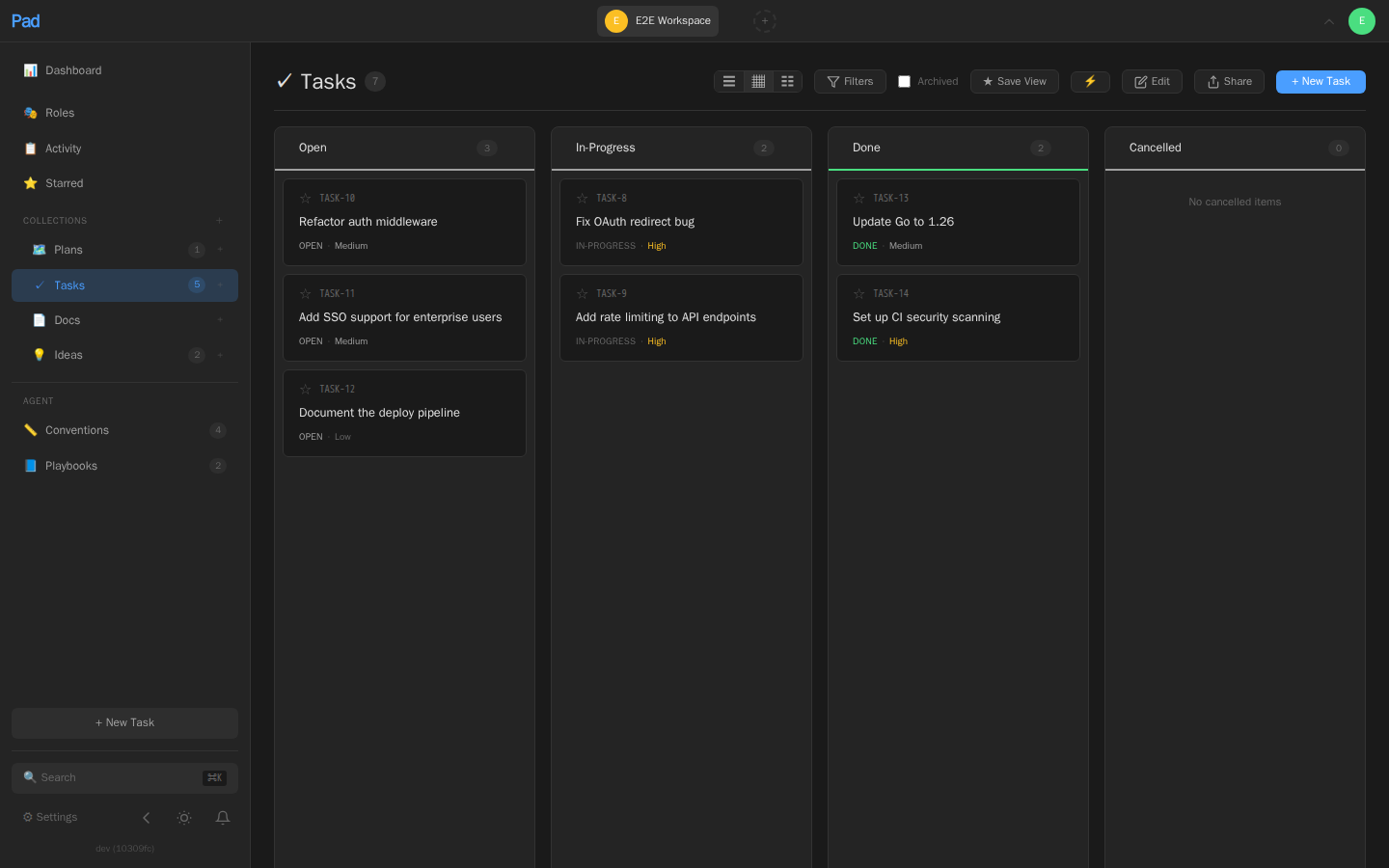
Web UI that stays out of your way. A clean interface at localhost:7777, in dark and light themes, with:
- Board, list, and table views — drag-and-drop between status columns
- Keyboard navigation —
j/kto move,Enterto open,Escto go back,Cmd+Kto search - Rich text editor — Tiptap-based with markdown and auto-save, and real-time co-editing
- Wiki-links — type
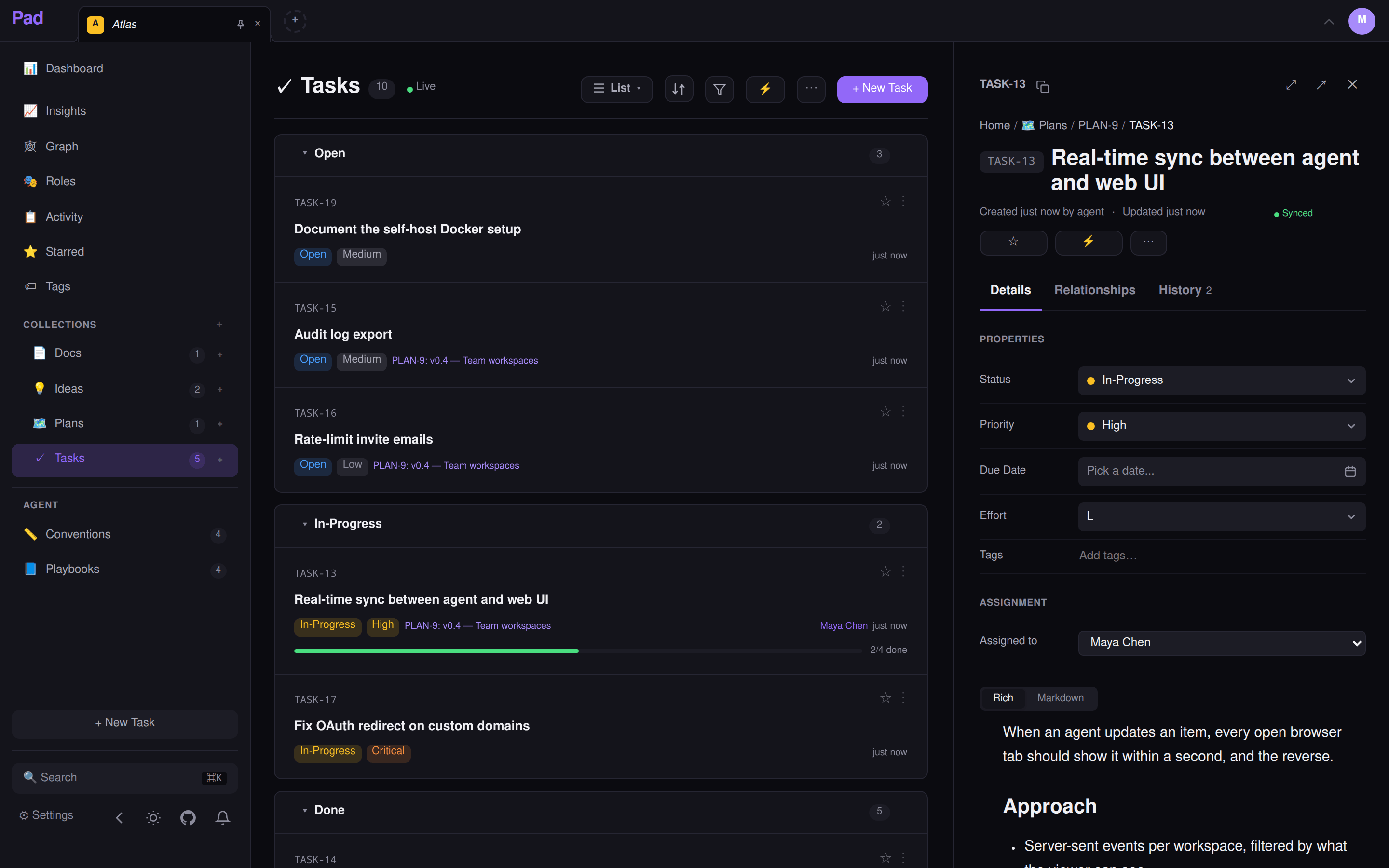
[[Title]]to link between items - Real-time updates — an agent creates a task in the terminal, it appears in the browser instantly
- History — every change is versioned, with who made it: a person, or a named agent
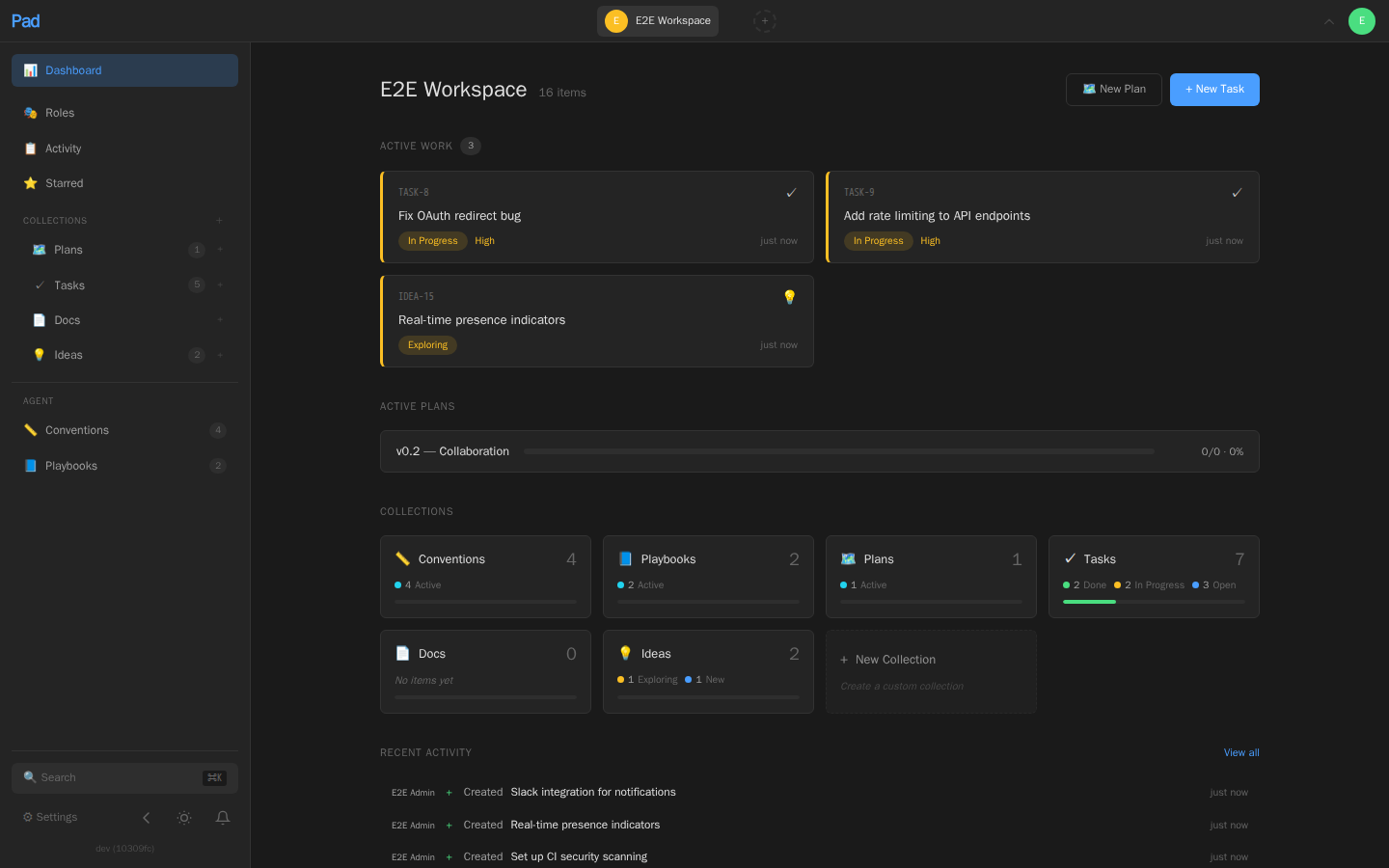
- Dashboard — active work, plan progress, what needs attention, and what to do next
For AI Agents
Using Claude Code? Install the Pad plugin. It bundles the /pad skill, typed shortcuts (/pad:status, /pad:capture, /pad:onboard), live item notifications and a side panel (/pad-pane), and it updates itself:
/plugin marketplace add PerpetualSoftware/pad
/plugin install pad@pad
In the Claude Desktop app's Code tab: + → Plugins, add the marketplace PerpetualSoftware/pad, then install pad. Open the panel with /pad-pane. If nothing is set up yet, it walks you through connecting to Pad Cloud, installing Pad on this machine, or linking your own server. The panel needs Claude Code 2.1.287 or later; the skills work on any version.
Your agent becomes a project partner. Install the /pad skill once, and your AI coding tool can read, create, and update project items through natural language. Cursor, Codex, Windsurf, and OpenCode receive a compact dispatcher, reuse bootstrapped context within a conversation, and load detailed guidance by topic with pad agent guide, keeping routine turns small.
pad agent install # Auto-detects your tools and installs the skill
Works with Claude Code, Cursor, Windsurf, Codex, OpenCode, GitHub Copilot, Amazon Q, and JetBrains Junie.
Then just talk to your project:
> /pad what should I work on next?
> /pad I finished the OAuth fix
> /pad create a task to add rate limiting
> /pad let's brainstorm about the API redesign
Conventions and playbooks teach agents how your project works:
- Conventions — trigger-based rules like "run tests before marking a task done" or "use conventional commits"
- Playbooks — multi-step workflows like "when implementing a feature: read the spec, create a branch, write tests first, then implement". Playbooks can declare a kebab-case
invocation_slugso users can invoke them directly:/pad ship PLAN-42,/pad release 0.5.0. Freshstartupworkspaces ship a genericshipplaybook out of the box.
pad item create convention "Run tests before completing tasks" \
  --field trigger=on-task-complete \
  --field scope=all \
  --field priority=must
Agents load relevant conventions automatically, and every agent action is attributed in the activity feed — so you can see what the AI changed rather than finding it later in a diff.
Name your agents. An agent that identifies itself gets its name on its writes: in the activity feed, the dashboard, item timelines and the admin audit log. Pad takes the first of these it finds:
pad session register --agent rook   # 0. this session's registered name
# 1. agent_name = "reviewer" in .pad.toml (per workspace, committed)
export PAD_AGENT=reviewer           # 2. per process
# 3. otherwise the detected runtime, e.g. "claude-code"
With none of these, the write is recorded as the person whose credentials it used. The name is self-declared, so it labels a trail rather than proving who acted; provenance surfaces show both, e.g. reviewer (via Dana). pad session list shows which registered sessions on this machine are alive, and as which agent.
Onboard agents to a new codebase:
Open an agent session in the workspace directory and run /pad onboard. The agent walks an interview, detects your build/test/CI tooling, and adapts your workspace's collections, conventions, roles, and playbooks to match the project. Works for any agent that speaks Pad — Claude Code, MCP-only agents, etc.
Collections & Custom Fields
Pad organizes work into collections — typed containers with structured fields.
Built-in collections:
| Collection | Purpose |
|---|---|
| Tasks | Work items with status, priority, assignee, effort, due date |
| Ideas | Feature ideas with impact and category |
| Plans | Project milestones with progress tracking |
| Docs | Documentation, decisions, reference material |
| Conventions | Project rules that guide agent behavior |
| Playbooks | Multi-step workflows for agents to follow |
Create your own with typed fields — select, text, date, number, url, relation, checkbox:
pad collection create "Bug Reports" \
  --fields "severity:select:low,medium,high,critical; browser:text; reproducible:checkbox"
Items get reference numbers automatically (TASK-5, BUG-12) and can be moved between collections with field migration.
Installation
Homebrew (macOS and Linux)
brew install PerpetualSoftware/tap/pad
Build from Source
git clone https://github.com/PerpetualSoftware/pad
cd pad
make build
cp pad ~/.local/bin/   # or /usr/local/bin/
Requires Go 1.26+ and Node.js 22+. Alternatively, nix develop provides a shell with the exact Go and Node versions pinned — see the Nix section below.
The go install github.com/PerpetualSoftware/pad/cmd/pad@latest path is not supported for the full Pad binary, because the web UI must be built and embedded during the source build.
Docker
docker run -p 127.0.0.1:7777:7777 -v pad-data:/data ghcr.io/perpetualsoftware/pad
This publishes Pad to localhost:7777 on the host machine, which is the recommended default for local use.
Pin a version for anything you keep. The untagged name is latest, which moves to each new stable release (never a release candidate) the next time the image is pulled. Name the release instead, as a bare version with no leading v, for example ghcr.io/perpetualsoftware/pad:0.17.2, and change the tag when you choose to upgrade. Every published image is multi-arch and cosign-signed.
First run — create the first admin. Open http://localhost:7777 and you'll hit a setup page asking for a bootstrap token. On first start with no users, Pad logs a one-time setup URL to stderr (captured by docker logs) — grep it and open the printed link:
docker logs <container> 2>&1 | grep -A6 'Pad first-run setup'
# → http://<your-host>:7777/setup#token=<one-time-token>
Open that URL, create your admin account, and the token is consumed (the banner stops appearing). If you'd rather stay on the CLI, docker exec -it <container> pad auth setup works too — running inside the container counts as loopback, which the bootstrap gate allows. On a network you already trust, set PAD_BYPASS_SETUP_TOKEN=true to skip the token and create the admin straight from http://<your-host>:7777/setup (only safe when the port isn't reachable from the open internet).
Single user, more than one device? Publish to all interfaces so you can reach Pad from your phone, tablet, or another machine on the same LAN, Tailscale network, or home VPN:
docker run -p 7777:7777 -v pad-data:/data ghcr.io/perpetualsoftware/pad
Set PUID / PGID to match your host's file ownership: the entrypoint runs Pad as that user. The defaults, 99/100, are Unraid's nobody:users.
For multi-instance deployments, Pad supports Postgres + Redis via docker-compose.yml — see docs/deployment.md for the full setup. The compose file runs the released image; set PAD_VERSION in .env to pin it.
Nix
Run without installing:
nix run github:PerpetualSoftware/pad
Or install into your profile:
nix profile install github:PerpetualSoftware/pad
A flake devShell (Go, Node, and friends, pinned to the same versions CI uses) is also available for contributors:
nix develop
A
nixpkgspackage (nix-shell -p pad/environment.systemPackages) is planned but not yet merged upstream. Until then, use thegithub:PerpetualSoftware/padflake reference above.
Binary Download
Pre-built binaries for macOS, Linux, and Windows are available on the releases page.
Pad Cloud (hosted)
Don't want to run anything? Pad Cloud is the managed option — same product, same CLI, same /pad skill, free during beta. Sign up on the web, then connect a project directory:
pad init --url https://app.getpad.dev --workspace my-workspace
Self-hosting stays first-class: the binary is unchanged and no features are Cloud-only.
Upgrading Pad
Pad ships a new binary on a roughly weekly cadence. Upgrades are designed to be boring: install the new binary and restart. Database migrations run automatically at startup, only the ones your database is missing are applied, and each migration commits atomically (a failed migration rolls back cleanly and is retried next boot).
The one rule: only ever move forward. Newer binaries know how to migrate an older database; older binaries do not understand a newer schema. Since Pad added its schema-ahead guard, a downgraded binary that finds a database newer than itself refuses to start rather than silently running old code against a newer schema (which can corrupt data):
database schema is newer than this pad binary: ... This almost always means the
binary was DOWNGRADED (e.g. brew/docker rollback) ... Upgrade pad back to a build
that includes those migrations, or re-run with `pad start --force`.
To recover, reinstall the newer binary (brew upgrade pad, pull the newer Docker tag, etc.). If you have intentionally downgraded and accept the risk, start with pad start --force (or set PAD_ALLOW_SCHEMA_AHEAD=1) to override the guard.
Automatic pre-migration snapshot (SQLite). Whenever a SQLite-backed instance has pending migrations to apply, Pad first copies the database file to pad.db.pre-<version> next to it. If an upgrade ever goes wrong, stop the server and copy that snapshot back over pad.db. This is a convenience net, not a backup strategy — keep your own backups (see docs/backup.md). PostgreSQL instances are skipped here; use pg_dump or a provider snapshot before upgrading.
Recommended upgrade flow:
# 1. Back up first (SQLite shown; see docs/backup.md for Postgres)
pad db backup -o pad-backup-$(date +%Y%m%d).db

# 2. Stop the server, install the new binary, restart
#    (migrations + the pre-migration snapshot run automatically on start)
brew upgrade pad        # or: a new image tag (see Docker above), binary download, make install

# 3. Confirm it's healthy
pad --version
curl -s localhost:7777/api/v1/health
Getting Started
1. Set up Pad
cd ~/projects/myapp
pad init "My App"
pad init is the smart entry point that handles everything in one command:
- Configures this client's connection (local server, remote, or Docker)
- Auto-starts the local server
- Creates the first admin account on a fresh local install (Docker / remote hosts run
pad auth setupon the server instead) - Logs you in if needed
- Creates or links a workspace for the current directory (writes
.pad.toml) - Installs the
/padskill for any AI tools detected in the project
Run from your project root. Safe to re-run anytime — it skips finished steps and prints a status summary if nothing's needed.
Choose a template with --template, or omit it for an interactive picker grouped by category (Software / People / …):
pad workspace init --list-templates                   # See the full catalog grouped by category
pad init "My App" --template scrum                    # Scrum-style with sprints
pad init "My App" --template product                  # Product management focused
pad init "My Hiring" --template hiring                # Company-side: requisitions, candidates, interview loops, feedback
pad init "Job Search" --template interviewing         # Candidate-side: applications, interviews, companies, contacts
pad init "My App" --template blank                    # Custom: system collections only — let /pad onboard build the rest
Pad ships templates for software (startup / scrum / product), people workflows (hiring, interviewing), and a custom blank template — system collections (Conventions, Playbooks) only, with the /pad onboard playbook as its sole seeded content. blank is the entry point for the agent-driven /pad onboard flow: it walks you through shaping collections, conventions, and roles to match your actual project. Reserved categories for research, content, operations, and personal use await their first templates, so the same project-management primitives fit well beyond code projects. There's also a hidden demo template — the startup layout pre-loaded with realistic sample data — that's kept out of the picker but can be built explicitly with --template demo.
2. Start working
# From the CLI
pad item create task "Set up CI pipeline" --priority high
pad item create idea "Add WebSocket support" --category infrastructure
pad project dashboard

# From the web UI
pad server open              # Opens localhost:7777 in your browser

# From your AI agent
# Just use /pad in Claude Code, Cursor, etc.
3. Teach your agents the rules
In an agent session inside the workspace:
/pad onboard
The agent walks an interview, detects your tooling, and adapts the workspace's collections, conventions, roles, and playbooks. To browse the library directly:
pad library list --type conventions  # Pre-built conventions you can adopt
pad library list --type playbooks    # Pre-built multi-step workflows
4. Optional — connect a desktop AI app via MCP
Pad ships an MCP (Model Context Protocol) server so Claude Desktop, Cursor, Windsurf, Claude Code, or Codex can manage items, plans, ideas, and dependencies as native tools, read workspace state by URL, and load multi-step workflows as prompts.
pad mcp install claude-desktop   # or: cursor, windsurf, claude-code, codex, --all
# Restart the client; pad shows up as the "pad" MCP server.
Cursor and Codex installations can opt into compact tool results:
pad mcp install cursor --compact-results
pad mcp install codex --compact-results
Pad keeps the result channel each client currently exposes to its model: JSON
text for Cursor and structuredContent for Codex. It removes the duplicate
channel only from successful structured results; errors and one-channel results
remain unchanged. Leave the flag off for other clients or compatibility testing.
pad mcp install writes each client's native config: JSON mcpServers for
Claude Desktop / Cursor / Windsurf, a project-local .mcp.json in the current
directory for claude-code, and an [mcp_servers.pad] table in
~/.codex/config.toml (TOML) for codex. Because Claude Code's config is
project-scoped, it's install-on-request only — --all and pad mcp status cover
the per-user clients (including Codex) and skip it.
Tool catalog (v0.99) — ten resource × action tools plus pad_set_workspace. Undeclared input keys are rejected with a structured error rather than silently dropped, and field values are typed against the collection schema on the server:
| Tool | Actions |
|---|---|
pad_item |
create, update, delete, get, list, move, restore, link, unlink, deps, context, star, unstar, starred, comment, list-comments, edit-comment, delete-comment, backlinks, bulk-update, note, decide, export, import, history, remind, ack-reminder, reminders, unremind, link-pr, unlink-pr, claim, release, patch |
pad_workspace |
list, members, invite, storage, audit-log, create, claim, deleted, restore |
pad_collection |
list, create, update, delete, list-archived, restore |
pad_project |
dashboard, next, ready, stale, standup, changelog, report, activity |
pad_role |
list, create, update, delete |
pad_search |
query |
pad_playbook |
list, get, run, match |
pad_library |
list, get, activate |
pad_attachment |
list, show |
pad_meta |
server-info, version, tool-surface, bootstrap |
pad_set_workspace |
session-default workspace pinning (response embeds the bootstrap blob) |
Plus resources at pad://workspaces, pad://workspace/{ws}/dashboard,
pad://workspace/{ws}/items, pad://workspace/{ws}/items/{ref},
pad://workspace/{ws}/collections,
pad://workspace/{ws}/attachments/{id} (bounded image bytes),
pad://workspace/{ws}/bootstrap,
and pad://_meta/version.
Stability contract. The catalog is versioned
(tool_surface_version: "0.99") and advertised in the initialize handshake and at
pad://_meta/version, so external agents can pin against it; the per-version
changelog lives in internal/mcp/version.go. Errors
come back as structured envelopes ({error: {code, message, hint, ...}}) from a
closed code list in internal/mcp/errors.go. Branch on code, not message
text, and treat stored_state_unreadable as STOP rather than retry.
Full guide at getpad.dev/mcp/local — install paths, action enums per tool, error taxonomy, troubleshooting.
On Pad Cloud? Skip the install: add https://mcp.getpad.dev as a remote
MCP server in Claude Desktop, Claude.ai, Cursor, or Windsurf and sign in with
OAuth — same tool surface, no local binary. Setup guide at
getpad.dev/mcp/remote. ChatGPT connects
through its own OAuth-only endpoint; see
getpad.dev/docs/mcp/chatgpt.
Self-hosting? The same remote MCP endpoint is built in and off by default: an admin turns it on, with OAuth when its issuer URL is https and personal API tokens either way. See "MCP for agents (self-hosted)" in docs/deployment.md.
CLI Reference
pad auth configure                    Configure how this client connects to Pad
pad auth setup                        Initialize the first admin account
pad auth login                        Sign in
pad auth whoami                       Show current user

pad server start                      Start the Pad API server
pad server stop                       Stop the Pad server
pad server info                       Show client, connection, and local server status
pad server open                       Open web UI in browser

pad workspace init [name]             Initialize workspace in current directory
pad workspace link <workspace>        Link current directory to an existing workspace
pad workspace list                    List all workspaces
pad workspace switch <workspace>      Switch active workspace
pad workspace context                 Show structured workspace context
pad workspace context set --file X    Update structured workspace context from JSON
# Workspace onboarding: run `/pad onboard` from an agent session inside the workspace
pad workspace members                 List workspace members
pad workspace invite <email>          Invite a workspace member
pad workspace join <code>             Accept an invitation
pad workspace export                  Export workspace data
pad workspace import <file>           Import workspace data

pad project dashboard                 Project dashboard
pad project next                      Recommended next task
pad project ready                     Query actionable next items
pad project stale                     Query stalled or attention-worthy items
pad project standup [--days N]        Daily standup report
pad project changelog [--days N]      Release notes from completed items
pad project watch                     Real-time activity stream
pad project reconcile                 Reconcile item and PR state

pad item create <coll> "title"        Create item (task, idea, plan, doc, ...)
pad item list [collection]            List items (filters: --status, --priority, --all)
pad item show <ref>                   Show item detail
pad item open <ref>                   Open item in web UI
pad item update <ref>                 Update item fields
pad item delete <ref>                 Delete item
pad item move <ref> <collection>      Move item between collections
pad item edit <ref> [--force]         Open item in $EDITOR (guarded save; see --help)
pad item search "query"               Full-text search across all items
pad item comment <ref> "text"         Add comment to an item
pad item comments <ref>               View item comments
pad item note <ref> "summary"         Append an implementation note to an item
pad item decide <ref> "decision"      Append a decision log entry to an item
pad item block <src> <target>         Create dependency
pad item blocked-by <item> <blk>      Mark item as blocked
pad item deps <ref>                   Show dependencies
pad item context <ref> [--intent X]   One brief for working an item (conventions, parents, deps)
pad item unblock <src> <target>       Remove dependency
pad item related <ref>                Show direct relationships for an item
pad item implemented-by <ref>         Show incoming implementers for an item
pad item claim <ref>                  Atomically claim an item for execution (--holder, --ttl; 409 names the live holder)
pad item release <ref>                Release your execution lease (idempotent)
pad item bulk-update --status X       Batch update multiple items

pad collection list                   List collections with item counts
pad collection create <name>          Create a custom collection

pad library list                      Browse convention and playbook library
pad library activate <title>          Activate a convention or playbook

pad agent install [tool]              Install /pad skill for AI coding tools
pad agent guide [topic]               Print one section of the canonical agent guide
pad agent status                      Show supported tools and installation status
pad agent update                      Update installed tool integrations

pad github link [item-ref]            Link current branch's PR to item
pad github status [item-ref]          Show PR status for linked items
pad github unlink <item-ref>          Remove PR link from item

pad webhook list             List workspace webhooks
pad webhook create <url>     Create webhook

pad session register         Record this session (harness pid + agent name) locally
pad session list             Registered sessions on this machine, with liveness
pad session prune            Remove records of sessions that are dead
All commands accept --format json for machine-readable output and --workspace to target a specific workspace.
Shell completion
pad ships completion scripts for bash, zsh, fish, and PowerShell:
# Bash — current session only
source <(pad completion bash)
# Bash — persistent
pad completion bash > /etc/bash_completion.d/pad                   # Linux
pad completion bash > $(brew --prefix)/etc/bash_completion.d/pad   # macOS (Homebrew)

# Zsh (make sure compinit runs in your ~/.zshrc)
pad completion zsh > "${fpath[1]}/_pad"

# Fish
pad completion fish > ~/.config/fish/completions/pad.fish

# PowerShell (append the output to your $PROFILE)
pad completion powershell | Out-String | Invoke-Expression
Beyond command and flag names, completion is context-aware: collection arguments (e.g. pad item list <TAB>) complete against your workspace's collections, --workspace completes configured workspace names, and --status / --priority complete their valid values.
Authentication
Pad runs without authentication by default for frictionless local use. For local installs, pad init creates the first admin account inline. The lower-level commands are useful when you're hosting a Pad server (Docker / remote) and need to set up auth on the server host directly:
pad auth setup         # Initialize the first admin account (server host, non-local mode)
pad auth login         # Sign in
pad auth whoami        # Show current user
pad auth logout        # Sign out
Once a user exists, all API requests and web UI access require authentication. Credentials are stored in ~/.pad/credentials.json. Multiple users can be invited to workspaces with role-based access control (owner, editor, viewer).
Authenticating with an environment token
Set PAD_TOKEN to a Pad API token (minted with pad token create, or under Settings → API tokens in the web UI) to authenticate without pad auth login:
PAD_TOKEN=pad_xxxxxxxx pad item list
PAD_TOKEN takes precedence over credentials saved by pad auth login, like gh's GH_TOKEN. It suits CI, scripts, and machines where several agents share one CLI install but should act as different Pad users: give each its own token in its environment. pad auth whoami reports the token's identity. pad auth logout signs out the stored session only; revoke an env token with pad token revoke or under Settings → API tokens.
PAD_TOKEN is only sent to the server you chose: --url, PAD_URL, your config, or the default. A repository's .pad.toml can name a different server, and anyone can commit one, so the CLI does not send PAD_TOKEN to a server that only .pad.toml names. Requests there use the credential saved for that server, and the CLI prints one line saying so. To use the token with that server, set PAD_URL to it or pass --url.
Managing API tokens from the CLI
pad token create --name ci-agent              # Mint a token (secret shown once)
pad token create --name cursor --expires-in 30
pad token list                                # Metadata only — never secrets
pad token rotate <token-id>                   # New secret; the old one dies with the same write
pad token revoke <token-id>                   # Immediate; the id must be exact
Tokens are user-scoped and act as the user who minted them. create prints the secret exactly once — the server stores only a hash and cannot show it again — so pair each mint with wherever the token will live (CI secret store, an agent's PAD_TOKEN). revoke takes the exact id from pad token list; revocation is immediate, and anything still authenticating with that token fails on its next call. rotate keeps a token's metadata (name, scopes) and replaces its secret in place: the old secret stops working immediately — there is no grace window — so update whatever holds it before its next call, and use --expires-in <days> to set a new expiry (otherwise the original is preserved).
create and rotate need a login session; list and revoke do not. A request authenticated by an API token (including a pad_ token in PAD_TOKEN) is refused with 403 session_required, because tokens a token mints would outlive its revocation. A browser session, a saved CLI login, or a padsess_ token in PAD_TOKEN mints normally; on a headless machine, pad auth login -i prompts for email and password. list and revoke stay reachable by a token, since revoking is the response to a leaked one.
pad workspace members               # List workspace members
pad workspace invite user@example.com
pad workspace join <code>
Decision provider (optional)
Pad can ask a small classification model typed questions about your items, such as "does this need a human decision?" or "is this blocked?", and use the answers in the dashboard and playbook routing. It is off by default, and off is not a degraded mode: with no provider configured, no decision job is queued and nothing is sent anywhere. The dashboard shows only its graph-derived attention entries, the decisions list is empty, and playbook match answers 404 decision_provider_unavailable.
What uses it
- The dashboard's
attentionlist gainsneeds_humanentries, and a text-derivedblockedentry for an item the dependency graph has not already flagged. Only answers computed from the item's current state count. pad playbook match -- "<text>"(pad_playbook action=matchover MCP) picks the active playbook that free text asks for. It answers404 decision_provider_unavailablewith no provider, so callers fall back to slug or trigger routing.GET /workspaces/{ws}/items/{slug}/decisionslists an item's latest answers.
Answers are computed asynchronously. Creating, updating, restoring or moving an item, and creating, editing or deleting a comment on it, queues a job, and a server tick makes the provider call, so no write ever waits on the network. Only open items in non-system collections are asked about: a job owed for a closed item is dropped at the tick without a call.
Configure (later sources win, per field): the config file, then the instance-admin setting (Console → Admin → Settings), then the environment.
| Environment | ~/.pad/config.toml |
Meaning |
|---|---|---|
PAD_DECISION_PROVIDER |
decision_provider |
typesafe to enable; none (or unset) to disable |
PAD_TYPESAFE_API_KEY |
typesafe_api_key |
the provider key: never logged, and write-only on the admin page |
PAD_DECISION_MODEL |
decision_model |
model pin; defaults to jev-1.13.0 (a fixed version, so stored answers stay comparable) |
Because the environment overrides the admin setting, PAD_DECISION_PROVIDER=none is how an operator turns off a provider an admin enabled. On Pad Cloud, the environment is the only source. pad server info shows what the CLI host's config file and environment resolve to. It cannot see the admin setting, so it is not the server's full effective configuration.
What leaves the box. Enabling it sends item content to https://api.typesafe.ai/v1/systemone (typesafe.ai's Jev). For an item question, that is the title, collection slug, field values, the body clipped to 16,000 characters, and the last 10 comments. For playbook match, it is the text you asked about plus the active playbooks' refs, titles, summaries and triggers. Nothing is sent until a provider is enabled. Disabling it takes effect without a restart: no new call starts, though a request already in flight may finish.
Architecture
┌──────────────────────────────────────────────┐
│              pad (single binary)              │
│                                               │
│  ┌──────────┐  ┌──────────┐  ┌────────────┐  │
│  │   CLI    │  │  REST    │  │  Embedded  │  │
│  │ (Cobra)  │  │  API     │  │  Web UI    │  │
│  └────┬─────┘  └────┬─────┘  │ (SvelteKit)│  │
│       │    HTTP      │        └────────────┘  │
│       └──────────────┤                        │
│                ┌─────▼─────┐                  │
│                │  SQLite   │                  │
│                │  + FTS5   │                  │
│                └───────────┘                  │
└───────────────────────────────────────────────┘
- Go backend — chi router, SQLite via modernc.org/sqlite (pure Go, no CGO), FTS5 full-text search, SSE for real-time updates
- SvelteKit frontend — Svelte 5, Tiptap editor, drag-and-drop, adapter-static, embedded via
go:embed - Single binary — serves the API and web UI, runs on macOS, Linux, and Windows
- Workspace-per-project — each project gets its own workspace linked by a
.pad.tomlfile
Self-hosted, all data lives in ~/.pad/pad.db. Your data. Your machine. No telemetry, no sign-up — cloud only if you opt in.
Community
- r/getpad — how-tos, roadmap discussion, and notes from the agents that run Pad's own workspaces
- GitHub Issues — bugs and feature requests
- X / Bluesky — release announcements
Contributing
See CONTRIBUTING.md for the development guide.
make build      # Build web UI + Go binary
make test       # Run Go tests
make dev-web    # SvelteKit dev server with hot reload
make install    # Build, install to ~/.local/bin, restart server
Security
See SECURITY.md for reporting vulnerabilities.
Pushes into agent sessions are consent-gated. pad push (and the web push composer) puts an item — and a message — in front of a running Claude Code session as direction from its own user. That is deliberate terminal instruction injection, so since v0.15.0 (PLAN-2613) receiving it is opt-in per session, not a side effect of installing the plugin:
- No consent, no stream. Nothing streams and nothing listens — watches and pushes alike — until the session consents. At session start the plugin's mod records the session's presence and asks whether it has consented; a session that has not starts nothing and shows nothing (TASK-3513).
/pad:connectarms the session locally and starts the monitor, which announces the armed state when its stream connects;/pad:disconnectwithdraws;/pad:statusreports the state. A repo can opt its sessions in at start withpush.auto_arm = truein.pad.toml— an explicit file edit, never a machine-global default, and vetoable per user in~/.pad/config.toml. - Self-addressed only. The server forces every push's target to the caller's own sessions; nobody can push into a session that isn't theirs. Delivery is filtered to armed sessions, and the surfaces are honest about it: the web composer shows the split ("2 connected, 0 accepting pushes") and withholds a send it knows nobody would accept; a CLI broadcast still publishes and reports
delivered_sessions(in JSON output), and a targeted push to a session that is not accepting skips the publish rather than pretending. - No grandfathering. Updating the plugin replaces the v0.14 always-on monitor with the gated one for everyone. Sessions that used to receive pushes receive none until they connect; the web composer's counts make that visible rather than silent.
- The accepted caveat. An agent can run the arm command from inside its own session. That is visible in the transcript, within the operator's sight: the gate protects sessions from the outside and does not police the inside. A push can inject text; it cannot click a permission prompt.
License
Categories
Related apps
Explore more like this
Explore allDetails
ghcr.io/perpetualsoftware/pad:latestRuntime arguments
- Web UI
http://[IP]:[PORT:7777]/- Network
bridge- Shell
sh- Privileged
- false
Template configuration
Pad web UI. Browse to http://[your-tower]:[port]/ after install.
- Target
- 7777
- Default
- 7777
- Value
- 7777
Pad's persistent data: SQLite database, attachments, encryption key, logs, and config. Back this up to keep your workspace safe.
- Target
- /data
- Default
- /mnt/user/appdata/pad/
- Value
- /mnt/user/appdata/pad/
User ID the pad process runs as. Default 99 (nobody) matches Unraid's appdata permissions. Change only if you know what you're doing — must be a positive integer.
- Default
- 99
- Value
- 99
Group ID the pad process runs as. Default 100 (users) matches Unraid's appdata permissions. Change only if you know what you're doing — must be a positive integer.
- Default
- 100
- Value
- 100
Verbosity for the server log. One of: debug, info, warn, error.
- Target
- PAD_LOG_LEVEL
- Default
- info
- Value
- info
If true, the first admin account can be created directly from the web UI (browse to http://[your-tower]:[port]/setup) without copying a bootstrap token from the container logs. Convenient for trusted home networks. Default false (token required from logs). WARNING: while no users exist, anyone who can reach the WebUI port can claim the first admin account — only set true on networks you trust (LAN behind a firewall, Tailscale, etc.). Once an admin exists this setting has no effect.
- Target
- PAD_BYPASS_SETUP_TOKEN
- Default
- false
- Value
- false
External URL when pad is behind a reverse proxy (SWAG / NGINX Proxy Manager / etc.). Required for emailed invitation links to point at the right host. Example: https://pad.example.com
- Target
- PAD_URL
Optional. Enables transactional email (workspace invitations). Without it, invites use copyable join codes via the CLI. Sign up at maileroo.com.
- Target
- PAD_MAILEROO_API_KEY
Sender address for invitation emails. Required if Maileroo API Key is set. Must be on a domain you control.
- Target
- PAD_EMAIL_FROM
Display name on outbound emails (the human-friendly part before the address). Defaults to 'Pad'.
- Target
- PAD_EMAIL_FROM_NAME
- Default
- Pad
- Value
- Pad