
All apps · 0 apps
OxiCloud
Docker app from paulynomial's Repository
Overview
Readme
View on GitHub
A fast self-hosted cloud for people who want files, calendars, contacts, and office editing without dragging a heavy stack behind them.
Documentation · Quick Start · Star OxiCloud · Request a Feature · Supported Clients · Project Status






If OxiCloud saves you setup time, RAM, or complexity, give it a star. If something is missing, ask for a feature or request a docs improvement.
Why People Try OxiCloud
OxiCloud is aimed at self-hosters, home labs, and small teams who want the useful parts of a cloud suite without the operational drag of a traditional PHP stack.
What pulls people in:
- Standard protocols first: WebDAV, CalDAV, and CardDAV are built in
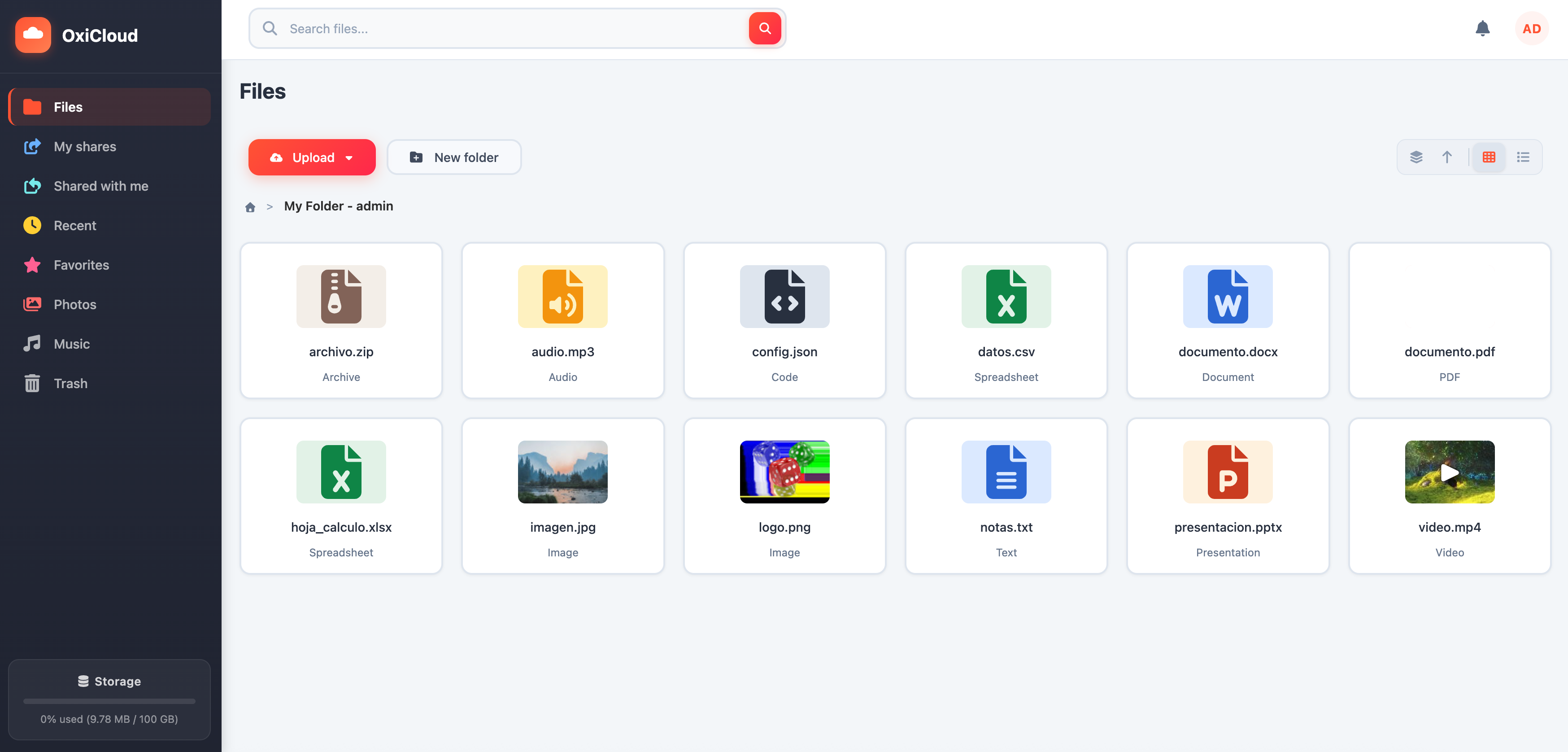
- Useful product surface already there: files, previews, sharing, trash, search, favorites, and recent items
- Modern auth and admin basics: OIDC/SSO, quotas, roles, and shared links
- Better interoperability: native desktop and mobile clients work without custom sync tooling for basic access
- Lower deployment friction: Docker Compose, environment-based configuration, Helm chart, and Nix module
OxiCloud is not trying to mirror the full plugin ecosystem of Nextcloud. It is designed for a smaller stack, fast startup, and standards-based interoperability.
Quick Start
Docker Compose
Requires Docker and Docker Compose.
git clone https://github.com/AtalayaLabs/OxiCloud.git
cd OxiCloud
cp example.env .env

# If users will access OxiCloud through a domain or reverse proxy,
# set OXICLOUD_BASE_URL in .env before the first login.
docker compose up -d
Open http://localhost:8086.
Prebuilt binary
Binary releases (Linux musl amd64/arm64, macOS Intel/Apple Silicon)
are attached to every tagged release on GitHub — the whole SPA + all
operator subcommands + migrations bake into a single self-contained
executable. See docs/install/binary.md for
the download / verify / systemd walkthrough.
cargo binstall oxicloud works too once a release is out.
Run from source
Requires Rust 1.93+ and PostgreSQL.
git clone https://github.com/AtalayaLabs/OxiCloud.git
cd OxiCloud
cp example.env .env

# If PostgreSQL runs on your host instead of Docker, update both
# OXICLOUD_DB_CONNECTION_STRING and DATABASE_URL to use localhost:5432.
cargo run
Deployment details: deployment guide · example.env
What You Get
| Area | Included |
|---|---|
| Files | Multi-file upload, folders, inline previews, thumbnails, chunked uploads, deduplication, trash |
| Sync and clients | WebDAV, CalDAV, CardDAV, native OS clients, Thunderbird, DAVx5 |
| Security | JWT auth, Argon2id, OIDC/SSO, shared links, quotas, admin/user roles |
| Integrations | REST API and WOPI for Collabora or OnlyOffice |
| Operations | Docker image, Docker Compose, env-driven config, PostgreSQL backend |
| Project tooling | Architecture docs, Helm chart, Nix module, CI |
Supported Clients
OxiCloud uses standard DAV protocols, so it works with native clients instead of requiring a custom sync stack for basic access.
| Use case | URL |
|---|---|
| Files via WebDAV | https://your-host/webdav/ |
| Calendars via CalDAV | https://your-host/caldav/ |
| Contacts via CardDAV | https://your-host/carddav/ |
Common clients that work well:
- macOS Finder
- Windows Explorer
- GNOME Files and KDE Dolphin
- Thunderbird
- Apple Calendar and Contacts
- DAVx5 on Android
Client setup guides: DAV client setup · WebDAV guide · CalDAV & CardDAV guide
Project Status
OxiCloud is actively developed and already covers the core self-hosted cloud workflow.
| Capability | Status | Notes |
|---|---|---|
| File storage and web UI | Ready | Uploads, previews, sharing, trash, and search |
| WebDAV | Ready | Standard file access for desktop and mobile clients |
| CalDAV and CardDAV | Ready | Working with Thunderbird, Apple clients, and others |
| OIDC / SSO | Ready | Documentation and config examples included |
| WOPI office editing | Ready | Works with Collabora or OnlyOffice |
| DAVx5 Android support | Partial | File sync works well; calendar and contact behavior is still being refined |
| Desktop sync client | Planned | Not yet available |
| Mobile apps | Planned | Not yet available |
| End-to-end encryption | Planned | Roadmap item |
Roadmap: TODO-LIST.md
Help Shape OxiCloud
If you want OxiCloud to get better faster, use the repo like a product feedback loop, not just a code dump.
- Give it a star if you want more people to discover the project: Star OxiCloud
- Propose missing functionality: feature request
- Point out confusing onboarding or weak docs: documentation request
- Report breakage or regressions: bug report
- Build it with us: CONTRIBUTING.md
The best feature ideas usually come from real deployment pain. If you hit friction, open an issue and describe the workflow you want.
Architecture and Deployment
OxiCloud follows a clean, hexagonal architecture so protocol handlers, business logic, and infrastructure stay separated.
- Backend: Rust + Axum
- Database: PostgreSQL
- Configuration: environment variables
- Default deployment: Docker Compose
- Additional packaging: Helm chart and Nix module
Architecture docs: internal architecture · caching architecture · database transactions · storage safety
Configuration and Integrations
Start with example.env. The most important settings are:
OXICLOUD_BASE_URLfor reverse proxies, domains, and external accessOXICLOUD_DB_CONNECTION_STRINGfor PostgreSQLOXICLOUD_OIDC_ENABLEDand related settings for SSOOXICLOUD_WOPI_ENABLEDand discovery URL for office editingMIMALLOC_PURGE_DELAY=0for lower idle RSS in constrained environments
Integration docs: OIDC setup · OIDC architecture · OIDC config examples · WOPI integration
Documentation
- Docs site: AtalayaLabs.github.io/OxiCloud
- Deployment: docs/config/deployment.md
- Batch operations: docs/guide/batch-operations.md
- Search: docs/guide/search.md
- Thumbnails and transcoding: docs/guide/thumbnails-and-transcoding.md
- Deduplication: docs/guide/deduplication.md
Development
cargo fmt --all --check
cargo clippy --all-features --all-targets -- -D warnings
cargo test --workspace
Contributing
Contributions are welcome. Read CONTRIBUTING.md before opening a pull request and CODE_OF_CONDUCT.md for community expectations.
If you are not ready to code yet, starring the project and opening a precise feature request is still a meaningful contribution.
Contributors
OxiCloud is a community-driven project, and we appreciate all contributions. Check out the Contributors page to see the amazing people who have helped make OxiCloud better.
Star History
License
OxiCloud is a trademark of the OxiCloud project. All other trademarks are the property of their respective owners.
Requirements
Categories
Download Statistics
Total Downloads Over Time
Related apps
Explore more like this
Explore allDetails
diocrafts/oxicloud:latestRuntime arguments
- Web UI
http://[IP]:[PORT:8086]- Network
bridge- Shell
sh- Privileged
- false
- Extra Params
--restart=unless-stopped
Template configuration
Host port mapped to the OxiCloud web interface. Browse to http://[UNRAID-IP]:[this port] to reach OxiCloud.
- Target
- 8086
- Default
- 8086
- Value
- 8086
PostgreSQL connection string. OxiCloud has no built-in database so it needs an external PostgreSQL container. After installing PostgreSQL, create a database and a role both named oxicloud, then replace HOST-IP with that container address or the Unraid host IP. Example postgres://oxicloud:yourpassword@192.168.1.10:5432/oxicloud . The schema is created automatically on first start.
- Target
- OXICLOUD_DB_CONNECTION_STRING
- Default
- postgres://oxicloud:oxicloud@HOST-IP:5432/oxicloud
- Value
- postgres://oxicloud:oxicloud@HOST-IP:5432/oxicloud
Holds all user files (the content-addressable blob store), the auto-generated JWT secret, the full-text search index, and the Tailscale state directory. Must persist across restarts and image updates. For a large file library you can point this at an array share such as /mnt/user/oxicloud instead of the cache-backed appdata path.
- Target
- /app/storage
- Default
- /mnt/user/appdata/oxicloud
- Value
- /mnt/user/appdata/oxicloud
Interface OxiCloud binds inside the container. Must stay 0.0.0.0 or the container becomes unreachable through the mapped port. Do not change.
- Target
- OXICLOUD_SERVER_HOST
- Default
- 0.0.0.0
- Value
- 0.0.0.0
Port OxiCloud listens on inside the container. Keep it matched to the container side of the WebUI Port mapping above (8086). Change both together if you remap it.
- Target
- OXICLOUD_SERVER_PORT
- Default
- 8086
- Value
- 8086
Secret that signs session tokens (HS256). Leave blank to let OxiCloud generate a strong one on first start and persist it inside the Storage volume as .jwt_secret, which survives restarts. Set your own (minimum 32 characters) only if you want a fixed value across redeployments. Generate one with: openssl rand -hex 32
- Target
- OXICLOUD_JWT_SECRET
External URL clients use to reach OxiCloud, including the scheme. Set this when access goes through a reverse proxy, a custom domain, or a Tailscale hostname so generated share links and OIDC redirects are correct. Example https://oxicloud.your-tailnet.ts.net or https://cloud.example.com . Leave blank for plain LAN access by IP.
- Target
- OXICLOUD_BASE_URL
Set to true to block public self-registration once you have created your accounts. Recommended for an internet-exposed instance. Leave false while setting up.
- Target
- OXICLOUD_DISABLE_REGISTRATION
- Default
- false
- Value
- false
Container timezone, used for log timestamps. tzdata is installed in the image. Example Europe/Madrid or America/New_York. Leave blank for UTC.
- Target
- TZ