
All apps · 0 apps

otter-edid-editor
Docker app from Stoatworks Labs' Repository
Overview
Readme
View on GitHubAI-assisted project. This codebase was created with Claude (Anthropic), directed and reviewed by a human author. The timing engine is checked against published VESA DMT values and the DisplayID Type VII layout against the Linux kernel's own parser. No EDID this tool produced has ever been loaded into a display, a source or a processor, and the twenty-one-model compatibility table is vendor paperwork — cited per claim, but never tried against the hardware it describes. Mosaic mode reproduces another tool's Mac-tested files byte for byte; Otter has not tested them itself. See What is verified, and what is not.
Otter EDID Editor
Live at otter-edid.stoatworks-labs.com — nothing to install.
A browser EDID editor for event video. Build an EDID from a resolution and a refresh rate, or edit every field by hand — then see which processors will actually take it, and in which mode.
Nothing is uploaded. There is no backend to upload it to.
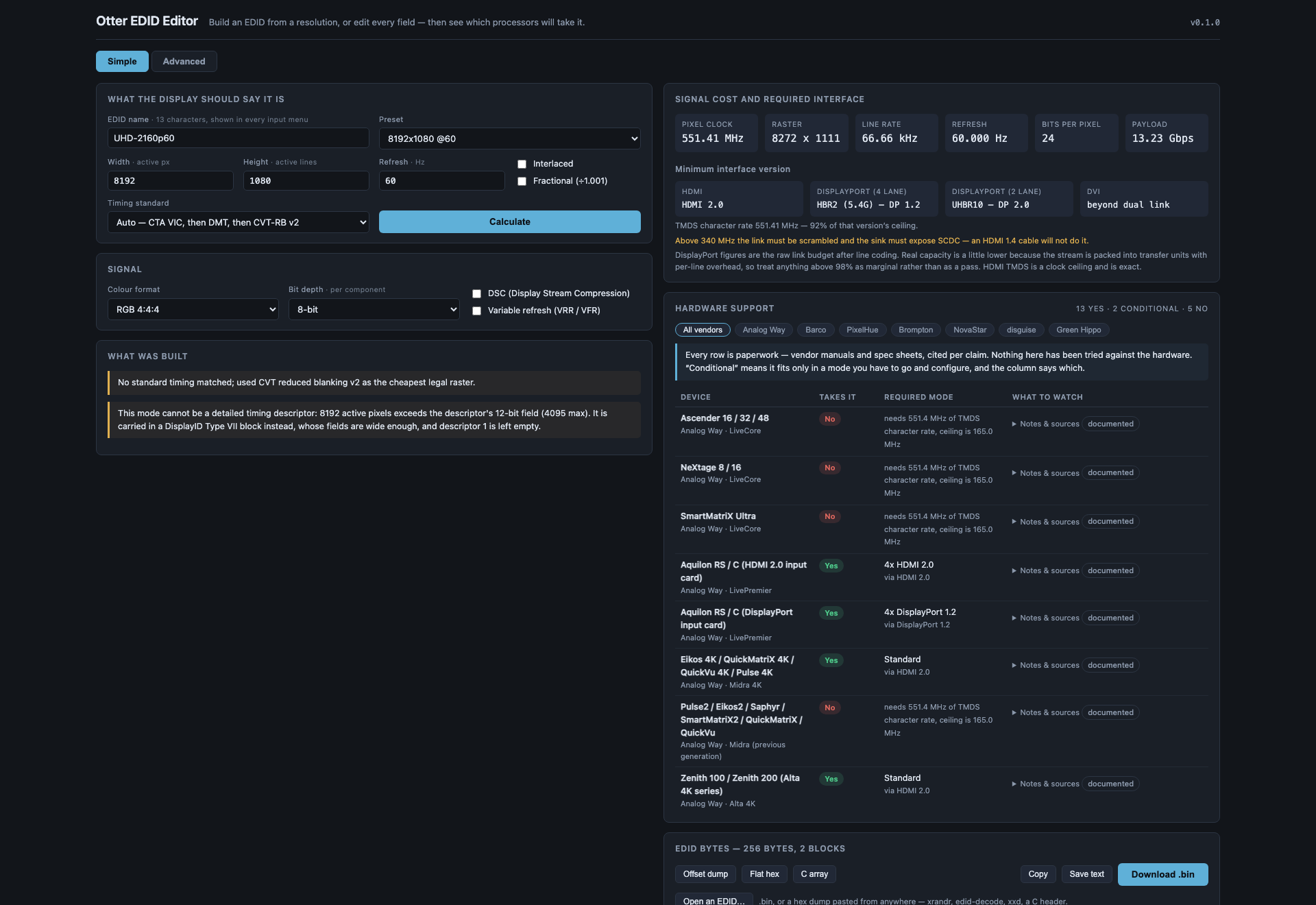
An 8192 × 1080 @ 60 EDID built in Simple mode: the CVT-RB v2 raster it needed, a 551 MHz pixel clock that puts it past HDMI 1.4, the minimum interface per standard, and the per-processor table saying which will take it — every row from the vendor's own documents, none of it tried against hardware.
Three modes
Simple. Type a resolution and a refresh rate, name it, press Calculate. You get a complete, valid EDID 1.4: the mode as a detailed timing, a range-limits descriptor sized to it, the name where every input menu will read it, and a CTA-861 extension carrying the VIC when the mode has one.
Advanced. Every field. Identity, video input definition, chromaticity, established and standard timings, all four descriptors, the CTA-861 extension (video and audio descriptors, HDMI and HDMI Forum vendor blocks, HDR static metadata, colorimetry, 4:2:0 maps) and a DisplayID 2.0 extension.
Mosaic. One canvas split across two or four plugs, for frame-synced multi-output from a Mac. You give the whole canvas, the grid (2 × 1 or 2 × 2) and the rate; you get one EDID per plug, each carrying a DisplayID Tiled Display Topology block. A Mac that reads matching blocks on several connectors joins them into one display and drives them as one, so the seams cannot tear. Download them one by one or as a zip. Alongside: what macOS will make of the canvas (up to 6144 wide on any recent macOS, up to 12288 on macOS 27, only 2 × 1 and 2 × 2 bond), and the cost and hardware table for the per-plug mode.
The mosaic layout is not Otter's invention. It reproduces, byte for byte, a
reference builder whose files have bonded on macOS 26 and 27. Its base and CTA
blocks are a real display's EDID, because EDIDs built from scratch never bonded.
A test pins the match against the reference's own output. The topology id is
Stoatworks Labs' own (SWK).
All three modes name the EDID. All three show the same two answers on the right.
The two answers
What the mode costs, and the smallest interface that carries it. Pixel clock, raster, line rate, payload — and then the minimum HDMI version (1.0–1.2, 1.3/1.4, 2.0, or which FRL rate), the minimum DisplayPort rate at 4 and 2 lanes, and whether DVI needs one link or two.
Which hardware takes it. Twenty-one models across Analog Way, Barco, PixelHue, Brompton, NovaStar, disguise and Green Hippo, each answering yes / conditional / no — and where the answer is conditional, the capacity mode you have to configure to get it:
- A LiveCore dual-link input costs you the neighbouring input.
- A Barco E2 Gen 1 does 4K60 only across two cables.
- A Barco E2 Gen 2 quad card is four WQXGA inputs or two UHD60 ones.
- An Aquilon DisplayPort card is four DP 1.2 ports or two DP 1.4 ports — and DP 1.4 preempts ports 2 and 4.
Every device carries its sources, quoted, with the date they were read.
DSC and variable refresh
Both are toggles, and both are real: they change the bandwidth arithmetic, they change which interface version is required, and they get written into the EDID (DSC capability and the VRRmin/VRRmax window in the HDMI Forum block). Turning DSC on correctly makes every HDMI 2.0 and earlier input say no, because DSC travels only over a fixed-rate link.
Import
Open a .bin, or paste a hex dump from anywhere — xrandr, edid-decode,
xxd, a C header, a bare hex string. A bad checksum is reported, not refused:
the dump off a misbehaving device is exactly when you need to look at it.
Running it
npm install
npm run dev
npm test runs the suite. npm run build produces dist/, which deploys as a
Cloudflare static-assets Worker.
What is verified, and what is not
The timing engine is checked against published VESA DMT values, and the
DisplayID Type VII and Tiled Display Topology layouts against the Linux kernel's
parser. The hardware table is vendor paperwork, cited per claim, and has not
been tried against any hardware. See AGENTS.md for the honest breakdown.
Mosaic mode is the one exception to "never on hardware", and only at second hand: its layout is byte-identical to reference files reported bonding on macOS 26 and 27. Otter has not loaded its own files into a Mac, and the macOS limits it quotes come from that testing, not ours.
Not affiliated with Analog Way, Barco, PixelHue, Brompton, NovaStar, disguise or Green Hippo. Product names appear only to state compatibility.
MIT.
Run your own copy
Otter EDID Editor is a static page, so hosting it yourself is one container serving the built files — the same files the hosted copy serves, running somewhere that still works when the venue has no internet.
Docker. The image is built by this repo's docker.yml workflow on every
push and published as ghcr.io/stoatworks-labs/otter-edid-editor:
docker run -d --name otter-edid-editor --restart unless-stopped -p 8529:80 ghcr.io/stoatworks-labs/otter-edid-editor:latest
Or docker compose up -d with the docker-compose.yml
in this repo, which maps the same port. Either way it is then at
http://localhost:8529/.
Unraid. Search Community Applications for Otter EDID Editor — the template is
templates/otter-edid-editor.xml
in stoatworks-unraid, which is what the CA feed reads.
Stoatworks Burrow lists it under Self-hosted, with the compose file a click away.
The Dockerfile, docker-compose.yml, docker/ and the workflow are
generated from fleet.json in stoatworks-unraid. Change them there and
regenerate rather than editing them here.
Categories
Related apps
Explore more like this
Explore allDetails
ghcr.io/stoatworks-labs/otter-edid-editor:latestRuntime arguments
- Web UI
http://[IP]:[PORT:80]/- Network
bridge- Shell
sh- Privileged
- false
Template configuration
Host port for the web interface.
- Target
- 80
- Default
- 8529
- Value
- 8529