

Orca
Docker app from OriginalByteMe's Repository
Overview
Readme
View on GitHubunraid-orca
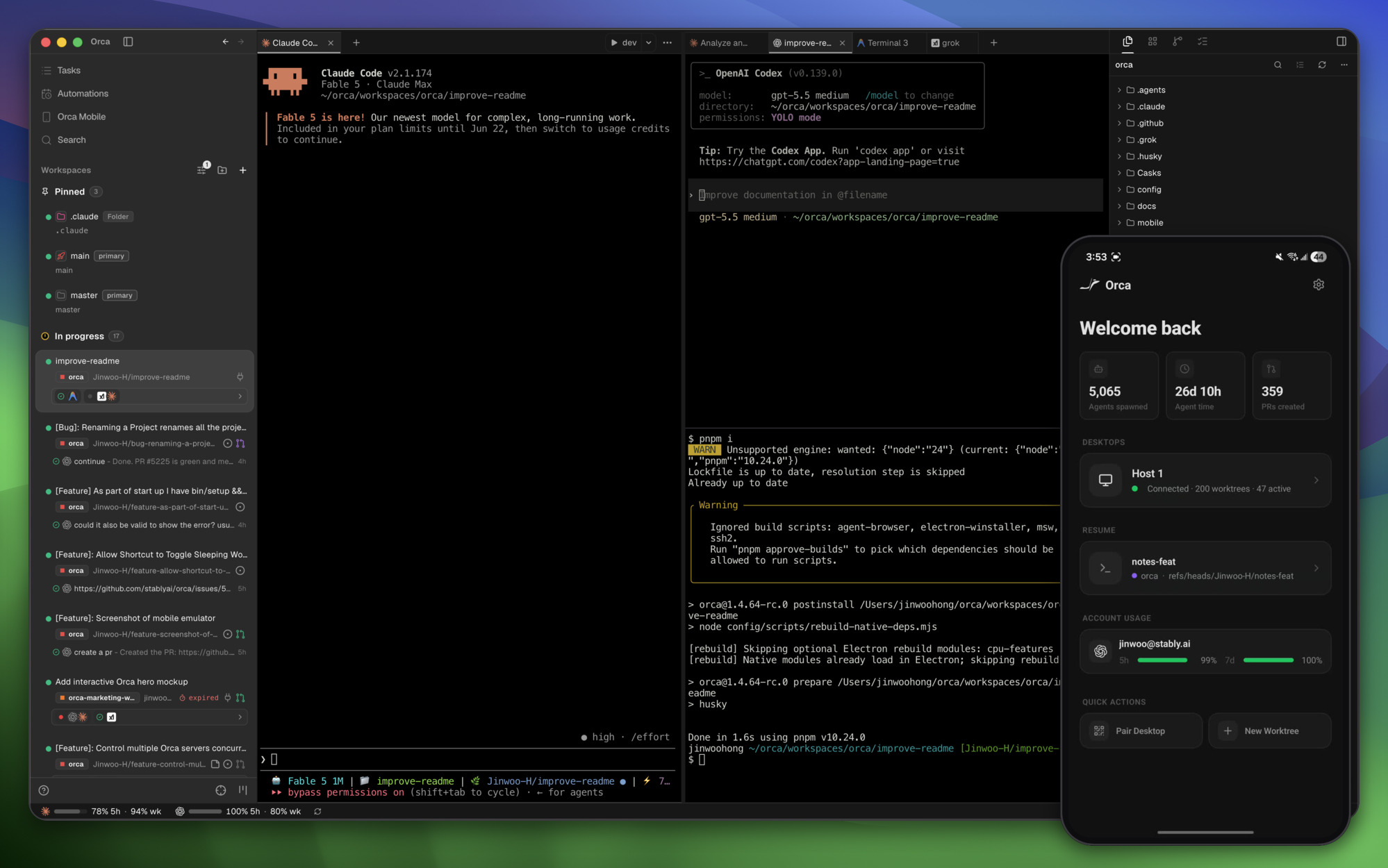
An unofficial Unraid template and Docker image for Orca
(source), Stably's open-source app for
running coding agents such as Claude Code and Codex side by side, each in its own
git worktree. The container runs orca serve, Orca's headless runtime, so the
agents, worktrees and terminals live on your server while the Orca desktop app,
the browser client or the Orca phone app connect to it. This project is not
affiliated with Stably.
The image is rebuilt whenever Orca publishes a release, because Orca clients and servers need matching versions to talk to each other.
What this image adds to Orca
- Starts
orca serveas Unraid's usual 99:100 account and prints the pairing link in the container log. - Installs agent CLIs by name, for example
claude codex omp, into the Data folder so they survive updates. - Clones a list of GitHub repositories into a Projects folder and adds them to Orca.
- Offers bash, zsh with optional Oh My Zsh, or fish for the terminals, plus tmux.
- Works with Unraid's Use Tailscale switch, so any device on your tailnet can pair.
- Can hand the agents the Docker or libvirt socket, so they can run their own containers and VMs.
Getting started
Install the template. Until it is in Community Apps, copy it onto the flash drive from the Unraid terminal:
curl -fsSL -o /boot/config/plugins/dockerMan/templates-user/my-Orca.xml \
  https://raw.githubusercontent.com/OriginalByteMe/unraid-orca/main/templates/orca.xml
Then on the Docker tab choose Add Container and pick Orca from the user templates.
Choose how your devices reach it. Turn on Use Tailscale and leave Pairing address empty (see Tailscale), or set Pairing address to the server's LAN or Tailscale IP.
Point Projects at your code. The default is a folder inside appdata; any share works.
List your repositories. Put them under Repositories as
owner/name, and fill in GitHub token if any are private. They are cloned and added to Orca on the first start, so your projects are waiting when you pair.Pick your agents and shell, for example
claude codexunder Agents, andzshwith Oh My Zsh set totrue.Apply and pair. Open the container's log; Orca prints a Pairing URL and a Browser URL. In the Orca desktop app go to Settings → Remote Orca Servers → Add Server and paste the pairing URL, or open the browser URL. For the phone app, add
--mobile-pairingunder Extra serve arguments; the log then prints a mobile pairing link and QR code instead.Log in to each agent once. Open the container's Console and run, for example,
claudeand then/login, orcodex login --device-auth. Logins are kept in the Data folder, so updates don't log you out.
Tips
- Get your repositories in early. Fill in Repositories before the first
start. Adding one later and applying clones only the new one; existing clones
are never touched or deleted. You can also
git cloneinto/projectsfrom the Console. - Use
owner/nameor HTTPS URLs with a GitHub token. The token is set up for both git andgh, so agents can push and open pull requests. SSH URLs need a key in~/.ssh(in the Data folder) and github.com inknown_hosts; runningssh -T git@github.comonce from the Console adds it. - Set Git user name and email in the advanced view, so the agents' commits carry your name.
- Keep Data and Projects on a fast pool. Worktrees,
node_modulesand agent logs are lots of small files, which a cache pool or SSD handles far better than the parity array. - Cap its memory with
--memory=8gunder Extra Parameters, so one runaway build can't starve the rest of the server. - Turn off key expiry for the
orcamachine in the Tailscale admin console, or it drops off your tailnet after 180 days.
Settings
| Setting | Variable | What it does |
|---|---|---|
| Orca port | 6768 | Port the clients connect to |
| Data | /home/orca |
State, pairing keys, agent logins, shell settings and worktrees |
| Projects | /projects |
Your repositories. Open or clone projects here from Orca; point it at any share |
| Pairing address | ORCA_PAIRING_ADDRESS |
Address clients dial. Empty means the container's Tailscale IP |
| GitHub token | GH_TOKEN |
Used by git and gh for clones, pushes and pull requests |
| Repositories | GIT_REPOS |
Space-separated owner/name or clone URLs, cloned once into /projects and added to Orca |
| Agents | AGENTS |
Agent CLIs installed once into the Data folder; they update themselves from there. See the list below |
| Shell | SHELL |
bash, zsh or fish for Orca's terminals and the console. tmux is installed too |
| Oh My Zsh | OH_MY_ZSH |
true installs Oh My Zsh into the Data folder on the next start, keeping an existing .zshrc as .zshrc.pre-oh-my-zsh |
| Git user name / email | GIT_USER_NAME, GIT_USER_EMAIL |
Identity on the agents' commits |
| Docker socket | /var/run/docker.sock |
Off unless you fill it in. See below |
| libvirt socket | /var/run/libvirt/libvirt-sock |
Off unless you fill it in. See below |
| Extra serve arguments | ORCA_EXTRA_ARGS |
Extra flags for orca serve |
| PUID / PGID | PUID, PGID |
Account the agents run as, 99:100 by default like other Unraid apps |
The agents run as that unprivileged account. The Console button drops you into
its shell too; use sh instead of bash if you need root inside the container.
Agents
Agents takes names from
Orca's supported agents, for
example omp claude codex. Each one is installed from its vendor's official npm
package; any other word is installed as an npm package of that name. Node and
Bun are both in the image, so Bun-based CLIs such as omp run too.
| Name | npm package |
|---|---|
amp |
@ampcode/cli |
auggie |
@augmentcode/auggie |
autohand |
autohand-cli |
claude |
@anthropic-ai/claude-code |
cline |
cline |
codebuddy |
@tencent-ai/codebuddy-code |
codebuff |
codebuff |
codex |
@openai/codex |
command-code |
command-code |
continue |
@continuedev/cli |
copilot |
@github/copilot |
crush |
@charmland/crush |
droid |
droid |
freebuff |
freebuff |
gemini |
@google/gemini-cli |
kilo |
@kilocode/cli |
kimi |
@moonshot-ai/kimi-code |
minimax |
@minimax-ai/code |
omp |
@oh-my-pi/pi-coding-agent |
openclaw |
openclaw |
opencode |
opencode-ai |
pi |
@earendil-works/pi-coding-agent |
qwen |
@qwen-code/qwen-code |
The rest of Orca's list (Aider, Ante, Antigravity, Cursor CLI, DeepSeek Harness, Devin, Goose, Grok, Hermes, Kiro, Mistral Vibe, Muse, Prime Agent, Rovo Dev, Trae and ZCode) has no npm package its vendor documents. Install those from the console following the vendor's instructions; most install into your home folder, which is the Data folder, so they survive updates.
Docker and VM access
Fill in the Docker socket path to let agents run docker, for example to
give each agent its own sandbox container through an Orca
per-workspace environment recipe.
Fill in the libvirt socket path to let them start and manage VMs with
virsh, for recipes that need another operating system.
Either socket gives the agents root-level control of the whole server: anything
that can start a container or define a VM can mount your shares, read every
other app's data, or stop other containers and VMs. Only map them when you trust
every agent and prompt that runs in this container. Containers the agents start
are not limited by this container's memory settings, so give them --memory
caps yourself.
Tailscale
The template is set up for Unraid's Use Tailscale switch (Unraid 7 or later):
the hostname defaults to orca and Tailscale's state lives in the Data folder.
Turn it on, apply, and approve the container from the link in its log. With the
pairing address left empty, Orca advertises the container's Tailscale IP, so any
device on your tailnet can pair.
Updating
Unraid shows an update on the Docker tab when a new image is out. Update the Orca desktop and phone apps at about the same time; a client and server too far apart report an incompatible protocol version.
Updating or restarting the container ends every running terminal and agent in it; their history and worktrees stay in the Data folder. Do it between tasks.
Building it yourself
docker build --build-arg ORCA_VERSION=1.4.237 -t unraid-orca .
Every push runs .github/workflows/build.yml, which builds the image and checks
that it refuses to start without a pairing address, honours PUID and PGID, can
use a mapped Docker socket, installs agents by name (omp running on Bun), serves
the web client, clones and registers a repository in /projects, and opens
Orca terminals in zsh with Oh My Zsh loaded. Images are published from a manual
run with publish ticked, or by the schedule when Orca has a release this
repository has not built yet.
Credits
Orca is made by Stably and is MIT licensed;
the icon and the images in screenshots/ are Orca's, Copyright (c) 2026
Lovecast Inc., used under
Orca's MIT license. The
Docker approach borrows from
ivan-cavero/Orca-Headless. This
repository is MIT licensed.
Media gallery
1 / 2Requirements
Categories
Related apps
Explore more like this
Explore allDetails
ghcr.io/originalbyteme/unraid-orca:latestRuntime arguments
- Web UI
http://[IP]:[PORT:6768]/web-index.html- Network
bridge- Shell
bash- Privileged
- false
Template configuration
Port the Orca clients connect to.
- Target
- 6768
- Default
- 6768
- Value
- 6768
Orca's state, pairing keys, agent logins, shell settings and worktrees.
- Target
- /home/orca
- Default
- /mnt/user/appdata/orca
- Value
- /mnt/user/appdata/orca
Your repositories, at /projects in the container. Open or clone projects here from Orca. Point it at any share.
- Target
- /projects
- Default
- /mnt/user/appdata/orca/projects
- Value
- /mnt/user/appdata/orca/projects
Address the clients dial: this server's LAN IP, Tailscale IP or hostname. Leave empty when Use Tailscale is on and the container's own Tailscale IP is used.
- Target
- ORCA_PAIRING_ADDRESS
Optional. A GitHub token git and gh use for cloning, pushing and pull requests.
- Target
- GH_TOKEN
Optional. Space-separated owner/name (GitHub) or clone URLs. Each is cloned once into /projects and added to Orca.
- Target
- GIT_REPOS
Space-separated agent CLIs installed once into the Data folder: amp, auggie, autohand, claude, cline, codebuddy, codebuff, codex, command-code, continue, copilot, crush, droid, freebuff, gemini, kilo, kimi, minimax, omp, openclaw, opencode, pi, qwen, or any npm package name. Log in to each agent once from the container console.
- Target
- AGENTS
- Default
- claude codex
- Value
- claude codex
Shell for Orca's terminals and the console. tmux is installed as well.
- Target
- SHELL
- Default
- bash|zsh|fish
- Value
- bash
Install Oh My Zsh into the Data folder on the next start. Used when Shell is zsh.
- Target
- OH_MY_ZSH
- Default
- false|true
- Value
- false
Optional. Name on the agents' commits.
- Target
- GIT_USER_NAME
Optional. Email on the agents' commits.
- Target
- GIT_USER_EMAIL
Optional. Enter /var/run/docker.sock to let agents create and manage containers, for example a sandbox per agent. This gives the agents root-level control of this server.
- Target
- /var/run/docker.sock
Optional. Enter /var/run/libvirt/libvirt-sock to let agents start and manage VMs with virsh. This gives the agents root-level control of this server.
- Target
- /var/run/libvirt/libvirt-sock
Optional flags for orca serve, for example --mobile-pairing to print a phone pairing link.
- Target
- ORCA_EXTRA_ARGS
User ID the agents run as.
- Default
- 99
- Value
- 99
Group ID the agents run as.
- Default
- 100
- Value
- 100