
All apps · 0 apps

OPNsense-Exporter
Docker app from Florian Dambrine's Repository
Overview
Readme
View on GitHubOPNsense Prometheus Exporter
The missing OPNsense exporter for Prometheus



Table of Contents
About
Focusing specifically on OPNsense, this exporter provides metrics about OPNsense, the plugin ecosystem and the services running on the firewall. However, it's recommended to use it with node_exporter. You can combine the metrics from both exporters in Grafana and in your Alert System to create a dashboard that displays the full picture of your system.
While the node_exporter must be installed on the firewall itself, this exporter can be installed on any machine that has network access to the OPNsense API.
Grafana Dashboard
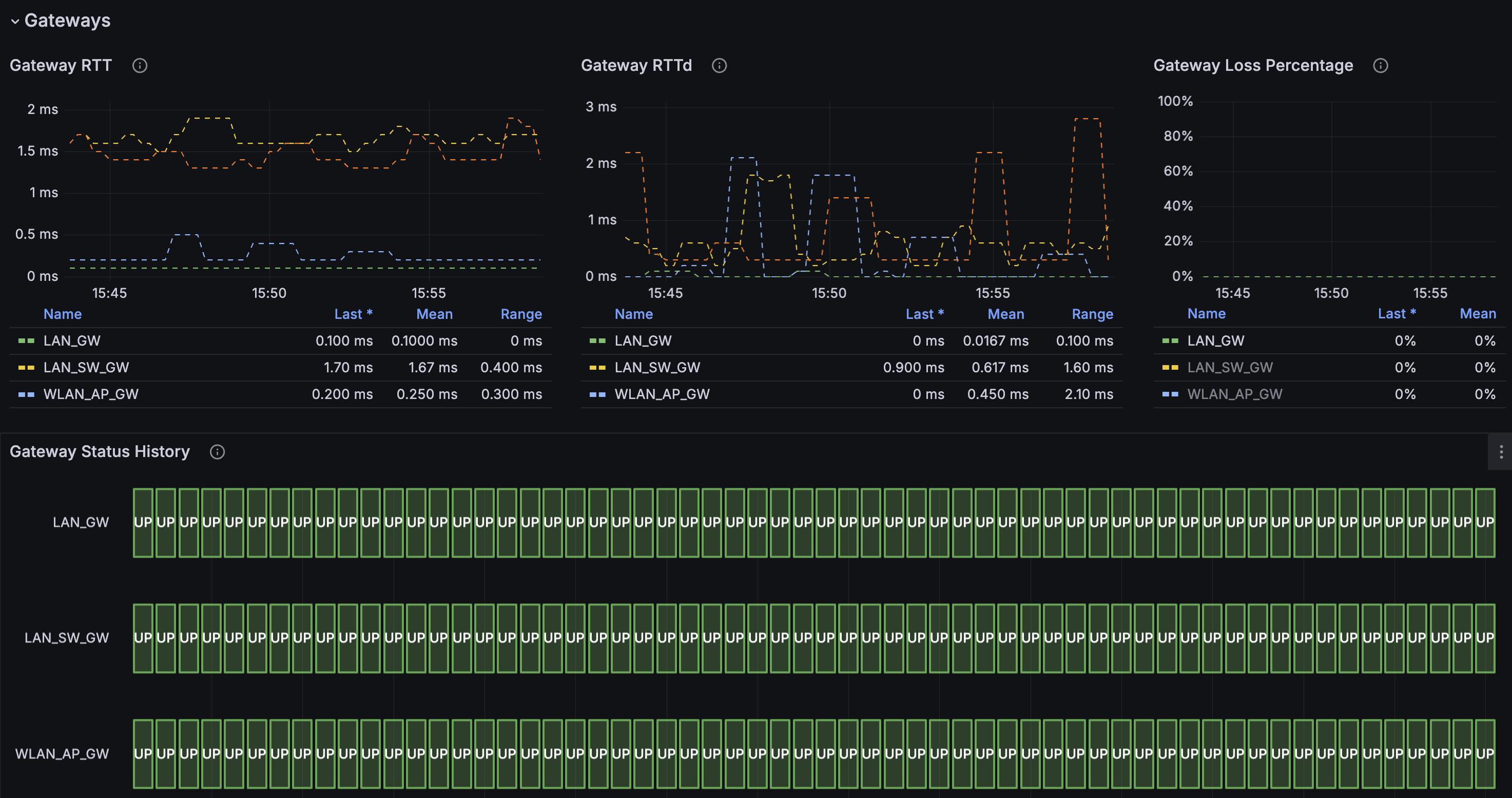
Finaly we have a Grafana dashboard to visualize the data from this exporter. The dashboard can be imported into Grafana by using the id 21113 or by importing the deploy/grafana/dashboard-v1.json file. Please give a review to the dashboard if you like our work. Thank you!
OPNsense user permissions
| Type | Name |
|---|---|
| GUI | Diagnostics: ARP Table |
| GUI | Diagnostics: Firewall statistics |
| GUI | Diagnostics: Netstat |
| GUI | Reporting: Traffic |
| GUI | Services: Unbound (MVC) |
| GUI | Status: DHCP leases |
| GUI | Status: DNS Overview |
| GUI | Status: IPsec |
| GUI | Status: OpenVPN |
| GUI | Status: Services |
| GUI | System: Firmware |
| GUI | System: Gateways |
| GUI | System: Settings: Cron |
| GUI | System: Status |
| GUI | VPN: OpenVPN: Instances |
| GUI | VPN: WireGuard |
| GUI | Services: DHCP: Kea(v4) |
| GUI | Services: DHCP: Kea(v6) |
Note: The temperature collector calls
api/diagnostics/system/systemTemperature. On current OPNsense releases this URL is not covered by a dedicated GUI privilege, so a least privilege API user may receive403for it. Grant theLobby: Dashboardprivilege or disable the collector with--exporter.disable-temperatureif that happens. Boxes without thermal sensors (most VMs) and releases without the endpoint simply report no temperature metrics.
OPNsense settings
The exporter requires that the following OPNsense settings be enabled:
- Unbound collector:
- Unbound DNS > Advanced > Extended Statistics
Usage
Docker
The following command will start the exporter and expose the metrics on port 8080. Replace ops.example.com, your-api-key, your-api-secret and instance1 with your own values.
docker run -p 8080:8080 ghcr.io/athennamind/opnsense-exporter:latest \
      /opnsense-exporter \
      --log.level=debug \
      --log.format=json \
      --opnsense.protocol=https \
      --opnsense.address=ops.example.com \
      --opnsense.api-key=your-api-key \
      --opnsense.api-secret=your-api-secret \
      --exporter.instance-label=instance1 \
      --web.listen-address=:8080
TODO: Add example how to add custom CA certificates to the container.
Docker Compose
- With environment variables
version: '3'
services:
  opnsense-exporter:
    image: ghcr.io/athennamind/opnsense-exporter:latest
    container_name: opensense-exporter
    restart: always
    command:
      - --opnsense.protocol=https
      - --opnsense.address=ops.example.com
      - --exporter.instance-label=instance1
      - --web.listen-address=:8080
      #- --exporter.disable-arp-table
      #- --exporter.disable-cron-table
      #- ....
    environment:
      OPNSENSE_EXPORTER_OPS_API_KEY: "<your-key>"
      OPNSENSE_EXPORTER_OPS_API_SECRET: "<your-secret>"
    ports:
      - "8080:8080"
- With docker secrets
Create the secrets
echo "<your-key>" | docker secret create opnsense-api-key -
echo "<your-secret>" | docker secret create opnsense-api-secret -
Run the compose
version: '3'
services:
  opnsense-exporter:
    image: ghcr.io/athennamind/opnsense-exporter:latest
    container_name: opensense-exporter
    restart: always
    command:
      - --opnsense.protocol=https
      - --opnsense.address=ops.example.com
      - --exporter.instance-label=instance1
      - --web.listen-address=:8080
      #- --exporter.disable-arp-table
      #- --exporter.disable-cron-table
      #- ....
    environment:
      OPS_API_KEY_FILE: /run/secrets/opnsense-api-key
      OPS_API_SECRET_FILE: /run/secrets/opnsense-api-secret
    secrets:
      - opnsense-api-key
      - opnsense-api-secret
    ports:
      - "8080:8080"
Systemd
TODO
Configuration
The configuration of this tool is following the standard alongside the Prometheus ecosystem. This exporter can be configured using command-line flags or environment variables.
OPNsense API
To configure where the connection to OPNsense is, use the following flags:
--opnsense.protocol- The protocol to use to connect to the OPNsense API. Can be eitherhttporhttps.--opnsense.address- The hostname or IP address of the OPNsense API.--opnsense.api-key- The API key to use to connect to the OPNsense API.--opnsense.api-secret- The API secret to use to connect to the OPNsense API--exporter.instance-label- Label to use to identify the instance in every metric. If you have multiple instances of the exporter, you can differentiate them by using different value in this flag, that represents the instance of the target OPNsense. You must not start more then 1 instance of the exporter with the same value in this flag.
SSL/TLS
For self-signed certificates, the CA certificate must be added to the system trust store.
If you want to disable TLS certificate verification, you can use the following flag:
--opnsense.insecure- Disable TLS certificate verification. Defaults tofalse.
Exporters
Gathering metrics for specific subsystems can be disabled with the following flags:
--exporter.disable-arp-table- Disable the scraping of ARP table. Defaults tofalse.--exporter.disable-cron-table- Disable the scraping of Cron tasks. Defaults tofalse.--exporter.disable-wireguard- Disable the scraping of Wireguard service. Defaults tofalse.--exporter.disable-unbound- Disable the scraping of Unbound service. Defaults tofalse.--exporter.disable-openvpn- Disable the scraping of OpenVPN service. Defaults tofalse.--exporter.disable-ipsec- Disable the scraping of IPsec service. Defaults tofalse.--exporter.disable-firewall- Disable the scraping of Firewall (pf) metrics. Defaults tofalse.--exporter.disable-firmware- Disable the scraping of Firmware infos. Defaults tofalse.--exporter.disable-kea-dhcpv4- Disable the scraping of Kea DHCPv4 leases. Defaults tofalse.--exporter.disable-kea-dhcpv6- Disable the scraping of Kea DHCPv6 leases. Defaults tofalse.--exporter.disable-temperature- Disable the scraping of temperature sensors. Defaults tofalse.
To disable the exporter metrics itself use the following flag:
--web.disable-exporter-metrics- Exclude metrics about the exporter itself (promhttp_*, process_*, go_*). Defaults tofalse.
All Options
Flags:
  -h, --[no-]help                Show context-sensitive help (also try --help-long and --help-man).
      --[no-]exporter.disable-arp-table
                                 Disable the scraping of the ARP table ($OPNSENSE_EXPORTER_DISABLE_ARP_TABLE)
      --[no-]exporter.disable-cron-table
                                 Disable the scraping of the cron table ($OPNSENSE_EXPORTER_DISABLE_CRON_TABLE)
      --[no-]exporter.disable-wireguard
                                 Disable the scraping of Wireguard service ($OPNSENSE_EXPORTER_DISABLE_WIREGUARD)
      --[no-]exporter.disable-unbound
                                 Disable the scraping of Unbound service ($OPNSENSE_EXPORTER_DISABLE_UNBOUND)
      --[no-]exporter.disable-openvpn
                                 Disable the scraping of OpenVPN service ($OPNSENSE_EXPORTER_DISABLE_OPENVPN)
      --[no-]exporter.disable-ipsec
                                 Disable the scraping of IPsec service ($OPNSENSE_EXPORTER_DISABLE_IPSEC)
      --[no-]exporter.disable-firewall
                                 Disable the scraping of the firewall (pf) metrics ($OPNSENSE_EXPORTER_DISABLE_FIREWALL)
      --[no-]exporter.disable-firmware
                                 Disable the scraping of the firmware metrics ($OPNSENSE_EXPORTER_DISABLE_FIRMWARE)
      --[no-]exporter.disable-kea-dhcpv4
                                 Disable the scraping of Kea DHCPv4 leases ($OPNSENSE_EXPORTER_DISABLE_KEADHCPV4)
      --[no-]exporter.disable-kea-dhcpv6
                                 Disable the scraping of Kea DHCPv6 leases ($OPNSENSE_EXPORTER_DISABLE_KEADHCPV6)
      --[no-]exporter.disable-temperature
                                 Disable the scraping of the temperature sensors ($OPNSENSE_EXPORTER_DISABLE_TEMPERATURE)
      --web.telemetry-path="/metrics"
                                 Path under which to expose metrics.
      --[no-]web.disable-exporter-metrics
                                 Exclude metrics about the exporter itself (promhttp_*, process_*, go_*).
                                 ($OPNSENSE_EXPORTER_DISABLE_EXPORTER_METRICS)
      --runtime.gomaxprocs=2     The target number of CPUs that the Go runtime will run on (GOMAXPROCS) ($GOMAXPROCS)
      --exporter.instance-label=EXPORTER.INSTANCE-LABEL
                                 Label to use to identify the instance in every metric. If you have multiple instances of the
                                 exporter, you can differentiate them by using different value in this flag, that represents
                                 the instance of the target OPNsense. ($OPNSENSE_EXPORTER_INSTANCE_LABEL)
      --[no-]web.systemd-socket  Use systemd socket activation listeners instead of port listeners (Linux only).
      --web.listen-address=:8080 ...
                                 Addresses on which to expose metrics and web interface. Repeatable for multiple addresses.
                                 Examples: `:9100` or `[::1]:9100` for http, `vsock://:9100` for vsock
      --web.config.file=""       Path to configuration file that can enable TLS or authentication. See:
                                 https://github.com/prometheus/exporter-toolkit/blob/master/docs/web-configuration.md
      --opnsense.protocol=OPNSENSE.PROTOCOL
                                 Protocol to use to connect to OPNsense API. One of: [http, https]
                                 ($OPNSENSE_EXPORTER_OPS_PROTOCOL)
      --opnsense.address=OPNSENSE.ADDRESS
                                 Hostname or IP address of OPNsense API ($OPNSENSE_EXPORTER_OPS_API)
      --opnsense.api-key=""      API key to use to connect to OPNsense API. This flag/ENV or the OPS_API_KEY_FILE my be set.
                                 ($OPNSENSE_EXPORTER_OPS_API_KEY)
      --opnsense.api-secret=""   API secret to use to connect to OPNsense API. This flag/ENV or the OPS_API_SECRET_FILE my be
                                 set. ($OPNSENSE_EXPORTER_OPS_API_SECRET)
      --[no-]opnsense.insecure   Disable TLS certificate verification ($OPNSENSE_EXPORTER_OPS_INSECURE)
      --log.level=info           Only log messages with the given severity or above. One of: [debug, info, warn, error]
      --log.format=logfmt        Output format of log messages. One of: [logfmt, json]
Categories
Related apps
Explore more like this
Explore allDetails
ghcr.io/athennamind/opnsense-exporterRuntime arguments
- Web UI
http://[IP]:[PORT:8080]/metrics- Network
bridge- Privileged
- false
Template configuration
Port on which the /metrics endpoint is exposed for Prometheus scraping.
- Target
- 8080
- Default
- 8080
- Value
- 8080
Protocol used to reach the OPNsense API. Use 'https' (recommended) or 'http'.
- Target
- OPNSENSE_EXPORTER_OPS_PROTOCOL
- Default
- https
- Value
- https
Hostname or IP address of the OPNsense firewall (e.g. 192.168.1.1 or opnsense.lan). Do NOT include the protocol prefix.
- Target
- OPNSENSE_EXPORTER_OPS_API
API key generated for the read-only OPNsense user (System > Access > Users).
- Target
- OPNSENSE_EXPORTER_OPS_API_KEY
API secret generated for the read-only OPNsense user (System > Access > Users).
- Target
- OPNSENSE_EXPORTER_OPS_API_SECRET
Set to 'true' to disable TLS certificate verification (useful for self-signed certs). Not recommended in production.
- Target
- OPNSENSE_EXPORTER_OPS_INSECURE
- Default
- false
- Value
- false
Label added to all metrics to identify this OPNsense instance. Useful when scraping multiple firewalls.
- Target
- OPNSENSE_EXPORTER_INSTANCE_LABEL
- Default
- opnsense
- Value
- opnsense
Log verbosity. Options: debug, info, warn, error.
- Target
- OPNSENSE_EXPORTER_LOG_LEVEL
- Default
- info
- Value
- info
Set to 'true' to disable ARP table metric collection.
- Target
- OPNSENSE_EXPORTER_DISABLE_ARP_TABLE
- Default
- false
- Value
- false
Set to 'true' to disable Unbound DNS metric collection.
- Target
- OPNSENSE_EXPORTER_DISABLE_UNBOUND
- Default
- false
- Value
- false
Set to 'true' to disable WireGuard VPN metric collection.
- Target
- OPNSENSE_EXPORTER_DISABLE_WIREGUARD
- Default
- false
- Value
- false
Set to 'true' to disable OpenVPN metric collection.
- Target
- OPNSENSE_EXPORTER_DISABLE_OPENVPN
- Default
- false
- Value
- false
Set to 'true' to disable IPsec VPN metric collection.
- Target
- OPNSENSE_EXPORTER_DISABLE_IPSEC
- Default
- false
- Value
- false
Set to 'true' to disable firewall statistics metric collection.
- Target
- OPNSENSE_EXPORTER_DISABLE_FIREWALL
- Default
- false
- Value
- false
Set to 'true' to disable firmware information metric collection.
- Target
- OPNSENSE_EXPORTER_DISABLE_FIRMWARE
- Default
- false
- Value
- false
Set to 'true' to disable cron task metric collection.
- Target
- OPNSENSE_EXPORTER_DISABLE_CRON_TABLE
- Default
- false
- Value
- false
Set to 'true' to exclude internal Go/process metrics from the /metrics output.
- Target
- OPNSENSE_EXPORTER_DISABLE_EXPORTER_METRICS
- Default
- false
- Value
- false