
All apps · 0 apps

OpenWebRX-Plus
Docker app from SeattleBandit's Repository
Overview
Readme
View on GitHubimzenreally Unraid Community Applications
Community Applications templates maintained by imzenreally.
Available applications
OpenWebRX+
OpenWebRX+ is an actively maintained, browser-based, multi-user software-defined radio receiver. The template packages the upstream slechev/openwebrxplus-softmbe image without rebuilding it.
Features include:
- Live spectrum and waterfall in a modern browser
- Browser audio, tuning, scanning, bookmarks, and recording
- AM, FM, SSB, CW, and other analog modes
- Digital decoders supported by OpenWebRX+
- SoftMBE digital voice support for DMR, D-Star, YSF, NXDN, FreeDV, and DRM
- Support for multiple SDR families through native drivers and SoapySDR
OpenWebRX+ defaults
| Setting | Default |
|---|---|
| Container image | slechev/openwebrxplus-softmbe:latest |
| Web interface | Host port 8073 to container port 8073 |
| Configuration | /mnt/user/appdata/openwebrxplus/etc to /etc/openwebrx |
| Application data | /mnt/user/appdata/openwebrxplus/var to /var/lib/openwebrx |
| USB access | /dev/bus/usb |
| Temporary files | In-memory /tmp tmpfs |
| Privileged mode | Disabled |
| Network mode | Bridge |
The installer requires an administrator password. The container creates the configured administrator account on first start if it does not already exist.
OpenWebRX+ hardware and security notes
A physical SDR normally cannot be opened by two containers at once. Stop any ADS-B, radio, or feeder container using the dongle before assigning it to OpenWebRX+, or connect a second SDR dedicated to OpenWebRX+.
The default template passes the complete /dev/bus/usb tree because USB bus and device numbers can change after reconnection or reboot. This is broader than mapping one stable device path. Network SDRs may not need the USB mapping.
Keep the receiver on a trusted LAN or VPN unless you intentionally configure accounts, HTTPS, and a hardened reverse proxy for public multi-user access.
Template support: repository issues
Upstream resources:
World Monitor AIO
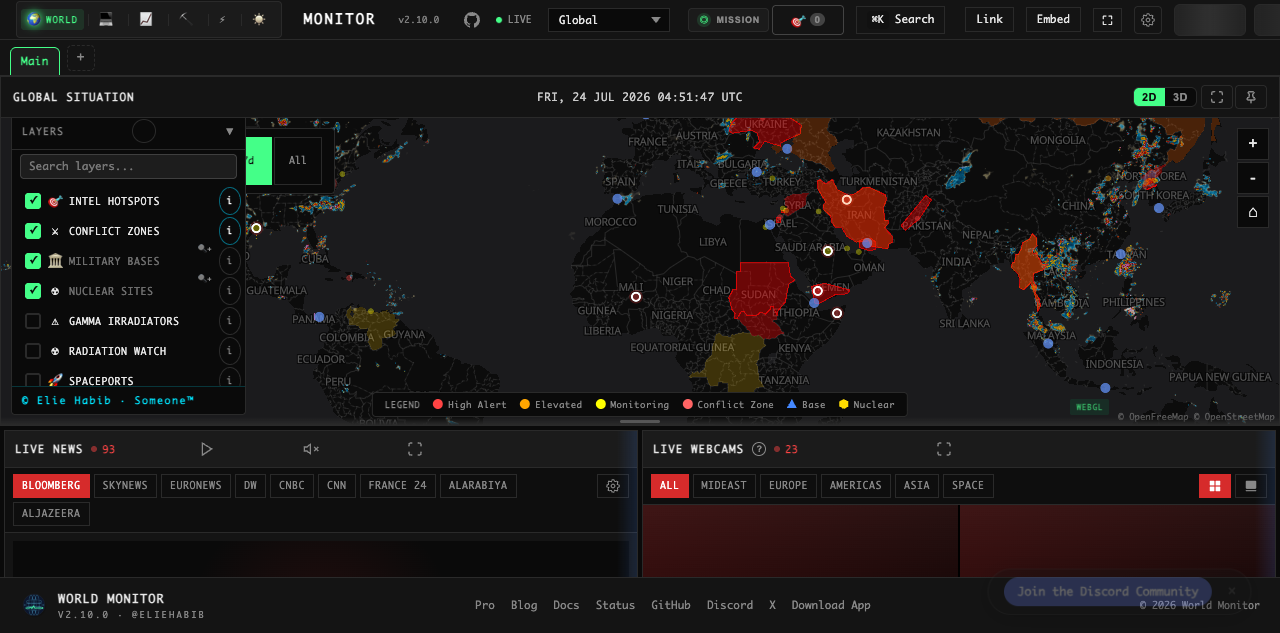
World Monitor AIO is an unofficial, all-in-one Unraid package for World Monitor, a real-time global intelligence dashboard.
The container includes:
- World Monitor frontend
- Local Node API
- Authenticated Valkey cache
- Loopback-only Redis-compatible REST adapter
- Optional loopback-only AIS relay
- Scheduled data seeders
Only the dashboard HTTP port is published. It does not require privileged mode, host networking, the Docker socket, host devices, or access to Unraid storage outside its dedicated appdata directory.
Beta status
This listing has passed manual runtime testing and has been submitted to Community Applications for review. The beta image is published at:
ghcr.io/imzenreally/worldmonitor-unraid-aio:beta
Complete source, build workflow, tests, security notes, and the manual installation guide:
- World Monitor AIO source
- Unraid installation and operations guide
- Getting third-party API keys
- Packaging support
Important security note
World Monitor does not provide built-in user authentication. Keep it accessible only on a trusted LAN or VPN unless it is protected by an authenticated reverse proxy. Do not expose its HTTP port directly to the public internet.
Persistent data
The template maps one dedicated appdata directory to /config. It contains generated internal credentials, Valkey data, and seeder state. No API key is required to start; optional integrations are available as masked Advanced variables.
Validation
Run the repository validator before committing:
python3 scripts/validate.py
GitHub Actions runs the same validation on every push and pull request.
License
The template metadata in this repository is MIT licensed. OpenWebRX+, SoftMBE, World Monitor, and the packaged container images retain their respective upstream licenses. World Monitor and its derivative AIO image are distributed under AGPL-3.0-only; complete corresponding source is linked above.
Requirements
Categories
Download Statistics
Related apps
Explore more like this
Explore allDetails
slechev/openwebrxplus-softmbe:latestRuntime arguments
- Web UI
http://[IP]:[PORT:8073]/- Network
bridge- Shell
bash- Privileged
- false
- Extra Params
--tmpfs /tmp:rw,nosuid,nodev,mode=1777
Template configuration
OpenWebRX+ browser interface. Change the host port if 8073 is already in use.
- Target
- 8073
- Default
- 8073
Persistent OpenWebRX+ configuration and user database.
- Target
- /etc/openwebrx
- Default
- /mnt/user/appdata/openwebrxplus/etc
Persistent bookmarks, recordings, decoder output, and runtime data.
- Target
- /var/lib/openwebrx
- Default
- /mnt/user/appdata/openwebrxplus/var
USB device tree used to access attached SDR hardware. Remove this mapping for a network-only SDR.
- Target
- /dev/bus/usb
- Default
- /dev/bus/usb
IANA time zone name, for example America/Los_Angeles.
- Target
- TZ
- Default
- America/Los_Angeles
Initial administrator username. The image creates this account on first start if it does not already exist.
- Target
- OPENWEBRX_ADMIN_USER
- Default
- admin
Initial administrator password. Required on first installation and masked in the Unraid form.
- Target
- OPENWEBRX_ADMIN_PASSWORD