

OpenTodo
Docker app from UnraidUser-0038593877's Repository
Overview
Readme
View on GitHub

OpenTodo
A to-do app that runs on your own server.
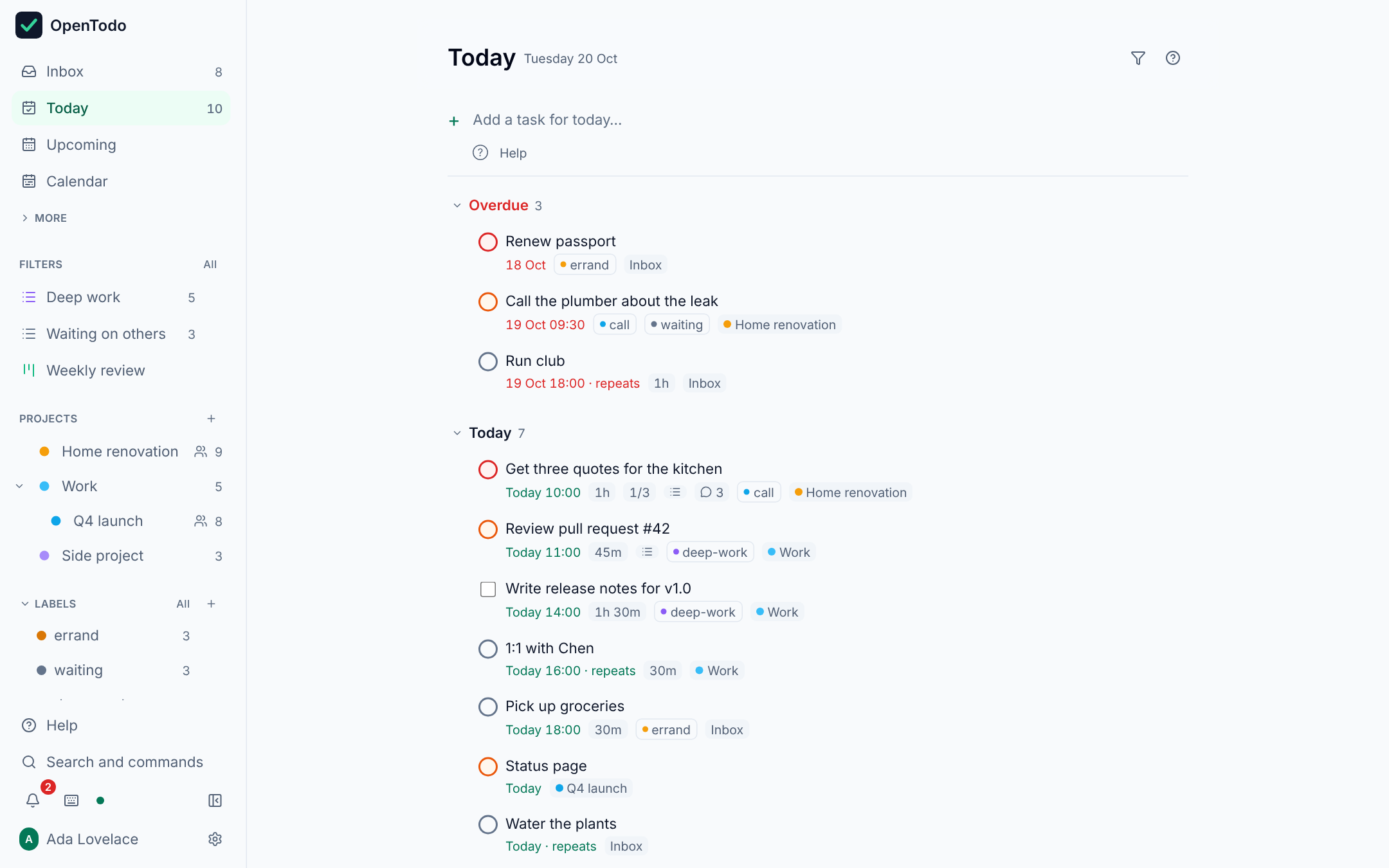
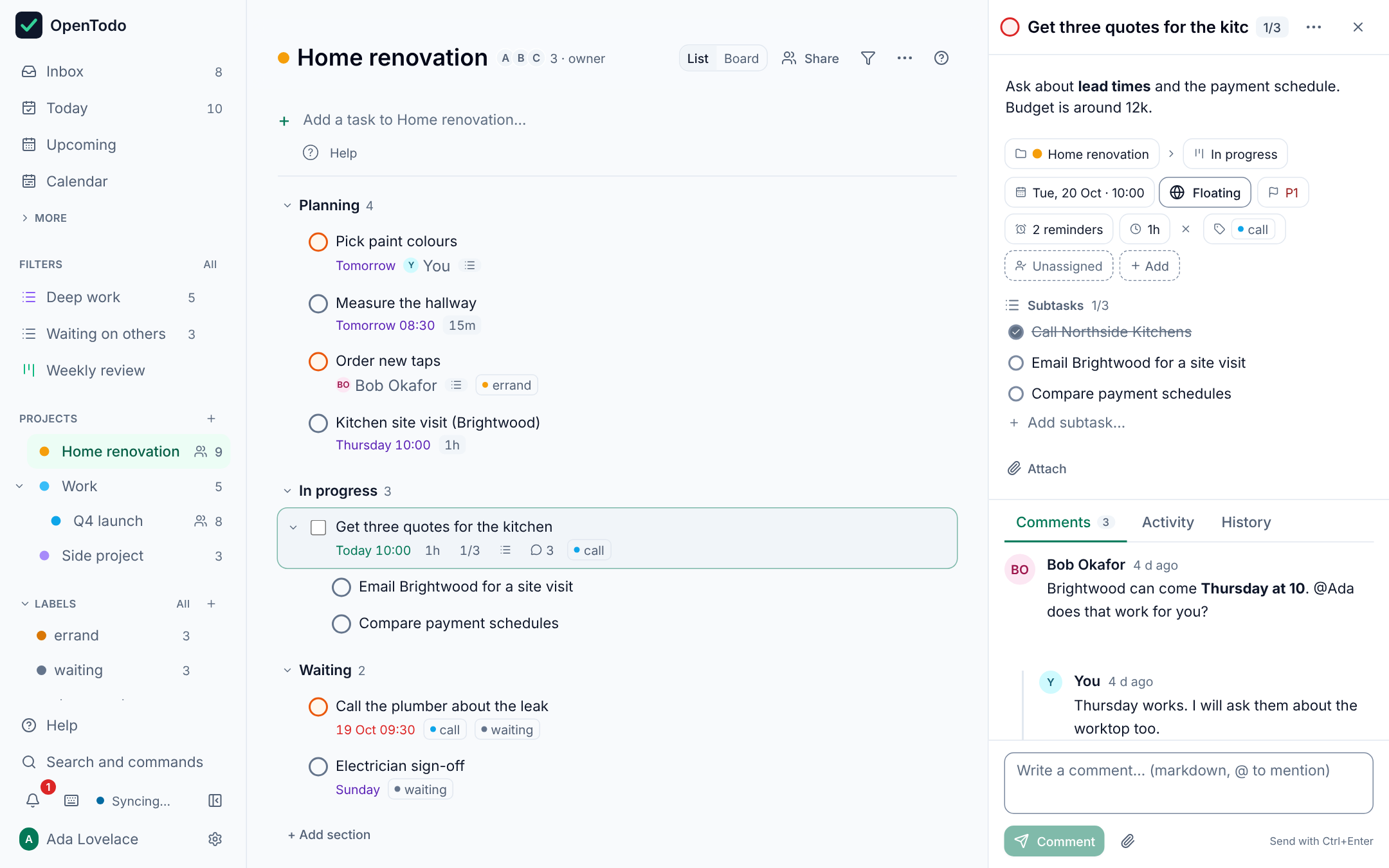
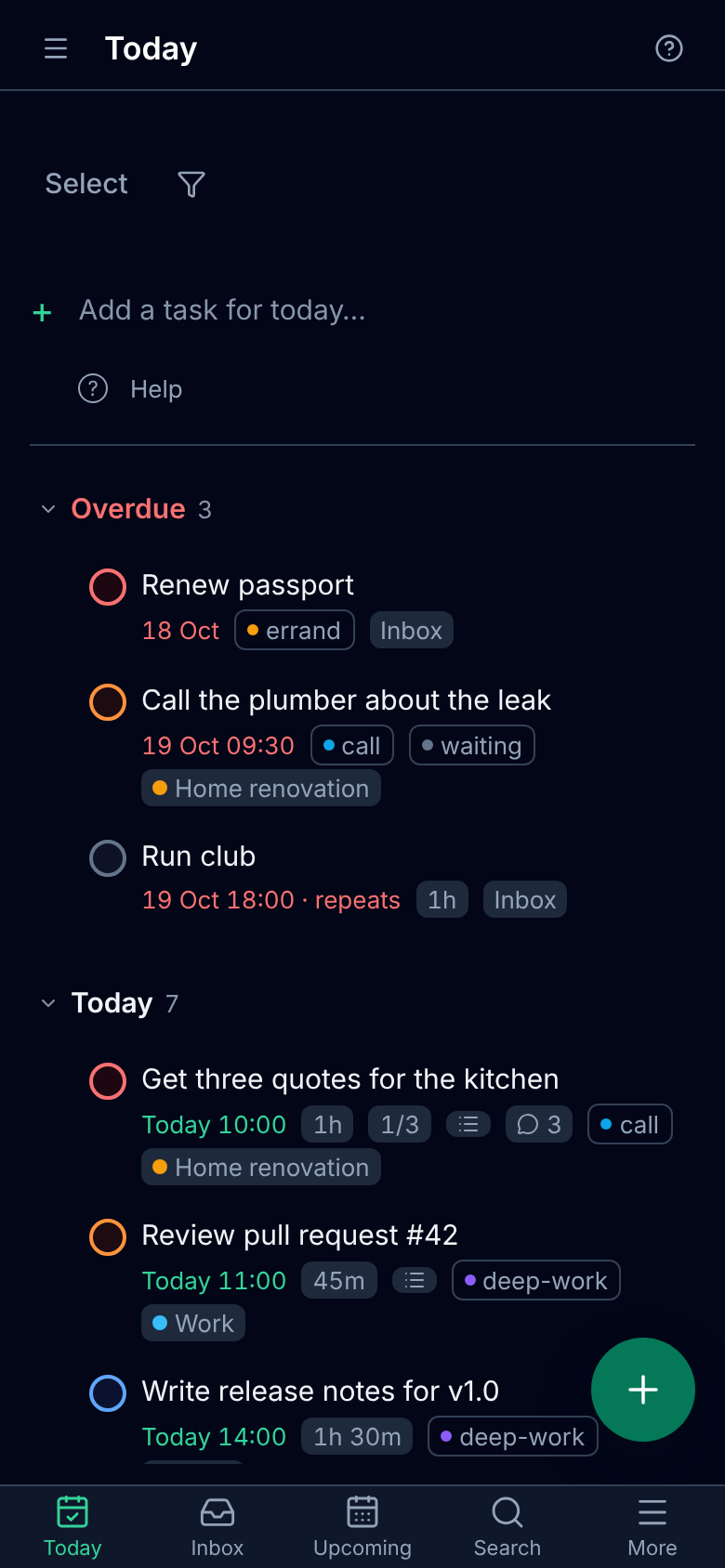
Plan your day, keep projects in order, set reminders and share lists with your family or your team. Works on your phone and your computer, even offline. No monthly plan per person, and your tasks stay with you.







Try the demo (no sign-up) · Install in 2 minutes · Read the docs · Website
If OpenTodo looks useful, a star on GitHub helps other people find it, and a coffee helps me keep building it.

Try it in 30 seconds
No install: open the demo and press Try the demo. You get a private copy with sample data, deleted after a few hours.
On your machine or server:
docker run -d -p 8080:8080 -v opentodo-data:/data ghcr.io/pixari/opentodo:stableOpen http://localhost:8080; the first visit creates your account. No configuration needed. Coolify, Unraid, Compose and plain binaries are in Quick start.
Questions, ideas and bug reports are welcome in issues.
Why OpenTodo
- No subscription, no lock-in. Free software under the AGPL. Nobody can paywall your task list or shut it down with the company.
- Works offline, on every device. Each phone and computer keeps a full copy of your data (local-first), so the app works with no connection at all. The server syncs, backs up and shares; it is never in the way of an edit.
- Your data, one folder. Everything lives in one
/datavolume around a single SQLite file. Export to JSON at any time, import it (or a CSV, or another app's export) on any instance, and schedule encrypted backups to disk, S3 or WebDAV. - Tiny footprint. One container, one static binary of about 23 MB with the web app inside, around 20 MB of memory when idle. Runs on a Raspberry Pi or the cheapest VPS. No database server, no Redis, no mandatory configuration.
- Private by design. No telemetry, no analytics, no phone-home, no third-party scripts or fonts. The server only contacts what you configure (see Privacy).
- Bring your own AI, if you want it. Plan and change tasks by talking to the assistant in the app (Anthropic, OpenAI, Gemini or a model on your own network), connect the assistant you already use over MCP, or let a coding agent drive the
otCLI. Off by default, every change recorded and undoable, no AI vendor built in. See Use AI with OpenTodo. - Keyboard-first.
qto capture,j/kto move,cto complete,1–4for priority,gtfor Today,?for the full list, and optional Vim keybindings. - Built in the open with specs. Every feature starts as an OpenSpec change under
openspec/, so behaviour is documented before it is built.
Status
OpenTodo is at 0.4: every feature on the roadmap is in, covered by automated tests, but some integrations still need real-world testing (CalDAV with specific apps, single sign-on providers, real phones). If you try it, tell us how it went in the call for testers.
How it's built: every feature starts as a written spec (OpenSpec), and much of the code was written with AI coding agents working from those specs. A strict CI checks every change: Go and web tests, spec validation, a phone-layout check in Chromium and WebKit, and accessibility checks. Everything is reviewed before it's merged, and the full history is public.
Features
The highlights: the app in six languages, quick add in plain language, projects with sections and boards, recurring tasks, reminders with push, filters and saved views, time blocking, shared projects with comments, CalDAV, webhooks, a REST API and CLI, passkeys, two-factor and single sign-on, optional end-to-end encryption.
Full feature list
Capture
- The app in your language: English, German, French, Spanish, Italian or Portuguese, picked once and synced to every device; dates, notifications and quick add follow it. The guide stays in English. Language · Translating
- Quick add from anywhere (
q), with the view's context as defaults: today in Today, the current project in a project. - Natural language in six languages, offline:
Call Sarah next Wed 3pm #work @call p1 +30msets the date, time, project, label, priority and estimate, with dismissible preview chips. English, German, French, Italian, Spanish and Portuguese. Syntax - Voice capture (opt-in per device): dictate into quick add with the microphone button or
Shift+V; "hashtag home priority two" becomes#home p2. Uses the browser's own speech recognition; the server never receives audio. Voice - Share sheet, bookmarklet and browser extension: send a page from the phone's share menu, any desktop browser or the Chromium/Firefox extension in
extension/to a prefilled capture screen. Works offline, holds no token. Capture - Email to task: forward a mail to your secret address (
todo+…@example.com) and it lands in the Inbox. Optional; the operator points OpenTodo at one IMAP mailbox. Email - Command line:
ot add "Call the plumber" --due tomorrow,ot today,--jsonfor scripts. CLI
Organisation and views
- Inbox, Today, Upcoming, Completed and projects with colours, nested to any depth, with rolled-up counts.
- Subtasks to any depth with
done/totalprogress; Tab and Shift+Tab indent and outdent. - Sections and Kanban board per project (
vtoggles list and board), drag and drop on mouse and touch, orShift+←/→. - Manual ordering by drag and drop or
Alt+↑/↓, convergent across devices. - Labels across projects with colours, a type-ahead picker (
L), per-label views and merging of duplicates. - Filters: one-line queries such as
@work & due <= tomorrow & p1, evaluated on the device, live and offline. Filters - Saved views and dashboards: pin a filter to the sidebar with live counts, choose grouping and sort, combine up to six views on one dashboard. Saving views
- Rich-text notes with headings, lists, check lists, links and Markdown shortcuts; edits from several devices or people merge character by character, offline too. Scripts and integrations keep reading the note as Markdown.
- Trash and history: restore deleted tasks and projects, browse each item's change history with "restore this value", empty the Trash for good; old items are purged after 30 days. Projects whose tasks are all done are archived automatically. Purge
- Vim keybindings (opt-in per device): modes, counts,
gg/G,ddand a:command line.
Time
- Floating due dates with optional time, the same day and time wherever you are; a timed task can be fixed to a time zone (
z) for meetings and flights. See Floating vs fixed times. - Recurring tasks with rules you can read:
every weekday,every last weekday,every 3 days after completion,until 2026-12-31,for 10 times; skip or detach one occurrence. Recurrence - Reminders: any number per task, relative to the due time or at a fixed moment, with snooze and dismiss. In the app offline, and as web push to devices that opt in, with no vendor account. Reminders
- Time blocking: duration estimates (
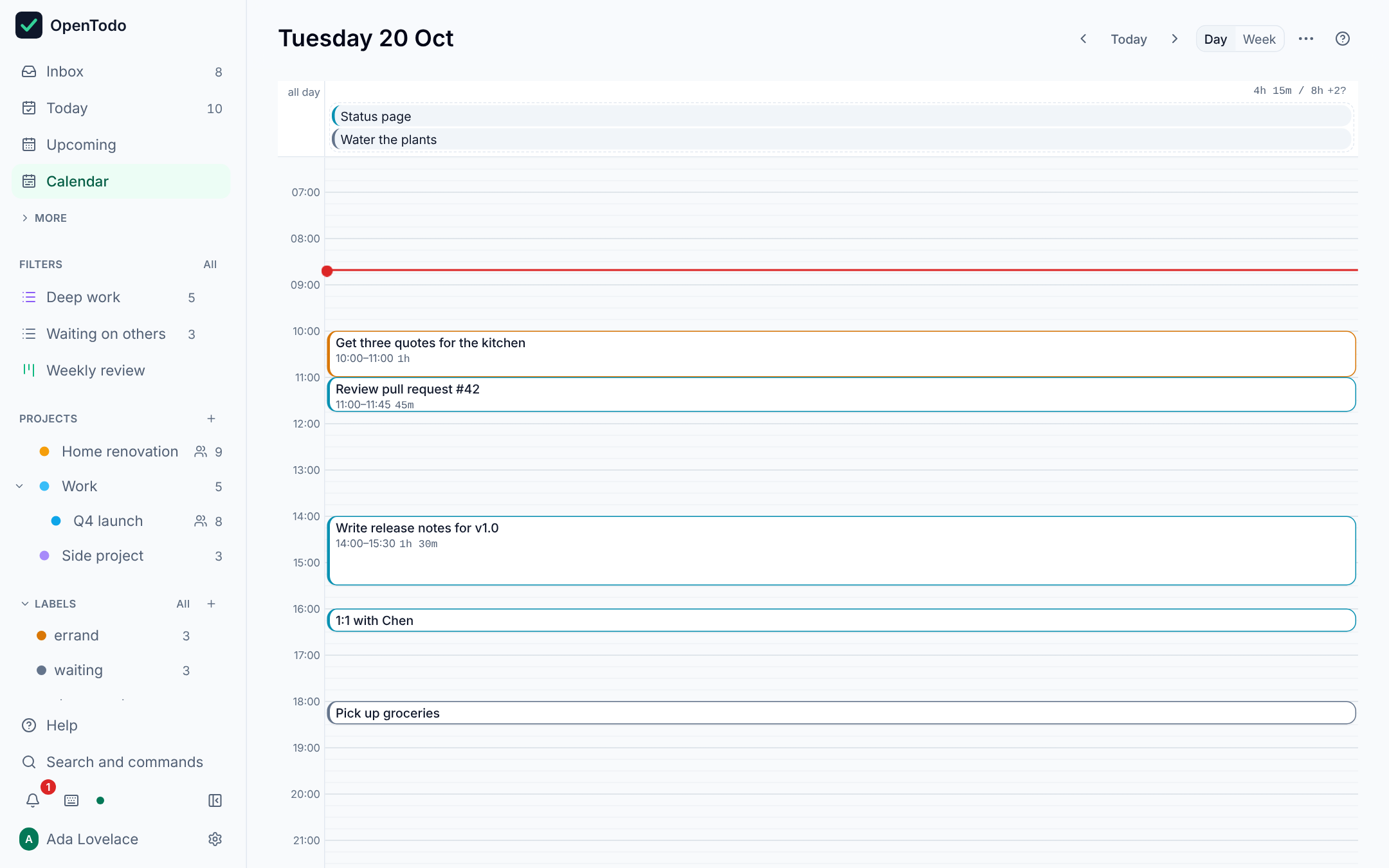
e), Day and Week calendars (g d,g w) with a 15-minute grid, drag to schedule or resize, planned hours against your day length, full keyboard control.
Collaboration
- Shared projects with the accounts on your server as viewer, editor or admin (
Shift+S); members edit offline and converge like your own devices; roles are enforced by the server. Sharing - Assignees (
Shift+A), an Assigned to me view and in-app notifications. Assignment - Threaded Markdown comments with
@mentions, and a per-task and per-project activity log derived from the sync history. Comments - Activity feed (
g h) across every shared project, with unread counts that sync between your own devices only. Activity feed - Invitations and user administration: single-use invitation links, admin and member roles, deactivation, reset links you send yourself, owner transfer. Adding people
Integrations and data
- REST API and API tokens (full or read-only) that write through the same op log as the app. API
- Calendar apps (CalDAV): two-way sync with Apple Reminders, Thunderbird and Android tasks apps via DAVx⁵, with per-device app passwords. Off until the owner enables it. CalDAV
- AI assistant in the app: plan and change your tasks by talking (Shift+I), with Anthropic (Claude), OpenAI, Gemini or a model on your own network, using your own key. Off until the owner enables it; each person accepts what is sent first; every change is proposed for review and undone in one step; conversations stay on the device. AI assistant
- AI assistants (MCP): a read-only Model Context Protocol endpoint so an assistant can answer "what is on my plate today?". Off until the owner enables it. MCP
- Webhooks on task and project events for Home Assistant, n8n or a Telegram relay: signed, retried, logged, with private-network protection. Webhooks
- Import the app's own export, CSV or other task managers' JSON exports, with a preview, duplicate detection and undo. Import
- Export everything as JSON from Settings or
GET /api/v1/export. - Scheduled backups of the whole server to a folder, S3-compatible storage or WebDAV, with retention, optional encryption and
opentodo restore. Backups
Security and privacy
- Closed sign-up by default after the owner account is created; argon2id passwords,
HttpOnlysessions, strict origin checks, CSP, rate limits. - Passkeys (WebAuthn) with browser autofill; needs an https
OPENTODO_BASE_URL. - Two-factor authentication (TOTP) with recovery codes, "remember this device", an owner policy to require it, and step-up confirmation before sensitive changes.
- Single sign-on with your own OpenID Connect provider (Authentik, Keycloak, Authelia, Zitadel…), including an SSO-only mode with owner break-glass. SSO
- Audit log of sign-ins, credentials, invitations, exports and setting changes; never task content, client addresses only if the owner opts in. What is logged
- Optional end-to-end encryption per account: titles, notes, names and comments are encrypted on your devices, so the server, backups and integrations hold only ciphertext. Threat model
Everywhere
- Offline and installable: every change is applied locally first and queued; the app loads and works with no network.
- Live sync: field-level, conflict-free sync across devices with no "pick a version" dialogs; a change shows up on your other devices within a second or two, with polling as the fallback. Sync protocol
Floating vs fixed times
A due date such as "pay rent on the 1st" or "call mum Sunday 18:00" is floating: it means that calendar day and clock time wherever you are, so it never moves when you travel. That is the default for every task.
Some times are instants: a stand-up at 09:00 Berlin time, a flight that departs at 14:35 in Lisbon. Open the task, set a time and tick Fixed to time zone (or press z): the time is pinned to your current zone. A device in Los Angeles then shows the stand-up at 00:00 with 09:00 Berlin as a hint, and Today, Upcoming, sorting, filters, reminders and the calendar all use the converted time, across daylight-saving changes. The API takes the same shape: "due":{"date":"2026-10-11","time":"09:00","tz":"Europe/Berlin"}.
Quick start
No environment variable is required. Open the app, create the owner account, and you are done; everything else is optional.
Docker
docker run -d --name opentodo -p 8080:8080 -v opentodo-data:/data \
  ghcr.io/pixari/opentodo:stable
Open http://localhost:8080 and create the owner account. Opened from outside your local network, the setup screen asks for a one-time setup code: find it with docker logs opentodo (details). Behind a reverse proxy, add -e OPENTODO_BASE_URL=https://todo.example.com (needed for Secure cookies, passkeys and web push). The image is published for linux/amd64 and linux/arm64. :0.6 follows the 0.6 releases; :latest follows the development branch. Details: docs/self-hosting/docker.md.
Docker Compose
git clone https://github.com/pixari/opentodo.git
cd opentodo
cp .env.example .env          # optional, every value has a default
docker compose up -d
Data is kept in the opentodo-data volume. Setting up from outside your local network needs the setup code from docker compose logs opentodo.
Coolify
- New Resource → Public Repository, URL
https://github.com/pixari/opentodo, build pack Docker Compose. - Assign a domain to the
opentodoservice; Coolify provisions HTTPS and passes the URL to the app. - Deploy, open the domain, create the owner account.
Or paste the one-click template deploy/coolify/opentodo.yaml as a Docker Compose resource (pending in Coolify's built-in service list). Details, including building from your fork: docs/self-hosting/coolify.md.
Unraid
OpenTodo is in Community Applications: open Apps, search for OpenTodo and click Install, then open the WebUI and create the owner account. The template lives in pixari/opentodo-unraid, published from deploy/unraid/. Details: docs/self-hosting/unraid.md.
Other platforms
Templates for CapRover, CasaOS and ZimaOS, Cosmos Cloud, Dokploy, Easypanel, Fly.io, Kubernetes (Helm), Podman, Portainer, Render, Runtipi, Synology, TrueNAS and Umbrel are in deploy/, each with a guide: CapRover · CasaOS · Cosmos · Dokploy · Easypanel · Fly.io · Kubernetes · Podman · Portainer · Render · Runtipi · Synology · TrueNAS · Umbrel. Until a platform's catalog lists OpenTodo, the guide shows how to install it as a custom app.
Single binary
Download opentodo-<os>-<arch> from the latest release (Linux, macOS and Windows; check it with SHA256SUMS), or build it yourself:
chmod +x opentodo-linux-amd64 && ./opentodo-linux-amd64   # serves on :8080, data in ./data
# or from source (needs Go 1.26+ and Node 22+):
make build && ./bin/opentodo
The binary is fully static (CGO_ENABLED=0, pure-Go SQLite) and also offers opentodo restore, opentodo mfa-reset, opentodo reset-owner-password, opentodo healthcheck and opentodo version.
Command line client
ot talks to any OpenTodo server over the REST API with a token it creates at login. It is a separate static binary (release assets for Linux, macOS and Windows, or go install github.com/pixari/opentodo/cmd/ot@latest) and is not part of the container image.
ot login https://todo.example.com
ot add "Call the plumber" --project Home --due tomorrow --time 09:00 --priority 2
ot today
ot done 8c2a                  # full id or unique prefix
ot list --json | jq '.[].title'
Full reference: docs/cli.md.
Configuration
Every setting is an optional environment variable with a safe default; an invalid value stops startup with a message naming the variable. The container image sets OPENTODO_ADDR=:8080 and OPENTODO_DATA_DIR=/data. See .env.example for a commented template.
| Variable | Default | Purpose |
|---|---|---|
OPENTODO_ADDR |
:8080 |
Listen address |
OPENTODO_DATA_DIR |
./data (binary), /data (image) |
Directory for the SQLite database, secrets, the VAPID key and local backups |
OPENTODO_BASE_URL |
unset (inferred from requests) | Public URL. With https: Secure cookies, Strict-Transport-Security, passkeys and web push; also used for strict origin checks (the request must be addressed to its host) and in invitation, reset and CalDAV links |
OPENTODO_SETUP_TOKEN |
unset | When set (16+ characters), creating the first account requires this token from every address, so a fresh public server cannot be claimed by a stranger. Unset, setup from a public address needs the one-time setup code printed in the server log instead. No effect once the owner exists. The Coolify template generates one |
OPENTODO_ALLOW_SIGNUP |
false |
Let anyone create an account after the owner exists. Prefer invitations |
OPENTODO_SESSION_DAYS |
90 |
Browser session lifetime in days |
OPENTODO_LOG_LEVEL |
info |
debug, info, warn or error. The startup line shows the level in use (log_level=); debug adds one line per API request (method, path, status, duration) |
OPENTODO_IMPORT_MAX_MB |
20 |
Largest import file, 1–200 |
OPENTODO_ATTACHMENTS_MAX_FILE_MB |
25 |
Optional preset for the largest attachment, 1–2048; applied once, then Settings decides |
OPENTODO_ATTACHMENTS_QUOTA_MB |
1024 |
Optional preset for each account's attachment total, 0 (unlimited)–1048576; applied once |
OPENTODO_TRASH_RETENTION_DAYS |
30 |
Days a deleted task or project stays in the Trash before it is purged, 0–3650; 0 never purges automatically. See Purge |
OPENTODO_DEMO |
unset (off) | true turns a dedicated instance into a public demo: a private, seeded sandbox per visitor, deleted after 2 h of inactivity, after 24 h and every night at 03:00 UTC; abusable features refused with 403 demo_restricted |
OPENTODO_DEMO_MAX_SANDBOXES, OPENTODO_DEMO_MAX_DB_MB |
500, 1024 |
Optional demo tuning: live sandbox cap and the database size above which no new sandbox is created |
OPENTODO_TRUSTED_PROXIES |
loopback and private networks | Optional: the proxies whose X-Forwarded-For, X-Forwarded-Host and X-Forwarded-Proto are believed, for rate limits, the audit log and the setup code (IPs, CIDRs, private for the default ranges, cloudflare for Cloudflare's edges plus the default). A list replaces the default; see Behind a reverse proxy |
OPENTODO_PUSH |
on |
off disables web push for reminders: no requests to push services; reminders still show in the app |
OPENTODO_WEBHOOKS_ALLOW_PRIVATE |
unset | true/false presets the owner's "allow private network targets" webhook policy on first start; afterwards Settings decides |
OPENTODO_MCP |
unset (off) | true presets the AI assistants (MCP) endpoint on first start; afterwards Settings → AI → AI assistants decides |
OPENTODO_MCP_WRITES |
unset (off) | true presets "AI assistants may make changes" on first start; each user must still allow it and use an agent token. Afterwards Settings → AI → AI assistants decides |
OPENTODO_CALDAV |
unset (off) | true presets the CalDAV endpoint on first start; afterwards Settings → Integrations → Calendar apps decides |
OPENTODO_OIDC_ISSUER, _CLIENT_ID, _CLIENT_SECRET, _DISPLAY_NAME, _SSO_ONLY |
unset | Optional single sign-on settings; each one set overrides and locks that field in Settings → Access policies → Single sign-on. The issuer must be https |
OPENTODO_SMTP_HOST, _SECURITY, _USER, _PASSWORD (or _PASSWORD_FILE), _FROM |
unset (off) | Optional outgoing email for password resets, sign-up confirmations and invitations; HOST and FROM together; each one set overrides and locks that field in Settings → Server → Outgoing email |
OPENTODO_EMAIL_ADDRESS, _IMAP_HOST, _IMAP_USER, _IMAP_PASSWORD (or _IMAP_PASSWORD_FILE) |
unset (off) | Email to task: all four together turn it on; setting only some stops startup |
OPENTODO_EMAIL_IMAP_MAILBOX, _POLL_SECONDS, _PROCESSED |
INBOX, 60, move:OpenTodo/Processed |
Email to task tuning (minimum poll 15 s; _PROCESSED may be delete) |
OPENTODO_BACKUP_* |
unset | Optional presets for scheduled backups (DESTINATION, SCHEDULE, TIME, WEEKDAY, KEEP, MAX_AGE_DAYS, COMPRESS, LOCAL_DIR, S3_*, WEBDAV_*, PASSPHRASE/PASSPHRASE_FILE), applied once; Settings → Backups wins afterwards |
OPENTODO_HOST_URL, _TOKEN, _OPERATOR_ADDR, _IDLE_MINUTES, _MAX_OPEN, _LIMITS |
unset (off) | Host mode for operators of a hosted service: many tenants in one process, chosen by host name. Not needed to self-host |
OPENTODO_PORT and OPENTODO_BIND in .env only change the host port and address published by docker-compose.yml (default 0.0.0.0:8080, every interface; behind a reverse proxy on the same machine, OPENTODO_BIND=127.0.0.1 is the safer choice). The ot client reads its own variables (OPENTODO_URL, OPENTODO_TOKEN, OPENTODO_PROFILE, OPENTODO_CONFIG), see docs/cli.md.
Adding people
Sign-up stays closed after the owner account exists. To add a partner or a colleague, open Settings → Administration → Members, optionally enter their email, pick an expiry (1 hour to 30 days, default 7 days) and create an invitation. Copy the link (it is shown once) and send it however you like; OpenTodo sends no email. The link creates exactly one member account and then stops working; you can revoke a pending link at any time. Admins can create invitations too.
Manage accounts afterwards in Settings → Administration → Users: promote admins, deactivate and reactivate, issue password reset links, delete accounts, transfer ownership (docs/self-hosting/docker.md). If the owner forgets their password, opentodo reset-owner-password on the host prints a reset link. With single sign-on configured, people can also sign in through your identity provider. Set OPENTODO_BASE_URL so links point at your public URL. API details: docs/api.md.
How it works
┌───────────────────────── device ─────────────────────────┐      ┌──────────── server ────────────┐
│ React PWA  ──►  IndexedDB (source of truth)              │      │ Go binary + SQLite             │
│                 │ every edit = field ops {ts, device}    │ sync │  ops log (append-only)         │
│                 └► outbox ──────────────────────────────►├─────►│  fields (last-writer-wins)     │
│                 ◄─ ops from other devices ◄──────────────┤◄─────┤  REST, CalDAV, email, import   │
└──────────────────────────────────────────────────────────┘      │  all write through ops         │
                                                                  └────────────────────────────────┘
- Every change is a small operation that sets one field of one entity, stamped with a hybrid logical clock and the device id.
- Clients apply ops locally first, then push the outbox and pull what other devices wrote. The same per-field last-writer-wins rule runs on every replica, so all devices converge no matter the order ops arrive in. Rich-text notes are mergeable documents, so concurrent edits to one note combine instead of replacing each other.
- Each op belongs to a sharing scope (your personal data, or one shared project); the server checks the author's role when it receives an op.
- Connected devices keep a lightweight server-sent event stream open; when the server records new ops it tells the other devices "sync now" (no data on the wire). If the stream is unavailable the app polls.
- The REST API, CalDAV, email capture and imports write through the same log, so a task created with
curlshows up on your phone right away. - Deletes are tombstones, which keeps sync correct and powers the Trash.
More in docs/architecture.md and docs/sync.md.
Documentation
Read the docs with screenshots and search at open-todo.app/docs, or in the app under Help (offline, matching your server's version). The same pages are Markdown in docs/:
- Start here: getting started · installing the app · all user guides
- Reference: quick add · filters and saved views · recurring tasks · reminders · capture · import · end-to-end encryption
- Self-hosting: Docker · Coolify · Unraid · CasaOS · Cosmos · Dokploy · Easypanel · Portainer · Runtipi · TrueNAS · Umbrel · CapRover · Fly.io · Kubernetes · Podman · Render · Synology · single sign-on · public demo instance · backups · email to task · calendar apps (CalDAV)
- AI: overview: which option to pick · assistant in the app · MCP ·
otfor agents - Integrations: REST API · CLI · webhooks · AI assistant in the app · AI assistants (MCP)
- Internals: architecture · sync protocol
- Project: changelog · roadmap · security · contributing
Development
make dev        # Go API on :8080 + Vite with hot reload on :5173
make check      # vet, typecheck, Go + web + extension tests, docs check, OpenSpec validation (what CI runs)
make docs       # regenerate the docs website and in-app help from docs/
Repository layout:
cmd/opentodo/        server entry point (serve, restore, mfa-reset, reset-owner-password, healthcheck, version)
cmd/ot/              command-line client entry point (logic in internal/cli)
internal/            Go packages: store, sync, auth, httpapi, caldav, mcp, email, push, backup, … (see docs/architecture.md)
web/                 React 19 + Vite + Tailwind PWA; builds into internal/web/dist
extension/           browser capture extension (Manifest V3, plain JS)
openspec/            specs (live behaviour contracts) and changes (proposals in flight and archived)
docs/                user, operator and protocol documentation
Working with specs
This repository uses OpenSpec. The current behaviour of the product is described in openspec/specs/<capability>/spec.md; each new feature is a change folder with a proposal, delta specs, a design and a task list. With Claude Code or any supported assistant:
/opsx:propose "natural language quick add"   # plan a change
/opsx:apply                                  # implement it
/opsx:archive                                # merge its specs into the live ones
Validate everything with make openspec-validate (the OpenSpec CLI at the version pinned in the Makefile; also part of make check and CI).
Privacy
The web app makes no network requests except to your own server: no analytics, crash reporters, update pings or third-party fonts. The server makes outbound requests only for features you configure:
- web push to the push service a device's browser chose (Google, Mozilla, Apple), end-to-end encrypted and carrying only ids unless the device opts in to titles (
OPENTODO_PUSH=offturns push off); - webhook URLs you add;
- backup destinations (S3 or WebDAV) you configure;
- the single sign-on issuer you configure;
- the IMAP mailbox you configure for email to task;
- the SMTP server you configure for outgoing email;
- the calendar addresses people add to show other calendars beside their tasks (private network addresses only if you allow them);
- the model provider you enable for the in-app assistant (off by default), only after a person has accepted what is sent and only while they wait for an answer.
The CalDAV and MCP endpoints only answer requests; they never call out. The audit log records security events (sign-ins, tokens, invitations, exports), never task content, and stores client addresses only if the owner turns that on; see SECURITY.md. With optional end-to-end encryption the server holds only ciphertext for task content.
Contributing
Issues and pull requests are welcome. Please read CONTRIBUTING.md: changes that alter behaviour go through an OpenSpec change first. Security issues go to the address in SECURITY.md.
License
AGPL-3.0-only. You can run, study, modify and share OpenTodo freely. If you offer a modified version as a network service, you must offer its source under the same license. That is what keeps a self-hosted project from being quietly turned back into a subscription.
Requirements
Categories
Related apps
Explore more like this
Explore allDetails
ghcr.io/pixari/opentodo:stableRuntime arguments
- Web UI
http://[IP]:[PORT:8080]/- Network
bridge- Privileged
- false
Template configuration
The port the app and API answer on.
- Target
- 8080
- Default
- 8080
- Value
- 8080
Everything OpenTodo stores: the database, attachments and backups. Back up this folder.
- Target
- /data
- Default
- /mnt/user/appdata/opentodo
- Value
- /mnt/user/appdata/opentodo
The address people open, for example https://todo.example.com. Needed behind a reverse proxy for passkeys, secure cookies and links in emails. Include the port if there is one. Leave empty when you open OpenTodo by the server's address.
- Target
- OPENTODO_BASE_URL
Optional, at least 16 characters. When set, creating the first (owner) account asks for this token, so a server reachable from the internet cannot be claimed by a stranger.
- Target
- OPENTODO_SETUP_TOKEN
true lets anyone who can reach the server create an account. Otherwise the owner invites people.
- Target
- OPENTODO_ALLOW_SIGNUP
- Default
- false
- Value
- false
Reverse proxies whose X-Forwarded-For is trusted for the visitor's address: IP addresses or ranges such as 192.0.2.0/24 separated by commas, or cloudflare. Set it only when every request comes through them.
- Target
- OPENTODO_TRUSTED_PROXIES
on or off: reminders as push notifications (needs https).
- Target
- OPENTODO_PUSH
- Default
- on
- Value
- on
Days a sign-in stays valid.
- Target
- OPENTODO_SESSION_DAYS
- Default
- 90
- Value
- 90
Days deleted items stay in the Trash; 0 keeps them forever.
- Target
- OPENTODO_TRASH_RETENTION_DAYS
- Default
- 30
- Value
- 30
Largest import file accepted, in MB.
- Target
- OPENTODO_IMPORT_MAX_MB
- Default
- 20
- Value
- 20
debug, info, warn or error. The first log line shows the level in use; debug adds one line per request the app makes.
- Target
- OPENTODO_LOG_LEVEL
- Default
- info
- Value
- info