
All apps · 0 apps

OpenHands
Docker app from junkerderprovinz's Repository
Overview
Readme
View on GitHubOpenHands for Unraid







A plug-and-play Unraid Community Applications template for OpenHands —
the open-source AI software-development agent. Pre-wired for local
Ollama with qwen2.5-coder:14b, Docker-socket sandboxing,
and host.docker.internal routing. Install from the Unraid
Apps tab, hit Apply, open the WebUI.

Table of Contents
- What is this?
- Features
- Quick Start on Unraid
- Configuration
- GitHub Personal Access Token
- Switching to OpenAI / Anthropic / other LLMs
- Updating
- Troubleshooting
- Security Notes
- Screenshots
- Contributing / License
- Support this project
1. What is this?
OpenHands (formerly OpenDevin) is an open-source autonomous agent that can read, write, run and debug code, browse the web, and execute shell commands in isolated sandbox containers.
This repository is not a fork of OpenHands. It only contains the Unraid
Community Applications metadata — an XML template, an icon and this README —
that tells Unraid how to deploy the upstream
docker.openhands.dev/openhands/openhands
image in a sensible default configuration for a typical Unraid box.
What this template gives you over a bare docker run:
- Pre-configured for Ollama — defaults point at
ollama/qwen2.5-coder:14bviahost.docker.internal, so a local Ollama install on the Unraid host works out of the box, no LLM gateway needed - Sandbox-ready — the Unraid Docker socket is mounted, the right
SANDBOX_VOLUMESand--add-hostflags are pre-set, so OpenHands can actually spawn its execution containers - Persistent config —
/.openhandsis mapped to/mnt/user/appdata/openhands, workspace files live in/mnt/user/ai-workspace - Embedded local embeddings —
LLM_EMBEDDING_MODEL=localavoids surprise API calls - Pinned to a known-good tag — the template ships with the OpenHands
image pinned to
:1.7. New versions are surfaced as Renovate PRs so every bump is reviewed before users get it.
2. Features
- ✅ Pre-configured for Ollama with
qwen2.5-coder:14bas the default coding model - ✅ Talks to the host via
host.docker.internal(the--add-host host.docker.internal:host-gatewayflag is set automatically), sohttp://host.docker.internal:11434reaches Ollama on the Unraid host without bridging gymnastics - ✅ Binds the Unraid Docker socket (
/var/run/docker.sock) so OpenHands can spin up its per-task sandbox containers - ✅ Workspace and sandbox volumes are kept in sync via
SANDBOX_VOLUMES, so files the agent writes show up under/mnt/user/ai-workspaceon the host - ✅ Persistent agent state in
/mnt/user/appdata/openhands - ✅ Single template, no extra plugins or scripts required
- ✅ MIT-licensed wrapper — fork and adapt freely
3. Quick Start on Unraid
This is a plug-and-play Community Applications template. No SSH, no config-file editing.
Step 1 — Install from Apps
In the Unraid Web UI:
- Go to the Apps tab.
- Search for
OpenHands. - Click Install.
[!NOTE] If this template hasn't been accepted into the CA index yet, the search won't find it. In that case, jump to § Manual install below — a one-time
curlputs the template into your user-templates folder, and it then shows up under User templates in the Add Container dialog.
Step 2 — (Optional) make sure Ollama is reachable
Defaults assume you have Ollama running on the Unraid host (or in
another container reachable as host.docker.internal:11434) with the
qwen2.5-coder:14b model pulled:
ollama pull qwen2.5-coder:14b
If you want a different model or a remote LLM, see § 6.
Step 3 — Apply the template
The CA install opens the template form with everything pre-filled. You can leave every field at its default. The two you may want to tweak:
- Workspace Directory — defaults to
/mnt/user/ai-workspace. This is where the agent reads and writes project files. Point it at an existing project share if you prefer. (If you change this, also adjust the Sandbox Volumes variable to match.) - LLM Model — defaults to
ollama/qwen2.5-coder:14b. Change to any LiteLLM-style model string.
Hit Apply. First start pulls the image (~3 GB) and warms up the embedding model.
Step 4 — Open the WebUI
http://<unraid-ip>:3000/
On first launch, OpenHands will ask you to confirm the LLM settings and to provide a GitHub Personal Access Token if you want it to interact with GitHub repos — see § 5.
Manual install (pre-CA-listing)
Until this repo is accepted into the Community Applications index, you can still load the template by hand. Run this once on the Unraid console or via SSH:
mkdir -p /boot/config/plugins/dockerMan/templates-user && \
curl -fsSL -o /boot/config/plugins/dockerMan/templates-user/my-OpenHands.xml \
  https://raw.githubusercontent.com/junkerderprovinz/unraid-apps/main/openhands/openhands.xml
Then in the Unraid Web UI: Docker → Add Container → in the Template dropdown, pick OpenHands under User templates.
Plain Docker (no Unraid)
docker run -d \
  --name openhands \
  --restart unless-stopped \
  --add-host host.docker.internal:host-gateway \
  -p 3000:3000 \
  -v /mnt/user/appdata/openhands:/.openhands \
  -v /mnt/user/ai-workspace:/workspace \
  -v /var/run/docker.sock:/var/run/docker.sock \
  -e SANDBOX_VOLUMES=/mnt/user/ai-workspace:/workspace:rw \
  -e LLM_API_KEY=ollama \
  -e LLM_MODEL=ollama/qwen2.5-coder:14b \
  -e LLM_BASE_URL=http://host.docker.internal:11434 \
  -e LLM_EMBEDDING_MODEL=local \
  docker.openhands.dev/openhands/openhands:1.7
4. Configuration
| Variable | Default | Description |
|---|---|---|
LLM_API_KEY |
ollama |
API key for the LLM backend — any non-empty value works for Ollama |
LLM_MODEL |
ollama/qwen2.5-coder:14b |
LiteLLM-style model string |
LLM_BASE_URL |
http://host.docker.internal:11434 |
Endpoint of the LLM. Default reaches Ollama on the Unraid host. Leave blank for hosted providers (OpenAI/Anthropic/…) |
LLM_EMBEDDING_MODEL |
local |
Embedding model — local ships in the image |
SANDBOX_VOLUMES |
/mnt/user/ai-workspace:/workspace:rw |
Host:container mount injected into every sandbox the agent spawns |
Ports & Volumes
| Port | Purpose | Volume | Purpose | |
|---|---|---|---|---|
3000 |
OpenHands WebUI | /.openhands |
Persistent agent state, settings, sessions | |
/workspace |
Files the agent reads / writes | |||
/var/run/docker.sock |
Required to spawn sandbox containers |
Extra runtime flags
The template applies:
--add-host host.docker.internal:host-gateway
This lets the container reach services running on the Unraid host (Ollama,
your dev DB, etc.) via http://host.docker.internal:<port>.
Image tag
The template ships pinned to docker.openhands.dev/openhands/openhands:1.7.
New OpenHands versions are picked up by Renovate, which
opens a PR bumping the tag once a new release is available. After review
and merge, Unraid CA polls the repo within ~2 hours and offers the
update to users via the standard Update Available notification. Users
who want to override the tag manually can do so in the Unraid template's
Repository field (Advanced View).
5. GitHub Personal Access Token
OpenHands can clone repos, push commits, and open PRs on your behalf — but only if you give it a token. The template does not ship a token (it shouldn't — tokens are personal).
- On GitHub: Settings → Developer settings → Personal access tokens →
Tokens (classic) → Generate new token.
- Scopes:
repo(mandatory),workflow(optional, for editing Actions),read:org(optional).
- Scopes:
- Open the OpenHands WebUI at
http://<unraid-ip>:3000/. - Click the gear icon → Git → GitHub → paste the token → Save.
The token is stored inside /mnt/user/appdata/openhands and never leaves
your box.
[!WARNING] Treat the token like a password. Anyone with it can push to your repos.
6. Switching to OpenAI / Anthropic / other LLMs
OpenHands uses LiteLLM, so the model string is all that needs to change. Examples:
| Provider | LLM_MODEL |
LLM_API_KEY |
|---|---|---|
| Ollama (default) | ollama/qwen2.5-coder:14b |
ollama |
| Ollama — other model | ollama/llama3.1:70b-instruct-q4_K_M |
ollama |
| OpenAI | gpt-4o |
your OpenAI key |
| Anthropic | anthropic/claude-3-5-sonnet-20241022 |
your Anthropic key |
| OpenRouter | openrouter/anthropic/claude-3.5-sonnet |
your OpenRouter key |
| Mistral | mistral/mistral-large-latest |
your Mistral key |
Edit the Unraid template's LLM_MODEL and LLM_API_KEY fields, hit
Apply, done.
For Ollama on a different host (e.g. a GPU box on your LAN), change the
LLM Base URL field from the default http://host.docker.internal:11434
to http://<gpu-host>:11434. For a hosted provider (OpenAI, Anthropic,
…) clear that field — those use their own endpoints.
7. Updating
On Unraid: Docker tab → click the container → Force Update. Your
/.openhands data is untouched. If a new OpenHands version is released,
this repo's Renovate workflow opens a PR bumping the
<Repository> tag; once merged, a new tagged release ships and CA
re-pulls the template.
[!TIP] Tag-pin to a specific minor (e.g.
:1.7) — OpenHands ships often and the floating:latesttag has shipped breaking changes in the past.
8. Troubleshooting
WebUI loads but every task fails with "connection refused"
Most likely the LLM endpoint isn't reachable. From inside the container:
docker exec openhands curl -fsS http://host.docker.internal:11434/api/tagsShould list your Ollama models. If it times out, Ollama isn't bound on the host's external interface — check
OLLAMA_HOST=0.0.0.0in your Ollama service.Confirm
--add-host host.docker.internal:host-gatewayis actually applied:docker inspect openhands | grep -A2 ExtraHosts.
"Failed to create sandbox" / docker socket errors
- Check the socket mount:
docker inspect openhands | grep docker.sock - The host's
dockergroup must allow access — on Unraid this is the default; on plain Linux you may need to run the container as a user in thedockergroup. - If you're using
rootlessDocker, the socket path differs ($XDG_RUNTIME_DIR/docker.sock). Adjust the template accordingly.
Custom VLAN / ipvlan: "Sandbox server not running" or "Agent Server Failed to start properly"
This template defaults to the Docker-socket sandbox, where OpenHands
spawns a separate sandbox container and talks to it via
host.docker.internal. On a bridge network that works. On a custom
VLAN / ipvlan network it often doesn't — host.docker.internal routing
between containers breaks, and tasks fail with:
Sandbox server not running: http://host.docker.internal:xxxxx
Two ways out:
Easiest — keep this container on
bridge. The agent's sandbox containers still spawn correctly; only the OpenHands container itself needs reliablehost.docker.internalrouting, whichbridgegives you. Put a reverse proxy in front if you need it on the VLAN.Process sandbox — run the agent as an in-container process instead of a sibling container, avoiding cross-container networking entirely. Add these variables:
RUNTIME=process
SANDBOX_RUNTIME=process
[!WARNING] Known bug in image
:1.7. Process sandbox currently fails with500: Agent Server Failed to start properlyeven though the agent server actually comes up — the readiness check wrongly probeshost.docker.internalinstead of127.0.0.1. Tracked upstream as issue #14499, fixed by PR #14540 (not yet released at time of writing). Until a fixed image ships, prefer thebridgeoption above. Renovate will surface the fixed release as an update PR automatically.
Agent writes files but I can't find them on the host
- They land in whatever path
SANDBOX_VOLUMESmaps. With the defaults, that's/mnt/user/ai-workspaceon the host. The agent itself sees them as/workspace. - If you changed Workspace Directory but not
SANDBOX_VOLUMES, the two will be out of sync — the sandbox writes to a different host path. Keep them aligned.
Out of memory / OOM-killed during long tasks
qwen2.5-coder:14bneeds ~10 GB of RAM (or VRAM). Smaller alternatives:qwen2.5-coder:7b,deepseek-coder-v2:16b-lite-instruct-q4_K_M.- Each sandbox container the agent spawns also consumes RAM — set a resource limit in the Unraid template's Advanced View if needed.
GitHub token not accepted
- Classic tokens must have at least
reposcope. Fine-grained tokens must be granted access to the specific repos you want OpenHands to touch. - Some self-hosted GitHub Enterprise instances need
GITHUB_API_URL=https://github.your-corp.com/api/v3as an extra variable.
9. Security Notes
- Docker socket = root on the host. Mounting
/var/run/docker.sockgives this container full control over your Unraid Docker daemon. Treat the OpenHands WebUI like a root shell — don't expose port 3000 to the internet without auth in front of it. A reverse proxy with authentication (e.g. NPM + Authelia / Authentik) is the right pattern. - The agent runs code. That's the whole point. Sandbox containers
reduce the blast radius but don't eliminate it — keep
/mnt/user/ai-workspaceon a share that doesn't contain anything you'd cry about losing. - Your LLM sees your code. If you use a hosted LLM (OpenAI, Anthropic, etc.), every file the agent reads is sent to that provider. Ollama keeps everything on-box.
10. Screenshots
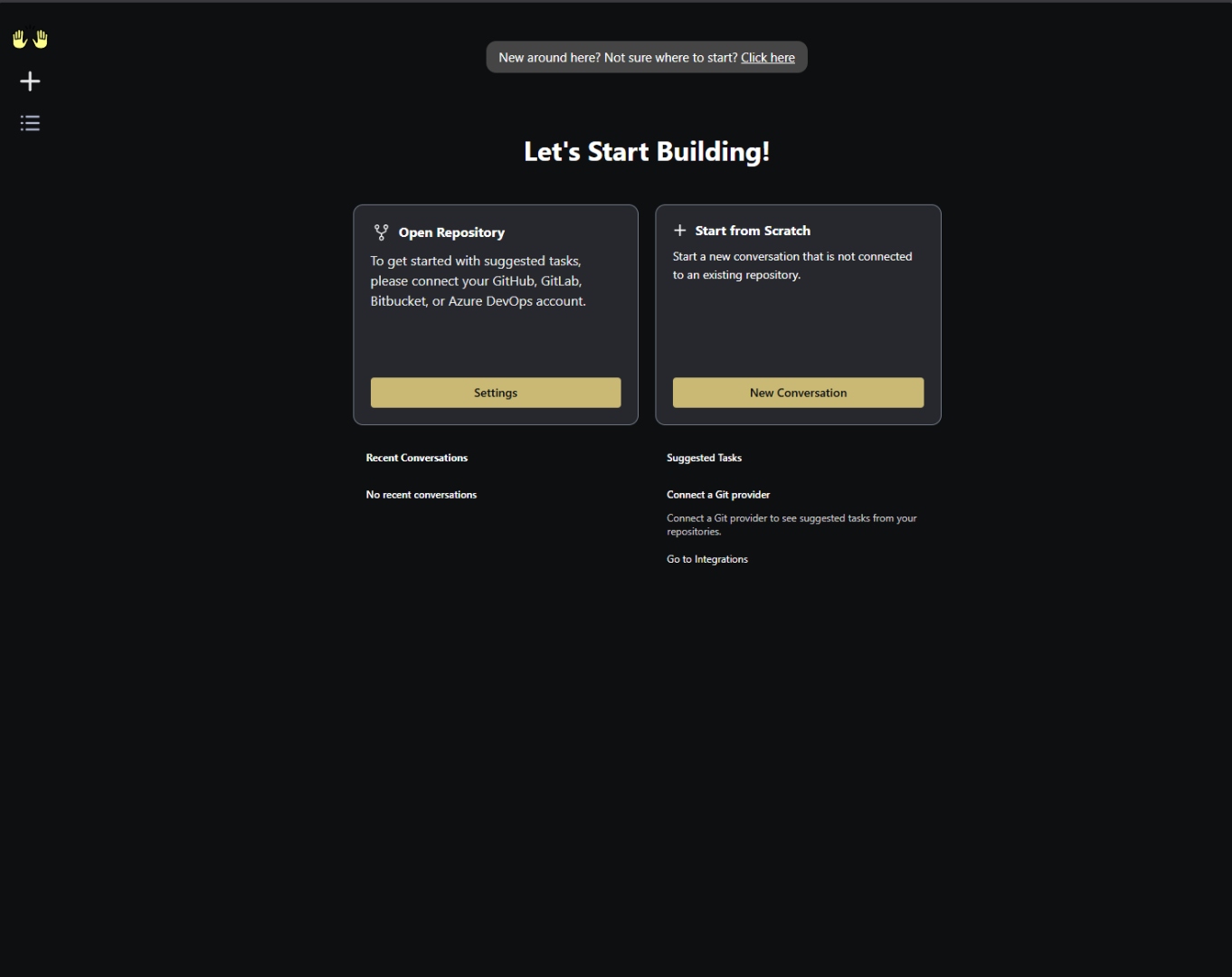
Home — 'Let's Start Building': open a repository or start from scratch.
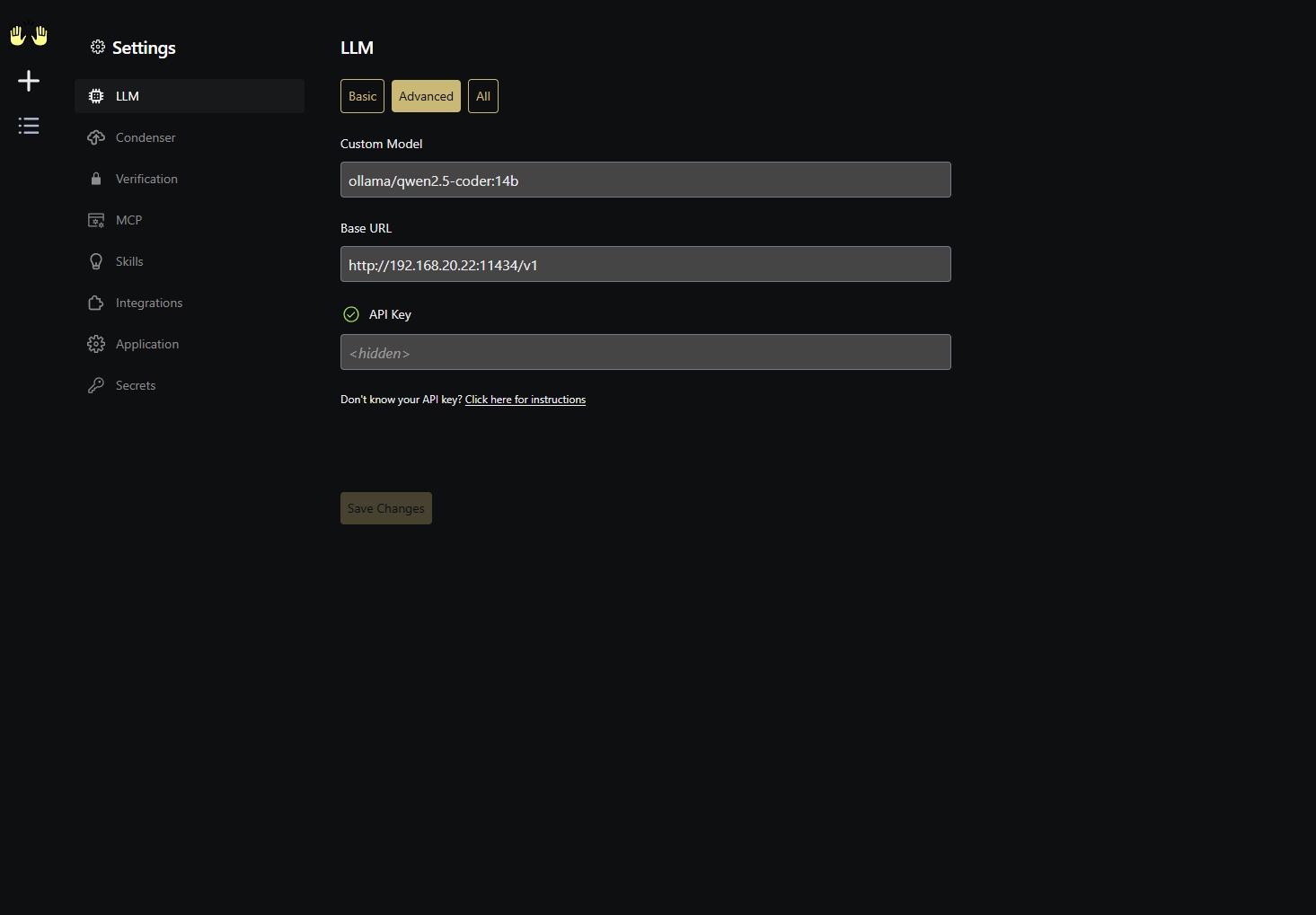
Settings → LLM: Custom Model ollama/qwen2.5-coder:14b against a local Ollama at http://<LAN-IP>:11434/v1 — no API key required.
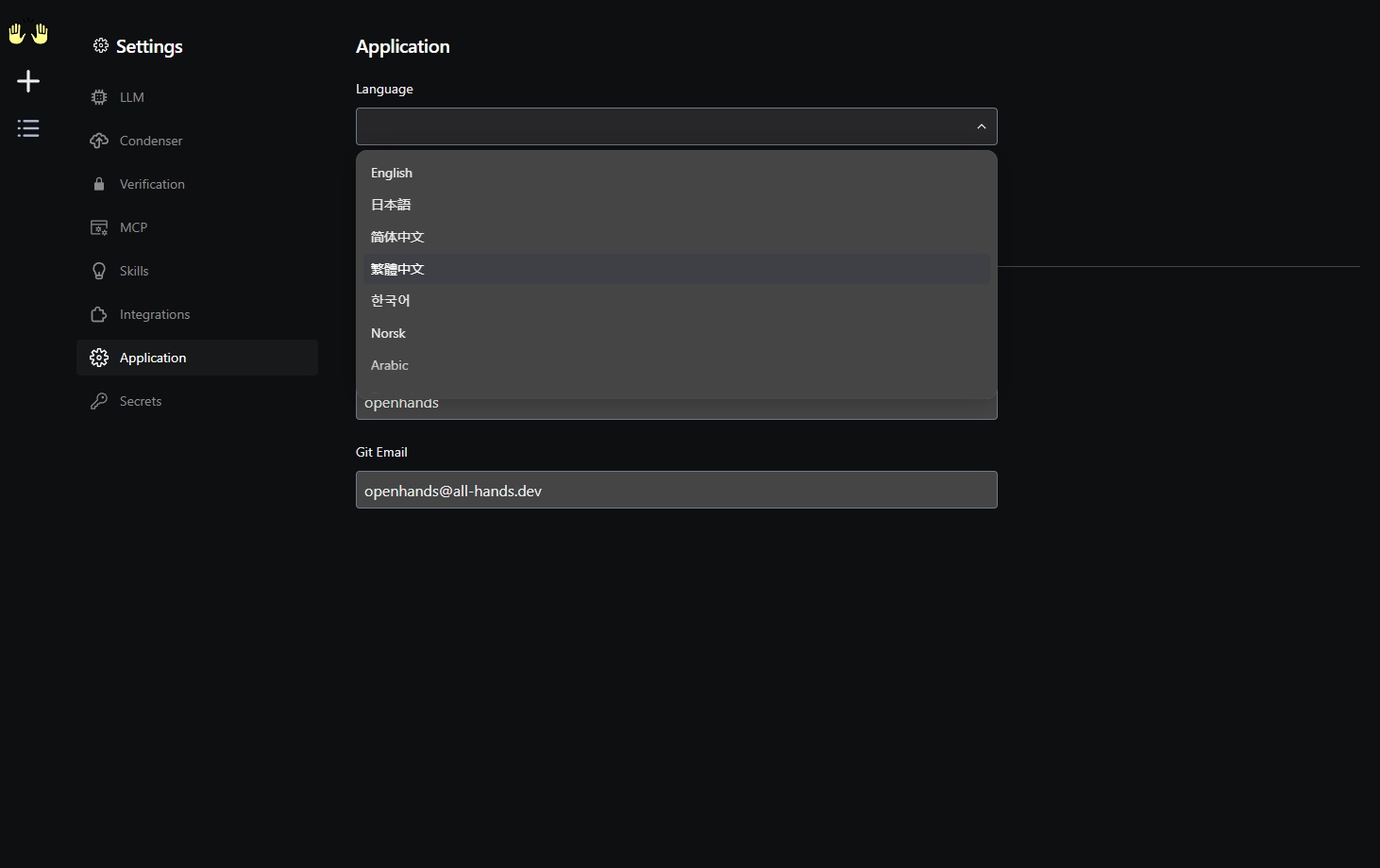
Settings → Application: built-in language picker (English, 日本語, 中文, 한국어, Norsk, Arabic…).
11. Contributing / License
Pull requests welcome. Issues: https://github.com/junkerderprovinz/unraid-apps/issues.
CI runs XML validation, an Unraid CA sanity check, markdown + YAML lint
and a link check on every PR — see .github/workflows/ci.yml.
Licensing — dual:
- This wrapper repository (Unraid template, README, banner/icon artwork) is licensed under the MIT License.
- OpenHands itself is developed by the OpenHands community and retains its upstream license — see https://github.com/OpenHands/OpenHands. When you run, redistribute or rebuild the resulting container image, you must comply with all upstream licenses, not only with this wrapper's MIT license.
Credits
- OpenHands — the team and community building the agent
- Ollama — for making local LLMs painless
- LiteLLM — for unifying every LLM API on the planet
- Unraid Community Applications — for being the best app store in self-hosting
12. Support this project
If this template saves you a setup hassle or a debug night, consider buying me a coffee:
Install OpenHands on Unraid in a few clicks.
Find OpenHands in Community Apps on your Unraid server, review the template, and click Install. Unraid handles the Docker app or plugin setup from the published template.
Requirements
Related apps
Explore more like this
Explore allLinks
Details
docker.openhands.dev/openhands/openhands:1.7Runtime arguments
- Web UI
http://[IP]:[PORT:3000]/- Network
bridge- Shell
sh- Privileged
- false
- Extra Params
--add-host host.docker.internal:host-gateway
Template configuration
OpenHands web interface
- Target
- 3000
- Default
- 3000
- Value
- 3000
Persistent OpenHands configuration and state
- Target
- /.openhands
- Default
- /mnt/user/appdata/openhands
- Value
- /mnt/user/appdata/openhands
Working directory exposed to the agent
- Target
- /workspace
- Default
- /mnt/user/ai-workspace
- Value
- /mnt/user/ai-workspace
Required so OpenHands can spawn isolated sandbox containers
- Target
- /var/run/docker.sock
- Default
- /var/run/docker.sock
- Value
- /var/run/docker.sock
Host:container mount(s) injected into every sandbox container the agent spins up. Must match the Workspace Directory mapping.
- Target
- SANDBOX_VOLUMES
- Default
- /mnt/user/ai-workspace:/workspace:rw
- Value
- /mnt/user/ai-workspace:/workspace:rw
API key for the LLM backend. For Ollama any non-empty value works (e.g. 'ollama').
- Target
- LLM_API_KEY
- Default
- ollama
- Value
- ollama
LiteLLM-style model string. Default targets Ollama with qwen2.5-coder:14b.
- Target
- LLM_MODEL
- Default
- ollama/qwen2.5-coder:14b
- Value
- ollama/qwen2.5-coder:14b
Base URL of the LLM endpoint. Default reaches Ollama on the Unraid host via host.docker.internal. For a remote/LAN Ollama use http://host:11434. Leave blank for hosted providers (OpenAI/Anthropic/etc.) that use their own endpoints.
- Target
- LLM_BASE_URL
- Default
- http://host.docker.internal:11434
- Value
- http://host.docker.internal:11434
Embedding model used for memory/context. 'local' uses the bundled embedding model.
- Target
- LLM_EMBEDDING_MODEL
- Default
- local
- Value
- local