

openflash
Docker app from Stoatworks Labs' Repository
Overview
Readme
View on GitHubopenflash
AI-assisted project. This codebase was created with Claude (Anthropic), directed and reviewed by a human author. I've run it end to end on a Pixel 4a, from bootloader unlock through to a booted LineageOS 23.2 with MindTheGapps, and the plan generator is checked against all 733 devices in the LineageOS database. That's one device and one of the two install engines: the other 553 procedures come out of the same code but have never been run against the hardware they describe.
Install LineageOS and other alternative Android systems from a browser. It talks to the phone over WebUSB, does the parts a machine should do, and tells you straight which parts only you can do.
Live at openflash.stoatworks-labs.com.
Deep links work: ?device=sunfish&os=lineageos
opens straight onto the procedure for a Pixel 4a.
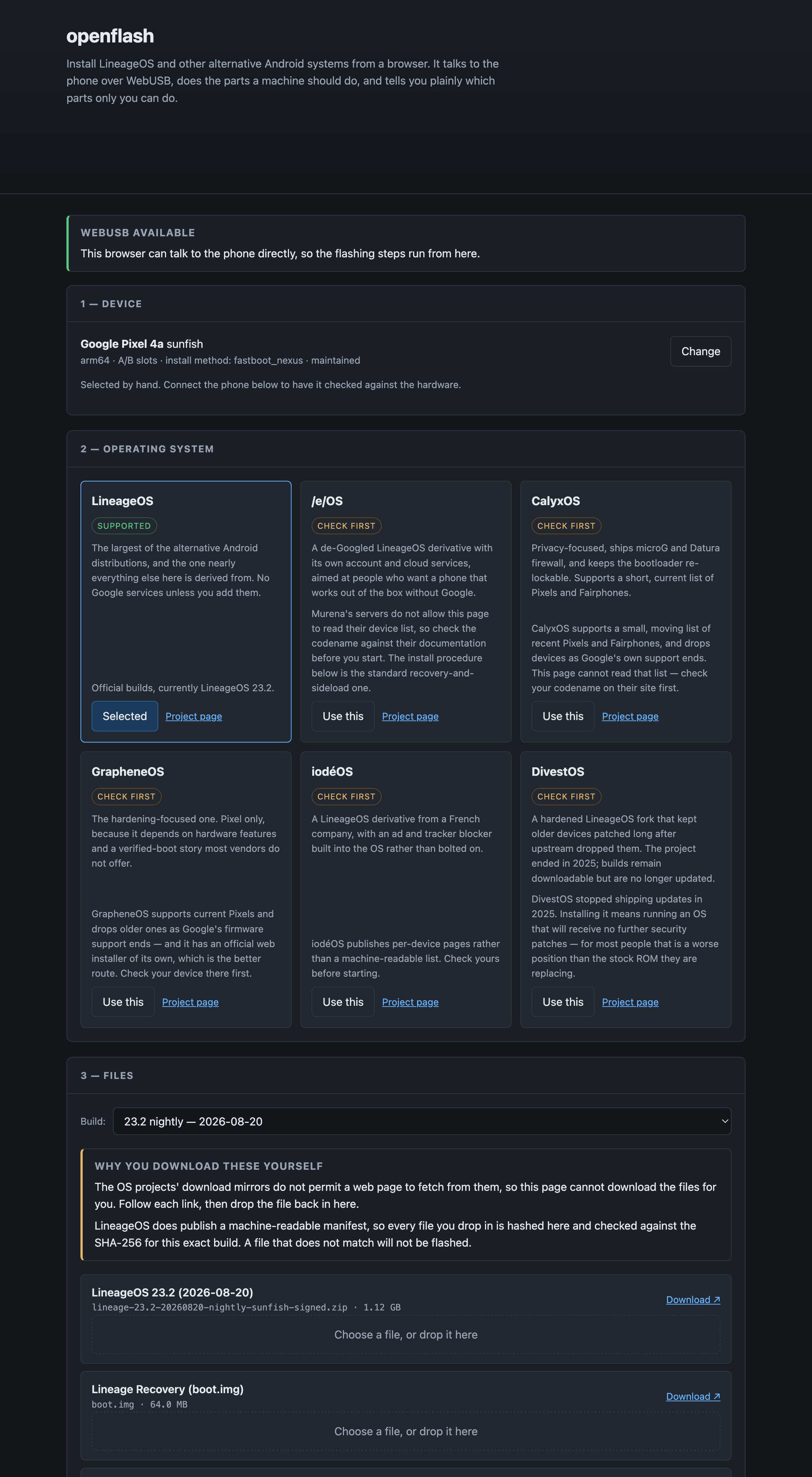 pick a device, pick a system |
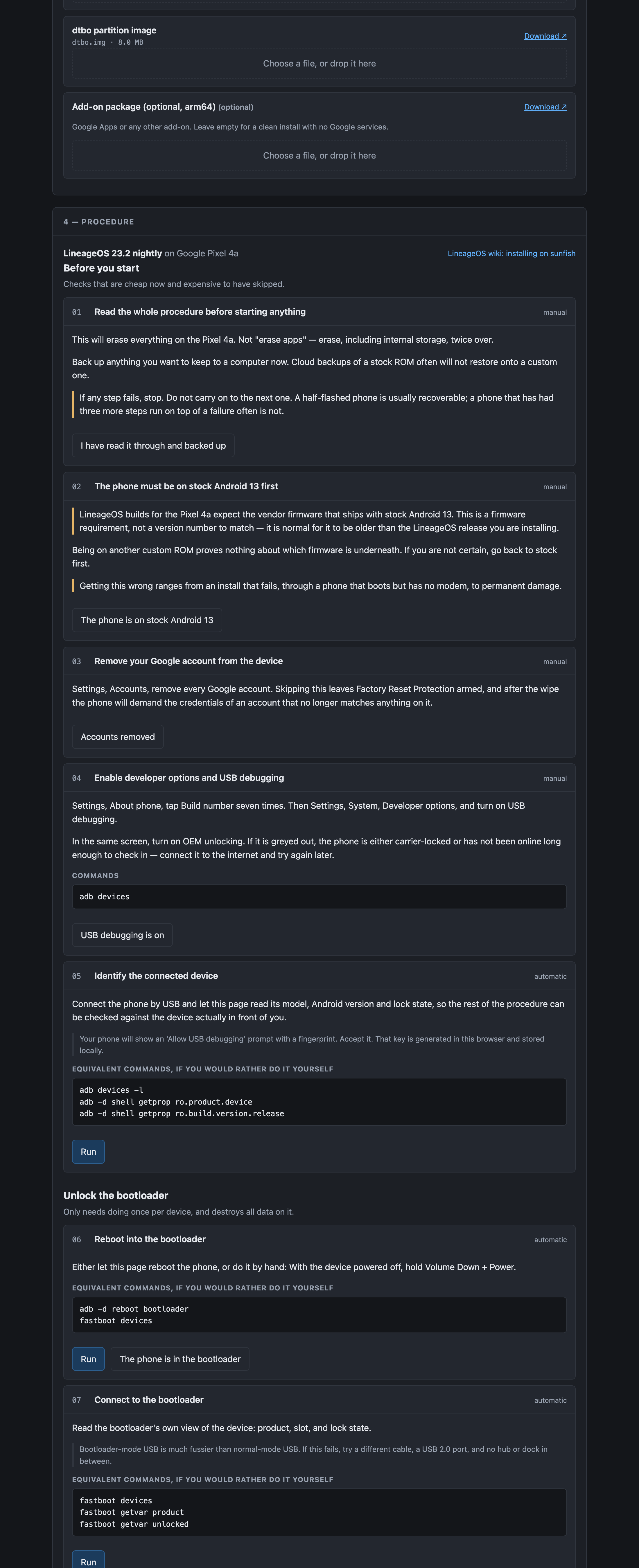 the procedure it generates for that pair |
What it does
Autodetects the phone. Plug it in and the page reads its codename, model, Android version, security patch level, bootloader version, slot layout and lock state, over ADB if it's booted or over fastboot if it's in the bootloader. If the codename doesn't match the procedure you've selected, it refuses to carry on rather than flash one device's build onto another.
Generates the procedure for that exact device. You don't get a generic guide with
"(on some devices)" scattered through it. The Pixel 4a gets its dtbo partition
step and its stock-Android-13 firmware requirement; a Xiaomi gets told that Mi
Unlock and a seven-day wait stand between it and anything else on the page; a
Samsung gets told this tool can't flash it at all, because Odin isn't fastboot.
Runs the parts a machine should run. Unlocking, flashing partitions and
adb sideload of the ROM zip all happen over WebUSB, with progress. The parts only a
human can do (holding Volume Down, answering the phone's own unlock prompt,
picking "Format data" out of a recovery menu) are marked as such and wait for
you.
Shows the equivalent commands anyway. Every automated step prints the adb
and fastboot commands it stands in for. That's what makes the page useful in
Firefox and Safari, which have no WebUSB (you get a correct, ordered,
device-specific command list instead), and it's how you check what the page is
about to do before you let it.
Checks what you feed it. LineageOS publishes a machine-readable build manifest, so files you drop in are hashed in the page and checked against the SHA-256 for that exact build. A file that doesn't match doesn't get flashed.
Devices
The device database is generated from the LineageOS wiki's own
_data/devices/*.yml,
which is what drives their install pages. That's 733 devices across 28 install
methods.
| devices | |
|---|---|
| Full procedure generated | 554 |
Not flashable from a browser (Odin, dd, APX, EDL, …) |
179 |
| …of the 554, unlocked by a fastboot command | 217 |
| …unlocked only through the vendor's own portal | 328 |
| …already unlocked, or no unlock step | 9 |
Regenerate after an upstream change:
npm run devices
Systems
| how it installs | what this tool knows | |
|---|---|---|
| LineageOS | recovery + sideload | Everything: live build list, exact filenames, sizes and SHA-256 per build |
| /e/OS | recovery + sideload | Procedure only — Murena's servers block browser reads, so bring your own files |
| CalyxOS | factory image zip | Procedure only, and their device list moves; check it first |
| GrapheneOS | factory image zip | Procedure only — and they have their own official web installer, which you should use instead |
| iodéOS, DivestOS | recovery + sideload | Via JSON profiles in public/profiles/ |
| Another ROM | either, your choice | Nothing — you bring the files and the project's own guide; the page drives the flash for your exact device |
Any other ROM can be added as a profile: a dozen lines of JSON naming the project, its download page and which of the two engines it uses. No code.
Running it
npm install && npm run dev
It's a static site with no server component, so npm run build produces
something you can drop on any static host. Deep links work:
?device=sunfish&os=lineageos opens straight onto the procedure for a Pixel 4a.
WebUSB needs Chrome, Edge, or another Chromium browser. Everything except the flashing itself works everywhere.
Stop your adb server first with adb kill-server. A running adb server grabs
any Android device the moment it appears, and the browser then gets refused the
same USB interface. It bites after the phone reboots into recovery, so the
step that fails isn't the step that caused it.
Deploy: every push to main deploys through .github/workflows/deploy.yml (a
static-assets Worker, not a Pages project). cf-run npm run deploy still does it by hand.
Checks
npm run check
check:sha256: the hand-written incremental SHA-256 against Node'scrypto, at every length where the padding changes behaviour.check:unlock: every distinct unlock command in the database parses into something sendable. This caught a real bug: free-form fastboot commands go on the wire with spaces (flashing unlock), not colons, and two Nubia devices carry a three-line unlock sequence with a reboot in the middle.check:plans: a plan is generated for all 733 devices. No step may require a file the plan never asks for, and no plan may reach a sideload without formatting data first.
None of that touches a phone, which is the limitation that matters. See below.
Verified on hardware
A Pixel 4a (sunfish), 2026-08-25, complete run: device detection over ADB,
fastboot flashing unlock, dtbo flashed, Lineage Recovery flashed to boot,
data formatted, LineageOS 23.2 sideloaded, MindTheGapps sideloaded, first boot
into a working LineageOS. Every step driven from the page.
Two defects that only a real handset could have found, both fixed along the way:
- The USB interface was never released between transports. The phone reboots
between bootloader and recovery several times per install, and the handle from
before the reboot still held the interface, so the next claim failed with
The device is already in used by another program. A localadbserver causes the identical symptom, which is why the error now leads withadb kill-server. - A silent hang on the add-ons step. Add-on packages aren't signed with the OS project's key, so recovery refuses the signature and waits on an Install anyway? prompt on the handset. The browser can't see that prompt, and said nothing, so the page looked frozen while the phone was asking a question. It now reports how far the transfer got and where to look.
What that does and doesn't cover. One device, one vendor, one install
method (fastboot_nexus), one OS. The factory-zip engine (GrapheneOS, CalyxOS)
has never been run at all. The 553 other recovery-sideload procedures are
generated by the code that produced this one, which is a reason for some
confidence and not a substitute for trying it.
What this is not
It isn't a replacement for the LineageOS wiki. The wiki is the authority; this page is generated from its data and links back to the page for your device on every screen. Where the two disagree, the wiki is right and this is a bug.
It doesn't download ROMs for you, because it can't: the mirrors send no CORS headers, so a web page isn't allowed to fetch from them. You download, you drop the file in, and the page checks it.
It won't pretend a vendor-locked bootloader is one command away.
Run your own copy
openflash is a static page, so hosting it yourself is one container serving the built files — the same files the hosted copy serves, running somewhere that still works when the venue has no internet.
Docker. The image is built by this repo's docker.yml workflow on every
push and published as ghcr.io/stoatworks-labs/openflash:
docker run -d --name openflash --restart unless-stopped -p 8536:80 ghcr.io/stoatworks-labs/openflash:latest
Or docker compose up -d with the docker-compose.yml
in this repo, which maps the same port. Either way it is then at
http://localhost:8536/.
Unraid. Search Community Applications for openflash — the template is
templates/openflash.xml
in stoatworks-unraid, which is what the CA feed reads.
Stoatworks Burrow lists it under Self-hosted, with the compose file a click away.
Note: WebUSB needs a secure context. Served over plain http at a LAN address there is no navigator.usb at all, so the container cannot reach a device — open it at http://localhost:PORT on the machine holding the USB cable, or put a TLS terminator in front of it. This fails silently rather than loudly: the page loads and simply offers no device. Without WebUSB the page is still a correct, ordered, device-specific adb and fastboot command list, which is most of its value.
The Dockerfile, docker-compose.yml, docker/ and the workflow are
generated from fleet.json in stoatworks-unraid. Change them there and
regenerate rather than editing them here.
Licence
MIT. See LICENSE and ATTRIBUTIONS.md.
Categories
Related apps
Explore more like this
Explore allDetails
ghcr.io/stoatworks-labs/openflash:latestRuntime arguments
- Web UI
http://[IP]:[PORT:80]/- Network
bridge- Shell
sh- Privileged
- false
Template configuration
Host port for the web interface.
- Target
- 80
- Default
- 8536
- Value
- 8536