
All apps · 0 apps

OpenFanController
Docker app from SasaKaranovic's Repository
Overview
OpenFAN is open-source, open-hardware 12V PWM fan controller for the hobbyists and hackers!
This fan controller allows you to control 10 PWM fans over USB or remotely over network.
OpenFAN gives you two ways to control each fan:
Traditional (PWM): Set target PWM and the fan will spin at whatever RPM it is designed to spin with that PWM. (ie. Assuming 2000RPM fan, if we set the PWM to 50%, the fan should spin at 1000RPM which is half of full speed)
Advanced (RPM): Set target RPM and OpenFAN will use it's built in PID algorithm to keep the fan always spinning at that RPM.
OpenFAN also has an open-source API that allows you to programmatically control your fans, set custom profiles and more.
OpenFAN was designed by PC enthusiast for PC enthusiasts.
Key features:
- Works on Windows, Linux and Mac
- 10x PWM fans (Supports 12V, 4-pin fans)
- Individually control each fan
- SATA power (cable not provided)
- Micro-USB communication (motherboard cable included)
- Control fans by setting target PWM or target RPM
- Optional I2C/1-Wire (header not populated)
- Open source API for communication and control
- Open source and open-hardware design
- Control fans over USB or remotely over network*
- FanControl integration through plugin
- To control fans remotely over network, the OpenFAN board needs to be connected to the PC via USB and running the OpenFAN software. The software allows you to access the fan controller remotely over network.
Readme
View on GitHubDIY OpenFAN Controller
What is this project about?
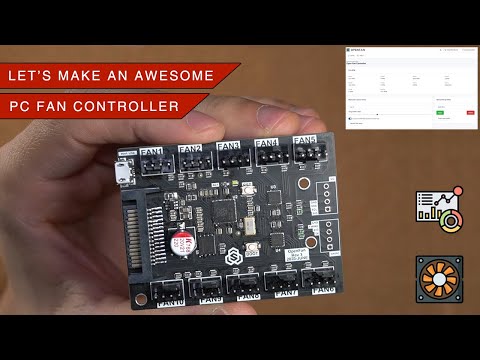
Above video shows the finished 10 channel PC fan controller, how it works and motivation behind some of the design decisions.
Some of the main features of the OpenFAN controller are:
- Individually control up to 10 fans
- USB communication with the host PC
- Has a built-in USB bootloader for smooth firmware upgrade experience
- GUI to control and monitor fans. Accessible locally/remotely through web browser
- Control fans by setting PWM percentage or target RPM
- Supports virtually unlimited number of custom fan profiles that you can create and apply through GUI/API
- Built in API interface for integration, (remote) monitoring or (remote) control.
- Built using simple off-the-shelf components to make it hacker/diy friendly
- Designed to be platform/OS agnostic and works on Windows, Linux and Mac
- GUI/API can be deployed as Docker application
- Fan Control integration through FanControl.OpenFAN plugin (Windows)
- Unraid docker integration through OpenFanController application (Unraid)
- Docker image available (Docker)
Can I buy OpenFAN controller
Yes you can. It's available on the web shop.
Can I build my own?
Yes you can. The above video explains the idea and how hardware and firmware works. It's recommended that you watch that first.
Hardware, Firmware and Software build instructions and source files are available in this repository.
Is there documentation?
Documentation for OpenFAN Controller (and other projects) can be found at the official docs page.
What platforms are supported?
OpenFAN is designed to be platform agnostic. This means you can use it on Windows, Linux and Mac.
You can find more information on how to run OpenFAN software in the software read me
Blog page: https://sasakaranovic.com/projects/openfan-controller/
YouTube video: http://www.youtube.com/watch?v=C8tcsyASQRM
Sasa Karanovic
 Home Page ·
 YouTube ·
 GitHub ·
 Twitter ·
 Instagram ·
Sponsor on GitHub
Instagram ·
Sponsor on GitHub
Categories
Related apps
Explore more like this
Explore allLinks
Details
ghcr.io/sasakaranovic/openfancontroller:releaseRuntime arguments
- Web UI
http://[IP]:[PORT:3000]- Network
bridge- Shell
sh- Privileged
- false
- Extra Params
--memory=512M
Template configuration
Path to OpenFan Controller USB-to-Serial port. Usually this is `/dev/ttyACM0` unless you have multiple USB-to-Serial devices connected
- Default
- /dev/ttyACM0
- Value
- /dev/ttyACM0
Server port for accessing Web UI
- Target
- 3000
- Default
- 3210
- Value
- 3210
OpenFAN USB Device. Usually `/dev/ttyACM0` This should match your OPENFANCOMPORT environment variable.
- Value
- /dev/ttyACM0