

OpenFAN-Service
Docker app from SasaKaranovic's Repository
Automatic fan control for the OpenFAN controller.
Overview
Readme
View on GitHubOpenFAN Service
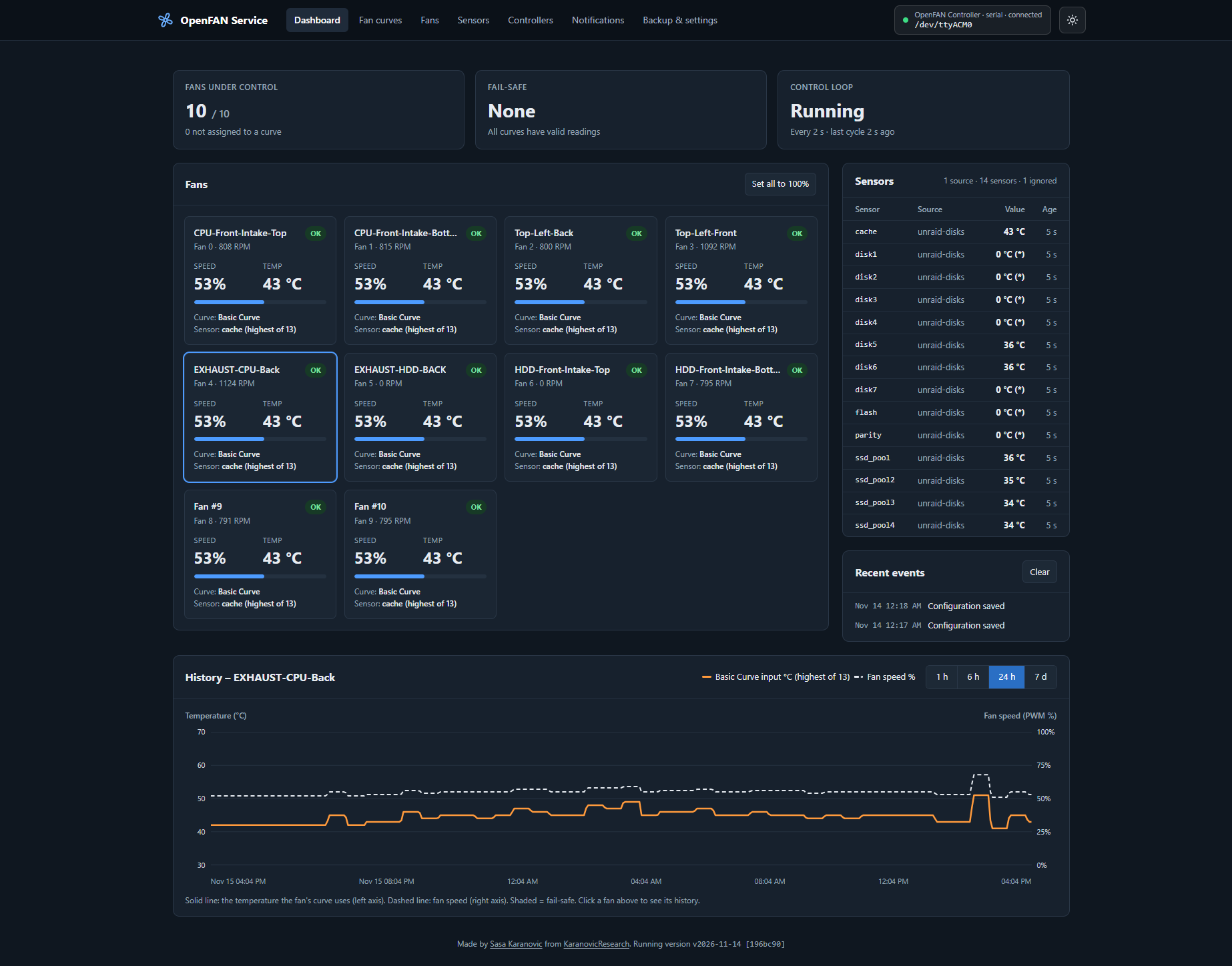
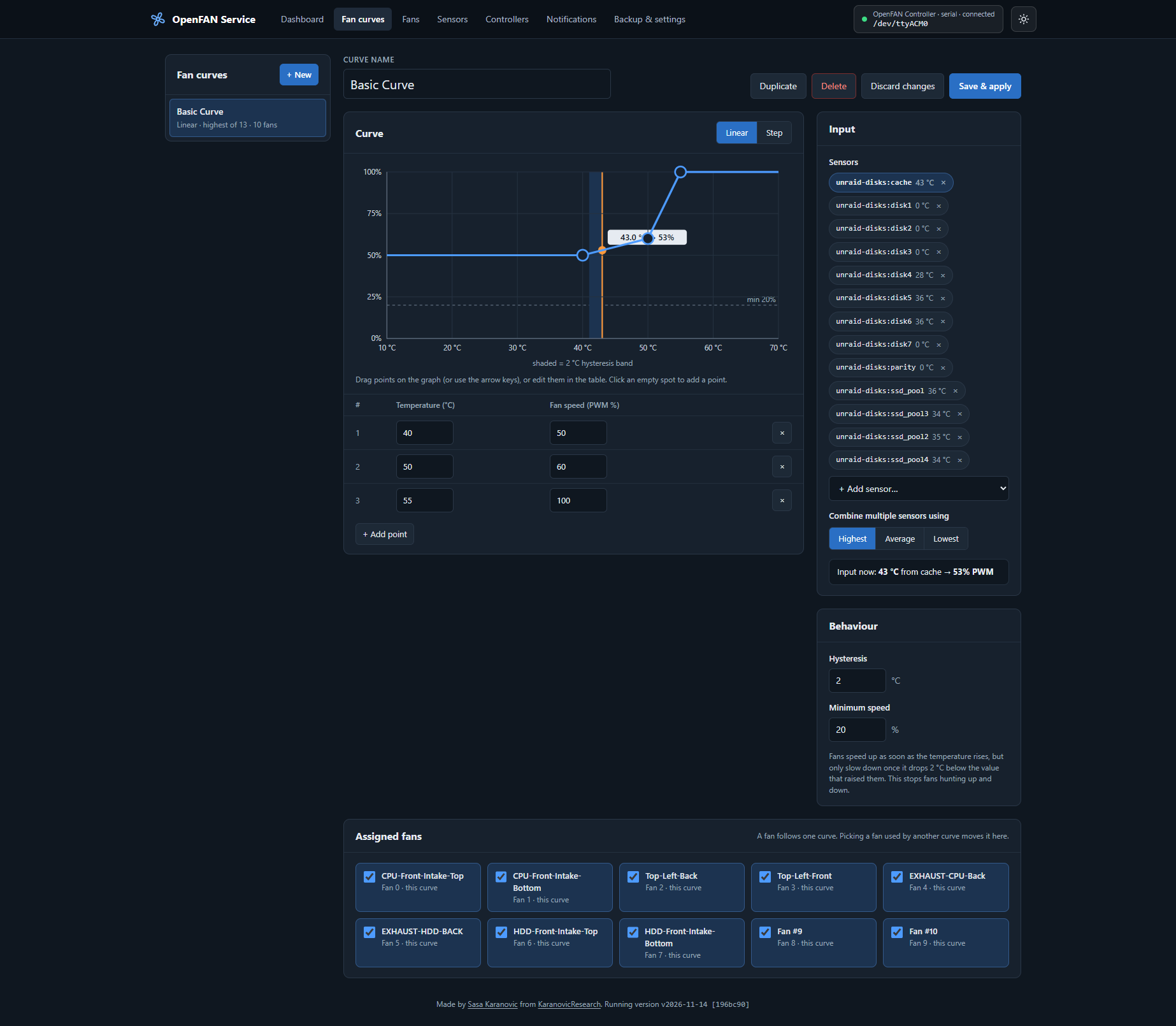
Automatic, temperature-driven fan control for the OpenFAN Controller, with a web UI.
- Draw fan curves in the browser and assign them to one or more fans.
- Feed temperatures from plugins: Unraid disks, Linux hwmon (CPU, NVMe, motherboard), any command or script, a file, a JSON URL, or values your own script pushes to the API. The rest of the app does not care where a temperature comes from, so it runs the same on Unraid, TrueNAS, Proxmox or plain Linux.
- Fail-safe by design: if a curve is deleted, a sensor disappears, goes stale or fails, its fans go to 100% until the problem is gone. You get a warning in the UI and, if you want, a notification (Telegram, Discord, ntfy, e-mail, Pushover, Gotify, Slack and 100+ more).
- History graphs of temperature and fan speed, per fan.
- Backup and restore of the whole configuration, plus automatic backups on every change.
- One Docker container, one web port (5340), one config folder.
Quick start
- Plug the OpenFAN controller into the server over USB and find its device (usually
/dev/ttyACM0):ls -l /dev/serial/by-id/ /dev/ttyACM* - Save
docker-compose.ymland adjust thedevices:line if needed. - Start it:
docker compose up -d - Open
http://<server>:5340. The controller is detected automatically. - In the web UI:
- Sensors → Add sensor source (for example Unraid disks or Linux hwmon) → Test → Add source.
- Fan curves → + New: pick the sensors, shape the curve and tick the fans that should follow it → Create curve.
That's it. Fans that are not assigned to a curve are not managed: the service never touches them.
Want to look around first?
docker compose -f examples/docker-compose.demo.yml upstarts the service with a simulated controller and sensors.
Unraid
Install the container with the template in examples/unraid-template.xml, or by hand with the settings in examples/docker-compose.unraid.yml:
| What | Container | Host |
|---|---|---|
| Config (settings, backups, history) | /config |
/mnt/user/appdata/openfan-service |
| Unraid disk info, read-only | /unraid |
/var/local/emhttp |
| OpenFAN USB device | /dev/ttyACM0 |
/dev/ttyACM0 |
| Web UI port | 5340 |
5340 |
Then add a sensor source of type Unraid disks with path /unraid/disks.ini. Spun-down disks are reported by Unraid as *. You choose what that means per source: 0 °C (default), ignore (leave out of the curve), or fault (fail-safe).
TrueNAS SCALE
See examples/docker-compose.truenas.yml. Store /config on a dataset, set PUID/PGID to 568, and use the Linux hwmon sensor source. hwmon covers CPU, NVMe and SATA drives that have the drivetemp driver.
Bare-metal Linux / Proxmox / anything else
Use the main docker-compose.yml. Good sensor sources are Linux hwmon, a Command (for example nvidia-smi --query-gpu=temperature.gpu --format=csv,noheader), or the Push API from a cron job or script.
Using the REST API instead of USB
If the controller is connected to another machine, or you want to keep running the OpenFAN Controller app, add a controller of type OpenFAN over network (REST API) with the app's address, for example http://192.168.1.10:3000. See examples/docker-compose.rest.yml.
With a REST controller, the Fans page has an Import fan names from controller button. It copies the fan names you set in the OpenFAN Controller app. Over USB the board stores no names, so the button is not shown.
A USB serial port can only be used by one program at a time. When this service talks to the controller over USB, the OpenFAN web app cannot connect to it at the same time.
How the fail-safe works
Every control cycle (default every 2 s), each fan gets one of these states:
| State | When | Fan speed |
|---|---|---|
| OK | Curve and all its sensors are fine | From the curve |
| FAIL-SAFE | Curve deleted · curve has no sensors · a sensor is missing, failing, or has no valid reading for 60 s (configurable) | 100% (configurable, 50–100) |
| STARTING | Service just started, sensors have not reported yet | 100% |
| OVERRIDE | You pressed Set all to 100% | 100% for 10 minutes |
| OFFLINE | The controller is not connected | Unchanged (cannot be set) |
| NOT MANAGED | Fan has no curve | Not touched |
- Fans return to their curve automatically when the problem is fixed. A notification is sent both ways.
- If any sensor of a multi-sensor curve fails, its fans go to fail-safe, because the missing sensor could be the hot one.
- A sensor that reports an error keeps its last good value until the stale timeout runs out. Short glitches, such as a file being rewritten while it is read, therefore do not cause alarms.
- If the controller is unreachable for longer than the stale timeout, you get one alert, and another one when it reconnects.
- When the container stops, every managed fan is set to 100% (configurable), so a stopped service never leaves fans slow.
- A watchdog restarts the process if the control loop ever stops cycling. With
restart: unless-stopped, Docker then starts it again. - A broken
config.yamlnever stops the service: it runs from the newest valid backup and shows a warning.
Hardware note: if the whole server or Docker hangs, no software can change the fans. They stay at their last speed. If you want protection against that too, a firmware watchdog on the controller would be the next step.
Hysteresis
Each curve has a hysteresis setting (default 2 °C). Fans speed up as soon as the temperature rises, but only slow down once it has dropped by the hysteresis below the value that raised them. This stops fans from hunting up and down around a curve point.
Sensor sources (plugins)
| Type | Reads | Typical use |
|---|---|---|
| Unraid disks | disks.ini from /var/local/emhttp |
Unraid array, pool and cache disks |
| Linux hwmon | /sys/class/hwmon |
CPU (k10temp, coretemp), NVMe, board sensors, drivetemp |
| Command / script | Output of a shell command | smartctl, nvidia-smi, ipmitool, your own script |
| File | A file another program writes | Anything that can write a number or JSON |
| HTTP / JSON | A URL returning JSON | Home Assistant, Glances, Netdata, your API |
| Push (API) | Values POSTed to the service | Cron jobs, scripts on other machines |
| Demo | Simulated values | Trying things out |
Any sensor can be ignored on the Sensors page, for example an empty Unraid slot that always reports DISK_NP_DSBL. An ignored sensor is hidden from the dashboard, never reports problems, and is left out of any curve that uses it. If all sensors of a curve are ignored, its fans go to fail-safe. Restore brings an ignored sensor back.
The command, file and push types accept a single number, name=value lines, or JSON. Use Multiply by 0.001 for millidegree values.
Push API
Create a source of type Push (for example with id script), then send values:
curl -X POST http://server:5340/api/push/script \
  -H 'Content-Type: application/json' \
  -H 'X-OpenFAN-Token: <token, if you set one>' \
  -d '{"cpu": 52.5, "gpu": 61}'
Sensors appear as script:cpu and script:gpu. If values stop arriving, they go stale after the stale timeout and their fans go to fail-safe.
Writing your own plugin
Put a .py file in /config/plugins/ and restart the container. Copy examples/plugins/example_random.py to start:
from openfan_service.sensors import Option, Reading, SensorPlugin

class MySensor(SensorPlugin):
    type_name = "my_sensor"          # unique
    title = "My sensor"
    options = [Option("path", "Path", default="/data/temp.txt")]

    def read(self):                  # called in a worker thread every poll interval
        value = float(open(self.opts["path"]).read())
        return {"temp": Reading(value)}
The options you declare become a form in the web UI. Raise an exception if the source failed.
Notifications
Notifications page → paste one or more Apprise URLs → Send test message → Save. Examples:
| Service | URL |
|---|---|
| Telegram | tgram://<bot token>/<chat id> |
| Discord | discord://<webhook id>/<webhook token> |
| ntfy | ntfys://ntfy.sh/<topic> |
| Pushover | pover://<user key>@<app token> |
mailtos://<user>:<app password>@gmail.com |
WhatsApp works through Apprise's whatsapp:// URL, which needs a Meta WhatsApp Business account.
Configuration, backups and permissions
Everything lives in the /config volume. Mount it to a folder on disk so it survives container re-creation and updates:
/config/config.yaml        all settings (YAML; editable by hand, validated on load)
/config/backups/           automatic backup on every change (last 30 kept)
/config/history.sqlite     temperature / fan history (7 days by default)
/config/plugins/           your own sensor plugins
- Backup & settings → Download configuration saves one YAML file. Restore from file… loads it back, and the current config is backed up first.
- Every save is atomic (temp file + rename) and validated. An invalid change is rejected and never applied.
- The container runs as
PUID:PGID(default99:100, Unraid's nobody:users). It fixes the ownership of its own files in/configon start. Set them to your user (id -u,id -g) on other systems, or to568on TrueNAS. - On network shares (SMB/NFS), the history database automatically uses a safer journal mode.
Environment variables
| Variable | Default | Meaning |
|---|---|---|
PUID / PGID |
99 / 100 |
Owner of files in /config |
UMASK |
022 |
File creation mask |
TZ |
UTC |
Time zone for logs |
OPENFAN_PORT |
5340 |
Web UI / API port |
OPENFAN_PASSWORD |
– | Turn on the login with this password (overrides the UI setting) |
OPENFAN_SERIAL_PORT |
auto |
First start only: serial port of the controller |
OPENFAN_CONTROLLER_URL |
– | First start only: use the REST API at this URL instead of USB |
OPENFAN_DEMO |
0 |
First start only: simulated controller and sensors |
OPENFAN_LOG_LEVEL |
info |
debug, info, warning |
OPENFAN_USER_PLUGINS |
1 |
Load plugins from /config/plugins |
Login
Off by default, because the service is meant for a home network behind a firewall. Turn it on under Backup & settings → Login, or with OPENFAN_PASSWORD. Health checks (/api/health) and push requests (which use their own per-source token) do not need the login.
Versions
There are no semantic version numbers. Every Docker image build is a new version, named by its build date (UTC) and the git commit. The page footer, /api/health and the log show it as v2026-11-13 [a1b2c3d].
| Where | Version |
|---|---|
| Published image (GitHub workflow) | Tags :latest, :2026-11-13 and :2026-11-13-a1b2c3d on every push to master (or release). One image covers amd64 and arm64; Docker picks the right one. |
Local build with scripts/docker-build.* |
Tags openfan-service:dev and openfan-service:2026-11-13-a1b2c3d. -dirty is added when tracked files have uncommitted changes. |
Plain docker build without build arguments |
vdev [unknown] |
| Running from source | Date and hash of the last commit, plus -dirty if there are uncommitted changes |
To pin a specific version, use its date tag instead of latest, e.g. ghcr.io/sasakaranovic/openfan-service:2026-11-13.
API
The web UI uses a JSON API that you can script too. Main endpoints:
| Method & path | Purpose |
|---|---|
GET /api/health |
Liveness (used by the Docker healthcheck) |
GET /api/state |
Live state: fans, sensors, controllers, events |
GET /api/config |
Current configuration (secrets masked) |
POST /api/curves, PUT/DELETE /api/curves/{id} |
Manage curves (body may include fans: ["main:0", ...]) |
PUT /api/fans/{controller}/{index} |
{ "name": "...", "curve": "id" | null } |
POST /api/sources, PUT/DELETE /api/sources/{id}, POST /api/sources/test |
Sensor sources |
POST /api/sensors/ignore {ref, ignored} |
Ignore or restore one sensor |
POST /api/push/{source} |
Push sensor values |
POST /api/controllers, PUT/DELETE /api/controllers/{id}, POST /api/controllers/test |
Controllers |
GET /api/controllers/{id}/fan-names, POST /api/controllers/{id}/fan-names/import |
Read / import the fan names saved in the OpenFAN Controller app (REST controllers only) |
GET /api/history?fan=main:0&hours=24 |
History for one fan (temp, pwm, rpm, fs) |
POST /api/override {pwm, minutes}, DELETE /api/override |
Manual override |
DELETE /api/events |
Clear the Recent events list |
GET /api/backup, POST /api/restore, GET /api/backups |
Backup and restore |
Development
See docs/DEVELOPMENT.md for running from source on Windows and Linux, building and running the Docker image locally, USB passthrough on Windows, and tools that fake the hardware.
pip install -r requirements-dev.txt
OPENFAN_DEMO=1 OPENFAN_CONFIG_DIR=./config python -m openfan_service   # http://localhost:5340
python -m pytest
The web UI is plain HTML, CSS and JavaScript modules in openfan_service/web/, with no build step. Edit and reload.
openfan_service/
  app.py              wiring, auth middleware, watchdog
  engine.py           control loop + fail-safe state machine
  curves.py           curve maths (pure functions)
  models.py           config schema (pydantic)
  config_store.py     atomic save, backups, recovery
  sensors/            plugin interface, built-in plugins, polling manager
  controllers/        OpenFAN serial + REST drivers, connection manager
  history.py          SQLite history
  notifier.py         Apprise notifications
  api.py              HTTP API
  web/                the web UI
Sasa Karanovic
 Home Page ·
 YouTube ·
 GitHub ·
 Twitter ·
 Instagram ·
Sponsor on GitHub
Categories
Related apps
Explore more like this
Explore allLinks
Details
ghcr.io/sasakaranovic/openfan-service:latestRuntime arguments
- Web UI
http://[IP]:[PORT:5340]/- Network
bridge- Privileged
- false
- Extra Params
--restart=unless-stopped
Template configuration
Port of the web UI
- Target
- 5340
- Default
- 5340
- Value
- 5340
Settings, backups and history
- Target
- /config
- Default
- /mnt/user/appdata/openfan-service
- Value
- /mnt/user/appdata/openfan-service
Read-only. Contains disks.ini with disk temperatures. Use path /unraid/disks.ini in the Unraid disks sensor source.
- Target
- /unraid
- Default
- /var/local/emhttp
- Value
- /var/local/emhttp
The OpenFAN controller's USB serial device. Leave empty if you use the REST API instead.
- Target
- /dev/ttyACM0
- Default
- /dev/ttyACM0
- Value
- /dev/ttyACM0
User id for files in /config
- Default
- 99
- Value
- 99
Group id for files in /config
- Default
- 100
- Value
- 100
Optional. Turns on the login with this password.
- Target
- OPENFAN_PASSWORD