
All apps · 0 apps

OpenEasyX
Docker app from Raccommode's Repository
Overview
Readme
View on GitHubOpen EasyX
Open EasyX is one private, self-hosted application for discovering, downloading, organizing, browsing, and playing media: one Node server, one React application, one Docker container, and one media volume.
What is included
- performer discovery and source association;
- automatic and manual download queues;
- isolated partial downloads in
media/.downloads, with restart-from-zero recovery; - an indexed video and photo library with favorites, history, progress, previews, and statistics;
- direct live-cam aggregation and playback from installed source plugins;
- local subtitle transcription and translation;
- an official, built-in plugin store;
- additional plugin repositories from GitHub, Gitea, Forgejo, GitLab, or any compatible HTTP(S), SSH, or Git remote;
- integrated browser login for plugins that need an authenticated session.
No bridge, iframe, or second application runs behind Open EasyX.
Screenshots
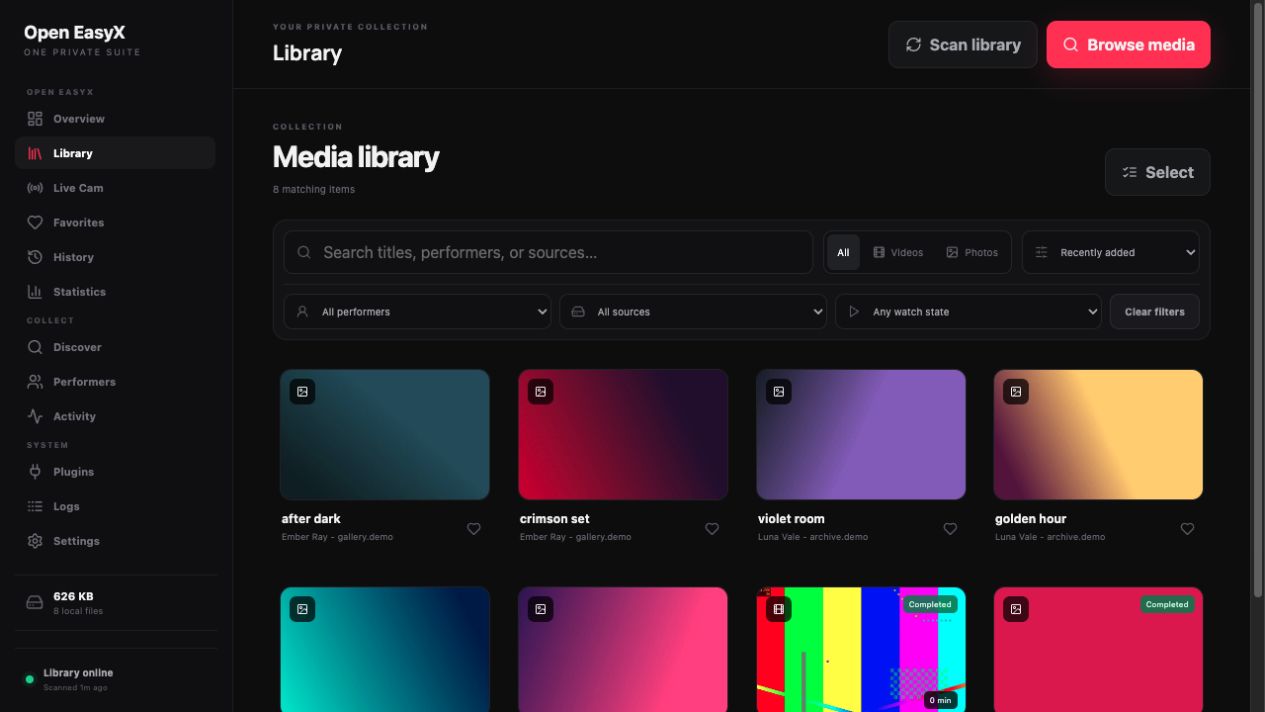
One optimized navigation and media library
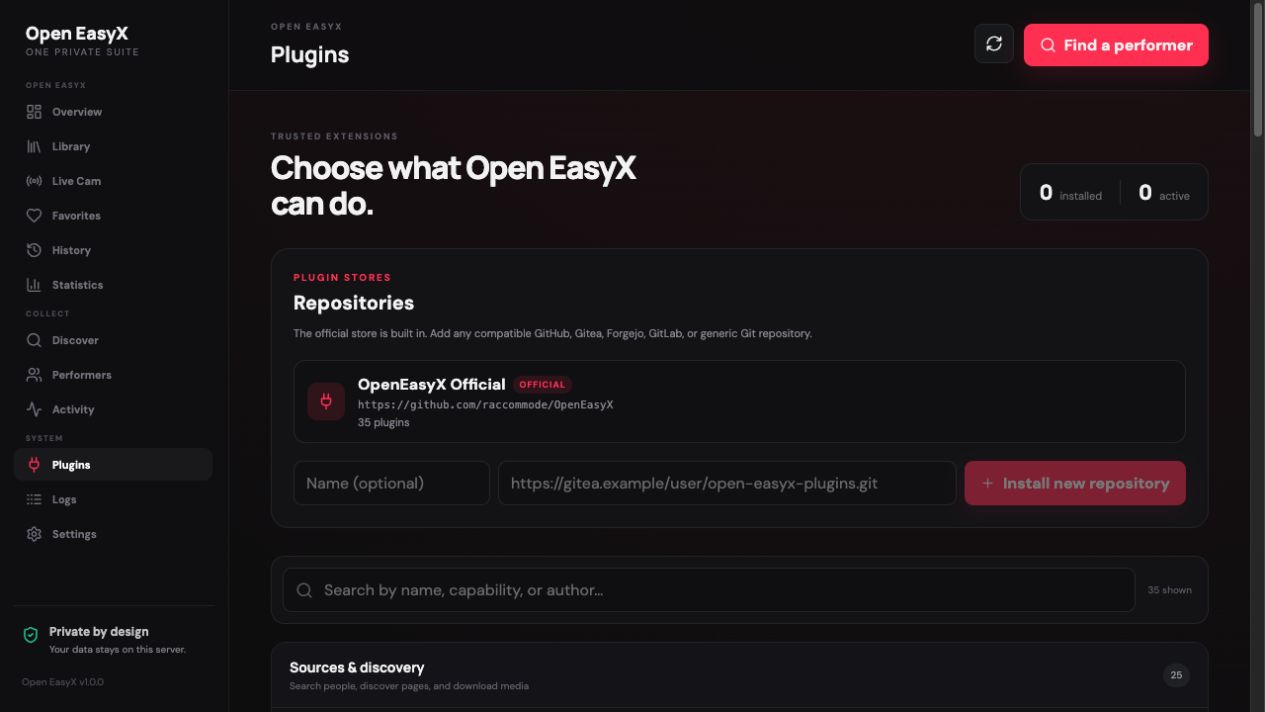
Built-in and community plugin stores
Start with Docker Compose
mkdir -p data media plugins-external
docker compose up -d
Open http://localhost:3210. The default Compose project starts one container named open-easyx.
Completed media is organized below /media/<performer>/<source>/ by default. In Settings → Storage, customize the folder and filename templates for new downloads, with a live example before saving. Existing files are not moved or renamed.
For example, folder {performer} and filename {site}-{date}-{filename} store files directly in the model's folder while keeping the source in the filename. An empty folder template uses the media volume root. Available variables are {performer}, {site}, {filename} (original name without extension), {title}, {id}, {date}, {time}, {year}, {month}, and {day}. Dates use the publication/recording timestamp in UTC. Extensions are added automatically, unsafe path components are rejected, and name collisions receive a suffix without overwriting existing files. Library performer/source metadata is retained independently of the chosen folder layout.
The Live recording preset setting defaults to the original stream without re-encoding. Optional presets produce MP4 with H.264 high quality, H.264 smaller files (up to 720p), or H.265/HEVC. Encoding runs after a live recording ends or Stop and save is selected; it requires extra CPU and temporary storage. The file is added to the library only after encoding completes. Ordinary video downloads and photos are not re-encoded. If encoding fails, the captured source is kept under .recording-recovery and its recovery path is shown in the Activity error.
Active transfers stay below /media/.downloads and are never exposed to the library. On restart, interrupted transfers are discarded and queued again from zero.
Live creator favorites are saved locally immediately. Connected-provider synchronization runs in the background with a visible status, and pending changes survive restarts and retry during account synchronization. A provider outage or expired login does not discard a saved local favorite.
Performer accounts and rescanning
Account URLs cannot be assigned to different performers without review. Adding an already linked Instagram account (including URL case, tracking parameters, or a trailing slash) shows the existing profile and offers Review merge. Choose which name to keep, then explicitly confirm. Sources, stored files, favorites, and playback history are retained; the other name becomes an alias. Existing conflicting links also appear on the performer profile. Active scans/downloads must finish before merging.
Each source has a Hard refresh button beside Scrape now. It rescans from the beginning within the plugin's configured scan limit and restores rediscovered deleted or missing items, following the source/global auto-download settings. Existing files and active downloads are preserved. Normal automatic scans continue to respect deletion history; hard refresh affects the selected source only.
Pornhub account scans use the account's uploads listing (channel video listing for channels) and verify the uploader of each candidate before queuing it. Unrelated recommendations, cast-only matches, and videos whose uploader cannot be verified are skipped. Verification also applies to older queued account videos before downloading. Checking metadata makes account scans slower than a flat playlist scan.
Chaturbate recording quality and connectivity
In Plugins → Chaturbate Live, set Maximum recording height to 720 (or 480, 1080) to capture a native stream at or below that resolution. 0 selects the best available quality. Separate audio and video tracks are captured together with FFmpeg. If the provider has no matching resolution with audio, the recording fails instead of silently selecting a larger stream.
To avoid re-encoding, keep Settings → Live recording preset on Original stream — no re-encoding. The H.264 — smaller files preset still performs a CPU-intensive conversion after capture; it is independent of the plugin's native resolution limit. New plugin settings apply to recordings started afterward.
Chaturbate stream extraction uses IPv4 by default to avoid unreachable IPv6 routes in containers. The Use IPv4 for stream extraction setting can be disabled on networks requiring IPv6. It applies to yt-dlp's metadata and playlist requests; FFmpeg makes its own connections while capturing. If errors persist, check connectivity from the Open EasyX container and the recording error in Activity.
Local development
Requirements: Node.js 22.5 or newer, Git, FFmpeg, and the downloader helpers used by the plugins you enable.
npm install
npm run dev
Run the full validation suite with:
npm run check
Plugins and stores
ViralXXXPorn supports public model video collections (/models/<name>/), search results (/search/<query>/), video lists, and individual /video/<id>/... and /short/<id>/... pages. Collection scans follow pagination up to Maximum videos per scan (100 by default). Downloads refresh the page's public MP4 link and select its highest available resolution. Photo albums and account-restricted videos are not supported.
DirtyShip supports performer video collections (/performer/<name>/), individual video pages, and full-resolution photo galleries (/gallery/<name>/). Both plugins are available in the built-in store; install the plugin, assign it to a performer's source URL, then select Scrape now.
Plugins are grouped in the UI by what they add:
- Sources & discovery — identity search, source discovery, scraping, and download resolution;
- Live cam — live directories and stream resolution;
- Features & addons — library hooks and other local features.
The official store lives in plugins/ and cannot be removed. In Plugins → Repositories, an administrator can install another Git repository URL. Open EasyX validates and clones it into /data/plugin-repositories, loads plugins from either its root or plugins/, and lets the administrator update or remove that repository later.
See docs/PLUGINS.md for the SDK contract, or start a store from the public Open EasyX Community Plugins template.
For JavLibrary, see Connect FlareSolverr for an existing instance, the optional Docker Compose service, and connectivity checks.
Persistent paths
| Container path | Purpose |
|---|---|
/data |
databases, sessions, plugin repository checkouts, thumbnails, subtitles, and models |
/media |
completed media library plus private .downloads staging |
/plugins |
optional legacy read-only local plugin folder |
Set EASYX_MAX_CONCURRENT_DOWNLOADS_LIMIT to a positive integer (default 8) to raise the ceiling of Settings → Automation → Maximum concurrent downloads. Restart the server after changing it, then save the desired concurrency in Settings. Invalid values fall back to 8; the API, input and download queue share the same ceiling.
Stripchat, BongaCams and CAM4 recordings can span short interruptions. STRIPCHAT_MERGE_GAP_MINUTES, BONGACAMS_MERGE_GAP_MINUTES and CAM4_MERGE_GAP_MINUTES default to 10; set any of them to 0 to finalize as soon as its stream ends. BongaCams and CAM4 fall back to the Stripchat value when their own variable is unset. Waiting recordings occupy a download slot. Automatic recording restarts after a completed or failed session, with backoff for short/failed recordings. A manual stop, cancel or deletion stays suppressed until a successful scan observes the room offline or non-public, including across app restarts.
Important environment variables include PUID, PGID, EASYX_SCAN_INTERVAL_MINUTES, EASYX_WHISPER_MODEL, EASYX_TRANSLATION_MODEL, and EASYX_LOG_LEVEL.
Container publishing
Every push to main runs tests, TypeScript, the production web build, a Docker build, and runtime checks. A successful push automatically creates a YEAR.WEEK.N version (for example 2026.35.1), publishes the multi-architecture image to ghcr.io/raccommode/open-easyx with both that version and latest, injects the version into the application, and creates the matching GitHub Release. Pull requests run the same checks without publishing a release.
AMD64 and ARM64 images build concurrently on native GitHub runners, with a separate persistent cache for each architecture. Each image passes the Unraid-style runtime and browser checks before upload; version and latest tags are published only after both images and the application tests succeed. Release metadata is added after dependency installation so a new version does not reinstall Chromium, Python tools, or subtitle libraries. The first build, dependency changes, or an expired cache still take longer than a routine code update.
For a manual validation or cache benchmark without publishing, run the workflow with Publish image tags and create a release disabled.
Run the same container checks locally with bash scripts/docker-runtime-smoke.sh <image> <expected-version>.
Responsible use
Only download, retain, and view material you are legally authorized to access. Third-party plugins execute trusted server-side code; review their source before installation.
License
Settings → Backup exports your performer directory, source URLs, recording priorities, supported app settings and installed plugin IDs. Media files, local portraits, playback history and plugin credentials are excluded. Import merges records by name or linked account, reports conflicts and skipped settings, and keeps the result visible. Back up the data and media volumes separately for a complete recovery.
A performer’s recording priority can be changed under Manage profile. Higher priorities start first and can stop a lower-priority live recording when all slots are occupied; the captured recording is kept. Paused recordings, file downloads and finalization are not interrupted.
Requirements
Related apps
Explore more like this
Explore allDetails
ghcr.io/raccommode/open-easyx:latestRuntime arguments
- Web UI
http://[IP]:[PORT:3210]- Network
bridge- Shell
sh- Privileged
- false
Template configuration
Open EasyX web interface and API port. Keep this accessible only on a trusted LAN or through an authenticated reverse proxy. Container port: 3210.
- Target
- 3210
- Default
- 3210
- Value
- 3210
Stores databases, sessions, plugin repository checkouts, thumbnails, subtitles, logs, and downloaded AI models. Back up and protect this path.
- Target
- /data
- Default
- /mnt/user/appdata/open-easyx
- Value
- /mnt/user/appdata/open-easyx
Stores the completed media library and private .downloads staging directory used for active transfers.
- Target
- /media
- Default
- /mnt/user/OpenEasyX
- Value
- /mnt/user/OpenEasyX
Optional legacy directory containing trusted external plugin folders. The built-in plugin store and added Git repositories are stored under Data instead.
- Target
- /plugins
- Default
- /mnt/user/appdata/open-easyx/plugins
- Value
- /mnt/user/appdata/open-easyx/plugins
Host user ID used for files written to Data and Media. Unraid's nobody user is UID 99.
- Default
- 99
- Value
- 99
Host group ID used for files written to Data and Media. Unraid's users group is GID 100.
- Default
- 100
- Value
- 100
Minutes between automatic media-library scans. The minimum effective value is 1 minute.
- Target
- EASYX_SCAN_INTERVAL_MINUTES
- Default
- 10
- Value
- 10
Whisper model used for local subtitle transcription. Larger models require more memory, storage, and processing time.
- Target
- EASYX_WHISPER_MODEL
- Default
- small
- Value
- small
Hugging Face model used for local subtitle translation.
- Target
- EASYX_TRANSLATION_MODEL
- Default
- facebook/nllb-200-distilled-600M
- Value
- facebook/nllb-200-distilled-600M
Subtitle processing chunk length in seconds. Open EasyX constrains this value between 120 and 1800.
- Target
- EASYX_SUBTITLE_CHUNK_SECONDS
- Default
- 600
- Value
- 600
Application log level, for example fatal, error, warn, info, debug, trace, or silent.
- Target
- EASYX_LOG_LEVEL
- Default
- info
- Value
- info
Timezone used by the container, for example America/Toronto.
- Target
- TZ
- Default
- America/Toronto
- Value
- America/Toronto