
All apps · 0 apps

Openbooks
Docker app from grtgbln's Repository
Overview
Readme
View on GitHubopenbooks
NOTE: Going forward only the latest release will be supported. If you encounter any issues, be sure you are using the latest version.

Openbooks allows you to download ebooks from irc.irchighway.net quickly and easily.
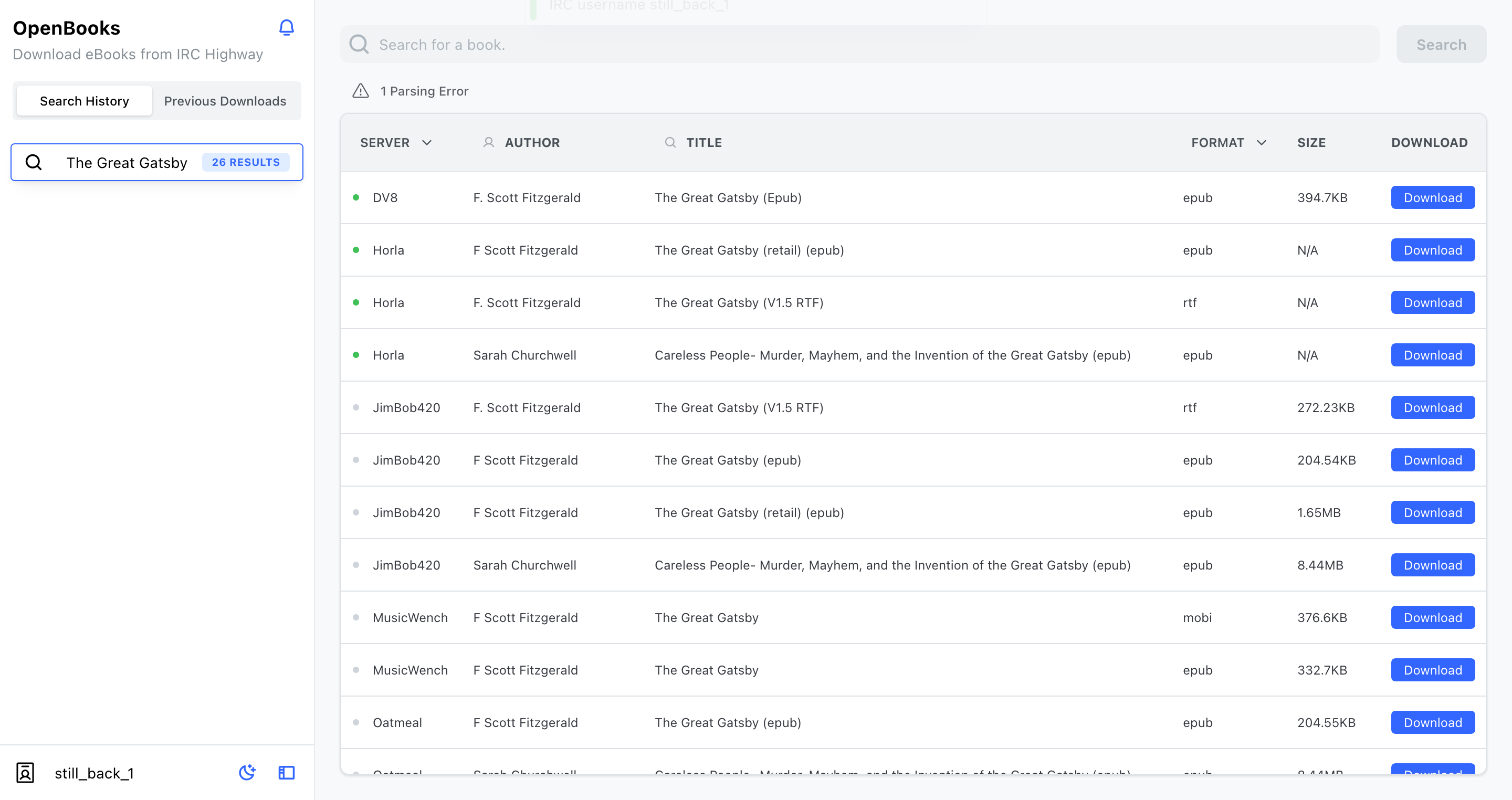
Getting Started
Binary
- Download the latest release for your platform from the releases page.
- Run the binary
- Linux users may have to run
chmod +x [binary name]to make it executable
- Linux users may have to run
./openbooks --help- This will display all possible configuration values and introduce the two modes; CLI or Server.
Docker
- Basic config
docker run -p 8080:80 evanbuss/openbooks
- Config to persist all eBook files to disk
docker run -p 8080:80 -v /home/evan/Downloads/openbooks:/books evanbuss/openbooks --persist
Setting the Base Path
OpenBooks server doesn't have to be hosted at the root of your webserver. The basepath value allows you to host it behind a reverse proxy. The base path value must have opening and closing forward slashes (default "/").
- Docker
docker run -p 8080:80 -e BASE_PATH=/openbooks/ evanbuss/openbooks
- Binary
./openbooks server --basepath /openbooks/
Usage
For a complete list of features use the --help flags on all subcommands.
For example openbooks cli --help or openbooks cli download --help. There are
two modes; Server or CLI. In CLI mode you interact and download books through
a terminal interface. In server mode the application runs as a web application
that you can visit in your browser.
Double clicking the executable will open the UI in your browser. In the future it may use webviews to provide a "native-like" desktop application.
Development
Install the dependencies
go getcd server/app && npm installcd ../..go run main.go
Build the React SPA and compile binaries for multiple platforms.
- Run
./build.sh - This will install npm packages, build the React app, and compile the executable.
Build the go binary (if you haven't changed the frontend)
go build
Mock Development Server
- The mock server allows you to debug responses and requests to simplified IRC / DCC servers that mimic the responses received from IRC Highway.
cd cmd/mock_server
go run .
# Another Terminal
cd cmd/openbooks
go run . server --server localhost --log
Desktop App
Compile OpenBooks with experimental webview support:
cd cmd/openbooks
go build -tags webview
Why / How
- I wrote this as an easier way to search and download books from irchighway.net. It handles all the extraction and data processing for you. You just have to click the book you want. Hopefully you find it much easier than the IRC interface.
- It was also interesting to learn how the IRC and DCC protocols work and write custom implementations.
Technology
- Backend
- Golang
- Chi
- gorilla/websocket
- Archiver (extract files from various archive formats)
- Frontend
- React.js
- TypeScript
- Redux / Redux Toolkit
- Mantine UI / @emotion/react
- Framer Motion
Media gallery
Requirements
In **Post Arguments**, replace $NAME with your IRC username. Optionally, change the server and searchbot.
Download Statistics
Total Downloads Over Time
Related apps
Explore more like this
Explore allLinks
Details
evanbuss/openbooks:latestRuntime arguments
- Web UI
http://[IP]:[PORT:80]/- Network
bridge- Privileged
- false
Template configuration
Container Port: 80
- Target
- 80
- Default
- 8080
- Value
- 8080
Directory where search results and eBooks are saved.
- Target
- /books