
All apps · 0 apps

onepacerr
Docker app from Soitora's Repository
Overview
Readme
View on GitHub[!WARNING]
If you're having issues connecting to websocket, please update to at least v1.8.11. In fact, please update to current latest anyways :) a lot of bugs fixes and performance improvements have been made.








Automated One Pace downloads and metadata for Plex, Jellyfin, and Emby
Built to complement your Sonarr stack
Because Sonarr does not natively support One Pace (the fan-edited, manga-accurate version of One Piece), this app bridges the gap by automatically downloading, organizing, and keeping your One Pace episodes fully up to date both on your disk, and on your Media Server of chosing (Plex, Jellyfin, Emby).
Other than organizing your episode files, it also updates metadata and posters so that it looks nice and professional on your Media Server.
It supports the most popular torrenting clients (qBittorrent, deluge, µTorrent and transmission) and the most popular Media Servers (Plex, Jellyfin, Emby), or it can even be used without a torrenting client or a Media Server at all.
Also check One Pace public API.
Not affiliated with One Pace's team.
Supported Torrenting Clients




Supported Media Servers




Works anywhere
| Cross Platform |  |
 |
 |
 |
|---|---|---|---|---|
| Deploy Docker Image | ✅ | ✅ | ✅ | ✅ |
| Run locally | ✅* | ✅* | ✅* |
*Requires Node installed

📃 Table of Contents
✨ Features
⚡ Usage
🖼️ Poster Sets
📅 Roadmap
✨ Features
Automated Discovery: Continuously pulls One Pace's RSS Release feed and metadata to detect missing and new releases.
Smart Library Scanning: Scans your existing Media Server (Plex, Jellyfin, Emby) or Local Folder Library to compare latest episodes against your local files.
File Verification (Optional): Hashes existing files to ensure they match the latest releases and automatically re-downloads outdated versions.
File Organization (Optional): Scans your existing Media Server (Plex, Jellyfin, Emby) or Local Folder library and renames files accordingly when needed.
Seamless Downloading (Optional): Automatically sends
magnetURIlinks to torrent client for missing episodes.Torrent Monitoring (Optional): Tracks download progress. Once completed, it:
- Copies and renames the file to your designated Library folder.
- Updates the metadata either directly on your Media Server (Plex, Jellyfin, Emby) or creates the files on your Local Folder for later imports.
- Assigns a custom (
completed) category to the processed torrents.
🚀 Getting Started
🧳 Prerequisites
Before running OnePacerr, ensure you have the following services up and running:
- Docker & Docker Compose (or k8s, or custom app in Truenas or equivalent)
- Alternatively you can run it locally with node:
- create a
.envfile in root (usesample.envas example) npm installnpm run buildnpm start
- create a
- Alternatively you can run it locally with node:
- one of these torrent clients (with WebUI/APIs enabled)
- qBittorrent (Recommended)
- Deluge
- More torrenting clients coming
- You can simply organize a Local Folder, but the best use case is to organize your Media Server of choosing:
📝 Recommended configs
🐔 Base Operation
If your files are nicely named and organized and if your Media Server has all the metadata, you can safely leave these as true (default) or not declare them at all:
# 🐔 BASE CONFIG WHEN YOUR LIBRARY IS ALREADY WELL ORGANIZED
PIPELINE_SKIP_VERIFY_PRESENT_FILES=true
PIPELINE_SKIP_ORGANIZE_PRESENT_FILES=true
PIPELINE_SKIP_UPDATE_METADATA_PRESENT_FILES=true
This will prevent the app to verify hash (CRC32 hashing can take a while depending on your machine), to verify Media Server file names (and rename where necessary) and to update metadata for the files that are already present on it.
🐣 First Run
My recommendation when Media Server already has some/all of the episodes is to run it once with the following configs, so that every file is gonna get verified to be up to date and all metadata is gonna be imported.
# 🐣 RECOMMENDED CONFIG FOR FIRST RUN
PIPELINE_SKIP_VERIFY_PRESENT_FILES=false
PIPELINE_SKIP_ORGANIZE_PRESENT_FILES=false
PIPELINE_SKIP_UPDATE_METADATA_PRESENT_FILES=false
After the app is done processing all of the present seasons/episodes, it's gonna continue monitoring for completed downloads and import as usual.
You can also optionally disable downloads for this first run, then stop the app once it's done and update the env vars to keep it running with the basic config.
⚡ Usage
🐳 Deploy via Docker
The recommended way to deploy is via docker-compose.
Create a docker-compose.yml file and copy the configuration below. Make sure to update
the environment variables and volume mounts to match your server's setup.
I listed every env variable for convenience. All default are commented out, except the most critical.
services:
  onepacerr:
    image: ghcr.io/eltharynd/onepacerr:latest
    container_name: onepacerr
    restart: unless-stopped
    environment:
      # Set the Timezone to yours
      - TZ=Europe/Zurich
      # Set the User/Group it should run as.
      # This User/Group should have read access to torrent folder
      # This User/Group should have read/write access to library folder
      # Your Media Server User/Group should also have read access to library folder
      - PUID=568
      - PGID=568

      # General
      #- LOG_LEVEL=info
      #- LOG_OUTPUT=text


      # Pipeline
      - PIPELINE_SKIP_VERIFY_PRESENT_FILES=false
      #- PIPELINE_SKIP_VERIFY_NOT_FOR_EXTENDED=false
      - PIPELINE_SKIP_ORGANIZE_PRESENT_FILES=false
      - PIPELINE_SKIP_UPDATE_METADATA_PRESENT_FILES=false
      #- PIPELINE_SKIP_DOWNLOADS=false
      #- PIPELINE_SKIP_DOWNLOADS_IMPORTS=false
      #- PIPELINE_FORCE_REDOWNLOAD=false
      #- PIPELINE_SKIP_POSTERS=false

      #- PIPELINE_INCLUDE_SPECIALS=false
      - PIPELINE_PREFER_EXTENDED=true
      - PIPELINE_PREFER_ALTERNATE=true

      #- PIPELINE_FILTERS_INCLUDE=S01
      #- PIPELINE_FILTERS_EXCLUDE=S35,S36

      #- PIPELINE_RETRY_INTERVAL=10


      # Library
      - LIBRARY_MEDIA_SERVER=plex
      - LIBRARY_SERIES_NAME=One Pace
      #- LIBRARY_SERIES_FOLDER_NAME=One Pace

      #- LIBRARY_FILENAME_FORMAT={SERIES_NAME} - S{ARC}E{EPISODE} - {TITLE}.mkv
      #- LIBRARY_CREATE_SHOW_IF_NOT_FOUND=true


      # Library - None
      #- LIBRARY_NONE_ROOT_FOLDER=C:\\OnePacerr

      # Library - Plex
      - PLEX_URL=http://localhost:32400
      - PLEX_TOKEN=<your-token-here>
      - PLEX_LIBRARY_NAME=TV
      #- PLEX_SKIP_METADATA_FILES=true
      #- PLEX_PLEXMATCH_EVEN_IF_NOT=false

      # Library - Jellyfin
      - JELLYFIN_URL=http://localhost:8096
      - JELLYFIN_USERNAME=<your-username-here>
      - JELLYFIN_PASSWORD=<your-password-here>
      #- JELLYFIN_LIBRARY_NAME=Shows

      # Library - Emby
      - EMBY_URL=http://localhost:8096
      - EMBY_USERNAME=<your-username-here>
      - EMBY_PASSWORD=<your-password-here>
      #- EMBY_LIBRARY_NAME=TV Shows


      # Torrent Settings
      - TORRENT_URL=http://localhost:8080
      - TORRENT_USER=<your-username-here>
      - TORRENT_PASSWORD=<your-password-here>
      - TORRENT_CLIENT=qbittorrent
      #- TORRENT_CLIENT_TIMEOUT=10
      #- TORRENT_CATEGORY_FORCE=false
      #- TORRENT_CATEGORY=onepacerr
      #- TORRENT_CATEGORY_ONCE_COMPLETED=completed
      #- TORRENT_CHECK_INTERVAL=60


      # Cross-Mount Mappings (Uncomment if needed, defaults to nothing)
      #- MOUNT_LIBRARY_MEDIA_SERVER=/mnt/Library/Series
      #- MOUNT_LIBRARY_ONEPACERR=\\TRUENAS\series
      #- MOUNT_DOWNLOADS_TORRENT=/mnt/Applications/Downloads
      #- MOUNT_DOWNLOADS_ONEPACERR=\\TRUENAS\downloads


      # Metadata Settings
      #- METADATA_URL=https://onepacerr.com/api/v1
      #- METADATA_LANGUAGE=en
      #- METADATA_POSTER_SET=default
      #- METADATA_DISABLE_WEBSOCKET=false
      #- METADATA_CHECK_INTERVAL=3600
    volumes:
      - /mnt/Library/Series:/mnt/Library/Series
      - /mnt/Applications/Downloads:/mnt/Applications/Downloads
🟢 Running locally
Install node (>=24 tested) on your machine then:
- create a
.envfile in root (usesample.envas example) - run
npm install - run
npm run build - run
npm start
👩💻 Contributing to the development
For developing first install dependencies:
npm i
Then, I recommend opening two side-by side tabs in vs code terminal and running one of these in each:
#Compile typescript and watch for changes
#if you have typescript installed globally `npm i -g typescript`
tsc -w
#otherwise you can do
npx tsc -w


#Shortcut for nodemon --enable-source-maps dist/index.js
#runs app and reloads any time tsc-w recompiles an edited file
npm run dev
⚙️ Environment Variables Explained
Here is a breakdown of key optional variables you can adjust in your
docker-compose.yml or in your .env file:
- ⭐ Mandatory
- 🍤 Can leave empty but double check default works for you
- 🍏 Useful
- 💭 These configuration are specific to your chosen Media Server type (
$LIBRARY_MEDIA_SERVER) so you only need to specify the ones for your case.
General
| General Variables | Default | Description |
|---|---|---|
LOG_LEVEL |
info |
Can be critical, error, warning, info, debug. |
LOG_OUTPUT |
text |
Can be set to json if you need to scrape your logs with Loki/Promtail for Grafana. |
🧪 Pipeline
| Pipeline Variables | Default | Description |
|---|---|---|
🍏 PIPELINE_SKIP_VERIFY_PRESENT_FILES |
true |
If false, hashes files present in Plex upon metadata updates to ensure they are the latest/wanted versions. |
🍏 PIPELINE_SKIP_VERIFY_NOT_FOR_EXTENDED |
false |
If true, PIPELINE_SKIP_VERIFY_PRESENT_FILES only applies to episodes without extended or alternate versions |
🍏 PIPELINE_SKIP_ORGANIZE_PRESENT_FILES |
true |
If false, makes sure the files existing on your Library are in the correct folder and named correctly. |
🍏 PIPELINE_SKIP_UPDATE_METADATA_PRESENT_FILES |
true |
If false, automatically updates metadata for files already in your Library, otherwise only does so for new downloads. |
🍏 PIPELINE_SKIP_DOWNLOADS |
false |
If true, skips download. Use if you only want to organize your current files. |
🍏 PIPELINE_SKIP_DOWNLOADS_IMPORTS |
false |
If true, skips updating posters when updating metadata. |
PIPELINE_FORCE_REDOWNLOAD |
false |
If true, downloads and imports files even if already present. |
PIPELINE_SKIP_POSTERS |
false |
If true, skips updating posters when updating metadata. |
| --- | --- | --- |
PIPELINE_INCLUDE_SPECIALS |
false |
Set to true to also process specials. |
PIPELINE_PREFER_EXTENDED |
false |
Set to true to prioritize extended cuts over standard releases. |
PIPELINE_PREFER_ALTERNATE |
false |
Set to true to prefer the G-8 cut at the end of Skypiea. |
PIPELINE_SKIP_SUPPLEMENTS |
false |
Set to true to skip supplementing incomplete arcs with alternate edits (Onigashima, Shaved). |
| --- | --- | --- |
PIPELINE_FILTERS_INCLUDE |
None | Only process seasons/episodes that match these filters. |
PIPELINE_FILTERS_EXCLUDE |
None | Only process seasons/episodes that don't match these filters. |
PIPELINE_RETRY_INTERVAL |
10 | Seconds to wait before re-running pipeline after failures. |
🔎 Filters
PIPELINE_FILTERS_INCLUDE and PIPELINE_FILTERS_EXCLUDE are lists of 'filters' as a comma separated string. For example: filter1,filter2,filter3.
Each filter can either match a specific season number, episode number or both. Meaning they can either be Sxx, SxxExx or Exx. For example S01E06 would match only S01E06, whilst S02 would match every episode in S02, and E06 would match episode 6 of every season (don't ask why).
This should give you flexibility to decide to only process whatever you want instead of the whole thing, by combining the _INCLUDE and _EXCLUDE filters.
Here's a couple of setup examples:
Only monitor S16E09 (Probably because you want to re-watch '32:54')
PIPELINE_FILTERS_INCLUDE=S16E09
Monitor all seasons before Wano (S35)
PIPELINE_FILTERS_EXCLUDE=S35,S36
Monitor all first episodes of each Season
PIPELINE_FILTERS_INCLUDE=E01
Monitor all first episodes of each Season, except Wano and Egghead (35,36)
PIPELINE_FILTERS_INCLUDE=E01
PIPELINE_FILTERS_EXCLUDE=S35,S36
In order for an episode to be Monitored (processed/downloaded/updated/etc), it has to match BOTH filters.
🎬 Library (Common)
[!IMPORTANT]
Configure the Library (Media Server) type here.
nonejust organizes files in a folder, when metadata is updated it creates.plexmatch,.nfo,poster.pngand all of the files that can be then used to automatically add metadata if imported to a Media Server at a later time.
plexPlex Media Server.
jellyfinJellyfin Media Server.
embyEmby Media Server.
| Library Variables | Default | Description |
|---|---|---|
⭐ LIBRARY_MEDIA_SERVER |
plex |
Media server, can be either plex, jellyfin, emby or none if you just want to organize files in a folder. |
🍤 LIBRARY_SERIES_NAME |
One Pace |
Name of the Series in Media Server. |
LIBRARY_SERIES_FOLDER_NAME |
$LIBRARY_SERIES_NAME |
Override if Media Server folder needs to be called differently from LIBRARY_SERIES_NAME. |
LIBRARY_FILENAME_FORMAT |
{SERIES_NAME} - S{ARC}E{EPISODE} - {TITLE}.mkv |
Overrides the filename each file should have, {SERIES_NAME}, {ARC}, {EPISODE} and {TITLE} will be replaced with values. .mkv automatically added if not specified. |
LIBRARY_CREATE_SHOW_IF_NOT_FOUND |
true |
If false, the app crashes if "LIBRARY_SERIES_NAME" isn't already a Show in your Media Server (useful for catching typos on first setup). Leave true to auto-create the show. |
LIBRARY_USE_HARDLINKS |
false |
If true, imports create a hardlink instead of copying, so the file only takes up space once and the torrent keeps seeding, and library renames move the file instead of copying it. Falls back to copying when the download and library folders are on different filesystems, which under Docker means anything not inside the same volume mount. Defaults to false (copy), which preserves the previous behaviour; set to true to enable hardlinks. |
[!IMPORTANT] Concerning Hard Links
In short, hard links is a way to copy a file (in this case from download folder to library folder) instantaneously and without taking double the space on your disk. There are limitations, however, the most important is that the two folders have to live on the same drive. Only turn on if you know what your doing.
Read more about it on trash guides.
📂 Library (Local Folder)
| 💭 Library - None | Default | Description |
|---|---|---|
🍤 LIBRARY_NONE_ROOT_FOLDER |
C:\\OnePacerr |
The root folder where your Library should be saved (Do not Include LIBRARY_SERIES_FOLDER_NAME). |
🍊 Library (Plex Media Server)
| 💭 Library - Plex Variables | Default | Description |
|---|---|---|
⭐ PLEX_URL |
http://localhost:32400 |
Plex URL. |
⭐ PLEX_TOKEN |
None | Your Plex Token. |
🍤 PLEX_LIBRARY_NAME |
TV Shows |
Name of the Library in Plex. |
PLEX_SKIP_METADATA_FILES |
true |
If false, will generate .nfo and poster pngs even when Media Server is Plex. |
PLEX_PLEXMATCH_EVEN_IF_NOT |
false |
If true, will generate .plexmatch file even when using a different Media Sever. |
Note on PLEX_SKIP_METADATA_FILES: Metadata for plex is set via API because doing so with just the files is unreliable at best. For this reason, when LIBRARY_MEDIA_SERVER is set to plex, by default (PLEX_SKIP_METADATA_FILES=true) OnePacerr will not generate the .nfo and the various poster.png on the Media Server folder.
If you set PLEX_SKIP_METADATA_FILES=false, you can instead generate those files regardless. This is useful if you want to use the same media folder for multiple Media Servers, or if you just would rather create all of the metadata in case you ever change Media Server (it doesn't take that much space anyways).
🪼 Library (Jellyfin)
| 💭 Library - Jellyfin Variables | Default | Description |
|---|---|---|
⭐ JELLYFIN_URL |
http://localhost:8096 |
Jellyfin URL. |
⭐ JELLYFIN_USERNAME |
None | Your Jellyfin username. |
⭐ JELLYFIN_PASSWORD |
None | Your Jellyfin password. |
🍤 JELLYFIN_LIBRARY_NAME |
Shows |
Name of the Library in Jellyfin. |
✳️ Library (Emby)
| 💭 Library - Emby Variables | Default | Description |
|---|---|---|
⭐ EMBY_URL |
http://localhost:8096 |
Emby URL. |
⭐ EMBY_USERNAME |
None | Your Emby username. |
⭐ EMBY_PASSWORD |
None | Your Emby password. |
🍤 EMBY_LIBRARY_NAME |
TV Shows |
Name of the Library in Emby. |
💾 Torrent
| Torrent Variables | Default | Description |
|---|---|---|
🍤 TORRENT_CLIENT |
qbittorrent |
Your torrent client between: qbittorrent, deluge, transmisson or utorrent. |
⭐ TORRENT_URL |
http://localhost:8080 |
Your torrent API URL. |
⭐ TORRENT_USER |
None | Your torrent API username. |
⭐ TORRENT_PASSWORD |
None | Your torrent API password. |
TORRENT_CLIENT_TIMEOUT |
10 | Seconds to wait for torrent client to respond to requests, increase if you have a LOT of torrents. |
TORRENT_CATEGORY_FORCE |
false |
If true, when trying to add a torrent also forces a category update if torrent already exists with a different category. |
TORRENT_CATEGORY |
onepacerr |
Creates downloads with this category, also filters completed torrents using this. |
TORRENT_CATEGORY_ONCE_COMPLETED |
completed |
After processing completed downloads, changes the torrent category to this one. |
TORRENT_CHECK_INTERVAL |
60 | Seconds between checking for completed downloads. |
💿 Mount Path Mappings
| Mount Configuration Variables | Default | Description |
|---|---|---|
MOUNT_LIBRARY_MEDIA_SERVER |
None | Use these mapping variables if your Media Server uses different mount paths than the OnePacerr container. |
MOUNT_LIBRARY_ONEPACERR |
None | Use these mapping variables if your Media Server uses different mount paths than the OnePacerr container. |
MOUNT_DOWNLOADS_TORRENT |
None | Use these mapping variables if your Torrent Client uses different mount paths than the OnePacerr container. |
MOUNT_DOWNLOADS_ONEPACERR |
None | Use these mapping variables if your Torrent Client uses different mount paths than the OnePacerr container. |
If you're not sure what Mount Path Mappings are you can have a read on TRaSH Guides.
ℹ️ Metadata
| Metadata Variables | Default | Description |
|---|---|---|
METADATA_URL |
https://onepacerr.com/api/v1 |
Metadata API url (untested with different ones). |
METADATA_LANGUAGE |
en |
Currently only language supported. |
METADATA_POSTER_SET |
default |
Currently default equals piratezekk. There are also official and mizzoufan523 available. If a set is missing a poster it uses default. |
METADATA_DISABLE_WEBSOCKET |
false |
If true, disables WebSocket mode. NOT recommended but available if your setup doesn't allow WebSockets or Long Polling (also supported). |
METADATA_CHECK_INTERVAL |
3600 | Ignored if METADATA_DISABLE_WEBSOCKET is false (default). Seconds between checking for new metadata. |
🖼️ Poster Sets
🔍 Previews
You can preview all of the custom poster sets at the following links:
When a poster is missing from the set, you will se a placeholder in these preview.
When updating metadata, a missing poster results in falling back to default.
📥 Adding/Updating Sets
If you want to contribute to the posters or create an entire new set, first of all I love you, then please read this.
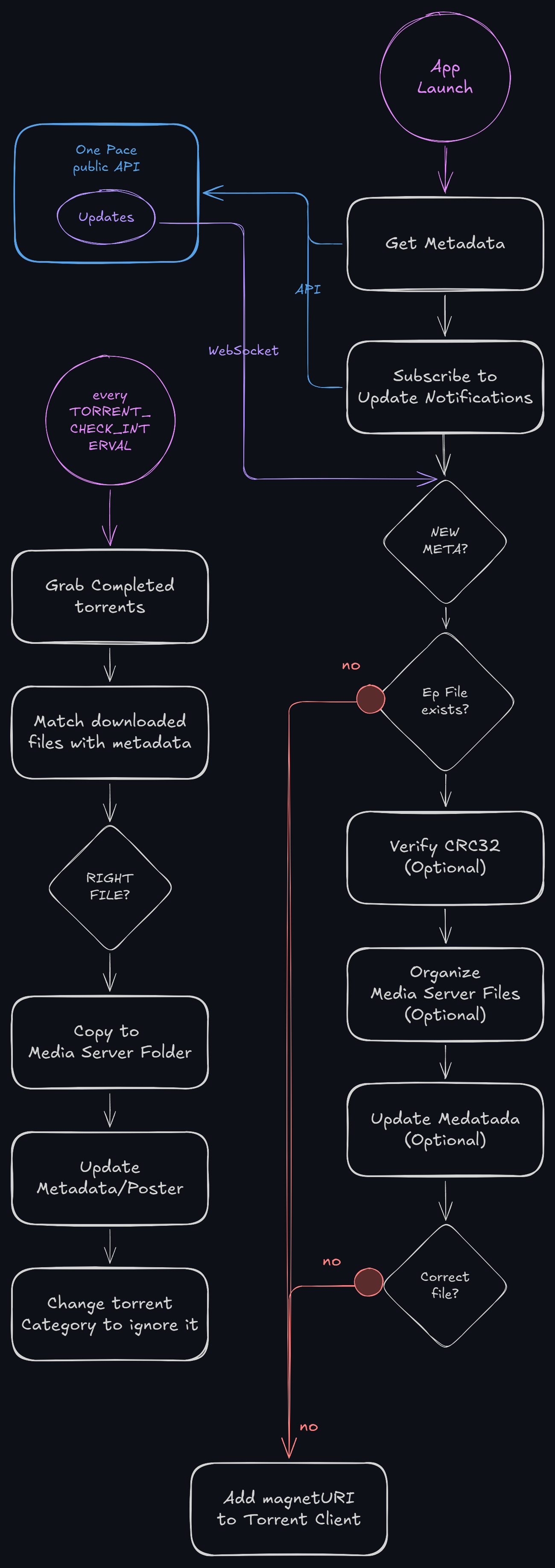
🧪 Pipeline Diagram
The following diagram synthesizes the pipeline:
📅 Roadmap
Support uTorrent since v1.7.5
Support Transmission since v1.7.5
Support hard/softlinks Thanks to Rasbandit #25 since v1.7.20
Docusaurus documentation
Rest API Manual execution/status/configuration endpoints
Support Libraries with multiple folders (currently only gets the first result from API)
🤝 Credits & Acknowledgements
This project wouldn't be possible without the incredible work of the community:
- One Pace: The incredible team behind the unofficial fan edits.
- For the custom poster artwork sets:
piratezekk(default) by /u/piratezekk.- Name spelling normalization and new Elpbaph matching poster by @3 from One Pace's Discord.
mizzoufan523by /u/Mizzoufan523.officialby One Pace's Team
- One Pace public API
💗 Support (One Pace, not me!)
Please do not donate to me for this tool.
Instead, please show your support for the team doing the heavy lifting by backing One Pace.
Related apps
Explore more like this
Explore allDetails
ghcr.io/eltharynd/onepacerr:latestRuntime arguments
- Web UI
http://[IP]:[PORT:3000]/api/v1/status/pipeline/report- Network
bridge- Shell
sh- Privileged
- false
- Extra Params
--user=99:100
Template configuration
JSON status and health API. There is no graphical configuration interface.
- Target
- 3000
- Default
- 3000
- Value
- 3000
Existing share containing your library and torrent downloads. For example, /mnt/user/data/media/tv becomes /data/media/tv inside OnePacerr.
- Target
- /data
- Default
- /mnt/user/data
- Value
- /mnt/user/data
Select your media server, or none to organize a local folder. Fill in only the selected server's settings.
- Target
- LIBRARY_MEDIA_SERVER
- Default
- jellyfin|plex|emby|none
- Value
- jellyfin
Series name in your media server and default series folder name.
- Target
- LIBRARY_SERIES_NAME
- Default
- One Pace
- Value
- One Pace
Enable upstream's hardlink import option. Downloads and library must share the same filesystem and Docker volume mount, such as the single /data mount. Defaults to copying. See the GitHub README for details.
- Target
- LIBRARY_USE_HARDLINKS
- Default
- false|true
- Value
- false
Used only with media server none. Parent directory of the series folder, inside the Data mount.
- Target
- LIBRARY_NONE_ROOT_FOLDER
- Default
- /data/media/tv
- Value
- /data/media/tv
Required for plex, e.g. http://192.168.1.10:32400. Use an address reachable from the container, not localhost.
- Target
- PLEX_URL
Required for plex. Authentication token for your Plex server.
- Target
- PLEX_TOKEN
Exact name of the TV library in Plex.
- Target
- PLEX_LIBRARY_NAME
- Default
- TV Shows
- Value
- TV Shows
Required for jellyfin, e.g. http://192.168.1.10:8096. Do not use localhost.
- Target
- JELLYFIN_URL
Required for jellyfin. Account with permission to update library metadata.
- Target
- JELLYFIN_USERNAME
Required for jellyfin. Password for the selected account.
- Target
- JELLYFIN_PASSWORD
Exact name of the TV library in Jellyfin.
- Target
- JELLYFIN_LIBRARY_NAME
- Default
- Shows
- Value
- Shows
Required for emby, e.g. http://192.168.1.10:8096. Do not use localhost.
- Target
- EMBY_URL
Required for emby. Account with permission to update library metadata.
- Target
- EMBY_USERNAME
Required for emby. Password for the selected account.
- Target
- EMBY_PASSWORD
Exact name of the TV library in Emby.
- Target
- EMBY_LIBRARY_NAME
- Default
- Shows
- Value
- Shows
Torrent client with its WebUI/API enabled. Deluge also needs its Label plugin enabled.
- Target
- TORRENT_CLIENT
- Default
- qbittorrent|deluge|transmission|utorrent
- Value
- qbittorrent
Required unless Skip downloads is true. Use a reachable URL, e.g. http://192.168.1.10:8080, not localhost.
- Target
- TORRENT_URL
Torrent client WebUI username, if the client uses one.
- Target
- TORRENT_USER
Torrent client WebUI password.
- Target
- TORRENT_PASSWORD
True disables torrent client integration and processes only your existing library.
- Target
- PIPELINE_SKIP_DOWNLOADS
- Default
- false|true
- Value
- false
Library root as reported by your media server, e.g. /tv. Set together with OnePacerr library path, or leave BOTH empty when paths match.
- Target
- MOUNT_LIBRARY_MEDIA_SERVER
Equivalent library root inside this container, e.g. /data/media/tv. Must exist under the Data mount. Set together with Media server library path.
- Target
- MOUNT_LIBRARY_ONEPACERR
Download root as reported by the torrent client, e.g. /downloads. Set together with OnePacerr download path, or leave BOTH empty when paths match.
- Target
- MOUNT_DOWNLOADS_TORRENT
Equivalent download root inside this container, e.g. /data/torrents. Set together with Torrent client download path.
- Target
- MOUNT_DOWNLOADS_ONEPACERR
False hashes existing episodes to check for updated releases. Can take time on large libraries.
- Target
- PIPELINE_SKIP_VERIFY_PRESENT_FILES
- Default
- true|false
- Value
- true
False organizes and renames episodes already in the library.
- Target
- PIPELINE_SKIP_ORGANIZE_PRESENT_FILES
- Default
- true|false
- Value
- true
False refreshes metadata for episodes already in the library. New imports still receive metadata when true.
- Target
- PIPELINE_SKIP_UPDATE_METADATA_PRESENT_FILES
- Default
- true|false
- Value
- true
True disables poster updates.
- Target
- PIPELINE_SKIP_POSTERS
- Default
- false|true
- Value
- false
Also process special episodes.
- Target
- PIPELINE_INCLUDE_SPECIALS
- Default
- false|true
- Value
- false
Prefer extended cuts when available.
- Target
- PIPELINE_PREFER_EXTENDED
- Default
- false|true
- Value
- false
Prefer the alternate G-8 cut at the end of Skypiea.
- Target
- PIPELINE_PREFER_ALTERNATE
- Default
- false|true
- Value
- false
Skip alternate edits that supplement incomplete arcs.
- Target
- PIPELINE_SKIP_SUPPLEMENTS
- Default
- false|true
- Value
- false
Optional comma-separated filters, e.g. S01,S02E01. Empty includes all episodes.
- Target
- PIPELINE_FILTERS_INCLUDE
Optional comma-separated filters, e.g. S35,S36.
- Target
- PIPELINE_FILTERS_EXCLUDE
Optional override. Empty uses Series name.
- Target
- LIBRARY_SERIES_FOLDER_NAME
Automatically create the series if missing from your media server.
- Target
- LIBRARY_CREATE_SHOW_IF_NOT_FOUND
- Default
- true|false
- Value
- true
For Plex, update metadata through its API without writing NFO and poster files. False also writes those files.
- Target
- PLEX_SKIP_METADATA_FILES
- Default
- true|false
- Value
- true
Category for downloads managed by OnePacerr.
- Target
- TORRENT_CATEGORY
- Default
- onepacerr
- Value
- onepacerr
Category assigned after importing completed downloads.
- Target
- TORRENT_CATEGORY_ONCE_COMPLETED
- Default
- completed
- Value
- completed
Seconds between checks for completed downloads.
- Target
- TORRENT_CHECK_INTERVAL
- Default
- 60
- Value
- 60
Seconds to wait for a torrent client response.
- Target
- TORRENT_CLIENT_TIMEOUT
- Default
- 10
- Value
- 10
Poster set identifier, e.g. default, official, or mizzoufan523. See the project's poster set documentation.
- Target
- METADATA_POSTER_SET
- Default
- default
- Value
- default
True uses periodic metadata polling instead of live updates.
- Target
- METADATA_DISABLE_WEBSOCKET
- Default
- false|true
- Value
- false
Polling interval in seconds; used only when metadata WebSocket is disabled.
- Target
- METADATA_CHECK_INTERVAL
- Default
- 3600
- Value
- 3600
Application log verbosity. Read output through Unraid's container logs.
- Target
- LOG_LEVEL
- Default
- info|critical|error|warning|debug
- Value
- info
- Default
- 99
- Value
- 99
- Default
- 100
- Value
- 100
- Default
- 002
- Value
- 002