

OctoFarm-Redux
Docker app from KrisMakes' Repository
OctoFarm-Redux unifies multiple OctoPrint instances into one web interface: live status and cameras for every printer, file and filament management, print history and statistics,…
Overview
Readme
View on GitHubStatus License Based on
OctoFarm-Redux

OctoFarm-Redux is a maintained fork of OctoFarm, created by James Mackay (NotExpectedYet) and its contributors - a single pane of glass that combines multiple OctoPrint instances into one interface, monitoring and managing a 3D printer farm over the OctoPrint API and websocket systems.
Everything here rests on their work. The application, its architecture, and very nearly all of the code are theirs; they built it, and they gave it away for free under the AGPL. This fork maintains what they made. Upstream OctoFarm is no longer being updated, so this repository keeps bugfixes and small improvements landing on top of it. It is not a successor or a community fork - just their work, kept running and improved, and shared in case it is useful to anyone else.
- About
- What's different from upstream
- Screenshots
- Getting Started
- Installation
- Development setup
- Deployment
- License
- Acknowledgements
- Support
About
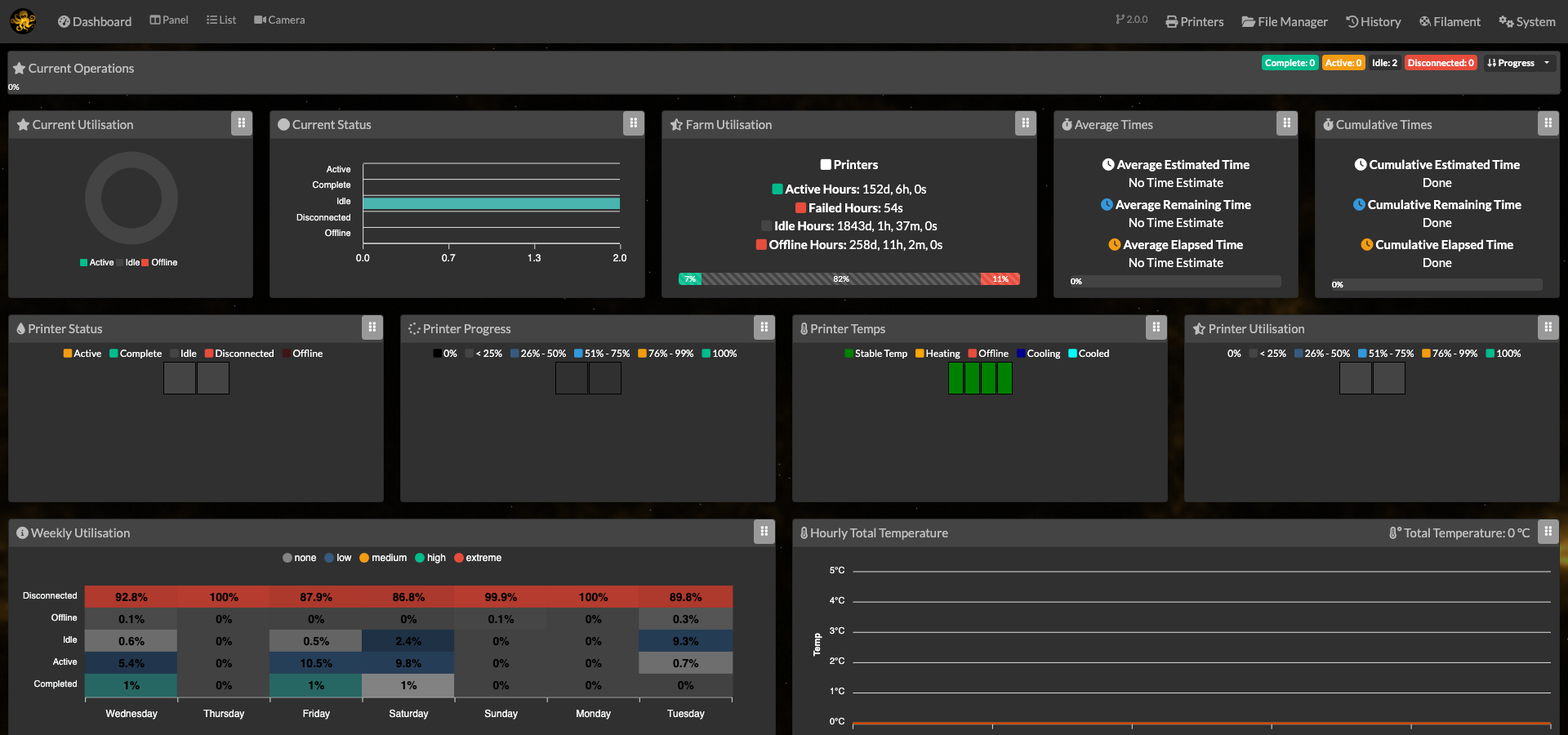
Everything described in this section is OctoFarm's own, built upstream by James Mackay and the project's contributors. It is what you get from OctoFarm itself; the fork's own changes are in the next section.
OctoFarm was built to solve a problem anyone running multiple 3D printers on OctoPrint runs into: how do you manage several printers from one place? Add your OctoPrint instances and it scans and keeps you up to date on the status of your whole farm.
- Manage your OctoPrint instances, right down to triggering updates and plugin installs.
- Keep track of all the live data on your farm with a selection of views.
- Manage your OctoPrint file system: turn on housekeeping mode to check off files and bulk-delete them, filter the list down to just successful, failed, or never-printed files, and let an age-based sweep auto-select old files for you (with per-folder exclusions).
- Get an overview of your farm with the customisable dashboard.
- Manage and track filament/spool usage and cost on your farm.
- Track history and logs for all of your instances.
- Supports a wide variety of OctoPrint plugins to augment the system with more information.
What's different from upstream
Everything in this section is a change on top of OctoFarm, not a replacement for it - the list is long only because upstream development stopped, not because there was anything wrong with what was built. Some of these are fixes that never landed upstream, some don't apply to a personal single-maintainer setup, and most of the rest is bringing dependencies that have since gone end-of-life back up to date.
New features
File manager overhaul - built entirely in this fork:
- Housekeeping mode: tick off files (or "select all visible") and delete them in one go, instead of one at a time.
- Filter the list down to successful, failed, or never-printed files.
- Age-based sweep ticks everything older than X days for you to review before deleting, with per-folder exclusions.
- Thumbnail hover preview, a density slider to fit more files on screen, search that matches words in any order, and a "Hide Folders" toggle.
- Copy a file straight to another printer - pick one or more targets and see which worked.
- The list refreshes itself after anything is added, removed or bulk-changed.
- The temperatures a file was sliced with, shown beside its size: nozzle and bed, first layer and the rest. OctoPrint does not track these at all, so they are read out of the gcode itself. PrusaSlicer and OrcaSlicer files both work, anything a file does not carry shows as a dash, and a file from a slicer that writes no settings block (such as Cura) shows nothing.
Torch - turn a printer's light on and off from the command panel. A real toggle that reflects the light's actual state, and it tells you when the light cannot come on because the printer's PSU is off, instead of claiming success.
Maintenance Mode - stops PSU Control powering a printer off while you are working on it, so the power does not cut out mid-calibration just because the printer counts as idle. A farm-wide banner names every printer currently left that way, so one does not sit powered up overnight because somebody forgot. Needs our companion OctoPrint plugin, Maintenance Mode (PSU Control), on each printer you want it for, so it stays off until switched on under System > Server > Features.
Spool manager - reworked so the numbers on screen can be trusted:
- Every spool carries a short number you can write on a sticker and put on the physical roll. Leave it blank and it takes the next free one, and a deleted spool's number is never handed out again in case its sticker is still about.
- That number shows up everywhere the spool does - the spool manager, the overview table and every spool picker ("#1 3DJake ecoPLA Black (901g) - PLA") - and both search and sort work on it.
- "Used (g)" now shows what has been used. It used to show what was left, and simply opening a spool to edit it could mark the spool empty.
- Remaining has a read-only column of its own, and sorting by Remaining really sorts by remaining.
- A pre-flight check before printing: what the file needs against what is left on the assigned spool, so you hear about it before the print starts rather than when it runs dry. The file list flags a file the spool cannot finish, and Multi-Print asks once for the whole batch. It only ever warns and always offers "print anyway" - both numbers are estimates - and it can be switched off under System > Server > Filament.
- Filament accounting corrected throughout: cost on cancelled prints, totals on a second tool, and spool assignments surviving a history edit.
Camera streaming - camera feeds come through OctoFarm itself rather than every browser tab connecting to every printer directly. This is also what stopped Safari loading them at all.
One connection per browser, not one per camera per tab - the single largest change in this fork, and the answer to grey camera panes and buttons that stop responding with nothing on screen to explain why.
A browser only allows about six connections to one address, shared across every tab, and anything that streams holds one of them open for as long as it is on screen. Two cameras in two tabs, plus the event and monitoring streams, and the budget is gone - and nothing fails cleanly when it does. The page simply renders with no printers on it and every button stops working, with no error anywhere saying why.
So the number of connections stopped following the number of viewers. The server opens one connection per camera however many people are watching, cameras nobody is looking at are not fetched at all, and everything - cameras, events and monitoring alike - now arrives down a single shared connection per browser instead of one per tab. A second tab showing the same camera costs nothing, and each printer's Pi serves one stream rather than one per pane. The old direct endpoints are untouched and still work as a fallback.
One per browser rather than one per tab is the part that matters in Safari, which counts a WebSocket against the same six-connection budget where Chrome does not. A socket per tab would have gone on eating the very budget this was meant to free - which is why there is one for the whole browser, shared between every tab you have open.
The camera half is opt-in, under System > Server > Cameras > Multiplexer, because it changes how every camera on the farm is delivered and an upgrade should not switch that on for you. Turning it off takes effect immediately on every open tab rather than at the next reload.
Raise the head after cancelling - a cancelled print used to leave the nozzle parked over the plate, in the way of whatever has to come off it. Cancelling now lifts it ten centimetres clear of wherever the print stopped, clipped at the top of the Z axis. It waits for the printer to actually stop first, and says so if it gives up waiting rather than leaving the impression the head moved. It covers every way a print is cancelled - the panel card, the control modal and bulk actions alike.
Cancel a single object mid-print - when one part of a multi-object plate lifts or turns into spaghetti, cancel just that one and let the rest of the plate finish.
It leads with a plate map: a top-down plan of the bed, drawn automatically from the running job, with every object in its real position and at its real footprint, numbered and clickable to cancel straight from the drawing. The one printing right now is highlighted and cancelled ones are dimmed, so a single look lines up what is on screen with what is in front of you - no counting down a list of filenames and hoping. Nothing has to be configured, measured or drawn by hand: the plate fills itself in over the first layer as each object starts.
The list underneath names each object by where it sits relative to the others ("back left") rather than by whatever the slicer called it, because "Part4.STL (Instance 2)" identifies nothing you can see while looking at a failed print. Cancelling asks first and says plainly what it does and does not do: the rest carries on, but what is already printed stays on the bed and the nozzle still travels over it.
It works through the Cancel Object OctoPrint plugin, so it does not depend on your printer's firmware supporting object cancellation. The section is always there and tells you why it is empty - file sliced without object labels, or the plugin not installed on that printer - rather than quietly disappearing.
Everything else:
- Error messages that say what is actually wrong when OctoPrint contradicts itself (for example "already printing" while the printer shows disconnected), instead of a generic conflict message.
- Health check failures name the check that failed - printer settings, API, websocket, connection defaults, webcam or history - instead of one generic "Failed health check!".
- A page under System showing what is really connected: how many live connections are open, what each has sent and dropped, and what the camera hub is doing. It is deliberately not administrator-only, because this is what you want to look at when a tab will not load, and a browser in that state cannot sign you in to ask.
- Replaced the toilet-roll filament icon with a real spool.
Improvements
- Switching back to an open tab no longer throws the whole page away and rebuilds it, which is why moving between tabs used to feel slow. The rebuild was there for a good reason - a connection the browser had quietly abandoned in the background could not be told apart from a working one, so discarding the lot was the only reliable cure. Now that everything runs over one connection, the page can just ask whether it is still alive and rebuild only if nothing answers. The full reload still happens where it is still needed, and still holds back while a dialog is open or something is half-typed.
- A tab left open across a deploy reloads itself once, instead of running yesterday's build until somebody thinks to refresh it. Three tabs left open across a day of deploys were still holding a camera connection each - a whole browser's worth between them - a week after that limit had been lifted.
- Camera frames are painted in step with the display rather than the instant they arrive. A camera sends thirty frames a second and a screen redraws sixty times a second, so drawing each frame the moment it lands made the spacing uneven. Chrome hid it; Safari showed it as judder.
- How far behind a browser has fallen is now measured by the browser itself. Nothing on the server could see it, so a viewer could sit a full second behind on every camera, permanently, while the server was satisfied everything was fine. A viewer that falls behind now has frames dropped rather than piled up.
- A page that loses its cameras writes down why - what the connection did, what each camera was told, and how long since each pane last drew a frame - and the next page to load sends it on. The reload that ends the problem is therefore how the evidence arrives rather than the end of it, and a page that recovers on its own reports itself just as readily.
- Printer cards on the panel, camera and group views are sized by width rather than by a fixed column count, so the number of columns follows the window and the printer count. Six per row is comfortable on a large monitor and unreadable on a laptop, so the setting is now a card size - compact, default or large - that means the same thing on any screen. Replaces the separate Camera and Group column settings.
- Leaving the page hands every camera connection back, so a tab sitting behind another window no longer holds one per camera, and the pane keeps showing its last frame rather than going blank while it is away.
- A camera that dies while you are watching is recovered on its own, and one showing an unchanging picture (a dark enclosure overnight) is not mistaken for a dead one and reconnected all night.
- Camera panes no longer leak a connection every time a printer card is redrawn. In Safari a discarded camera element keeps its stream open, so they piled up until the browser ran out of connections and every camera went blank - at which point reconnecting could not help either, because the reconnect could not get a connection of its own.
- A printer's camera only streams into its modal while that modal is actually open. Each printer used to hold a second live stream for a modal nobody had opened, which on a two-printer farm was four of the six connections a browser allows.
- The camera aspect-ratio setting is applied to the camera views, instead of being saved and then ignored.
- Print-finish time now displays in full (it was silently truncated) and is actually correct (it was off by hours, from a container timezone bug).
- Panel and camera cards stay a consistent height regardless of printer state.
- Static assets cache correctly in the browser, so a deployed fix is guaranteed to reach you rather than possibly serving stale code.
- Entire stack updated to current, supported versions - Node, MongoDB, Express, Mongoose and all major dependencies, several of which were end-of-life.
Bug fixes
- Alerts never actually worked - a data bug meant a configured alert never matched any printer, so nothing ever fired regardless of configuration.
- Opening a spool in the Spool Manager and saving it, without changing anything, silently marked the spool as fully used: the "Used" column was showing what was left, and the editor wrote that back into used.
- Saving any filament setting, while "allow single spools on multiple printers" happened to be off, detached every spool from every printer - even though spools can still be assigned one at a time when it is off.
- Every error message in the app rendered grey instead of red, so failures looked like ordinary notices.
- A lingering websocket handshake from a printer being reconnected could crash the entire server, taking monitoring for the whole farm down with it.
- A camera that failed to reconnect when returning to a tab never tried again, and a partially delivered frame left the picture half grey with nothing to recover it.
- Quick Connect's state could stop syncing entirely if one button was missing from the page.
- Spool cost was being silently under-reported on cancelled/failed prints (double-applied completion-ratio bug).
- Thumbnails could silently fail to save for any printer with API access control enabled.
- Gcode thumbnails never actually displayed. The browser was asking each printer for them directly, and OctoPrint serves thumbnails behind its access control, so it refused every time. They now go through the same proxy as every other OctoPrint call. Fixed in the job modal, the file manager and both camera fallbacks.
- The job modal rendered a broken image for any file that had no thumbnail at all.
- The job modal showed "NaN / NaN" for electricity, maintenance and printer-total costs whenever the matching options were switched off in server settings. It now says the cost was not calculated.
- The spool Remaining column printed "36.811371464054105g". It now shows whole grams, while the stored value keeps its precision so repeated small deductions still add up correctly.
- Camera streams rendered as empty boxes in Safari inside the card grid.
- Printer setup could hang forever on "Setting Up" and never appear in the dashboard.
- Old temperature history was never actually cleaned up - over 2 million stale records had piled up.
- File-action errors (delete, move, select) showed the same vague message for every possible cause.
- A crashed background task used to bring down the entire app; it's now logged and the app keeps running.
- Login sessions no longer reset on every restart. The session store moved into MongoDB, and the container now keeps its signing key in the data volume instead of minting a new one each start - either one on its own would still have logged everybody out.
- Container shutdowns are now clean instead of abrupt (previously risked database corruption).
- A finished print could keep showing "Complete" and stale progress after the file was unselected.
- The file manager's upload queue could silently upload the wrong file and drop one from the queue when more than one upload was queued at once.
- Deleting or exporting several history/log databases from System Settings threw an error and didn't work at all.
- Wiping a database from System Settings could double-restart the server and double-send its response.
- Editing a filament history entry could silently wipe spool assignments from other tools on the same job.
- A task with no repeat interval rendered the literal word "undefined" in System > Tasks.
- "Files common to all printers" was wrong whenever a printer's file list hadn't finished caching yet.
- A missing/renamed asset served a misleading 200 OK web page instead of a real 404.
- Live-updating data (websocket URL) could be missing from the printer summary, breaking monitoring views for affected printers.
- A CSP misconfiguration could block the bundled theme's Google web font from loading.
- Server-sent events (live dashboard/monitoring updates) could get stuck buffering for seconds under compression.
- Filament cost totals could be wrong on prints that only used a non-zero tool number.
- Alert/webhook scripts could receive a permanent placeholder instead of the real history/error record ID.
- Spool weight bookkeeping and snapshot capture had inverted or incomplete guard conditions.
- A database write failure could silently look like it succeeded to the code that requested it.
- Task presets used by more than one scheduled task could cross-contaminate each other's settings.
Security
- Closed a bypass where the registration page could be POSTed to directly and create an account even while registration was disabled in settings.
- The entire server-side template source tree used to be served as static files to anyone, logged in or not.
- Login and registration now have their own strict rate limit; previously the only limit in place was far too generous to stop password guessing.
- Removed a long-deprecated HTTP library and a stale dependency with a known sandbox-escape vulnerability.
- The live event stream no longer responds to unauthenticated requests.
- Your session cookie is no longer forwarded to third-party printers through the camera/file proxy.
- Every advisory
npm auditreports against the server is resolved: thirteen down to none, ten of which were in the production tree. Where an upgrade existed it was taken; where a library pinned a vulnerable transitive dependency and upstream had gone quiet, that dependency is pinned to a patched version through anoverridesentry; andnode-upnp-ssdp, unmaintained since 2015, was dropped for a small built-in SSDP client that does only what printer auto-discovery actually needs. - The client's bundled libraries went from thirty advisories to one. The remaining one is bootbox, and it has no fix: it renders dialog messages and titles as HTML by design, and upstream closed the report as out of scope, so there is no patched release to move to. Instead, every untrusted value that reaches a dialog - gcode file and folder paths, printer names, spool labels, strings relayed from an OctoPrint instance - is escaped at the call site, behind one shared helper that documents why.
Developer / build
- Reproducible builds, content-hashed asset filenames, and an asset-manifest system (no more hardcoded bundle names).
- New smoke tests requiring no framework, database, or hardware: proxy behavior, cross-printer file transfer, and build/manifest verification.
- Working lint config (previously silently never ran) and a cleaned-up, drift-free dependency lockfile.
- Removed dead code (an old camera-snapshot path fully superseded by the streaming proxy), nine unused server dependencies, and a Dockerfile that could no longer build this deployment.
- Stopped shipping webpack source maps in the built image.
- Various icon/favicon fixes for correct rendering in Safari.
Screenshots
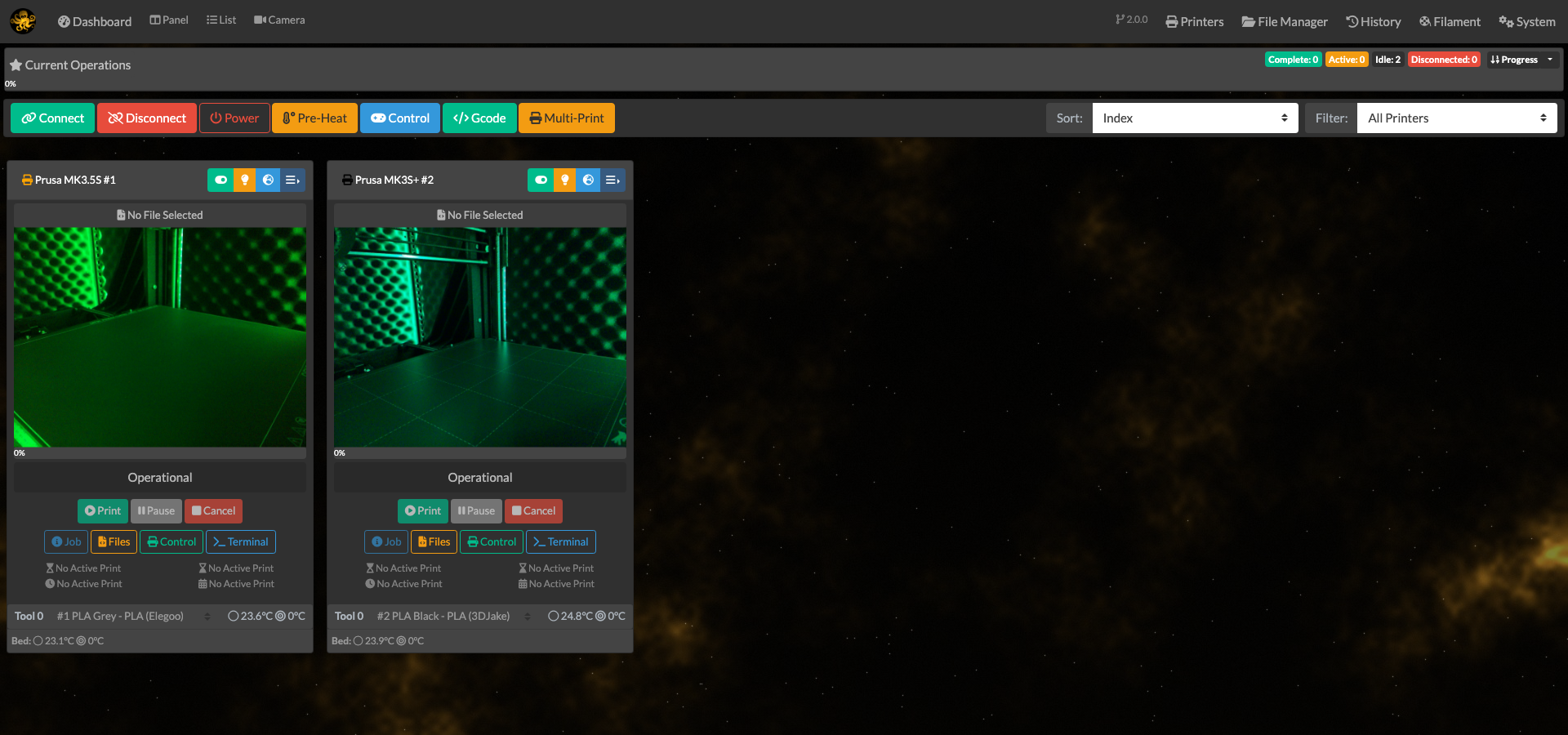 Panel view - every printer as a card, with its camera, temperatures and progress at a glance. |
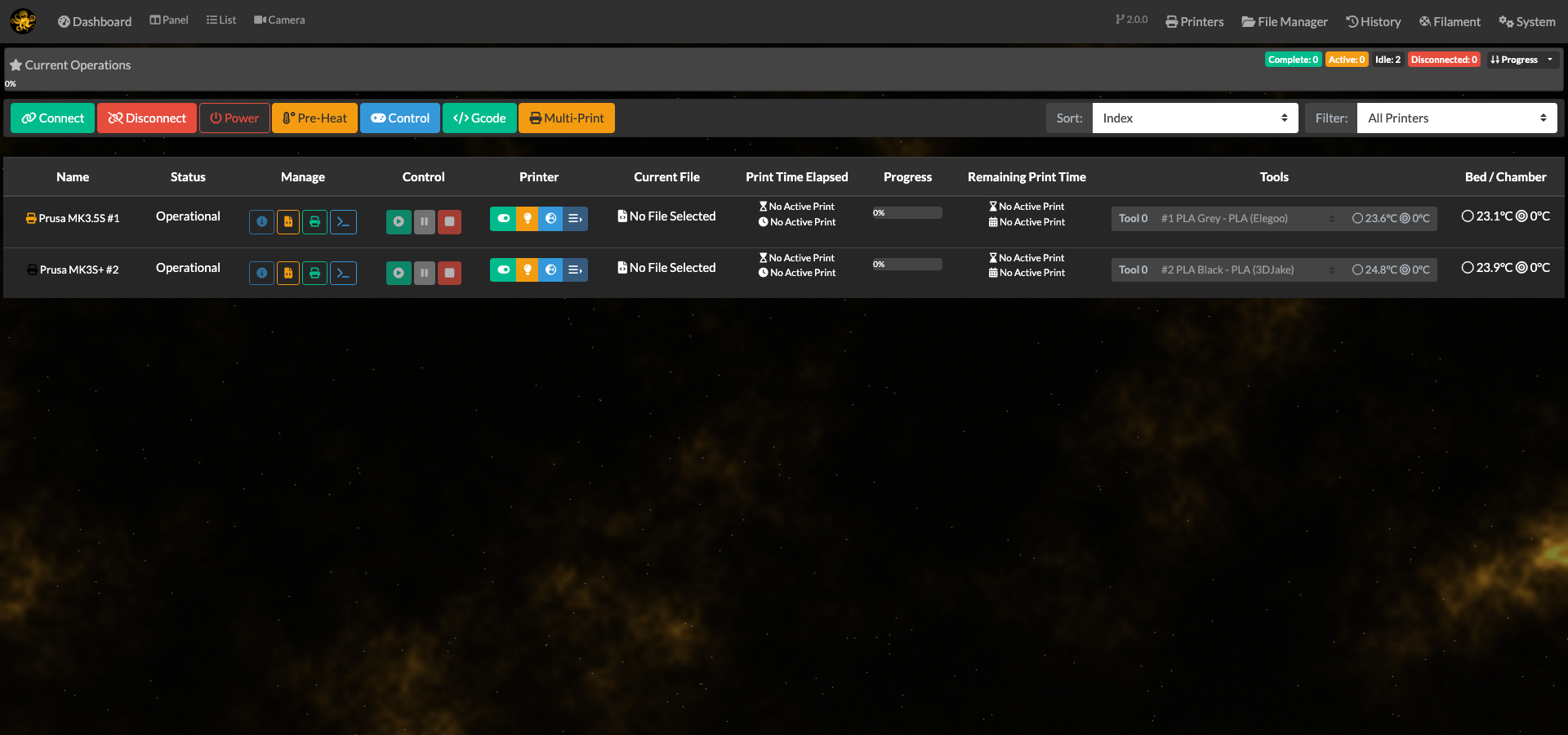 List view - the same farm as a dense table when you have more printers than screen. |
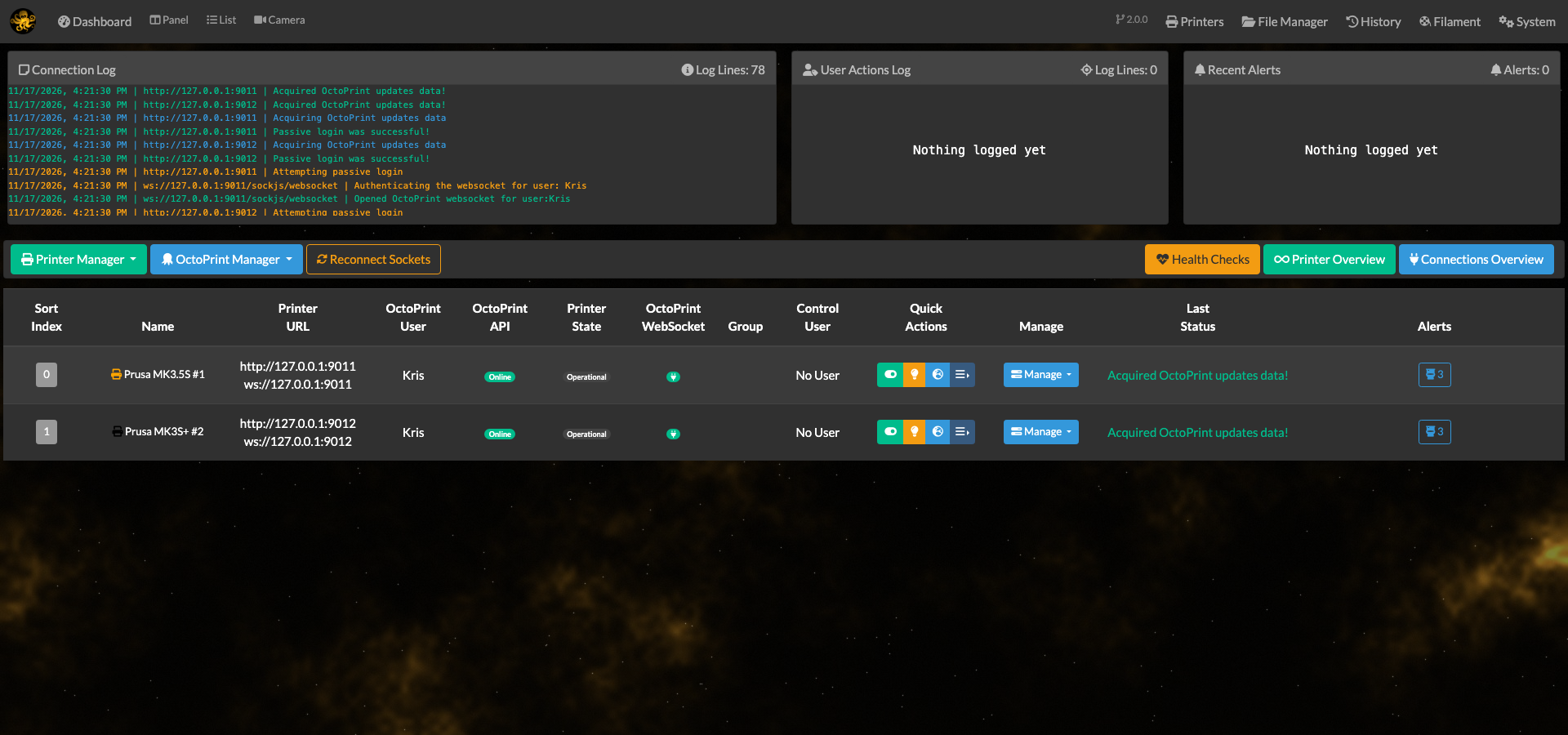 Printer manager - add, edit and troubleshoot instances, including OctoPrint updates and plugin installs. |
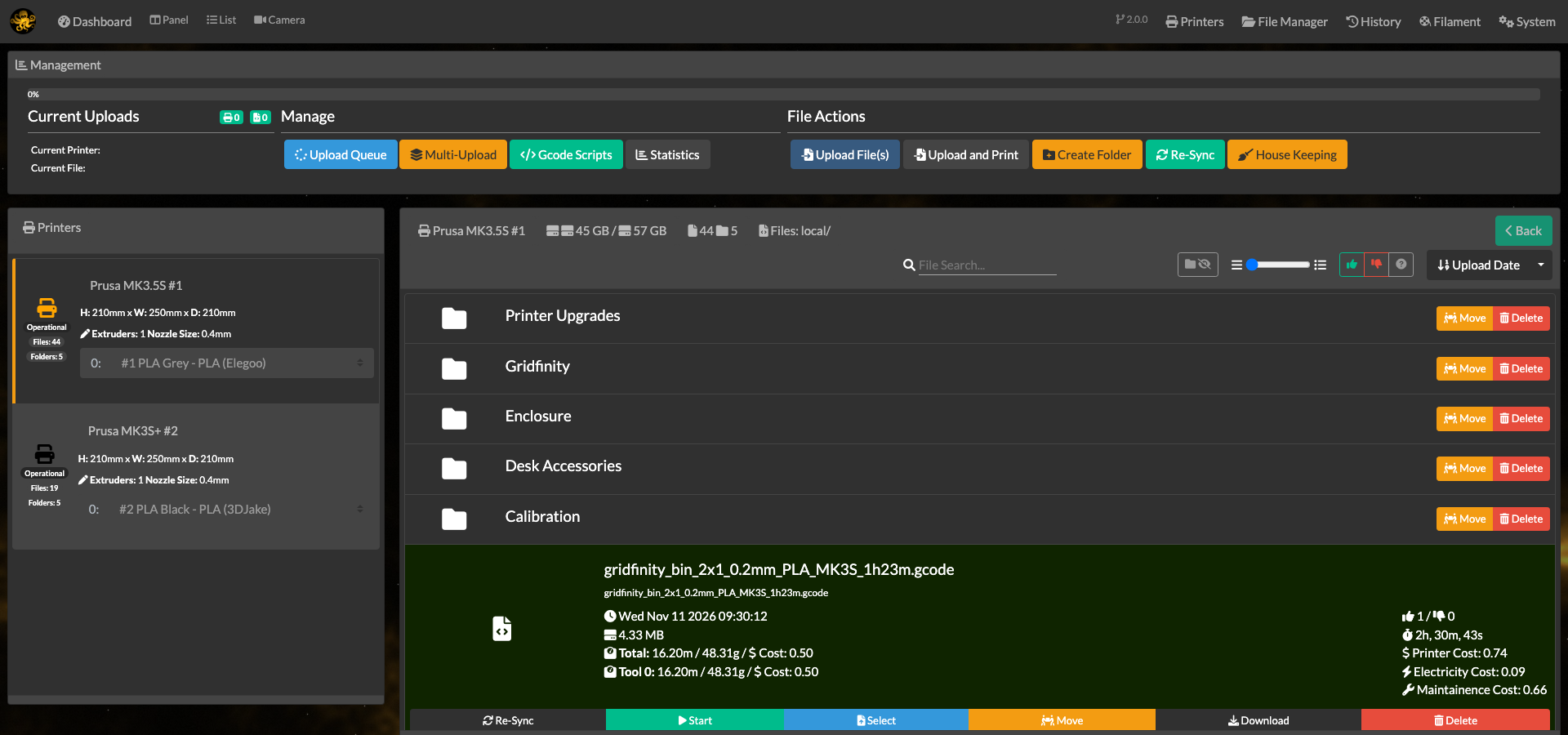 File manager - browse and upload gcode across the whole farm, with sliced settings read from the files themselves. |
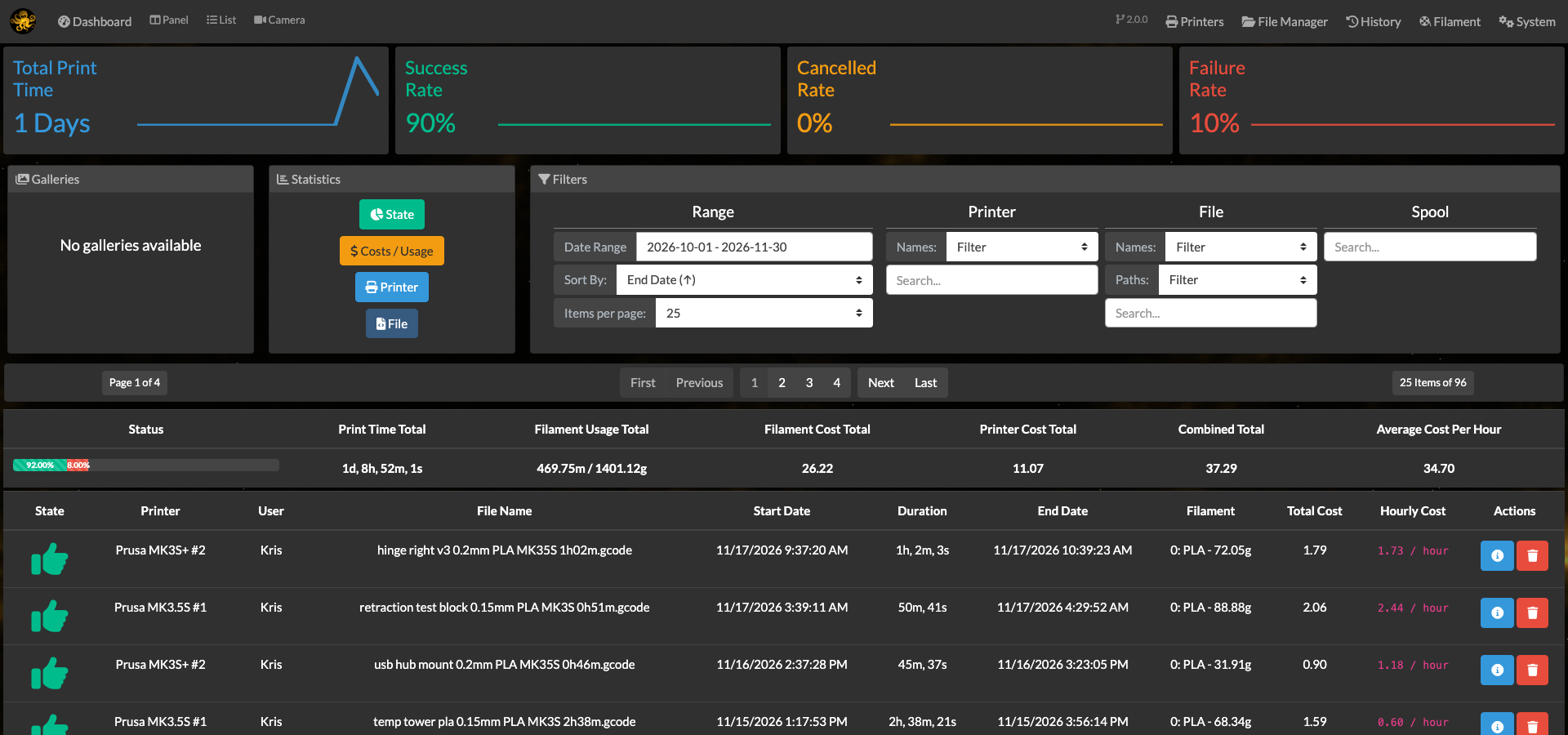 History - every finished print with its cost, filament use and outcome. |
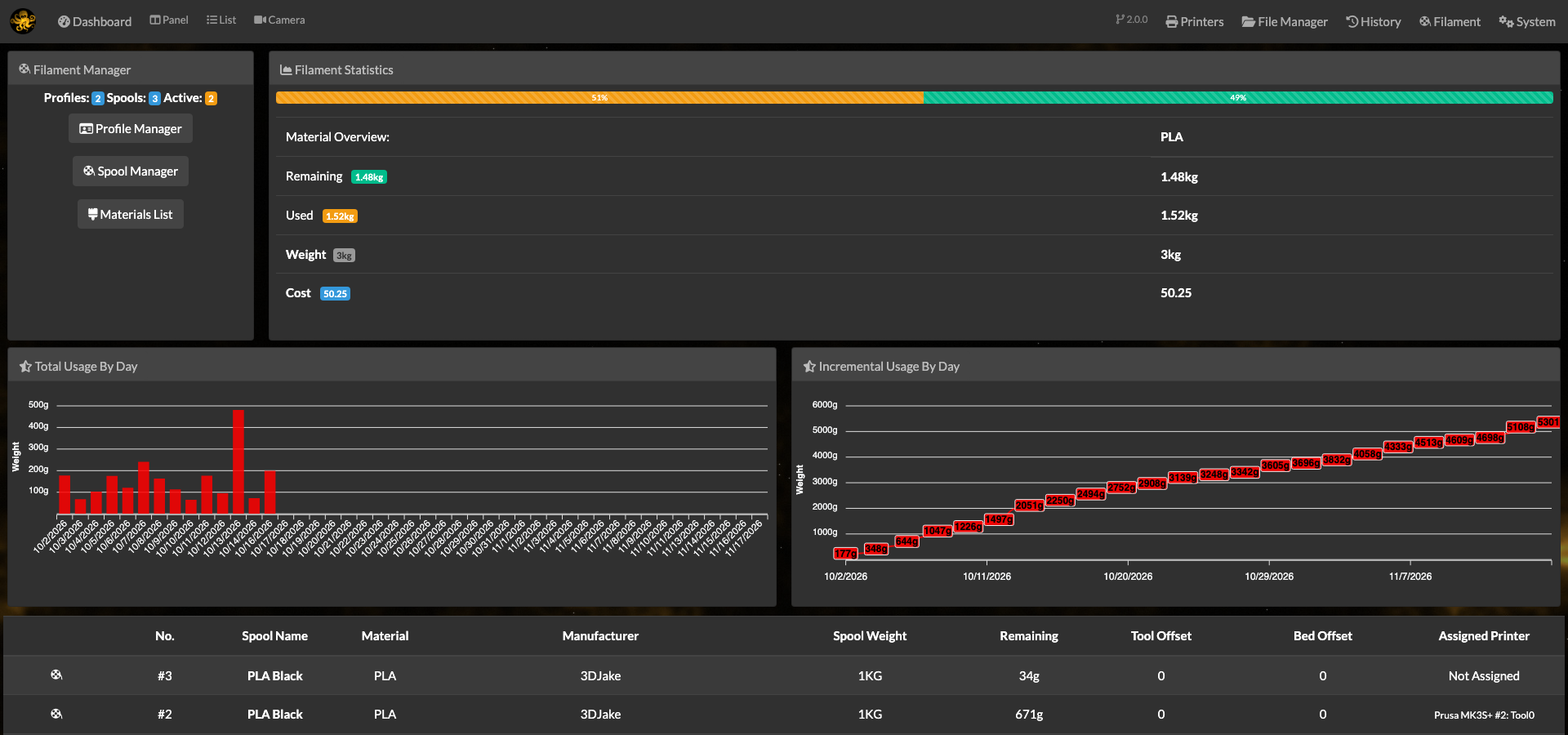 Filament manager - spools, what is loaded where, and what each print consumed. |
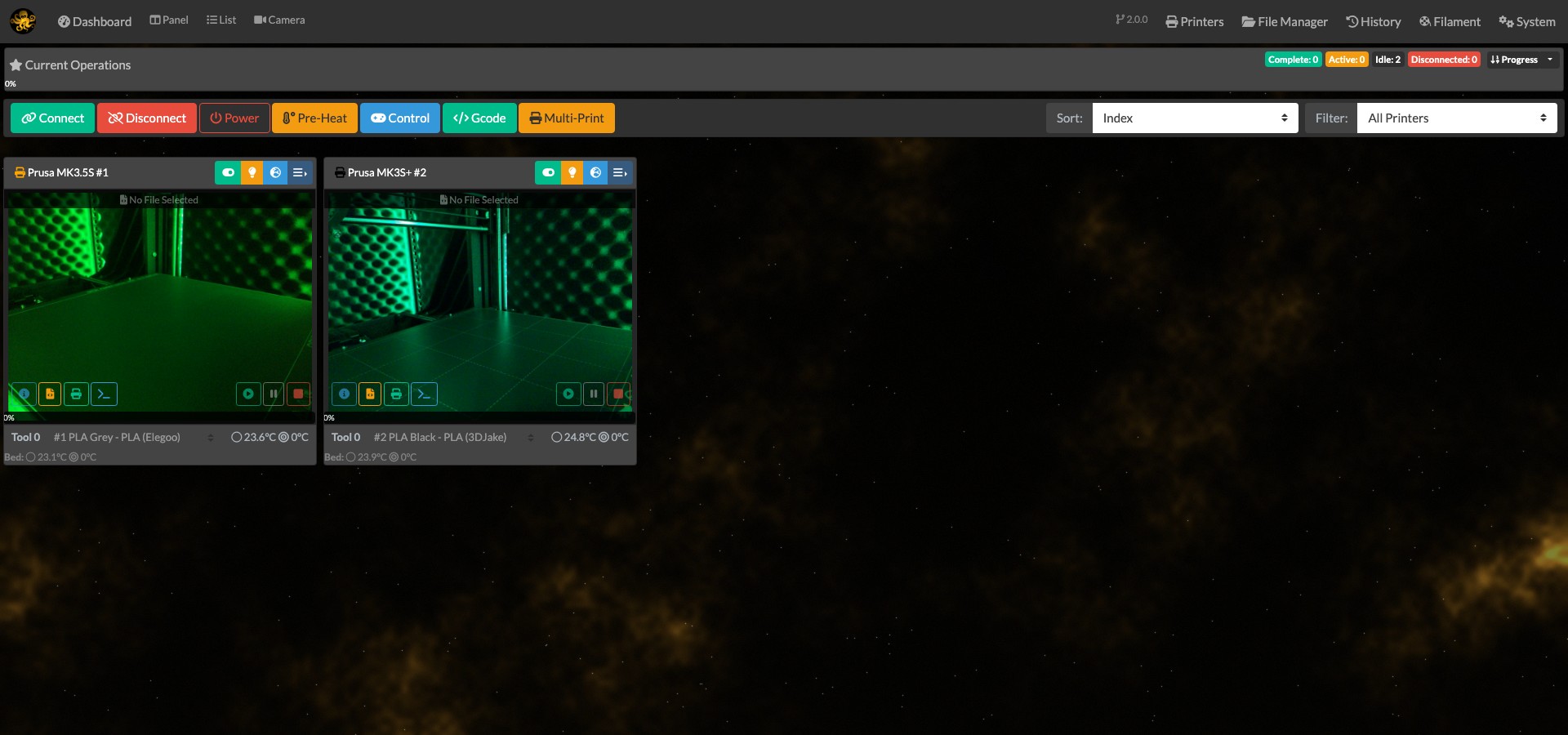 Camera view - every camera on the farm on one screen, served through a single shared stream per printer. |
Getting Started
This fork doesn't change how the application works day-to-day, only fixes and small additions on top. Upstream's
documentation site (docs.octofarm.net) is offline and its domain has lapsed, so what remains of the original
documentation lives in the original repository. Everything specific to this
fork is in this README.
Installation
Unraid
A Community Applications listing is planned. Until it is live, install it from the
Docker tab with Add Container using the values in the Docker section below, or import
templates/octofarm-redux.xml from this repository. Once the listing is live,
searching for OctoFarm-Redux in the Apps tab will do the same thing in one click.
The image bundles MongoDB, so there is no second container to add.
Two fields matter on first install:
- Session key (
SUPER_SECRET_KEY) - safe to leave empty. The container generates one on first start and keeps it in the data volume, so logins survive a restart or a recreation. Set it explicitly only if you would rather manage the key yourself, or need the same key across two installs. - Database config (
/data/configdb) - leave the mapping in place. Themongobase image declares that path as a volume, so removing it strands an anonymous volume on every redeploy.
Open the web interface afterwards and register the first account; it becomes the administrator.
Coming from an existing OctoFarm install, point Thumbnails and Scripts at the old images and scripts
folders and they carry over unchanged. The database does not: this image runs its own mongod against /data/db,
so the old MongoDB container's contents have to be moved across with mongodump and mongorestore.
Docker
Released images are published to GitHub Container Registry as linux/amd64:
docker run -d --name octofarm-redux --restart unless-stopped \
  -p 4000:4000 \
  -e TZ=Europe/London \
  -v /path/to/appdata/db:/data/db \
  -v /path/to/appdata/configdb:/data/configdb \
  -v /path/to/appdata/images:/app/images \
  -v /path/to/appdata/logs:/app/logs \
  -v /path/to/appdata/scripts:/scripts \
  ghcr.io/krismakes/octofarm-redux:latest
Then open http://<host>:4000 and register the first account; it becomes the administrator.
The session key is generated on first start and kept in the data volume, so there is nothing to set. Pass
-e SUPER_SECRET_KEY=... only if you would rather manage it yourself, or need the same key across two installs.
Remove the container with docker rm -v so its anonymous volumes go with it.
Development setup
Requirements
- Git
- Node.js >= 20.19.0 (the Docker image and CI both use Node 24)
- npm
- Clone the repo
git clone https://github.com/KrisMakes/OctoFarm-Redux.git
- Install the mono-repo eslint dependencies (eslint, prettier and nodemon)
npm install
- Install server and client dependencies
npm run setup-dev
- Create an
.envfile in the project root, e.g.OctoFarm-Redux/.env. Every setting is documented in.env.example, and every one has a default, so copying it unedited is enough to start:
cp .env.example .env
The minimum, if you would rather write it yourself:
NODE_ENV=development
MONGO=mongodb://127.0.0.1:27017/octofarm
OCTOFARM_PORT=4000
- Build the latest client
npm run build
- (Optional) Watch for client changes, requires a secondary console.
npm run dev-client
- Start the server
npm run dev-server
- The developer version uses nodemon for live server reloading on changes, and outputs all logs to the console.
Deployment
Released images are built from monolithic.Dockerfile by
.github/workflows/docker-publish.yml, which runs on a v* tag, pushes
ghcr.io/krismakes/octofarm-redux, and fails the release if the image it just pushed does not come up healthy. The
same image builds locally, and bundles MongoDB, so there is nothing else to deploy alongside it:
docker build -f monolithic.Dockerfile -t octofarm-redux:local .
Two things to get right when redeploying, both easy to miss:
- The base image is
mongo:8.0, which declares both/data/dband/data/configdbas volumes. Map only/data/dband Docker invents an anonymous volume for/data/configdb; remove the old container without-vand that volume is stranded, every single deploy. Map both paths, and remove withdocker rm -v. SUPER_SECRET_KEYis kept in/data/db/.super_secret_keywhen it is not passed in, so it survives a redeploy on its own - it sits inside the database mapping rather than beside it, because that is the one mapping the container cannot run without. Wiping the database wipes the key with it, and an explicit variable always wins.
Client-side changes need a client rebuild (cd client && npm run build) before committing - the prebuilt webpack
output is committed under server/assets/, and a client-only edit without a rebuild ships stale JS.
License
This work is licensed under the GNU Affero General Public License v3.
THE SOFTWARE IS PROVIDED "AS IS", WITHOUT WARRANTY OF ANY KIND, EXPRESS OR IMPLIED, INCLUDING BUT NOT LIMITED TO THE WARRANTIES OF MERCHANTABILITY, FITNESS FOR A PARTICULAR PURPOSE AND NONINFRINGEMENT.
Acknowledgements
This project would not exist without the people below. None of the work in this fork is original in any meaningful sense - it is maintenance on something other people designed, wrote, and released for free.
- James Mackay (NotExpectedYet) - the creator and original maintainer of OctoFarm. He wrote the application this fork is built from: the printer management, the monitoring views, the file and filament managers, the history system, the OctoPrint API and websocket layer - the whole of it. Years of his work were given away under a free licence, which is the only reason a fork like this is possible at all. Every feature listed above sits on that foundation.
- The OctoFarm contributors - everyone who filed issues, wrote code, tested releases, translated the interface, and helped people in the community. Their work is in here too.
- Gina Häußge and the OctoPrint project - OctoFarm manages OctoPrint instances, so without OctoPrint neither upstream nor this fork would exist.
If you found your way here looking for OctoFarm itself, go to
the original project first. This fork makes no claim to be its
continuation. Note that upstream's website and documentation domains have lapsed - octofarm.net and
docs.octofarm.net no longer resolve to the project - so the repository itself is all that is left of it.
Like upstream, this fork stays under the same AGPL-3.0 licence it was given under.
Support
OctoFarm-Redux is free. If the work in this fork - the fixes and additions listed above - has been useful to you, you can leave a tip at ko-fi.com/krismakes. Entirely optional; nothing is locked behind it.
Categories
Related apps
Explore more like this
Explore allLinks
Details
ghcr.io/krismakes/octofarm-redux:latestRuntime arguments
- Web UI
http://[IP]:[PORT:4000]/- Network
bridge- Shell
bash- Privileged
- false
Template configuration
Host port for the web interface. The container always listens on 4000 - the health check checks that port, so do not change OCTOFARM_PORT.
- Target
- 4000
- Default
- 4000
- Value
- 4000
MongoDB data directory. Everything you configure in OctoFarm-Redux lives here: printers, users, history, filament.
- Target
- /data/db
- Default
- /mnt/user/appdata/octofarm-redux/db
- Value
- /mnt/user/appdata/octofarm-redux/db
Second volume declared by the mongo base image. It stays empty for a standalone server, but leaving it unmapped strands an anonymous volume on every redeploy.
- Target
- /data/configdb
- Default
- /mnt/user/appdata/octofarm-redux/configdb
- Value
- /mnt/user/appdata/octofarm-redux/configdb
Thumbnail store for print history. Same path as upstream OctoFarm, so an existing images folder can be reused.
- Target
- /app/images
- Default
- /mnt/user/appdata/octofarm-redux/images
- Value
- /mnt/user/appdata/octofarm-redux/images
Application and process-manager logs. Map it to keep logs across container recreation - the Logs page in the interface reads them from here.
- Target
- /app/logs
- Default
- /mnt/user/appdata/octofarm-redux/logs
- Value
- /mnt/user/appdata/octofarm-redux/logs
Scripts the alert system can run on printer events. Same path as upstream OctoFarm. Leave it mapped even if you use no scripts.
- Target
- /scripts
- Default
- /mnt/user/appdata/octofarm-redux/scripts
- Value
- /mnt/user/appdata/octofarm-redux/scripts
Where the bundled mongod writes its own log. Only needed if you want to read it from outside the container.
- Target
- /data/logs
- Default
- /mnt/user/appdata/octofarm-redux/mongo-logs
- Value
- /mnt/user/appdata/octofarm-redux/mongo-logs
Signing key for login sessions. Leave empty and the container generates one on first start and keeps it in the data volume, so logins survive a restart. Fill it in only to manage the key yourself - a long random string, 40 or more characters.
- Target
- SUPER_SECRET_KEY
Container time zone, for example Europe/London. Leave empty for UTC. Timestamps in the history and log views follow it.
- Target
- TZ
Name shown in the browser tab and the navigation bar.
- Target
- OCTOFARM_SITE_TITLE
- Default
- OctoFarm-Redux
- Value
- OctoFarm-Redux
One of info, debug or silly. Raise it only while chasing a problem - debug and silly are noisy.
- Target
- LOG_LEVEL
- Default
- info
- Value
- info
Leave this alone unless you want the application to use a MongoDB server elsewhere. The bundled mongod starts either way and listens on 127.0.0.1 inside the container.
- Target
- MONGO
- Default
- mongodb://127.0.0.1:27017/octofarm
- Value
- mongodb://127.0.0.1:27017/octofarm