
All apps · 0 apps

ocrmypdf-auto
Docker app from cmccambridge's Repository
Overview
Readme
View on GitHub
cmccambridge/ocrmypdf-auto

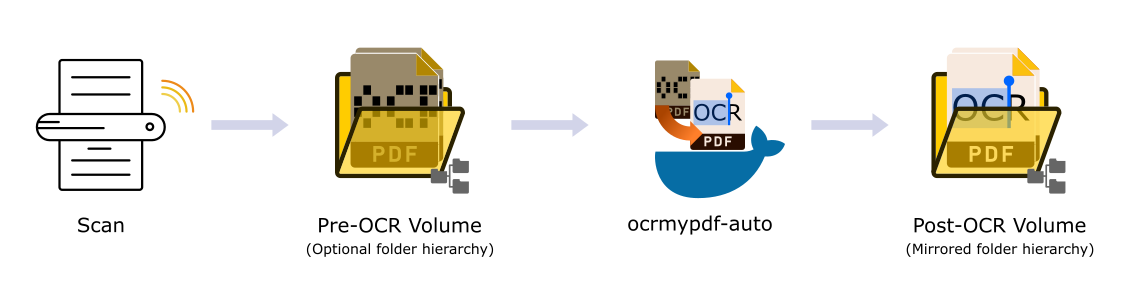
This container automates one stage in a "paperless" document processing pipeline: Take all the PDFs in a folder, run OCR on them, and save the output to another folder. It combines the excellent tools OCRmyPDF and tesseract-ocr with inotify-based file monitoring and some new configurability.
For example, you could configure a wireless document scanner to save all images to one volume, and use this container to monitor all new incoming files, OCR them, and write the finished (searchable!) PDFs to another volume.
Usage
Quick & Easy:
docker create \
  -v <input directory>:/input \
  -v <output directory>:/output \
  -v <appdata/config directory>:/config \
  cmccambridge/ocrmypdf-auto
Full Custom:
docker create \
  -v <input directory>:/input \
  -v <output directory>:/output \
  -v <appdata/config directory>:/config \
  -v <temp directory>:/ocrtemp \
  -v <archvie directory>:/archive \
  -e OCR_LANGUAGES="deu chi-sim ita" \
  -e OCR_OUTPUT_MODE=MIRROR_TREE \
  -e OCR_PROCESS_EXISTING_ON_START=1 \
  -e OCR_ACTION_ON_SUCCESS=ARCHIVE_INPUT_FILES \
  -e OCR_NOTIFY_URL=http://server.local/path \
  cmccambridge/ocrmypdf-auto
Volumes
Required Volumes
A few volumes are required for normal operation of ocrmypdf-auto:
| Volume | Description |
|---|---|
/input |
Directory to monitor for input files |
/output |
Directory to write OCR'ed PDF output to |
/config |
Directory to store the master ocr.config OCRmyPDF configuration file |
Optional Volumes
A few additional volumes may be mounted for advanced configuration:
| Volume | Description |
|---|---|
/ocrtemp |
Directory to use for all OCRmyPDF temporary files, e.g. to select a ramdisk or a local cache |
/archive |
Directory to use for archiving input files after successful processing, in ARCHIVE_INPUT_FILES output mode |
Environment Variables and Global Configuration
ocrmypdf-auto can be configured with a few top-level / global parameters that affect the overall operations of the container:
| Environment Variable | Description |
|---|---|
OCR_LANGUAGES |
Additional languages (besides English) to install. Given as a space separated list. All possible packages can be found on the Ubuntu site. Example: deu chi-sim ita |
OCR_OUTPUT_MODE |
Controls the output directory layout: MIRROR_TREE - (Default) Mirror the directory structure of the input directory, i.e. for an input file /input/foo/bar.pdf create an output file /output/foo/bar.pdf. SINGLE_FOLDER - Collect all output files in a single flat folder, i.e. for an input file /input/foo/bar.pdf create an output file /output/bar.pdf. |
OCR_PROCESS_EXISTING_ON_START |
Set to 1 to enable processing of any files in the input directory when the container is launched. Set to 0 (Default) or unset to ignore existing files until they are modified. |
OCR_DO_NOT_RUN_SCHEDULER |
Set to 1 to disable monitoring of the input directories. Instead, the container will exit once any initial processing is complete. If OCR_PROCESS_EXISTING_ON_START is not also set, then this feature will cause the container to do nothing and simply exit. (It is intended for automated testing, but you could use it to run this container in a "batch processing" mode where all available documents are processed and then the container exits.) |
OCR_USE_POLLING_SCHEDULER |
Set to 1 to monitor the input directory using a periodic polling mechanism instead of relying on file notifications. This may be useful for monitoring remote SMB/CIFS shares which do not raise file notifications. |
OCR_ACTION_ON_SUCCESS |
Controls the action (if any) to perform after successful OCR processing: NOTHING - (Default) Do nothing. Input files remain in place where they were found. ARCHIVE_INPUT_FILES - Archive input files by moving them (overwriting existing files!) to the /archive Volume DELETE_INPUT_FILES - Delete the input file after successful processing. |
OCR_NOTIFY_URL |
On a successful completion, a POST will be made to the given URL, with a JSON payload of {'pdf': '/output/doc.pdf', 'txt': '/output/doc.pdf.txt'}. The txt property will only be present if you add the --sidecar option to the ocr.config file. This could be used to kick off additional processing, like indexing of the content or notifications. |
OCR_VERBOSITY |
Control the verbosity of debug logging. Accepts python logging levels, e.g. warn (Default), info, debug, etc. |
USERMAP_UID |
Set the UID that the OCR tools will run as. |
USERMAP_GID |
Set the GID that the OCR tools will run as. |
OCRmyPDF Configuration Files
ocrmypdf-auto supports flexible configuration of the ocrmypdf binary itself, by allowing you to specify command line options in text files, one option per line.
Example:
# ocrmypdf-auto Config File
#
# The contents of this file are exactly one command-line option per line,
# including the "value" following the option, if any.
#
# Any blank lines or lines BEGINNING with a '#' are ignored

# Common OCRmyPDF options (see ocrmypdf --help for full current list!)

# Deskew the input file before OCR (and rebuild the output file with the skew correction)
--deskew

# Enable automatic page rotation based on tesseract orientation and script detection
--rotate-pages

# Configure automatic rotation threshold (in arbitrary units defined by tesseract)
--rotate-pages-threshold 4
Notes:
- The syntax is very simplistic, as described in the default
ocr.configfile that is created when the container is started with a new or empty/configVolume. - It is recommended for consistency of behavior that you specify the
--skip-textoption, which will causeOCRmyPDFNOT to consider it an error when an input page already contains text.
ocr.config File Selection
To support flexible configuration of OCRmyPDF from a single container, ocrmypdf-auto supports a "hierarchy" of configuration files. For a given input file, ocrmypdf-auto will first examine the file's own directory for an ocr.config to read. If found, that file (and that file alone) will be used to configure OCRmyPDF. If no ocr.config is present in the input directory, the parent directory will be searched next, and then the parent's parent, and so on up to the base /input Volume. If no ocr.config is found at any level of the directory hierarchy, then a final location is examined at /config/ocr.config.
Note that only a single ocr.config file is used for a given OCRmyPDF invocation, so all desired command-line options must be specified in the corresponding configuration file. (There is no mechanism to "override" configuration from parent directories.)
For example, in this /input Volume hierarchy:
/input
├── foo
│   ├── bar
│   │   ├── bar.pdf
│   │   └── ocr.config
│   ├── baz
│   │   └── baz.pdf
│   ├── foo.pdf
│   └── ocr.config
├── qux.pdf
└── quux
    └── quuux
        └── quuuux.pdf
The following ocr.config file selections would be made:
| PDF file | ocr.config file |
Notes |
|---|---|---|
/input/foo/bar/bar.pdf |
/input/foo/bar/ocr.config |
Same directory as bar.pdf |
/input/foo/baz/baz.pdf |
/input/foo/ocr.config |
No config file in baz, so parent's is selected |
/input/foo/foo.pdf |
/input/foo/ocr.config |
Same directory as foo.pdf |
/input/qux.pdf |
/config/ocr.config |
No config file exists in this directory, which is the /input Volume root |
/input/quux/quuux/quuuux.pdf |
/config/ocr.config |
No config file in the same directory nor any parent all the way to the /input Volume root |
unRAID Integration
If you're an unRAID user, you may want to install ocrmypdf-auto through Community Applications instead of directly installing this Docker image. The unRAID template will set some default settings that integrate well with unRAID (see below), as well as the latest updates if the container template itself changes over time.
unRAID-specific Recommended Settings
Notes:
- I'm using unRAID terminology
pathandvariablehere, for clarity, in place of Docker terminologyvolumeandenvironment variable. - You can also review these settings in the ocrmypdf-auto template itself
| Type | Setting | Value | Notes |
|---|---|---|---|
| Path | /config |
/mnt/user/appdata/ocrmypdf-auto |
Store configuration files (ocr.config) in standard unRAID appdata location |
| Variable | OCR_LANGUAGES |
`` | Additional languages (besides English) to install. Given as a space separated list. Example: deu chi-sim ita |
| Variable | OCR_OUTPUT_MODE |
MIRROR_TREE |
Organizes a tree of output files that mirrors the input files. This is a good, non-surprising default for running as a NAS service. |
| Variable | OCR_ACTION_ON_SUCCESS |
NOTHING |
By default, don't touch the input files after processing. This is a safe default for running as a NAS service, but Note: you may wish to customize this behavior once you're comfortable with ocrmypdf-auto operations! |
| Variable | OCR_PROCESS_EXISTING_ON_START |
0 |
Corresponding with the OCR_ACTION_ON_SUCCESS, we explicitly disable processing existing files on startup to avoid reprocessing all files every time the container is updated or unRAID is rebooted. |
| Variable | OCR_NOTIFY_URL |
`` | URL that gets a POST if set, with a JSON that has a pdf (and txt if --sidecar is used) property set with the relative path of the output. |
| Variable | USERMAP_UID |
99 |
This is the UID of unRAID's nobody user. You should use this value unless you really know what you're doing! |
| Variable | USERMAP_GID |
100 |
This is the GID of unRAID's users group. You should use this value unless you really know what you're doing! |
Future Work
Some specific future work items I have planned:
- #3 Evaluate image size reductions of an Alpine-based docker image... OR, migrate to the upstream
OCRmyPDFdocker image for ease of maintenance.
Please also see the GitHub Issues, where you can report any problems or make any feature requests as well!
Credits
Additional credits for icons in the flow chart:
- Icon made by Freepik from www.flaticon.com
- Icon made by Smashicons from www.flaticon.com
Categories
Download Statistics
Total Downloads Over Time
Related apps
Explore more like this
Explore allLinks
Details
cmccambridge/ocrmypdf-auto:latestRuntime arguments
- Network
bridge- Privileged
- false
Template configuration
Input directory from which to process files for OCR. emContainer path: code/input/code/em
- Target
- /input
Output directory to which post-OCR files will be written. emContainer path: code/output/code/em
- Target
- /output
Config/appdata directory. emContainer path: code/config/code/em
- Target
- /config
- Default
- /mnt/user/appdata/ocrmypdf-auto
- Value
- /mnt/user/appdata/ocrmypdf-auto
Controls the output directory layout: br / codeMIRROR_TREE/code - (Default) Mirror the directory structure of the input directory, i.e. for an input file code/input/foo/bar.pdf/code create an output file code/output/foo/bar.pdf/code. br / codeSINGLE_FOLDER/code - Collect all output files in a single flat folder, i.e. for an input file code/input/foo/bar.pdf/code create an output file code/output/bar.pdf/code.
- Target
- OCR_OUTPUT_MODE
- Default
- MIRROR_TREE
- Value
- MIRROR_TREE
Controls the action (if any) to perform after successful OCR processing: br / codeNOTHING/code - (Default) Do nothing. Input files remain in place where they were found. br / codeARCHIVE_INPUT_FILES/code - Archive input files by strongmoving/strong them em(overwriting existing files!)/em to the code/archive/code Volume br / codeDELETE_INPUT_FILES/code - Delete the input file after successful processing.
- Target
- OCR_ACTION_ON_SUCCESS
- Default
- NOTHING
- Value
- NOTHING
Additional languages (besides English) to install, given as a space-separated list of language abbreviations. All available languages can be found on the a href=https://packages.ubuntu.com/search?keywords=tesseract-ocr-&searchon=names&suite=bionic§ion=allUbuntu site/a. Example for German, Chinese - Simplified, and Italian: codedeu chi-sim ita/code
- Target
- OCR_LANGUAGES
On a successful completion, a POST will be made to the given URL, with a JSON payload of code{'pdf': '/output/doc.pdf', 'txt': '/output/doc.pdf.txt'} /code. The txt property will only be present if you add the code--sidecar /code option to the codeocr.config/code file. This could be used to kick off additional processing, like indexing of the content or notifications.
- Target
- OCR_NOTIFY_URL
Set to code1/code to enable processing of any files in the input directory when the container is launched. br/ Set to code0/code (Default) or unset to ignore existing files until they are modified.
- Target
- OCR_PROCESS_EXISTING_ON_START
- Default
- 0
- Value
- 0
Control the verbosity of debug logging. Accepts python codelogging/code levels, e.g. codewarn/code (Default), codeinfo/code, codedebug/code, etc.
- Target
- OCR_VERBOSITY
Set the UID that the OCR tools will run as. unRAID standard is 99.
- Target
- USERMAP_UID
- Default
- 99
- Value
- 99
Set the primary GID that the OCR tools will run with. unRAID standard is 100.
- Target
- USERMAP_GID
- Default
- 100
- Value
- 100