

nzbfast
OfficialDocker app from nzbfast's Repository
Overview
Readme
View on GitHubnzbfast
The fast Usenet downloader. One self-contained executable: download engine, web dashboard, poster-wall media browser, an optional built-in indexer (off by default), realtime preview, and the repair/extraction tools, nothing else to install.
Website · Features · Benchmarks · Manual · Download
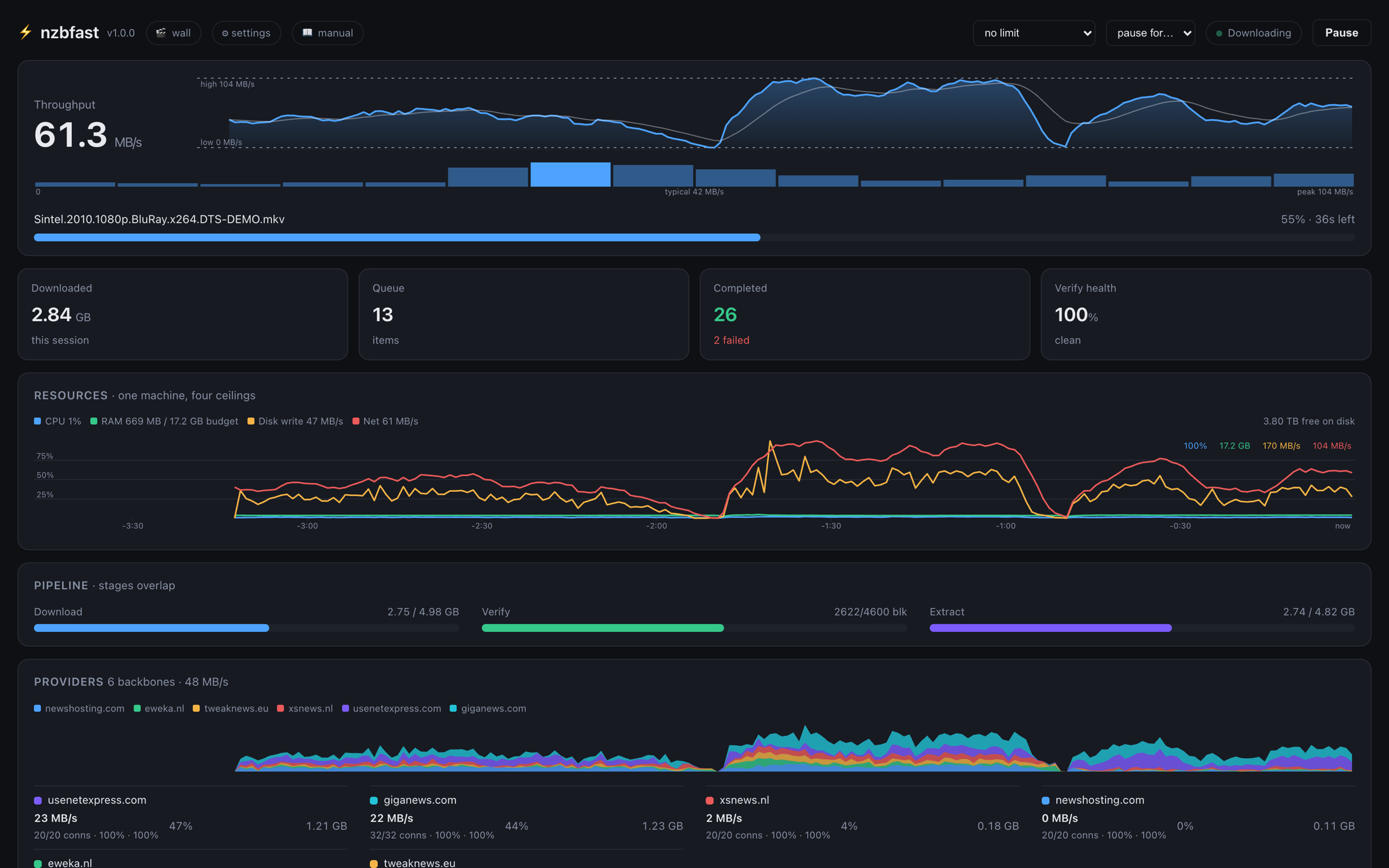
The rest of the screenshots (poster wall, queue detail, settings, mobile) are on the home and features pages, and the measured numbers with full method notes are on the benchmarks page.
Run it
Docker, NAS, seedbox - the compose file in this repo,
docker-compose.yml, is the whole install. Put it in a
folder of its own and:
docker compose up -d
Then open http://<host>:6789 and add your Usenet provider in the Welcome
panel: there is no config file to write, and no provider details go in the
compose file. The one line worth changing first is the downloads volume, so
it points at your own storage. Updating later is
docker compose pull && docker compose up -d. Every line in the file is
commented, and the volume mappings, the Sonarr/Radarr paths and the API key
are covered in Docker and NAS below.
macOS, Windows, Linux - take the installer or archive for your machine
from the download page or
the latest release and
run it: the setup wizard asks for your provider, and offers to adopt an
existing SABnzbd or NZBGet config if it finds one. On macOS and Linux
brew install nzbfast/tap/nzbfast does the same job in one command.
Unraid - search nzbfast in the Apps tab of Community Applications.
Synology - docs/SYNOLOGY.md walks through Container
Manager step by step, no SSH. Both run the same image as the compose file.
Why it's fast
- Pipelined NNTP - many article requests in flight per connection, so round-trip latency never idles a socket. Line-rate on 10 GbE has been measured and sustained.
- One-pass pipeline - download, PAR2 verification, and extraction overlap.
Archive volumes are unpacked in the stream and never touch disk: a job
needs 1× the release size, not 2×, and post-processing time is ~zero.
This is not a stored-RAR-only fast path. RAR (1.5, 3, 4 and 5), 7z and zip
all go through it, compressed and encrypted contents included, with nested
archives unwrapped as they arrive and repair happening at each layer. The
shapes that still finish with a conventional unpack after the download are
self-extracting archives, spanned zip (
.z01), and any job resumed after a restart. - Multi-provider union availability - every server contributes; articles missing on one backbone are fetched from another. Dead servers never stall the queue.
- Bounded memory - all engine caches share one budget and degrade to disk rather than swapping your machine.
Features
- Web dashboard: live throughput/resource charts, drag-to-reorder queue with per-job detail, provider leaderboard, data-usage history, in-UI log, every setting editable in the browser
- Poster wall: your newsgroups as a media library, keyless metadata (TVmaze / iTunes / IMDb datasets / Wikidata / AniList), preview or download from the tile
- Preview with real seeking while the download runs
- Optional built-in indexer, off by default: switch it on and it scans your newsgroups into a local index with a newznab endpoint. It finds what is posted under real filenames, a limited slice of Usenet, so keep using your commercial indexers too
- Watchlist auto-grab with quality upgrades, RSS automation, Smart Folders, weekly scheduler, SABnzbd-compatible post-processing scripts
- SABnzbd-compatible API and NZBGet JSON-RPC: Sonarr/Radarr, LunaSea, and nzb360 (as a SABnzbd server) work out of the box
- Crash-safe resume from an article journal; automatic PAR2 repair; encrypted-archive handling, including password chains
- Dashboard and poster wall in 28 languages; the user manual in 16
- One self-contained executable per platform: macOS (universal), Windows
(x64, plus an ARM64 beta), Linux (x86_64 and arm64, glibc or musl, with
beta
.deb/.rpmand an armv7 build for the Pi), FreeBSD (beta), and a multi-arch Docker image
Full documentation: User Manual
- also served by the app itself at
/manual.
Downloads: Releases · Issues: issue tracker
Docker and NAS
The image is multi-arch (amd64 + arm64) and lives on Docker Hub and ghcr.
docker-compose.yml is the shortest way in: it carries
everything below already, and updating it is one command
(docker compose pull && docker compose up -d). The same thing by hand:
docker run -d -p 6789:6789 \
  -e NZBFAST_OUT=/data/usenet \
  -v /srv/nzbfast/config:/config \
  -v /srv/nzbfast/watch:/watch \
  -v /data/usenet:/data/usenet \
  nzbfast/nzbfast
Pick your own host folders, but give the volumes absolute paths: the
mapped /config folder is your install (settings, API key, queue), and a
relative path like ./config points at a different, empty folder every
time the command runs from a different directory - which looks exactly like
an update that wiped your settings. To update, pull the new image and
recreate the container with the same mappings, which is the bookkeeping the
compose file does for you.
Running Sonarr or Radarr too? The downloads line above is mapped to the
same path on both sides, and under a root you also give them, and both
halves matter. nzbfast reports where a finished job is, so that path has to
mean the same thing inside their container as inside this one - otherwise
the download sits in the queue and the *arr reports a remote path mapping
error while the files are perfectly fine. And when downloads and the
library sit under one root (/data/usenet and /data/media), an import is
a rename: instant, with no second copy. On separate mounts Docker makes
them look like separate filesystems even when they are not, and every
import copies the whole 5-50 GB release and deletes the original. The root
does not have to be /data - /shared, /storage, anything - as long as
every container uses the same one. Give nzbfast the usenet subtree only;
your *arr is what moves the files and it sees both sides.
There is no incomplete folder to map. SABnzbd needs one because it writes
there and moves everything when a job finishes; nzbfast writes at the final
path from the first article on, so a SAB migrant has two filesystem
boundaries to get right and an nzbfast user has exactly one.
Then open http://<host>:6789 and add your provider in the Welcome panel.
On a new install nzbfast generates an API key for itself, prints it once at
startup, and stores it as apikey beside the config - that is the value
Sonarr/Radarr and phone apps want. An existing install is never given one,
so upgrading changes nothing. Wiring up Sonarr/Radarr? Add
-e NZBFAST_APIKEY=<your key> to the run command (or the compose
environment) instead: a key stored in the container definition lives on the
host and survives any container recreation, and a key set later in Settings
still wins over it.
Synology (Container Manager) has a step-by-step guide:
docs/SYNOLOGY.md. Unraid / TrueNAS SCALE / QNAP use
the same image.
Windows warnings on first run
The Windows builds are not code-signed yet, and Windows says so in two ways: SmartScreen shows "Windows protected your PC" (choose More info, then Run anyway), and the elevation prompt names an unknown publisher. Defender is more suspicious of unsigned binaries than of signed ones, and a small number of engines on VirusTotal score them the same way. That is expected on an unsigned build and it is not a statement about what the code does.
What draws the heuristics, as far as we can tell from Defender's own reports on real machines:
nzbtray.exestartsnzbfast.exeas a hidden child process, so no console window flashes up. A hidden-window child launch is one of the most heavily weighted generic behaviours there is, and it is why the tray scores worse than the engine.- The tray can write an autostart value under
HKCU\...\CurrentVersion\Run. It is a menu toggle, off unless you turn it on, but the code path is in the binary and a Run key is a signature in its own right. - The x64 build is cross-compiled with mingw-w64, whose runtime startup stubs are shared with a lot of old samples and are a known false-positive magnet.
- It opens a local listener and then makes many concurrent TLS connections to news servers, which as a behavioural profile resembles things it is not.
What is not in the binaries: no packer or compressor, no UPX, no
self-extracting stub, and no process injection of any kind - no
WriteProcessMemory, CreateRemoteThread, VirtualAllocEx or
SetWindowsHookEx anywhere in the tree or in its vendored dependencies. The
app does not modify itself either: the update check fetches a signed static
manifest and at most shows a banner with a link, and it can be turned off
(docs/UPDATE-DESIGN.md).
Check what you downloaded. Every release ships SHA256SUMS.txt, and the
hashes on the release page are the ones to compare against:
Get-FileHash .\nzbfast.exe -Algorithm SHA256
Verifying a download below has the stronger build-provenance check, which ties a binary to the workflow run and commit that produced it.
Signing status. We applied to the SignPath Foundation's free code-signing programme for open-source projects on 29 August 2026; the application is in review and there is no date yet. When a certificate is issued the Windows builds get signed and most of this section stops applying. Status is tracked in issue #3.
Verifying a download
From v1.0.5, releases include binaries built on GitHub's hosted runners straight from this repository, each carrying a signed build-provenance attestation (SLSA, via Sigstore). The attestation binds the exact file to the workflow run and commit that produced it - you can confirm a binary was built from this source without trusting us to hold any key.
With the GitHub CLI:
gh attestation verify nzbfast-x86_64-unknown-linux-gnu.tar.gz --repo nzbfast/nzbfast
A successful verify prints the source repo, commit SHA, and workflow
run. Attestations are also browsable under this repository's
Attestations tab, and every release ships SHA256SUMS.txt for a
plain checksum check (shasum -a 256 -c SHA256SUMS.txt).
Newer releases also attach the attestation beside each tarball, so the
proof is a file you can download and keep rather than a lookup (older
releases publish it only through the attestations API, where the plain
verify above still finds it):
gh attestation verify nzbfast-x86_64-unknown-linux-gnu.tar.gz \
  --bundle nzbfast-x86_64-unknown-linux-gnu.tar.gz.intoto.jsonl \
  --repo nzbfast/nzbfast
Which files are attested. Every file on a release page that has a
<file>.intoto.jsonl beside it was built on a GitHub-hosted runner by
provenance-release.yml,
from the tagged source, and that is the whole rule. The workflow builds
the target-triple tarballs, the Linux tarballs
(nzbfast-X.Y.Z-linux-x64.tar.gz, -linux-arm64.tar.gz), the Windows
installer and portable zip, the macOS disk image and universal zip, and
every update payload;
releases cut before it gained the installer jobs (1.7.1 and earlier)
attest the target-triple tarballs only. Files without an .intoto.jsonl
(the Android APK, the Linux packages, the NAS packages and the beta
builds) are built outside that workflow; when you
want a binary you can verify against source on those platforms, take the
matching target-triple tarball.
Each attested file also carries <file>.spdx.json, an SPDX software
bill of materials listing the crates compiled into it, at the versions
and licences of that build. The SBOM is attested to the same digest:
gh attestation verify nzbfast-X.Y.Z-windows-x64-setup.exe --repo nzbfast/nzbfast \
  --predicate-type https://spdx.dev/Document/v2.3
Container images are attested the same way once they are pushed by the
public workflow rather than by hand - the workflow assembles the image
from the release's own binaries (after checking them against
SHA256SUMS.txt) and attests the pushed manifest digest:
gh attestation verify oci://ghcr.io/nzbfast/nzbfast:<version> --repo nzbfast/nzbfast
The Docker Hub tags (nzbfast/nzbfast) are pushed from the same build
and carry the identical manifest digest. Images pushed before the
attestation pipeline existed predate it, and gh attestation verify
will simply report that no attestation is found for those digests.
That covers the binary. For the data it downloads, docs/INTEGRITY.md documents every integrity check the engine performs and when, each claim citing the source line that implements it, including the exact boundary where the in-stream fast path stops applying.
Security reports: see SECURITY.md.
Build
The toolchain is pinned by rust-toolchain.toml (rustup picks it up
automatically).
cargo build --release -p nzbfast
./target/release/nzbfast setup     # interactive server setup
./target/release/nzbfast serve --open
Cross-builds: macOS universal via --target aarch64-apple-darwin x86_64-apple-darwin + lipo; Windows via x86_64-pc-windows-gnu (mingw-w64)
with -C link-arg=-static.
Third-party components
- rapidyenc - SIMD yEnc decoding (see its license)
- rars (MIT OR Apache-2.0) - pure-Rust RAR extraction,
so RAR handling is fully native. PAR2 repair is native too; a
separately installed
unrarorpar2is invoked from$PATHonly as a last-resort fallback.
Contributing
Contributions of every size are welcome - typo fixes, docs, UI polish,
bug reports, code. Start with CONTRIBUTING.md;
issues labeled good first issue are picked to be approachable.
Every PR gets built and tested by CI automatically.
AI tooling, stated up front
This project is built with heavy use of AI coding assistants (mostly Claude), for code, tests, documentation and for drafting replies on issues and PRs. The maintainer reviews what ships and is accountable for everything published under the project's name, and when a reply goes out without that review it gets corrected in the open. The benchmark numbers, the test suite and the code are real and reproducible, and the repository is here so you can check rather than trust.
License
GNU General Public License v3.0 or later - see LICENSE, with the third-party breakdown in COPYRIGHT.md.
nzbfast is free software: use it, study it, share it, and modify it. If you distribute a modified version, those changes must be shared under the same terms.
Categories
Download Statistics
Related apps
Explore more like this
Explore allLinks
Details
nzbfast/nzbfast:latestRuntime arguments
- Web UI
http://[IP]:[PORT:6789]/- Network
bridge- Shell
sh- Privileged
- false
Template configuration
Dashboard and SABnzbd-compatible API.
- Target
- 6789
- Default
- 6789
- Value
- 6789
Settings and database.
- Target
- /config
- Default
- /mnt/user/appdata/nzbfast
- Value
- /mnt/user/appdata/nzbfast
Finished downloads land here.
- Target
- /downloads
- Default
- /mnt/user/downloads/nzbfast
- Value
- /mnt/user/downloads/nzbfast
Drop an .nzb file here to queue it automatically.
- Target
- /watch
- Default
- /mnt/user/downloads/nzbfast/watch
- Value
- /mnt/user/downloads/nzbfast/watch
User ID that owns downloaded files (99 = nobody, the Unraid default).
- Default
- 99
- Value
- 99
Group ID that owns downloaded files (100 = users, the Unraid default).
- Default
- 100
- Value
- 100
Timezone, e.g. Europe/London.
- Default
- Etc/UTC
- Value
- Etc/UTC
API key for Sonarr/Radarr and other automation. Set here, it lives in this template, so it survives every container update and reinstall and your apps never need re-pairing. Leave empty to set one later in the dashboard settings (a key set there wins over this one).
- Target
- NZBFAST_APIKEY