
All apps · 0 apps

Nvidia-Status
Docker app from EddDeDuck's Repository
Overview
Readme
View on GitHubNvidia Status
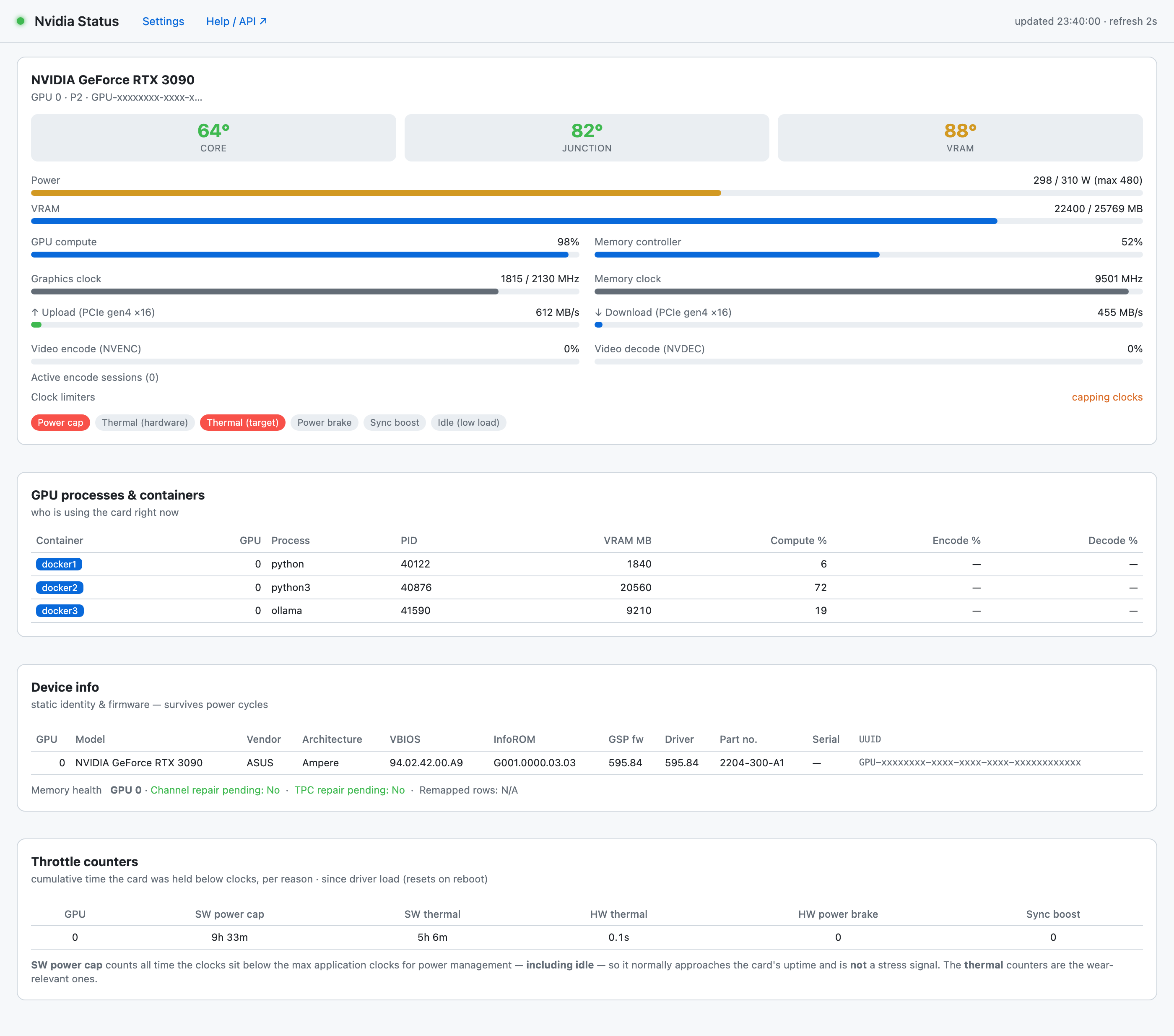
NVIDIA GPU dashboard + exporter — shows the GDDR6 / GDDR6X VRAM & junction
temps that nvidia-smi hides on consumer RTX 30/40 cards (read straight off the
GPU's PCIe BAR0), plus detailed stats including per‑Docker‑container GPU usage.
Exports to Prometheus, a JSON API, MQTT (with Home Assistant auto‑discovery) and InfluxDB (v1/v2) out of the box — one small container for live viewing and long‑term analysis in Grafana.
Built for Unraid, works on any Linux host with the NVIDIA proprietary driver.
Why?
nvidia-smi cannot report memory‑junction temperature on consumer GeForce cards — yet
that's the number that actually throttles a 3090/4090 (GDDR6X junctions run 20–30 °C hotter
than the core and throttle around 95–110 °C). Nvidia Status reads it directly from the
memory‑controller registers, alongside everything nvidia-smi does expose, and presents
it all in one place — plus which Docker container is using the GPU and what codec
it's encoding.
Features
- Hidden temps: core + junction + VRAM (via BAR0) + all thresholds
- Power: draw, limit, min/max/default, and optional per‑GPU power‑limit control with a latch that re‑applies after a restart
- Clocks / utilisation / VRAM / fan / PCIe gen & width + live upload/download bandwidth
- Throttle reasons (power cap, thermal, power brake, …) as clear indicators
- Per‑process → container: each GPU process' VRAM / compute / encode / decode, mapped to the owning Docker container
- NVENC sessions: codec (H.264 / HEVC / AV1), resolution, fps — per session, per container
- Multi‑GPU aware throughout (per‑GPU cards, metrics, MQTT devices, InfluxDB rows, control)
- Five outputs: dashboard, Prometheus, JSON, MQTT/HA, InfluxDB — enable/disable each
- Built‑in Settings page — configure MQTT/InfluxDB and toggle features from the browser
GPU support
Everything except junction/VRAM temps works on any GPU the NVIDIA Linux driver supports. The BAR0 junction/VRAM read is architecture‑specific:
| Support | Cards |
|---|---|
| ✅ Tested | RTX 3090, 4060 Ti 16GB, 4060 |
| ✅ Expected | RTX 4090 / 4080 / 4070 series, 3080 variants, pro A‑series, L40S, A10 |
| 🟠 Partial | Blackwell / RTX 50 (core + hotspot only) |
| ❌ Unsupported | RTX 3070 / 3070 LHR; pre‑Ampere (RTX 20, GTX 16/10) |
On unsupported cards junction/VRAM simply show blank — everything else still works.
Install (Unraid)
- Install the Nvidia‑Driver plugin (Community Applications) if you haven't.
- Search Community Applications for Nvidia Status and install, or add this repo's template.
- Open the WebUI. Configure MQTT/InfluxDB from the Settings page if you want them.
docker run
docker run -d --name nvidia-status \
  --runtime=nvidia -e NVIDIA_VISIBLE_DEVICES=all -e NVIDIA_DRIVER_CAPABILITIES=all \
  --cap-add SYS_RAWIO --device /dev/mem \
  --pid=host --cgroupns=host \
  -v /var/lib/docker/containers:/hostcontainers:ro \
  -v /mnt/user/appdata/nvidia-status:/config \
  -p 9835:9835 --restart unless-stopped \
  edddeduck/nvidia-status:latest
Add -e ENABLE_POWER_LIMIT=1 --privileged to enable power‑limit control.
Endpoints
| Path | What |
|---|---|
/ |
Live dashboard |
/settings |
Configure MQTT / InfluxDB / toggles / power control |
/metrics |
Prometheus |
/json |
Full JSON snapshot |
/help |
Full field/metric/topic reference |
Integrations
Configure from the Settings page or via env vars.
- Prometheus / Grafana / Netdata / Telegraf → scrape
/metrics - Home Assistant → set
MQTT_HOST(+ user/pass); sensors auto‑appear via MQTT discovery, grouped as one device per GPU — including the hidden junction temp - InfluxDB → Grafana → set
INFLUX_URL(+ v1INFLUX_DBor v2INFLUX_TOKEN); writes line protocol directly, no Telegraf needed - Homepage / Dashy / Node‑RED → read
/json
Configuration
Everything has an env var (see the Unraid template / nvidia-status.xml), and can also be set
on the Settings page (persisted to /config/settings.json, which overrides env vars).
Key ones: NODE_NAME, INTERVAL, ENABLE_DASHBOARD/METRICS/JSON/MQTT/INFLUX,
MQTT_HOST/PORT/USER/PASS, INFLUX_URL/DB/USER/PASS (or v2 INFLUX_TOKEN/ORG/BUCKET),
ENABLE_POWER_LIMIT, PL_MIN/PL_MAX.
Security
- Reads the GPU's BAR0 via
SYS_RAWIO+/dev/mem— required to read the junction/VRAM temps that Nvidia doesn't expose. This grants the container raw physical‑memory read. - Per‑process → container names need
--pid=host+--cgroupns=host+ the read‑only/var/lib/docker/containersmount. - Power‑limit control additionally requires
--privilegedand is off by default. - Secrets you enter (MQTT/InfluxDB passwords) are stored in the container's
/configvolume.
Credits
- VRAM‑junction/hotspot reader:
gputempsby ThomasBaruzier (Apache‑2.0) — vendored asgputemps.c, seeGPUTEMPS-LICENSE.
License
MIT — see LICENSE. The vendored gputemps.c retains its Apache‑2.0 license.
Requirements
Download Statistics
Related apps
Explore more like this
Explore allDetails
edddeduck/nvidia-status:latestRuntime arguments
- Web UI
http://[IP]:[PORT:9835]/- Network
bridge- Shell
sh- Privileged
- false
- Extra Params
--runtime=nvidia --cap-add SYS_RAWIO --device /dev/mem --pid=host --cgroupns=host
Template configuration
Dashboard, /metrics, /json, /settings, /help
- Target
- 9835
- Default
- 9835
- Value
- 9835
Persists settings.json + the power-limit latch
- Target
- /config
- Default
- /mnt/user/appdata/nvidia-status
- Value
- /mnt/user/appdata/nvidia-status
Read-only mount so GPU processes can be mapped to container names
- Target
- /hostcontainers
- Default
- /var/lib/docker/containers
- Value
- /var/lib/docker/containers
Which GPUs to expose (all, or a UUID/index)
- Target
- NVIDIA_VISIBLE_DEVICES
- Default
- all
- Value
- all
Leave as all (needs compute+utility+video)
- Target
- NVIDIA_DRIVER_CAPABILITIES
- Default
- all
- Value
- all
prometheus = web/HTTP server (normal). json = print JSON lines to the log instead.
- Target
- MODE
- Default
- prometheus
- Value
- prometheus
Identifier used in MQTT topics, InfluxDB tags and the HA device name. Defaults to the hostname.
- Target
- NODE_NAME
How often stats are refreshed
- Target
- INTERVAL
- Default
- 5
- Value
- 5
Serve the web dashboard at / (1=on, 0=off)
- Target
- ENABLE_DASHBOARD
- Default
- 1
- Value
- 1
Serve Prometheus at /metrics (1=on, 0=off)
- Target
- ENABLE_METRICS
- Default
- 1
- Value
- 1
Serve the JSON snapshot at /json (1=on, 0=off)
- Target
- ENABLE_JSON
- Default
- 1
- Value
- 1
Publish to MQTT if a broker host is set below (1=on, 0=off)
- Target
- ENABLE_MQTT
- Default
- 1
- Value
- 1
Write to InfluxDB if a URL is set below (1=on, 0=off)
- Target
- ENABLE_INFLUX
- Default
- 1
- Value
- 1
MQTT broker IP/host. Blank = MQTT off.
- Target
- MQTT_HOST
MQTT broker port
- Target
- MQTT_PORT
- Default
- 1883
- Value
- 1883
MQTT username (if the broker needs auth)
- Target
- MQTT_USER
MQTT password
- Target
- MQTT_PASS
Home Assistant MQTT discovery prefix
- Target
- MQTT_DISCOVERY_PREFIX
- Default
- homeassistant
- Value
- homeassistant
e.g. http://host:8086 . Blank = InfluxDB off.
- Target
- INFLUX_URL
v1 database name
- Target
- INFLUX_DB
v1 username
- Target
- INFLUX_USER
v1 password
- Target
- INFLUX_PASS
How often to write to InfluxDB
- Target
- INFLUX_INTERVAL
- Default
- 10
- Value
- 10
v2 API token (presence selects the v2 API)
- Target
- INFLUX_TOKEN
v2 organisation
- Target
- INFLUX_ORG
v2 bucket
- Target
- INFLUX_BUCKET
Allow setting the GPU power limit from the Settings page. Also requires Privileged = ON (advanced view). Default 0 = read-only.
- Target
- ENABLE_POWER_LIMIT
- Default
- 0
- Value
- 0
Optional lower clamp (watts). Blank = use the GPU's own minimum.
- Target
- PL_MIN
Optional upper clamp (watts). Blank = use the GPU's own maximum.
- Target
- PL_MAX