
All apps · 0 apps

nmcontroller_web
Docker app from Natcoso9955's Repository
Overview
Readme
View on GitHubNMController_web - Web Group Controller in your LAN
Description
NMController is designed for the devices:
The NMController will listen the UDP Broadcast in Port: 12345, any devices can be recognized on this channel according to the specified JSON format.
{
    "IP": "192.168.1.101",
    "BoardType": "NMLotto",
    "HashRate": "113.13K",
    "Share": "1/138",
    "NetDiff": "89.47T",
    "PoolDiff": "0.001",
    "LastDiff": "0.001",
    "BestDiff": "4.021M",
    "Valid": 0,
    "Progress": 0.167,
    "Temp": 48.5,
    "RSSI": -62,
    "FreeHeap": 8203.9,
    "Uptime": "000d 01:23:46",
    "Version": "v0.3.01"
}
Features
The NMController Web is developed based on python, the Flask Framework.
Install
Be sure your system installed the python3, the develop version is Python 3.11.
Install the requirements.
pip install -r requirements.txt
Note: If you just want a software installed on your computer, you can get the NMController Windows Desktop Version.
Running
python nmcontroller.py
The Web NMController will run on your local ip, port 7877. Enter the "http://127.0.0.1:7877" in the browser to access.
The Web Controller runs like this:
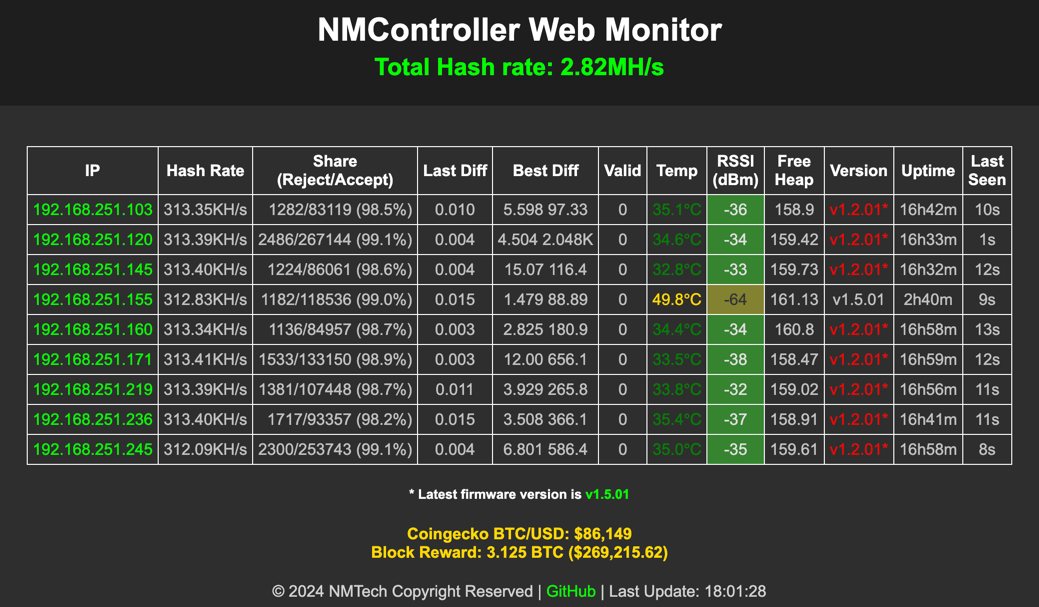
The page will refresh every 5 seconds.
Currently, the monitor will display the following information:
- IP
- HashRate
- Share info
- Net difficulty
- Last difficulty
- Best difficulty
- Valid number of blocks mined
- Device temp (℃)
- Wifi RSSI (dBm)
- Device free heap (KB)
- Uptime
- Last seen/updated
Contact
- Anything do not work as your expectation, just let us know.
| Telegram | |
|---|---|
| nmminer1024@gmail.com | https://t.me/NMMiner |
Contributors
Thank you to everyone who has contributed to this project! Special thanks to:
- dWiGhT (https://github.com/dwightmulcahy) - Thank you for your valuable contributions and continued support!
Categories
Download Statistics
Related apps
Explore more like this
Explore allLinks
Details
fgrfn/nmcontroller_webRuntime arguments
- Web UI
http://[IP]:[PORT:7877]- Network
bridge- Shell
sh- Privileged
- false
Template configuration
- Target
- 7877
- Default
- 7877
- Value
- 7877
- Target
- 12345
- Value
- 12345