
All apps · 0 apps

Nexview
Docker app from DerKezorm's Repository
Overview
Readme
View on GitHub
Nexview
Find something to watch — and request it straight from Radarr and Sonarr, or from nexcrate.
Nexview is a self-hosted media discovery dashboard for a household — family, flatmates, a circle of friends. It shows new releases from TMDB, marks what is already in your library, and hands requests to whatever procures for you: Radarr (movies) and Sonarr (shows), or nexcrate, which does both in one. Everyone gets their own account, with roles, approvals and quotas.
You pick one of the two when you set Nexview up, and you can switch later — an assistant walks through it and writes a backup first, because there is no other way back.
It downloads nothing itself and stores no media. It is the front door to a setup you already run — it does not replace any part of it.
Without a TMDB key Nexview starts with sample data, so you can look around before deciding anything.
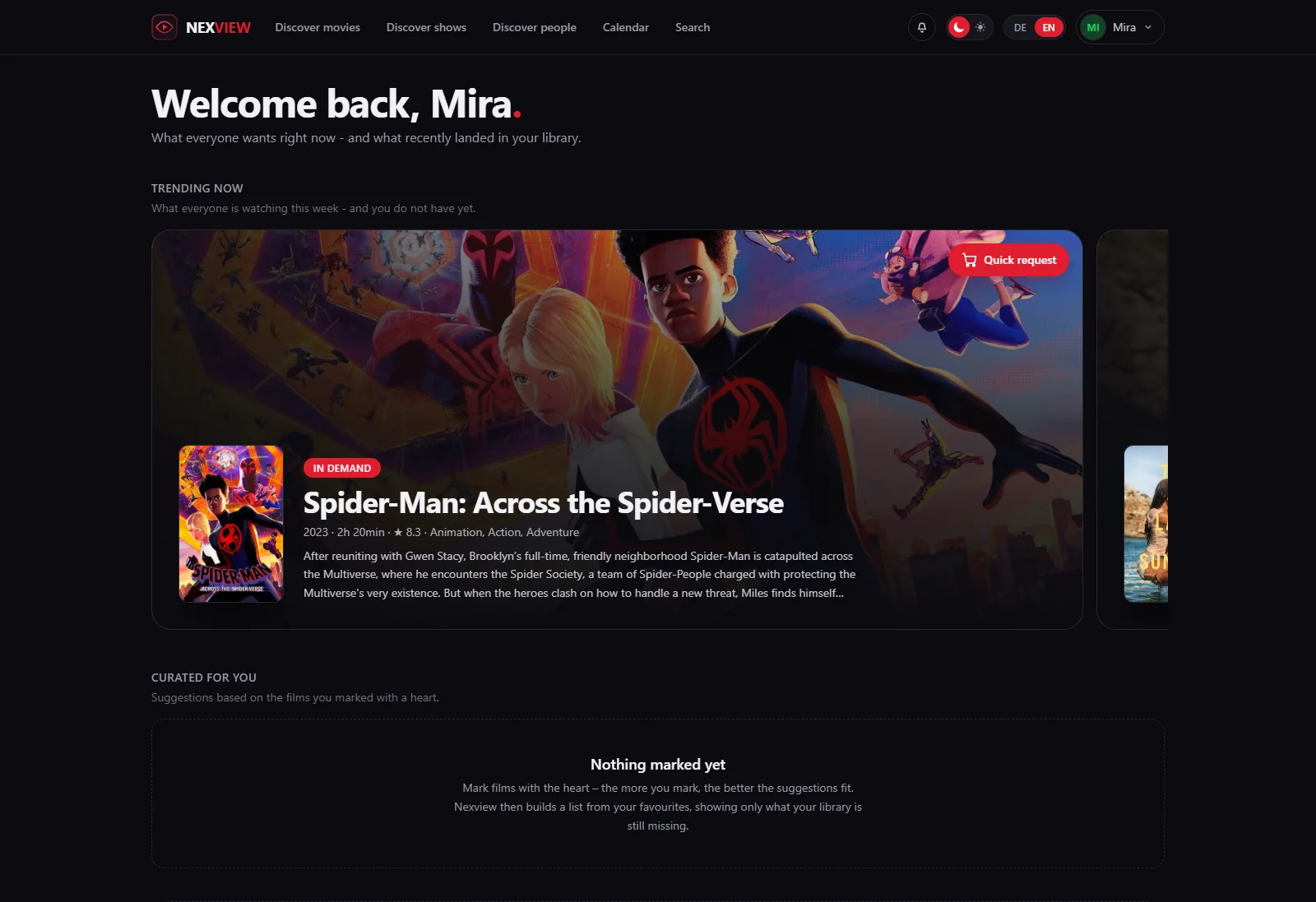
The home page. What each person marks as a favourite shapes what they get suggested.
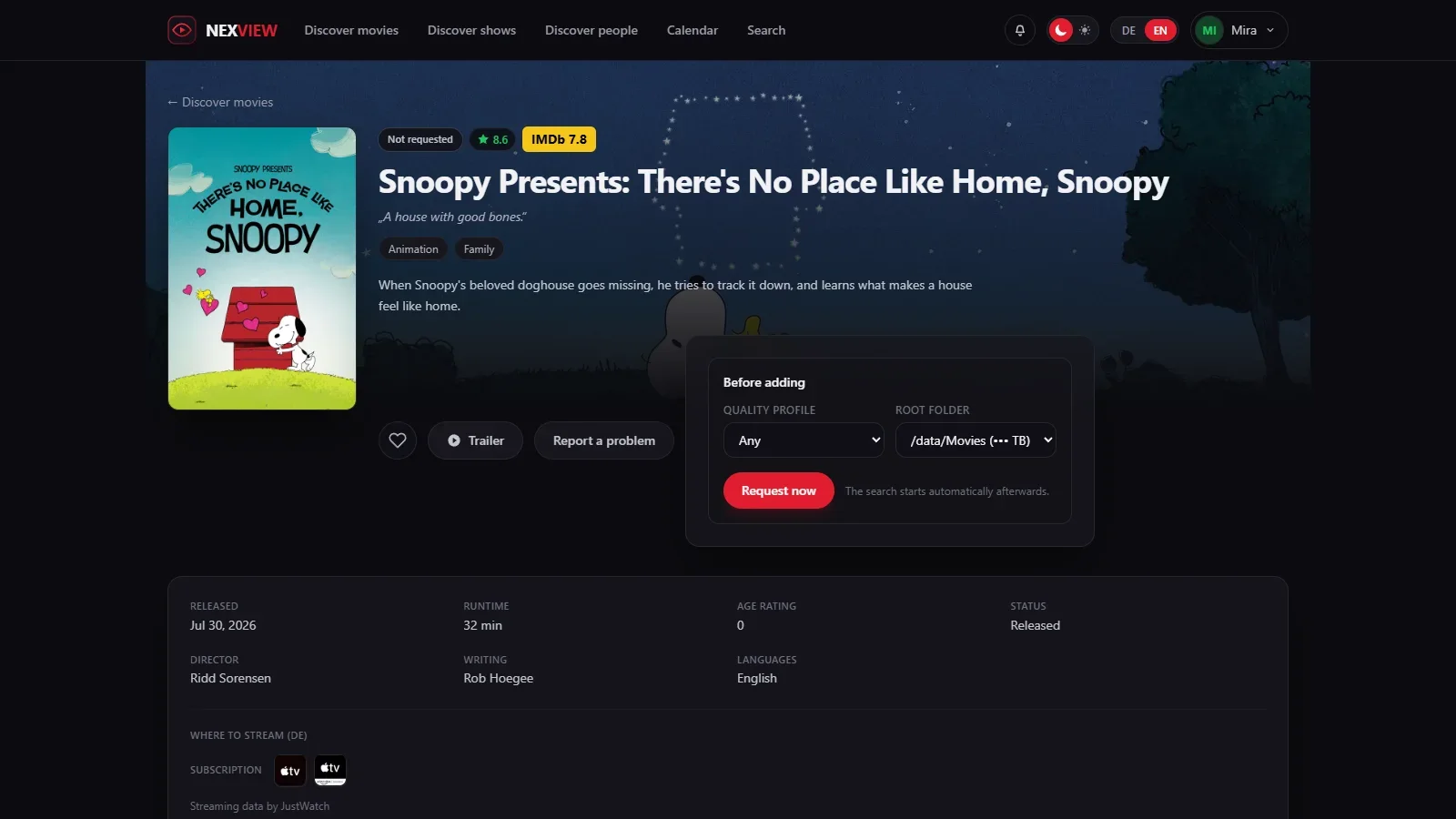
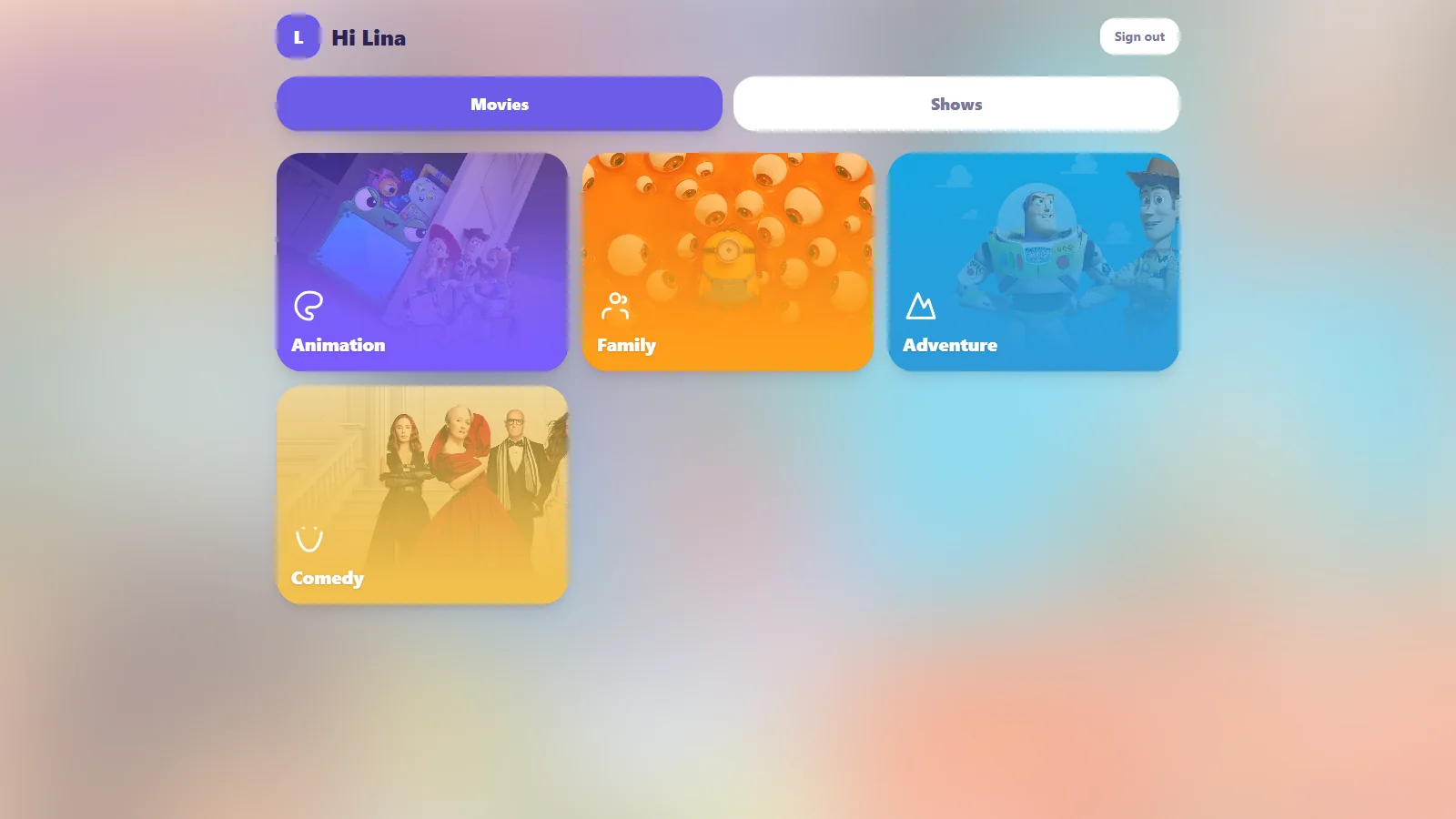
Requesting a title, and the same installation seen by a child.
The full tour is on the project site — every area with its own page and more screenshots.
What it does
Finding something
- Separate areas for movies and shows, each with its own logic
- Filter by period, language, region, genre, rating and studio; cards or list
- Detail pages with cast photos, directing and writing credits, studios, keywords, similar titles and the trailer in a window
- Ratings from IMDb, Rotten Tomatoes and Metacritic on the title itself
- Where a title is currently streaming in your region, split into subscription, free, rent and buy (data from JustWatch)
- Browse people — actors, directors, writers — and mark them as favourites; your favourites, titles and people alike, shape what gets suggested on your home page
- A release calendar, one week at a time: your own titles kept apart from new releases, with cinema and digital dates read for your region
Requesting
- Pick quality profile and target folder, or let the approver pick them instead
- Request whole shows or single seasons, optionally following future ones
- With nexcrate there is one connection instead of four, and quality profiles, naming, folders and the recycle bin live over there. Nexview then shows what it keeps: the versions of a title, why something has not arrived yet, and what can be restored
- Optionally a second Radarr and Sonarr instance for 4K: the same title once in 1080p and once in 4K, with separate folders, profiles and per-user permissions
- The state sits on the poster — not requested, requested, searching, already downloaded, in library, blocked — and updates itself as Radarr and Sonarr work
Who may do what
- Three roles: administrator, approver, user. An approver decides on requests without ever getting near your API keys
- Approve automatically or by hand, set separately for movies, shows and 4K
- Rules decide before that setting applies: an ordered list where every rule is a handful of conditions joined by AND and one consequence, approve at once or decline. The first rule that matches wins; if none does, the account setting decides as it always did. Conditions read the type, genre, rating, number of votes, year, runtime, original language, age rating, the requested tier, and whether the title is already here in the other tier. Approving may book it to house stock, where it counts against nobody's storage quota
- A decline is not a shrug: the request is created in the declined state, carries the reason you wrote and names the rule that decided. Per rule the requester may send it to an approver anyway, once, and never past a decision a person made. Nothing overrides the age filter, a parent's decision or the requester's own quota, and administrators and approvers are exempt from rules altogether
- Quotas per day, week or month — or, instead of counting titles, by disk space in gigabytes, which is the thing that actually runs out
- Child accounts: a parent creates a login for their child, with an age, a set of categories and a language. The child gets a separate, simpler app and does not request but wishes — nothing happens until the parent approves, and the request then runs in the parent's name
- A block list for titles that should stay out: visible, but not requestable
- Sign in through Authentik, Keycloak, Pocket ID, Authelia, Zitadel, Google or any other OpenID Connect provider — added alongside the password, never replacing it. Roles and quotas stay in Nexview; no group from the provider changes them
- One account owns the installation: no other administrator can switch it off, delete it, demote it or set its password. Handed on by its holder alone
With a media server
Plex is optional. Connect one and four things arrive:
- Sign in with a Plex account, checked against your server — no second password
- Titles already in the library are recognised even if they never came through Radarr or Sonarr, and cannot be requested twice
- Your Plex watchlist appears inside the catalogue, requestable with one click. Nothing happens on its own; every title takes a click
- What each person has already watched carries a marker. Everyone sees their own; an administrator sees who watched what, under Statistics & analysis → Watching
- Live playback across every connected server: who is watching what, on which device, and whether the server is transcoding the video for it — the one that costs CPU
Staying informed
- A bell in the app, and per-event e-mail if you want it
- Web push to your own phone, tablet and laptop, with the same per-event switches as e-mail: encrypted end to end, signed with a key Nexview generates once, arriving even while Nexview is closed. On iPhone and iPad via the Home Screen; needs https
- Seven notification channels for the installation as a whole: ntfy, Gotify, Telegram, Discord, a plain webhook, Apprise and e-mail. Each inbox picks its own events, language and urgency
- A ticket centre where people report problems and get an answer, with state and history
- Statistics and an error log for the administrator
- A Home Assistant integration: everybody enters their own key and gets their own figures and their own notifications, requests can be decided from a phone, and every Radarr, Sonarr and media server turns up as its own device
Running it
- An admin dashboard: twenty background checks across services, disk, supply, library, source reconciliation and Nexview itself. Every finding says what follows from it, and its button lands on the page that fixes it
- Statistics & analysis in six tabs — including where Radarr, the media server and Nexview's own books disagree, which is where the errors nobody looks for live
- A tile for Homepage or Homarr: one call, ready-made snippets
- House rules you write yourself, with images: reachable through a § button and the footer, tickable, and an overview of who accepted, declined or has not decided
And
- German and English throughout, including titles and descriptions
- A dark interface that works on a phone
Built with
- Frontend: React 19, Vite, Tailwind CSS 4
- Backend: Python, FastAPI
- Database: SQLite — accounts, settings and requests only, never media files
- Sessions: JWT, passwords hashed with bcrypt
- Deployment: a single Docker container serving both the API and the interface
Running with Docker
Nexview runs as one container: FastAPI serves the API and the built interface together. No extra web server is needed.
The image is on the GitHub Container Registry and is built for Intel/AMD and ARM, so nothing has to be compiled:
docker compose up -d
Nexview is then reachable at http://<your-server>:5173.
To build from source instead, replace image: ghcr.io/derkezorm/nexview:latest in
docker-compose.yml with build: . and add --build when starting.
What to back up
Everything that matters lives in the directory mapped to /data:
| File | Contents |
|---|---|
nexview.db |
accounts, requests, feedback, settings |
secret.key |
the key your stored API keys are encrypted with |
avatars/ |
profile pictures |
trash/ |
the fetched TRaSH guides your quality profiles were built against |
hausordnung/ |
the images used in the house rules |
logs/ |
error log |
secret.key belongs with the database. Without it the stored TMDB, Radarr, Sonarr
and SMTP credentials cannot be decrypted. Back both up together — and never put that
backup in a public repository.
trash/ matters for a subtler reason: each quality profile records which TRaSH snapshot
it was written against. Restore a database without it and Nexview measures those profiles
against a different snapshot, reporting drift on profiles nobody touched.
hausordnung/ has the same catch on a smaller scale: the database holds only the name
of each image in the house rules, never the file. Restore without the folder and the text
survives with holes in it.
Nexview's own backups (Settings → System → Backups) already contain all of this: database, key, avatars, TRaSH snapshot and house-rules images. The list above is for backing up the directory by hand.
Only the download is encrypted. The copies Nexview keeps for itself, the automatic
one before every schema change and anything you create with Back up now, sit in
sicherungen/ inside the data directory as plain SQLite files. Whoever can read that
directory can read every account out of them, and out of every older state still being
kept. The password you type when downloading protects the archive you take away, not the
copies that stay behind. If that gap matters in your setup, the answer is to protect the
directory, not the file: a backup that Nexview could decrypt on its own would have to keep
the key next to it, which protects nobody.
secret.key is created with mode 0600 and tightened to it on every start, so an older
installation gets there too. That is hardening, not a wall: it helps when the database
travels somewhere without the directory around it.
On a Synology
In Container Manager under Project → Create, pick the project folder and use the
docker-compose.yml. Two adjustments are worth making:
    ports:
      - "5173:8000"        # change the left number if 5173 is taken
    volumes:
      - /volume1/docker/nexview/data:/data
A fixed path instead of ./data makes backing up through Hyper Backup easier.
On host networking
With network_mode: host there is no port mapping — the port inside the container is
the port on your server, and if something already sits on 8000, Nexview will not come up.
NEXVIEW_PORT moves it:
    network_mode: host
    environment:
      NEXVIEW_PORT: 8123
Everyone else can ignore this. Without the variable Nexview listens on 8000 as before, and
the left number in ports: is what you reach it at.
You do not need to sort out permissions on that folder — the container sets them on
start. If you want the files to belong to a particular user, put their numbers in
PUID/PGID (find them over SSH with id username).
Updating
docker compose pull
docker compose up -d
The database is kept. Nexview brings it up to date itself on start: missing tables,
columns and indexes are added. Before anything is changed it writes a copy to
/data/sicherungen/, keeping the five most recent — so if something does go wrong, the
previous state is still there. The latest copy taken before an update is never rotated
out: it is the way back to the version you came from.
Going back to an older version
Do not simply start the older image on the updated data directory. An older Nexview cannot read what a newer one has written, and it changes data without saying so: it cancels open requests, drops 4K rights and rebuilds storage entries. From 1.0.0 on, Nexview guards against the worst of it:
- An older 1.x refuses to start, before it changes anything.
- A version older than 1.0.0 starts, but cannot write to accounts and their rights, requests and storage entries. Signing in fails, and its log says why.
That guard is deliberately narrow. Everything else can still change under a version older than 1.0.0: favourites, settings, invitations, tickets, the blocklist, children's wishes. A session that was already open keeps working there too. So if a version older than 1.0.0 was started on the updated database, even briefly, always go back with the backup below instead of carrying on with that database.
The way back is the backup taken before the update. It sits in sicherungen/ inside the
data directory and carries the comment Before update to … in its name, for example
nexview-automatisch-0.35.2-or-later-2026-09-26_091050-before-update-to-1-0-0.db. The
version in the name is the one the data came from; before 1.0.0 no version wrote itself
into the database, so for those it is the oldest it can be ("or later"). The start log of
the update names the exact file.
⚠️ Take that file, not a newer one. An older version started on the updated database
writes a backup of its own first, for example nexview-automatisch-0.35.2-….db without
the comment. It already holds the new data and does not take you back.
Going back works by swapping the file while Nexview is stopped, not through Restore in the settings:
- Stop the container:
docker compose down. - In the data directory, copy that backup over
nexview.db. - Delete
nexview.db-walandnexview.db-shmif they exist. They belong to the newer database and would be replayed onto the old one. - Set the image to the older version (for example
ghcr.io/derkezorm/nexview:0.35.2) and start it:docker compose up -d.
Everything done since the update (new requests, changed settings, new accounts) is not in that backup and is gone on the old version. Updating again later starts from the restored state and runs the update once more.
Image tags
Nexview follows the usual MAJOR.MINOR.PATCH numbering:
| Image | Contents |
|---|---|
ghcr.io/derkezorm/nexview:latest |
the latest released version — the recommendation |
ghcr.io/derkezorm/nexview:0.20.0 |
exactly that one version, never changes |
ghcr.io/derkezorm/nexview:main |
the current development state, may be broken |
The running version is in the footer and in detail under About Nexview, which also reports when a newer one exists. For that it asks GitHub at most once a day. The check sends nothing out of Nexview and can be switched off on the same page.
Configuration
Every setting is optional — Nexview runs without a configuration file. For production,
copy .env.example to .env:
| Variable | Meaning |
|---|---|
NEXVIEW_SECRET_KEY |
Secret for sessions and for encrypting the API keys. Generated automatically and stored in data/secret.key if unset. |
NEXVIEW_DATA_DIR |
Directory for the database and key file (default: ./data) |
NEXVIEW_ACCESS_TOKEN_MINUTES |
How long a sign-in stays valid (default: 30) |
NEXVIEW_REFRESH_TOKEN_DAYS |
How long you stay signed in (default: 30) |
NEXVIEW_CORS_ORIGINS |
Allowed origins in development |
NEXVIEW_STATIC_DIR |
Folder with the built frontend (the container sets this itself) |
NEXVIEW_LOG_LEVEL |
Overrides the log level chosen in the app (quiet, normal, detailed, trace). Emergency exit for when Nexview does not start. |
NEXVIEW_PORT |
Port Nexview listens on inside the container (default: 8000). Read by the container's start script, not by the backend itself. Only needed on host networking — see below. |
NEXVIEW_CLIENT_IP |
How Nexview learns the caller's address, for rate limiting sign-ins: unset (count per account only), direct, proxy, or proxy:2. See below. |
NEXVIEW_COOKIE_SECURE |
Whether the sign-in cookie is marked Secure: auto (default), on, or off. See below. |
NEXVIEW_URL_BASE |
Serve Nexview under a sub-path behind a reverse proxy, e.g. /nexview for https://example.com/nexview/. Unset means the root, exactly as before. See below. |
NEXVIEW_CSP |
Content security rules: on (default), report-only, or off. See below. |
NEXVIEW_FRAME_ANCESTORS |
Who may put Nexview in a frame: none (default), self, or an origin. See below. |
NEXVIEW_IMG_SOURCES |
Extra image hosts, space separated. Only needed if calendar posters stay blank. See below. |
NEXVIEW_BETREIBER |
Emergency exit: the username of the account that owns this installation. Normally unset — the account from the setup wizard owns it. Only needed if the owner locks themselves out. See below. |
No TMDB, Radarr or Sonarr keys belong in .env — you enter those in the app.
Moving in from Seerr
The setup wizard offers a third way on its front page: from a running Seerr. Paste Seerr's address and API key, and Nexview reads the installation through Seerr's API, area by area, and shows what it found. You tick what should come along: Radarr and Sonarr with their keys and folders, the mail server including its password, region and language, the house quota default, the block list, and the notification channels. Nothing is preselected; the key is never stored, and Nexview only reads from Seerr.
Accounts come along ready to use. One of Seerr's accounts becomes the owner, with a password you set; for everyone else you tick who comes and pick a role per row (default: user). Each account arrives with display name, a username shaped from it, its count quota, its personal region and language, its profile picture and its Plex, Jellyfin or Emby identity. Plex people sign in through Plex once the server is connected; everyone else sets a password via "Forgot password" or gets one from you.
Everything is written in one go at the last step, or not at all. The media server is connected afterwards, with the owner's session: Plex through the code at plex.tv, Jellyfin and Emby through address and administrator sign-in. What does not come along, the wizard says on the spot: the request history (what sits in Radarr and Sonarr, Nexview shows anyway), passwords, watch lists, per-person notification addresses and Seerr's override rules. The wizard only runs while the installation is empty.
The owner account
Exactly one account owns the installation. It carries an Owner badge in Settings → Users, and no other administrator can switch it off, delete it, demote it, change its quotas or set its password. The buttons are greyed out for them, with a sentence explaining why.
The flag grants no extra rights. It only says what others may not do with that account. The owner approves requests, spends quota and manages keys exactly like any other administrator.
Who gets it. On a new installation, the account you create in the setup wizard. On an existing installation being upgraded, the oldest active administrator — usually that same account. If there is no active administrator, the flag stays unassigned and says so in the user list.
Handing it over. Only the current owner can, under Profile → Security → Hand over ownership. The target must be an active administrator. Afterwards the previous owner is an ordinary administrator again and cannot take the flag back — only the new owner can hand it back.
If you lock yourself out — password gone with no mail delivery set up, login
provider dead, account unusable — set NEXVIEW_BETREIBER to your username and
restart the container:
environment:
  NEXVIEW_BETREIBER: yourusername
That account carries the flag again on the next start, with one line in the log. Then remove the line: the variable is read on every start, so while it is set, Nexview refuses to hand ownership over in the app rather than silently undoing it on the next restart. A username that does not exist is ignored with a warning — no account is created from this variable.
⚠️ The owner flag protects against a second administrator, not against someone with access to your server. Whoever can restart the container already has full control over Nexview and its database.
Rate limiting sign-ins
After a few wrong passwords Nexview slows the next attempt down, and after ten it closes the door for fifteen minutes. The lock opens again by itself — nobody has to unlock anything. It covers signing in to Nexview, signing in with a media-server password, and the links sent by mail.
Counting always happens per account, which needs no configuration. Counting per
address is extra, and it needs NEXVIEW_CLIENT_IP, because Nexview cannot tell on its
own whether it sits behind a reverse proxy:
| Value | When |
|---|---|
| unset | You are not sure. Only accounts are counted. This is always safe. |
direct |
Nexview is reachable directly, with no proxy in front |
proxy |
Exactly one reverse proxy in front (Nginx, Caddy, Nginx Proxy Manager, Traefik) |
proxy:2 |
Two in front, for example Cloudflare and then your own |
⚠️ Leave it unset if you are unsure. Saying
directwhile a proxy sits in front makes every request look like it comes from the same address — one typo would then lock out the whole household, you included.
The sign-in cookie
Your sign-in is kept in an HttpOnly cookie. The browser sends it back on its own, and
no script on the page can read it — which is the point: a script that gets onto the page
can no longer carry your sign-in away with it.
NEXVIEW_COOKIE_SECURE decides whether that cookie is marked Secure, meaning the
browser only ever sends it over HTTPS:
| Value | When |
|---|---|
auto |
Default. Secure is set whenever the request itself arrived over HTTPS. Works everywhere, including plain HTTP. |
on |
Always set it. Use this when a reverse proxy terminates HTTPS and forwards plain HTTP to Nexview — Nexview sees http and would leave it off. |
off |
Never set it. |
⚠️ Do not set
onif Nexview is meant to be reachable overhttp://. A browser throws aSecurecookie away over plain HTTP, and nobody would be able to sign in.
Nexview deliberately does not guess from X-Forwarded-Proto: that header can be
faked just like X-Forwarded-For, and the same question is already answered by asking
rather than guessing over at NEXVIEW_CLIENT_IP.
The same setting governs the short-lived cookie of a sign-in through an external
provider, which holds the state, the nonce and the PKCE verifier for the ten
minutes you spend at the provider. Until 0.26.0 that one never carried Secure at all,
not even with on set.
Signing in through an external provider
Nexview can hang off a sign-in service you already run — anything that speaks OpenID Connect. Set it up under Settings → System → Sign-in; a button per provider then appears on the sign-in page.
You need four things from your provider:
| Field | Where it comes from |
|---|---|
| Issuer URL | The base address of your provider. Nexview reads its /.well-known/openid-configuration itself, so you do not enter individual endpoints. |
| Client ID | Created when you register Nexview as an application. |
| Client secret | Same place. Required. Nexview always authenticates itself at the token endpoint (HTTP Basic, client_secret_basic); a public client without a secret cannot be set up. |
| Label | What the button says: “Sign in with Authentik”. |
And your provider needs one thing from you — the redirect URI:
https://your-nexview/api/auth/oidc/<slug>/callback
The slug is what you chose when adding the provider; Nexview shows the finished address
on the settings page, ready to copy. Requested scopes are openid email profile.
⚠️ The public address has to be right. The redirect URI is built from it, and a provider rejects anything that does not match its registration exactly. If you run Nexview under a sub-path, the address includes it.
Existing accounts link from the profile, under Profile → Sign-in. Your password keeps working — an external provider is added, it never replaces what is there. New people can be created automatically if you switch that on; they get the role and quota from your defaults. Leave it off and only people you have already invited can sign in that way.
What Nexview reads, and what it ignores
Nexview checks the ID token (signature, issuer, audience, expiry, nonce) and then asks
the provider's userinfo endpoint, on every sign-in, if the provider advertises one.
The answer is only used when its sub matches the token; where the two disagree, the
ID token wins, because that one is signed and verified. If userinfo is missing,
slow or broken, the sign-in carries on without it.
| Claim | What it is for | If it is missing |
|---|---|---|
iss + sub |
The identity. Both together are what a link and a block are stored against — not the address, not the name. Rename the person at your provider and the link holds. | The token is rejected and nobody signs in. Every provider sends both. |
email |
The bridge to an account that already exists, and the address a “forgot password” mail would go to. | No bridge: an existing account is never found, whatever else matches. With automatic creation on, the new account has no address and no way back in without the administrator. |
email_verified |
Whether that bridge may be used at all. See the next section. | Counts as “not confirmed”. Missing and false are the same answer here. |
preferred_username, else name |
Username and display name of a newly created account. | The part of the address before the @; with no address either, user. Characters Nexview does not allow in a username are dropped, and a name already taken gets -2 appended. |
Groups are not read. If you know OIDC from Grafana, Gitea or Paperless you will look for the group-to-role mapping: there is none, deliberately. Your provider vouches for who somebody is; what they may do here — role, quotas, blocked quality profiles, auto-approval — stays in Nexview and is set in Settings → Users. An account created automatically from an external sign-in starts as an ordinary user whose requests need approval, even if it is an administrator at your provider; only an open Nexview invitation for that address can say otherwise. Nothing at the identity provider can widen it.
⚠️ When the provider does not vouch for the address
Nexview links an external sign-in to an existing account only when the provider
reports the address as confirmed (email_verified: true). This is not a formality: the
address is the only thing the two accounts have in common, and anyone who can register
that address at any provider you trust would otherwise walk into the matching Nexview
account.
That default catches most self-hosted setups. Authentik reports false out of the
box since release 2025.10, Keycloak does for newly created accounts until an
administrator ticks the box, and Pocket ID does until the address is confirmed. What you
see when it happens: the person gets “There is no account for this sign-in yet. Ask the
administrator for an invitation.”, and the log (see below) names the reason, along with
whether an account for that address exists after all.
Three ways out, in the order worth trying:
- Fix it at the provider. The honest one: a provider that has confirmed an address should say so. Recipe for Authentik below.
- Let the person link it themselves, signed in, under Profile → Sign-in. This is
not a hole in the check above — it is the reason the check exists. Whoever is already
signed in has proved who they are; nothing has to be inferred from an address, so
email_verifiednever comes into it. This is also the right answer for a provider that has noemail_verifiedat all, such as Microsoft Entra ID. - Switch automatic account creation on for that provider. That does not repair the bridge — it creates a second, empty account beside the existing one, with new quotas and no history. Fine on a fresh installation, wrong for people who are already here. And if the address already belongs to an account, the sign-in is refused anyway rather than creating a duplicate address.
Authentik, concretely. Two objects, and the second one replaces something:
- On the account: a user attribute
email_verified: true. - A scope mapping of your own (Customisation → Property Mappings; in the German
interface that type reads Umfang Zuordnung) whose expression hands that attribute
out under the name
email_verified, then bound to the provider under Scopes.
⚠️ The new mapping has to replace the built-in email mapping on that provider, not
sit next to it. Leave both bound and the shipped one keeps answering for the email
scope, and nothing changes.
If a sign-in is refused
Look in Settings → System → Log. Every refused external sign-in leaves one WARNING
line naming the reason, the issuer, whether an address arrived, whether the provider
vouched for it, and whether an account with that address exists:
OIDC sign-in refused (no auto-create, address not confirmed by the provider): issuer='https://sso.example.com' email=ma***@example.org verified=False account_exists=True
The address is shortened on purpose — enough to recognise which case this was, not
enough to turn a log file into an address book. WARNING shows at every log level,
quiet included, so nothing has to be switched on first.
The person signing in is deliberately told less than the log says. They always get the same sentence, whether Nexview does not know them at all or an account exists that the bridge was not allowed to use. Otherwise the sign-in page would answer the question “does this house have an account for this address?” for anyone who asks.
Authentik
Applications → Providers → Create → OAuth2/OpenID Provider. Set the redirect URI,
choose Authorization code flow, and take the client ID and secret from the
provider page. The issuer URL is
https://authentik.example.com/application/o/<application-slug>/ — Authentik shows it
under the provider as OpenID Configuration Issuer.
⚠️ Since release 2025.10 Authentik reports
email_verified: falseout of the box, so a sign-in will not find an existing Nexview account until you change that. See When the provider does not vouch for the address above.
Keycloak
Clients → Create client, type OpenID Connect. Switch Client authentication on
(otherwise there is no secret), enable Standard flow, and enter the redirect URI under
Valid redirect URIs. The issuer URL is
https://keycloak.example.com/realms/<realm>.
⚠️ A freshly created Keycloak account has Email verified switched off, and until an administrator switches it on, Nexview will not link it to an existing account. See When the provider does not vouch for the address above.
Pocket ID
OIDC Clients → Add client. Enter the redirect URI, copy client ID and secret. The
issuer URL is your Pocket ID address itself, e.g. https://id.example.com.
⚠️ Pocket ID reports
email_verified: falseuntil the address has been confirmed — same consequence as with Authentik, see above.
Authelia
The client goes into Authelia's own configuration, under
identity_providers.oidc.clients: client_id, the hashed client secret, the
redirect URI in redirect_uris, and scopes: [openid, email, profile]. Authelia stores
the secret hashed (authelia crypto hash generate pbkdf2) — Nexview gets the plaintext
you generated it from. The issuer URL is your Authelia address itself, e.g.
https://auth.example.com.
⚠️ Authelia does not put the address in the ID token. Its own documentation calls doing so “a break-glass measure … on a best-effort basis”. Nexview therefore reads
email_verifiedfrom theuserinfoendpoint, which needs nothing from you. A signeduserinforesponse works too: if Authelia returns a JWT instead of plain JSON, Nexview verifies it against the same published keys, issuer and audience as the ID token, and only then reads the address from it. You do not have to turn that setting off.
Zitadel
Console → your project → Applications → New, type Web, authentication method Basic
— that is the one that produces a client secret, and Zitadel shows it exactly once. Add
the redirect URI, and make sure the email scope is requested. The issuer URL is your
instance address, e.g. https://your-instance.zitadel.cloud or your own domain.
⚠️ Zitadel does not put the address in the ID token on the authorization-code flow. As with Authelia, Nexview picks it up from
userinfo; there is nothing to configure for that.
Google Cloud Console → APIs & Services → Credentials → Create credentials → OAuth
client ID, type Web application. Add the redirect URI under Authorised redirect
URIs. The issuer URL is https://accounts.google.com.
Google hands out an email address for every Google account in the world. Leave automatic account creation off unless you have restricted the OAuth client to your own workspace — otherwise anyone with a Google account can sign in.
Behind a reverse proxy
With its own (sub)domain — https://nexview.example.com — Nexview needs no
configuration at all. To serve it under a sub-path of a shared domain instead,
set one variable and restart the container:
NEXVIEW_URL_BASE=/nexview
Now Nexview lives at https://example.com/nexview/. Any prefix works, /tools/nexview
too. Leave the variable unset and everything behaves exactly as before.
With the prefix set, Nexview answers both forms of address: with the prefix (for proxies that pass the path through unchanged — the recommended setup) and without it (for proxies that strip the prefix before forwarding, and for the container's own health check). Whichever way your proxy is configured, it works.
nginx
location /nexview {
    proxy_pass http://127.0.0.1:5173;
    proxy_set_header Host $host;
}
Caddy
handle /nexview* {
    reverse_proxy 127.0.0.1:5173
}
handle_path (which strips the prefix) works just as well.
Traefik (labels on the Nexview container)
- traefik.http.routers.nexview.rule=PathPrefix(`/nexview`)
- traefik.http.services.nexview.loadbalancer.server.port=8000
A stripprefix middleware works just as well.
Nginx Proxy Manager
On your proxy host, add a Custom Location /nexview and forward it to the host and
port Nexview listens on. No advanced configuration needed.
⚠️ Set the public address with the prefix included. The address under Settings → Addresses goes into every link Nexview sends — invitations, password resets. With a prefix it must read
https://example.com/nexview. Nexview suggests it correctly and shows a warning when the prefix is missing, but it cannot stop you from saving without it.
Content security rules
Nexview tells your browser where it may load things from, and where it may send things to. Anything not on the list is refused. The one that matters most is that no script on the page can send data to any address other than Nexview's own — which is exactly the gap the sign-in cookie leaves open: the cookie stops a stolen pass being carried away, not being used.
You should not need to touch any of this. Three switches exist for the cases where you do:
| Variable | Values | When |
|---|---|---|
NEXVIEW_CSP |
on (default), report-only, off |
report-only reports breaches in the browser console without blocking anything — useful to look before you commit. off turns the header off entirely. |
NEXVIEW_FRAME_ANCESTORS |
none (default), self, or an origin |
Set this if you embed Nexview in a dashboard such as Organizr. Without it the frame stays empty, with no error message. |
NEXVIEW_IMG_SOURCES |
space separated origins | Set this if calendar posters stay blank. |
⚠️ Why posters can stay blank. Calendar posters are not built by Nexview — it passes on whatever address Radarr or Sonarr stored, and that depends on your metadata provider. The usual ones (TMDB, TheTVDB, fanart.tv) are allowed already. If yours is something else, the posters simply do not appear; the browser only says so in its console.
NEXVIEW_IMG_SOURCES=https://your.hostfixes it.
The HTTP interface
Nexview has one HTTP interface, and the web interface uses it too. Anyone who can reach
your instance can call it — the endpoints themselves are protected, but the map is open:
the browsable documentation lives at /docs, the machine-readable version at
/openapi.json.
API tokens
Scripts, dashboards and anything else that talks to Nexview without a browser use a personal API token. You create one in Profile → Account → Security, and it is shown exactly once — afterwards only a checksum remains, and not even an administrator can look it up.
curl -H "Authorization: Bearer nxv_…" https://your-nexview/api/v1/requests/mine
A token has exactly the rights of the account it belongs to — no more. Role, quota, approval and blocklist apply to it just as they apply to its owner, so a token belonging to an ordinary account still goes through approval instead of around it. If you want a service account with few rights, create a user with those rights and give it a token.
One switch on top: may only read. Such a token can fetch data but not create, change or delete anything — right for dashboards and monitoring.
Tokens can carry an expiry date, the list shows when each was last used, and revoking one takes effect immediately. Child accounts do not get tokens.
Administrators see every token in the installation under Settings → System → API tokens — owner, name, age and last use. They can look, not revoke: only the owner switches off their own token. Deactivating an account locks its tokens along with it.
What is promised, and what is not
Sixteen endpoints live under /api/v1, and for those there is a promise: as long as
v1 is in the address, nothing disappears from their answers. If something has to break,
/api/v2 will appear beside it and v1 will keep running.
GET /api/v1/search/{media_type} |
find a title |
GET /api/v1/media/{media_type}/{tmdb_id} |
details for one |
POST /api/v1/requests |
request it |
GET /api/v1/requests/mine |
how your own requests are doing |
GET /api/v1/requests/quota |
how much you may still request |
POST /api/v1/requests/{request_id}/cancel |
withdraw one |
GET /api/v1/home/recent |
what was recently downloaded |
GET /api/v1/tickets/open-count |
open tickets |
GET /api/v1/admin/requests/pending/count |
requests waiting for approval |
GET /api/v1/notifications/unread/count |
unread notifications |
GET /api/v1/storage/me |
your own storage use |
GET /api/v1/about |
which version is running |
GET /api/v1/health |
whether it is up |
GET /api/v1/me |
who is asking, and what this request may do |
GET/PUT/POST/DELETE /api/v1/me/push |
where Nexview should notify this key's owner |
GET /api/v1/dashboard |
one tile for your home dashboard |
Everything else under /api/… is an inside part of the application. You may use it,
but it can change with any version — field names included. Nothing there is promised.
⚠️ GET /api/v1/home/recent also carries requested_by and requester_avatar. Putting
that on a dashboard shows who asked for what. In a household that is usually the point;
on a screen other people see, it may not be.
A tile for Homepage or Homarr
GET /api/v1/dashboard answers with everything a tile needs in one call: how many findings
are open, what is waiting, how full the library is, and whether the instances are answering.
Ready-made snippets for both are in docs/dashboard-tile.md.
⚠️ That one needs a token belonging to an administrator. Instance state and disk figures
are an operator's business, and a token inherits the rights of its owner. May only read
limits it to GET, but an administrator's read-only token can still read the user list, the
log and the settings — worth knowing before you pin it to a screen somebody else can see.
Development
Requirements: Python 3.12+ and Node.js 20+
Backend
cd backend
python -m venv .venv
.venv/Scripts/activate      # Linux/macOS: source .venv/bin/activate
pip install -r requirements-dev.txt
python -m uvicorn app.main:app --reload --port 8000
The API then runs on http://127.0.0.1:8000, with interactive documentation at
http://127.0.0.1:8000/docs.
Frontend
In a second terminal:
cd frontend
npm install
npm run dev
The interface opens at http://localhost:5173. Requests to /api are forwarded to the
backend automatically.
First run
A one-time wizard appears on first launch:
| Step | Required | For |
|---|---|---|
| Account | yes | administrator with username, e-mail address and password |
| Picture | no | profile picture — without one, Nexview shows initials |
| TMDB | no | titles, posters, descriptions. Without a key you get sample data |
| Radarr | no | movies. Without Radarr, movies cannot be requested |
| Sonarr | no | shows. Without Sonarr, no show requests |
| nexcrate | no | movies and shows in one, instead of Radarr and Sonarr |
| Address | yes | the address Nexview is reachable at; it goes into every link |
| yes | SMTP server for invitations and password recovery |
The last two cannot be skipped, and Continue only unlocks after a successful connection test: every invitation and every password reset goes out through them.
The address of the account you create here counts as confirmed right away, and the owner can always sign in, even with an address that is not confirmed yet (after changing it without a mail server, say). Every other account, further administrators included, cannot sign in with its password until its address is confirmed. The confirmation mail says so.
If the confirmation never arrives, the sign-in page helps: with the right password it offers Resend confirmation and Correct address, so a typo is not fatal. The link needs a working mail server.
Further accounts come from invitations — or through the media server. The administrator sets only the address and the role; the invitee picks their own username, display name and password through the link in the mail. Nobody else learns that password, not even the administrator.
Before you push
One check deliberately runs before the push rather than in CI: it searches every versioned file for personal data, meaning names, account identifiers, tokens, e-mail addresses with a real domain, public IP addresses and home directory paths. CI would find them too, but only once they are already in the history, and getting them out of there means rewriting it. Activate the hook once per clone:
git config core.hooksPath .githooks
To run the same check by hand:
cd backend
python tools/personendaten_pruefen.py
Tests
The backend suite — the big one, and the one that has to be green before a release:
cd backend
.venv/Scripts/python.exe -m pytest
The interface is tested on two levels. The fast ones run without a browser against a replaced API layer, in seconds:
cd frontend
npm test
And one runs in a real Chromium, against a real server: it signs in, reloads, and signs out again. That is the only way to prove that the browser really keeps the sign-in across a reload — the session lives in a cookie that JavaScript cannot read, so nothing below a real browser can tell you. It starts backend and interface itself, on their own ports and on an empty database:
cd frontend
npx playwright install chromium   # once
npm run e2e
All three run in CI on every push and every pull request.
Starting over
To discard all accounts and settings, delete the data/ directory. The next start runs
the wizard again.
Credits
Metadata comes from TMDB. This project is neither endorsed nor certified by TMDB.
Sign-in, library matching and the watched state run through Plex, when a server is connected. Nexview is neither endorsed by nor affiliated with Plex.
Downloads are handled by Radarr and Sonarr, or by nexcrate; ratings come from IMDb, Rotten Tomatoes and Metacritic, streaming availability from JustWatch. Notifications can go through ntfy, Gotify, Telegram, Discord, a plain webhook or Apprise.
Quality profiles, custom formats and the file naming scheme are built from the TRaSH Guides (MIT). Nexview ships a snapshot of their JSON data so the first setup works without internet access, and fetches newer versions from their repository when you ask it to. The scoring itself — which release is worth more than which, and why — is their work.
Seerr, which grew out of Overseerr and Jellyseerr, was the model: the idea of what a request interface for Radarr and Sonarr can look like comes from there, from the second instance for 4K down to matching against the media server. Nexview is an independent implementation and takes no source code from it, but owes it a great deal.
Licence
Nexview is under the GNU Affero General Public License, version 3 or later (AGPL-3.0-or-later) — see LICENSE. The source may be used, modified and passed on, commercially too. What the AGPL asks in return: if you change Nexview and let other people use your changed version — including over a network, without handing out any files — you have to make your changed source available to them too. Running Nexview unchanged asks nothing of you. There is no warranty.
Versions up to and including 0.17.0 were released under the MIT licence. That grant is perpetual and is not being withdrawn — anyone who received those versions keeps them under MIT. From 0.18.0 on, the AGPL applies.
The licence covers this project's source. It does not cover:
- Metadata, posters and images from TMDB. Those fall under the TMDB terms of use; running Nexview needs your own API key.
- Plex, Radarr, Sonarr, Docker, Synology, IMDb, Rotten Tomatoes, Metacritic, JustWatch, ntfy, Gotify, Telegram, Discord and Apprise. Trademarks of their respective owners, named here descriptively only.
- The dependencies in
frontend/package.jsonandbackend/requirements.txt, which carry their own licences.
Categories
Related apps
Explore more like this
Explore allDetails
ghcr.io/derkezorm/nexviewRuntime arguments
- Web UI
http://[IP]:[PORT:8000]/- Network
bridge- Shell
sh- Privileged
- false
Template configuration
Port you reach Nexview at. Container port: 8000
- Target
- 8000
- Default
- 5173
- Value
- 5173
Holds the SQLite database, the encryption key for your stored API credentials, and profile pictures. Back up this folder.
- Target
- /data
- Default
- /mnt/user/appdata/nexview
- Value
- /mnt/user/appdata/nexview
User id that should own the files in /data. 99 is the Unraid default.
- Default
- 99
- Value
- 99
Group id that should own the files in /data. 100 is the Unraid default.
- Default
- 100
- Value
- 100
Time zone used for the log and for dates in the interface, for example Europe/Berlin.
- Target
- TZ
- Default
- Etc/UTC
- Value
- Etc/UTC
Leave this empty unless you switched Network Type to Host. In bridge mode the WebUI Port above already does the job and setting this will break it, because the mapping still points at 8000. On host networking there is no mapping - the port inside the container is the port on your server - so use this to move Nexview off 8000 if something else is already there.
- Target
- NEXVIEW_PORT
Signs login tokens and encrypts your stored Radarr, Sonarr and TMDB credentials. Leave blank: Nexview generates one on first start and keeps it in /data/secret.key.
- Target
- NEXVIEW_SECRET_KEY
Only needed if you want failed sign-ins counted per address as well as per account. Nexview cannot tell on its own whether a reverse proxy sits in front of it, and behind one every request looks like it comes from the same address - so leaving this blank is always safe, and accounts are still counted. Set direct if Nexview is reachable without a proxy, proxy if exactly one sits in front, or proxy:2 for two (for example Cloudflare and then your own). Your proxy must pass X-Forwarded-For; most do by default.
- Target
- NEXVIEW_CLIENT_IP
Emergency override: quiet, normal, detailed or trace. Leave blank - the level is set inside the app and turns itself back down after troubleshooting. Only set this if Nexview will not start at all.
- Target
- NEXVIEW_LOG_LEVEL
Only needed to serve Nexview under a sub-path of a shared domain behind a reverse proxy, for example /nexview for https://example.com/nexview/. Leave blank to serve at the root, exactly as before. Both common proxy setups work - passing the path through unchanged and stripping the prefix. Remember to include the prefix in the public address inside Nexview's settings, or links in outgoing mail lead nowhere. Proxy examples: README, section 'Behind a reverse proxy'.
- Target
- NEXVIEW_URL_BASE
How long a sign-in stays valid before it is refreshed.
- Target
- NEXVIEW_ACCESS_TOKEN_MINUTES
- Default
- 30
- Value
- 30
How long someone stays signed in without entering their password again.
- Target
- NEXVIEW_REFRESH_TOKEN_DAYS
- Default
- 30
- Value
- 30