
All apps · 0 apps
nextrmnl
Docker app from DerKezorm's Repository
Overview
Readme
View on GitHubnextrmnl
SSH and SFTP in the browser, self-hosted, for the machines in your own network. Accounts with a vault each, host keys that are checked and remembered, and a terminal that copies and pastes the way PuTTY and Windows Terminal do.
nextrmnl is part of the nex apps and looks like them. The project site with the full tour, in English and German, is at nextrmnl.nexapps.dev.
Screenshots
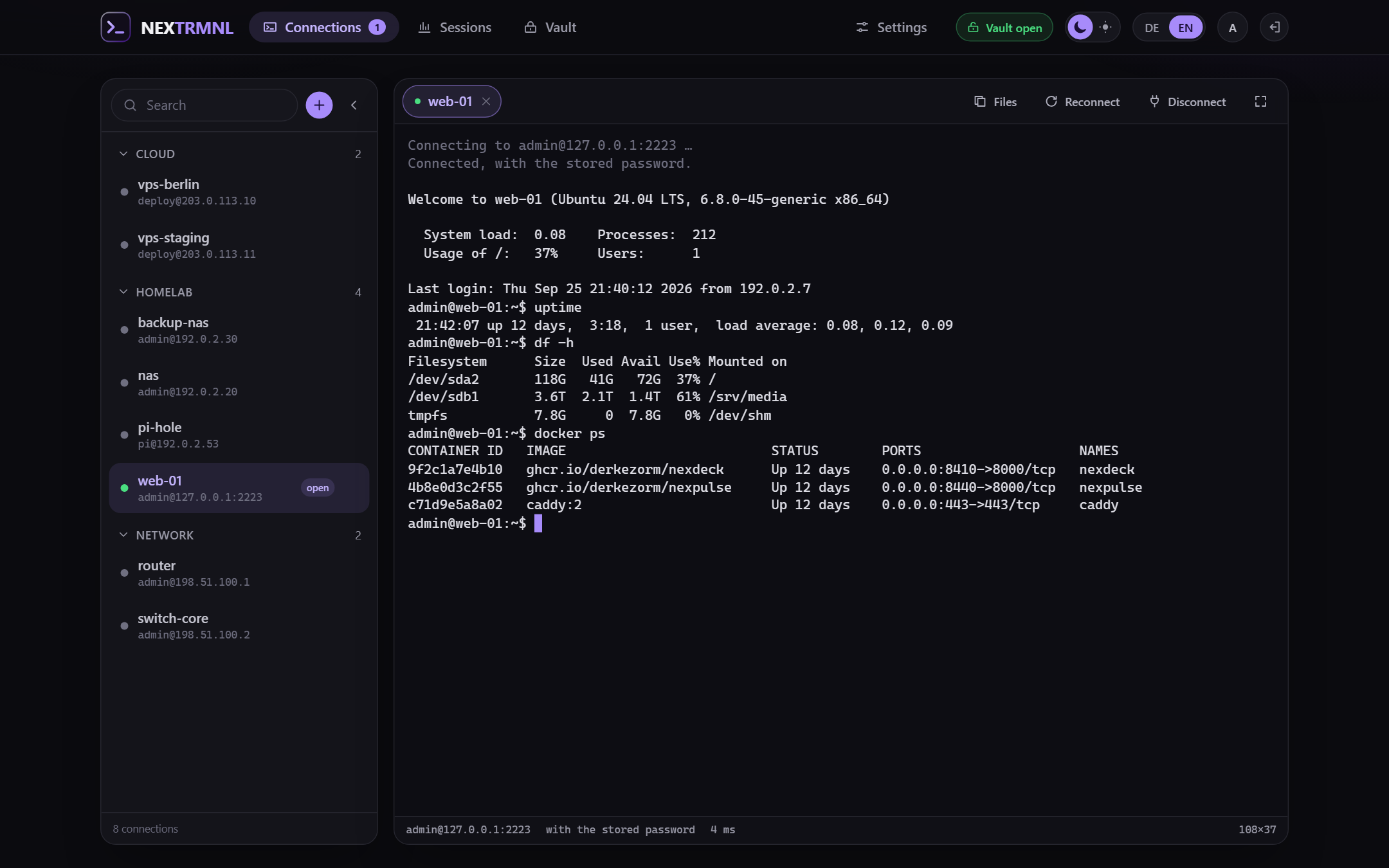
The terminal, with the connection list pinned to the left. It floats above the terminal by default.
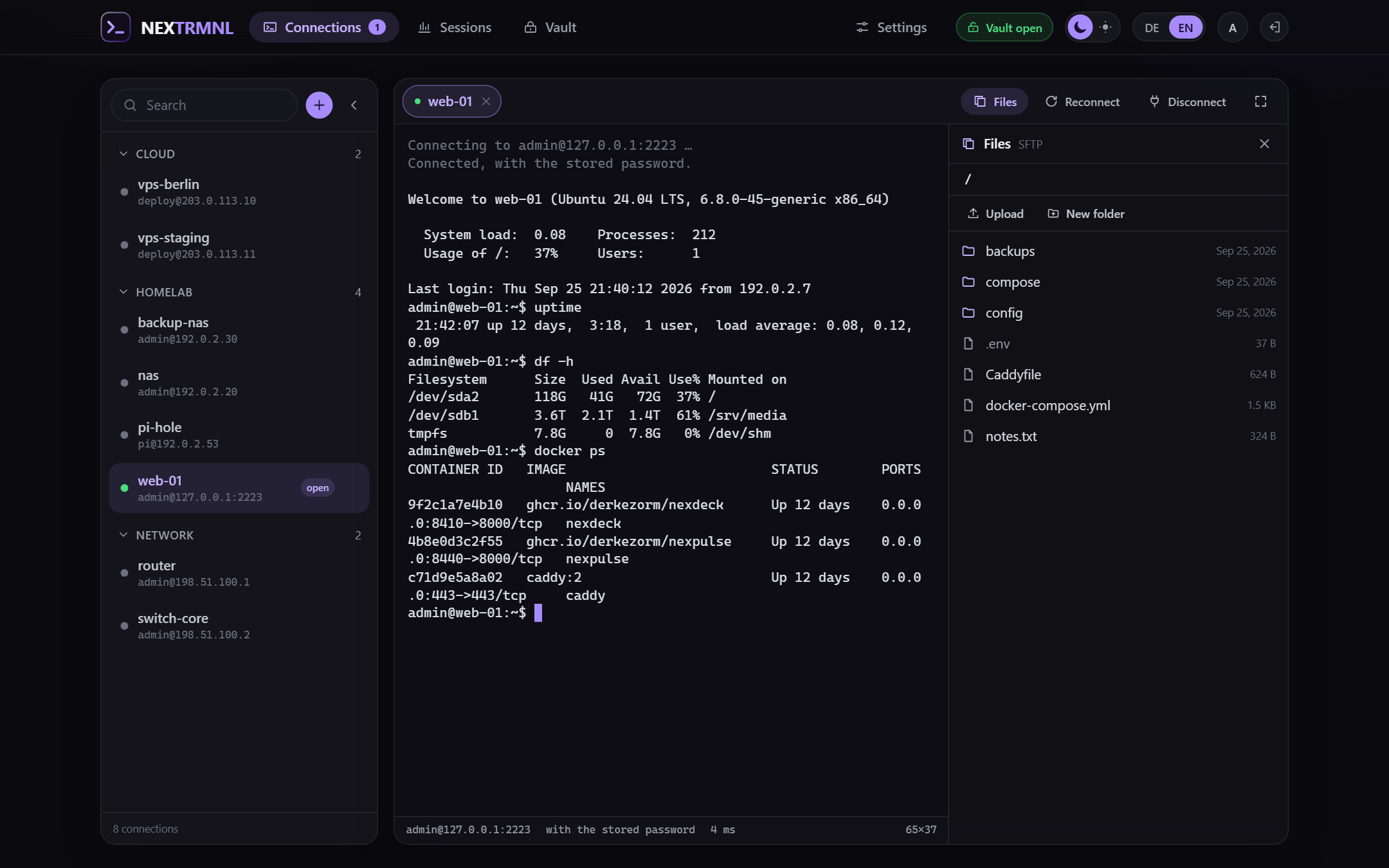
Files over SFTP next to the terminal: browse, upload, download, rename, delete.
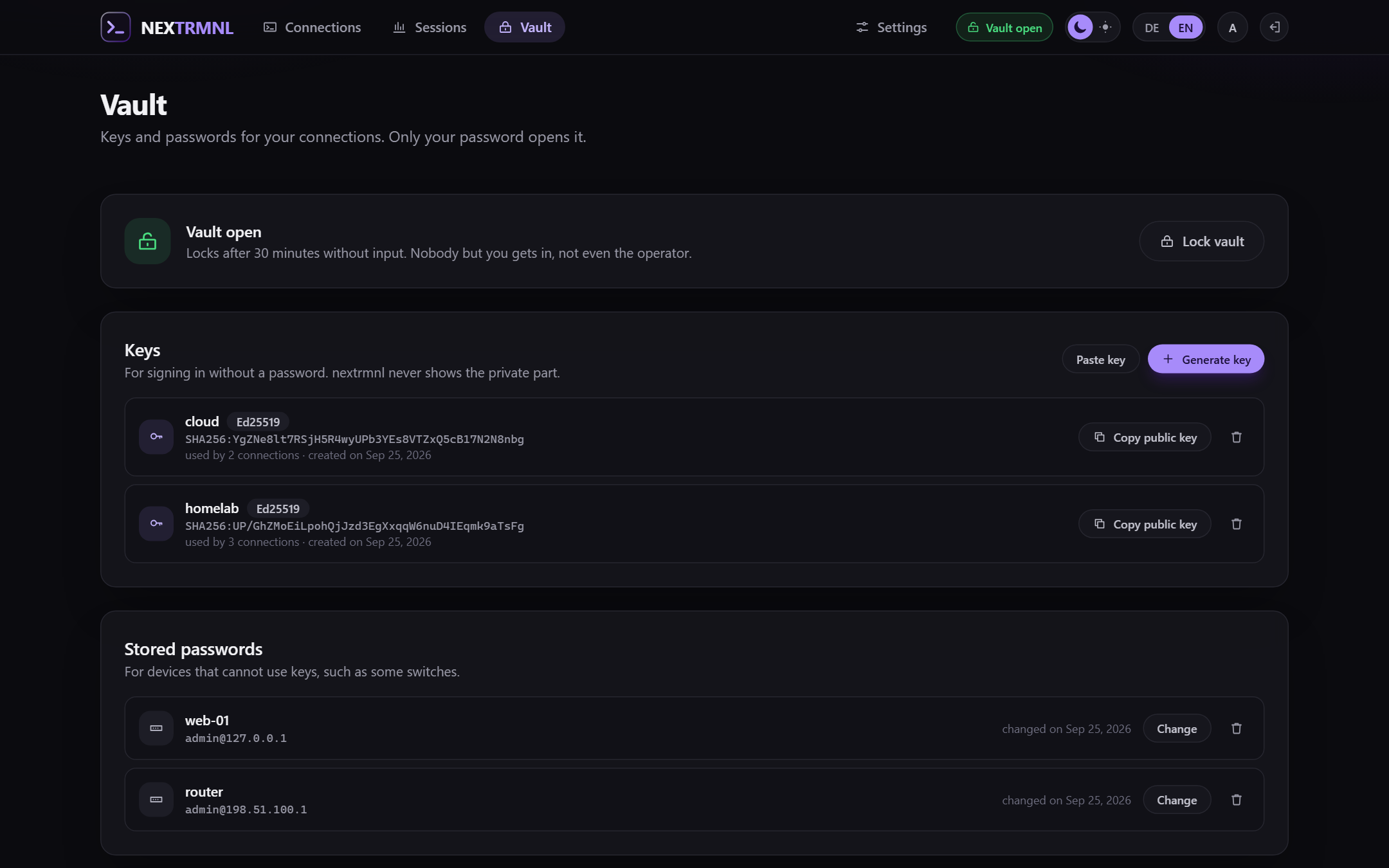
The vault: keys and stored passwords, sealed with the account's password.
What it does
- Terminal in the browser (xterm.js) over a WebSocket to the nextrmnl server, which speaks SSH to your machines. Full-screen, tabs for open sessions, jump hosts, a command to run after sign-in, keepalives.
- SFTP next to the terminal: browse, upload with drag and drop, download, rename, delete, all through the same SSH connection.
- Copy and paste like PuTTY: selecting copies, Ctrl+Shift+C, Ctrl+Insert, Ctrl+C with a selection; paste with Ctrl+V, Ctrl+Shift+V, Shift+Insert or a right click. Several lines are shown before they run.
- Accounts: the first account is the operator, others come by invitation link or through OpenID Connect. Connections can be shared; sharing passes name, address and settings, never access.
- Second factor: a code from an authenticator app on top of the password (TOTP), with recovery codes for the day the phone is gone. The operator can require it for every password account; whoever locks themselves out gets it reset by the operator.
- A vault per account for private keys and stored passwords, encrypted with a key that only the account's password unwraps. Not the operator, not a backup, not a database dump can read it. Generate Ed25519 or RSA keys, or paste existing ones. Download the vault as an encrypted file and restore it, here or on another nextrmnl.
- Host keys are compared on every connection. Unknown hosts are shown with their fingerprint before you trust them; a changed key is refused until you say otherwise.
- Allowed targets: by default nextrmnl only connects into private networks (10/8, 172.16/12, 192.168/16, 100.64/10 for VPNs, loopback, link-local). The operator can add networks and names, or open it up.
- OpenID Connect: any provider with discovery; for authentik there is a one-button setup that creates the provider, application, signing key and mappings with a one-time API token, or a blueprint file to do it without a token.
- Backups: consistent copies on a schedule and before every schema change, downloads as an AES encrypted ZIP that 7-Zip opens without nextrmnl, restore with a preview and a restart.
- A log with four levels (the deep ones switch themselves off), a request id in every line and in every error message, downloadable. Never with terminal content, keystrokes, passwords, keys or tokens.
- Read-only API keys for dashboards such as nexdeck: four endpoints under
/api/v1(status,sessions,history,connections) with the key asAuthorization: Bearer. Off by default; the operator switches them on and creates them under Settings, Security. - German and English; another language is one JSON file.
Start
services:
  nextrmnl:
    image: ghcr.io/derkezorm/nextrmnl:latest
    container_name: nextrmnl
    restart: unless-stopped
    ports:
      - "8460:8000"
    volumes:
      - ./data:/data
    environment:
      PUID: 1000
      PGID: 1000
      TZ: Europe/Berlin
docker compose up -d
Open http://<your-host>:8460 and create the operator account. The password is at least 12 characters; it also
protects your vault.
Put nextrmnl behind a reverse proxy with TLS before you use it from anywhere but your own desk. It holds the access to your machines. Pasting with a right click also needs HTTPS; the browser allows reading the clipboard only on secure origins (Ctrl+V works regardless).
Where things are stored
Everything lives in /data: the SQLite database nextrmnl.db, secret.key, backups/, logs/. Mount it
from a local disk, never from an SMB or NFS share.
secret.key protects the server-side secrets (the OIDC client secret). The vaults do not depend on it: they
open with the account's password only. Both go into the backup archive.
Environment
| Variable | Default | Meaning |
|---|---|---|
NEXTRMNL_DATA_DIR |
/data |
Data directory |
NEXTRMNL_SECRET_KEY |
created on first start | Protects the server-side secrets; when set, it wins over secret.key |
NEXTRMNL_PUBLIC_URL |
from the request | The address people use to reach nextrmnl; for invitation links and the OIDC redirect. The public address under Settings, Sign-in wins when set |
NEXTRMNL_LOG_LEVEL |
stored setting | quiet, normal, detailed or trace; overrides the setting, the emergency exit when the app does not start |
NEXTRMNL_TRUSTED_PROXIES |
none | Addresses or networks of reverse proxies whose X-Forwarded-For is believed, comma separated (172.18.0.0/16, 10.0.0.5). Without it every request counts as coming from its peer, so a proxy in front makes all its clients share one sign-in brake |
NEXTRMNL_SESSION_DAYS |
14 |
A browser session ends after this many days |
NEXTRMNL_API_DOCS |
false |
Serves /api/docs and /api/openapi.json; off by default |
NEXTRMNL_COOKIE_SECURE |
auto |
on, off or auto (from the request or X-Forwarded-Proto) |
NEXTRMNL_PORT |
8000 |
Port inside the container, for host networking |
PUID, PGID |
1000 |
Owner of the files in the data directory |
Security in short
- Passwords are hashed with Argon2id. Ten failed sign-ins in a row lock the account for fifteen minutes.
- With a second factor, the password alone opens nothing: the vault key waits in memory for the code, at most five minutes and five tries. A code counts once; the seed is stored encrypted, recovery codes as hashes.
- The vault key is wrapped with Argon2id and AES-256-GCM; entries are AES-256-GCM. An open vault is its key in the server's memory, forgotten after 30 minutes without use (configurable) and on every restart.
- Every changing request needs the header
X-Requested-By: nextrmnl; WebSockets must come from the same origin. - Every password check while signed in (opening the vault, exporting it, changing the password, the second factor) counts like a sign-in: wrong answers lock the account. Terminals end with the sign-in they came with.
- A member of a shared connection signs in with their own user, key or password, and only their own start command runs in their shell; a stored password stays with the host, port and user it was given for.
- Responses carry a Content Security Policy,
X-Frame-Options: DENYand friends. - Host keys are verified before authentication; nothing is trusted automatically.
- API keys only read. A key is shown once and stored as a hash, works only as a Bearer header, and stops working when the switch goes off or its account is no longer the operator. It opens no terminal, no file and no vault, and what it reads carries no sender addresses.
- The log never contains terminal content, keystrokes, passwords, passphrases, private keys or tokens, and a test scans the code for the obvious mistakes.
Development
cd backend && python -m venv .venv && .venv/Scripts/pip install -r requirements-dev.txt
.venv/Scripts/uvicorn app.main:app --port 8460 --reload
cd frontend && npm ci && npm run dev
The frontend on port 5460 proxies /api to the backend. Tests: pytest in backend, npx vitest run in
frontend.
License
AGPL-3.0.
Install Nextrmnl on Unraid in a few clicks.
Find Nextrmnl in Community Apps on your Unraid server, review the template, and click Install. Unraid handles the Docker app or plugin setup from the published template.
Categories
Related apps
Explore more like this
Explore allLinks
Details
ghcr.io/derkezorm/nextrmnlRuntime arguments
- Web UI
http://[IP]:[PORT:8000]/- Network
bridge- Shell
sh- Privileged
- false
Template configuration
Port you reach nextrmnl at. Container port: 8000
- Target
- 8000
- Default
- 8460
- Value
- 8460
Holds the SQLite database with accounts, connections and the sealed vaults, the key secret.key, backups and logs. Keep it on a local disk, not on a network share.
- Target
- /data
- Default
- /mnt/user/appdata/nextrmnl
- Value
- /mnt/user/appdata/nextrmnl
User id that should own the files in /data. 99 is the Unraid default.
- Default
- 99
- Value
- 99
Group id that should own the files in /data. 100 is the Unraid default.
- Default
- 100
- Value
- 100
Time zone for timestamps in the log and the session history, for example Europe/Berlin. Leave blank for UTC.
- Target
- TZ
The address people use to reach nextrmnl, for example https://nextrmnl.example.com when it sits behind a reverse proxy. Used for invitation links and the return address of OpenID Connect. Leave blank to take the address of the request; the same can be set later under Settings, Sign-in.
- Target
- NEXTRMNL_PUBLIC_URL
Leave this empty unless you switched Network Type to Host. In bridge mode the WebUI Port above already does the job and setting this will break it, because the mapping still points at 8000. On host networking the port inside the container is the port on your server, so use this to move nextrmnl off 8000 if something else is already there.
- Target
- NEXTRMNL_PORT
Protects the server-side secrets (the OpenID Connect client secret, second-factor seeds). Leave blank: nextrmnl creates one on first start and keeps it in /data/secret.key. The vaults do not depend on it; they open with the account's password only.
- Target
- NEXTRMNL_SECRET_KEY
auto marks the session cookie Secure when the request arrived over https, also behind a proxy that sends X-Forwarded-Proto. Use on only if a proxy terminates TLS and forwards plain http without that header, and never if nextrmnl should also be reachable over http, or nobody can sign in. off never marks it.
- Target
- NEXTRMNL_COOKIE_SECURE
- Default
- auto
- Value
- auto