
All apps · 0 apps

nexsift
Docker app from DerKezorm's Repository
Overview
Readme
View on GitHubnexsift
The filter for your homelab's notifications. Every service wants to tell you something: Proxmox about its backups, Watchtower about every container update, Uptime Kuma about every hiccup, the NAS about its disks. Sooner or later the phone buzzes so often that you stop looking. That is notification fatigue, and it is how the one alert that matters gets missed.
nexsift collects the alerts of all your services in one inbox, sorts them, bundles the noise and passes on only what matters: to your phone, or wherever you want it.
It is not another push server. ntfy and Gotify deliver every message they are given. nexsift sits in front of them: your services report to nexsift, and nexsift decides what is worth a push. That push then goes out through the ntfy, Gotify, Telegram or Apprise you already use, or straight to the phone as a Web Push notification without any extra app.
| Without nexsift | With nexsift |
|---|---|
| 30 container updates, 30 pushes | one line "Watchtower: 30 containers updated", no push |
| a failed backup, somewhere in the noise | a red line on top, one push at once, an all-clear when it works again |
| every service with its own push setup | every service reports to nexsift, the phone is set up once |
Senders need no plugin and no change. To make that possible, nexsift answers like the services they already know: a Gotify server, an ntfy server, a Discord webhook, a mail server, a syslog server, or a plain webhook.
Screenshots
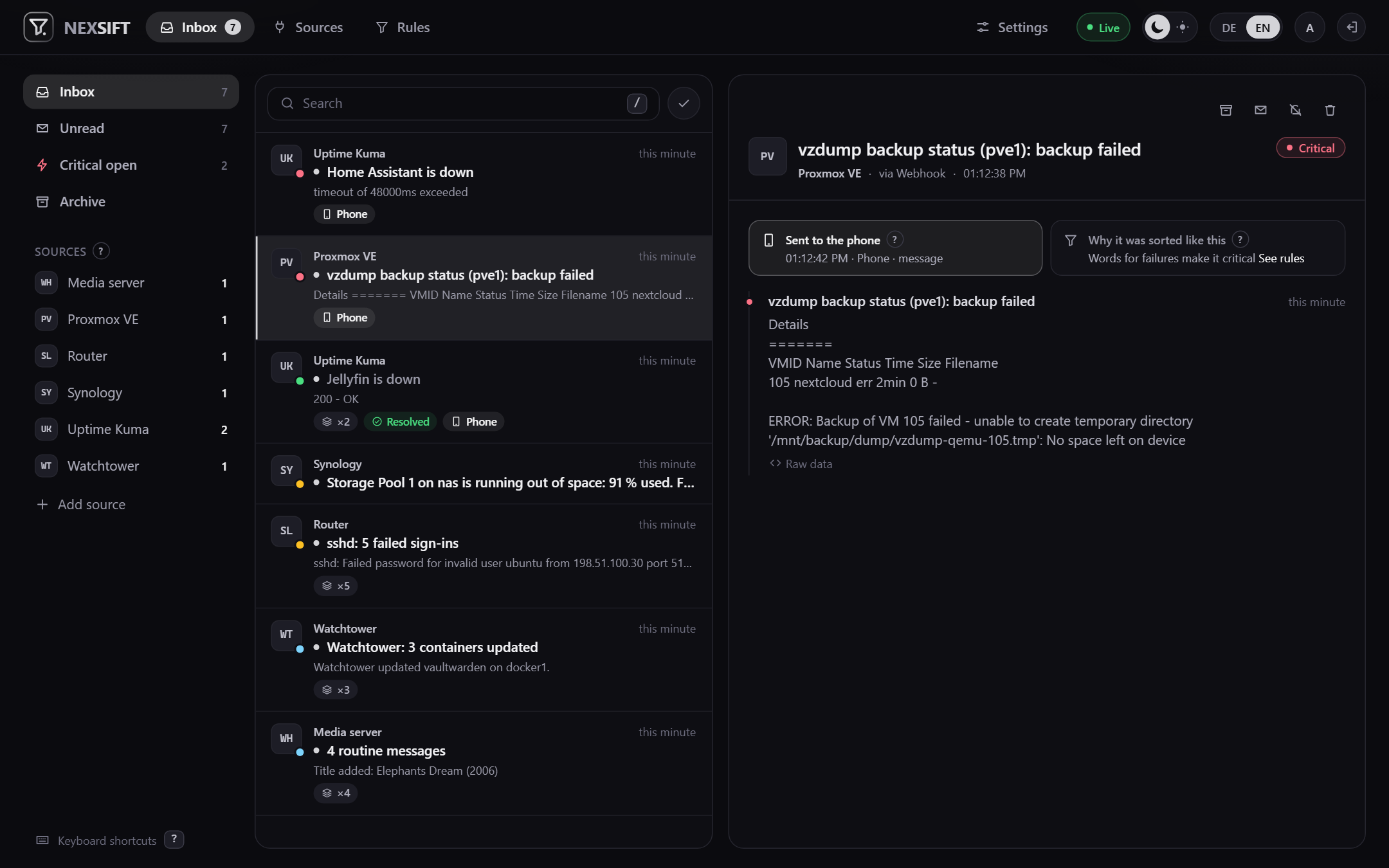
The inbox. Problems on top, each with where it came from, why it is critical and whether it reached the phone.
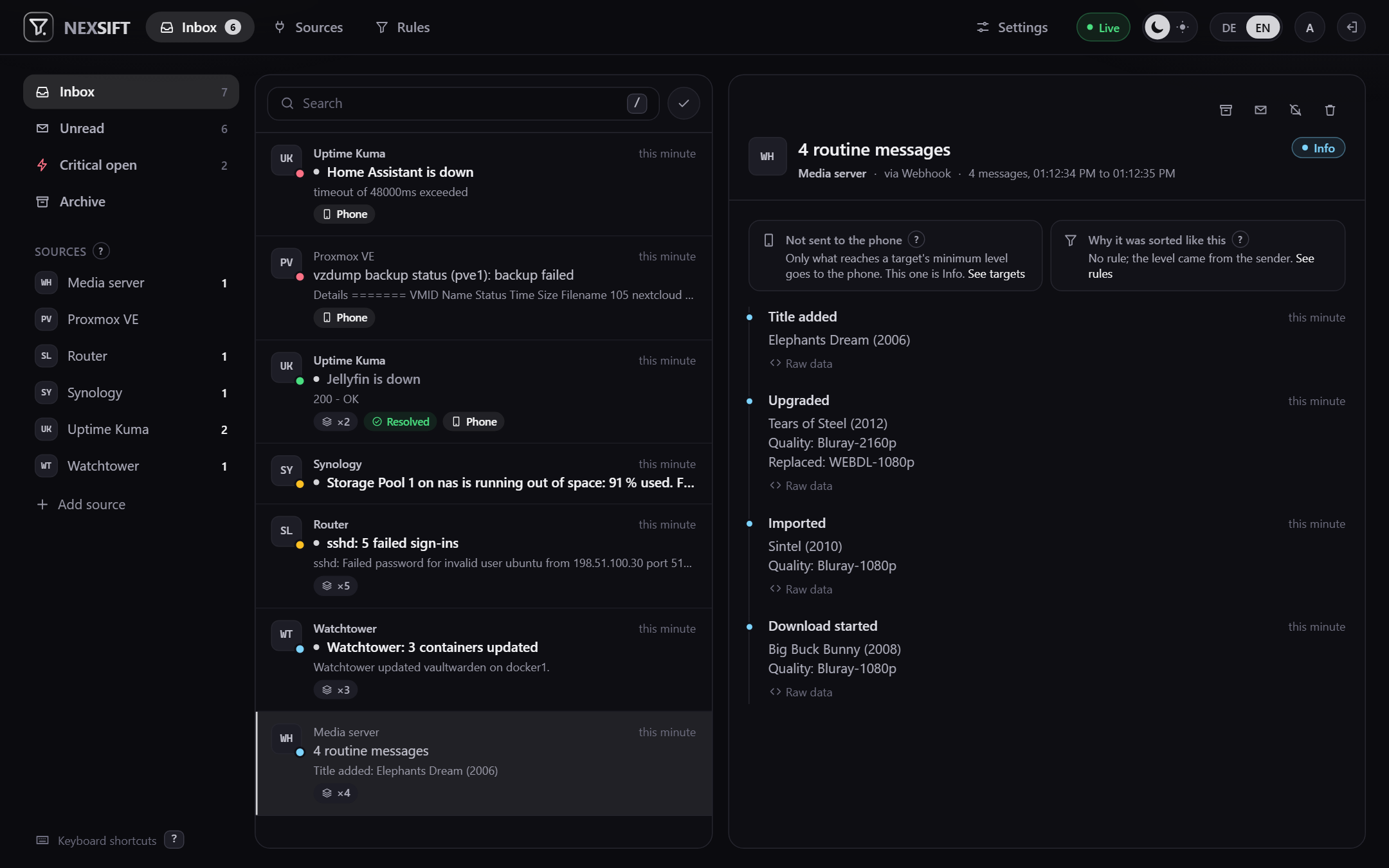
Routine from one source in one line, whatever the titles. Nothing of it rang the phone.
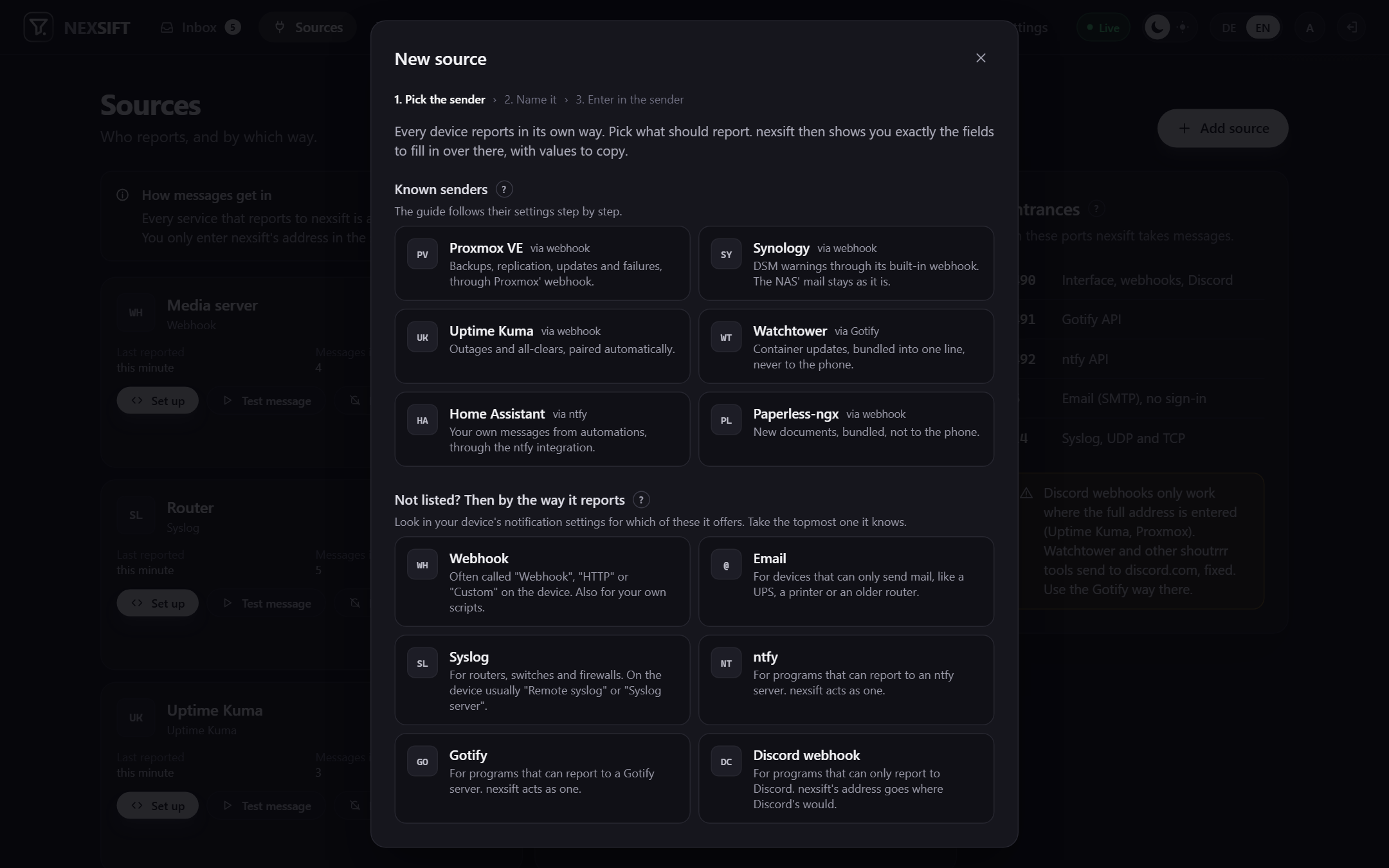
Adding a source: pick the sender, and nexsift shows exactly what to enter there, with values to copy.
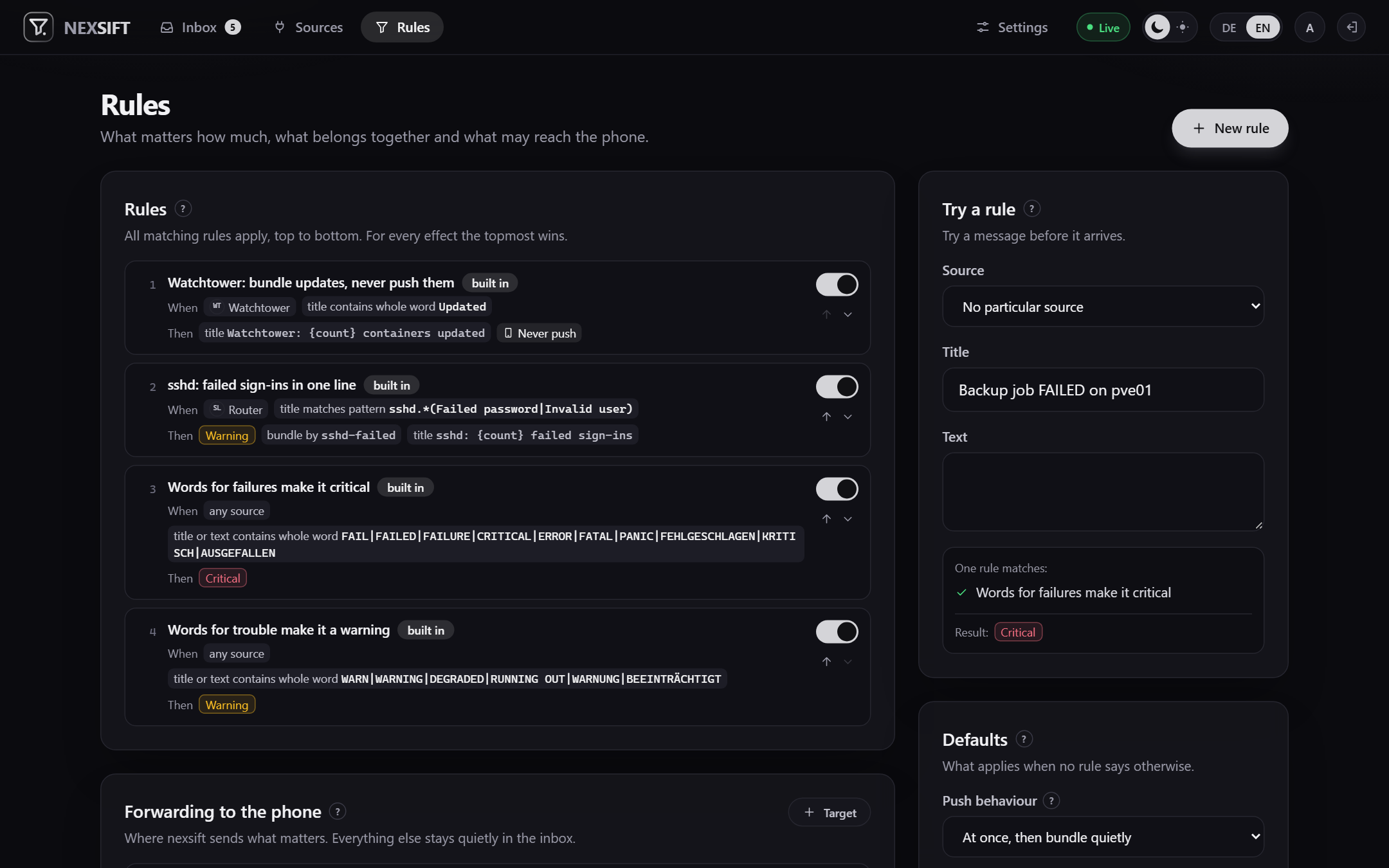
Rules decide level, bundling and push. Try a message against them before it arrives.
What it does
- Many ways in, one inbox. Each way is its own port, so senders keep the addresses they expect:
- a webhook for JSON or form posts;
title,messageandprioritywork, and so do the field names most senders already use (text,body,severity,level,status, …) - a Gotify API (
POST /message), for Watchtower and everything else built on shoutrrr - an ntfy API (
POST /<topic>), including the subscription Home Assistant's ntfy integration opens - Discord webhook addresses, for senders that only know Discord
- SMTP without sign-in, for a UPS, a printer or an old router that can only send mail
- syslog over UDP and TCP (RFC 3164 and 5424)
- a webhook for JSON or form posts;
- Senders it knows by name, with a step by step setup that follows their own settings page: Proxmox VE, Synology DSM, Uptime Kuma (webhook or Discord), Watchtower, Home Assistant and Paperless-ngx. For these nexsift pairs outage and all-clear, names the updated containers and groups backups per host. Anything else comes in through whichever way it speaks.
- Unknown senders knocking on the mail, syslog or ntfy door are listed with what they sent, and become a source with one click.
- Three levels: info, warning, critical. From what the sender says, from words in the message (FAILED, ERROR, DEGRADED, … in English and German, editable), or from your own rules.
- Bundling without knowing the sender. All info messages of a source within the bundle window share one line. Warnings and critical messages get one line per subject; an open critical problem stays one line until it is resolved.
- All-clears close problems instead of opening new lines: Uptime Kuma's "up", a successful Proxmox backup after a failed one, or anything a rule says.
- Push to the phone through ntfy, Gotify, Telegram, Apprise or a webhook, each with a minimum level (critical by default) and quiet hours.
- Or straight to the device, no extra app (Web Push): open nexsift over https, add it to the home screen, tap "Sign this device up and save". Works with Chrome, Edge and Firefox, and on the iPhone from the home screen app (iOS 16.4 or later). Every device signs itself up and is a target of its own; any device can sign any device off. Messages are encrypted for the device; they travel through the browser maker's push service, so this way out is only used once you sign a device up, and can be paused for all of them. The first critical message of a subject goes out at once; more of the same are counted and summed up once at the end of the window. The all-clear follows quietly.
- Storm guard: when many things fail at once, such as a power cut, the phone gets one summary instead of twenty pushes. A source that floods (more than 30 messages a minute by default) is counted, not stored.
- Rules with conditions on title and text (whole word, contains, regular expression) and effects: level, bundling key, bundle title, all-clear, push behaviour, or drop. All matching rules apply, top to bottom.
- A live inbox with search, unread, archive and keyboard shortcuts (
?shows them). - One operator account with a password, optionally OpenID Connect; for authentik there is a one-button setup. The account at the provider is linked once, signed in, under Settings, Sign-in; from then on exactly that one gets in, and the password can be switched off.
- Backup and restore: a copy of the database every night (or weekly, monthly, off), one before every update that changes the database, and one whenever you press the button. Download it as an AES-256 ZIP that 7-Zip opens without nexsift; it carries the key, so tokens and credentials come back with it. Restoring shows first what the archive holds and makes a copy of the current state as the way back.
- A log you read in the interface: newest lines with a filter by level, search, download and clear. Four levels, switchable at runtime; the two talkative ones switch themselves off. Every error message names a request id that finds its lines. Tokens, topics, target credentials, Web Push keys and passwords never go in, on no level.
- Read-only API keys for dashboards such as nexdeck, behind a switch that is off out of the box:
GET /api/v1/status(unread, open critical, messages today, …) andGET /api/v1/threads(newest lines, titles only), withAuthorization: Bearer nxs_…. - What's new after every update, once, with where to find each change; all of them on the About page.
- Housekeeping: archived lines go after 30 days, all others after 90, what senders sent verbatim after 7. All three are settings.
- German and English. Another language can be uploaded as one JSON file under Settings; for now it is kept in the browser that uploaded it.
Start
services:
  nexsift:
    image: ghcr.io/derkezorm/nexsift:latest
    container_name: nexsift
    restart: unless-stopped
    ports:
      - "8490:8000"      # interface, webhooks, Discord-style webhooks
      - "8491:8001"      # Gotify API
      - "8492:8002"      # ntfy API
      - "25:2525"        # SMTP, no sign-in
      - "514:5514/udp"   # syslog
      - "514:5514/tcp"
    volumes:
      - ./data:/data
    environment:
      PUID: 1000
      PGID: 1000
      TZ: Europe/Berlin
      NEXSIFT_PUBLIC_PORTS: "web=8490,gotify=8491,ntfy=8492,smtp=25,syslog=514"
docker compose up -d
Open http://<your-host>:8490 and create the operator account (a password of at least 12 characters). Then add
the first source; the dialog shows what to enter in the sender. The docker-compose.yml in
this repository explains every line.
Remove a port line to close that door. If a host port is taken, use another one on the left and say so in
NEXSIFT_PUBLIC_PORTS, so the setup hints show the right numbers.
Put the interface (port 8490) behind a reverse proxy with TLS if you open it beyond your own network. The other doors are meant for the devices in your network.
On a Synology
- Find your user's numbers with
idover SSH and put them intoPUIDandPGID. The first administrator is often 1026, later users are not. - DSM puts an access list on folders created in a shared folder, and it only lets the administrators group write.
nexsift then stops with "the data directory is not writable". Remove the list for the data folder only:
sudo synoacltool -del /volume1/docker/nexsift/data, thensudo chown -R <uid>:<gid>on the same folder. - Port 514 is taken when the Log Center receives logs, port 25 when MailPlus runs. Map another port and say so in
NEXSIFT_PUBLIC_PORTS.
Behind a reverse proxy
Set two addresses under Settings: the public address you type in the browser (https://nexsift.example.com),
and the address for senders at home (192.168.1.10). Syslog, email and the Gotify and ntfy doors do not go
through a proxy, so the setup hints have to send the devices to nexsift directly.
Where things are stored
Everything lives in /data. Mount it from a local disk, never from an SMB or NFS share; SQLite's locking does not
hold up over network filesystems.
| Path | What |
|---|---|
nexsift.db |
The SQLite database: sources, rules, targets, messages, settings |
secret.key |
Protects the stored secrets: source tokens, push target credentials, the OIDC client secret, the Web Push key pair |
backups/ |
Copies of the database with a small .json next to each (version, kind, note, counts) |
backups/restore-pending/ |
Only for a moment: a checked archive waiting for the next start |
logs/nexsift.log |
The log; rolls over at 5 MB, three older files, gone after 14 days |
The copies in backups/ lie on the same disk as the database. A real backup is the archive you download under
Settings, Backup, kept somewhere else; it holds nexsift.db and secret.key. Without its password nobody opens it.
A restore happens at the next start: nexsift ends itself after the upload and comes back through
restart: unless-stopped. It also ends with exit code 3, so restart: on-failure brings it back too. All browsers
are signed out afterwards.
Forgot the password? In the container: python -m app.reset_password.
Environment
| Variable | Default | Meaning |
|---|---|---|
NEXSIFT_DATA_DIR |
/data |
Data directory |
NEXSIFT_SECRET_KEY |
created on first start | Protects the stored secrets; when set, it wins over secret.key |
NEXSIFT_PUBLIC_URL |
from the request | The address people and senders use to reach nexsift; for the setup hints and the OIDC redirect. The setting under Settings wins when set |
NEXSIFT_PUBLIC_PORTS |
the inner ports | The ports as seen from outside, for the setup hints: web=8490,gotify=8491,ntfy=8492,smtp=25,syslog=514 |
NEXSIFT_TRUSTED_PROXIES |
none | Addresses or networks of reverse proxies whose X-Forwarded-For is believed, comma separated |
NEXSIFT_SESSION_DAYS |
30 |
A browser session ends after this many days |
NEXSIFT_COOKIE_SECURE |
auto |
on, off or auto (from the request or X-Forwarded-Proto) |
NEXSIFT_LOG_LEVEL |
empty | Usually left out: the level is set under Settings, Log. When set (quiet, normal, detailed, trace, or WARNING, INFO, DEBUG) it wins and the interface cannot change it; the way out when nexsift does not even start |
NEXSIFT_API_DOCS |
false |
Serves /api/docs and /api/openapi.json |
NEXSIFT_GOTIFY_PORT, NEXSIFT_NTFY_PORT, NEXSIFT_SMTP_PORT, NEXSIFT_SYSLOG_PORT |
8001, 8002, 2525, 5514 |
Ports inside the container; 0 turns that door off |
PUID, PGID |
1000 |
Owner of the files in the data directory |
Security in short
- Passwords are hashed with Argon2id. Ten failed sign-ins in a row lock the account for fifteen minutes.
- Through OpenID Connect only the identity linked while signed in gets in; a matching email address is not enough.
- Every source has its own token or topic, long enough not to be guessed. Tokens are stored as hashes for the check and encrypted for showing the setup again. An unknown token or topic is refused, never created.
- Every changing request of the interface needs the header
X-Requested-By: nexsift. - Responses carry a Content Security Policy,
X-Frame-Options: DENYand friends. - Links in messages are only made clickable for
httpandhttps. - API keys only read, only through
/api/v1, and only while the switch under Settings, API keys is on. Only their hash is stored. A signed-in browser does not get into/api/v1. - The log masks tokens in addresses before a line is written; a test sends tokens through every door at the most talkative level and searches the file for them.
Development
cd backend && python -m venv .venv && .venv/Scripts/pip install -r requirements-dev.txt
NEXSIFT_WEB_PORT=8490 .venv/Scripts/python -m app.serve
cd frontend && npm ci && npm run dev
The frontend on port 5480 proxies /api to http://127.0.0.1:8490 (another address with NEXSIFT_API).
Tests: pytest in backend, npm test in frontend.
License
AGPL-3.0.
Install Nexsift on Unraid in a few clicks.
Find Nexsift in Community Apps on your Unraid server, review the template, and click Install. Unraid handles the Docker app or plugin setup from the published template.
Categories
Related apps
Explore more like this
Explore allDetails
ghcr.io/derkezorm/nexsiftRuntime arguments
- Web UI
http://[IP]:[PORT:8000]/- Network
bridge- Shell
sh- Privileged
- false
Template configuration
Port you reach nexsift at. Also takes nexsift's own webhooks and Discord-style webhooks. Container port: 8000
- Target
- 8000
- Default
- 8490
- Value
- 8490
Answers like a Gotify server (POST /message), for Watchtower and everything else built on shoutrrr. Remove this port to close the door. Container port: 8001
- Target
- 8001
- Default
- 8491
- Value
- 8491
Answers like an ntfy server (POST /topic), including the subscription Home Assistant's ntfy integration opens. Remove this port to close the door. Container port: 8002
- Target
- 8002
- Default
- 8492
- Value
- 8492
Plain SMTP without sign-in, for a UPS, a printer or an old router that can only send mail. Map 25 here if a device cannot change its mail port. Remove this port to close the door. Container port: 2525
- Target
- 2525
- Default
- 2525
- Value
- 2525
Syslog over UDP (RFC 3164 and 5424). Map 514 here if a device cannot change its syslog port and Unraid's own syslog server is off. Use the same number as the TCP port below. Container port: 5514
- Target
- 5514
- Default
- 5514
- Value
- 5514
Syslog over TCP. Use the same number as the UDP port above. Container port: 5514
- Target
- 5514
- Default
- 5514
- Value
- 5514
Holds the SQLite database with sources, rules, targets and messages, the key secret.key, backups and logs. Keep it on a local disk, not on a network share.
- Target
- /data
- Default
- /mnt/user/appdata/nexsift
- Value
- /mnt/user/appdata/nexsift
User id that should own the files in /data. 99 is the Unraid default.
- Default
- 99
- Value
- 99
Group id that should own the files in /data. 100 is the Unraid default.
- Default
- 100
- Value
- 100
The clock the quiet hours of push targets go by, for example Europe/Berlin. Leave blank for UTC.
- Target
- TZ
The host ports above, for the setup hints on the sources page. Keep it in line whenever you change a port, or the hints send devices to the wrong number. Nothing else depends on it.
- Target
- NEXSIFT_PUBLIC_PORTS
- Default
- web=8490,gotify=8491,ntfy=8492,smtp=2525,syslog=5514
- Value
- web=8490,gotify=8491,ntfy=8492,smtp=2525,syslog=5514
The address people and senders use to reach nexsift, for example https://nexsift.example.com when it sits behind a reverse proxy. Used for the setup hints and the return address of OpenID Connect. Leave blank to take the address of the request; the setting under Settings wins when set.
- Target
- NEXSIFT_PUBLIC_URL
Addresses or networks of reverse proxies whose X-Forwarded-For is believed, comma separated, for example 172.17.0.0/16. Leave blank when nexsift is not behind a proxy.
- Target
- NEXSIFT_TRUSTED_PROXIES
Protects the stored secrets: source tokens, push target credentials, the OpenID Connect client secret and the Web Push keys. Leave blank: nexsift creates one on first start and keeps it in /data/secret.key, and the backup archive carries it. When set, it wins over secret.key.
- Target
- NEXSIFT_SECRET_KEY
auto marks the session cookie Secure when the request arrived over https, also behind a proxy that sends X-Forwarded-Proto. Use on only if a proxy terminates TLS and forwards plain http without that header, and never if nexsift should also be reachable over http, or nobody can sign in. off never marks it.
- Target
- NEXSIFT_COOKIE_SECURE
- Default
- auto
- Value
- auto