

nexpulse
Docker app from DerKezorm's Repository
Overview
Readme
View on GitHubnexpulse
A speed test tracker for your homelab. Measures on a schedule, shows every test live on a gauge, keeps the history and tells you when your line is slower than what you pay for.
Status: early. A small side project, part of the nex apps (Nexview and friends).
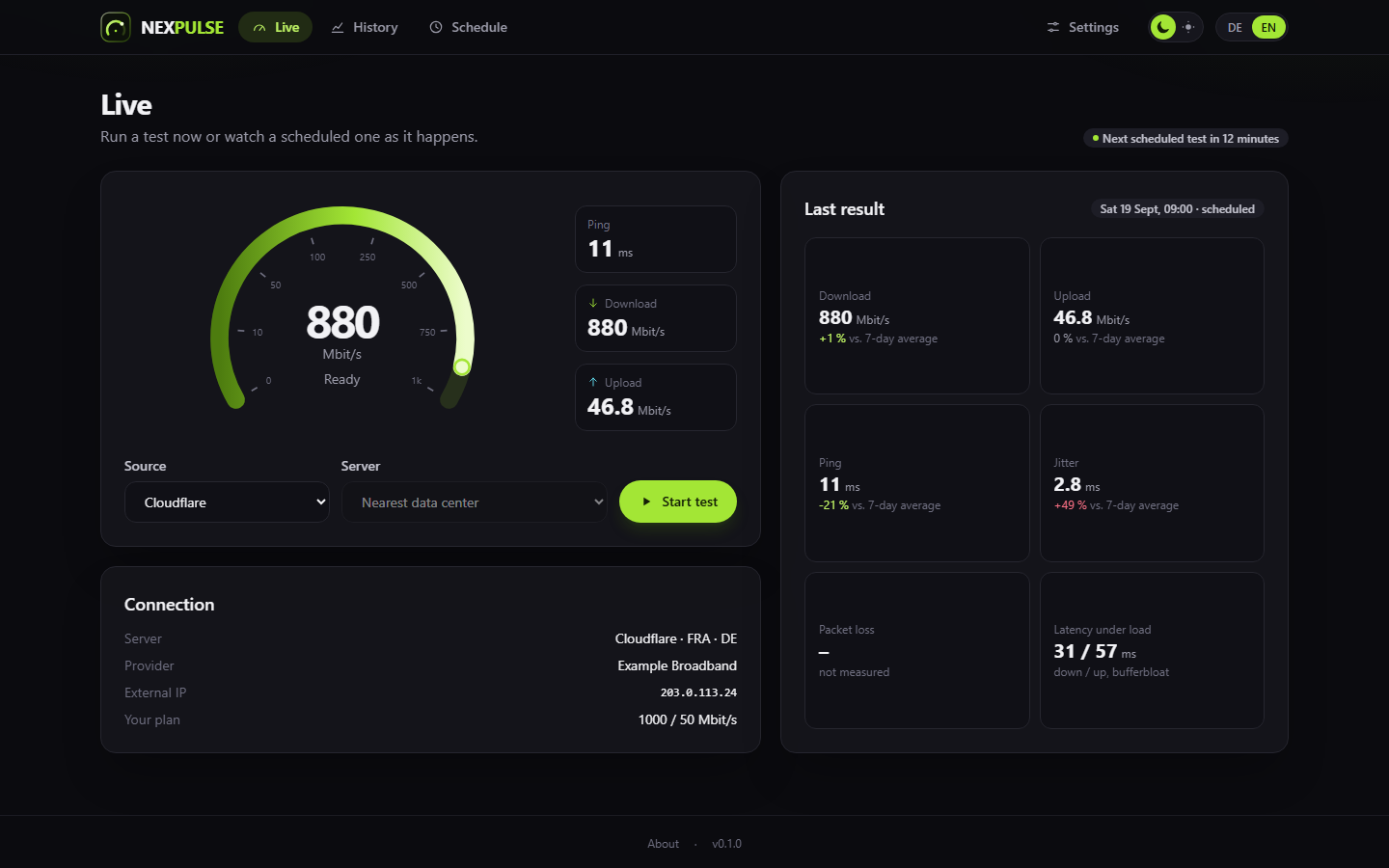
The screenshots show a throwaway instance with made-up data.
What it does
- Live view with a gauge: ping, download and upload as they happen, whether you started the test or a schedule did.
- Four sources: Cloudflare (works right away), LibreSpeed (public servers or your own), iperf3 against a server of your own, and, if you activate it yourself, Ookla. See below.
- Everything measurable: download, upload, ping, jitter, lowest and highest ping, latency under load (bufferbloat), and packet loss where the source measures it.
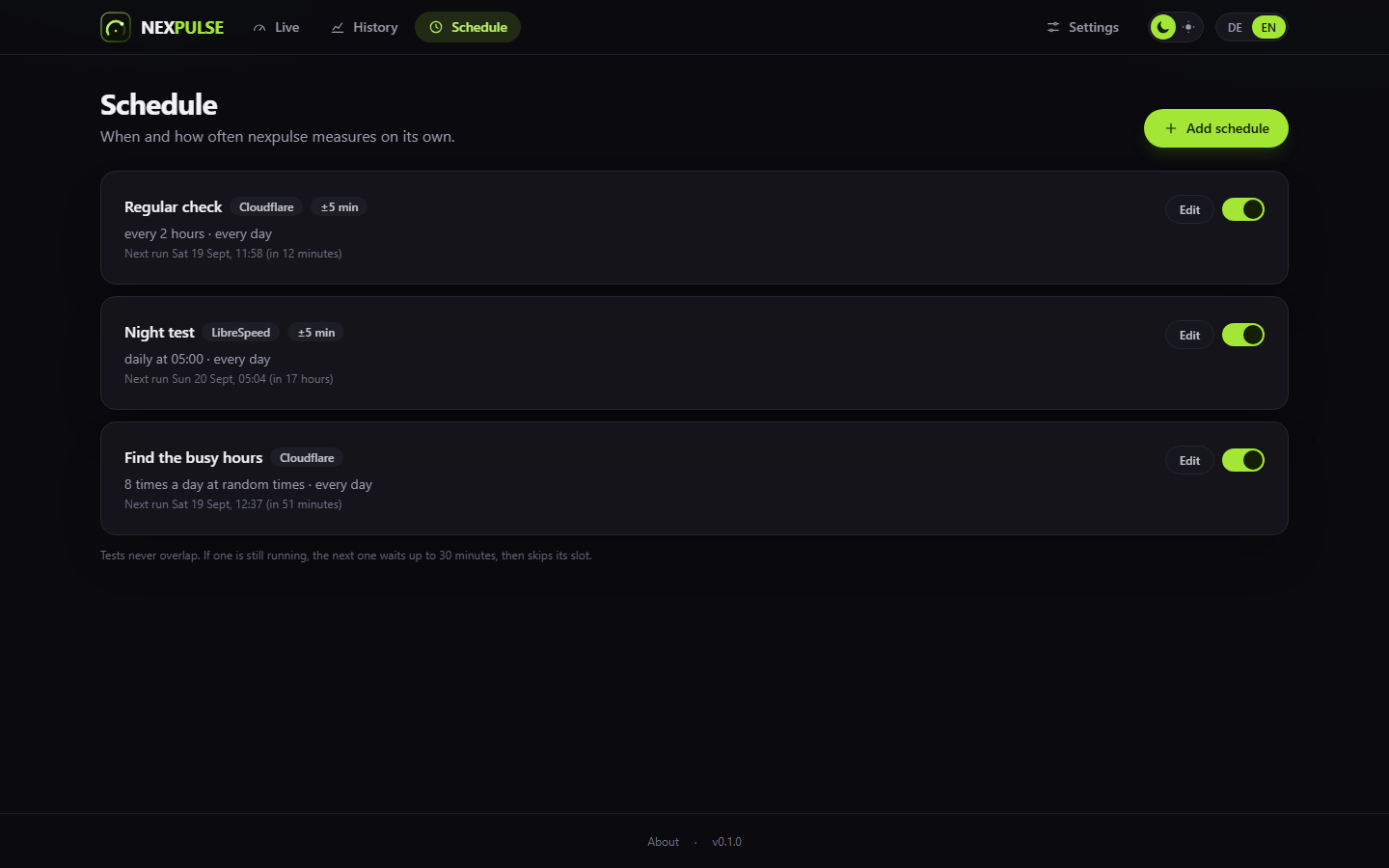
- Schedules: every n minutes, once a day, a cron expression, or n times a
day at random times: the day is split into n equal parts with one test at a
random minute in each, drawn anew every day, so over a few weeks every hour is
covered and busy times show up. All of them can be limited to weekdays and a
time window. Tests never overlap. A schedule can take one server, your
favorites in turn, or, for your own LibreSpeed and iperf3 servers, every
server with certain tags in turn (for example all with
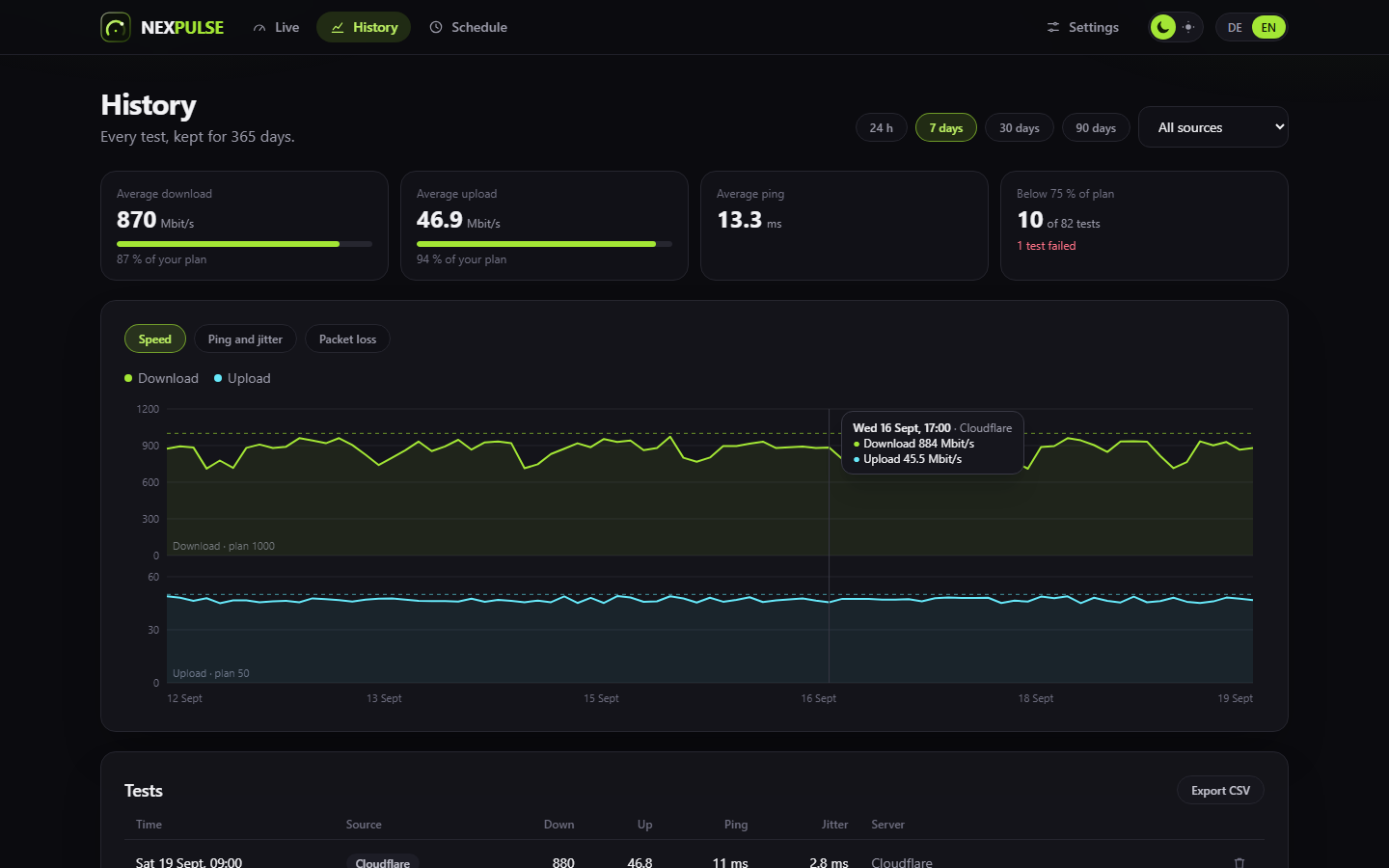
JP, or all withofficeandPro). For Ookla you can enter any server ID, also one far away. - History with charts, averages and a CSV export.
- Your plan: enter what your provider promises, and nexpulse marks tests below a threshold of it.
- Alerts via ntfy, Gotify, Telegram or a webhook: slow test, high ping, failed test. A schedule can also report every one of its results.
- API for dashboards like nexdeck or Home Assistant, with keys that can only read or also start tests.
- No accounts. Optionally one password for the interface. The API always needs a key.
- German, English and Chinese (Simplified and Traditional), dark and light.
Sources
| Source | Server choice | Packet loss | Notes |
|---|---|---|---|
| Cloudflare | automatic (nearest data center) | no | The same endpoints as speed.cloudflare.com. Cloudflare refuses tests that come too often; one an hour is plenty. |
| LibreSpeed | automatic, a public server or your own | no | Automatic pings all servers, tries the nearest ones briefly and takes the fastest. |
| Ookla | automatic or any nearby server | yes | Not included. See below. |
| iperf3 | your own servers only | no | For a VPS or a second site: what the line between you and that machine really does. Directions, connections and IP version per server. See below. |
About iperf3
iperf3 measures against a machine you run yourself, so there is no server list:
start iperf3 -s on the target, then add its address under Settings > Sources.
By default nexpulse measures one direction after the other, which takes about
twenty seconds, and reports download, upload, ping and latency under load.
Packet loss stays empty; over TCP there is none to report.
Every server carries its own settings, and you can change them later: which directions to measure (both, download only, upload only), how many parallel connections (1 to 32), and whether to force IPv4 or IPv6.
An iperf3 server lets anyone who knows its address and port run a test against it, and use up its bandwidth. Open the port to your own network only, or to the address nexpulse comes from.
The container ships iperf3 (BSD licensed, by ESnet). If you run nexpulse some
other way, install the iperf3 package; without it the source stays off.
About Ookla
nexpulse does not ship any Ookla software. If you activate Ookla in the settings, nexpulse downloads the official Speedtest CLI from Ookla into your data folder.
Ookla's license does not cover this use. It allows the CLI only for personal, non-commercial use on a single personal computer, and forbids running it on a device that other devices can reach over the network, or on routers, modems or other devices that are not personal computers. A container in a homelab falls under that. nexpulse says so before you activate it; if you do, it is your decision and your risk.
Install
services:
  nexpulse:
    image: ghcr.io/derkezorm/nexpulse:latest
    container_name: nexpulse
    restart: unless-stopped
    ports:
      - "8440:8000"
    volumes:
      - ./data:/data
    environment:
      PUID: 1000
      PGID: 1000
      TZ: Europe/Berlin
Then open http://<your-host>:8440. The full example with every option is in
docker-compose.yml.
Behind a reverse proxy that ends TLS, name it in NEXPULSE_TRUSTED_PROXIES
(addresses or networks, comma separated). nexpulse then takes the scheme from its
X-Forwarded-Proto (the rightmost value of the last header line) and the sender
from its X-Forwarded-For, so the session cookie is marked Secure and the
sign-in brake counts each visitor on their own. From anyone else these headers
count for nothing. Empty by default: nexpulse believes no one.
Forgot the password? This turns it off:
docker exec nexpulse python -m app.cli remove-password
API
Create a key under Settings > Access and API, then send it as X-Api-Key
or as Authorization: Bearer.
| Method | Path | Access |
|---|---|---|
| GET | /api/v1/me |
read (any key: name, access, whether it may start tests) |
| GET | /api/v1/status |
read |
| GET | /api/v1/latest |
read |
| GET | /api/v1/results?from=…&to=…&source=… |
read |
| GET | /api/v1/stats?range=24h|7d|30d|90d|all |
read |
| POST | /api/v1/tests with {"source": "cloudflare"} (or librespeed, ookla, iperf3) |
run |
| GET | /api/v1/tests/{id} |
read |
The full reference is at /api/docs on your instance.
Development
| Part | Command |
|---|---|
| Backend | cd backend && python -m venv .venv && .venv/Scripts/pip install -r requirements-dev.txt, then python -m uvicorn app.main:app --port 8440 |
| Frontend | npm --prefix frontend install, then npm --prefix frontend run dev (port 5440, proxies /api to 8440) |
| Checks | python -m ruff check app tests, python -m pytest -q in backend; npm run lint, npm test, npm run build in frontend |
License
GNU AGPL v3.0. Cloudflare, LibreSpeed, Ookla, Speedtest and iperf are names of their owners; nexpulse is not affiliated with them.
Categories
Download Statistics
Related apps
Explore more like this
Explore allDetails
ghcr.io/derkezorm/nexpulseRuntime arguments
- Web UI
http://[IP]:[PORT:8000]/- Network
bridge- Shell
sh- Privileged
- false
Template configuration
Port you reach nexpulse at. Container port: 8000
- Target
- 8000
- Default
- 8440
- Value
- 8440
Holds the SQLite database with all results and the key that signs sessions. Keep it on a local disk, not on a network share.
- Target
- /data
- Default
- /mnt/user/appdata/nexpulse
- Value
- /mnt/user/appdata/nexpulse
User id that should own the files in /data. 99 is the Unraid default.
- Default
- 99
- Value
- 99
Group id that should own the files in /data. 100 is the Unraid default.
- Default
- 100
- Value
- 100
Schedules run at the wall clock time of this zone, for example Europe/Berlin. Leave blank to pick the zone later in the settings; until then nexpulse uses UTC.
- Target
- TZ
Leave this empty unless you switched Network Type to Host. In bridge mode the WebUI Port above already does the job and setting this will break it, because the mapping still points at 8000. On host networking the port inside the container is the port on your server, so use this to move nexpulse off 8000 if something else is already there.
- Target
- NEXPULSE_PORT
Signs sessions and encrypts stored notification tokens. Leave blank: nexpulse creates one on first start and keeps it in /data/secret.key.
- Target
- NEXPULSE_SECRET_KEY
Only matters with a password. auto marks the session cookie Secure when the request arrived over https. Use on only if a proxy terminates TLS and forwards plain http, and never if nexpulse should also be reachable over http, or nobody can sign in. off never marks it.
- Target
- NEXPULSE_COOKIE_SECURE
- Default
- auto
- Value
- auto
Addresses or networks of your reverse proxies, comma separated, for example 172.16.0.0/12. Only their X-Forwarded-For and X-Forwarded-Proto (the rightmost value) are believed, so only they can tell nexpulse that a request came in over https; without it every sign-in seems to come from the proxy and the brake against password guessing cannot tell people apart. Requires nexpulse 0.4.3.
- Target
- NEXPULSE_TRUSTED_PROXIES