
All apps · 0 apps

nexpaper
Docker app from DerKezorm's Repository
Overview
Readme
View on GitHubnexpaper
Paperless-ngx for the home: the simple version. A light filing cabinet for the papers of a household or a small firm, on your own server. Upload, find, done. One container, no Redis, no Celery, no Postgres, and an import that takes over what you already have in Paperless-ngx.
- One inbox for everything. Photos from the phone, files from the browser, a scanner's folder, a mailbox, an import from Paperless: all of it waits in the inbox with the fields filled in, and one click files it.
- Vaults. Everybody has a vault of their own, and the operator makes shared ones ("Household", "Business"). Rights are read, edit or manage; single documents can also be shared with a person or, for somebody without an account, as a link that ends.
- Text recognition and search. Scans become searchable PDFs; the original stays exactly as it came, with its
checksum. The search understands parts of words and filters (
kind:invoice amount:>100). - Tools for pages. Turn, delete and order pages, join documents, split a stack at blank separator sheets. Every change is a new version; nothing is overwritten.
- For small firms. E-invoices (ZUGFeRD, Factur-X, XRechnung) are read from their data, there is a history of who changed what, and an export for the tax adviser (a ZIP with the PDFs and a list). No claim of GoBD compliance.
- No Redis, no Celery, no Postgres. One container, SQLite, plain readable files on the disk.
- Best kept at home. nexpaper is meant for your own network; from on the way, reach it through a VPN. It still
comes with a second factor from the start, passkeys, sign-in through your own provider and a checklist in the
settings. Everything the web app does goes through an open API (
/api/v1) for your own tools.
nexpaper is one of the nex apps and looks like them: light paper and kraft by day, a dark desk by night.
1.0.0. Back up /data like any other data of yours (the documents are plain files in /data/dokumente) and read
what a backup holds and what it does not (below). nexpaper is an independent project and not affiliated with
Paperless-ngx; it only reads from a Paperless-ngx server when you import.
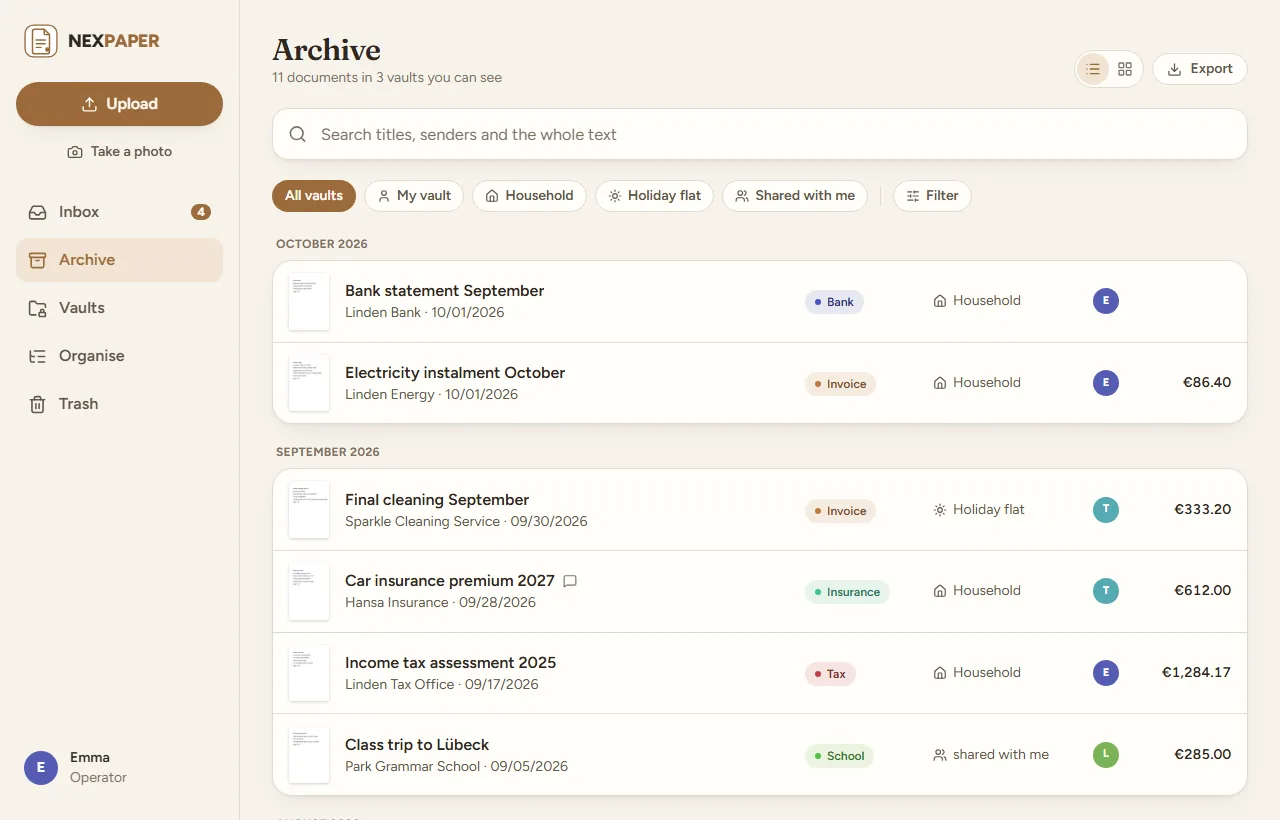
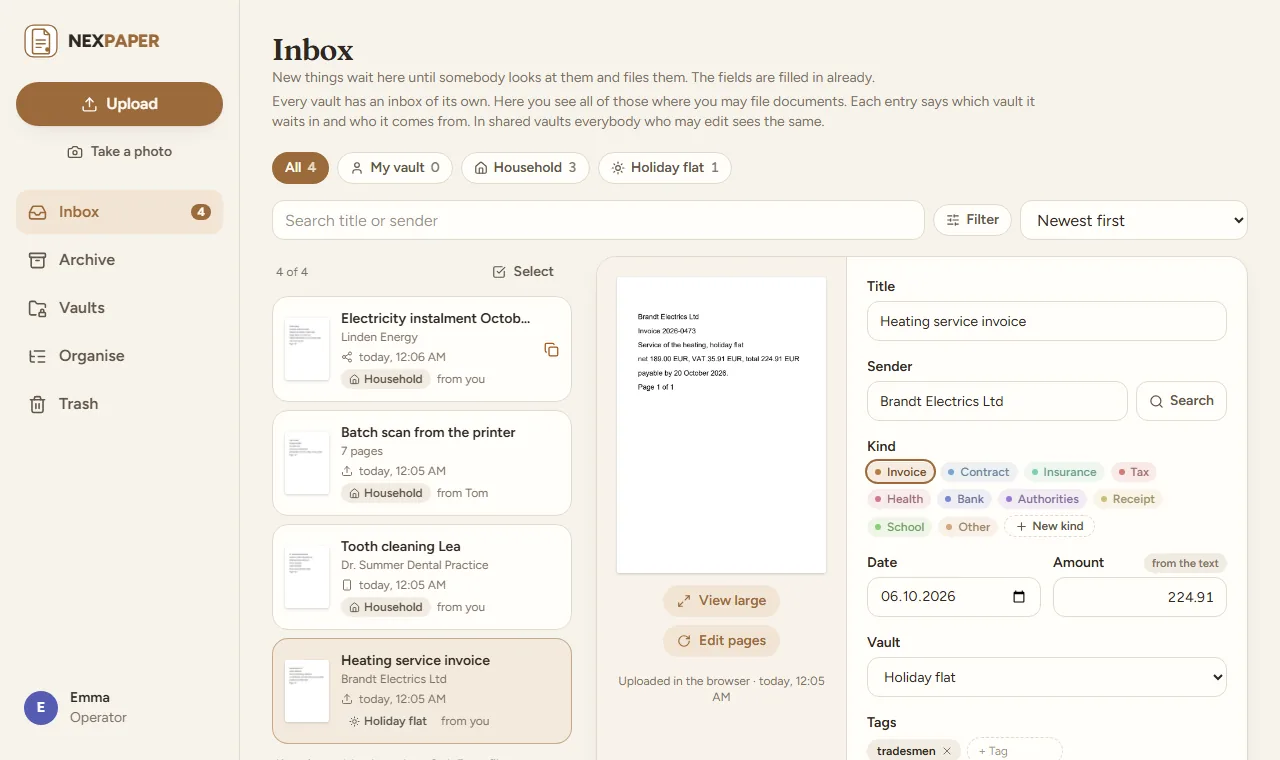 |
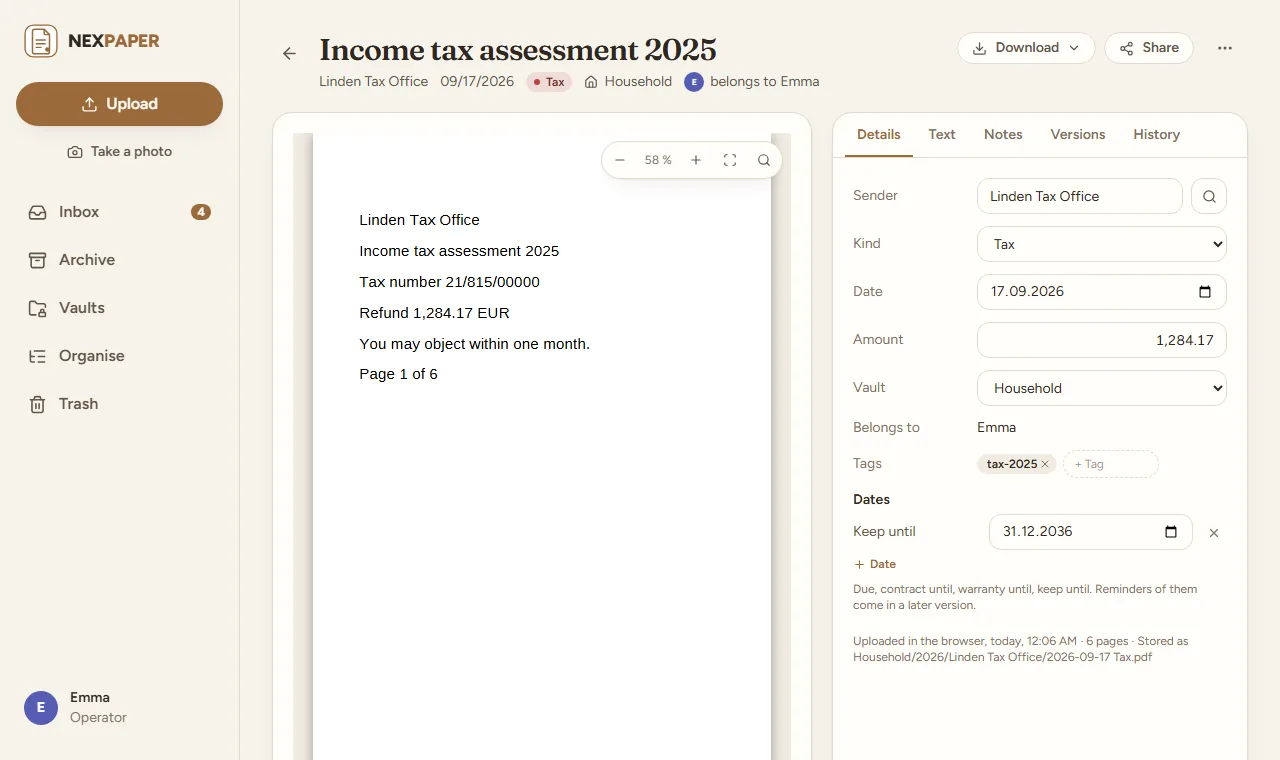 |
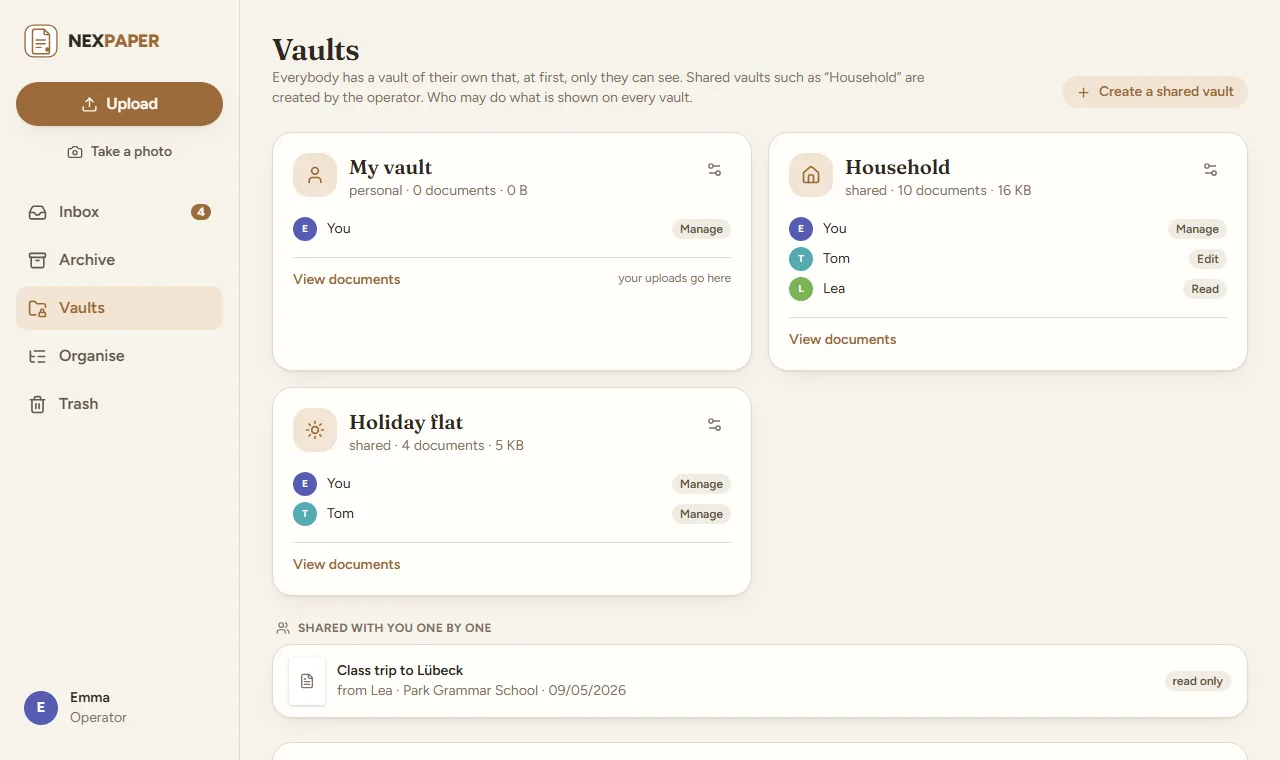 |
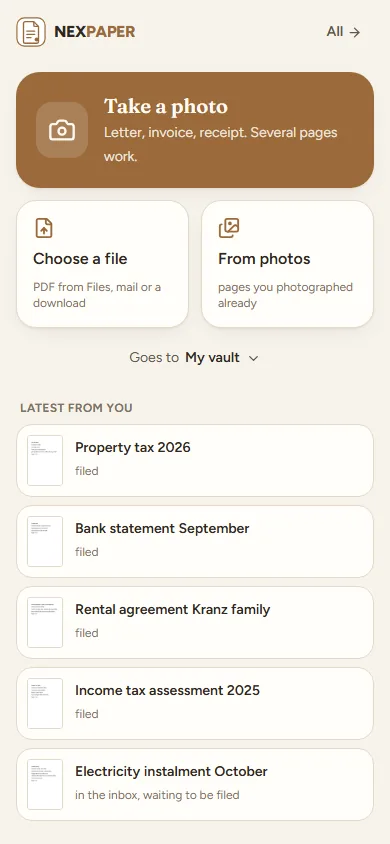 |
The pictures show a made-up household.
Start
services:
  nexpaper:
    image: ghcr.io/derkezorm/nexpaper:latest
    container_name: nexpaper
    restart: unless-stopped
    ports:
      - "127.0.0.1:8560:8000"
    security_opt:
      - no-new-privileges:true
    cap_drop:
      - ALL
    cap_add:
      - CHOWN
      - DAC_READ_SEARCH
      - SETUID
      - SETGID
    volumes:
      - ./data:/data
    environment:
      PUID: 1000
      PGID: 1000
      TZ: Europe/Berlin
docker compose up -d
The container may not gain rights later and keeps only what its start needs: setting the owner of /data (CHOWN,
DAC_READ_SEARCH) and dropping from root to the user nexpaper (SETUID, SETGID). nexpaper itself runs as that
user, with none.
Built from source instead: clone this repository, use docker-compose.yml as it is (it has build: .) and run
docker compose up -d --build. The file has every option explained.
Open http://127.0.0.1:8560 on that machine (the port listens only there; the comment in
docker-compose.yml says how to change that). The first account you create there is the operator.
It needs the setup code from the log, so that nobody who reaches a fresh instance first can take it:
docker logs nexpaper
shows the code, new at every start until nexpaper is set up. To choose it yourself, set NEXPAPER_SETUP_TOKEN. Right
after the password the account sets up its second factor; then the operator invites the others by link. Everything
personal is under "My account" for everybody; "Settings" is the operator's and holds the server.
Reaching nexpaper from outside
Your papers are best kept in your own network. To reach nexpaper on the way, a VPN into your home network (WireGuard, Tailscale, NetBird and the like) is the safer choice than opening a port. If you open it to the internet anyway, do it with care and at least this:
- Set it up first, from your own network, with the setup code from the log. Only then forward a port.
- https at a reverse proxy, and nexpaper reachable only through it: publish the port as
127.0.0.1:8560:8000when the proxy runs on the same host, or keep both on a Docker network without a published port. Send HSTS from the proxy. - Tell nexpaper about the proxy:
NEXPAPER_PUBLIC_URL(the address people use),NEXPAPER_TRUSTED_PROXIES(the proxy's address or network; without it every sign-in seems to come from the proxy and the brake against guessing cannot tell people apart) andNEXPAPER_COOKIE_SECURE: "on". - A second factor is required from the start: right after the password every account sets one up (a code from an app, or a passkey) and keeps the recovery codes. The operator may switch the requirement off; do not.
- Look at "Ready for the internet?" (Settings, Sign-in). It checks the points above for itself: https, the second factor, your own account with one, the brake, the server secrets, the cookies, the proxy and the backups.
- Backups somewhere else, as carefully as the data folder. A backup holds every account and the server's secrets
(
secret.key) but not the documents: those are plain files in/data/dokumenteand belong in the backup your server makes anyway. Try a restore with "Check" now and then. - Leave the switches closed that you do not need: API keys and the AI are off until the operator opens them. Pin a
version instead of
latest, update on purpose, back up before. - Nobody, the operator included, sets a password for somebody else. Whoever forgot theirs gets a link to set a new one: the operator sends it (Settings, Accounts), or, where a mail server and the public address are set, the person asks for it on the sign-in page. The link works once and for 24 hours. An operator without a mail server who forgot their own password makes one in the container (below).
- Passkeys work under the public https address, or on localhost.
Optionally keep the operator's settings at home: NEXPAPER_OPERATOR_NETWORKS: "192.168.0.0/16" refuses them from
anywhere else (behind a proxy only together with NEXPAPER_TRUSTED_PROXIES).
Sign-in with a provider
Besides the password, people can sign in through any provider that speaks OpenID Connect: authentik, Microsoft Entra ID, Keycloak, Authelia, Pocket ID. Settings, Sign-in has three cards: the sign-in itself (password sign-in, the public address, the second factor), the list of sign-in providers (each gets a button on the sign-in page, in the order of the list), and authentik in one step.
- authentik in one step: give the address of authentik and an API token that may create applications; nexpaper sets up provider and application there and enters them here. The token is used for that run only and never stored. Who would rather not hand out a token downloads the blueprint instead and enters client ID and secret by hand.
- By hand: "Add a provider" asks for the name on the button, a short name (part of the redirect address
https://paper.example.com/api/v1/oidc/<short name>/callback, fixed once made), the issuer, client ID and secret. For Microsoft Entra ID the issuer ishttps://login.microsoftonline.com/<tenant>/v2.0, orcommonororganizationsfor several tenants. - Who comes in: an identity is known by its provider and its subject only, never by its mail address. An account links itself on its own page (Security, with its password); new people come in by invitation, or, where the operator switches "New people get an account" on for a provider, as members. Everybody gets a vault of their own.
- Addresses from a provider are shown and can be taken, but they are never confirmed by that alone: a mail to the intake counts only for an address the person confirmed by the link nexpaper sends. An address 1.0.1 took from the provider as confirmed waits for that link once after the update (My account, Profile); it needs the mail server.
- The second factor: "The provider checks the second factor itself" is on for a new provider. Off, whoever has a second factor in nexpaper is asked for its code after the provider. "Require a second factor" is for signing in with a password: an account without a password, and whoever comes in through a provider whose entry has "The provider checks the second factor itself" on, is not made to set one up (a change from 1.0.1). Device tokens and API keys of an account with a password and no second factor of its own wait until it sets one up, also when it signs in through a provider that checks one.
- Password sign-in can go off once a provider is active; the operator can always sign in with the password.
Behind a reverse proxy the redirect address is the public address (set it in Settings, Sign-in, or the authentik
card offers the address the browser uses). For the authentik card and the Secure flag to see https, name the proxy in
NEXPAPER_TRUSTED_PROXIES: nexpaper then believes its X-Forwarded-For and its X-Forwarded-Proto (the last value the
proxy wrote), and nobody else's.
Coming from 1.0.1: the one provider of 1.0.1 becomes the entry oidc with every account linked as before, after a
backup, and keeps its redirect address /api/v1/oidc/callback, so nothing changes at the provider. Whether it checks
the second factor comes from 1.0.1's switch. Going back to 1.0.1 works for this version: 1.0.1 finds its settings as the
entry oidc stands while the entry is on and checks the second factor itself (its switch on), otherwise without a
client, so that 1.0.1 never lets anybody in with less than the entry asks. What 1.0.1 changes there is taken over at the
next start of the newer version.
Forgot your password, and no mail server
Whoever can run a command in the container holds the database and the secrets anyway, so a link made there gives nothing away. It is the same link the operator sends from Settings, Accounts: it works once and for 24 hours, a new one replaces the one before, and using it ends every session and lifts a lock after failed sign-ins. The second factor stays: sign in with the new password, then with the code from your app, a passkey or a recovery code. An account that signs in only through a provider gets a password this way and becomes an account with a password, as with the link the operator sends.
docker exec -it -u nexpaper nexpaper python -m app.reset_link <account>
-u nexpaper runs it as the user the server runs as (with the ids of PUID and PGID); as root it refuses, because a
file root makes in /data the server could not open any more. Where the compose file starts the container with a
user: of its own, give that instead. Without an account name it lists the accounts. It prints the whole link when
the public address is set (Settings, Sign-in, or NEXPAPER_PUBLIC_URL), otherwise the path /reset/... to open at the
address you use. An unknown or blocked account gets no link and a message, and the command ends with an error. The log
notes that a link was made this way, and for whom, never the link itself.
Where things are stored
Everything lives in /data:
| Where | What |
|---|---|
nexpaper.db |
The SQLite database: accounts, settings, the filing, the recognised text and the search index. |
secret.key |
The server's own secret (the secrets of the sign-in providers, the mail password, the AI key and the like). |
backups/, logs/, locales/ |
Backups, the log, extra languages as JSON files. |
dokumente/ |
The documents themselves, as readable files (below). Readable without nexpaper. |
cache/, uploads/, exports/ |
Pictures of pages (trimmed to a size you set), uploads in progress, ZIPs for the tax adviser. |
eingang/ |
The intake folder, when it is switched on (Settings, Inputs): one subfolder per person. |
The documents lie as <vault>/<year>/<sender>/<date> <kind>.<ending>, the original as it came, for example
Household/2026/City Utilities/2026-10-07 Invoice.pdf. Beside it lie the searchable copy (2026-10-07 Invoice (searchable).pdf, also the PDF made from a photo) and the older versions (2026-10-07 Invoice (version 1).pdf); two
documents with the same name get (2). The title is not part of the name (the export for the tax adviser names its
files by date and title). Where a part is missing, the folders and files on the disk have English names whatever the
language of the interface: undated for the year and the date, no sender, and Document for the kind. The interface
shows them translated; the names on the disk stay as they are.
Mount /data from a local disk, never from an SMB or NFS share: SQLite's locking does not work reliably over network
filesystems. There is no per-person encryption: it would stop search and make the files unreadable without nexpaper. A
personal vault means only that nexpaper shows it to nobody else; protecting the disk is the operator's business.
When the operator deletes an account, they decide where the documents of its personal vault go, and may give them to
themselves or to a vault they are in: the dialog says so, and every document's history notes the takeover and by whom.
Backup
A backup is one ZIP file with the database, the settings and secret.key, made while nexpaper runs (through SQLite's
backup function, never as a file copy). It holds no documents: they lie as plain files in /data/dokumente and belong
in the backup your server makes anyway (Hyper Backup, restic, snapshots). It holds no search index either: that is
the largest part of the database, and it is built anew from the recognised text after a restore (the search works while
that goes on, with more and more hits). Together with secret.key it opens the mail and AI credentials and the addresses
of open links, so keep backups protected.
Settings, Backups: automatic daily or weekly with a number to keep, "Back up now", upload, download, check and restore. The trial run ("Check", and again in the dialog before a restore) starts the database of the archive the way the server would, on a scratch copy, and says whether the archive is whole (a damaged one is told as damaged) and can be started, which version made it (one from a newer nexpaper is refused), how many documents it knows, which of their files are missing on the disk or have another checksum, which documents of today the restore would remove (their files stay in the folder), and which devices, keys and links it would bring back to life: a backup does not know what you withdrew after it was made. Download, delete and restore ask for the operator's password again. A restore keeps the state before it as a backup; if it cannot be put in place at the restart, the staged files are put aside, you are told, and the server goes on with the database it had. Moving to a new server: download a backup, upload it on the new one, check it, restore it, and copy the documents folder along.
Checking the files, and the storage card
Every file has a checksum. Once a week, and on a click (Settings, Backups, "Check files"), nexpaper reads them all in small portions with pauses and compares. A document whose file is missing or changed gets a warning sign in the archive, the inbox and on its page, a line in its history, and the operator a notice. The sign goes at the next check, or at once when the operator asks for that one document on its page, when a new version of it was read, when a version that could not be read is put away, or when the document comes back from the trash. The storage card beside it shows what the database (and of it the search index), the documents, the cache, the exports and the backups take, and how much room is left. It warns, here and in the log at the start, when the database lies on a network share.
Updating
With an image: docker compose pull && docker compose up -d. Built from source: pull the new code and run
docker compose up -d --build. nexpaper adds what the database lacks at the start and makes a backup first; nothing
needs doing by hand. The way back is under Settings, Backups.
Going back from 1.1.0 to 1.0.1: there, the sign-in through the provider works only if its entry had "The provider checks the second factor itself" on; otherwise only the password does. Coming up to 1.1.0 again brings everything back.
Environment
| Variable | Default | Meaning |
|---|---|---|
NEXPAPER_DATA_DIR |
/data |
Database, logs, backups, secrets and the languages |
NEXPAPER_LOCALES_DIR |
<data>/locales |
Extra languages, one JSON file each |
NEXPAPER_SECRET_KEY |
made on first start | Protects server-side secrets; when set, it wins over secret.key |
NEXPAPER_PUBLIC_URL |
from the request | The address people use, for invitation links and the redirect address of the sign-in providers. The setting in the interface wins |
NEXPAPER_TRUSTED_PROXIES |
none | Addresses or networks of reverse proxies whose X-Forwarded-For and X-Forwarded-Proto are believed, comma separated |
NEXPAPER_SETUP_TOKEN |
made at start | The code the first account needs |
NEXPAPER_OPERATOR_NETWORKS |
none | Networks the operator's settings may be changed from, comma separated |
NEXPAPER_SESSION_DAYS |
30 |
A session of "stay signed in on this device" ends after this many days without use |
NEXPAPER_COOKIE_SECURE |
auto |
on, off or auto (from the request, or X-Forwarded-Proto of a trusted proxy) |
NEXPAPER_COOKIE_SUFFIX |
none | Appended to the cookie names; keeps two instances on one host apart |
NEXPAPER_LOG_LEVEL |
stored setting | quiet, normal, detailed or trace; overrides the setting |
NEXPAPER_DECODE_SLOTS |
1 |
How many pictures are unpacked at the same moment (each takes some 150 MB while open) |
NEXPAPER_UPDATE_URL |
GitHub | Where the update check asks for the newest release |
NEXPAPER_ARGON2_TIME, NEXPAPER_ARGON2_MEMORY_KIB, NEXPAPER_ARGON2_PARALLELISM |
3, 65536, 2 |
Cost of the password hash; only the tests lower it |
NEXPAPER_FRONTEND_DIST |
/app/static |
Where the built interface lies (set by the image) |
NEXPAPER_DISABLE_BACKGROUND |
false |
Switches off the background jobs (the log, backups, tidying up, the queue, checking the files, the inputs); for tests. The update check is none of them: it asks only when somebody opens the about page and the last answer is older than a day |
NEXPAPER_PORT |
8000 |
The port inside the container; only for host networking |
PUID, PGID |
1000 |
Owner of the files in the data directory |
TZ |
The time zone of the container's log. People's own time zones come from their browsers |
AI
The AI is off until the operator chooses a service, for everybody (Settings, AI): none, a local model in your own
network (Ollama or anything that speaks /v1/chat/completions), a service on the internet that speaks the same, or one
that speaks the Messages API. Every person can switch it off for their account. It proposes title, sender, kind, date and
amount for a new document where nothing surer (an e-invoice, a rule, the same sender as last time, the text itself)
knew them; a proposal is only a proposal, and the inbox says where each field came from.
- A local service must lie in your own network and a service on the internet must be reached over https: an address that points elsewhere is refused, when it is saved and at every request. The API key is sealed and never shown again.
- What goes out is the text of the first two pages and the list of kinds the document can have, nothing else. Documents in personal vaults stay away from it unless the operator lets them in.
- The operator sets a limit of documents per day for the whole server (200 from the start, 0 for none), so that a large delivery does not send every document, one request each, to a service that is paid for by the request. When it is reached, the documents keep what the rules and the text gave them until the next day.
Filing
New documents wait in the inbox with proposals. Rules (a vault's own, made by its managers, and the operator's for the whole server) fill in a vault, a kind, a tag, a sender or a title when conditions hold; their words are compared as plain text, never as patterns. A rule of the operator's for the whole server does not reach into the personal vault of anybody else. Kinds come in two sorts: the ones that come with nexpaper and the operator keeps, and the ones a vault makes for itself (anybody who may edit it, with "+ New kind" at the end of the choice of kinds; a name that sounds like an existing one is shown first). A document that moves takes its kind along by name. E-invoices (ZUGFeRD, Factur-X, XRechnung) are read from their data, with limits on the size and the shape of the XML.
Everything that deletes or locks out asks first, and says whether it can be undone (a document in the trash stays 30 days and can be brought back; one deleted for good, a key, a link or a device that is locked out cannot).
Push
Notices arrive by Web Push, to every device a person signs up (My account, Devices and apps): of a new sign-in, of an export that is ready or failed or a finished import from Paperless, of a second factor the operator reset or an account the operator unlinked from a sign-in provider; operators also hear when the check of the files finds something wrong or a restore fails. It needs https (or localhost). On an iPhone it works only for the app added to the home screen (Share, Add to Home Screen) and only from iOS 16.4. The server makes its own keys; the operator can add a contact and further push services. A push never carries the content of a document.
On the phone
A phone opens on the quick upload (once per visit; a switch under My account, Upload): take a photo, choose a file, see what was uploaded last and what waits in the inbox, and choose the vault files go to. The camera finds the edges of the page by itself (OpenCV in the browser, served by nexpaper itself and loaded only on that page), takes the picture once the page holds still, lets the corners be pulled by hand, offers colour, greyscale and black and white, and makes one PDF of several pages. It needs https (or localhost), like every camera in a browser.
- Android: nexpaper added to the home screen stands in the share menu of every app. The shared files stay on the phone until the person taps "Upload".
- iPhone: Safari puts no web app into the share menu, so a shortcut steps in. iOS imports only shortcuts signed by Apple, so nexpaper cannot ship the file: My account explains how to build it in four steps with a key that only uploads, and the operator can share a finished one by an iCloud link (docs/iphone-shortcut.md).
- Pairing a device: a QR code under My account, valid for five minutes and once, or OAuth 2 with PKCE for apps. Each device gets a token of its own and stands with the signed-in devices, where it can be signed out.
Inputs
Besides the browser and the phone, documents come in two more ways (Settings, Inputs). Nothing from either is filed by itself: it all waits in an inbox.
- Intake folder: a folder in the container (
/data/eingangunless you name another one, mounted as a volume for a scanner or a share) with a subfolder per person. A file is taken once it lay still for 10 seconds, goes into that person's inbox and leaves the folder; what is not taken (another kind of file, too large, empty) is moved toabgelehnt/beside it with the reason. Files in the folder itself or in a subfolder nobody has go to the operator, marked unknown. Links are not followed, hidden and temporary files are left alone. - Mailbox: one IMAP mailbox for the whole server, fetched every 5 minutes. PDF, pictures and e-invoices as XML are
taken from the mails, also from forwarded ones; the mails themselves do not become documents. A mail belongs to the
person whose confirmed address it comes from (My account, Upload) or who is named in
paper+<account>@; everything else goes to the operator, marked unknown (or stays in the mailbox, if you choose so). Once every part was taken the mail is marked read, moved tonexpaperor deleted; a mail with parts over the limits stays and is flagged. The first start takes only the unread mails. TLS or STARTTLS is required (without it only for a server on the same machine), a server in your own network must be allowed first, and switched off nothing connects. A stranger who knows the address can send files into an inbox: nexpaper limits how much per run and day, see SECURITY.md.
From Paperless, and for the tax adviser
- Import from Paperless-ngx (Settings, Import; the operator): give the address and an API token, look first (how many documents, tags, correspondents and types, who owns what), choose a person here for each owner and whether each document goes into the own vault of its person or everything into one vault. The documents come with the file as it came, the searchable copy and the text Paperless recognised (nothing is read again), title, date, sender, kind, tags, notes, custom fields (as a note) and the people they were shared with. It runs in the background, can be stopped and goes on where it stopped, also after a restart; running it again takes only what is new. Office files (Word, Excel) are not taken; when Paperless made a PDF of one, that PDF becomes the document and its history says so. What is skipped is in the log with its reason. Paperless itself is only read.
- Export (Archive, Export): a ZIP of the documents of a period and of chosen vaults, with the filters of the archive: the searchable PDFs, the originals if wanted, e-invoices as XML and a list as CSV (Excel opens it as it is), in folders as on the disk. It is made and fetched in the browser, packed in the background, and a notice says when it is ready. Instead of downloading it, the ZIP can go to the tax adviser as a link without an account, valid as long as links are (Settings, Sharing); it shows when it was opened and can be revoked.
For programs
Everything the web app does goes through /api/v1; the web app uses nothing else. A phone or a later app pairs with a
device token (My account, Devices and apps) and acts with the rights of its account; scripts use an API key that
only reads or only uploads, never more than its account may (off until the operator switches it on; 120 requests a
minute, 50 uploads an hour). The description is served at /api/v1/docs and, for machines, at /api/v1/openapi.json;
docs/api.md says how to sign in.
Security in short
- Passwords are hashed with Argon2id. Five failed sign-ins lock an account and an address for 15 minutes; with a second
factor, the password alone opens nothing. A session ends after 30 days without use (
NEXPAPER_SESSION_DAYS), or after 12 hours when "stay signed in" was not ticked, and every device can be signed out on its own. - Rights are checked on the server for every request. A wrong device token or API key counts against the sender like a wrong password. A device token never changes the way into the account (password, second factor, passkeys), never reaches the operator's side (settings, accounts, backups, the log) and never pairs another device; a lost phone is blocked in the list and stops at once.
- Every changing request of a browser needs a header a page on another site cannot send. Cookies are
HttpOnlyandSameSite; the Content Security Policy only allows the app's own files. Only the worker that finds the edges of a page in a photo may compile code at run time (OpenCV); it sees pixels and nothing else. - Addresses the server reaches out to (the AI, push services, the mailbox) are checked against the internet and the home network: resolved once, connected to exactly as checked, no redirect followed, never a metadata address.
- A backup is read with limits (nothing but its three parts, a manifest of at most 64 KB, the bytes counted while unpacking) and tried out on a scratch copy before a restore, and downloading, deleting, uploading and restoring one ask for the operator's password again. A restore brings back devices, keys and links withdrawn after the backup; the trial run counts them.
- The log never contains the content of a document, passwords, keys or tokens.
How to report a problem: SECURITY.md.
Development
cd backend && python -m venv .venv && .venv/Scripts/python -m pip install -r requirements-dev.txt
.venv/Scripts/python -m pytest -q
.venv/Scripts/python -m uvicorn app.main:app --port 8560 --no-proxy-headers --no-server-header
cd frontend && npm ci && npm run dev && npm test && npm run lint && npm run build
On Linux the virtual environment's programs are in .venv/bin. The frontend on port 5571 sends /api to the backend.
The tests need no network and keep their data in a folder of their own. When the interface changes on purpose, renew the
recorded description: NEXPAPER_RECORD_OPENAPI=1 python -m pytest tests/test_routes.py.
The sign-in through a provider end to end, headless, with a stand-in provider on its own port:
cd frontend && npx playwright install chromium && npm run e2e (builds the interface, starts the backend on 18566 and
the stand-in on 18567, both with a fresh data folder). The sign-in module in backend/app/vendor/nexoidc,
frontend/src/vendor/nexoidc and backend/tests/nexoidc is shared by every nex app and checked against its checksums;
it is changed at its source only.
License
The icons are Lucide (ISC, partly MIT from Feather); the fonts are Fraunces and Figtree (OFL-1.1).
Their notices ship with the app at /licenses/. Everything else nexpaper ships or depends on, with its licence, is
listed in THIRD-PARTY.md.
Categories
Related apps
Explore more like this
Explore allDetails
ghcr.io/derkezorm/nexpaperRuntime arguments
- Web UI
http://[IP]:[PORT:8000]/- Network
bridge- Shell
sh- Privileged
- false
Template configuration
Port you reach nexpaper at. Container port: 8000
- Target
- 8000
- Default
- 8560
- Value
- 8560
Holds the SQLite database with accounts and the search index, the documents as plain files in dokumente/, the key secret.key, backups and logs. A backup made by nexpaper does not hold the documents: copy this folder with the backup your server makes anyway. Keep it on a local disk, not on a network share.
- Target
- /data
- Default
- /mnt/user/appdata/nexpaper
- Value
- /mnt/user/appdata/nexpaper
User id that should own the files in /data. 99 is the Unraid default.
- Default
- 99
- Value
- 99
Group id that should own the files in /data. 100 is the Unraid default.
- Default
- 100
- Value
- 100
Time zone for timestamps in the log, for example Europe/Berlin. Leave blank for UTC. People's own time zones come from their browsers.
- Target
- TZ
The code the first account needs to become the operator. Leave blank: nexpaper makes a new one at every start until it is set up and writes it to the container log.
- Target
- NEXPAPER_SETUP_TOKEN
The address people use to reach nexpaper, for example https://paper.example.com when it sits behind a reverse proxy. Used for invitation links and the return address of OpenID Connect. Leave blank to take the address of the request; the same can be set later in the settings.
- Target
- NEXPAPER_PUBLIC_URL
Addresses or networks of your reverse proxies, comma separated, for example 172.16.0.0/12. Only their X-Forwarded-For is believed; without it every sign-in seems to come from the proxy and the brake against password guessing cannot tell people apart.
- Target
- NEXPAPER_TRUSTED_PROXIES
Leave this empty unless you switched Network Type to Host. In bridge mode the WebUI Port above already does the job and setting this will break it, because the mapping still points at 8000. On host networking the port inside the container is the port on your server, so use this to move nexpaper off 8000 if something else is already there.
- Target
- NEXPAPER_PORT
Protects the server-side secrets (the OpenID Connect client secret, the mail password, the AI key). Leave blank: nexpaper creates one on first start and keeps it in /data/secret.key.
- Target
- NEXPAPER_SECRET_KEY
auto marks the session cookie Secure when the request arrived over https, also behind a proxy that sends X-Forwarded-Proto. Use on only if a proxy terminates TLS and forwards plain http without that header, and never if nexpaper should also be reachable over http, or nobody can sign in. off never marks it.
- Target
- NEXPAPER_COOKIE_SECURE
- Default
- auto
- Value
- auto