

nexdeck
Docker app from DerKezorm's Repository
Overview
Readme
View on GitHubnexdeck
The live homelab dashboard. Cards that move, actions on the cards, boards for the desk, the phone and the wall.
nexdeck belongs to the nexapps family, next to Nexview, nexcrate, nexpaper, nexmail, nexpulse and more. Every one of them has cards on the board.




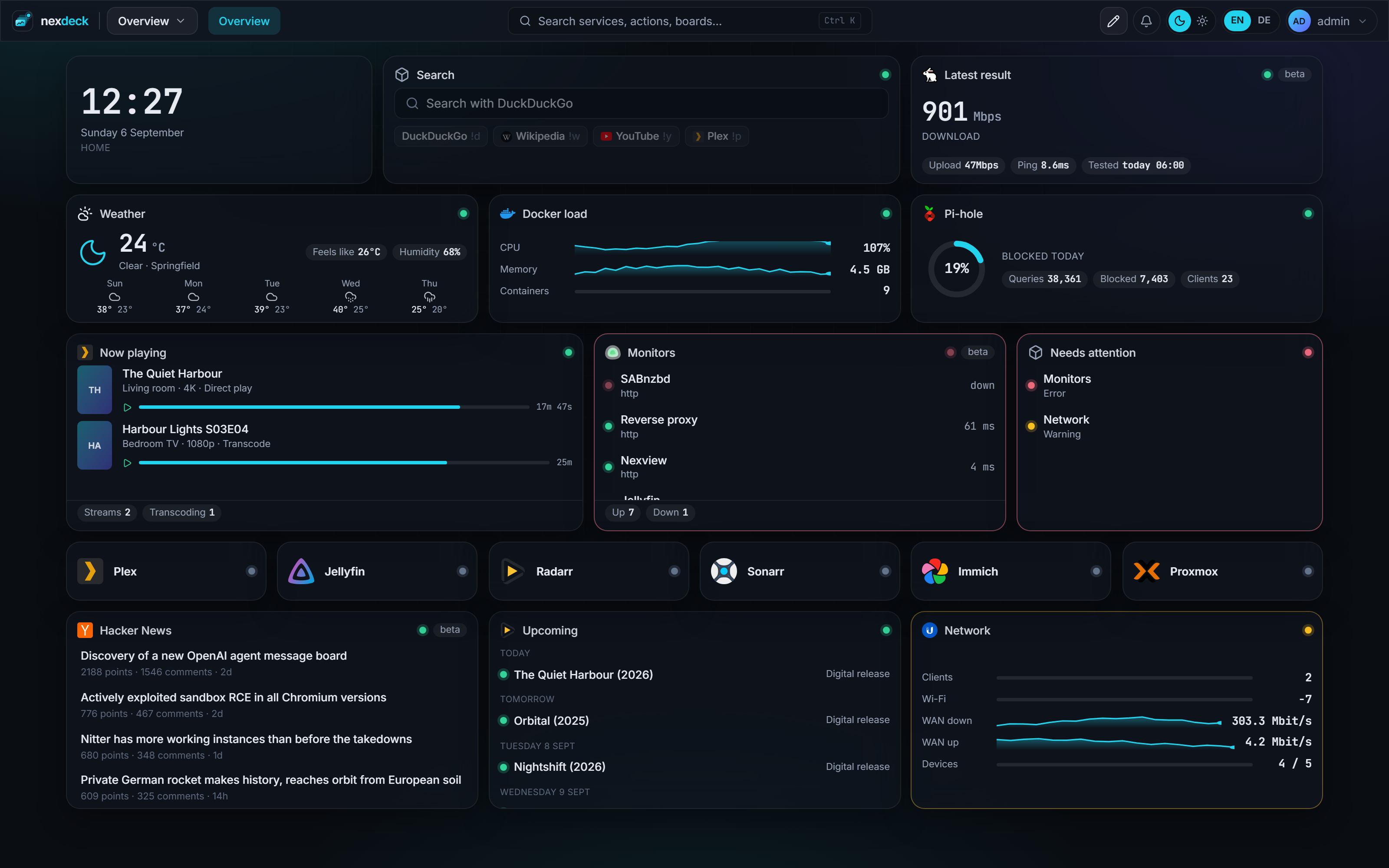
What it does
- Live, not polled by your browser. The server asks every service in its own rhythm and pushes changes to every open browser. Ten tabs cost a service one request.
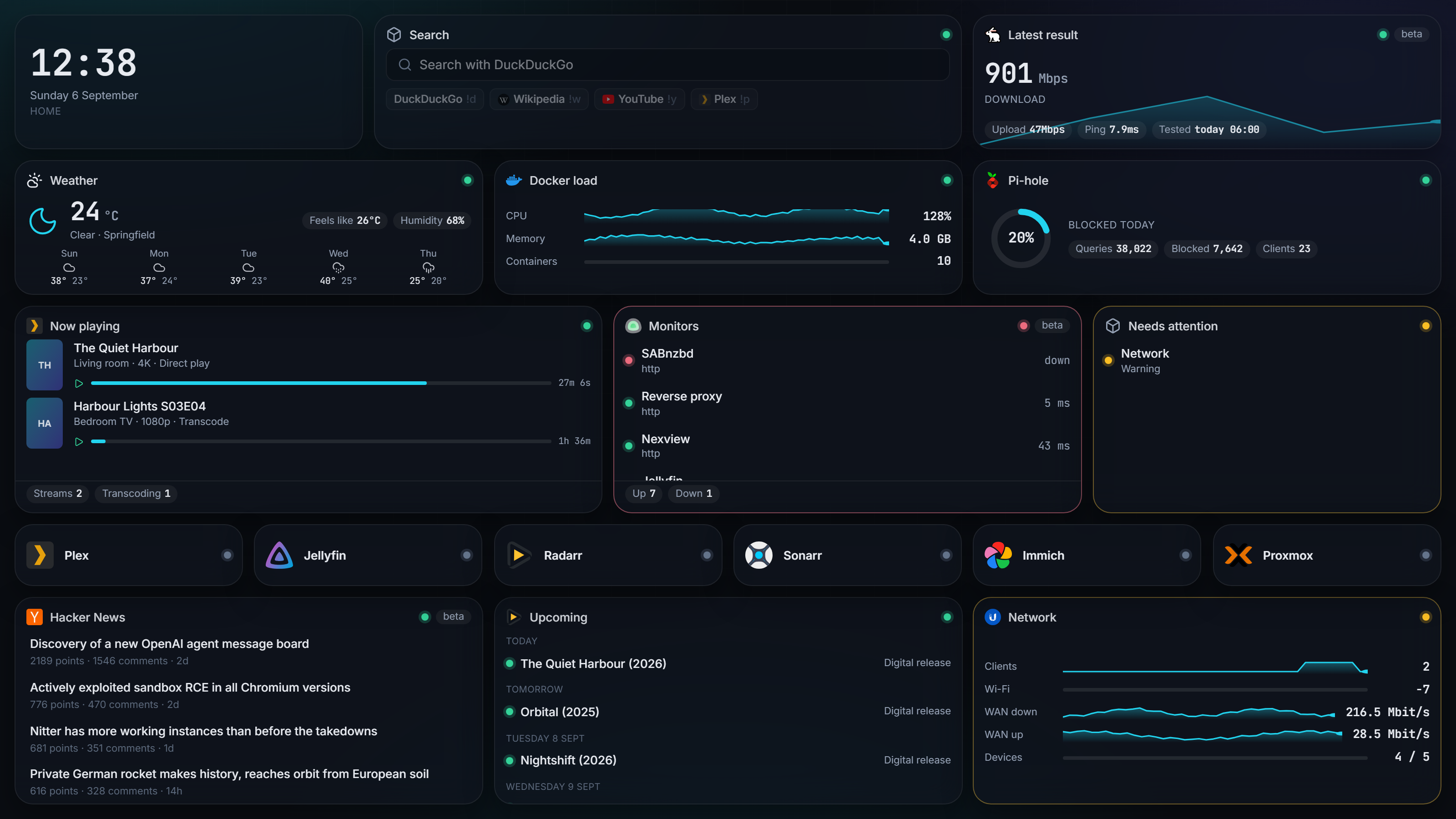
- 234 integrations, listed in full further down. Generic building blocks for everything else: a JSON API widget, a calendar that merges several sources and shows a list, a week or a month, a weather card with an hourly strip, air quality, UV and pollen, iframes, notes and bookmarks.
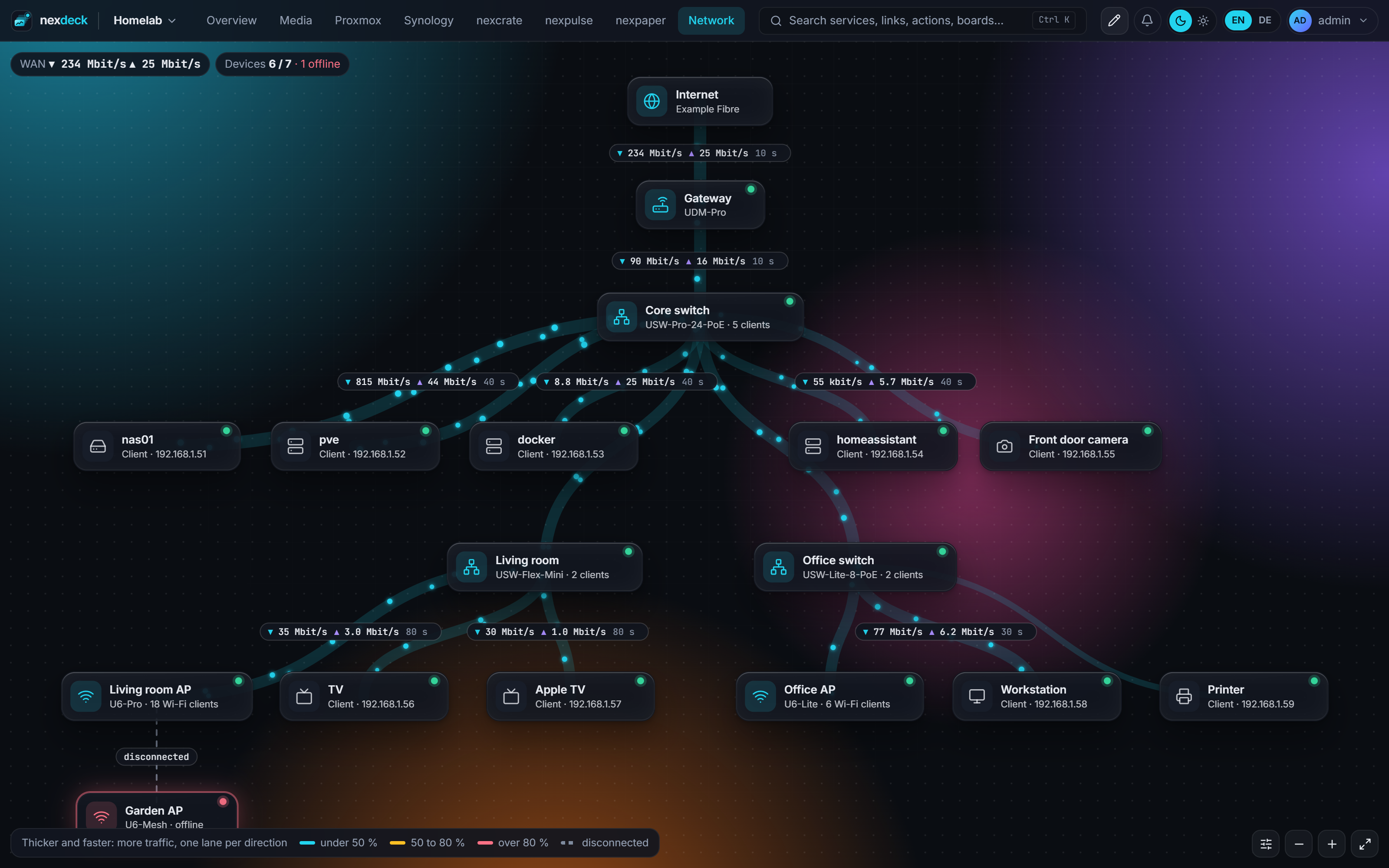
- A map of your network. A page can be a live plan of your UniFi network: gateway, switches and access points as a tree, each on the port it hangs from, with the traffic of every link running in both directions. You pick which servers and devices join it, and nothing moves by itself.
- Your home, switched from the board. A page can hold the lamps, thermostats, covers, scenes, switches, sensors and statistics of Home Assistant on a free surface, as small as a light switch, each in a style of its own, from a pill to a rocker switch, a dial, a window or a door. nexdeck calls nothing but their own services, and only for what stands on the page. A beta for now.
- Actions where the data is. Restart a container, start a VM, pause downloads, approve a request, wake a machine, flip a light. Destructive actions confirm once. Everything is logged.
- Three screens. A free grid of 12, 24 or 36 columns you arrange once: a tablet shows it as arranged, a phone stacks the cards in the same order. Drag cards into a group, where each takes a width and a height of its own, or into a side bar that stays in place while the page scrolls. An installable phone app with a bottom bar, kiosk links for wall tablets that cycle pages and dim at night, and a sign-in without a password for a tablet on the home network.
- Yours to look at. Your own name and logo in the browser tab, the bar, on the sign-in page and on the installed app. Thirteen colour themes besides nexdeck's own, Catppuccin, Nord, Dracula, Tokyo Night, Gruvbox and Rosé Pine among them, cards drawn as glass, liquid glass with an edge that bends the light, flat, outline or with a neon edge, each card in a colour of its own if you like, and backgrounds that drift, show the stars or follow the time of day. Numbers roll to each new reading, and a card that goes down glows red while the room behind it turns a little red too.
- A look of 1984. Every card a window with a striped title bar, the bar a menu bar, the page a dotted desk, in pixel type, black on white and inverted for the night. A yellow card is hatched and a red one turns black, so a status never rests on colour alone.
- Skins. A skin redraws more than the colours: little pixel pictures, frames, a tiled desk, symbols of its own for a status, motions and short sounds, and a style sheet that names the parts of nexdeck. Build one by clicking in the skin workshop, have the assistant make one from a sentence ("like a game console of the nineties"), or install one from the Card shop. Everybody wears the installation's skin, every account may wear its own, and pages that ask for a password always keep nexdeck's own drawing.
- Light, dark and type. Light and dark follow the system or the clock, for each account and each wall display. In the light theme the accent is darkened in its own hue until it reads as text. A calm card style, six types for the interface, an editor for a colour theme of your own, and cards without their head or frame.
- One style everywhere. The card style under Appearance is drawn on the boxes of the settings and System, the sheets, dialogs, menus, the search and the assistant too. A board with a style of its own changes only its cards.
- Cards you copy, hide and open by key. Copy a card, or a whole group, onto another page or board. Hide a card on the phone. Number keys open app tiles, a swipe turns the page on a phone and on a wall tablet, and
/go/<name>, Ctrl+K or nexdeck as the search engine of your browser opens a tile by its short name, also a tile that only follows a connection. - For the wall. Key figures put numbers from several services into one grid of tiles that grow with the card and turn yellow or red. A countdown to a date, and a kitchen timer that rings and flashes when it is done.
- Made to be shown. Showcase mode replaces addresses, host names, people, devices and appointments with made-up ones that read like real ones, and a board saves as a picture on a frame of colour, ready for a forum or a chat.
- Users, roles and sharing. Administrators, users and guests. Boards are private, shared with people or with a whole role, at view, edit or act level.
- What changed, and since when. A chronicle of every card that turned yellow or red, every outage, new version and restarted container, and what was changed in nexdeck. A card that needs a look says since when, one card gathers everything that does, a daily report sums up the day, and maintenance keeps a planned restart quiet.
- Ask nexdeck. A chat for administrators that answers from the cards, the chronicle and the history, and shows a button with what it would hit instead of pressing it. Claude, or a model on your own network such as Ollama; off until you choose one.
- Your boards for MCP programs. Claude Code, claude.ai or another MCP program reads your boards with a key of its own or as a connector over OAuth, with the rights of your account and only the boards you give it. It presses a card's button only after you allow it in the bell, unless you let it press without asking, and a dangerous button always asks. Off until an administrator switches it on; see docs/mcp.md.
- What runs on what, and why it broke. nexdeck learns which service runs in which container on which machine, from Docker, Portainer, a Synology, Proxmox and Nginx Proxy Manager. A host that goes down is one message naming what it took with it, and a red card's "Why?" opens a page with since when, what happened before, the container's log on asking and a runbook of your own.
- History over months. Every number kept as hours for 90 days and days for two years, charts over a year, and a forecast of when a volume is full.
- Reachability and notifications. App tiles carry a check with uptime bars; outages reach you through Telegram, e-mail, Web Push, ntfy, Gotify, Discord, Slack or Apprise.
- What is out of date. Every connection shows the version its service runs, and once you let nexdeck ask GitHub, the Updates card lists the services behind their project's newest release, next to containers from What's Up Docker, Cup, Arcane and Dockhand.
- A head start. Six board templates that fill their slots with whichever of your services fits, and an import from Homepage or Homarr that shows its plan before it makes anything. Services nexdeck finds in your containers and guests wait in the catalog under Found in your network, one click from a connection.
- Boards as files. Export a board as YAML, keep it in Git, drop it into
data/boards/to provision it. Docker labels create tiles. - Sign in your way. Local accounts, OpenID Connect with several providers side by side (authentik in one step, Microsoft Entra ID, Keycloak, Authelia, Pocket ID and friends), personal API tokens that only read unless you say otherwise.
- In English, German, Spanish, French or Italian. The interface and every card, including what the services report. Each account picks the two languages that stand in its top bar.
A board is whatever you put on it
Every card is a widget of one integration, dropped on a free grid and sized by hand. A template is only where you begin.
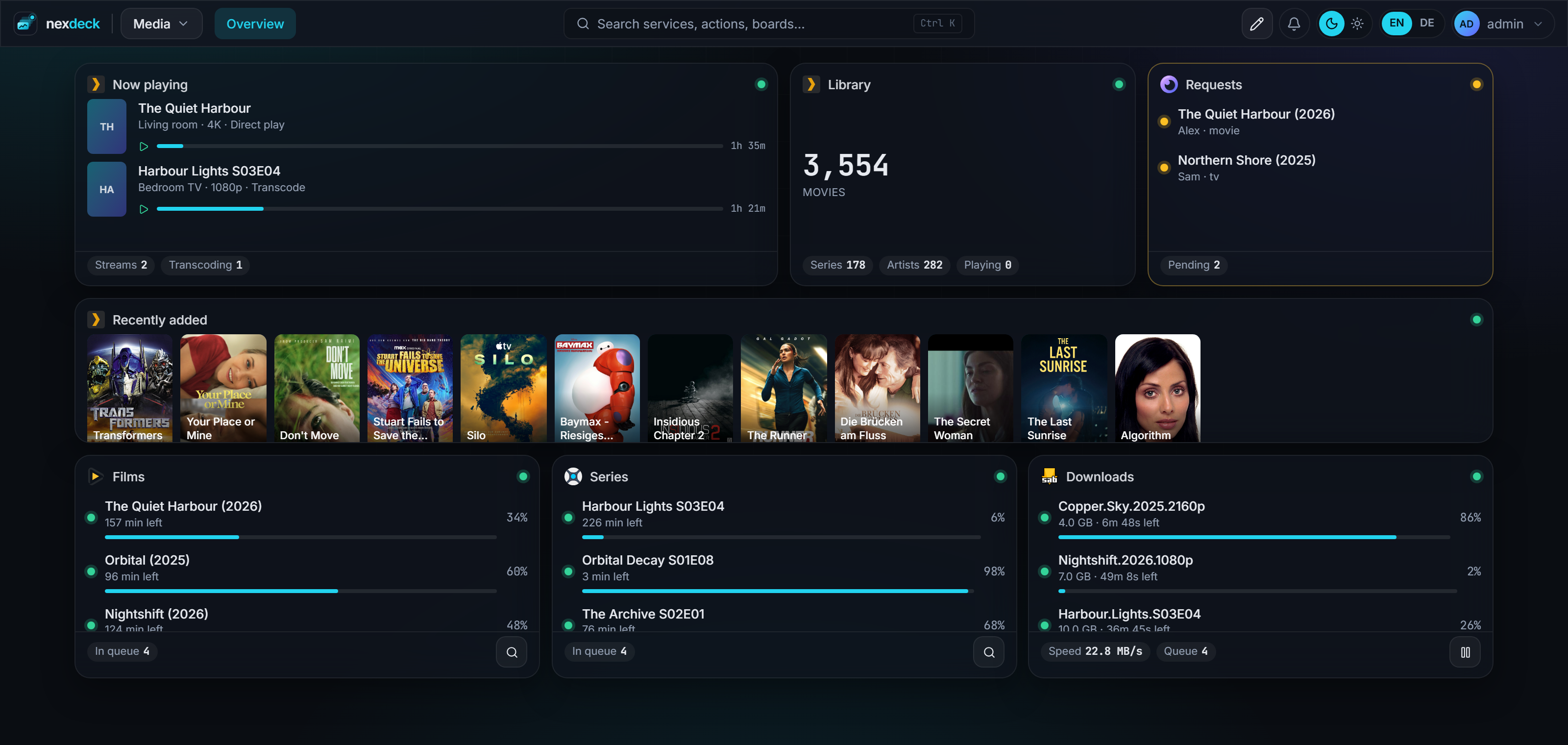
Media
What is playing, what the library holds, what is on its way in, and the covers of what arrived last. And your own music: a player card plays the library of Plex, Jellyfin or Emby in the browser, keeps playing from board to board, and edits playlists on the server.
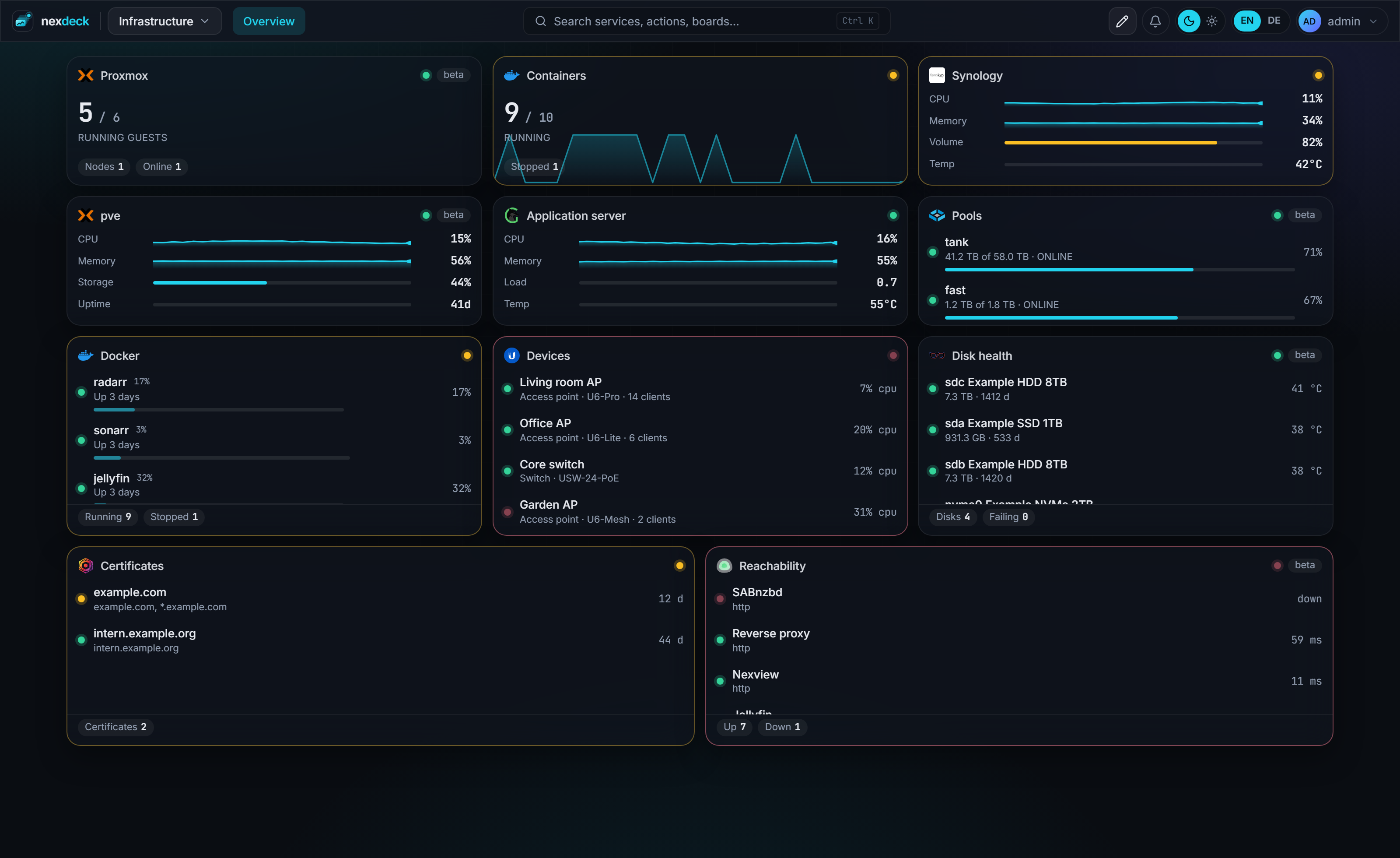
Infrastructure
The same grid, a different question. Hosts, containers, pools, disks, certificates and what answers.
Your network
A page of its own kind: the plan of a UniFi network, read from the console you already connected. Each link carries its traffic as dots or dashes in both directions, coloured by load, with the age of the value beside it. Click a device to light up its way to the internet and see its ports. Servers, the NAS and other wired devices join from a list; whatever the console finds later waits under Found until you place it. On a phone the plan becomes an indented list. UniFi only for now; SNMP is next.
Your home
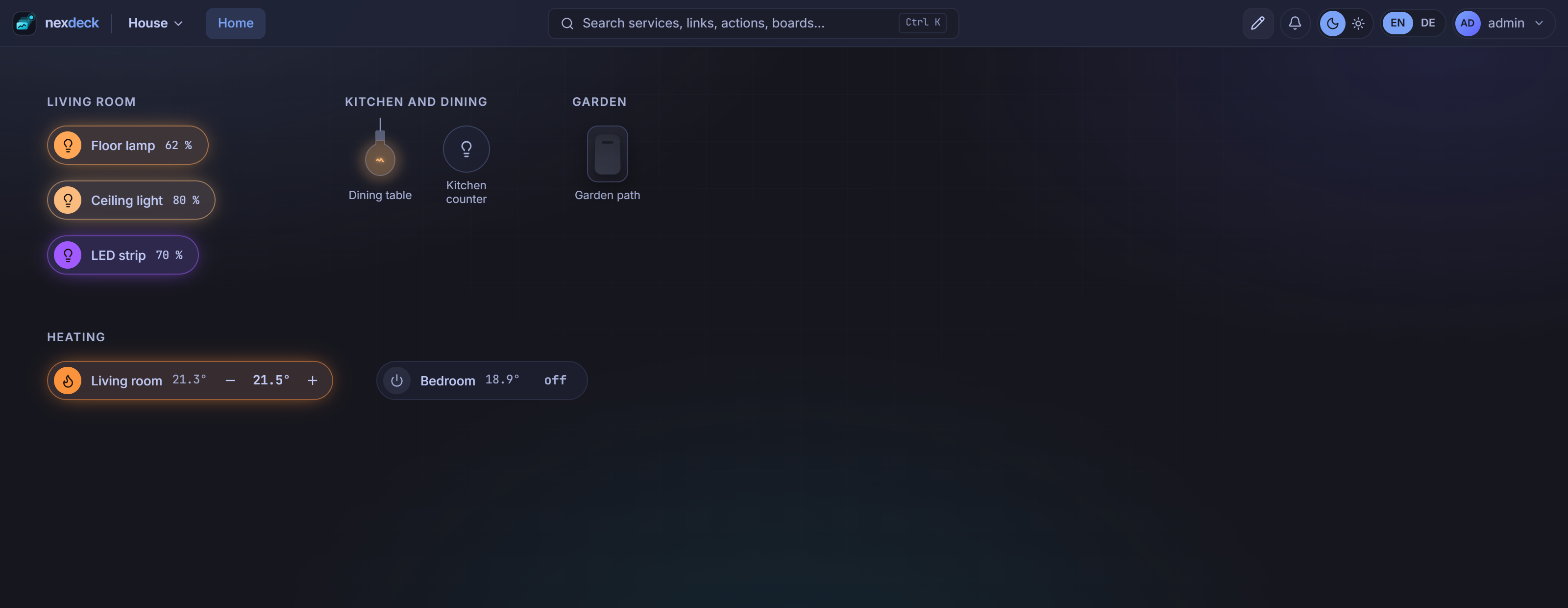
A third kind of page, for Home Assistant and a beta for now: the controls of your home on a free surface instead of the card grid, so a light switch takes the room of a light switch. Put headings over your rooms, place everything where you like it, and grow or shrink a drawing by its corner. Pick from lists that leave out what does not belong on a wall (settings, diagnostics, anything hidden in Home Assistant):
- Lamps in ten styles: pill, round, chip, tile, slider, ring, rocker, dots, bulb or knob, mixed as you like. A tap switches a lamp, a drag sideways dims it, and holding it opens its brightness, white and colour, as far as the lamp has them.
- Thermostats in ten styles of their own (pill, round, chip, tile, slider, dial, valve head, thermometer, radiator or big digits), showing the room as read by the thermostat or by a temperature sensor you choose. Swipe one sideways to set the target, or turn the dial and the valve head; it stays in the thermostat's own steps and bounds and is sent once you let go. A tap opens its mode, presets and recent history.
- Covers as a pill, chip, tile, window, slider or slats: open, close, stop and a position, and the slats where the cover has them. Several covers make one card, with positions of your own such as Morning or Night.
- Scenes and scripts as a pill or a tile, or several as a bar or a grid. A scene says when it last ran, a script whether it is running.
- Switches, plugs among them, as a pill, outlet, rocker, toggle, chip or tile, with what the device draws when it has a power sensor. A switch can ask before it turns off, and several make one card with their total.
- Sensors: doors and windows (pill, chip, tile, window or door, or many on one card or a house), temperature and humidity (pill, tile, thermometer or ring, or the rooms in a list), and a card of hints such as a window open in a room being heated or humidity from 65 %.
- Statistics from Home Assistant's long-term statistics, as a line, rooms, a band, bars, small or a comparison, over 24 hours, 7 or 30 days, with now, low, high and mean.
Every element can carry a name of its own, keeps its place when it is renamed in Home Assistant, and follows the card style under Appearance, liquid glass and tilt included. On a phone every heading keeps its elements under it, and on a wall display the page switches when its kiosk link allows actions. The lists are read from Home Assistant's registry, which it shows only to an administrator, so the connection needs a long-lived token of one.
On the wall
A kiosk link opens one board without a sign-in, read-only unless you say otherwise. It cycles through the pages and dims at night. The token is handed in once at the door and never rides in an address afterwards.
Quick start
mkdir nexdeck && cd nexdeck
curl -fsSL https://raw.githubusercontent.com/DerKezorm/nexdeck/main/docker-compose.yml -o docker-compose.yml
docker compose up -d
Open http://your-host:5175. The first start creates the administrator and offers a demo board with invented, moving data, so you can look around before connecting anything.
Mount /var/run/docker.sock (already in the compose file) to see this host's containers, act on them and follow their logs. On Synology the same socket serves Container Manager.
Configuration
| Variable | Default | Purpose |
|---|---|---|
NEXDECK_SECRET_KEY |
generated into /data/secret.key |
Encrypts stored API keys and signs sessions. Set it once and keep it. |
NEXDECK_PUBLIC_URL |
empty | How browsers reach nexdeck. Needed for OpenID Connect and Web Push. |
NEXDECK_DEMO |
0 |
Start every widget with invented data. |
NEXDECK_LOG_LEVEL |
INFO |
DEBUG logs every adapter request. |
NEXDECK_ALLOW_LOOPBACK_TARGETS |
0 |
Let notification channels, Web Push, RSS cards and reachability checks call 127.0.0.1. Connections an administrator made are never affected. |
NEXDECK_UPLOAD_QUOTA_MB |
200 |
What one account may leave lying in /data/uploads. 0 means no ceiling. |
NEXDECK_KEEP_ACTION_LOG_DAYS |
90 |
How long the record of who pressed what is kept. 0 keeps it forever. |
NEXDECK_KEEP_NOTICES_DAYS |
90 |
How long messages in the notice centre are kept. |
NEXDECK_KEEP_OUTAGES_DAYS |
365 |
How long finished outages are kept, and maintenance that is over. A running one is never swept. |
NEXDECK_KEEP_EVENTS_DAYS |
365 |
How long the lines of the chronicle are kept. |
NEXDECK_WORKSHOP_TOKEN |
empty | Only for a private copy of the Workshop: a key that may read that repository. The public Workshop needs none. |
NEXDECK_WORKSHOP_CLIENT_ID |
the Client ID of the "nexdeck Workshop" GitHub App | The public Client ID used to sign administrators in to GitHub when they share a card. There is no secret to go with it. |
PUID, PGID |
1000 |
Owner of the files in the data volume. |
DOCKER_GID |
detected | Group of the mounted Docker socket, when detection fails. |
Rarely needed, but real:
| Variable | Default | Purpose |
|---|---|---|
NEXDECK_DATA_DIR |
/data |
Where the database, the key file, uploads and caches live. |
NEXDECK_STATIC_DIR |
set in the image | The built frontend. Empty means the API only. |
NEXDECK_COOKIE_SECURE |
auto |
auto sets the Secure flag when the request came over HTTPS, directly or from a proxy named in NEXDECK_TRUSTED_PROXIES; always and never force it. |
NEXDECK_SESSION_DAYS |
30 |
Days a browser stays signed in without activity. |
NEXDECK_BCRYPT_ROUNDS |
12 |
Cost of a password hash. Lower is faster and weaker. |
NEXDECK_DB_POOL_SIZE |
20 |
Database connections held open. |
NEXDECK_DB_MAX_OVERFLOW |
20 |
How many more may be opened under load. |
NEXDECK_REQUEST_THREADS |
24 |
Worker threads for synchronous routes. Keep it below the two above added together. |
NEXDECK_HISTORY_RAW_HOURS |
1 |
How long raw samples are kept before they become minute averages. |
NEXDECK_HISTORY_MINUTE_HOURS |
24 |
How long those minute averages are kept. |
NEXDECK_HISTORY_HOUR_DAYS |
90 |
How long hour averages are kept, with their lowest and highest: charts of 7 and 30 days and the forecasts read them. |
NEXDECK_HISTORY_DAY_DAYS |
730 |
How long day averages are kept: a chart of a year. |
NEXDECK_LOG_HISTORY_HOURS |
6 |
How long container log lines are kept. |
NEXDECK_HEALTH_INTERVAL_SECONDS |
30 |
Default interval for reachability checks. |
NEXDECK_OUTAGE_THRESHOLD_SECONDS |
120 |
How long a service must be down before an outage is announced. |
NEXDECK_ICON_CACHE_DAYS |
30 |
How long a fetched logo is kept. |
NEXDECK_UPDATE_CHECK |
0 |
Ask GitHub whether a newer nexdeck exists, and for the newest releases of the connected services. Off by default: it is an outbound call, and the projects asked about tell GitHub which services run here. Also under System, About. |
NEXDECK_CORS_ORIGINS |
empty | Origins allowed to call the API from a browser. * is refused at start-up, because with credentials it would let any site act as the signed-in user. |
NEXDECK_BACKUP_EVERY_HOURS |
24 |
How often a snapshot is written by itself. 0 switches it off. |
NEXDECK_TRUSTED_PROXIES |
empty | Addresses or networks of the reverse proxies in front of nexdeck, comma separated. Their X-Forwarded-For is believed when nexdeck decides whether a browser is on the home network; without it, a forwarded request is never signed in automatically. It is also the only list whose X-Forwarded-Proto is believed for the Secure flag of cookies and whose X-Forwarded-Proto and X-Forwarded-Host the sign-in believes for its redirect address; empty, nobody's is (see below). |
A guard test keeps this table in step with the settings in the code.
Reverse proxy
nexdeck speaks plain HTTP on port 8000. It believes X-Forwarded-Proto only from a proxy named in NEXDECK_TRUSTED_PROXIES, and out of the box from nobody: then the scheme is the one the request really came in on, so a visitor cannot choose it. Of a named proxy the right-most value of the last header line counts (the one the nearest proxy wrote), http or https in any case. That scheme decides the Secure flag of the cookies. Behind a proxy that ends TLS, name it in NEXDECK_TRUSTED_PROXIES, or set NEXDECK_COOKIE_SECURE=always; otherwise the cookies go without the Secure flag (until 0.39.0 every sender's header was believed for it). The redirect address the sign-in sends to a provider: with a public address set (System → Sign-in) that address is used and no header is read; without one, scheme and host come from X-Forwarded-Proto and X-Forwarded-Host by the same rule, so a visitor cannot make the sign-in send a provider an address of their choosing. Without a named proxy the sign-in uses the address the request really came in on. This is the setting the authentik card means when it warns that the server sees a request as http: name your proxy, or set the public address. Server-Sent Events need a proxy that does not buffer: for nginx, proxy_buffering off; on the location; Traefik and Caddy need nothing.
Sign-in providers
Under System → Sign-in an administrator adds OpenID Connect providers (each gets a button on the sign-in page, in the order of the list), sets authentik up in one step with a one-time API token, or downloads a blueprint instead. Microsoft Entra ID takes https://login.microsoftonline.com/common/v2.0 (or organizations, or a tenant) as the issuer. A provider's redirect address is <public address>/api/v1/oidc/<short name>/callback; providers set up with nexdeck 0.36 or older keep /api/v1/auth/oidc/<short name>/callback, which their provider already knows. Accounts are found by the provider's subject only, never by an e-mail address; people link their own account under Profile, with their password. Password sign-in can be switched off once a provider is active; administrators can always use their password.
Signing in on the home network (System → Home network) needs the browser's real address. Behind a proxy, name the proxy in NEXDECK_TRUSTED_PROXIES; the page shows what nexdeck makes of your own address. The image starts uvicorn with --no-proxy-headers and reads the forwarding headers itself; a compose file that overrides the command should do the same.
The services it speaks to
Hosts and containers. Docker, Proxmox VE, Proxmox Backup Server, ProxMenux, Kopia, Duplicati, Portainer, Pterodactyl, AMP, Nomad, Cup, Coolify, Gitea, Forgejo, GitLab, Semaphore UI, Meilisearch, Synology DSM, Unraid, TrueNAS, openmediavault, Glances, dashdot, Beszel, Prometheus, InfluxDB, Alertmanager, Grafana, Scrutiny, UPS through PeaNUT, NUT, Wake-on-LAN, Backrest, Zerobyte, Komodo, Arcane, Dockhand, Kubernetes, UrBackup, Elasticsearch and OpenSearch, Netdata, Pulse, Ollama, Garage, llama.cpp, Open WebUI, Watchtower, ArchiveTeam Warrior, What's Up Docker, Zabbix, nextrmnl, PatchMon, GoatCounter, Jenkins, Cronicle, Container registry, Synapse, Woodpecker CI, Umami.
Network. Public IP address, Cloudflare, UniFi, MikroTik, SNMP (switches and network devices), FRITZ!Box, OPNsense, pfSense, FortiGate, OpenWrt, Traefik, Caddy, Nginx Proxy Manager, nginx ignition, Pi-hole, AdGuard Home, Technitium, NextDNS, Tailscale, Headscale, NetBird, Pangolin, wg-easy, NetBox, Gluetun, authentik, Keycloak, CrowdSec, Wazuh, Shlink, Speedtest Tracker, MySpeed, nexpulse, nexsift, Uptime Kuma, UptimeRobot, Healthchecks, ChangeDetection.io, n8n, Blocky, Gatus, NetAlertX, Pocket ID.
Media. Plex, Jellyfin, Emby, Tautulli, Tracearr, Jellystat, Radarr, Sonarr, Lidarr, Readarr, Prowlarr, autobrr, NeutArr, Bazarr, SABnzbd, NZBGet, qBittorrent, Qui, Transmission, Deluge, rTorrent, MeTube, Seerr, Overseerr, Jellyseerr, ReadMeABook, Nexview, nexcrate, nexbeat, Maintainerr, Reclaimerr, Tdarr, Unmanic, FileFlows, RomM, Sportarr, Tube Archivist, Real-Debrid, M3U Editor, Minecraft, aria2, pyLoad, Jackett, Ombi, slskd, Owncast, Kodi, PeerTube, rclone, Stash, xTeVe, Your Spotify.
Home and files. Home Assistant, Frigate, Reolink, evcc, Immich, Nextcloud, FileBrowser Quantum, Syncthing, SFTPGo, Syncthing Relay, Paperless-ngx, Papra, Firefly III, Actual Budget, Mealie, Grocy, Vikunja, nexlore, nexpaper, nexdiary, nexcanvas, nexbrand, Kimai, Dawarich, wger, Audiobookshelf, Navidrome, Komga, Kavita, Calibre-Web, BookOrbit, Ghostfolio, Homebox, PhotoPrism, Tandoor Recipes, Wallos, OctoPrint, Spoolman, Moonraker, openHAB, Homebridge, Node-RED, ESPHome, Tasmota, Fronius, OpenDTU, Shelly, BookStack, Wiki.js, Trilium, Memos, KitchenOwl, LubeLogger, Planka, Traccar, Anchor.
Feeds, weather and messages. Hacker News, YouTube, GitHub, share prices, Twitch, RSS, Miniflux, FreshRSS, Karakeep, Linkwarden, Linkding, iCal and CalDAV, Weather, ntfy, Gotify, nexmail, IMAP, Mailpit, Readeck, Steam, Mastodon, Lemmy, mailcow, Stalwart.
Adapters that have not been confirmed against a live instance yet carry a beta badge in the interface. If one misbehaves, please open an issue with the service's version.
When a service fails
Every card asks its service on its own, so a slow or hanging service holds up only its own cards. A request gives up after 15 seconds unless its integration says otherwise, and a card's whole round after a minute. When several cards of one connection ask the same address at the same time, nexdeck sends one request and hands the answer to all of them, also while a slow service is still thinking. A card whose service keeps failing asks less often, its interval doubling up to five minutes, and asks at its own pace again as soon as an answer comes. Until then it keeps its last good numbers under the error, marked "Showing the last good values".
Measured with 100 connections to a made-up Proxmox, three cards each (node, guests, summary), every 30 seconds, for two minutes healthy and then two minutes with one service answering in 3 seconds and one hanging for 40 seconds:
| Before sharing | With sharing | |
|---|---|---|
| Requests a minute, every service healthy | 1005 | 880 |
| The same request at one service at the same time, at most | 3 | 1 |
Requests to the hanging service in two minutes (/nodes) |
6 | 3 |
/nodes a minute to each healthy service, healthy and then during the fault |
4.18 and 4.22 | 4.17 and 4.19 |
| nexdeck itself | 8 to 9 % of one core, 284 MB | 8 to 9 % of one core, 282 MB |
The healthy services kept their pace while one hung. The hanging service still held requests nexdeck had already given up on; they are not counted above. Several browsers on the live stream were not part of the test.
Documentation
- Running nexdeck: backups, restoring, updating
- Integrations and widgets
- Docker labels
- Boards as files and provisioning
- Kiosk displays
- API
- AI from outside: MCP
Development
Backend: Python 3.13, FastAPI, SQLAlchemy, SQLite. Frontend: React 19, Vite 7, Tailwind 4.
# backend
cd backend
python -m venv .venv && . .venv/bin/activate
pip install -r requirements-dev.txt
uvicorn app.main:app --reload --port 8000

# frontend, in a second terminal
cd frontend
npm ci
npm run dev
The frontend on http://localhost:5176 proxies /api to the backend. Tests: python -m pytest in backend/, npm test and npm run e2e in frontend/. The whole CI set, read from the workflow: python tools/ci_local.py in backend/ (--tag vX.Y.Z adds the version check, --install the installs). The guards in backend/tests/test_guards.py and frontend/src/i18n/*.test.ts enforce English messages, complete translations, an auth decision on every address and no personal data in the repository.
Adding an adapter
One file in backend/app/adapters/: declare the connection fields and the widgets, implement test, fetch, optionally action, and demo. Every widget maps onto one of fifteen renderers, so no frontend code is needed. See docs/adapters.md.
License
AGPL-3.0-or-later. See LICENSE.
Categories
Download Statistics
Related apps
Explore more like this
Explore allDetails
ghcr.io/derkezorm/nexdeckRuntime arguments
- Web UI
http://[IP]:[PORT:8000]/- Network
bridge- Shell
sh- Privileged
- false
Template configuration
Port you reach nexdeck at. Container port: 8000
- Target
- 8000
- Default
- 5175
- Value
- 5175
Holds the SQLite database, uploaded pictures and the generated key. Back up this folder, and keep it on a local disk, not on a network share.
- Target
- /data
- Default
- /mnt/user/appdata/nexdeck
- Value
- /mnt/user/appdata/nexdeck
Optional. Lets nexdeck show the containers on this server, start and stop them and follow their logs. Access to the socket amounts to root on the server; inside nexdeck only administrators can act on containers. Clear this path if you do not want the Docker cards.
- Target
- /var/run/docker.sock
- Default
- /var/run/docker.sock
- Value
- /var/run/docker.sock
User id that should own the files in /data. 99 is the Unraid default.
- Default
- 99
- Value
- 99
Group id that should own the files in /data. 100 is the Unraid default.
- Default
- 100
- Value
- 100
Time zone of the server side, for example Europe/Berlin. Clocks in the browser follow the browser. Leave blank for UTC.
- Target
- TZ
How browsers reach nexdeck, for example https://deck.example.com. Needed for sign-in with an identity provider and for Web Push. It can also be set later inside nexdeck.
- Target
- NEXDECK_PUBLIC_URL
Encrypts the stored API keys and signs sessions. Leave blank: nexdeck creates one on first start and keeps it in /data/secret.key. Setting it here moves the key out of the data folder, so a stolen copy of that folder alone is worthless. Never change it afterwards, every stored credential is bound to it.
- Target
- NEXDECK_SECRET_KEY
Group that owns the Docker socket on this server. Leave blank, nexdeck reads it from the socket at start. Only set it if the Docker cards answer permission denied.
- Target
- DOCKER_GID
Leave this empty unless you switched Network Type to Host. In bridge mode the WebUI Port above already does the job and setting this will break it, because the mapping still points at 8000. On host networking the port inside the container is the port on your server, so use this to move nexdeck off 8000 if something else is already there.
- Target
- NEXDECK_PORT
Leave blank. The level is chosen inside nexdeck, where a deep level switches itself back off. A value here fixes the level and greys that switch out. Only set it if nexdeck will not start.
- Target
- NEXDECK_LOG_LEVEL
Addresses or networks of your reverse proxies, comma separated, for example 172.16.0.0/12. Only their X-Forwarded-Proto and X-Forwarded-Host (the rightmost value) are believed when nexdeck builds its own address without a public URL. Leave blank when nexdeck is not behind a proxy or a public URL is set.
- Target
- NEXDECK_TRUSTED_PROXIES