
All apps · 0 apps
nexbrand
Docker app from DerKezorm's Repository
Overview
Readme
View on GitHubnexbrand

The corporate design of your clients in one place, on your own server: colours, fonts, logos, type scale, rules and example files, per client and per project, with every version kept. For agencies, freelancers and developers who build for several brands.
nexbrand is one of the nex apps and looks like them: cobalt, dark and light. Whoever knows nexlore or nexcanvas finds the same frame here: accounts, second factor, sign-in through a provider, log, languages and backups. What it can do and a guide from the first client to the first review are on the project site, www.nexbrand.de.
Early days. nexbrand is at its first version. It works and is well tested, but a lot of it is still finding its shape, and this is the time when ideas and feedback change the most. What do you keep for your clients today, and where? What is missing, what is in the way, what would make you switch? Tell me in an issue, small or large.
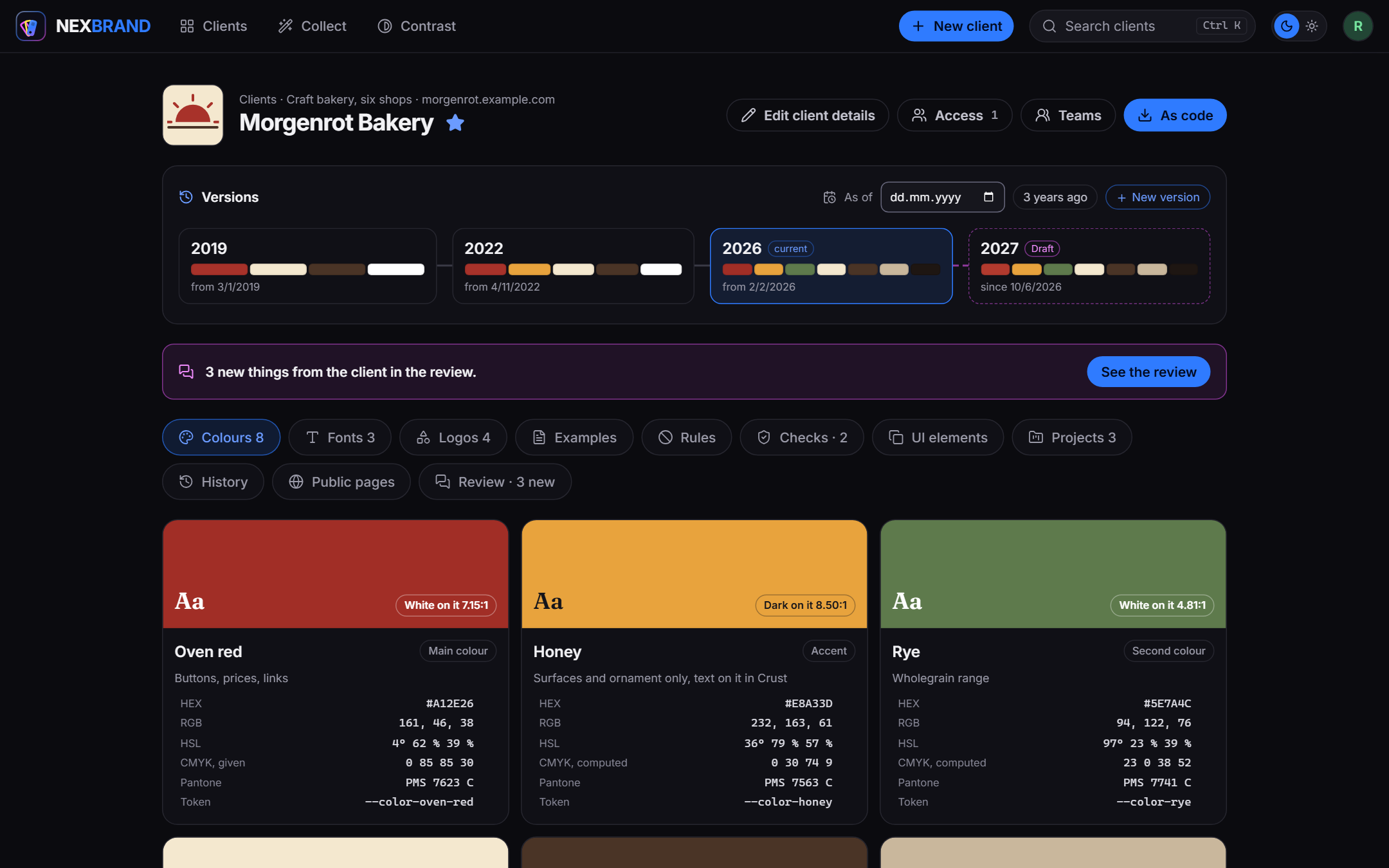
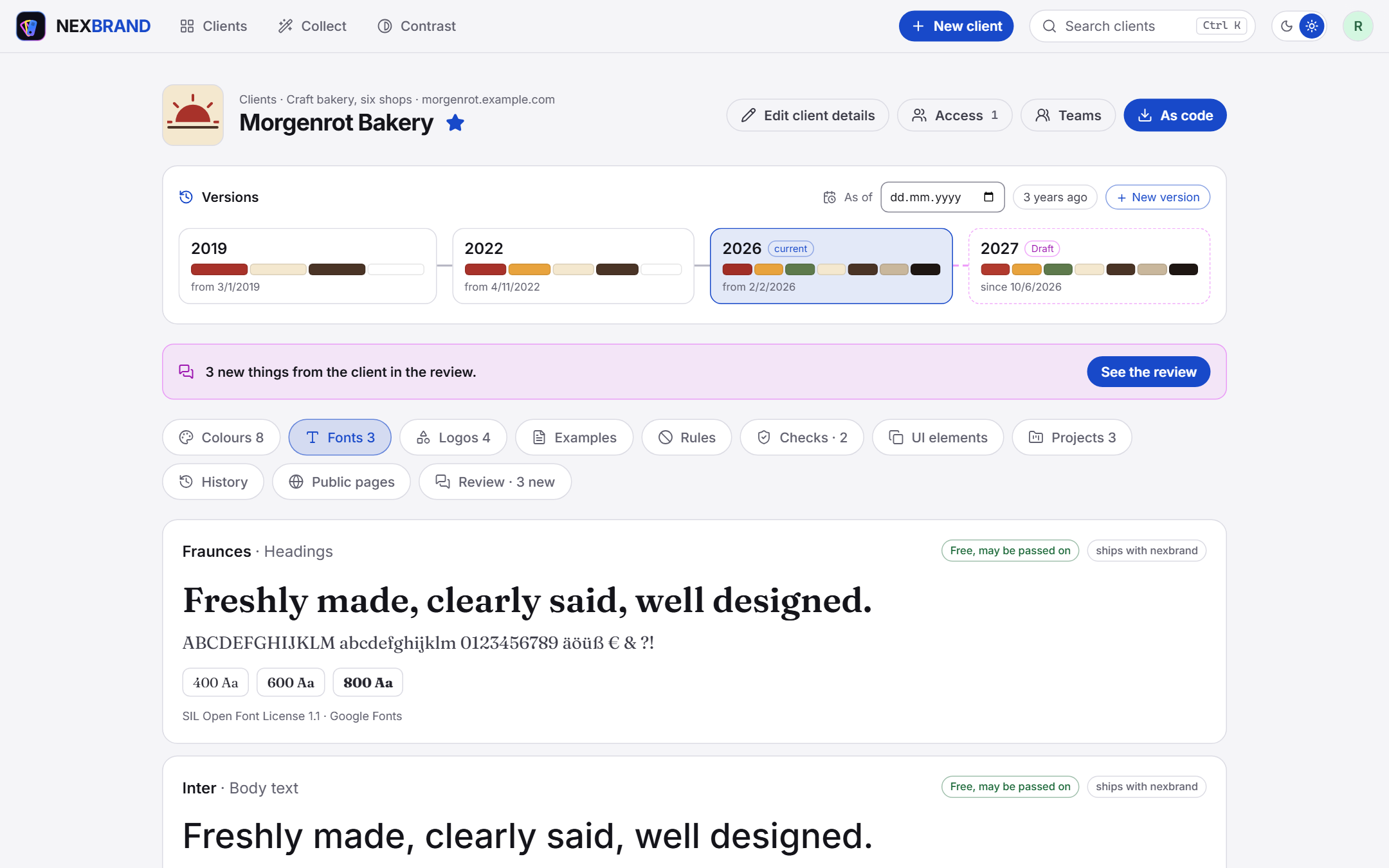
A client. Its versions on a time line: 2019, 2022, the current 2026 and a draft for 2027 that is before the client, who has left three comments. Every colour with the text that reads on it, its values for screen and print, and the name it has in code.
Screenshots
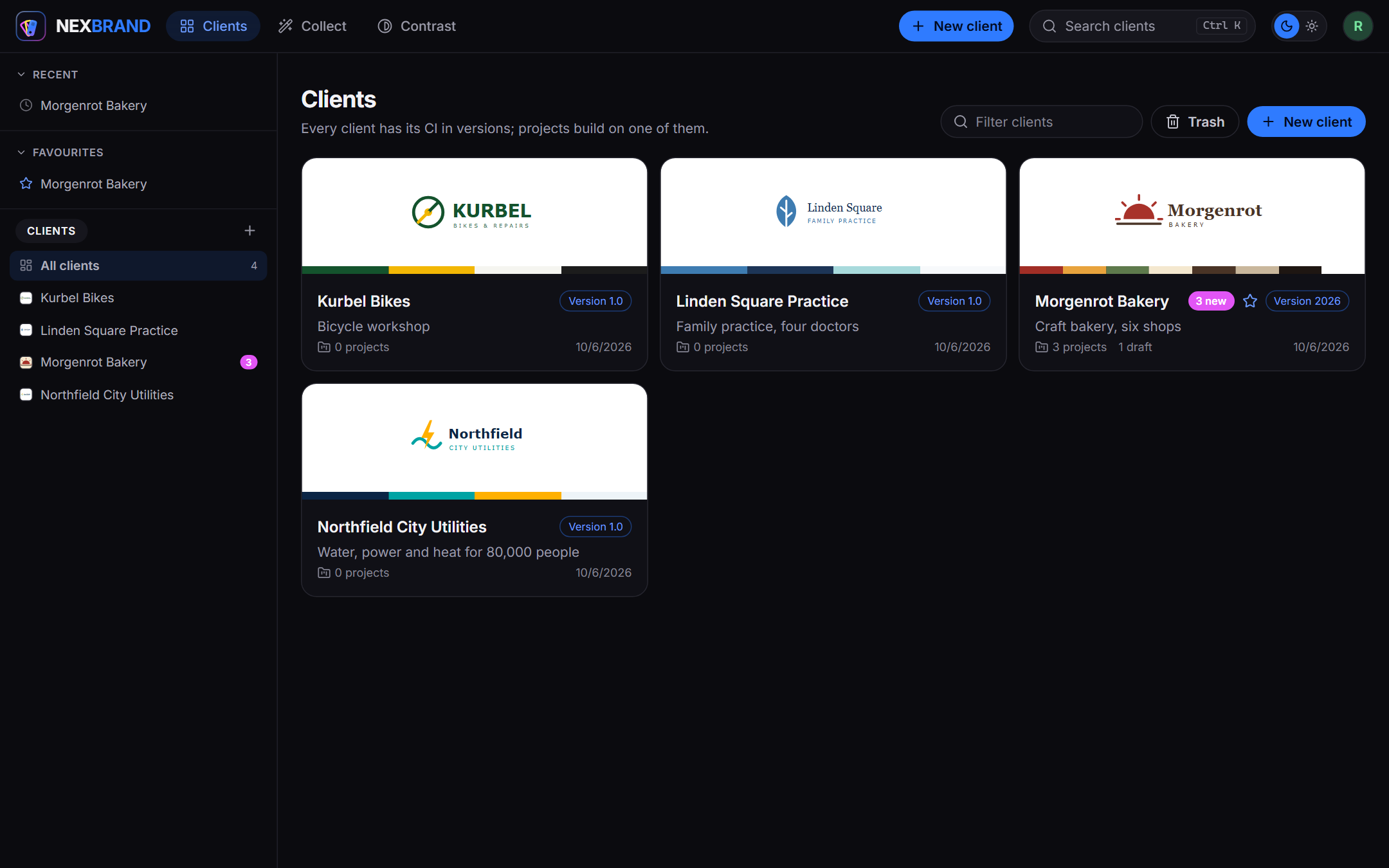
Every client with its logo and colours, the version it is at, its projects and drafts, and what is new from the client. People and teams get access per client.
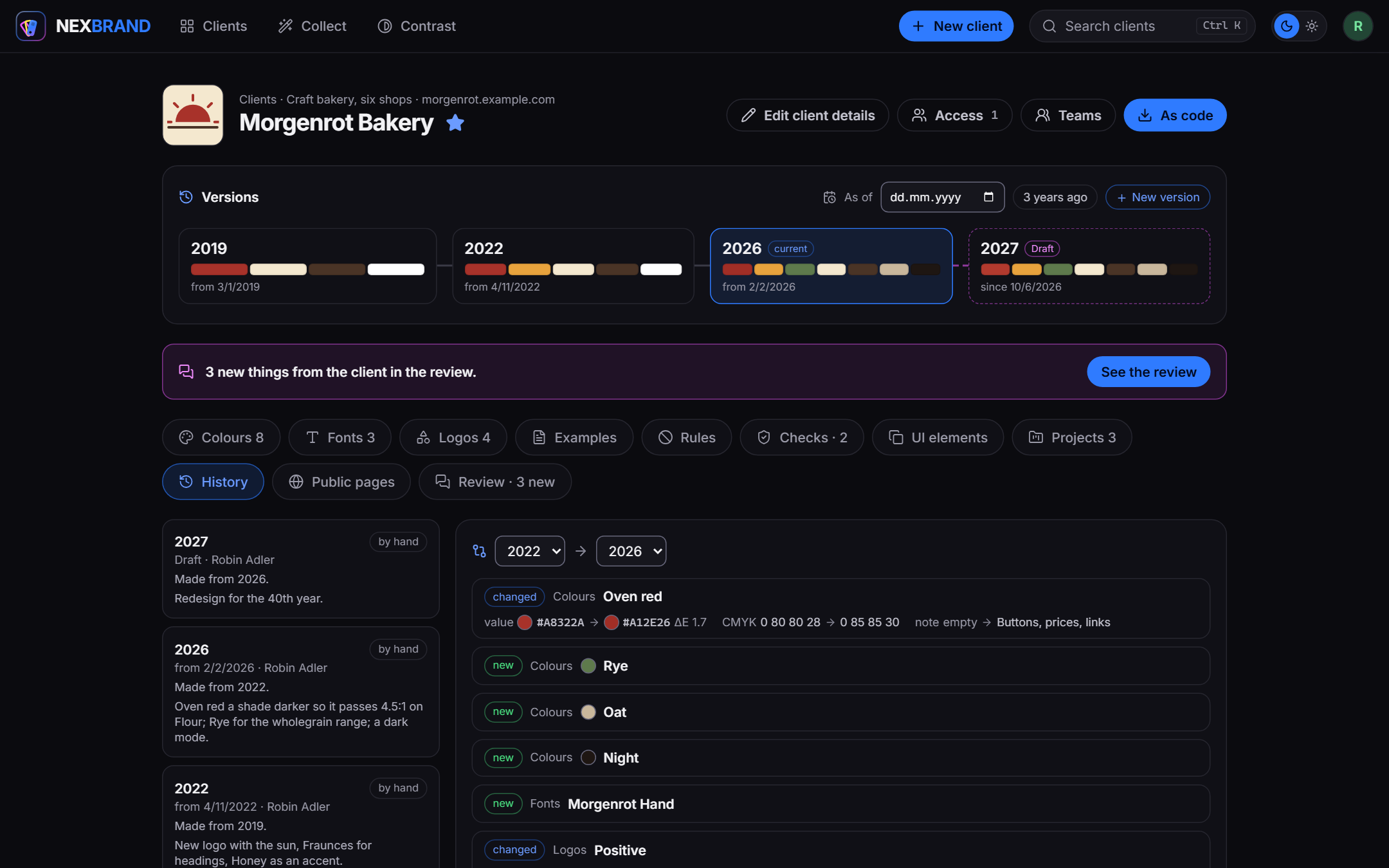
Two versions side by side: a colour that changed, with its distance (ΔE) and print values, new colours and fonts, logos that changed. "As of" shows the CI of any day. A project stays on the version it was made with until somebody moves it, so a reprint looks like the first print.
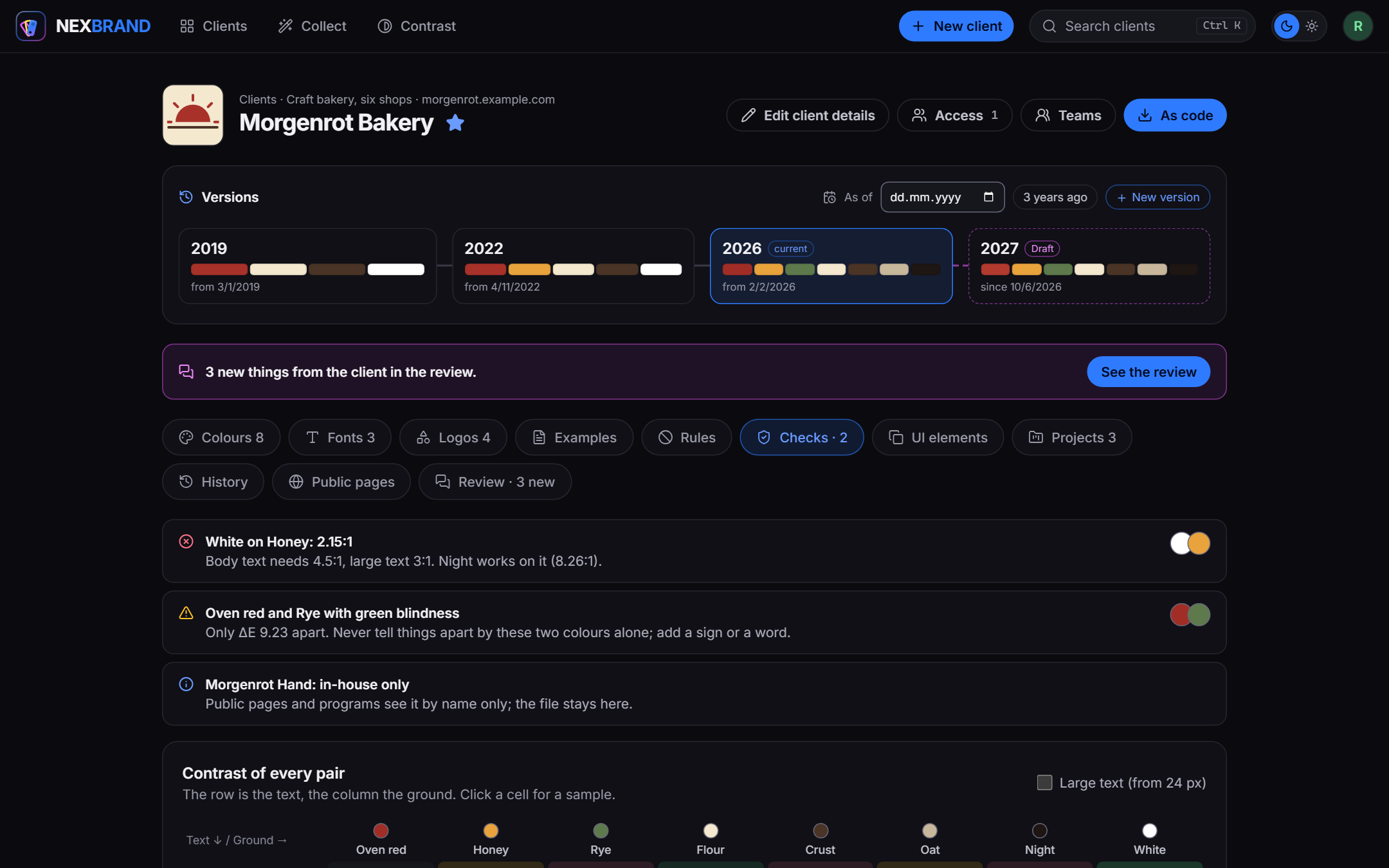
Checks computed from the set, never written by hand: contrast by WCAG 2.2 with the colour of the set that would work, colours that a colour vision deficiency pulls together, rules the set breaks, fonts that stay in the house. Below, the contrast of every pair.
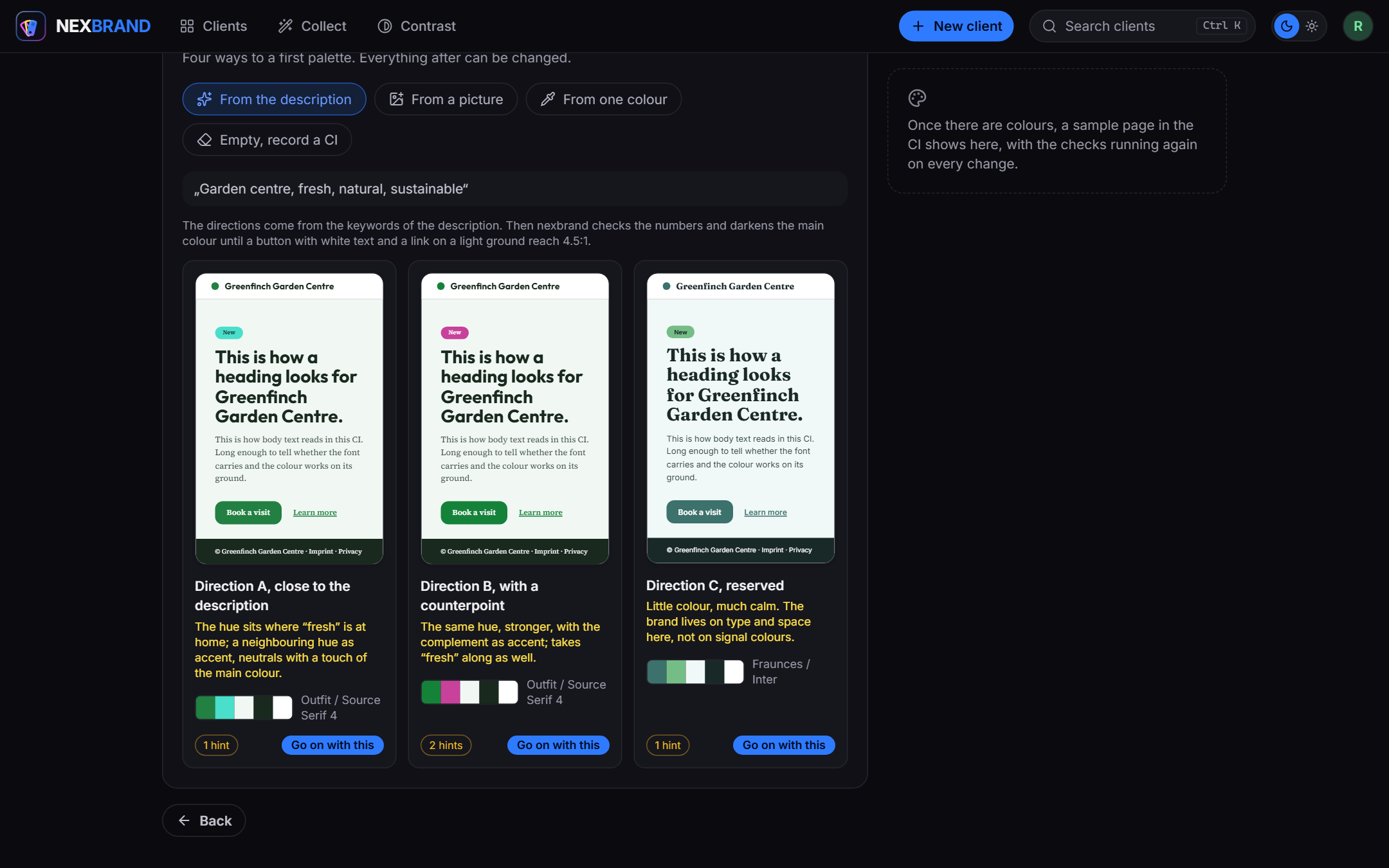
The workbench for a client without a CI: three directions from a few words, each on a sample page and checked before anything is chosen. From there colours with harmonies, a font pair and a type scale, while the sample page and the checks follow every change.
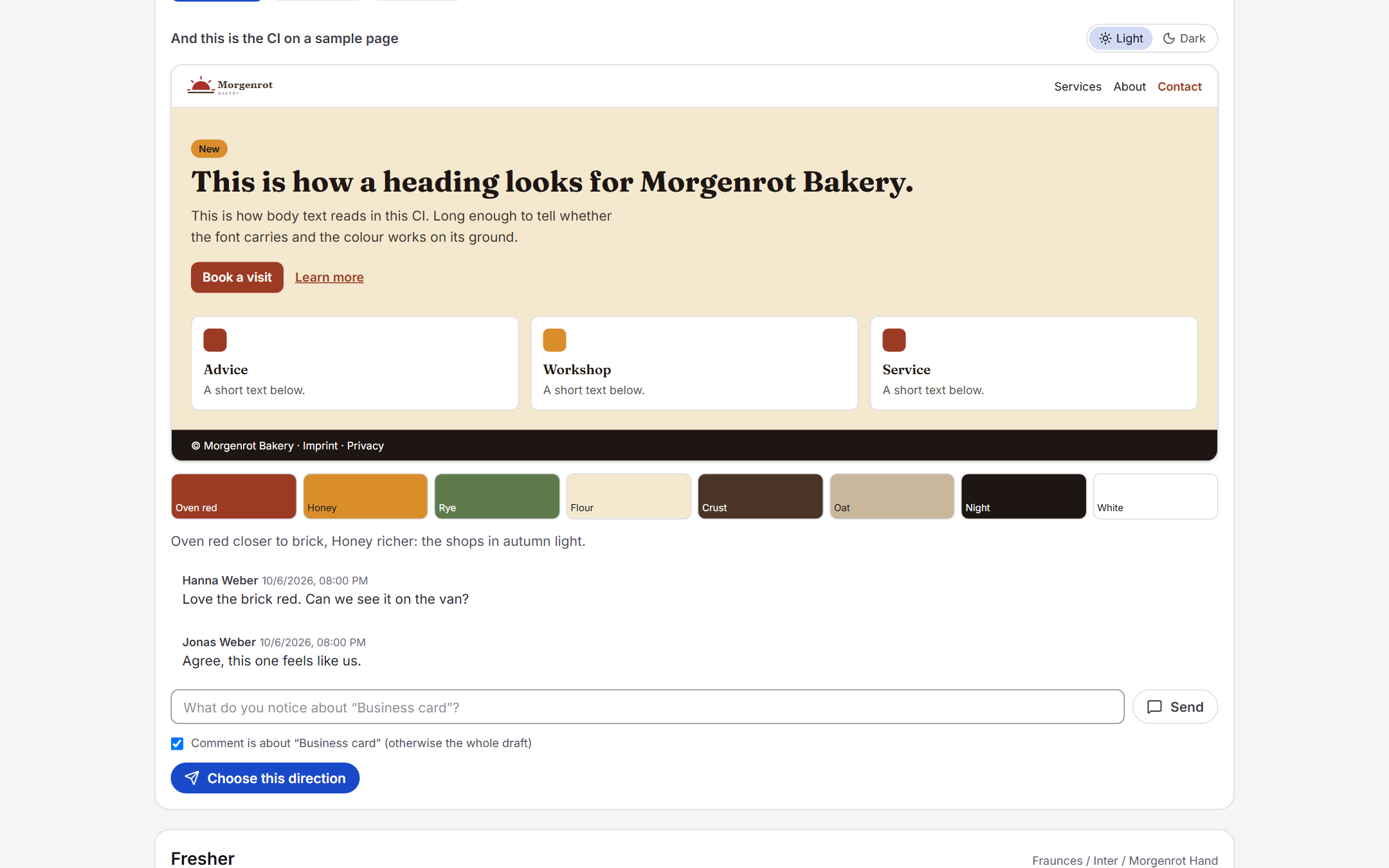
The client's side of a review, without an account: the agency's own drafts to leaf through, every direction on a sample page in light and dark, comments on the whole or on one picture, and a button to choose. The choice becomes the next version.
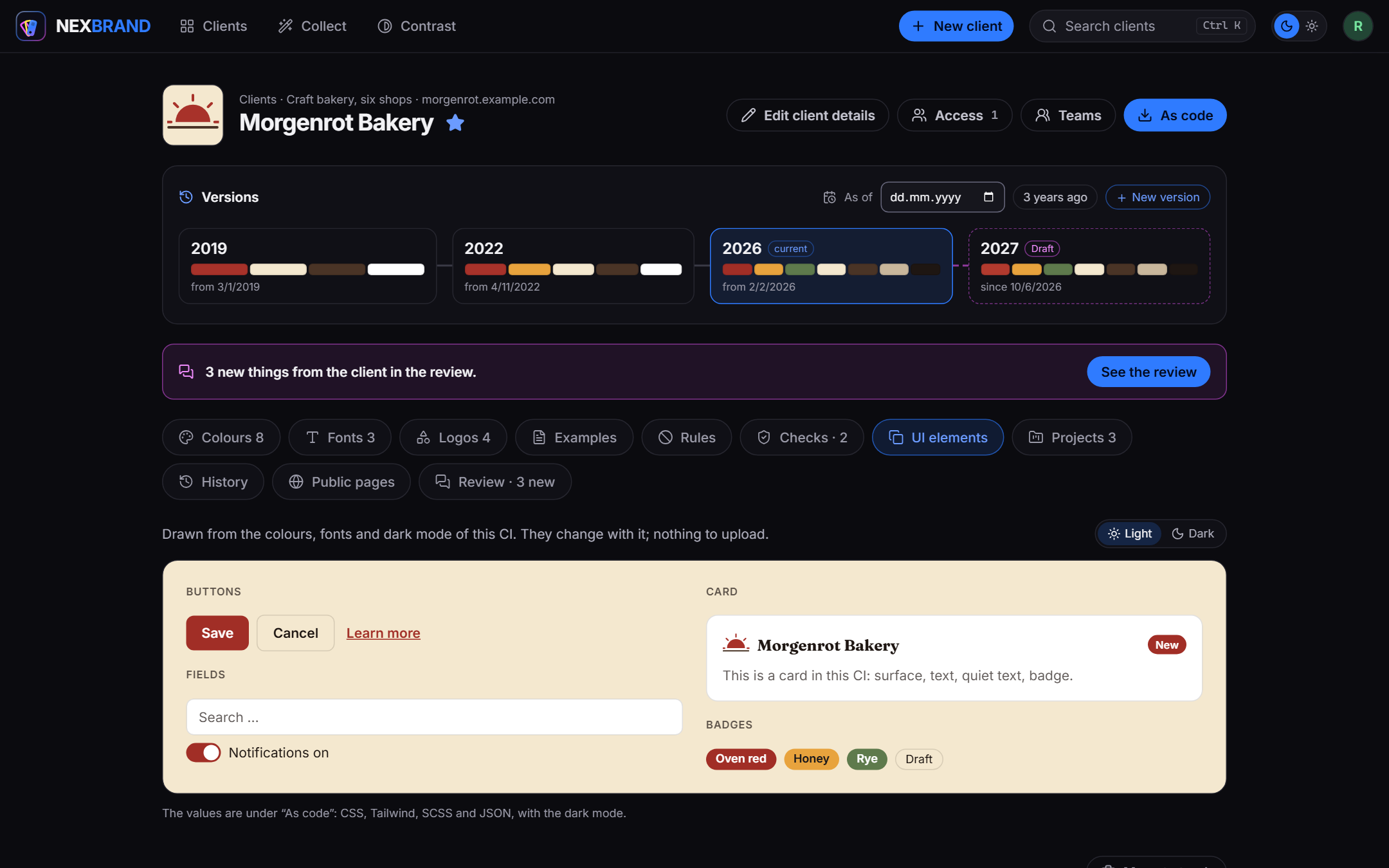
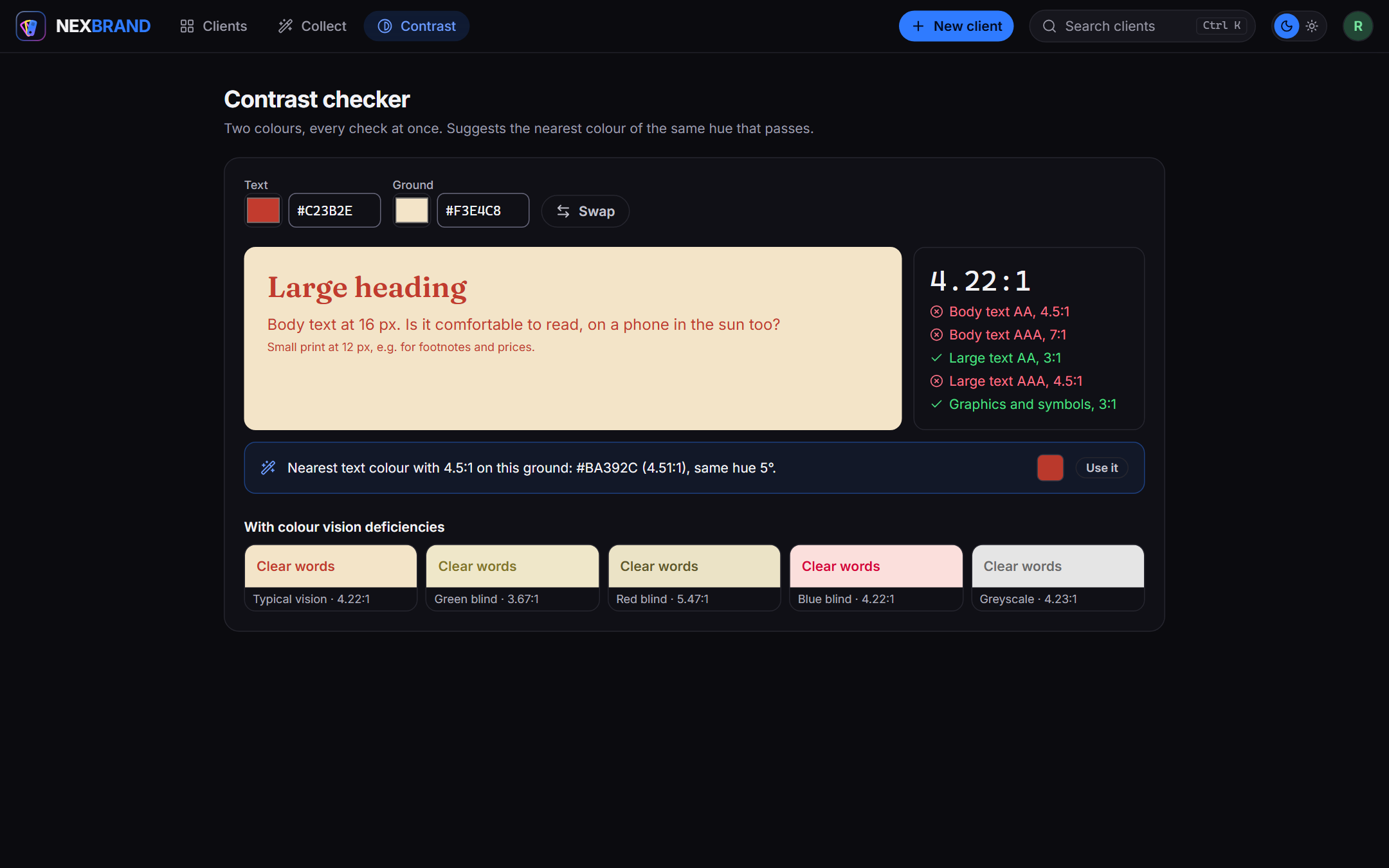
UI elements drawn from the CI, in its light and its dark mode, and the contrast checker, which proposes the nearest colour of the same hue that passes.
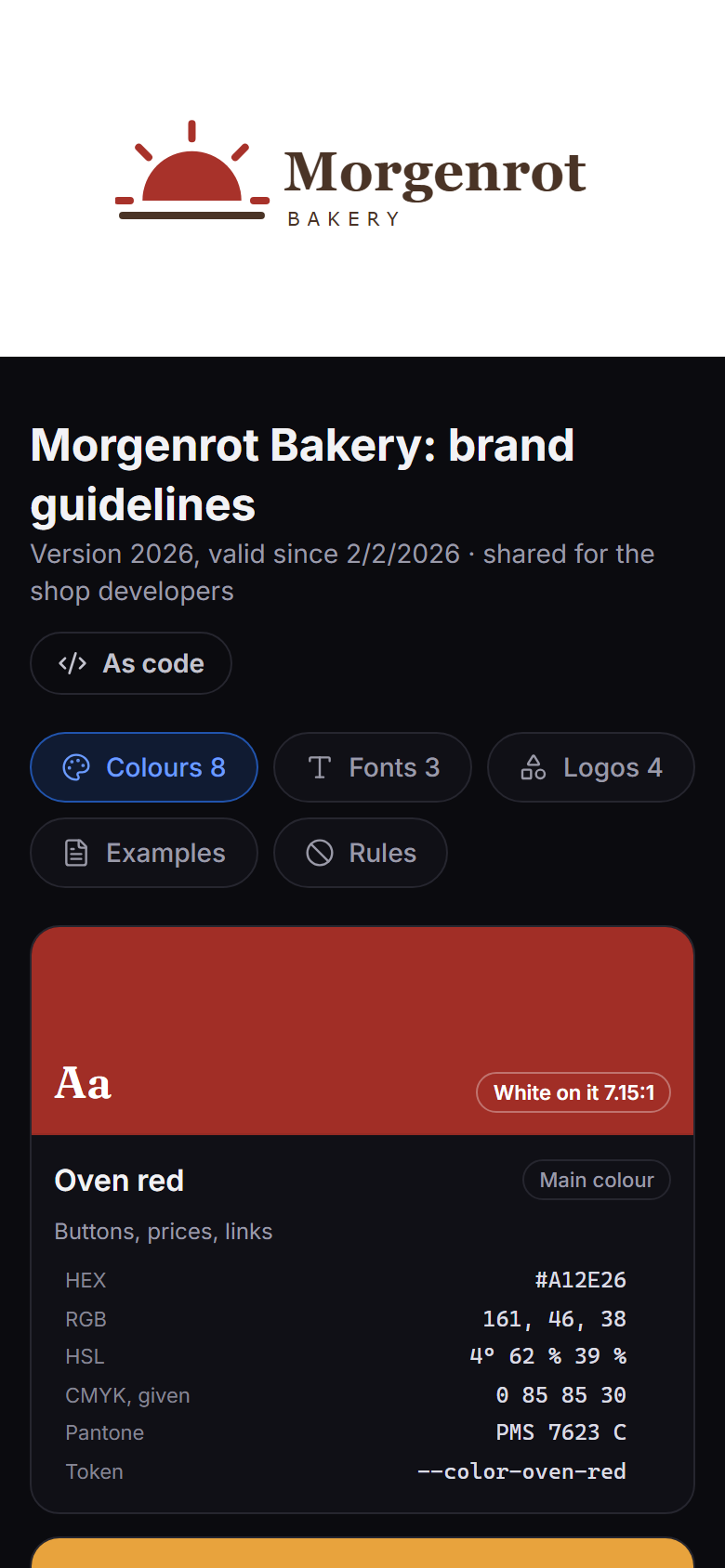
Light and dark, and on the right the public page a developer gets: the design set read only, also as code, without an account and with an end date.
What it does
- Clients and their design sets. A client has colours with roles (primary, secondary, accent, neutral) and their print values, fonts with their licence, logos with the ground they belong on, a type scale, do's and don'ts, and example files. Each colour shows its scale from 50 to 950, contrast with white and dark, RGB, HSL and CMYK.
- Versions on a time line. Every change becomes a draft first; publishing freezes it with the day it applies from. "As of" shows the design set of any day, "three years ago" is one click. Two versions side by side show what changed, colours with their distance, and how the checks changed with them.
- Projects keep their version. A project (a website, a reprint, a trade fair) is pinned to the version it was made with and may have colours of its own. It moves to a newer version only when somebody moves it, so a reprint looks like the original.
- Checks that are computed, never written by hand. Contrast of every pair by WCAG 2.2, logos at 3:1 against their ground, how the colours look with colour vision deficiencies (Machado 2009), colours nearly the same (CIEDE2000), body text too small, fonts that may not leave the house. A contrast calculator proposes the nearest colour of the same hue that passes.
- The workbench for a new CI. Start from a few words, a picture, one colour or nothing: harmonies, neutrals with a touch of the main colour, a font pair, sizes from a base and a ratio. A sample page and the checks run next to it while you work. Until a logo exists, a word mark from the name keeps developers going.
- Review with the client. A link without an account shows the directions as sample pages; the client comments and picks one, and the choice becomes version 1.0. With a mail server set up, nexbrand mails the link as well.
- Collect from what exists. A website, a GitHub repository or a PDF style guide provides its colours, fonts and logos. The values are always measured; rules or your own AI service sort them. The result is a draft, or a check of a site against the CI that finds the nearly right shades and the foreign fonts.
- As code. Every version as CSS variables, a Tailwind 4 theme, SCSS or design tokens (JSON), with scales, fonts and the type scale with size, line height and weight. Public pages show a design set read only, a fixed version or always the current one, with an end date and a password if you like, and hand a developer the same code without an account.
- For programs and AI tools. API tokens read design sets over
/api/v1and over MCP, so an AI in an editor builds with the right colours. A token of the level "draft" writes a redesign back, as a draft; publishing stays with a person. - Your own AI, if you want one. Each account may enter its own service: a hosted one, Ollama at home, or any other with the usual chat interface. It sorts what was collected and proposes directions for a new client. Off until the operator allows it; every request is listed word for word for 14 days.
- Access per client. People and teams get access to a client, to read, write or manage it; whoever creates a client manages it, and the operator decides whether members may create clients. Teams are the operator's; the lead of a team changes its members only when the operator allows it (off from the start). A client somebody may not see answers like one that does not exist. Clients go to the trash for 30 days.
- Around it, as in nexlore. Accounts by invitation (the mail, like the operator's test mail, in the receiver's language when an account with that address has one, else in the sender's), blocked and let in again by the operator (a blocked account hears so only after its right password; the links it made for clients stay until the operator withdraws them), second factor with recovery codes, sign-in through an OIDC provider with a button for authentik, a log in four levels, German and English plus languages the operator adds as JSON files, backups of the database together with every file, with a check before going back.
Start
services:
  nexbrand:
    image: ghcr.io/derkezorm/nexbrand:latest
    container_name: nexbrand
    restart: unless-stopped
    ports:
      - "8540:8000"
    volumes:
      - ./data:/data
    environment:
      PUID: 1000
      PGID: 1000
      TZ: Europe/Berlin
docker compose up -d
Built from source instead: clone this repository, put build: . in place of image: and run
docker compose up -d --build.
Open http://<your-host>:8540. The first account you create there is the operator. It needs the setup code
from the server's log, so that nobody who reaches a fresh instance first can take it:
docker logs nexbrand
shows the setup code, new at every start until nexbrand is set up. To choose it yourself, set
NEXBRAND_SETUP_TOKEN. docker-compose.yml in this repository has the same service with every option explained.
Put nexbrand behind a reverse proxy with TLS before you use it from anywhere but your own desk.
nexbrand on the internet
nexbrand is made to be reachable from outside, for yourself on the road or for a small team. Before you open it:
- Set it up first, from your own network, with the setup code from the log. Only then forward a port.
- TLS at a reverse proxy, and nexbrand reachable only through it: publish the port as
127.0.0.1:8540:8000when the proxy runs on the same host, or keep both on a Docker network without a published port. Send HSTS from the proxy. - Tell nexbrand about the proxy:
NEXBRAND_PUBLIC_URL(the address people use),NEXBRAND_TRUSTED_PROXIES(the proxy's address or network; without it every sign-in seems to come from the proxy and the brake against guessing cannot tell people apart: a browser that signed in as that name before still gets in (until a new password, a block or signing out everywhere), any other waits; Settings, Server says so while it is missing), andNEXBRAND_COOKIE_SECURE: "on". - A second factor: set up your own under My account, Security. Or sign in through your OpenID Connect provider.
- Leave the switches closed you do not need: public pages, API tokens, collecting from websites and AI are off until you open them.
- Optionally keep the operator's settings at home:
NEXBRAND_OPERATOR_NETWORKS: "192.168.0.0/16"refuses them from anywhere else (behind a proxy only together withNEXBRAND_TRUSTED_PROXIES). - Backups somewhere else: they contain everything, logos, fonts and files included. Copy one off the machine now and then, as carefully as the data directory, and try a restore with "Check".
- Pin a version instead of
latest, update on purpose, back up before.
Where things are stored
Everything lives in /data: the SQLite database nexbrand.db (accounts, teams, clients with their access,
versions and projects), media/ (logos, fonts and example files, the same file stored once), secret.key, backups/, logs/,
locales/.
Mount it from a local disk, never from an SMB or NFS share: SQLite's locking does not work reliably over network
filesystems.
Back it up with nexbrand's own backups (Settings, Server, Backup), which copy the database consistently while it runs and take every file along. A backup is a plain ZIP; whoever has it has everything, so keep downloaded copies as carefully as the data directory itself.
Moving to a new server: download a backup, set up nexbrand there, upload the backup under Settings, Server, Backup, check it and restore it. Afterwards the new server has the old accounts, clients, versions and files.
Updating
With an image: docker compose pull && docker compose up -d. Built from source: pull the new code and run
docker compose up -d --build. nexbrand adds what the database lacks at the start; nothing needs doing by hand. Make a backup before a big jump anyway.
Environment
| Variable | Default | Meaning |
|---|---|---|
NEXBRAND_DATA_DIR |
/data |
Database, files, logs, backups, languages |
NEXBRAND_MEDIA_DIR |
<data>/media |
Logos, fonts and example files |
NEXBRAND_LOCALES_DIR |
<data>/locales |
Extra languages, one JSON file each |
NEXBRAND_SECRET_KEY |
created on first start | Protects server-side secrets; when set, it wins over secret.key |
NEXBRAND_PUBLIC_URL |
from the request | The address people use to reach nexbrand, for invitation links, public pages and the OIDC redirect. The setting in the interface wins when set |
NEXBRAND_TRUSTED_PROXIES |
none | Addresses or networks of reverse proxies whose X-Forwarded-For is believed, comma separated |
NEXBRAND_SETUP_TOKEN |
created at start | The code the first account needs |
NEXBRAND_OPERATOR_NETWORKS |
none | Networks the operator's settings may be changed from, comma separated |
NEXBRAND_UPLOAD_MAX_MB |
50 |
The largest file; the operator can lower it in the settings |
NEXBRAND_SESSION_DAYS |
30 |
A browser session ends after this many days |
NEXBRAND_LOG_LEVEL |
stored setting | quiet, normal, detailed or trace; overrides the setting |
NEXBRAND_COOKIE_SECURE |
auto |
on, off or auto (from the request or X-Forwarded-Proto) |
NEXBRAND_API_DOCS |
false |
Serves /api/docs and /api/openapi.json |
PUID, PGID |
1000 |
Owner of the files in the data directory |
For programs and AI tools
Build pipelines, scripts, nexdeck and AI tools in an editor read design sets with an API token: as JSON, as CSS, Tailwind, SCSS or design tokens, of any version or day, with a project's own colours. Over MCP an AI checks contrast, compares versions, audits the colours in code against the CI, and with a draft token writes a redesign back as a draft. Off until the operator switches it on; every account then creates its own tokens, which see only the clients chosen and run out after 90 days unless somebody wants more on purpose. Everything is in docs/api.md.
Security in short
- Passwords are hashed with Argon2id; failed sign-ins lock an account for a while, and a brake per sender slows guessing on top. With a second factor, the password alone opens nothing. A lock from guessing leaves the account's API tokens working, so nobody switches a program off with ten wrong passwords.
- Every changing request needs the header
X-Nexbrand-Client, which a page on another site cannot send. - A client somebody may not see answers exactly like one that does not exist, in every route.
- A published version never changes; drafts from tokens or collecting stay drafts until a person publishes them. One published to apply from a later day applies from that day on, in the app, the code and the API alike.
- Fonts marked internal never leave as a file: not on public pages, not through a token or MCP, not as an example or a logo download either.
- The links of public pages and reviews are keys: from the right to write for a client up a person sees, copies and creates them; readers only see that there are some.
- Collecting fetches only public addresses, resolved and checked by nexbrand itself, every redirect again, with size limits; a key for GitHub never follows a redirect to another host. An AI service in the own network needs the operator to name its host.
- Files are served with their own sandboxing policy; whatever a browser would not show by itself is a download.
SVG logos are shown as pictures, never as pages, and an SVG with a script, an event attribute, a
javascript:address, embedded HTML or a DOCTYPE is refused on upload. A picture's pixels are counted before it is decoded. - Deleting a client for good takes the own password, as do the operator's acts on other accounts.
- After signing in, nexbrand only ever sends the browser to one of its own pages, never to another address.
- The log never contains a client's design, passwords, keys or tokens.
- Names and titles contain no control characters, wherever they come from, and every answer asks search engines not to index it, the public pages too.
Development
cd backend && python -m venv .venv && .venv/Scripts/python -m pip install -r requirements-dev.txt
.venv/Scripts/python -m uvicorn app.main:app --port 8540
cd frontend && npm ci && npx vite
On Linux the virtual environment's programs are in .venv/bin. The frontend on port 5540 sends /api to the
backend. Tests: python -m pytest -q in backend, npx vitest run in frontend.
License
AGPL-3.0.
The buttons use the Lucide icons (ISC, partly MIT from Feather); their notice is in
frontend/public/licenses/lucide.txt and ships with the app at /licenses/lucide.txt. The nine fonts of the
workbench's catalog are under the SIL Open Font License, their notice at /licenses/fonts.txt. Everything else nexbrand ships or depends on, with its licence, is listed in
THIRD-PARTY.md.
Categories
Related apps
Explore more like this
Explore allDetails
ghcr.io/derkezorm/nexbrandRuntime arguments
- Web UI
http://[IP]:[PORT:8000]/- Network
bridge- Shell
sh- Privileged
- false
Template configuration
Port you reach nexbrand at. Container port: 8000
- Target
- 8000
- Default
- 8540
- Value
- 8540
Holds the SQLite database with accounts, clients, versions and projects, the logos, fonts and example files, the key secret.key, backups and logs. Keep it on a local disk, not on a network share.
- Target
- /data
- Default
- /mnt/user/appdata/nexbrand
- Value
- /mnt/user/appdata/nexbrand
User id that should own the files in /data. 99 is the Unraid default.
- Default
- 99
- Value
- 99
Group id that should own the files in /data. 100 is the Unraid default.
- Default
- 100
- Value
- 100
Time zone for timestamps in the log and the versions of a client, for example Europe/Berlin. Leave blank for UTC.
- Target
- TZ
The code the first account needs to become the operator. Leave blank: nexbrand makes a new one at every start until it is set up and writes it to the container log.
- Target
- NEXBRAND_SETUP_TOKEN
The address people use to reach nexbrand, for example https://brand.example.com when it sits behind a reverse proxy. Used for invitation links, public pages, review links and the return address of OpenID Connect. Leave blank to take the address of the request; the same can be set later in the settings.
- Target
- NEXBRAND_PUBLIC_URL
Addresses or networks of your reverse proxies, comma separated, for example 172.16.0.0/12. Only their X-Forwarded-For is believed; without it every sign-in seems to come from the proxy and the brake against password guessing cannot tell people apart.
- Target
- NEXBRAND_TRUSTED_PROXIES
Leave this empty unless you switched Network Type to Host. In bridge mode the WebUI Port above already does the job and setting this will break it, because the mapping still points at 8000. On host networking the port inside the container is the port on your server, so use this to move nexbrand off 8000 if something else is already there.
- Target
- NEXBRAND_PORT
Protects the server-side secrets (the OpenID Connect client secret, the mail password, second-factor seeds, keys for collecting). Leave blank: nexbrand creates one on first start and keeps it in /data/secret.key.
- Target
- NEXBRAND_SECRET_KEY
auto marks the session cookie Secure when the request arrived over https, also behind a proxy that sends X-Forwarded-Proto. Use on only if a proxy terminates TLS and forwards plain http without that header, and never if nexbrand should also be reachable over http, or nobody can sign in. off never marks it.
- Target
- NEXBRAND_COOKIE_SECURE
- Default
- auto
- Value
- auto
The largest logo, font or example file in megabytes. The operator can lower it in the settings.
- Target
- NEXBRAND_UPLOAD_MAX_MB
- Default
- 50
- Value
- 50