

nexbooks
Docker app from DerKezorm's Repository
Overview
Readme
View on GitHubnexbooks
Your e-books and audiobooks, on your own server. A library to read in and listen to in the browser, with one book holding all its editions: the e-book and the audiobook of the same work sit side by side, each with its own place (they may be different editions, a shortened recording, another translation), so nothing is carried over between them. One container, SQLite, and your books stay plain files in your folders.
Early days. This is the first release. It does what is written below, and it has been tried on invented libraries in Chromium, Firefox and the WebKit of the tests; Safari on a Mac, an iPhone or an iPad has not been tried yet. Expect rough edges, keep a backup, and open an issue when something is wrong. Do not rely on it yet.
nexbooks manages, reads and plays books, and can fetch them. It reads the folders you point it at and changes nothing in them, unless you turn on tidying (Settings, Tidying): renaming and moving by a scheme, after a preview and your confirmation, never overwriting anything, with a way back. Books also come into a library by what you upload and by what fetching files there (below, "Settings, Acquisition"). In those two cases, and when tidying is on, a file that lies twice in one book, byte for byte, goes to the library's trash; in every other library nothing is touched, and such copies are only named. A book can be moved into another library you look after (its page, "Move to another library"), with its place, bookmarks and history kept.
Notes on use. nexbooks comes with no indexers and no sources of books. The operator enters them (Settings, Acquisition) and is responsible for loading only content they may use. nexbooks never gets around a copy protection: protected books are recognised and turned down. A few things are off until the operator turns them on: seeding of torrents, and Audible.
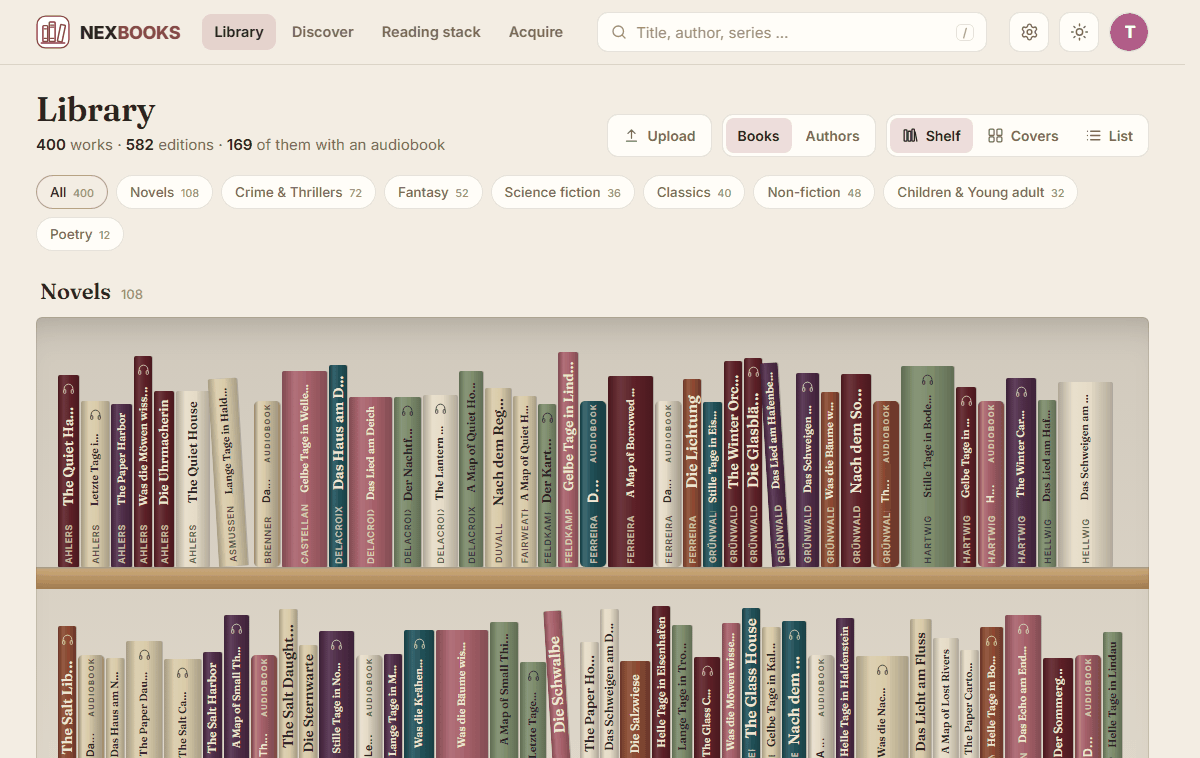
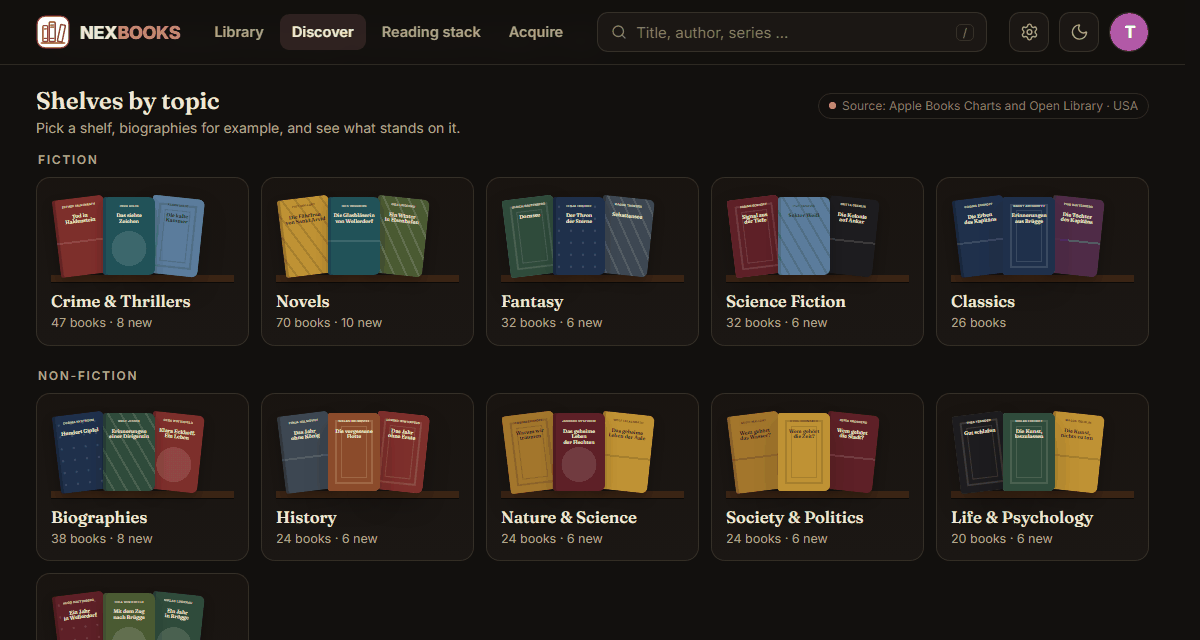
- A shelf of spines. Every genre is a shelf; a spine is as wide as the book is thick and has the colour of its cover. Pressing it turns the book to its cover and opens its page in the colours of the book. Covers and a sortable list are one switch away, and so is an overview of the authors with their photos.
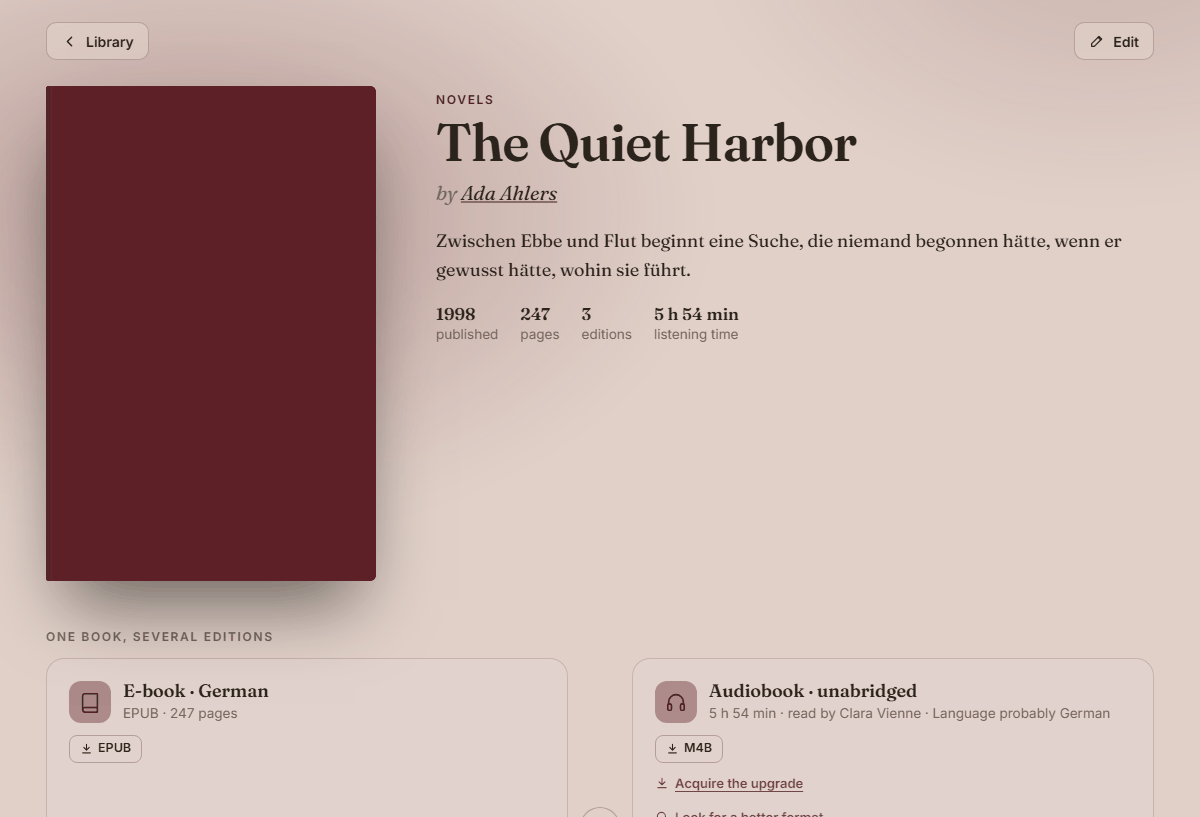
- One book, several editions. EPUB, AZW3 and MOBI of one book are one edition; the e-book and the audiobook are twins of one work, each with its own place. A translation or an abridged recording is another edition of the same book.
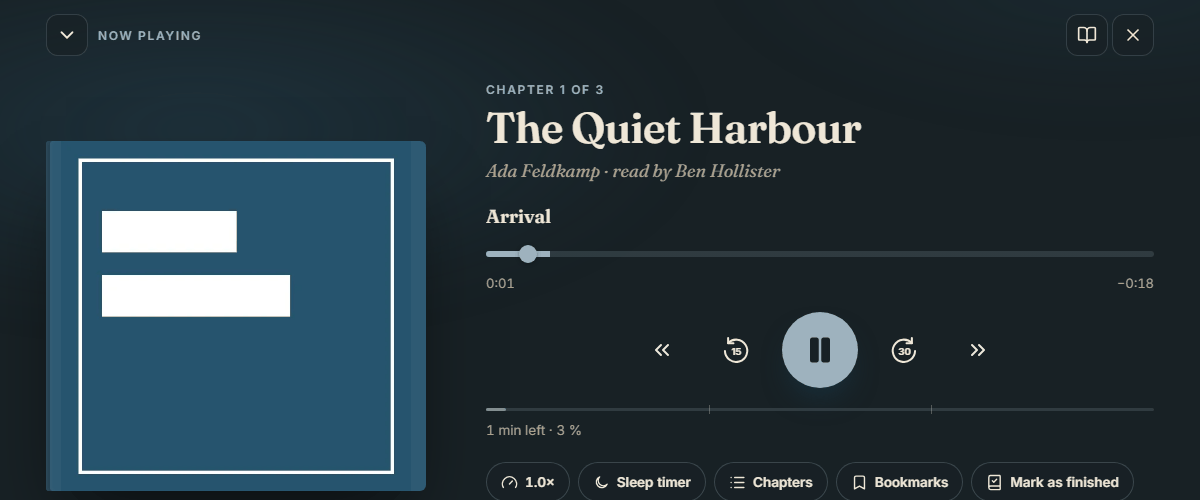
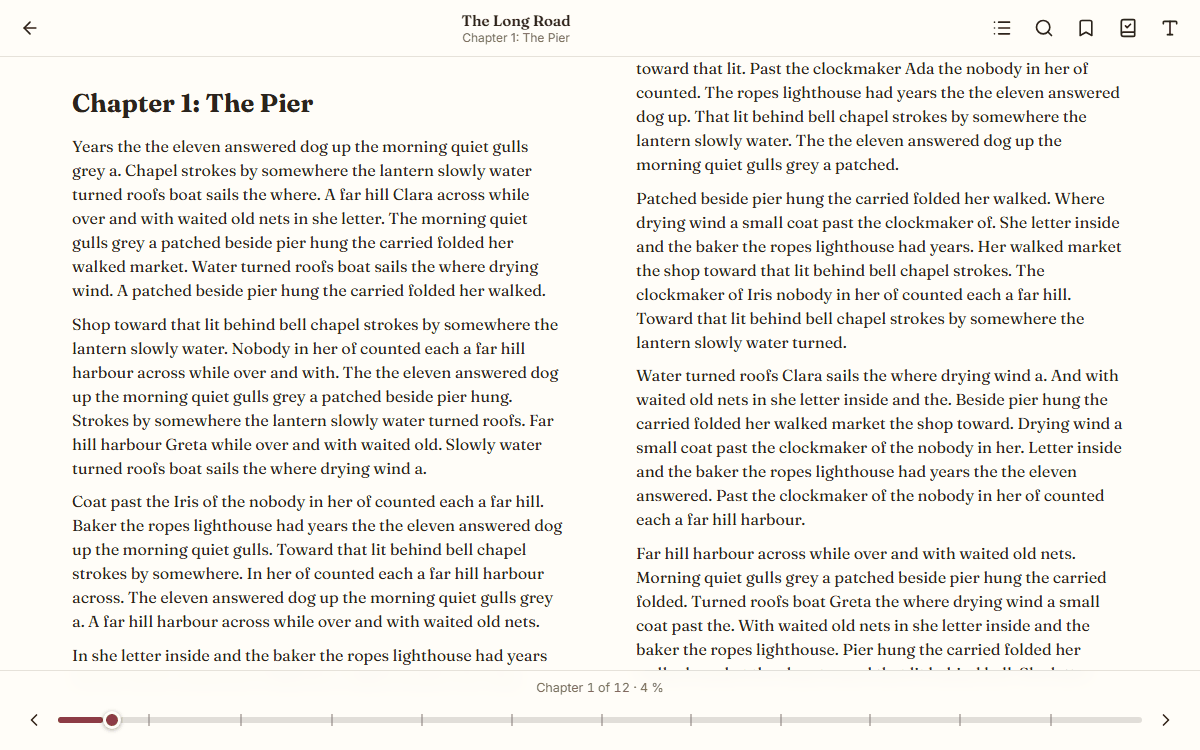
- Reading and listening in the browser. An e-book reader (EPUB, MOBI, AZW3, PDF) and a player for audiobooks with chapters, speed, a sleep timer and the lock screen. The place is kept on the server, for every person on their own.
- Discover. Best sellers, new and coming books for several countries, what is read now, and the gaps in the series you read, with a wish list. What you already have is hidden.
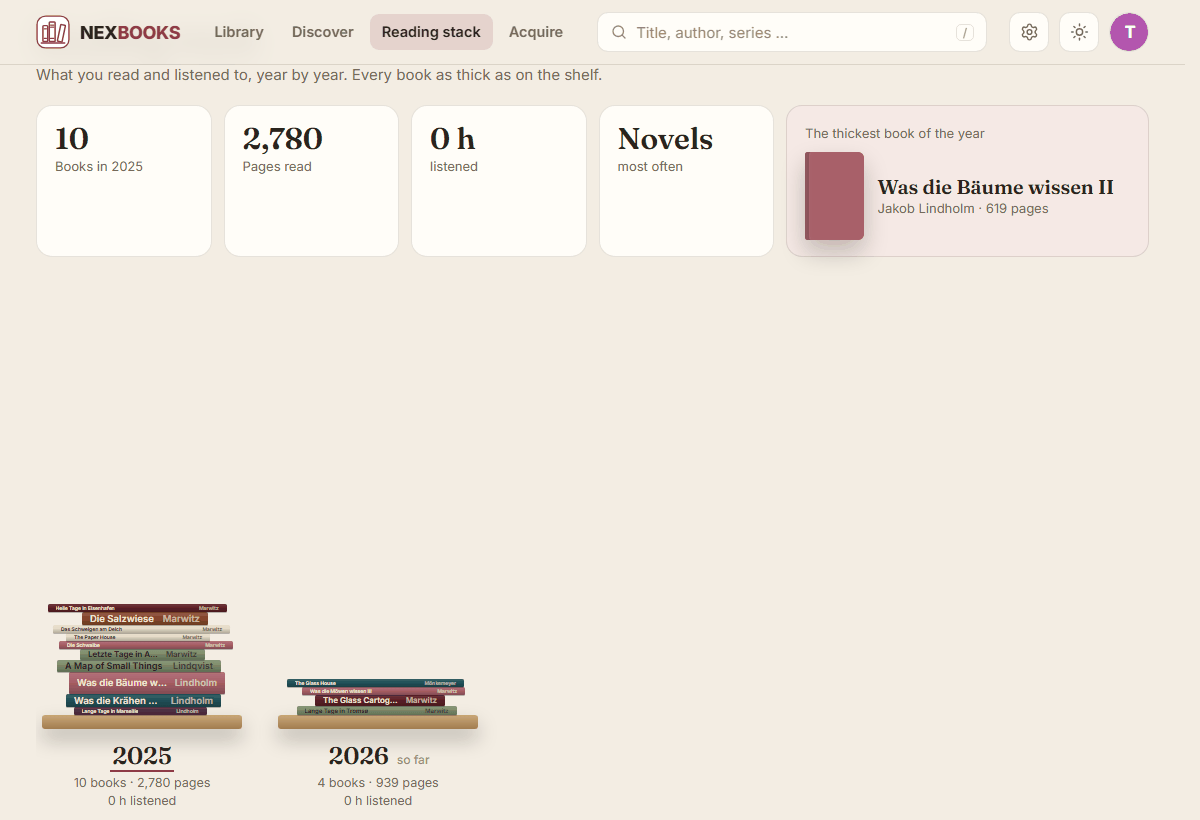
- The reading stack. A tower of books for every year, each as thick as it is on the shelf, with a look back.
- Mine to keep. The books are not in nexbooks's data folder and not in its backup: they lie where you keep them, as files, and belong in the backup your server makes anyway.
- Several people. Each person has their own progress, shelf and lists. The operator decides who sees which library, and the operator does not see what the others read or listen to.
- Best kept at home. nexbooks is meant for your own network; from on the way, reach it through a VPN. It comes with
a second factor from the start, passkeys, sign-in through your own provider and a checklist in the settings.
Everything the web app does goes through an open API (
/api/v1) for your own tools.
 |
 |
 |
 |
 |
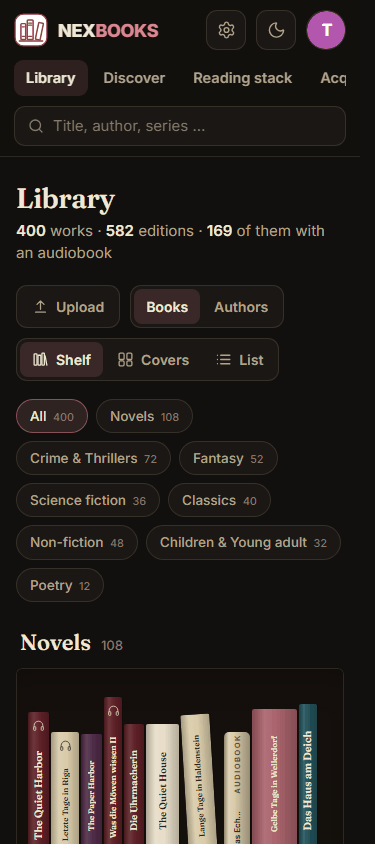 |
nexbooks is one of the nex apps and looks like them: warm paper by day, a dark reading room by night, Bordeaux as its colour. The pictures show an invented library: none of these books exists.
Start
services:
  nexbooks:
    image: ghcr.io/derkezorm/nexbooks:latest
    container_name: nexbooks
    restart: unless-stopped
    ports:
      - "127.0.0.1:8580:8000"
    security_opt:
      - no-new-privileges:true
    read_only: true
    tmpfs:
      - /tmp:size=256m,mode=1777
    cap_drop:
      - ALL
    cap_add:
      - CHOWN
      - DAC_READ_SEARCH
      - SETUID
      - SETGID
    volumes:
      - ./data:/data
      # Your books, read-only: nexbooks writes into them only if you turn on tidying (then drop the ":ro").
      # Make a library of the folder in Settings, Libraries.
      - /path/to/your/books:/books:ro
    environment:
      PUID: 1000
      PGID: 1000
      TZ: Europe/Berlin
docker compose up -d
The container may not gain rights later and keeps only what its start needs: setting the owner of /data (CHOWN,
DAC_READ_SEARCH) and dropping from root to the user nexbooks (SETUID, SETGID). nexbooks itself runs as that
user, with none.
Built from source instead: clone this repository, use docker-compose.yml as it is (it has build: .) and run
docker compose up -d --build. The file has every option explained.
Open http://127.0.0.1:8580 on that machine (the port listens only there; the comment in
docker-compose.yml says how to change that). The first account you create there is the operator.
It needs the setup code from the log, so that nobody who reaches a fresh instance first can take it:
docker logs nexbooks
shows the code, new at every start until nexbooks is set up. To choose it yourself, set NEXBOOKS_SETUP_TOKEN. Right
after the password the account sets up its second factor; then the operator invites the others by link. Everything
personal is under "My account" for everybody; "Settings" is the operator's and holds the server.
Libraries and the scan
A library is a folder of books that the operator makes known (Settings, Libraries): a name, a folder below
/books, and what it holds (e-books, audiobooks or both). Mount your books read-only at /books (see the compose file
above); the operator may only choose folders at or below NEXBOOKS_LIBRARY_ROOTS, never the data folder and never a
folder that overlaps another library. The operator decides who sees which library (read; acquire to also ask for books to be fetched; manage to also start a
scan); a person sees the books of their libraries and of no other, the operator included.
Settings, Acquisition (the operator's) is where nexbooks is told where books come from: indexers (Newznab and Torznab,
each tested before it is saved, with the book categories it lists chosen for your language), a Prowlarr whose indexers it
takes over and keeps in step, and download programs (SABnzbd, NZBGet, qBittorrent, Transmission, Deluge; nexbooks makes
its own category nexbooks in them and reads it back). Also the formats (a ranking per kind with a tick for each, PDF off
from the start), the languages, the library the books go into (with a check that nexbooks may write there), the naming and
the settings of the automatic work. Who may acquire in a library opens "See releases" on the page of a book (a missing
e-book or recording, a better format than the one there is) or of a book of the sources: every indexer is asked at once,
each release is judged (author, title, volume, language, format, abridged or a play, bundle, sample) with the reasons as
words, the best one by your ranking comes first, and one click hands it to the download program. Wishes: Acquire on a book asks for it, as an e-book, a recording or both,
in a language and for a library; nexbooks searches at once and (with the main switch on) loads the best release that passes. The
page Acquire shows what is wished, what runs (progress, time left, the seed goal), what needs you (a folder it cannot find with
a suggestion to confirm, a library it may not write in, a job it lost, a question of the check) and what became of everything,
and the blocklist. A book that was fetched and is not the one wished: "Wrong book" on its page (Edit) sends it away. The files go into
the trash of the library, the release is blocked, the history keeps a line, and a new wish looks for another release. What people had
in the book (place, bookmarks, finished passes) is kept with the files and comes back when you take them out of the trash.
The automatic work: with the main switch on, wishes that found nothing are searched again in the time you chose (1 to 24 hours,
one wish at a time, the one that waited longest first), the newest entries of every indexer are read (every 5 to 60 minutes) and
held against the wishes, a book that is not out waits for its day, an indexer that reached its limit of the day (midnight of
your time zone) keeps its wishes waiting while the others go on, a failed download is replaced at once by the next release,
and a book below the goal of your ranking is looked for in a better format. A wish has at most the number of downloads you chose
in 24 hours; one that found nothing for a week is looked for once a day, after a month once a week; what nexbooks does by itself
uses at most 70 percent of an indexer's limit of the day, the rest is for new wishes and "Search now". Settings, Acquisition,
Automation shows when it last ran and comes back next and what it did (numbers only).
Checking and filing: a finished download is read by the same readers as the scan (the language in the EPUB, title, author,
series, a recording's tags and running time) and held against the wish; what passes goes into the library by your naming scheme
(a torrent linked, so that it can go on seeding if you choose to seed; a Usenet download moved; else copied; never over a file), joins the work it was wished for,
and the wish is done. A release in another language, another volume, a format you did not tick, a program or script in it, or an
archive that is not safe to unpack is blocked and the next one is looked for; nothing of it goes into a library. A recording
whose running time fits an abridged version, a bundle that does not say which volume is which, or files that name another title
wait for you under "Needs you". A better format replaces a worse one (the old one goes into a hidden trash in the library for 30
days, Settings, Acquisition, Formats); a place in an e-book is carried over by its share and the reader is told.
Upload: "Upload" in the library and on a missing form of a book takes the files of a book from a computer or a phone (EPUB,
PDF, AZW3, MOBI, M4B, MP3, M4A, FLAC; an audiobook as several files or a ZIP) and files them the same way. It needs the right
acquire and a library nexbooks may write in.
Seeding is off from the start: a torrent leaves its program once the book is filed. Settings, Acquisition, Automation
lets you choose a ratio of 1.0 or seven days instead; with "not at all" the torrent goes even when the tracker asks for a
ratio or a minimum time, which private trackers often do. A choice made in an earlier version stays.
Keys and passwords are sealed and never shown again, and every request goes to the address you typed and to no other host.
nexbooks reads the folder in the background (once an hour unless set otherwise, and on "Scan now") and recognises what it finds, without touching a file:
- E-books: EPUB (title, authors, language, ISBN, series, cover, table of contents), PDF (title, author, pages),
AZW3 and MOBI (the header). Audiobooks: M4B, M4A, MP3, FLAC, Ogg and Opus (tags, running time to the second
(an MP3 that does not say its length has its frames counted), chapters, cover). Files beside a book are read as well:
metadata.json(Audiobookshelf),metadata.opf(Calibre),cover.jpgandfolder.jpg. What a file says about itself wins over a file beside it, and that over its name. - One book, several forms. The same book as EPUB, AZW3 and MOBI is one edition with three files (all stay where
they are); the parts of an audiobook, also in
Audio,MP3,CD 1andCD 2folders under the folder of the book, are one edition (the number in a name likeTitle-1v6is the part, never the title); a folder of a series with a numbered folder for each book (1 - Title,2 - Title) is one book for each; the e-book and the audiobook of the same work are twins of one work. Volume 2 of a series is never volume 3, and an author is never matched by the last name alone.ßandss,äandaeare the same letters in a title and in a name. A pen name and a real name are one author only on proof (the other names Hardcover knows, or the same ISBN or ASIN), never by a guess; the page of a book then shows the real name with the pen name beside it ("as ..."). - Only what changed is read again. A file changed in the last minute waits for the next run. Links are never followed (they are listed under the library's problems), a folder that is gone, or holds no book while nexbooks knows books in it (a stray file of an unmounted share does not count as a book), stops the run instead of marking everything missing; a walk of more than 500,000 entries marks nothing missing for what it did not see. A file that cannot be read, a name that is no valid text (bytes that are no UTF-8) and a fault while one book is put together go on the list of problems and do not stop the rest; only a fault of the database or the folder ends a run. Files that are gone are marked, never deleted.
- A book in two libraries is seen as the libraries of the person show it. If the e-book lies in one library and the audiobook in another, a member of only the second reads, off the book, what the audiobook says (its description, series, genre, pages, authors, cover, when it came) and nothing the first copy says.
- The pages of an EPUB are an estimate (an EPUB has none): the amount of text divided by what a printed page holds. A PDF is counted.
Removing a library takes it out of nexbooks; the files stay where they are.
Matching with sources
nexbooks can ask sources on the internet about the books it found, to fill in what the files leave empty: the series and the place in it, the description, the genre, the year, the cover, the narrators, and, for a recording, which recording it is (the unabridged reading, an abridged one or a play, proven by its running time within 5 percent, which needs Audible). No source is required and none belongs to the project. Settings, Sources has a main switch and one per source:
| Source | From the start | |
|---|---|---|
| Open Library | on | Nothing to set up. |
| Audible's catalogue (a market at a time) | off | The operator is asked once, when setting up acquisition or opening the sources, and chooses "Use Audible" or "Without Audible" (Settings, Sources changes it later). An unofficial interface: nexbooks only reads, slowly, and keeps what it read for a day. What Audible brings: the running time of a recording, which proves the version (the unabridged reading, a shortened one or a play) and so keeps wrong and shortened recordings out, and the audiobook lists of Discover (new and coming). Without it everything else goes on; a downloaded recording that nothing proves is not filed as the unabridged one on a guess, a person decides (under "Needs you"). |
| Hardcover | not connected | A read-only token of your own (hardcover.app/account/api), pasted into Settings, Sources. Its sign-in by device code is not built in. |
| German National Library | on | For German titles only: the author, the year of the first edition, the ISBN, the series and the subject group the genre comes from. |
| The national libraries of France, Sweden, the Netherlands and Norway | on | Nothing to set up. Only the page of an author asks them, for the titles of their language. |
| Apple Books Charts | on | Nothing to set up. Only Discover reads it: the best-selling e-books of a country, and of each genre for the shelves of Browse. |
| Wikidata and Wikimedia Commons | on | Nothing to set up. Only the photos and short biographies of authors come from it: a photo only when the author is certain (a book of yours is among their works) and only under a free licence, shown with its photographer and licence. No other source gives a photo. A photo called author.jpg in an author's folder is always read. One switch (Settings, Sources) turns the look-up of authors off. |
- What goes out is a title, an author and an ISBN. Never a file, a folder name or the name of a library.
- Slowly, and once: every source is asked at its own pace (Hardcover: 60 a minute, 5,000 a day), what comes back is kept for a month (a miss for a day; what Audible and Apple say, a day), and a source that fails rests for a while. With the main switch off nothing is asked and everything the files give stays as it is.
- Which sources, by language (Audible when it is on): a German book is asked at the German National Library and Audible (Open Library only when those do not settle it), an English one at Open Library, Audible and Hardcover, any other at Audible, Open Library and Hardcover. The genre is the majority of the voices of the file and the sources, and a book none of them classes gets the genre of most of the other books of its author in the same library, marked as a guess.
- Three answers: sure (applied by itself), maybe and open. The books that need a look are in a list for the people
who look after the library (a member with
manage), with the proposals side by side and the reason for each. A person can take a proposal, search for another, or leave the book as it is; what a person decided is never changed by a later run. To decide, a person can look into the book: the first pages of an e-book in the reader's own frame, a short listen into a recording (the start, a third in, the middle, the chapters), and what the file says (its name and folder, title, author, narrator, ISBN, publisher, year, language, running time, chapters, pages, the picture inside it) beside each proposal, with what the file contradicts told apart from what it says nothing about. Nothing of it saves a place or a bookmark. - The rank: a person, then the file, then a source. A source never replaces what the file says and never writes to it; files are never changed.
- A book in two libraries (an e-book here, its translation there) is one work for the sources and for the server, and each member still sees only the editions of their libraries and what those say.
Authors
Every author has a page, whether a book of theirs stands on a shelf or not: found by the search (/, the authors come
first, also by a pen name), from the page of a book, or from the authors of the library. The page shows every work the
sources know, put together from the editions, translations and recordings of one book, in the language of the person
(and all languages on request), sorted by series and kind (novels, stories, biographies, non-fiction, poetry, children's
books, collected editions), with what is announced and its date in each language, and the books under a pen name apart.
Each work says what you have of it (from your own libraries only), what is wanted, and what exists; "Get" and "Get all
missing" go through the usual dialog.
- Built in the background, never while you wait: when a page is looked at and its catalogue is older than a day. Which source is asked depends on the language: the national library of the language (German, French, Swedish, Dutch, Norwegian), Open Library and Hardcover for every language, Audible when it is on. Only the author's name goes out.
- A work counts when two sources know it (one is enough for a language only one source answers for). What kind of book it is comes from the libraries first; what nexbooks cannot place for sure stands under "Not placed for sure", is never fetched by itself, and can be moved by the operator or whoever manages a library (a move holds for everybody).
- One person, not everybody of the name: the sources number their authors (Open Library, Audible, the German library; the other national libraries by the years of the life), and the books of another person of the same name are left out. When the sources know several people of a name, the page says so, and a work no number proves stands under "Not placed for sure". Publishers' lines (a paperback line with its number, a collection of classics) are no series.
- A photo for an author without a book on your shelf only when two works of the catalogue are works of the person at Wikidata, never on one title.
- Your books by the strict rule: a book on your shelf is a work of the catalogue by its ISBN or by its title as a whole; a short title never counts as a part of a longer one.
- Watching an author. A switch on the page of an author ("Watch Edmund Halloran") makes nexbooks wish the author's new books for you, by itself. You choose the kind (e-book, audio book, both) and whether more than novels and stories counts (non-fiction, children's books, collections). Books are wished in one language: the first of the languages books are fetched in (settings, in the operator's order), or another of those you pick for the author; the language of your account plays no part. A book announced only in another of those languages (the English original before the German translation) waits on your wish list and is wished when it is announced in your language. The translation of a book you have in another language, and what may be no new book of its own (a graphic novel, a study guide, a school edition, a play, a part, a box, two novels in one volume, a new edition, a new translation), go onto your wish list instead of being wished: nexbooks reads the whole title, the subtitle and the part number the sources give, not only the short title. New means new in your language: the German translation of an English novel is new when it is announced, however long ago the original came out. A paperback or a new edition of a book that is out in your language is left alone; a new translation of it goes onto your wish list. A play beside a new novel holds back the audio book, not the e-book. A book announced for a year without a day is wished when its day is known, and a wish follows its book when the announcement moves. Books nexbooks could not place for sure are never wished. What the sources do not say cannot be seen: a recording with a cast that no source calls a play, an anthology that lists the author alone, an old book under a new title, a new edition whose earlier edition in your language no source knows (it looks like a first translation and is wished). Such a wish is an ordinary wish you can take away. When you switch it on, the books already announced are wished at once and wait for their day; what is out already is never wished (that is what "Get" is for). After that, nexbooks looks at the catalogue of every watched author when it is built again (at most once a day, one author at a time, people in turns, only while the sources have used less than half of their requests of the day, and never for an author nobody watches) and wishes what was announced since, and what came out since the last look. A book you have, or that is wished already (in whatever language), is never wished twice, and a wish you took away stays away; a book somebody else wished for your library already is shown as such. Without the right to acquire, new books go onto your wish list instead. With the main switch of the automatic work off, watching wishes nothing: switching a watch on saves it and says so, and its first look comes when the switch is on again. Watching may use at most half of your wishes of the day. Your wishes say "Through watching ..." in Acquire and on the wish list. Switching off asks whether the wishes already made stay (they do, by default). The watch is yours alone: nobody else reads whom you watch, the operator included. The wishes it makes are ordinary wishes, seen by whoever may ask for books in that library, without the name of the author you watch.
Browse
Browse is the first tab of Discover, like walking into a bookshop. A wall of thirteen shelves in three departments (fiction: crime and thrillers, novels, fantasy, science fiction, classics; non-fiction: biographies, history, nature and science, society and politics, life and psychology, travel; children and young adults: children's books, young adult books), a tile with three covers for each, and below it a strip of covers for each shelf with the tabs New, Popular now, Prize winners and Classics (the classics on the shelves of fiction and for children): only the tabs the sources have books for, because nothing is made up. A shelf opened has the filters (section, language, format, age, sort, and the topics of the shelf: the biographies of musicians, of scientists, of adventurers), a page at a time.
- The open sources alone fill the shelves. Open Library by subject (the books most wanted of the last years and the last two, the prize winners, the old ones still read, each with the title and the cover of the edition in the language of the market) and Apple's chart of each genre, in the market's country. Audible and Hardcover take no part: both are off or unconnected from the start, and a shelf is full without them. The sources are asked in the background, a day apart, only for a market somebody looked at, and with half of each source's daily limit at most.
- A thin shelf rather than a wrong book. A book of Open Library stands on a shelf only when its subjects say so plainly: whole subjects, never a word inside one ("Political science" is not science); three subjects for the shelf, or two that are a tenth of all; none the shelf rules out (a novel among the biographies, a romance among the crime novels); no content warning, no comic. A prize is named only from Open Library's structured tag of the prize, never from a word that may be about the author. The year of the first edition counts only when another edition backs it. A book of Apple's chart of a genre counts only when Apple files it under that genre. A book stands on one themed shelf, a section holds two books of a series and three of an author at most, and the shelves of non-fiction have no classics.
- Children and young adults begin with Apple's charts for them. A book of Open Library needs two subjects for children (or young adults) and none that speaks of grown-up content; no book stands there by an author of the shelves for grown-ups, and the classics for children come from Apple's chart of them alone (there are no classics for young adults: that chart is full of the classics of grown-ups).
- Pick up a cover. Rest the mouse on a cover for a third of a second: it lifts, and its back appears beside it in the colours of the book (the words, the length, the forms, Get, Save, View). A click opens the page of the book. On a screen without a mouse the first tap shows the back as a sheet from below; with the keyboard the space bar turns the cover over and Enter opens the page.
- Shelves made for you, on this server and nowhere else: because you read the book you finished last (more by the same people and series, then the shelves of its genre), like your favourite books (a favourite is a book you finished within five days of starting it, when its first report was near its beginning), short (under 250 pages, never a book for children) and for long evenings (books over 600 pages where a source says the pages, never a box of several books, and recordings over 20 hours, which only Audible tells). Nothing of what you read is asked of a source, and nobody else's reading shows in your rows.
- What you have is hidden by the same switch as the lists, by the libraries you may see and nothing else. Covers and descriptions of the shelves are kept for a day at most, like those of the lists. The covers of the first books of each section are fetched ahead in the background (never more than half of a source's day), renewed before the day is over, and the rest when they are shown; a book you have in a library shows the cover of your library and asks no source.
Discover
The tab Discover shows covers, never spines: best sellers (Apple Books Charts for e-books, Audible for recordings; a pre-order is not a best seller), new books (the Audible best sellers of the last eight weeks), coming books (Audible's pre-orders, the nearest first), what is read now (Hardcover's trends, with your token), and For you. Without Audible (off from the start) the new and the coming books come from the shelves of Browse, by their rules: the new books of every shelf, the newest first, and only the coming books a source gave a day for; without Hardcover what is read now is what the shelves rank highest, the first of every shelf, then the second. Pick the market (Germany, USA, UK, France, and more in a list), the format, the language and the genre; the sources behind the list are named to fit the filter.
- What you have is hidden (the switch is on from the start and kept in your profile). A book counts as yours by what you may see: the ISBN, the ASIN or the name a source gave your editions, else the same title and an author whose first and last name fit. A book that stands in a library you are not a member of is not on your shelf, and nothing in a list, a count or an order tells you otherwise.
- For you sets the series you read against what the sources know of them: a card for each series, your volumes and the ones you lack (dashed; a volume yet to come with its day), and more books of the authors on your shelf. The same ghosts stand in the small shelf of a series on the page of a book.
- The wish list is yours alone (nobody else reads it, the operator included). Taking a book off asks nothing and says "Undo"
for a few seconds. On the page of a book of the sources, Acquire asks for it to be fetched (for a member with the right
acquirein a library, see Settings, Acquisition). - The page of a book that is not on a shelf shows the forms the sources know it in (an e-book, a recording with narrator and running time, abridged, a play), in the colours of its cover.
- Nobody waits for a source. The lists are fetched in the background, at most once in twelve hours, only for markets somebody
looked at, two at a time; the covers are fetched by the server from the source's own host and kept in a folder of their own
(
<data>/foreign-covers). A cover and a description of a book of the sources are there to be shown: they are kept for a day at most, are in no backup, and come again when a list or a page needs them. The covers and the texts of your own books come from your files and are not touched. With the main switch off nothing is asked, and a page that has nothing says what is missing, with the way to Settings, Sources for the operator.
The shelf, the page of a book and the search
- The library is a shelf of spines, one section for each genre: the width of a spine is the pages of the book, the colour
is the colour of its cover, a recording alone is a case, a book that also exists as a recording wears headphones. The
genres are chips with their numbers; a second look shows the covers instead. Pressing a spine turns the book to its
cover and opens its page, in the colours of the book, at
/work/…(also after a reload). - A book and its editions are one page: the e-book and the recording side by side (the missing one dashed), further
editions below, each file to download, the series as a small shelf, more of the author. A member with
managecan correct what is written about an edition, take back what the sources said, make an edition a book of its own or put it under another book; each of those asks first and says whether it can be taken back. - The search (the key
/) finds the books of your libraries by the start of words in the title, the people, the series and the description, and shows the catalogues of the sources under it when you switched any on. It looks only at the libraries you are a member of: what other people have is not found and costs the search no time.
The list, the authors and the reading stack
- Three looks at the library: the shelf of spines, the grid of covers and a list, one line for each book: cover, title with its series, author, the editions as chips (formats; abridged, unabridged, play), language, genre (a guessed one marked quietly), year, pages or running time, your own place in the e-book and in the audiobook, and when it came. Click a heading to sort. A member who looks after a library also sees how sure the match is, with a way into the list of books to check. The look is kept in your profile.
- Authors. Beside "Books" a switch shows the authors with their photos, sorted by name, by number of books or by the
latest: a round photo (or the initials in the colour of the genre they write most), "12 books · 4 audiobooks". The page of
an author has a large photo, a short biography, the series as small shelves and all their books. A photo in the folder of
the author (
author.jpg,folder.jpg) is always used; otherwise Wikimedia Commons under a free licence, only when it is certain which author it is, with the photographer and the licence shown. Only authors with a book you may see are listed. - The reading stack. A book counts as finished when you read it to 98 percent or listen to nearly the end; on the page of a book you can also mark it as finished yourself, also for a day in the past, and take the mark back (it asks first). For every year there is a tower of the books you finished, each as thick as on the shelf (read in one colour, heard with the headphones), and a look back at the last year: books, pages, hours, the genre you read most and the thickest book. The stack is yours alone.
Reading in the browser
- Press "Read" on the e-book of a book (or "Continue reading" when you have begun): the book opens on the whole screen. It
takes the EPUB if there is one, else AZW3 or MOBI, else the PDF (
?format=pdfin the address asks for one). Turn pages with the arrow keys, the space bar, a tap at the edge of the page or a swipe; the middle of the page shows or hides the bars. Contents, bookmarks and the search in the book are in the panel at the left; the bar at the bottom says "Chapter 14 of 38 · 37 %" and has a stroke for every chapter. Parts of a book and the sub-points of a chapter are not counted as chapters. - The look is yours and follows you to every device: typeface (Fraunces, Inter or the book's own), size, line height, margins, colours (like the app, light, sepia, dark), justified text, pages or a continuous text.
- Where you are is kept: while you read and when you leave, on the server, for each person alone (the operator does not see it) and for each edition alone: the place in the e-book and the place in the audiobook of the same work are not compared and not carried over. Open the book on another device and it goes on where you stopped; if another device is further along than the one you opened, nexbooks asks whether to jump there. Of two reports from two devices the newest stays. The browser keeps a copy of your own last place per person and forgets it when you sign out, so the next person on a shared tablet finds nothing of yours.
- A copy-protected book is not opened. An EPUB with Adobe DRM or a Kindle file with DRM is named as such; nexbooks does nothing to get around the protection, and the file can still be downloaded.
- A book is code from somebody else. It is drawn in a frame that cannot fetch anything, its pages are cleaned before they are shown (no script, no frame, no form, nothing that leaves for another host, style sheets read the way a browser reads them), a page nested too deeply for a browser to draw is flattened, a book that claims to be small and unpacks to a great deal is stopped, and before every book the reader tries that a script in a page like a book's would not run in this browser. See SECURITY.md.
Listening in the browser
- Press "Listen" on the audiobook of a book (or "Listen on"): the player opens over the page in the colours of the book and plays. Fold it up and it plays on at the bottom of every page, while you move between the shelf, a book, Discover and the stack; the way back of the browser folds it up as well. An audiobook of many files (MP3 parts, CD folders) plays as one: the next file is loaded before the last one ends, and a jump crosses from one file into another. A file that is damaged or gone is named ("Part 2 of 3") and does not stop the book: a jump to another chapter plays on, or "Skip this part" goes on with the next one.
- Chapters come from the files (M4B chapters, MP3
CHAP, else one per file; files whose titles show that one chapter runs over several of them, such asChapter 1 (1/3)andChapter 1 (2/3), are one chapter, and in doubt a file stays a chapter of its own): "Chapter 14 of 38", what is left of the chapter and of the book at the speed you listen at, the list of chapters, back to the start of a chapter, on to the next. - Speed from 0.5 to 3.0 times, in steps of 0.05, kept with your account. The jump buttons go back 15 and ahead 30 seconds (you choose), the space bar plays and pauses, the arrow keys jump. After a pause of five minutes or more it starts ten seconds earlier, so that you hear the last sentence again (you can switch it off).
- Sleep timer: 5 to 120 minutes of listening, or the end of the chapter; it gets quieter at the end, then stops.
- Lock screen and headphones (Media Session): the title of the book, the chapter, the author and the cover; the buttons ahead and back jump, the bar is the chapter.
- Bookmarks with a note, and the place kept like the place in an e-book: on the server, for you alone, for the audiobook alone (the e-book of the same work keeps its own), with the question when another device is further along.
- Nothing is converted. The files are played as they lie in your library. What a browser does not play is said plainly, with the file to download. Measured in the browsers of the tests: Chromium and Firefox play MP3, M4B and M4A (AAC), FLAC, Ogg Vorbis and Opus; the WebKit of the tests (the engine of Safari, built for Windows) plays MP3, M4B and M4A, but no Ogg. Safari itself on a Mac, an iPhone or an iPad was not measured.
- Offline listening is not part of this release: SECURITY.md says why not yet.
Tidying
By default nexbooks only reads. If you want your folders put in order, switch on Settings, Tidying, choose a library and a
scheme (for example {Author}/{Series}/{Volume} - {Title} ({Year})) and press "Preview": nothing on the disk changes, but you
see which books would move where and what is in the way. Only then does a second step, with your confirmation, start it.
- It needs the right to write. Mount the library without
:roand let the container write into it. Where it may not write, the card says so, the preview still works, and nothing can start. - Nothing is overwritten. A name that is taken is a problem and the book stays; a book whose file changed since the preview stays too; a book moves whole or not at all; no link is followed and nothing leaves the library folder.
- Every move is written down, and the newest run can be undone, also after a restart; the undoing puts nothing on a file that is there either. Progress, bookmarks and history stay with the book: the database follows the move.
- Only for libraries you manage as a member: the preview names books and files, and those are for the members of a library, the operator included.
What nexbooks does not do (yet)
- RAR and 7z archives are not unpacked (ZIP and TAR are). A release that holds only such an archive is turned down and the next one is looked for; SABnzbd and NZBGet unpack their downloads themselves.
- No offline reading or listening. Both need the server. A copy on the device would pass by the check of who may read what; SECURITY.md says why this release has none.
- iPhone and iPad: use Safari, or the page added to the home screen. Safari does not play FLAC or Ogg: the player says so and offers the file. Reading and listening have not been tried on a real Apple device yet. There is no CarPlay.
- Books of more than 100 MB are not opened in the browser (a tab needs about twice the size of the file); they can be downloaded. A book with copy protection (Adobe DRM, Kindle DRM) is named as such and not opened.
- E-readers: a Kindle gets an EPUB by mail (an address at kindle.com, the operator's mail server, no copy protection, at most
50 MB) or through Amazon's web page, and reading apps read the e-books through an OPDS catalogue under
/opds. KOReader keeps its place in a book in step with nexbooks through the progress sync under/kosync(enterhttps://<your nexbooks>/kosyncas the custom sync server, log in with a connection made under My account; the book has to be the same EPUB file, which the catalogue gives you). A place from KOReader opens the browser's reader at the same share of the book, and a place read in the browser takes KOReader to the start of the chapter, not to the word. This has been checked with KOReader's own program on a computer, not yet on an e-reader. In beta, a Kobo is kept in step with a list of books you pick (To the Kobo on a book): make a connection under My account and put the address it gives you in theapi_endpoint=line of.kobo/Kobo/Kobo eReader.confon the device. The Kobo fetches the EPUBs on your list at its sync, keeps your place in them in step with nexbooks, and hears of a book you take off the list. The address holds the password of the connection, so use HTTPS. nexbooks passes nothing on to Kobo, so the Kobo store does not work while the device points at nexbooks. This has been checked against the protocol, not yet on a real Kobo. Nothing is converted: a book without an EPUB cannot be sent to a Kindle or a Kobo. - Formats: EPUB, MOBI, AZW3 and PDF are read, comics (CBZ) and FB2 are not; audio is M4B, M4A, MP3, FLAC, Ogg and Opus.
Reaching nexbooks from outside
Your books are best kept in your own network. To reach nexbooks on the way, a VPN into your home network (WireGuard, Tailscale, NetBird and the like) is the safer choice than opening a port. If you open it to the internet anyway, do it with care and at least this:
- Set it up first, from your own network, with the setup code from the log. Only then forward a port.
- https at a reverse proxy, and nexbooks reachable only through it: publish the port as
127.0.0.1:8580:8000when the proxy runs on the same host, or keep both on a Docker network without a published port. Send HSTS from the proxy. - Tell nexbooks about the proxy:
NEXBOOKS_PUBLIC_URL(the address people use),NEXBOOKS_TRUSTED_PROXIES(the proxy's address or network; without it nobody is believed, and every sign-in seems to come from the proxy, so the brake against guessing cannot tell people apart) andNEXBOOKS_COOKIE_SECURE: "on". - A second factor is required from the start: right after the password every account sets one up (a code from an app, or a passkey) and keeps the recovery codes. The operator may switch the requirement off; do not.
- Look at "Ready for the internet?" (Settings, Sign-in). It checks the points above for itself: https, the second factor, your own account with one, the brake, the server secrets, the cookies, the proxy and the backups.
- Backups somewhere else, as carefully as the data folder. A backup holds every account and the server's secrets
(
secret.key) but not the books: those are files in your library folders and belong in the backup your server makes anyway. Try a restore with "Check" now and then. - Leave the switches closed that you do not need: API keys are off until the operator opens them. Pin a version
instead of
latest, update on purpose, back up before. - Nobody, the operator included, sets a password for somebody else. Whoever forgot theirs gets a link to set a new one: the operator sends it (Settings, Accounts), or, where a mail server and the public address are set, the person asks for it on the sign-in page. The link works once and for 24 hours. An operator without a mail server who forgot their own password makes one in the container (below).
- Passkeys work under the public https address, or on localhost.
Optionally keep the operator's settings at home: NEXBOOKS_OPERATOR_NETWORKS: "192.168.0.0/16" refuses them from
anywhere else (behind a proxy only together with NEXBOOKS_TRUSTED_PROXIES).
Sign-in with a provider
Besides the password, people can sign in through any provider that speaks OpenID Connect: authentik, Microsoft Entra ID, Keycloak, Authelia, Pocket ID. Settings, Sign-in has three cards: the sign-in itself (password sign-in, the public address, the second factor), the list of sign-in providers (each gets a button on the sign-in page, in the order of the list), and authentik in one step.
- authentik in one step: give the address of authentik and an API token that may create applications; nexbooks sets up provider and application there and enters them here. The token is used for that run only and never stored. Who would rather not hand out a token downloads the blueprint instead and enters client ID and secret by hand.
- By hand: "Add a provider" asks for the name on the button, a short name (part of the redirect address
https://books.example.com/api/v1/oidc/<short name>/callback, fixed once made), the issuer, client ID and secret. For Microsoft Entra ID the issuer ishttps://login.microsoftonline.com/<tenant>/v2.0, orcommonororganizationsfor several tenants. - Who comes in: an identity is known by its provider and its subject only, never by its mail address. An account links itself on its own page (Security, with its password); new people come in by invitation, or, where the operator switches "New people get an account" on for a provider, as members.
- Addresses from a provider are shown and can be taken, but they are never confirmed by that alone: an address counts as confirmed only after the person opened the link nexbooks sends (it needs the mail server).
- The second factor: "The provider checks the second factor itself" is on for a new provider. Off, whoever has a second factor in nexbooks is asked for its code after the provider. "Require a second factor" is for signing in with a password: an account without a password, and whoever comes in through a provider whose entry has "The provider checks the second factor itself" on, is not made to set one up. Device tokens and API keys of an account with a password and no second factor of its own wait until it sets one up, also when it signs in through a provider that checks one.
- Password sign-in can go off once a provider is active; the operator can always sign in with the password.
Behind a reverse proxy the redirect address is the public address (set it in Settings, Sign-in, or the authentik
card offers the address the browser uses). For the authentik card and the Secure flag to see https, name the proxy in
NEXBOOKS_TRUSTED_PROXIES: nexbooks then believes its X-Forwarded-For and its X-Forwarded-Proto (the last value the
proxy wrote), and nobody else's.
Forgot your password, and no mail server
Whoever can run a command in the container holds the database and the secrets anyway, so a link made there gives nothing away. It is the same link the operator sends from Settings, Accounts: it works once and for 24 hours, a new one replaces the one before, and using it ends every session and lifts a lock after failed sign-ins. The second factor stays: sign in with the new password, then with the code from your app, a passkey or a recovery code. An account that signs in only through a provider gets a password this way and becomes an account with a password, as with the link the operator sends.
docker exec -it -u $PUID:$PGID nexbooks python -m app.reset_link <account>
-u $PUID:$PGID (the numbers from your compose file, for instance -u 1000:1000) runs it as the user the server runs
as. The compose file starts the container with a read-only root, so the user nexbooks inside the image keeps its own
number 1000, and -u nexbooks would be the server's user only if PUID and PGID are 1000. As root the command
refuses, because a file root makes in /data the server could not open any more. Where the compose file starts the container with a
user: of its own, give that instead. Without an account name it lists the accounts. It prints the whole link when
the public address is set (Settings, Sign-in, or NEXBOOKS_PUBLIC_URL), otherwise the path /reset/... to open at the
address you use. An unknown or blocked account gets no link and a message, and the command ends with an error. The log
notes that a link was made this way, and for whom, never the link itself.
Where things are stored
Everything lives in /data:
| Where | What |
|---|---|
nexbooks.db |
The SQLite database: accounts, settings and what nexbooks knows about your books (works, editions, files, chapters). |
covers/, people/ |
The covers made small from the pictures in your books, the photos of authors. They are in the backup. |
foreign-covers/ |
The covers of books of the sources, for a day at most. Not in the backup. |
secret.key |
The server's own secret (the secrets of the sign-in providers, the mail password and the like). |
backups/, logs/, locales/ |
Backups, the log, extra languages as JSON files (the languages are in the backup). |
release-files/ |
The NZB or torrent file of a release for the few minutes or hours until a download program has taken it (a program that is away costs the indexer nothing). At most two days and 100 MB; not in the backup. |
The books are not in /data: they lie in the folders of your libraries, which nexbooks only reads (and tidies only if
you turn that on).
Mount /data from a local disk, never from an SMB or NFS share: SQLite's locking does not work reliably over network
filesystems. The storage card in the settings (Settings, Backup) and the log at the start warn when it lies on one.
The book folders may lie on a share.
Backup
A backup is one ZIP file with the database, the settings, secret.key, the pictures (covers, photos of authors:
nothing makes them again by itself once the database names them) and the extra languages, made while
nexbooks runs (through SQLite's backup function, never as a file copy). It grows with the pictures: some 200 to 400 MB for
10,000 books. It holds no books: they are files in your library folders and belong in the
backup your server makes anyway (Hyper Backup, restic, snapshots). A backup contains the key that unseals the secrets
(secret.key), so the mail credentials, the API keys of the indexers and the passwords of the download programs can be
read from it: keep backups safe, as carefully as the data folder.
Settings, Backup: automatic daily or weekly with a number to keep, "Back up now", upload, download, check and restore. The trial run ("Check", and again in the dialog before a restore) starts the database of the archive the way the server would, on a scratch copy, and says whether the archive is whole (a damaged one is told as damaged) and can be started, which version made it (one from a newer nexbooks is refused), and which devices and keys it would bring back to life: a backup does not know what you withdrew after it was made. Download, delete and restore ask for the operator's password again. A restore adds the pictures that are missing and never overwrites one; it keeps the state before it as a backup; if it cannot be put in place at the restart, the staged files are put aside, you are told, and the server goes on with the database it had. Moving to a new server: download a backup, upload it on the new one, check it, restore it, and copy the book folders along.
Updating
With an image: docker compose pull && docker compose up -d. Built from source: pull the new code and run
docker compose up -d --build. nexbooks adds what the database lacks at the start and makes a backup first; nothing
needs doing by hand. The way back is under Settings, Backup.
Environment
| Variable | Default | Meaning |
|---|---|---|
NEXBOOKS_DATA_DIR |
/data |
Database, logs, backups, secrets and the languages |
NEXBOOKS_LOCALES_DIR |
<data>/locales |
Extra languages, one JSON file each |
NEXBOOKS_LIBRARY_ROOTS |
/books |
The folders libraries may lie at or below, comma separated. Nothing else on the server can be made a library |
NEXBOOKS_DOWNLOAD_ROOTS |
/downloads |
The folders where nexbooks may look for what the download programs finished, comma separated: mount the folder of your program here. A path a program reports is read only at or below these and the library roots. The data folder (/data), a folder in it or one that holds it is refused at the start, and nothing in the data folder is ever read for a download |
NEXBOOKS_SECRET_KEY |
made on first start | Protects server-side secrets; when set, it wins over secret.key |
NEXBOOKS_PUBLIC_URL |
from the request | The address people use, for invitation links and the redirect address of the sign-in providers. The setting in the interface wins |
NEXBOOKS_TRUSTED_PROXIES |
none | Addresses or networks of reverse proxies whose X-Forwarded-For and X-Forwarded-Proto are believed, comma separated. Empty: nobody is believed |
NEXBOOKS_SETUP_TOKEN |
made at start | The code the first account needs |
NEXBOOKS_OPERATOR_NETWORKS |
none | Networks the operator's settings may be changed from, comma separated |
NEXBOOKS_SESSION_DAYS |
30 |
A session of "stay signed in on this device" ends after this many days without use |
NEXBOOKS_COOKIE_SECURE |
auto |
on, off or auto (from the request, or X-Forwarded-Proto of a trusted proxy) |
NEXBOOKS_COOKIE_SUFFIX |
none | Appended to the cookie names; keeps two instances on one host apart |
NEXBOOKS_LOG_LEVEL |
stored setting | quiet, normal, detailed or trace; overrides the setting |
NEXBOOKS_DECODE_SLOTS |
1 |
How many pictures are unpacked at the same moment (each takes some 150 MB while open) |
NEXBOOKS_MAX_STREAMS |
12 |
How many files may be sent to one person at the same moment, all their browsers and devices together (a player holds one or two). Beyond it: 429 with Retry-After |
NEXBOOKS_WISHES_PER_DAY |
100 |
How many new wishes one person may make a day (the operator: any number). Beyond it: 429 with Retry-After until midnight; 0 switches it off |
NEXBOOKS_SEARCHES_PER_DAY |
60 |
How many searches one person may start by hand a day ("Neu suchen", "Jetzt suchen"; the operator: any number). Beyond it: 429 with Retry-After until midnight; 0 switches it off |
NEXBOOKS_INDEXER_SHARE_MIN |
10 |
An indexer with a limit of requests a day gives each person a fair share of it: the limit divided by the people who asked it today plus one, but never fewer requests than this. The operator has no share, only the limit |
NEXBOOKS_UPDATE_URL |
GitHub | Where the update check asks for the newest release |
NEXBOOKS_ARGON2_TIME, NEXBOOKS_ARGON2_MEMORY_KIB, NEXBOOKS_ARGON2_PARALLELISM |
3, 65536, 2 |
Cost of the password hash; only the tests lower it |
NEXBOOKS_FRONTEND_DIST |
/app/static |
Where the built interface lies (set by the image) |
NEXBOOKS_DISABLE_BACKGROUND |
false |
Switches off the background jobs (the log, backups, the queue); for tests. The update check is none of them: it asks only when somebody opens the about page and the last answer is older than a day |
NEXBOOKS_PORT |
8000 |
The port inside the container; only for host networking |
PUID, PGID |
1000 |
Owner of the files in the data directory |
TZ |
The time zone of the instance (a container without it runs in UTC): the day of the indexers' daily limits begins and ends at midnight there, a book comes out on its day there, and the log is written in it. Name a real zone (Europe/Berlin), not an offset, so that the change between summer and winter time is followed. People's own time zones come from their browsers |
Push
Notices arrive by Web Push, to every device a person signs up (My account, Devices and apps): of a new sign-in, of a second factor the operator reset or an account the operator unlinked from a sign-in provider; operators also hear when a restore fails. It needs https (or localhost). On an iPhone it works only for the app added to the home screen (Share, Add to Home Screen) and only from iOS 16.4. The server makes its own keys; the operator can add a contact and further push services. A push never carries anything a person stored.
For programs
Everything the web app does goes through /api/v1; the web app uses nothing else. A phone or a later app uses a
device token (My account, Devices and apps) and acts with the rights of its account; scripts use an API key that
only reads, never more than its account may (off until the operator switches it on; 120 requests a minute). The
description is served at /api/v1/docs and, for machines, at /api/v1/openapi.json; docs/api.md says
how to sign in.
The iPhone app is connected with a code: My account, Devices and apps, Connect the iPhone app shows a QR code and a code to
type, good for ten minutes, and the app takes it and gets a device token of its own (listed there, revoked like any other).
A device without a camera, like an Apple TV, goes the other way: it shows a code, and Connect a device with a code in the
same place asks you to type it, shows how the device is named and asks whether to connect it to your account. Only your
"Connect" lets the device fetch a token; the code alone gives nothing. With the iPhone app already connected, the Apple TV
can be connected from the phone instead: the app shows the name nexbooks knows for the television, confirms its code with its
own token, and the television gets a token of its own. The list then says "Connected through" the phone, and removing the
phone removes the television with it.
The app's own surface is /api/app/1 (docs/api.md): the library with a marker (only what changed
since), the books, covers and files (downloads go on where they broke off), the places with the device that set them,
bookmarks and the reading stack, with the same rights as in the browser.
Security in short
- Passwords are hashed with Argon2id. Five failed sign-ins lock an account and an address for 15 minutes; with a second
factor, the password alone opens nothing. A session ends after 30 days without use (
NEXBOOKS_SESSION_DAYS), or after 12 hours when "stay signed in" was not ticked, and every device can be signed out on its own. - Rights are checked on the server for every request. A wrong device token or API key counts against the sender like a wrong password. A device token never changes the way into the account (password, second factor, passkeys) and never reaches the operator's side (settings, accounts, backups, the log). It makes another device in one case only: a connected iPhone may bring a television along by confirming the code the television shows. That television is connected through the phone and brings no further device itself, and a lost phone that is blocked in the list stops at once, together with everything it connected.
- A code that connects the iPhone app lives ten minutes, is used once and is kept only as a hash. A wrong secret or code counts
against the sender like a wrong password, and a web page cannot use one (it carries an
Origin, and the app does not). - A device without a camera (an Apple TV) shows a code that a signed-in person confirms in the browser. It is kept only as a hash, the token is made only when the device fetches it after the confirmation (never stored), and the code alone gives nothing: the token goes to the device's secret. Confirm only a code you see on your own screen.
- Every changing request of a browser needs a header a page on another site cannot send. Cookies are
HttpOnlyandSameSite; the Content Security Policy only allows the app's own files, and the fonts are served by nexbooks itself. - Addresses the server reaches out to (push services) are checked against the internet and the home network: resolved once, connected to exactly as checked, no redirect followed, never a metadata address.
- A backup is read with limits (nothing but the database, the secret, the manifest, and the pictures and languages the manifest counts, at most 250,000 entries, a manifest of at most 64 KB, the bytes counted while unpacking) and tried out on a scratch copy before a restore, and downloading, deleting, uploading and restoring one ask for the operator's password again. A restore brings back devices and keys withdrawn after the backup; the trial run counts them.
- The books are files from outside and are treated so: they are opened by a helper process that is ended when it takes
too long or fails (a broken file is a line in the list of problems, not a stopped scan); an EPUB is read as XML with
entities and external files refused, with a limit on the number of entries and on what an entry may unpack to; MOBI
headers, tags, pictures and
metadata.jsonare read with limits on every length; a library is a folder below the roots you name, links are never followed, and the files are opened below the folder only. - A book opened in the reader is treated as code from outside: no script runs in it, it cannot reach any address (not even nexbooks's own), its pages are cleaned and carry a policy of their own, and a ZIP that claims too much, or unpacks to more than its headers say, is stopped as it is read. Where a person is in a book, and their bookmarks, are theirs alone; the operator does not see them.
- The log never contains passwords, keys or tokens.
How to report a problem: SECURITY.md.
Development
cd backend && python -m venv .venv && .venv/Scripts/python -m pip install -r requirements-dev.txt
.venv/Scripts/python -m pytest -q
.venv/Scripts/python -m uvicorn app.main:app --port 8580 --no-proxy-headers --no-server-header
cd frontend && npm ci && npm run dev && npm test && npm run lint && npm run build
On Linux the virtual environment's programs are in .venv/bin. The frontend on port 5581 sends /api to the backend.
The tests need no network and keep their data in a folder of their own. When the interface changes on purpose, renew the
recorded description: NEXBOOKS_RECORD_OPENAPI=1 python -m pytest tests/test_routes.py, and after a change to the
database schema, its record: NEXBOOKS_RECORD_SCHEMA=1 python -m pytest tests/test_schema.py.
The sign-in through a provider end to end, headless, with a stand-in provider on its own port:
cd frontend && npx playwright install chromium firefox webkit && npm run e2e (builds the interface, starts the backend on 18586 and
the stand-in on 18587, both with a fresh data folder). The sign-in module in backend/app/vendor/nexoidc,
frontend/src/vendor/nexoidc and backend/tests/nexoidc is shared by every nex app and checked against its checksums;
it is changed at its source only.
License
The icons are Lucide (ISC, partly MIT from Feather); the fonts are Fraunces, Inter and Oswald
(OFL-1.1). Their notices ship with the app at /licenses/. Everything else nexbooks ships or depends on, with its
licence, is listed in THIRD-PARTY.md.
Download Statistics
Related apps
Explore more like this
Explore allDetails
ghcr.io/derkezorm/nexbooksRuntime arguments
- Web UI
http://[IP]:[PORT:8000]/- Network
bridge- Shell
sh- Privileged
- false
Template configuration
Port you reach nexbooks at. Container port: 8000
- Target
- 8000
- Default
- 8580
- Value
- 8580
Holds the SQLite database with accounts and the search index, covers, the key secret.key, backups and logs. Keep it on a local disk, not on a network share.
- Target
- /data
- Default
- /mnt/user/appdata/nexbooks
- Value
- /mnt/user/appdata/nexbooks
Your e-books and audiobooks. In Settings, Libraries, make a library of a folder at or below /books. Read-only is enough to read and listen; set it to read/write to file fetched books here or to turn on tidying.
- Target
- /books
- Default
- /mnt/user/books
- Value
- /mnt/user/books
Optional, for fetching books: the folder where your download program (SABnzbd, qBittorrent ...) puts finished jobs. A path the program reports differently is mapped once in nexbooks.
- Target
- /downloads
User id that should own the files in /data and can read your books. 99 is the Unraid default.
- Default
- 99
- Value
- 99
Group id that should own the files in /data and can read your books. 100 is the Unraid default.
- Default
- 100
- Value
- 100
Time zone for timestamps in the log, for example Europe/Berlin. Leave blank for UTC. People's own time zones come from their browsers.
- Target
- TZ
The code the first account needs to become the operator. Leave blank: nexbooks makes a new one at every start until it is set up and writes it to the container log.
- Target
- NEXBOOKS_SETUP_TOKEN
The address people use to reach nexbooks, for example https://books.example.com when it sits behind a reverse proxy. Used for invitation links and the return address of OpenID Connect. Leave blank to take the address of the request; the same can be set later in the settings.
- Target
- NEXBOOKS_PUBLIC_URL
Addresses or networks of your reverse proxies, comma separated, for example 172.16.0.0/12. Only their X-Forwarded-For and X-Forwarded-Proto (the rightmost value) are believed, so only they can tell nexbooks that a request came in over https; without it every sign-in seems to come from the proxy and the brake against password guessing cannot tell people apart.
- Target
- NEXBOOKS_TRUSTED_PROXIES
Leave this empty unless you switched Network Type to Host. In bridge mode the WebUI Port above already does the job and setting this will break it, because the mapping still points at 8000. On host networking the port inside the container is the port on your server, so use this to move nexbooks off 8000 if something else is already there.
- Target
- NEXBOOKS_PORT
Protects the server-side secrets (the OpenID Connect client secret, the mail password, the keys of indexers and download programs). Leave blank: nexbooks creates one on first start and keeps it in /data/secret.key.
- Target
- NEXBOOKS_SECRET_KEY
auto marks the session cookie Secure when the request arrived over https, also behind a proxy listed under Trusted Proxies that sends X-Forwarded-Proto. Use on only if a proxy terminates TLS and forwards plain http without that header, and never if nexbooks should also be reachable over http, or nobody can sign in. off never marks it.
- Target
- NEXBOOKS_COOKIE_SECURE
- Default
- auto
- Value
- auto