

nexbeat
Docker app from DerKezorm's Repository
Overview
Readme
View on GitHubnexbeat
Find music and request it from Lidarr or nexcrate with one click.
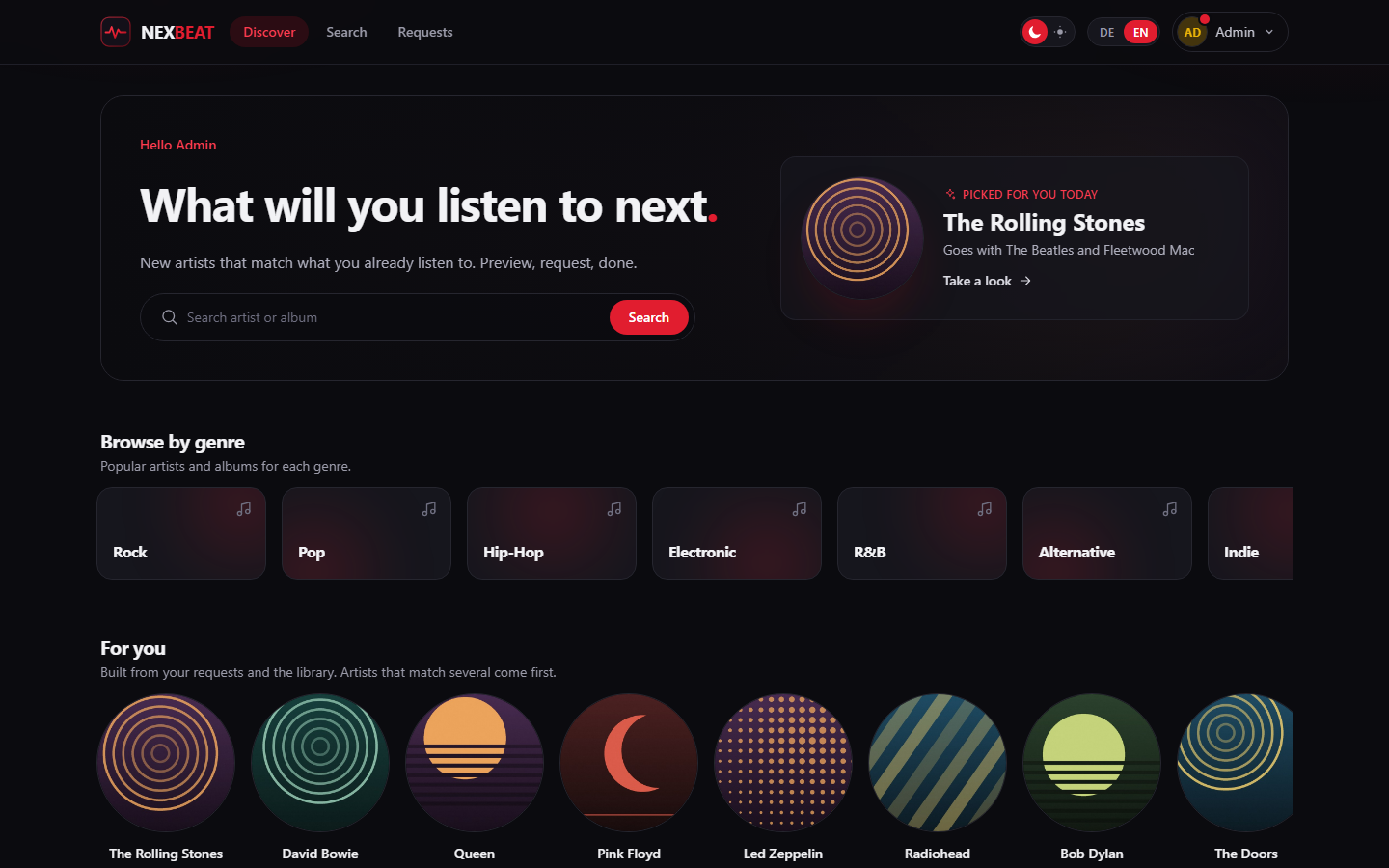
nexbeat is a small, self-hosted companion to Lidarr, built in the spirit of Nexview: accounts with invitations, per-user quotas counted by request, optional approval, and a discovery page that recommends artists based on what the library and each user already have.
Status: stable. Used daily against Lidarr and nexcrate.
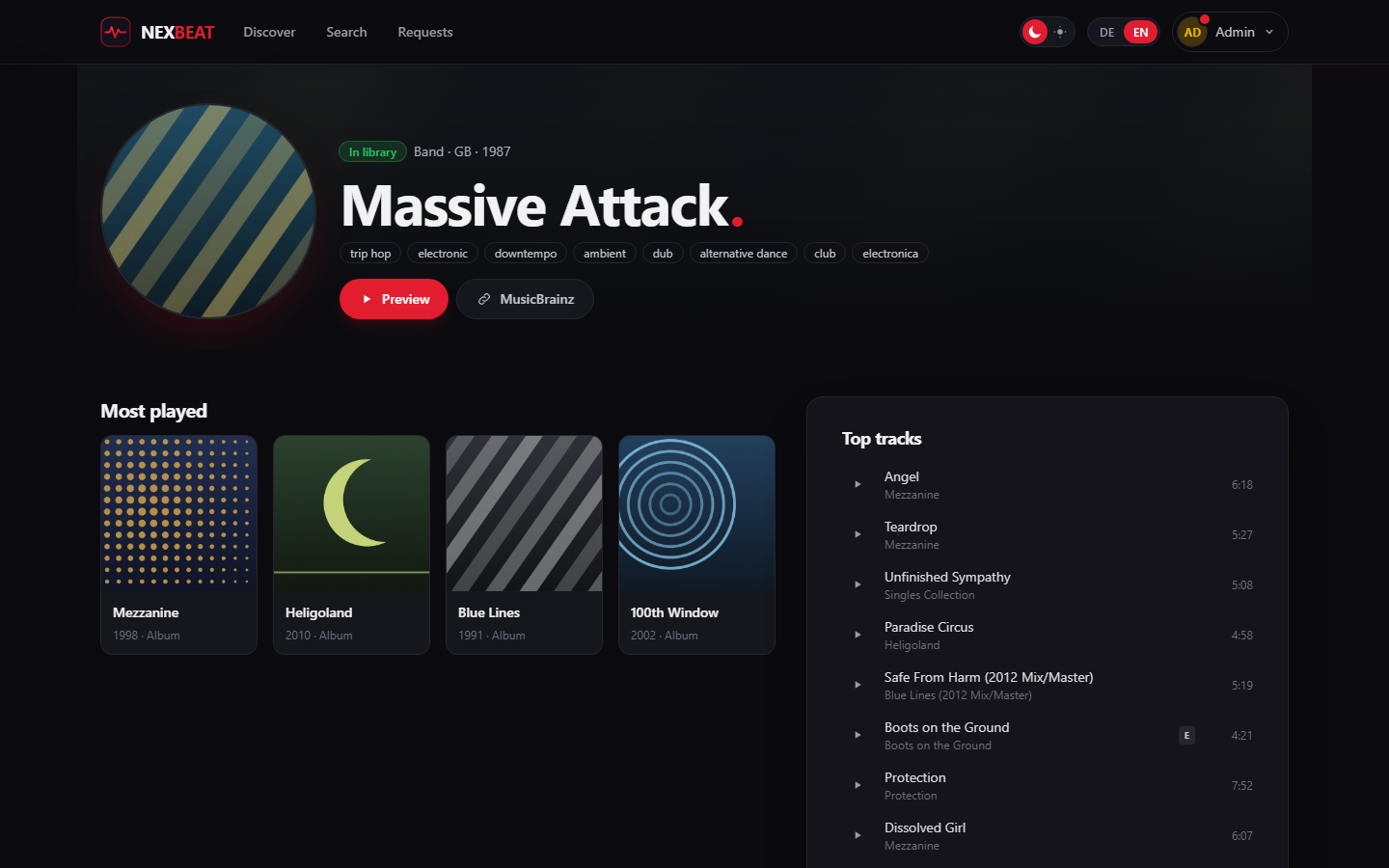
The screenshots show a throwaway instance with a few well-known artists as its library.
What it does
- Discover: "for you" and "because you listen to" rows from ListenBrainz similar-artist data, plus weekly trends. Artists already in the library are left out.
- Genres: browse twenty main genres. A genre page shows the most played artists and albums of that genre and related genres to follow. Artists in the library stay in the list, marked as such.
- Search artists and releases in MusicBrainz, browse discographies and similar artists, listen to 30 second previews.
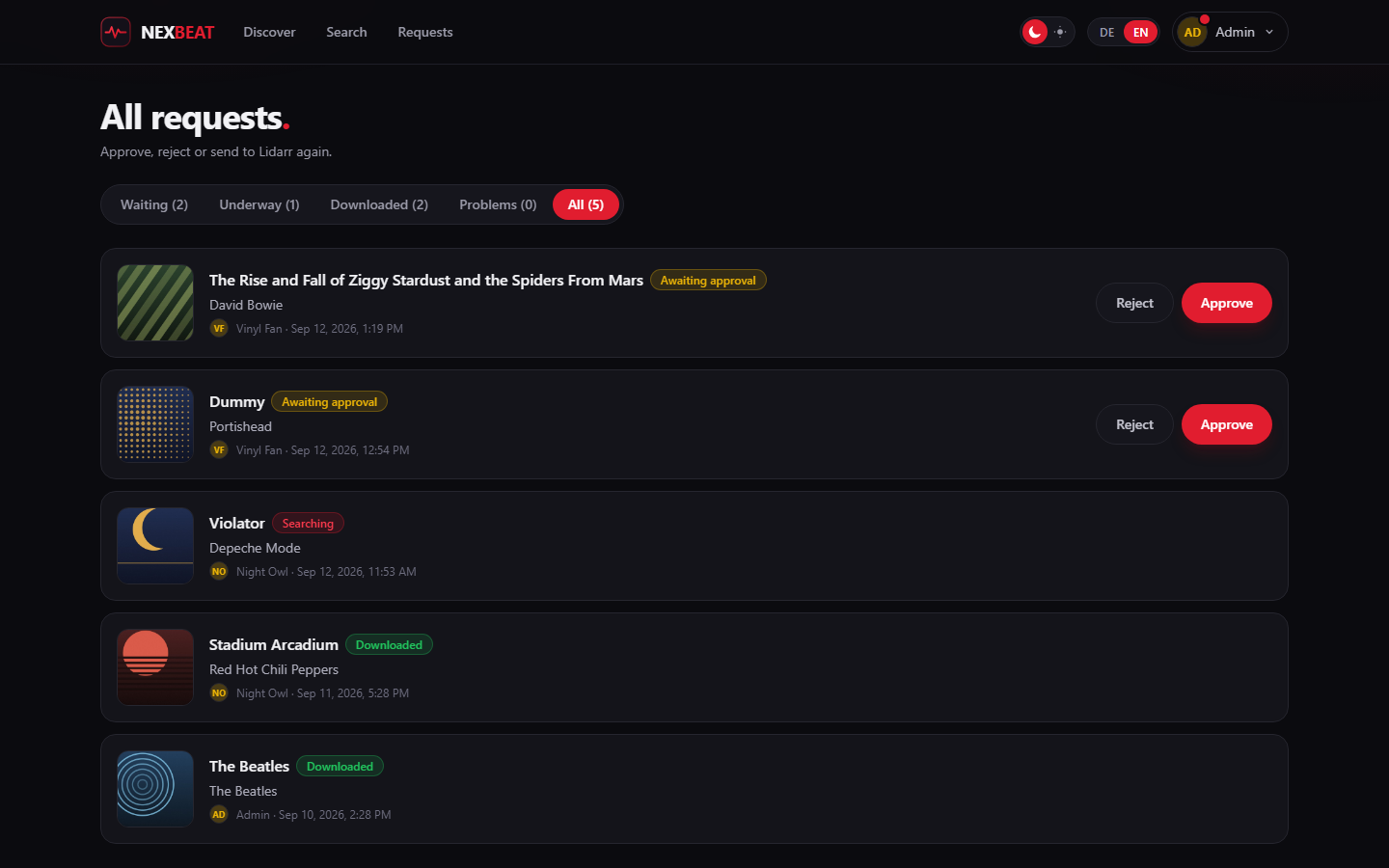
- Request a single album, EP or single. In ARR mode unknown artists are added to Lidarr with only the requested album monitored.
- Whole artists: one request for every studio album and future ones. With Lidarr only offered when the metadata profile keeps it to official studio albums. With nexcrate the request picks the album types (studio albums, EPs, live albums, compilations and more), studio albums preselected unless the administrator chose another default.
- Quotas count requests per day, week or month. Rejected and failed requests do not count.
- Accounts: invitations and password reset by email, or as a link to pass on when no mail server is set up.
- Single sign-on: sign in through authentik, Microsoft Entra ID, Keycloak, Authelia, Pocket ID or any other OpenID Connect provider. authentik is set up in one click (or with a blueprint).
- About and updates: version, source and licence in the footer. After an update every account sees once what is new; administrators see when a newer version is out.
nexbeat never changes Lidarr settings. It adds and monitors artists and albums and starts searches, nothing else.
Two modes. The administrator picks where requests go. In ARR mode it is
Lidarr, as described above. In NEX mode it is nexcrate, through its
interface for other programs (/api/v1, contract 1 with music): nexbeat asks
for albums and whole artists (in the chosen album types), reads their state in batches
and listens to nexcrate's event stream, so a change shows up within seconds.
Connecting takes one step: nexbeat asks for a key, nexcrate shows a code, the
owner confirms it there. A key made by hand works too. nexbeat changes nothing
in nexcrate's settings either. Switching modes hands open requests to the new
program once.
Running with Docker
mkdir nexbeat && cd nexbeat
curl -O https://raw.githubusercontent.com/DerKezorm/nexbeat/main/docker-compose.yml
docker compose up -d
Open http://<your-host>:8030 and create the first account. It becomes the
administrator. Then, under Settings:
- Services, Target: choose ARR or NEX mode.
- Lidarr: address, API key, root folder, quality and metadata profile. If users should be able to request whole artists, pick a metadata profile that allows official studio albums only. nexbeat checks this and says why when it does not fit.
- nexcrate: enter its address and connect, then confirm the code in nexcrate with the rights Read and Request. nexbeat shows whether nexcrate's music version is ready (profile, indexer with music categories, download client); that is set up in nexcrate, not here.
- Mail (optional): for invitations and password resets. Without a mail server, nexbeat hands out the links for you to pass on.
- Users: invite people, set their quota and whether their requests need approval.
In ARR mode the tab also shows a webhook address. Entered in Lidarr, it lets nexbeat notice finished downloads right away; without it, nexbeat checks every two minutes.
- Updating:
docker compose pull && docker compose up -d - Backing up: the whole data directory, the database and
secret.keytogether. Without the key, the stored credentials cannot be read. - Images are built for amd64 and arm64.
latestfollows releases,mainthe current development state.
Run from source
cd backend
python -m venv .venv
.venv/Scripts/python.exe -m pip install -r requirements-dev.txt
.venv/Scripts/python.exe -m uvicorn app.main:app --port 8030
cd frontend
npm install
npm run dev
Open http://localhost:5182 and create the first account.
API for scripts and dashboards
Every account can create API tokens under Profile > API tokens. A token carries exactly the rights of its account; ticked as read only it may look things up and change nothing. The token is shown once, when it is created, and is sent with every request as a header:
Authorization: Bearer nxb_…
The promised interface is under /api/v1 and described at /api/docs:
GET /api/v1/me: the account behind the token and what it may do (may:request,see_all,decide). Build buttons onmay, not on the role.GET /api/v1/dashboard: requests by state and the size of the library in one call. Administrators get the whole installation, everybody else their own requests.- Search, request, withdraw, and for administrators list, approve and turn down requests.
nexdeck uses it for its nexbeat cards. Administrators see every token of the installation under Settings > Users. Changing the password leaves tokens working; deactivating an account stops them.
Sign-in with OpenID Connect
Under Settings > System > Sign-in an administrator finds three cards:
- Sign-in: password sign-in (it can be switched off once a provider is active; administrators can always use their password) and the public address.
- Sign-in providers: any provider that speaks OpenID Connect, several at
once, each with a button on the sign-in page in the order of the list. The
redirect address to enter at the provider is
<public address>/api/oidc/<short name>/callback; the form shows it with a copy button. Providers set up in nexbeat 1.3.0 keep the address they know,/api/auth/oidc/<short name>/callback. - authentik in one step: enter the address of authentik and an API token that may create applications. nexbeat creates the provider and the application with authentik's own mappings and enters itself as a sign-in provider. The token is not stored. Rather not hand one over? Download the blueprint instead and import it in authentik. Without a public address the card suggests the one your browser uses and saves it first.
Microsoft Entra ID: register a web app, enter the redirect address (Entra
only accepts https, except for localhost) and create a client secret. Issuer:
https://login.microsoftonline.com/<tenant ID>/v2.0, or common and
organizations for several tenants. Entra sends an email address only as the
optional claim email; nexbeat works without it.
Accounts are matched by the provider's subject only, never by email address. An existing account links itself under Profile > Sign-in providers, with its password once more. New people come in through an invitation (the invitation page has a button per provider) or, per provider, through "New people get an account"; such accounts start as members without a password and can set one in their profile.
Behind a reverse proxy that ends TLS nexbeat takes the scheme
(X-Forwarded-Proto) only from the addresses in FORWARDED_ALLOW_IPS (the
setting for trusted proxies: addresses or networks such as 172.16.0.0/12,
comma separated, * for all). It is empty by default, so nexbeat trusts no
sender until you name your proxy. It reads the rightmost value, the one your
proxy wrote. Setting the public
address is enough for sign-in itself; trusting the proxy also keeps the session
cookie Secure and silences the warning in the authentik card.
Data sources
MusicBrainz, Cover Art Archive and ListenBrainz (open data). Artist images and 30 second previews can come from Deezer's web API. That source is off by default: it answers without a key, but Deezer no longer hands out keys to developers, so whether nexbeat asks it is up to you (Settings › Sources).
Once a day nexbeat asks GitHub for its newest release to tell administrators about updates. Nothing but the request itself goes out, and it can be switched off on the About page.
Licence
Categories
Download Statistics
Related apps
Explore more like this
Explore allDetails
ghcr.io/derkezorm/nexbeatRuntime arguments
- Web UI
http://[IP]:[PORT:8000]/- Network
bridge- Shell
sh- Privileged
- false
Template configuration
Port you reach nexbeat at. Container port: 8000
- Target
- 8000
- Default
- 8030
- Value
- 8030
Holds the SQLite database with accounts, requests and settings, and the key that signs sessions. Keep it on a local disk, not on a network share.
- Target
- /data
- Default
- /mnt/user/appdata/nexbeat
- Value
- /mnt/user/appdata/nexbeat
User id that should own the files in /data. 99 is the Unraid default.
- Default
- 99
- Value
- 99
Group id that should own the files in /data. 100 is the Unraid default.
- Default
- 100
- Value
- 100
The zone the container runs in, for example Europe/Berlin. Quotas count in calendar days, weeks and months of this zone. Leave blank to use UTC.
- Target
- TZ
Leave this empty unless you switched Network Type to Host. In bridge mode the WebUI Port above already does the job and setting this will break it, because the mapping still points at 8000. On host networking the port inside the container is the port on your server, so use this to move nexbeat off 8000 if something else is already there.
- Target
- NEXBEAT_PORT
Signs sessions and encrypts the stored credentials, such as the Lidarr API key and the password of the mail server. Leave blank: nexbeat creates one on first start and keeps it in /data/secret.key. Back it up together with the data directory.
- Target
- NEXBEAT_SECRET_KEY
auto marks the session cookie Secure when the request arrived over https. Use on only if a proxy terminates TLS and forwards plain http, and never if nexbeat should also be reachable over http, or nobody stays signed in. off never marks it.
- Target
- NEXBEAT_COOKIE_SECURE
- Default
- auto
- Value
- auto
Addresses or networks of your reverse proxies, comma separated, for example 172.16.0.0/12. Only their X-Forwarded-For and X-Forwarded-Proto (the rightmost value) are believed, so only they can tell nexbeat that a request came in over https. Leave blank when nexbeat is not behind a proxy; blank trusts nobody.
- Target
- FORWARDED_ALLOW_IPS