
All apps · 0 apps

NetSpy
Docker app from thefirstmojo's Repository
Overview
Readme
View on GitHubNetSpy — Live network + disk monitoring for Unraid + other servers


Real-time monitoring of your servers in one dashboard: per-interface, per-process and per-container network throughput, disk I/O per process, CPU/RAM, and latency/health — 1 s sampling, no database, no .env file. One image, two roles, one compose.
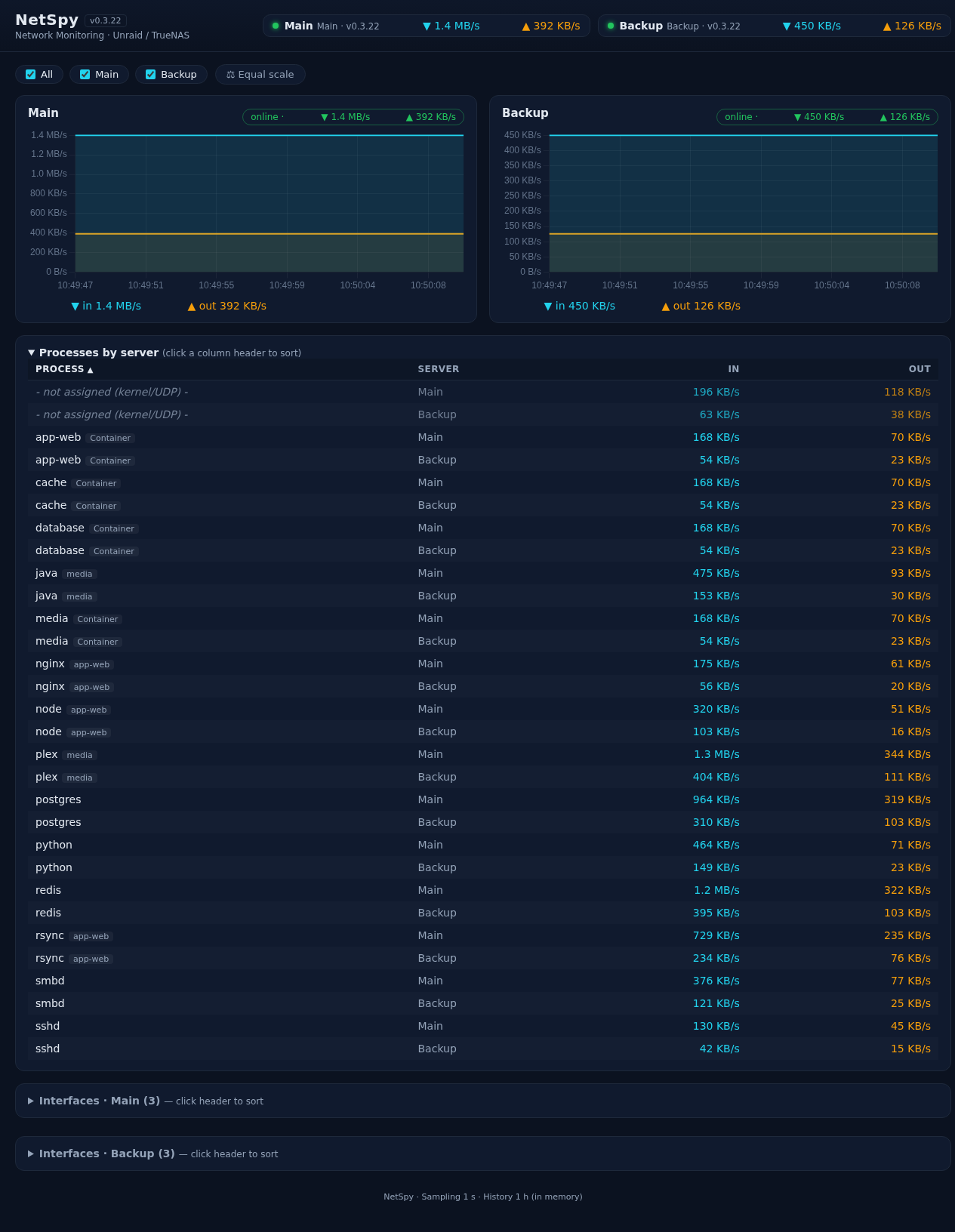 Screenshots show synthetic demo data — no real hosts, IPs or containers.
Features
🌐 Network tab
- Per-process rates — TCP tracked per socket inode (immune to fork spikes), capped at the physical link rate
- Interface rates — total traffic of the default-route interface(s), auto-detected
- Per-container rows — bridge containers via read-only Docker socket
- SMB sessions —
smbdrows split per client IP (smbd[10.0.0.5]): you see exactly which client is loading a share - Connection counts — active TCP connections per process (e.g.
docker-proxy:6379→ 🔗 47) - Detail charts — click a row for its 1 h history; hover shows the exact values of that moment
- Server filter chips — toggle hosts in tables and charts
- Latency / health — each server card shows its live poll response time (⏱️ ms badge, green/yellow/red) plus a 5 min latency chart; a hanging agent becomes visible before it drops offline
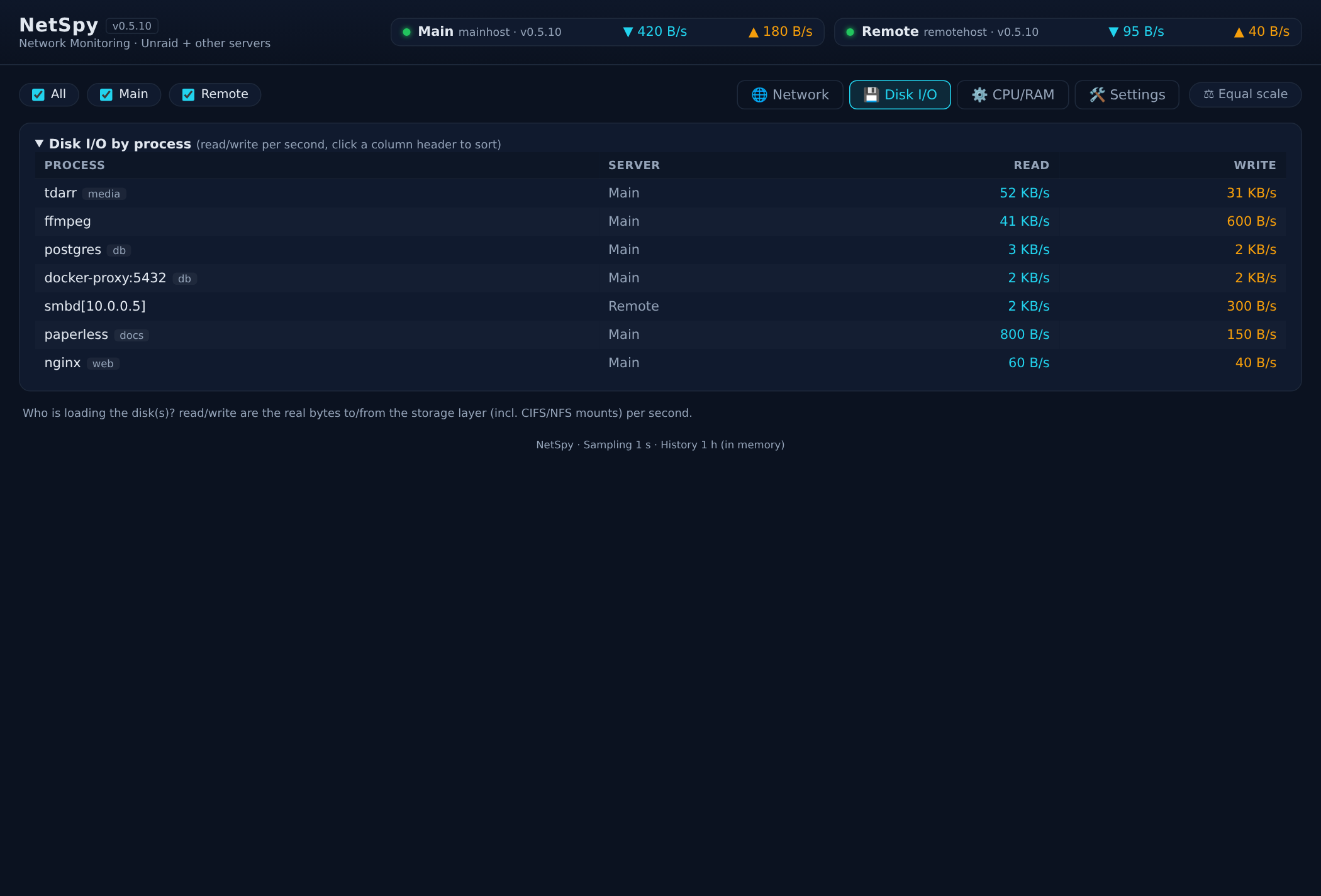
💾 Disk I/O tab
- Read/write per process from
/proc/<pid>/io— real storage bytes incl. CIFS/NFS (SMB transfers show up on the reader) - EMA-smoothed, sortable by process / server / read / write
⚙️ CPU/RAM tab
- CPU% and resident RAM per process, plus per-server host totals
- Display mode switch: live (EMA) or 10 s rolling average (⚡ / 📊 buttons)
💾 Storage tab
- Fill levels of the host's top-level filesystems/pools (no container-volume subfolders) — compact drive list plus one big line chart per recorded drive: 24 h (hourly), 7 d (daily, today live until midnight), months (month-end value)
- Recording is opt-in per drive (⏺ in the list) — activating a drive creates its chart; nothing is written automatically; data survives restarts (
storage_history.jsonin/netspy/data) - Drives that disappear keep their data until you delete it (🗑️ button)
🛠️ Settings page
- Add/remove servers in the UI — stored as human-editable
servers.yaml SERVERSenv entries stay in the env: each row is marked with its origin (env/config) and saving writes only the config rows (edit an env row to move it to the config)- Works without a volume too (env fallback); the UI explains what to mount
🖥️ Terminal tab (SSH via ttyd, web role)
- One persistent terminal per target, stacked below each other — connect to several servers at the same time
- Terminals survive tab switches and browser reloads (tmux attach on the target when tmux is installed, plain login shell otherwise)
- Targets are managed under Settings → 🖥️ SSH Terminal (stays open): name / host / user, optionally paste an SSH private key (stored
0600in/netspy/data/ssh, never sent back to the browser) - Passwords are never stored: without a key,
sshasks for the password interactively right in the terminal - Login (v0.7.12): the Terminal tab is locked behind a login form and only unlocks with the Docker environment variables
TTYD_USER+TTYD_PASSof the NetSpy container — set them in the container's env (Unraid: Docker → NetSpy → Edit → Apply, then recreate the container; agents/Portainer: the stack'senvironment:block). They are not a NetSpy settings-page option and are never stored in NetSpy — the login form only compares what you type against them. Without both variables set the tab shows a hint instead of a login (terminals stay off); the rest of the dashboard stays open either way. Log in once per browser session; a logout button is in the tab header. - Each terminal listens on a host port (7681, 7682, …; host networking) and is embedded at
http://<host-ip>:<port> - ⚠️ Security: private LAN only. The login guards the dashboard's terminal tab; the ttyd ports themselves have no login of their own (embedded iframes can't show a Basic-Auth prompt) — so the actual protection of the servers is their SSH authentication (interactive password when no key is stored, keys only if you add them explicitly). Do not expose the dashboard or ports 7681+ outside your trusted network.
⚠️ Requirements:
network_mode: host(the sampler needs the host's/procandss) and root (host PID namespace,/proc/<pid>reads, optional Docker socket — there is no non-root mode). Ports are set viaWEB_PORT/AGENT_PORT— with host networking the value is the host port.
Quick start
| You want to… | Do this |
|---|---|
| Install on Unraid | It's in the Unraid Community App Store: Apps → NetSpy → Install. Set SERVERS (e.g. Main=local) and AGENT_TOKEN; everything else has sensible defaults. |
| Add an agent (TrueNAS/Debian/…) | Copy docker-compose.yml to that host → set ROLE: agent, SERVERS: "", UPLINK (e.g. eth0), same AGENT_TOKEN. On TrueNAS also uncomment security_opt: [apparmor:unconfined] (minimal relaxation, no privileged). Deploy via Portainer stack or docker compose up -d. |
| Prefer Docker Hub? | The image is mirrored to docker.io/thefirstmojo/netspy — same manifest as GHCR (vX.Y, beta, latest). Pull from either registry. |
All settings stay editable later under Docker → NetSpy → edit. Pin the image tag (ghcr.io/thefirstmojo/netspy:vX.Y) for deterministic updates; with :latest tick "Pull latest image" when updating.
Configuration
All values live directly in docker-compose.yml — no .env file.
| Key | Default | Description |
|---|---|---|
ROLE |
web |
web (UI + sampler) or agent (sampler only) |
SERVERS |
Main=local (optional) |
Name=local;Name=http://host:8091 — semicolon-separated. Optional: if unset or empty, a local server (Main=local) is added automatically on first start |
UPLINK |
auto (default route) | Comma-separated override, e.g. br0,bond0 |
TZ |
UTC |
Container timezone, e.g. Europe/Berlin (v0.7.35+, tzdata ships in the image). Decides when the storage history closes its day and month (local midnight instead of 02:00 with UTC) and the zone of all timestamps. Without tzdata the variable would be silently ignored — hence it is part of the image |
WEB_PORT / AGENT_PORT |
8090 / 8091 |
Host ports (host networking — the values ARE the external ports) |
AGENT_TOKEN |
empty | Shared X-Agent-Token header — must match on all hosts |
TTYD_USER |
empty | Terminal tab login — username (v0.7.12+). Container env var only — never stored in NetSpy, no settings-page option. Set both TTYD_USER + TTYD_PASS → the Terminal tab shows a login form and unlocks with these credentials |
TTYD_PASS |
empty | Terminal tab login — password (v0.7.12+). Container env var only — never stored in NetSpy. Both empty (TTYD_USER + TTYD_PASS) → terminals stay disabled (tab shows a hint); the rest of the dashboard stays open |
DOCKER_SOCK |
/var/run/docker.sock (web) |
Docker socket for per-container rows; "" disables |
CONFIG_DIR |
auto-detected | Volume for servers.yaml — /netspy mount → /netspy/config |
Plus two commented blocks in the compose, enabled per host: AppArmor (security_opt: [apparmor:unconfined], hosts that enforce it) and the Docker socket volume.
Architecture
Unraid 10.10.10.10                        TrueNAS 10.10.10.20
┌──────────────────────────────┐         ┌─────────────────────────┐
│ netspy (ROLE=web)            │  HTTP   │ netspy (ROLE=agent)     │
│  :8090 Web UI                │◄───────►│  :8091 /api/metrics      │
│  :8091 /api/metrics          │  poll   │  /proc + ss (inet_diag)  │
└──────────────────────────────┘         └─────────────────────────┘
The web instance polls every agent once per second; agents never initiate connections. An unreachable agent is simply marked offline — the rest keeps working.
Security
- Plain HTTP, one shared token —
AGENT_TOKEN(asX-Agent-Token) is the only access control and does not encrypt anything. LAN / trusted network only; don't expose ports 8090/8091 without a VPN or TLS reverse proxy. The token is never written to logs. - Hardened container:
cap_drop: [ALL]with onlySYS_PTRACEadded, Docker socket read-only and off by default. - Root is required — NetSpy reads
/procandssof all processes (incl. root daemons like smbd): socket attribution,/proc/<pid>/io,/proc/<pid>/stat. Reading another user's proc files needs root; PUID/PGID 99:100 would silently produce empty lists. There is no non-root mode.
Config volume — make it writable
The settings page writes servers.yaml into the mounted volume. As root without CAP_DAC_OVERRIDE, the container can only write into world-writable directories — so make the mounted base directory world-writable once (the container creates subfolders 0777 and files 0666 itself, so you can still edit them):
chmod 777 /mnt/user/appdata/netspy      # Unraid
chmod 777 /opt/netspy                   # other hosts
⚠️ Do NOT add
--cap-add=DAC_OVERRIDEto fix this — that capability lets the root container bypass all file permission checks, including on every other mounted directory. Fix the folder permissions instead.
How it works (short)
- Interface rates:
/proc/net/devdeltas; "total traffic" = the interface(s) with the default route (auto-detected — br0 on Unraid, eth0/bond0 elsewhere). - Per-process rates:
ss -tinpeper socket inode, deltas aggregated by process, capped at the physical link rate (no impossible artifacts). UDP and kernel traffic (nfsd/kworker) land in the row "not assigned (kernel/UDP)". - Per-container rates: bridge containers get their own rows (veth sums → container name). Host-network containers (e.g.
binhex-*) share the host netns and deliberately get no badge (indistinguishable from host processes). - Disk I/O:
/proc/<pid>/iodeltas — storage-layer bytes incl. network filesystems, EMA-smoothed. - History: 1 h ring buffer in the web container's memory (no DB).
Known limits: TCP only per process (UDP/kernel → "not assigned") · 1 s sampling averages short bursts.
Local build (development only)
docker build -t netspy:latest . # then use image: netspy:latest in the compose
Tests
Backend tests need nothing but Python (no browser, no services):
python3 test_backend_units.py   # API payload, polling, storage history, config, terminal targets
python3 app/agent.py --selftest # parser fixtures (ss / route table)
DOM tests render the real app/static in Chromium (Playwright) and check the
terminal tab, the command list tooltip, the filter chips and the resize/auto-scroll
behaviour — run each script directly: python3 test_cmdlist.py,
test_filter_audit.py, test_resize_autoscroll.py, test_terminal_suggested.py.
Planned
- Persistent history (SQLite/InfluxDB) across restarts
- Threshold alerts (email/Telegram)
Provided "as is", without warranty of any kind. Use at your own risk.
Media gallery
Install NetSpy on Unraid in a few clicks.
Find NetSpy in Community Apps on your Unraid server, review the template, and click Install. Unraid handles the Docker app or plugin setup from the published template.
Categories
Download Statistics
Related apps
Explore more like this
Explore allDetails
ghcr.io/thefirstmojo/netspy:latestRuntime arguments
- Web UI
http://[IP]:[PORT:8090]- Privileged
- false
- Extra Params
--pid=host --cap-drop=ALL --cap-add=SYS_PTRACE
Template configuration
Role: web = dashboard + local sampler (this host); agent = collector for another web instance.
- Default
- web
Servers the dashboard polls, semicolon-separated: Name=local;Name=http://host:8091. 'local' samples this host directly; http://... polls an agent on another host. Once the config volume is mounted and servers.yaml exists there, that file wins over this variable.
- Default
- Unraid=local
Optional override of the uplink interfaces (comma-separated, e.g. br0,bond0). Empty = auto-detect via default route (br0 on Unraid).
Timezone inside the container, e.g. Europe/Berlin. It sets the day and month boundary of the storage history (daily/monthly fill level is fixed at local midnight instead of 02:00 with UTC) and all timestamps. Empty = UTC.
- Default
- Europe/Berlin
Host port of the web UI. Host networking: the value IS the host port.
- Target
- WEB_PORT
- Default
- 8090
Host port of the agent API (used by other hosts' dashboards to poll this one). Host networking: the value IS the host port.
- Target
- AGENT_PORT
- Default
- 8091
Shared token for agent API access — must be identical on the web instance and every agent (set a long random value).
SSH terminal tab login: username. The Terminal tab stays locked until both TTYD_USER and TTYD_PASS are set (the rest of the dashboard stays open). Leave both empty to disable the terminals.
SSH terminal tab login: password (with TTYD_USER). Never stored — only compared against the credentials you type in the login form.
Docker socket path for per-container rows. Keep the 'Docker Socket' path mapping below active; set to empty to disable.
- Default
- /var/run/docker.sock
Mount the Docker socket (read-only) so container names appear in the process list (per-container throughput).
- Target
- /var/run/docker.sock
- Default
- /var/run/docker.sock
Base directory for the settings page — servers.yaml is stored in the /netspy/config subfolder (created automatically). After install, make it world-writable on the host: chmod 777 /mnt/user/appdata/netspy (container runs as root with cap_drop ALL and needs write access).
- Target
- /netspy
- Default
- /mnt/user/appdata/netspy
Advanced: folder inside the container that holds servers.yaml. Empty = auto-detect (/netspy/config when the Config Volume above is mounted to /netspy). Only change it if you mount your config somewhere else.