
All apps · 0 apps
netlens
Docker app from GeorgeK's Repository
Overview
Readme
View on GitHub
NetLens
A dashboard for UniFi networks.
Self-hosted, it shows who used how much, of what, and when, how good each device's Wi-Fi is, how your access points, switches and gateway are doing, and what your firewall and intrusion prevention blocked — and it keeps that history, which UniFi itself deletes after a day or a week.
Not affiliated with, endorsed by, or sponsored by Ubiquiti Inc. UniFi is a trademark of Ubiquiti Inc.
Screenshots
 |
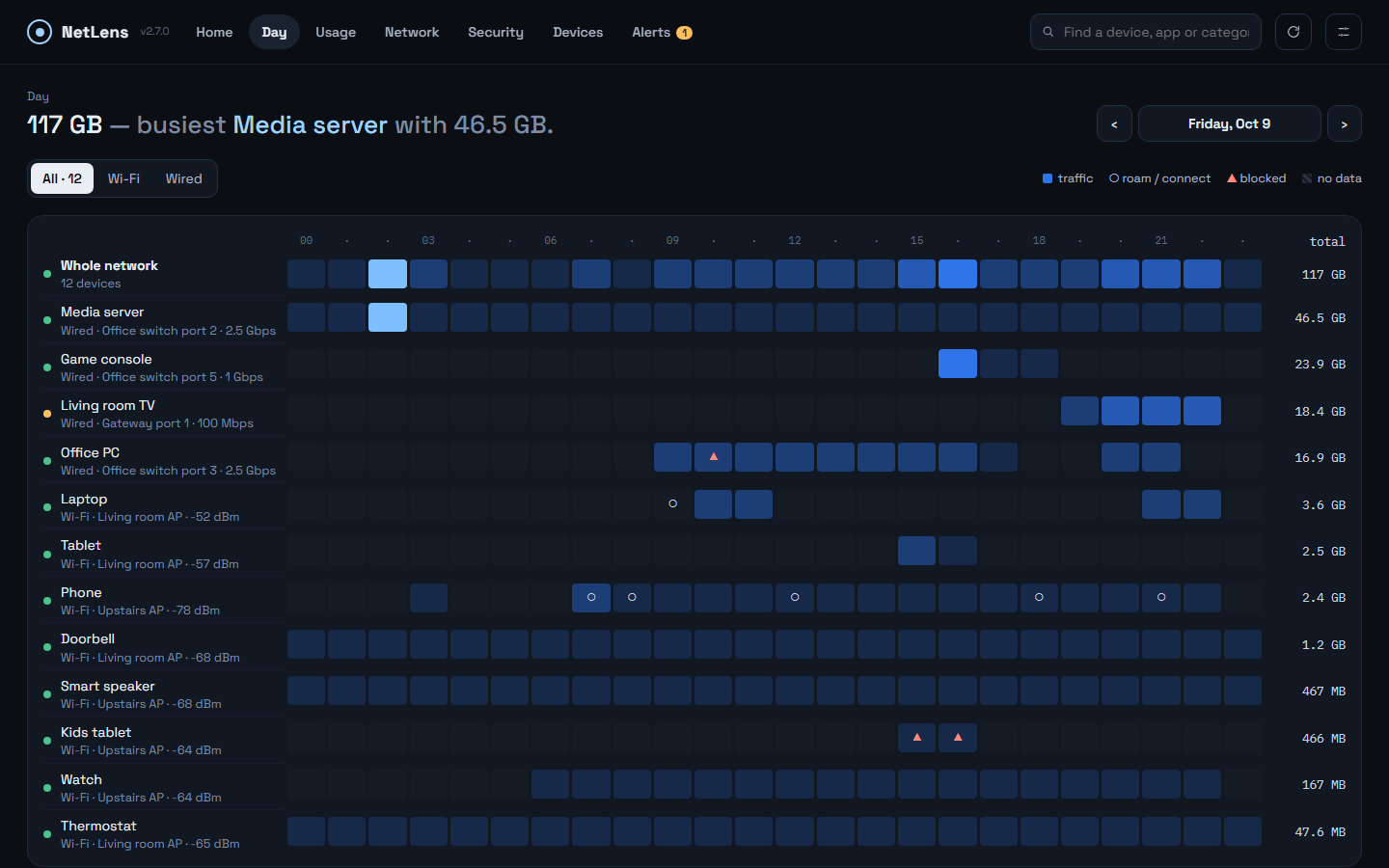 |
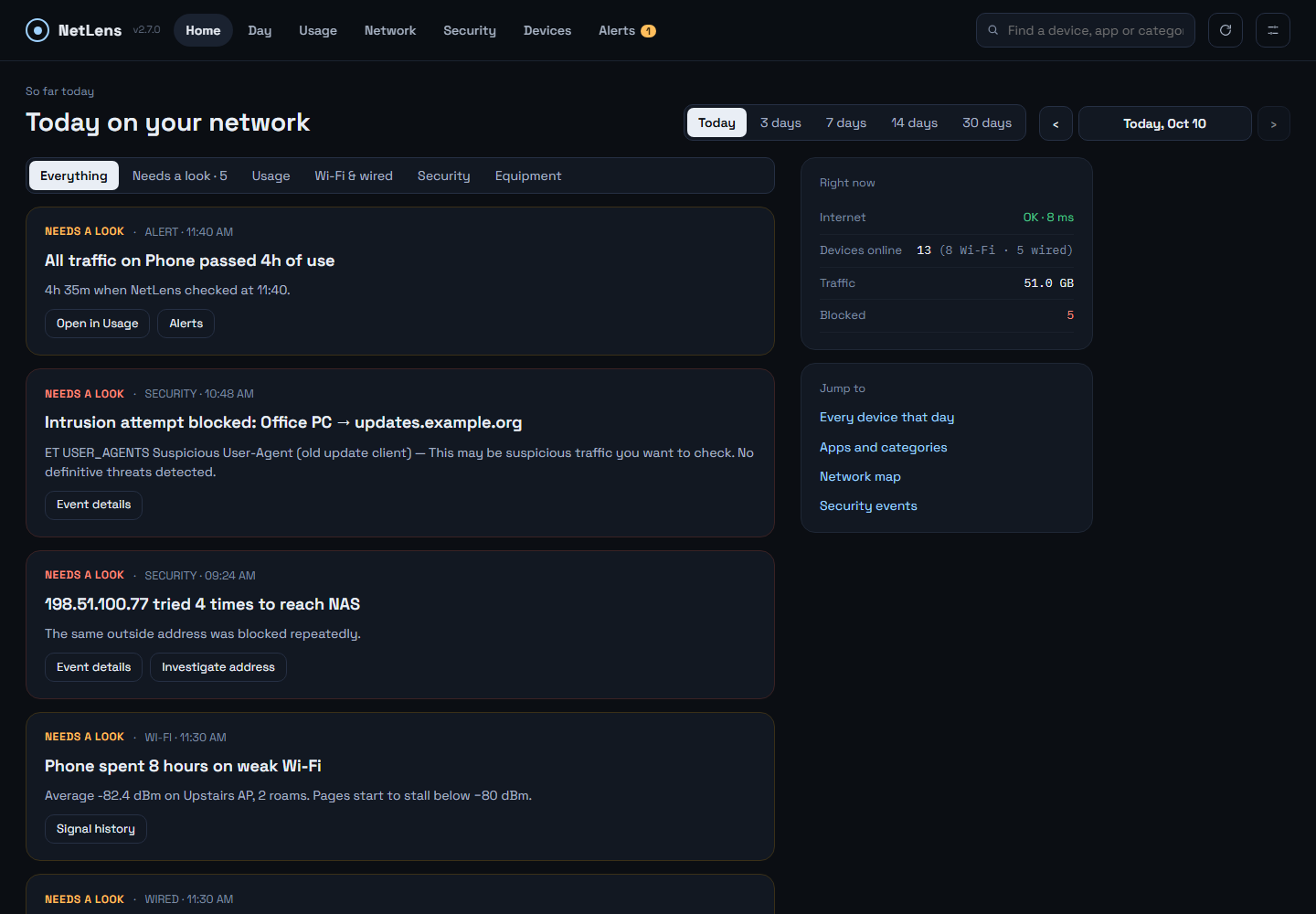
| Home — findings in plain language, alerts on top | Day — every device by hour |
 |
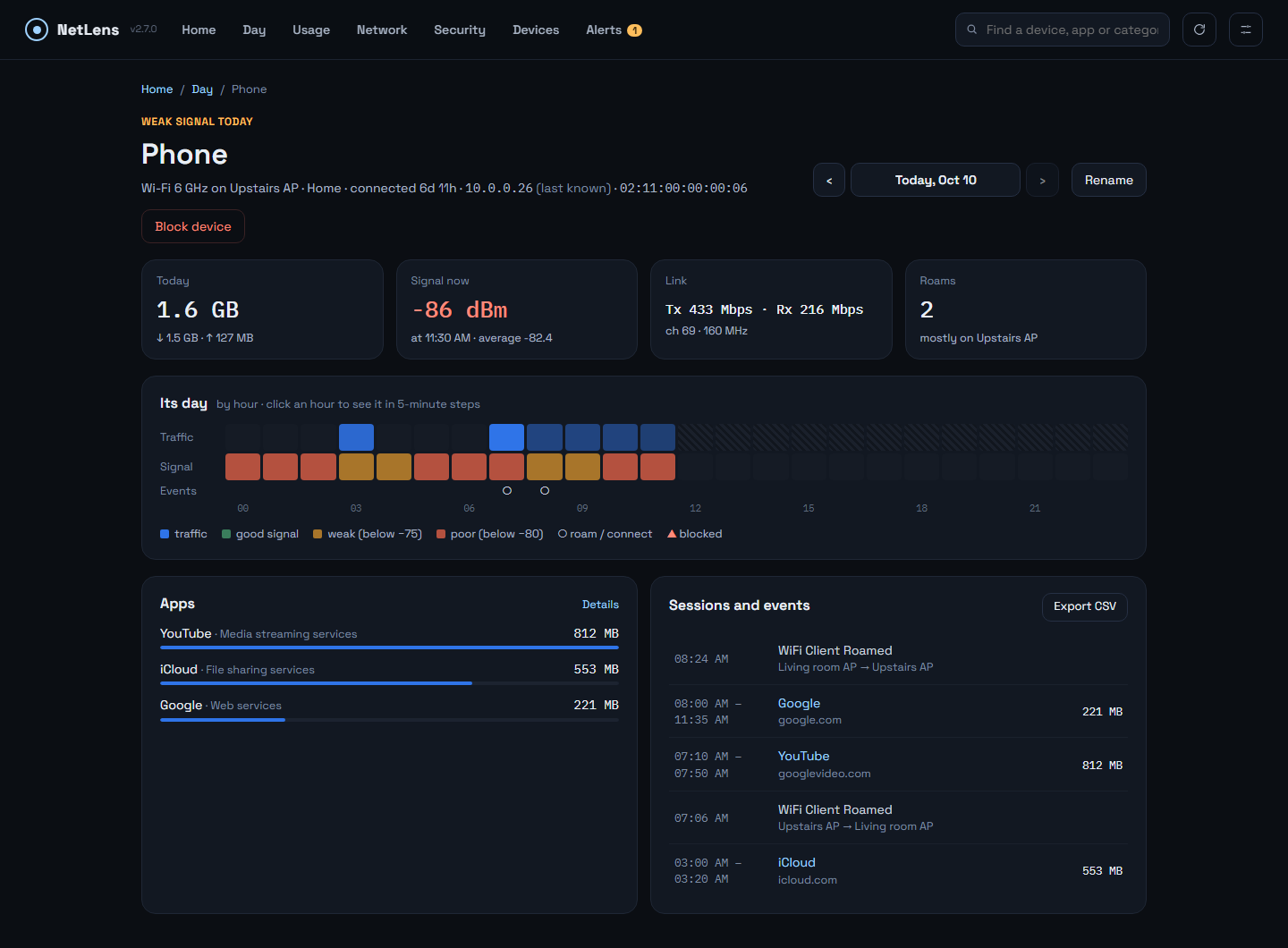 |
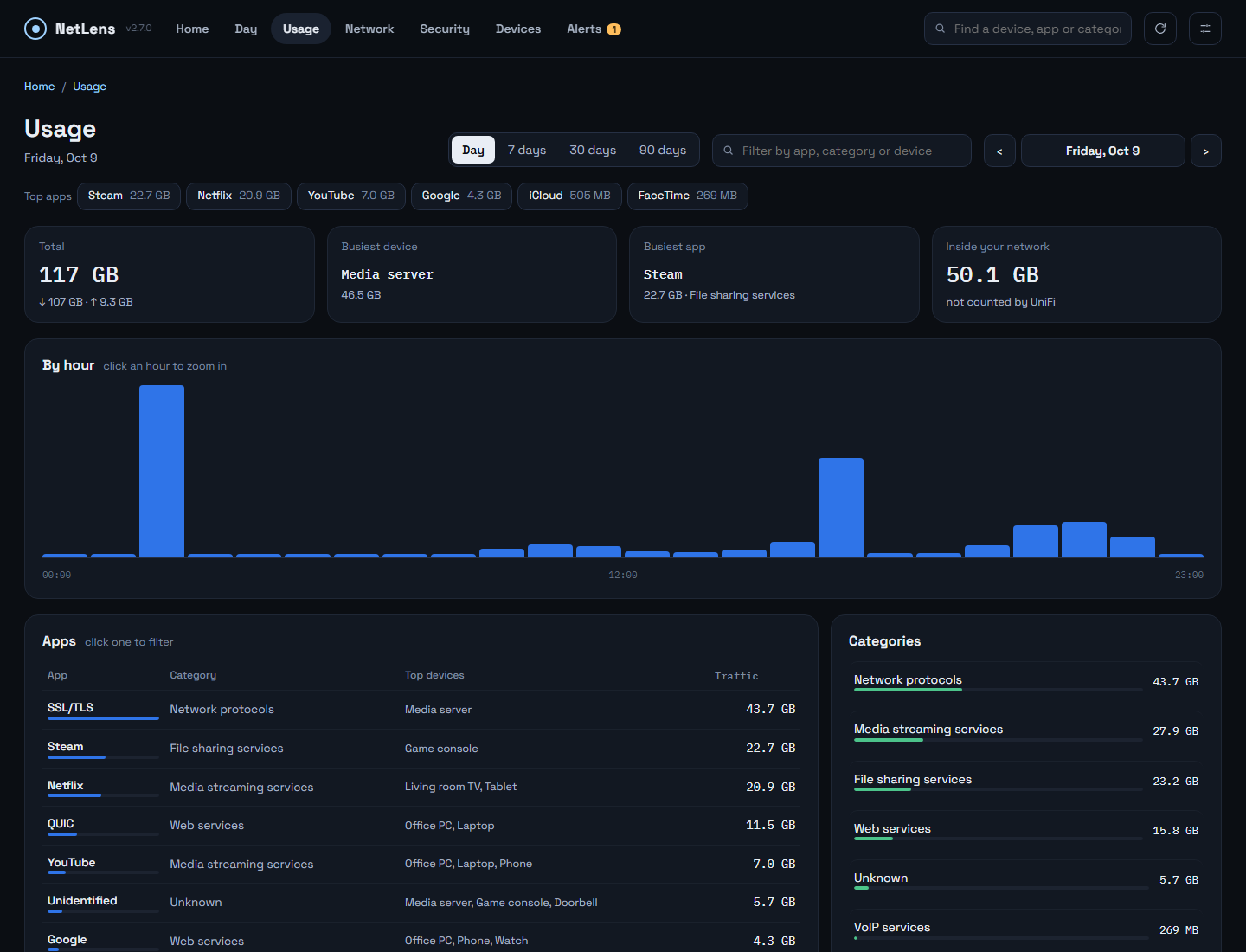
| Usage — top apps, search by app, category or device | Device — its day, apps, sessions and events |
 |
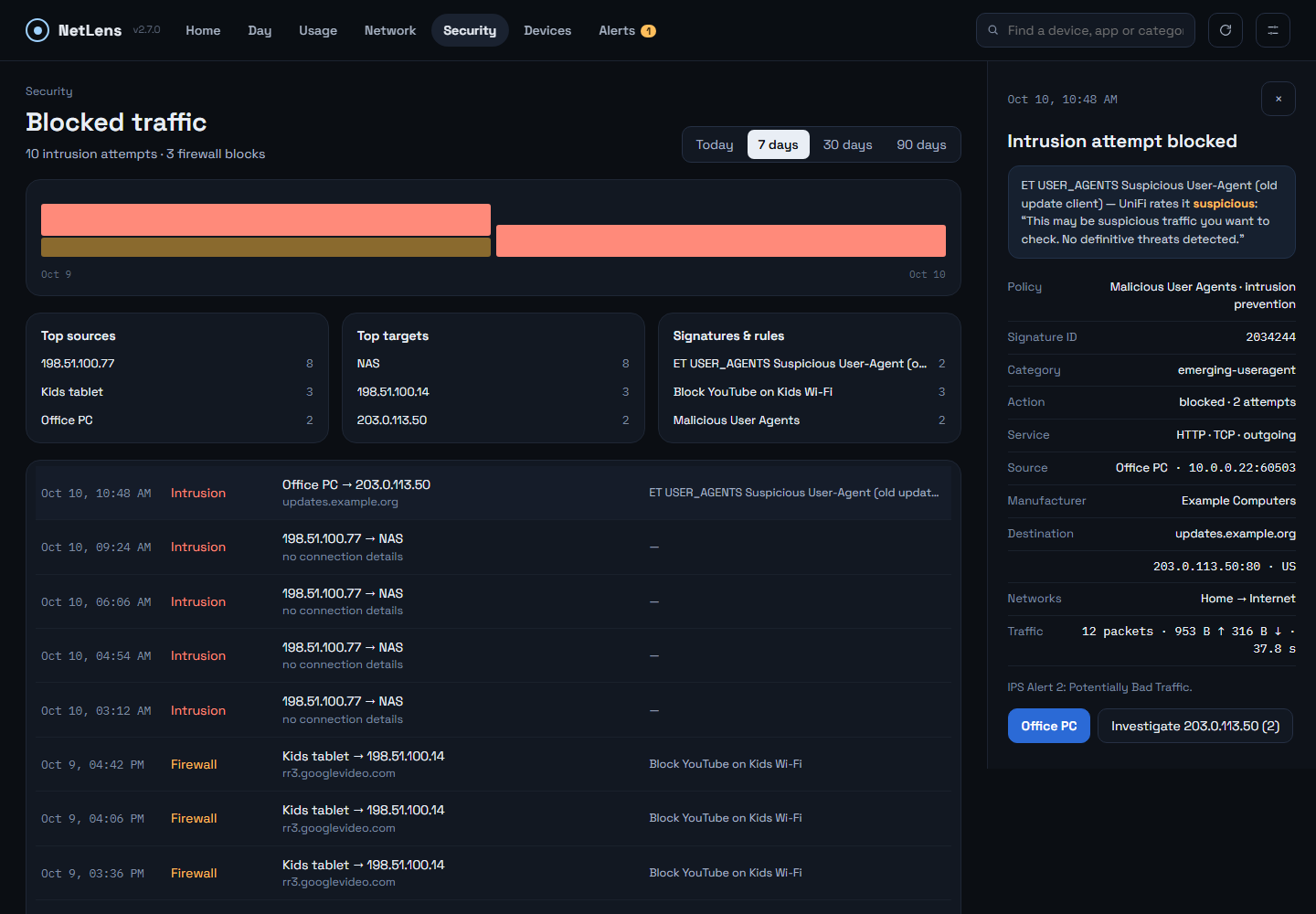 |
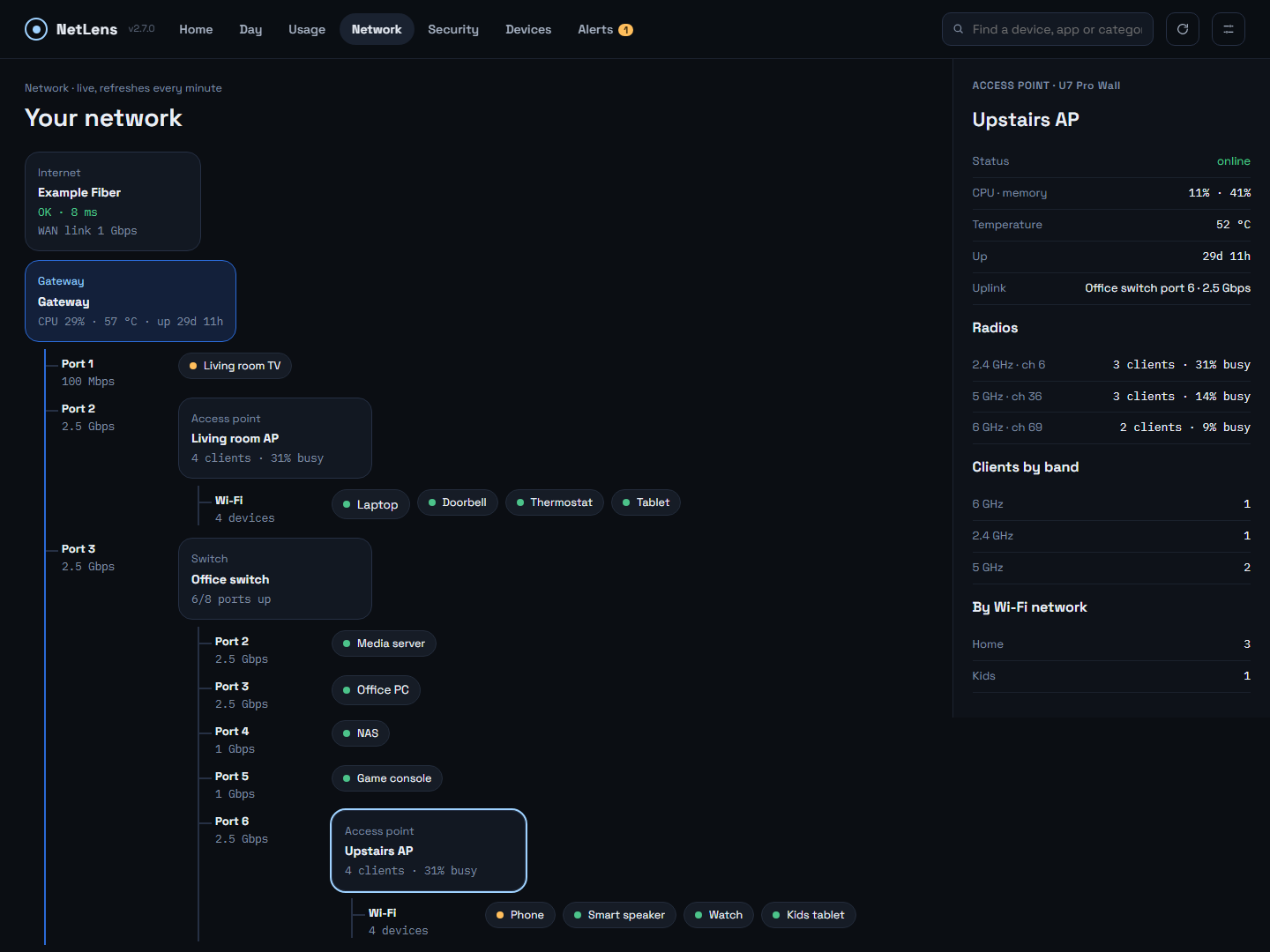
| Network — live map, access point selected | Security — blocked intrusion with its full record |
 |
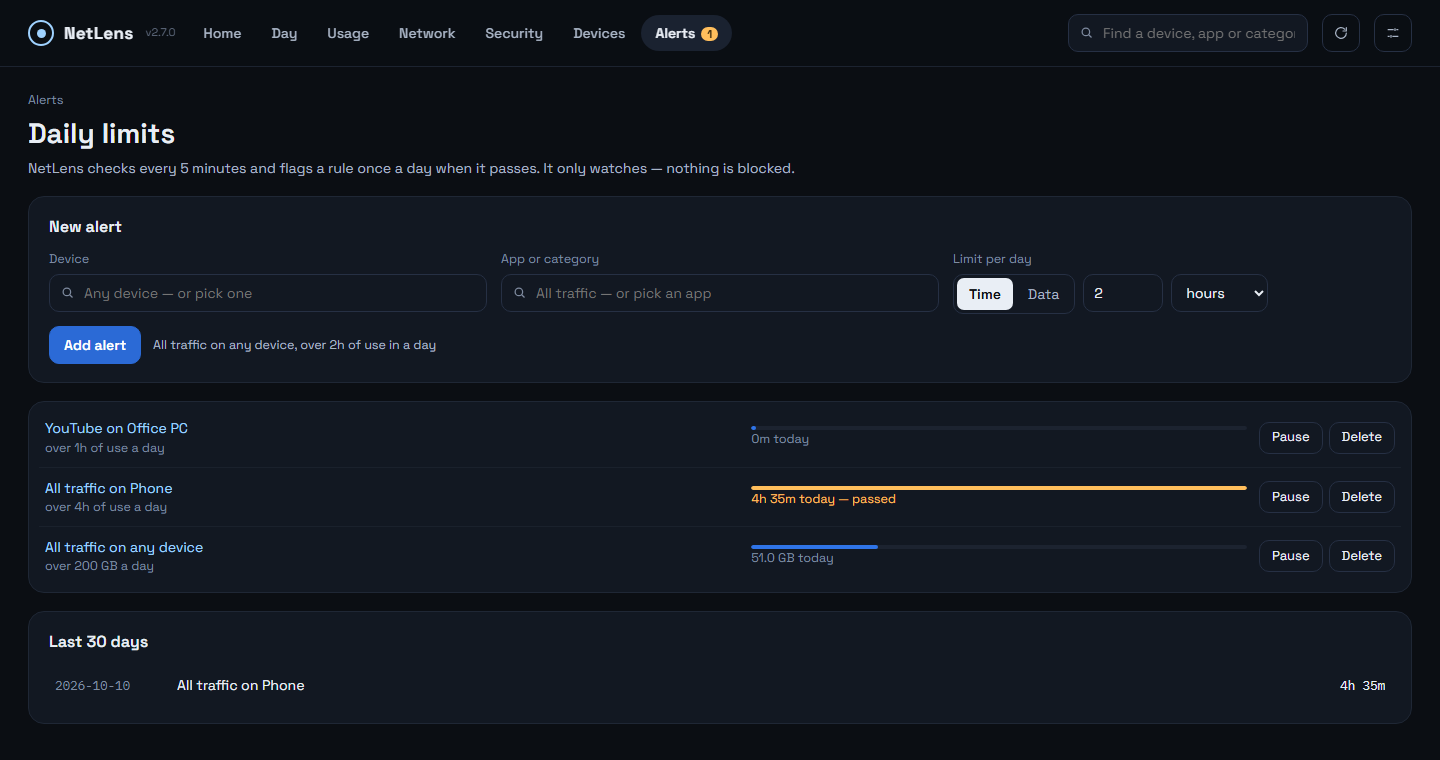 |
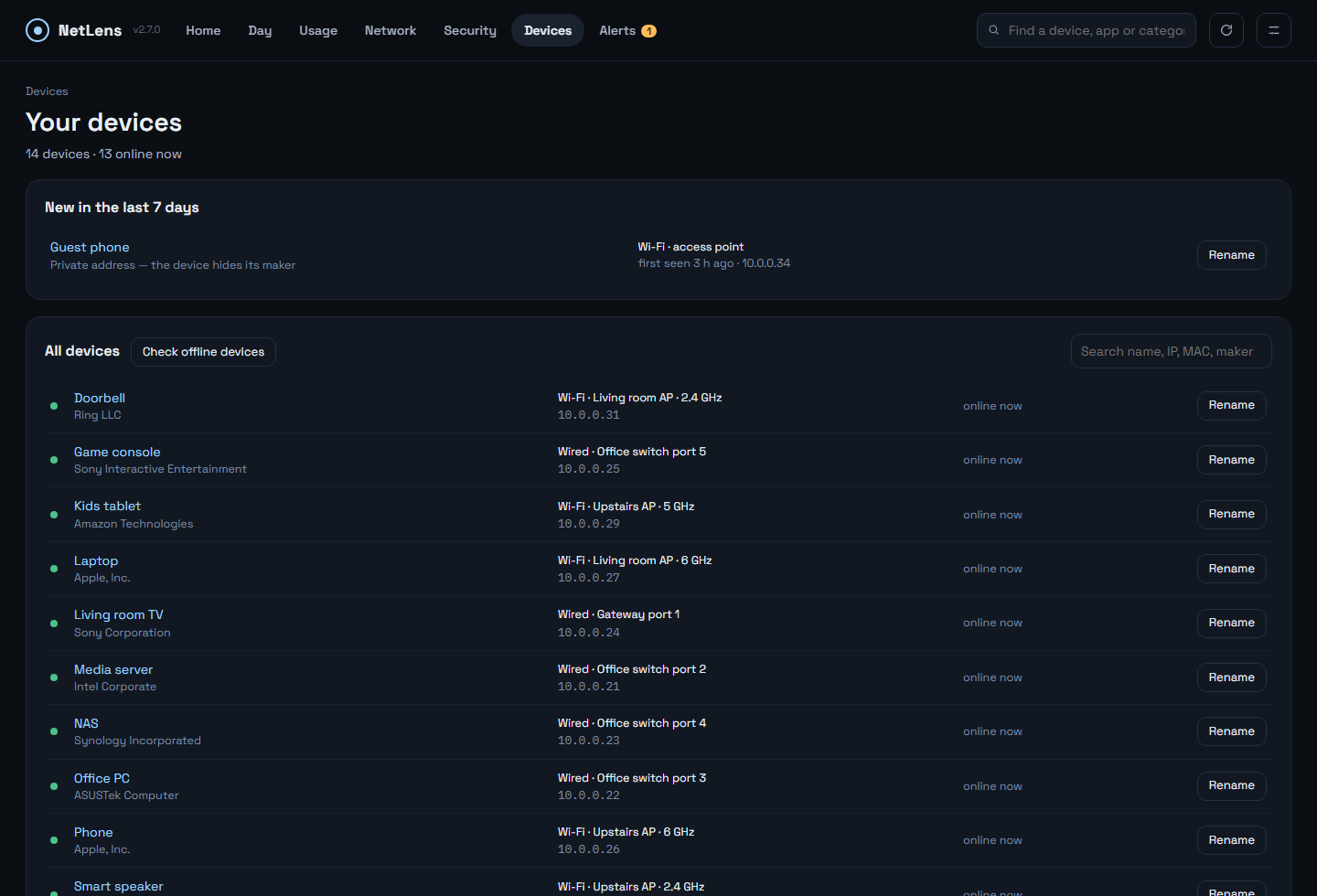
| Devices — new devices, maker, switch port or access point, rename | Alerts — daily limits per app and device |
 |
|
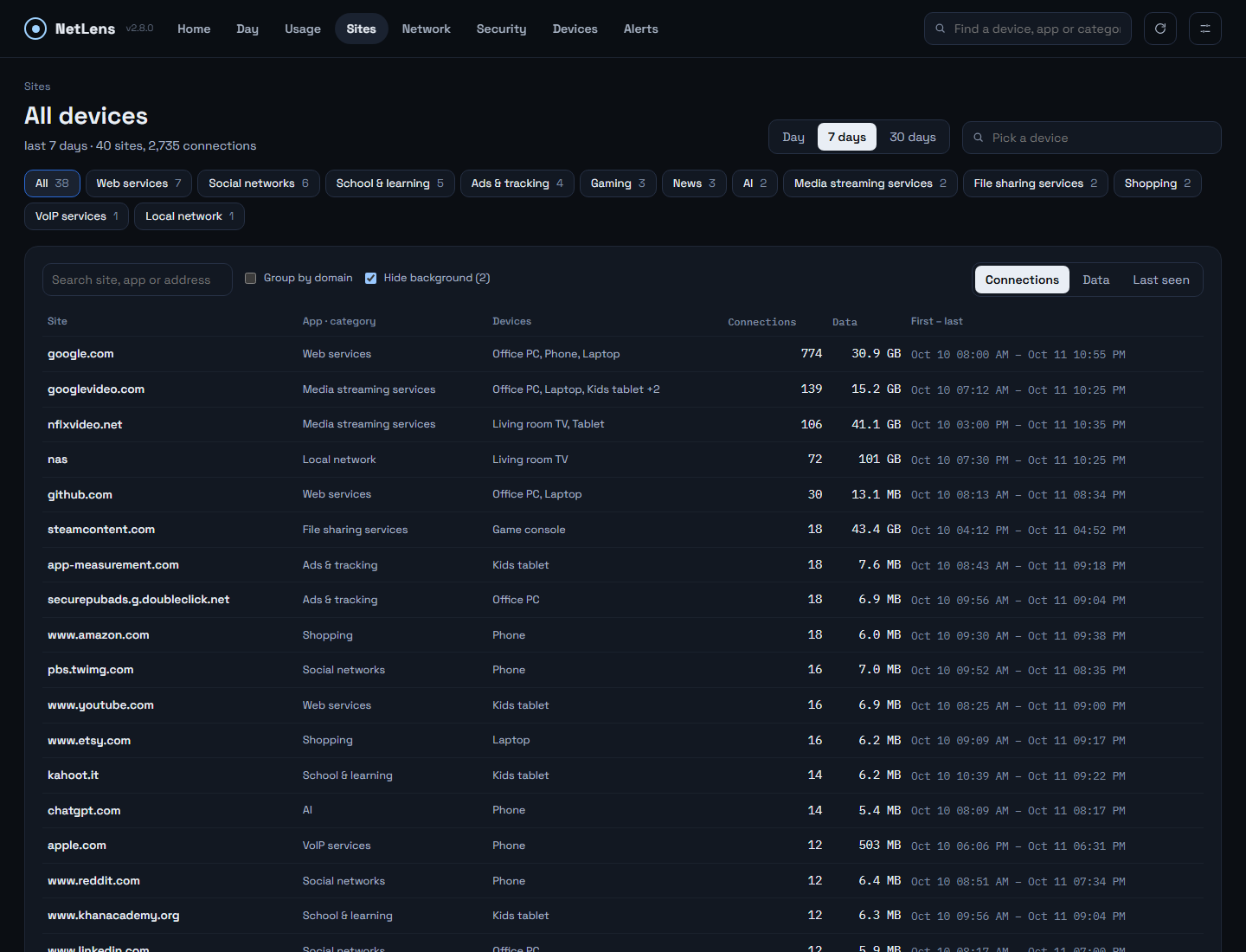
| Sites — every site each device connected to, filtered by category |
Screenshots use a made-up demo network, not real data.
Features
- Home — what happened today, in plain language: the day's big transfers, devices on weak Wi-Fi or slow wired links, blocked intrusions and firewall hits, repeat offenders, new devices, equipment problems — each linking to the details.
- Day — every device as a row, the day's hours as columns: when each device was busy, when it roamed or reconnected, when something was blocked. Click any hour to see it in 5-minute steps.
- Network — a live map: internet → gateway → switches and access points → devices. Click an access point for its radios and clients, a switch for its ports (speed, PoE, errors).
- Device — per device: traffic, Wi-Fi signal or wired link speed, apps, sessions, events, connection time, online history, CSV export, block / unblock.
- Devices — every device UniFi knows, new ones first: maker, where it connected (switch port or access point and band), IP, first and last seen; rename it (saved in UniFi). Offline devices are checked on the network every 5 minutes (ping, then common ports, with a MAC check), so a device that is on but not using the internet still shows as there. Blocked devices are listed on top, with an Unblock button.
- Sites — every site each device connected to over the last 30 days, with a filter per category (social, gaming, school, ads and tracking, AI, adult…), search, and the times of each connection. Taken from UniFi's connection records, not a DNS log (UniFi has none). When a browser's secure DNS hides the name, NetLens names the address if it belongs to a watched site, from its own hourly lookups.
- Alerts — daily limits on time in use or data for an app or category on a device, e.g. YouTube on the kids' tablet over 2 hours. Flagged on Home and the Alerts tab; watch only.
- Security — intrusion attempts and firewall blocks with the blocked connection's full record (IPS signature, policy, both ends, traffic); investigate an outside address; hide noisy rules.
- Usage — apps, categories and devices for a day, an hour or up to 90 days; one search box
for an app, category or device, and the top apps one click away. Every number on
a screen comes from one source and adds up; a built-in audit (
npm run audit) checks every day × device × app combination. - Local-network traffic (a media server, a NAS) shown separately — UniFi's counters only cover internet traffic.
- Missing data is marked, never shown as a quiet hour, and filled from UniFi's daily per-device totals where those still exist.
- History export / import, an optional syslog listener for ad-block counts.
Why it runs all the time
UniFi keeps fine-grained data only briefly. On the console this was built against:
| Data | Kept by UniFi |
|---|---|
| 5-minute usage | 24 hours |
| Hourly usage per app | 7 days |
| Connection records (flows) | a count cap — 500,000 on a UCG Fiber with storage, ≈ 4 days on a busy network |
| Daily per-device totals, System Log | 90 days |
| Wi-Fi signal, equipment health | only "right now" |
NetLens samples the console every 5 minutes and keeps its own copy (usage 30 days, events and Wi-Fi/equipment samples 90 days, daily totals a year), so history survives.
Requirements
- A UniFi OS console (UDM, UDM Pro/SE, UCG Ultra/Max/Fiber, UDR, Cloud Key Gen2+). Built and tested on a UCG Fiber running UniFi Network 10.6.
- A local API key: UniFi Network → Settings → Control Plane → Integrations → Create API Key. It is shown only once — copy it then.
- Docker (Unraid, Synology, any Linux host). The container must be able to reach the console.
Install
Unraid
Search NetLens in Community Applications, or add the template from
unraid/netlens.xml. Start it and open the web UI.
Docker
docker run -d --name netlens --restart unless-stopped \
  -p 3780:3780 \
  -v /path/to/netlens-data:/data \
  gjergjk/netlens:latest
Then open http://<host>:3780. Images: gjergjk/netlens (Docker Hub) and
ghcr.io/georgeal78/netlens, for amd64 and arm64.
Docker Compose
See docker-compose.yml.
First start
Open the web UI. A short setup asks for:
- your UniFi console address and the API key,
- the site (normally
default) and your timezone, - a login password — recommended, because the dashboard can block devices (leave both fields empty to run without one).
It checks the connection before finishing. Everything can be changed later in Settings (the
icon top right), including the password; Log out is there too. All data lives in /data.
Forgot the password? Start the container once with NETLENS_RESET_PASSWORD=1, set a new
password in the browser, then remove the variable.
Backup, restore and moving history
Settings → History: Export history downloads one file with everything saved — usage, connection records, network events, Wi-Fi and equipment samples. Import history… merges such a file into this installation: days it does not have are added, a day it has is replaced only by a fuller copy, and events and samples are added where missing. Use it to move to a new server, to restore a backup, or to bring in history from another installation. Settings, the API key and the password are never in the file. Days older than the 30 days of usage history are skipped.
Optional environment variables
For scripted installs these seed empty settings on the very first start; after that the
web UI is in charge: UNIFI_HOST, UNIFI_API_KEY, UNIFI_SITE, UNIFI_SITE_ID, TZ,
SIEM_PORT, UI_PASSWORD. UNIFI_PORT (default 3780) is the port inside the container.
Blocked-ad counts (optional)
Network events come from UniFi's System Log automatically. Only ad-block hits need syslog. The
container listens on port 5514 (TCP and UDP) by default: publish that port and point UniFi at
this server (CyberSecure → Traffic Logging → Activity Logging → SIEM Server). Clear the port in
Settings to turn the listener off.
Security
- The login password is required on first start: the dashboard can block devices.
- It is meant for your LAN. Do not expose it to the internet; use a VPN to reach it remotely.
- The API key never leaves the server: the UI only learns whether one is stored.
- Passwords are stored as scrypt hashes; sessions are signed cookies; five wrong passwords lock that address out for five minutes. Plain HTTP — fine on a home LAN, not across untrusted networks.
Development
npm install
npm run dev        # API on :3780, UI with hot reload on :5173
npm run build      # production UI into dist/
npm start          # server + built UI on :3780
npm run audit      # every screen must add up (needs a running server)
Node 24+. Data goes to ./database unless UNIFI_DATABASE_DIR is set.
Credits
- Wi-Fi presence definitions (dwell time, favourite AP, presence pattern) follow unifi-toolkit's Wi-Fi Stalker (MIT); the choice of client and equipment metrics was inspired by Unpoller (MIT). Ideas, not code.
- Public Suffix List (MPL-2.0).
- IP address data powered by IPinfo, licensed CC BY-SA 4.0.
See NOTICE.
Changelog
See CHANGELOG.md.
License
Requirements
Categories
Download Statistics
Related apps
Explore more like this
Explore allDetails
gjergjk/netlens:latestRuntime arguments
- Web UI
http://[IP]:[PORT:3780]/- Network
bridge- Privileged
- false
- Extra Params
--restart=unless-stopped
Template configuration
Port for the dashboard in your browser.
- Target
- 3780
- Default
- 3780
- Value
- 3780
Cache, settings and logs. Keep it on appdata so updates never lose history.
- Target
- /data
- Default
- /mnt/user/appdata/netlens
- Value
- /mnt/user/appdata/netlens
Optional: for blocked-ad counts. Turn the listener on in the app (Settings, port 5514).
- Target
- 5514
- Default
- 5514
- Value
- 5514
Optional: for blocked-ad counts. Turn the listener on in the app (Settings, port 5514).
- Target
- 5514
- Default
- 5514
- Value
- 5514