

negative-space
Docker app from Stoatworks Labs' Repository
Overview
Readme
View on GitHubAI-assisted project. This codebase was created with Claude (Anthropic), directed and reviewed by a human author. The geometry is tested and the generated
.pptxhas been opened in real PowerPoint, but the Resolume advanced-output XML has never been round-tripped through a running Arena, and no array laid out here has been built on site yet. Check one slice against the wall before you trust a show to it. See Status.
Negative Space
A negative-space calculator for LED and projection arrays. Lay out display surfaces with their real physical sizes and resolutions, say how far apart they are, and get the composite canvas including the blank pixels in the gaps, so content laid out across the array treats the space between the screens as though it were pixel surface.
It runs entirely in your browser, with no account to make and nothing uploaded.
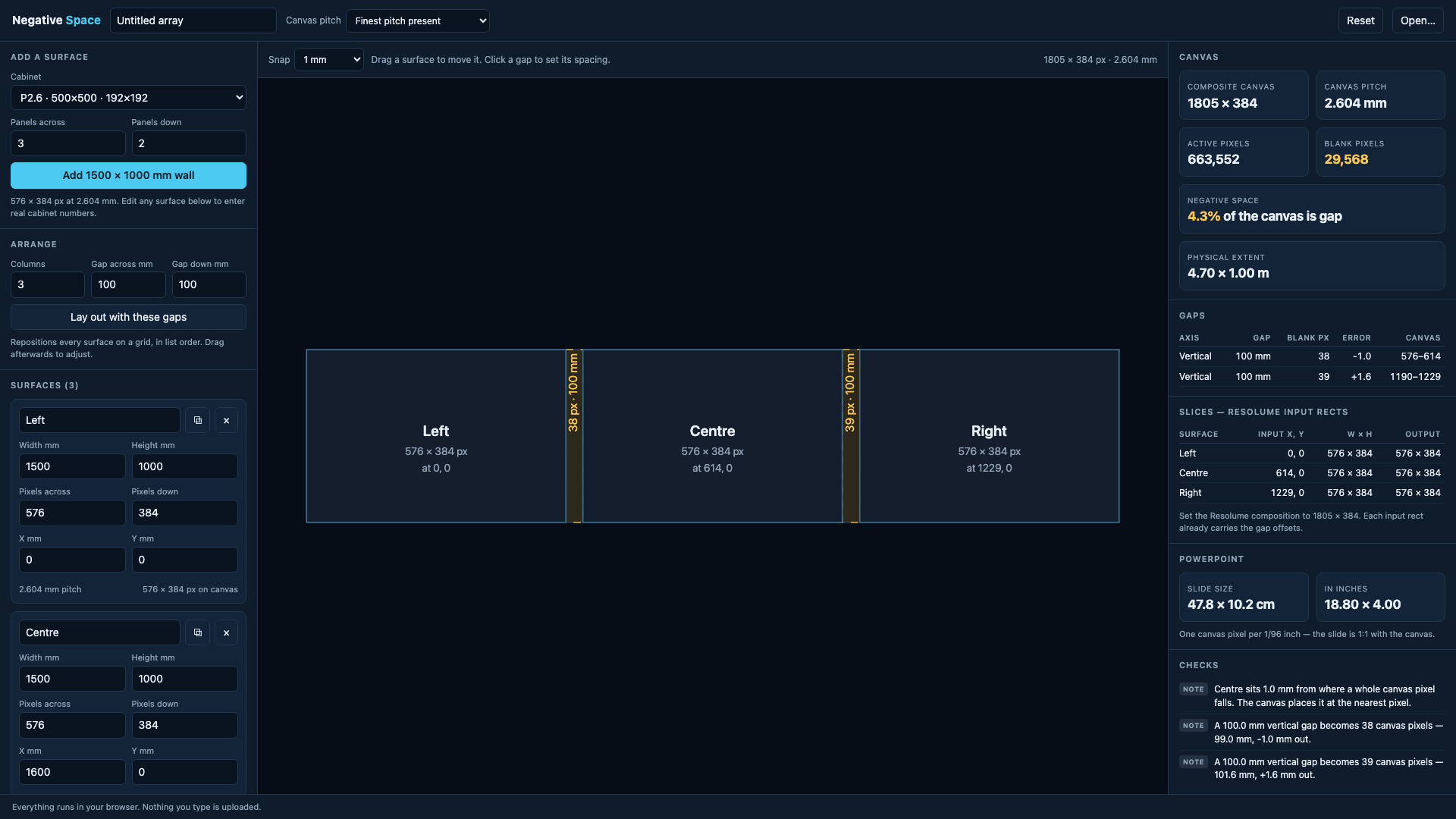
Three 1500 × 1000 mm P2.6 surfaces with 100 mm gaps: a 1805 × 384 composite canvas, 4.3 % of it gap, the blank pixels each gap costs and the rounding error it carries, plus the Resolume input rects and the PowerPoint slide size that fall out of it.
The problem
Three LED walls in a row, 100 mm apart. Each is 576 × 384 px. Lay them out as a 1728 × 384 composition and anything moving across the array jumps: it leaves the first wall and instantly turns up on the second, because the composition has no idea the gap is there.
What you actually want is a canvas that includes the gap (1805 × 384), where the 77 blank pixels between the walls are composited into the dark. Now an object crossing the array disappears behind the gap and comes out the far side at the speed it was really going.
Working out those blank pixel counts by hand means dividing physical gaps by a pixel pitch that's rarely a round number (a "P2.6" cabinet is 2.604166… mm), for every gap, and then offsetting every slice by the running total. That's the job this does, so you don't have to do it on the back of a roll of gaffer.
What it gives you
- The composite canvas size, and what fraction of it is gap.
- Per-surface slice rectangles, gap offsets already applied.
- Resolume Arena advanced output: both the
AdvancedOutput.xmland preset forms. - A guide image (SVG and PNG) at the canvas resolution, pixel for pixel, with the gaps shaded. Drop it behind a PowerPoint slide or into After Effects and design against the real negative space.
- PowerPoint slide geometry, plus a starter
.pptxwith the surfaces and gaps drawn on it. - CSV of every surface and gap, and a JSON project file to save and reload.
- A PDF report with a scale plan of the canvas, for taking to site.
- LivePremier pitch compensation: the H and V ratios an Analog Way Aquilon needs to drive surfaces of different pitches from one screen.
Using it
Add surfaces from the cabinet presets or type the real numbers in, drag them around the canvas, and click any gap to set its spacing precisely. Mixed pitches are handled: the canvas defaults to the finest pitch present, so no surface is ever asked to show fewer pixels than it has.
docs/USER-GUIDE.md has the rest.
LivePremier pitch compensation
If the array's going on an Analog Way LivePremier, one screen spanning surfaces of different pitches needs each output told how much canvas its raster is worth, or a layer crossing between them changes physical size on the way. The panel gives you the two numbers per surface, for Preconfig > Canvas > Pitch.
The arithmetic is aquilon-pitch's
engine, vendored as source into src/vendor/aquilon-pitch/. It carries four things about
the device that are easy to get backwards and still look right, each one established there
by driving a simulator rather than reading the manual: the ratio multiplies a raster to
give its canvas footprint, so a coarser wall goes above 1.000; the field is an
integer in thousandths, 0.100 to 10.000; an out-of-range write is discarded, not
clamped; and the footprint floors.
The ratios are right, but the positions aren't sent anywhere. A LivePremier lays its canvas out from each output's own area of interest, which this tool can't reach into, so the gaps (the whole point of a Negative Space canvas) still have to be built there by hand, from the canvas rectangles shown next to each ratio.
One thing to watch: those ratios are always built on the finest pitch, because a
reference below 1.000 would set the whole screen upscaling. If the project's canvas pitch
is set to coarsest or a manual value, the two canvases are different sizes and the panel
tells you so. The rectangles it shows are rescaled to match the ratios, so on purpose
they're not the pixel numbers you see elsewhere on the page.
Development
npm install
npm run dev      # vite dev server
npm test         # vitest
npm run build    # tsc -b && vite build -> dist/
AGENTS.md explains the model and the traps. CLAUDE.md is the command reference.
Status
The geometry is arithmetic and is covered by tests, including conservation invariants. The
.pptx has been opened in real PowerPoint. The Resolume XML has never been round-tripped
through a running Arena. The structure matches real Arena files and is asserted in CI, but
check one slice against the wall before you trust a show to it. See
docs/resolume-export.md.
Run your own copy
Negative Space is a static page, so hosting it yourself is one container serving the built files — the same files the hosted copy serves, running somewhere that still works when the venue has no internet.
Docker. The image is built by this repo's docker.yml workflow on every
push and published as ghcr.io/stoatworks-labs/negative-space:
docker run -d --name negative-space --restart unless-stopped -p 8541:80 ghcr.io/stoatworks-labs/negative-space:latest
Or docker compose up -d with the docker-compose.yml
in this repo, which maps the same port. Either way it is then at
http://localhost:8541/.
Unraid. Search Community Applications for Negative Space — the template is
templates/negative-space.xml
in stoatworks-unraid, which is what the CA feed reads.
Stoatworks Burrow lists it under Self-hosted, with the compose file a click away.
The Dockerfile, docker-compose.yml, docker/ and the workflow are
generated from fleet.json in stoatworks-unraid. Change them there and
regenerate rather than editing them here.
This project is built on other people's work — see ATTRIBUTIONS.md.
Licence
MIT. See LICENSE.
Categories
Related apps
Explore more like this
Explore allDetails
ghcr.io/stoatworks-labs/negative-space:latestRuntime arguments
- Web UI
http://[IP]:[PORT:80]/- Network
bridge- Shell
sh- Privileged
- false
Template configuration
Host port for the web interface.
- Target
- 80
- Default
- 8541
- Value
- 8541