
All apps · 0 apps

Nebulis
Docker app from Brent7187's Repository
Overview
Readme
View on GitHubNebulis
Your universe. Captured. Beautifully organized.
A full image library, observation planner, and sky forecast for your smart telescope. Self-hosted, runs on your own hardware, accessible from any browser on your network.
nebulis.app — macOS, Windows, iOS, tvOS, and Android apps also available.
Supported telescopes: ZWO SeeStar S30 / S50, DWARFLAB Dwarf II / Dwarf 3 / Dwarf Mini
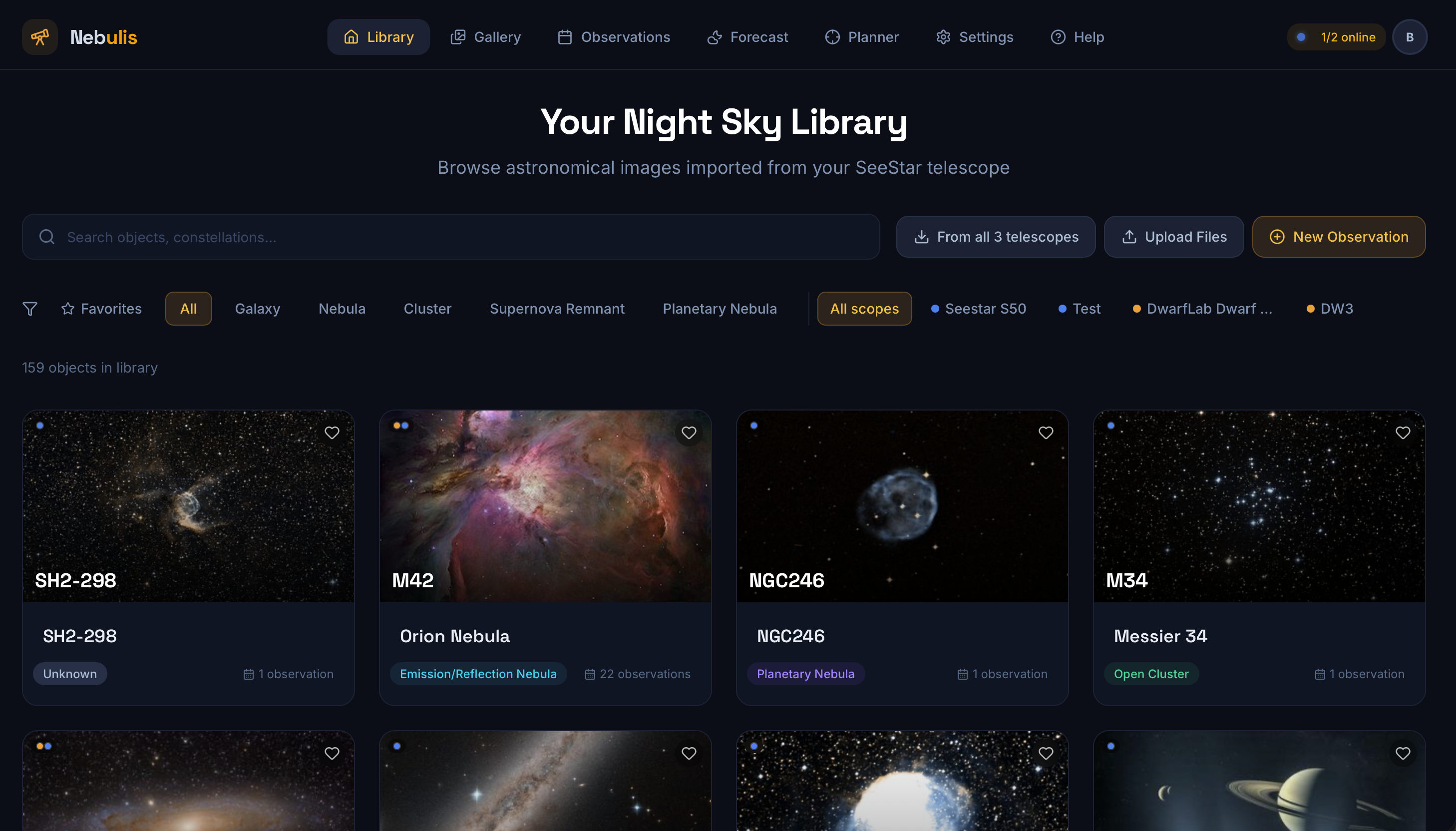
Features
- Import imaging sessions and sub-frames directly from your telescope's network share
- Native FITS viewer with header inspection and per-frame satellite trail detection
- Astronomical catalog enrichment: Messier, NGC, IC, Sharpless, Caldwell
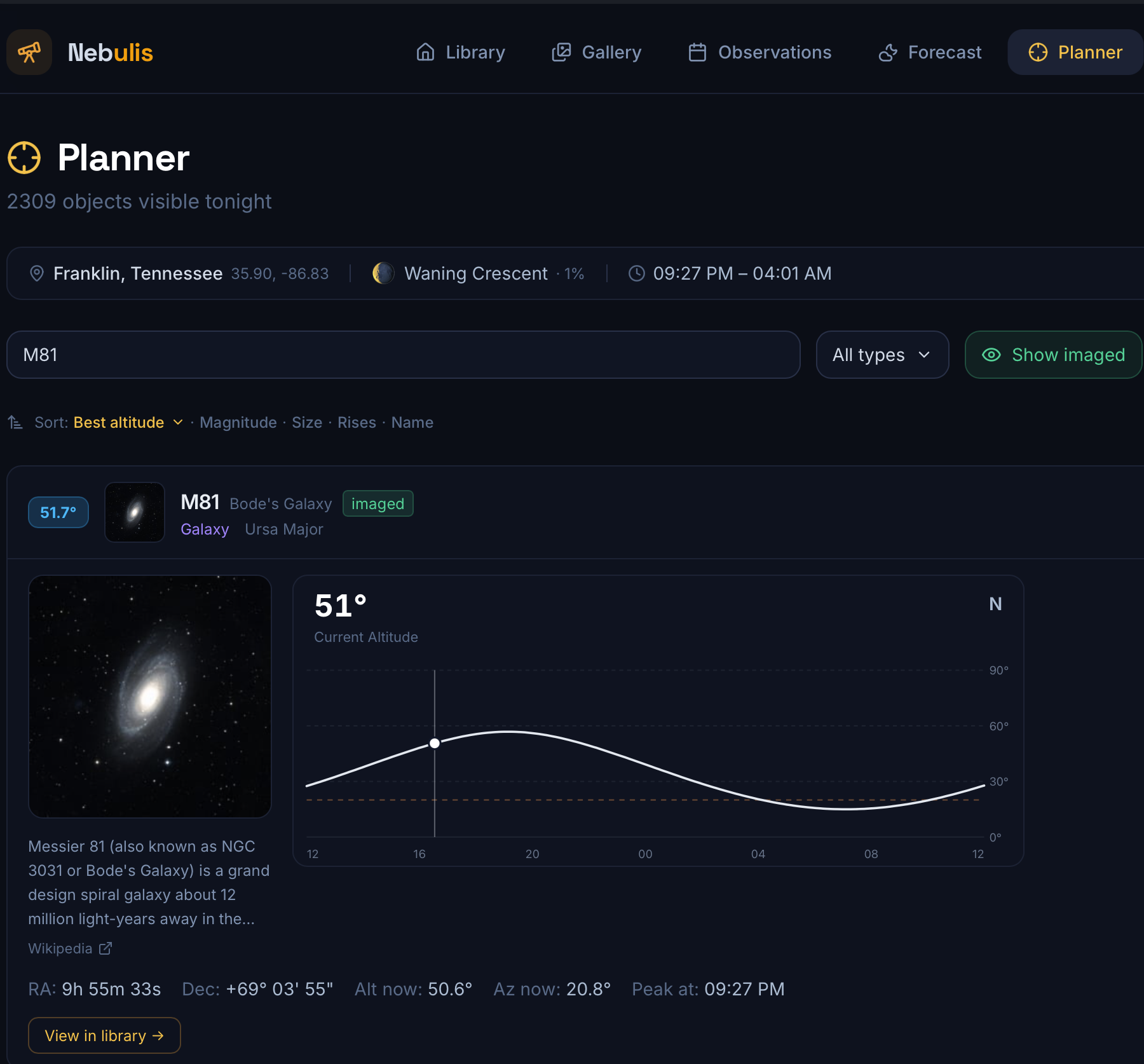
- Observation planner with altitude charts for 5,000+ deep-sky objects, drag-and-drop scheduling
- Sky forecast combining cloud cover, humidity, atmospheric seeing, and lunar phase
- Import frames into a managed local library; combine and process sub-frames
- Multi-user auth with device pairing (iOS / tvOS companion app)
- Light and dark theme
Docker Compose
services:
  nebulis:
    image: ghcr.io/nebulis-app/nebulis:latest
    container_name: nebulis
    restart: unless-stopped
    ports:
      - "8080:8080"        # Web interface
      - "47890:47890/udp"  # LAN discovery (optional)
    volumes:
      - nebulis-data:/app/data
    environment:
      - ADVERTISED_HOST=192.168.1.50  # your server's LAN IP

volumes:
  nebulis-data:
docker compose up -d
Open http://localhost:8080 (or your server IP) and complete the onboarding.
Environment Variables
| Variable | Default | Description |
|---|---|---|
PORT |
8080 |
HTTP listen port inside the container |
ADVERTISED_HOST |
(auto) | LAN IP advertised to the iOS app for auto-discovery. Set this if the app can't find the server automatically. |
LOG_LEVEL |
info |
trace, debug, info, warn, or error |
JWT_SECRET |
(auto-saved) | Auth signing secret. Auto-generated on first start and saved to /app/data/.jwt-secret. |
DATA_KEY |
(auto-saved) | Encryption key for stored telescope passwords. Auto-generated and saved to /app/data/.data-key. Keep this stable — changing it makes existing credentials unreadable. |
Volumes
| Path | Purpose |
|---|---|
/app/data |
Database, settings, secrets, thumbnail cache. Keep this on a persistent volume. |
/media (optional, read-only) |
Bind-mount the path where USB telescope drives appear for direct SD card access. |
Updating
docker compose pull && docker compose up -d
Your data and logins survive the update as long as /app/data is on a persistent volume.
Setup
- Open the web interface after starting the container.
- Complete the onboarding: set your location, units, and theme.
- Go to Settings → Hardware and add your telescope. Choose SeeStar or Dwarf, then enter its IP address and network share path, or point to a locally mounted USB path.
- Create an admin account under Settings → Account.
License
Categories
Related apps
Explore more like this
Explore allDetails
ghcr.io/nebulis-app/nebulis:latestRuntime arguments
- Web UI
http://[IP]:[PORT:8080]/- Network
bridge- Privileged
- false
Template configuration
Port for the Nebulis web interface.
- Target
- 8080
- Default
- 8080
- Value
- 8080
UDP port used for local network auto-discovery by the iOS/tvOS app.
- Target
- 47890
- Default
- 47890
- Value
- 47890
Stores the database, settings, thumbnails, and cache.
- Target
- /app/data
- Default
- /mnt/user/appdata/nebulis
- Value
- /mnt/user/appdata/nebulis