

mynah
Docker app from Stoatworks Labs' Repository
Overview
Readme
View on GitHubAI-assisted project. This codebase was created with Claude (Anthropic), directed and reviewed by a human author. It's driven a real switcher: Mynah's own store, recall, label, delete and Take have run against a physical Aquilon C on firmware 6.2.73 (a layer memory, a program recall and the six-op masked master store among them), with the filters read back exactly as compiled, and the hardware found two bugs the simulator never showed.
Set, for live layers and audio, came later and has only been written to hardware by a separate test harness, not by Mynah. Neither the X-Keys nor the Stream Deck path has ever been run against real hardware. See Status.
Mynah
A lighting-desk command line for Analog Way LivePremier (Aquilon) switchers, and, as a language core other apps embed, for Midra 4K and Alta 4K too.
Recall Screen 1 Memory 5
Store Master 12 If Screen 1 + 3 Category Source + Position
Recall Screen 1 Thru 4 Memory 7 Program
Take
Type the command and press Enter. The grammar rules are grandMA3's: verb first, any
unambiguous abbreviation, Thru / + / - ranges, and an If clause that masks a store.
The vocabulary is the switcher's own (Screen, Aux, Layer, Master, Memory, Preview, Program),
so nothing here calls anything a fixture or a cue. The lighting department can keep those.
It runs in a browser with nothing installed, talks to the switcher directly, and drives the same commands from a keyboard, an X-Keys panel, or a Stream Deck.
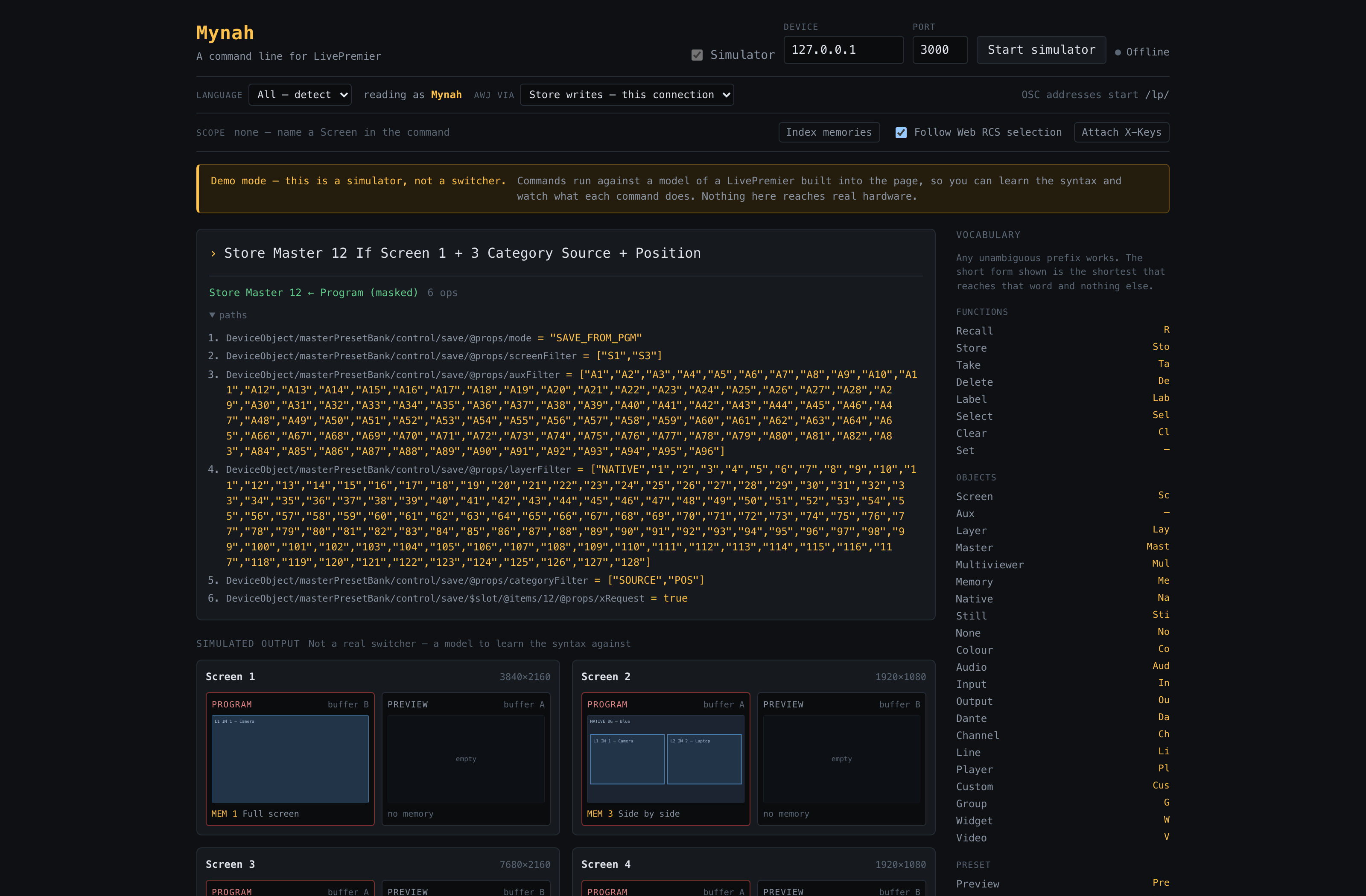
The hosted demo with a masked master store typed and compiled but not sent: one line becomes six ordered writes, the record mask narrowed to two screens and two categories, and every path is shown before anything would leave the browser. The simulator's on and nothing here reaches real hardware, and the page says so.
Download
v1.6.1 — prebuilt for macOS, Windows and Linux. Pick your platform:
macOS — Universal (Apple Silicon + Intel), Apple Silicon, Intel
| Build | Download | Size |
|---|---|---|
| Universal (Apple Silicon + Intel) · .dmg disk image | mynah-1.6.1-macos-universal.dmg |
8.9 MB |
| Apple Silicon · .dmg disk image | Mynah_1.6.1_aarch64.dmg |
2.4 MB |
| Intel · .dmg disk image | Mynah_1.6.1_x64.dmg |
2.5 MB |
| Universal (Apple Silicon + Intel) · .pkg installer | mynah-1.6.1-macos-universal.pkg |
8.9 MB |
Windows — x64
| Build | Download | Size |
|---|---|---|
| x64 · .exe installer | Mynah_1.6.1_x64-setup.exe |
2.1 MB |
Linux — x64
| Build | Download | Size |
|---|---|---|
| x64 · .deb package (Debian/Ubuntu) | Mynah_1.6.1_amd64.deb |
3.0 MB |
| x64 · .rpm package (Fedora/RHEL) | Mynah-1.6.1-1.x86_64.rpm |
3.0 MB |
Also in this release:
Mynah_1.6.1_aarch64.app.tar.gz— macOS app bundle (updater archive; the .dmg is the install), 2.4 MBMynah_1.6.1_x64.app.tar.gz— macOS app bundle (updater archive; the .dmg is the install), 2.5 MB
All builds, checksums and release notes: github.com/stoatworks-labs/mynah/releases.
macOS builds are signed and notarised and open normally. The Windows builds are unsigned, so SmartScreen warns once.
Why
A LivePremier has a lot of memories (1,000 screen, 500 master, 50 layer), and the vendor's Web RCS gets to them by pointing at things. Anyone who's run a lighting desk knows the alternative: say what you want, in one line, without your eyes leaving the screen. That's all this is.
What it does today
Memories: recall, store, delete, label, take, and scope.
Live layer control: source, size, position and opacity, on any layer of any screen:
Set Screen 3 Layer 2 Source 1 Size 50% Position 33% 50%
Percentages resolve against the screen's real canvas, and position is the layer's centre because that's the device's anchor.
| Bank | Slots | Scope |
|---|---|---|
| Screen | 1–1000 | Screen S1–S24, Aux A1–A96, × Preview/Program |
| Master | 1–500 | record mask: screens, auxes, layers, categories |
| Layer | 1–50 | Screen × Preview/Program × layer (Native, 1–128) |
| Multiviewer | 1–50 | output |
Four command languages. The same line accepts Mynah, raw AWJ, raw Web RCS store JSON, and OSC. These four are all the same write:
Take Screen 1
AWJ DeviceObject/$screenAuxGroup/@items/S1/control/@props/xTake = true
{"path":["device","screenAuxGroupList","items","S1","control","pp","xTake"],"value":true}
/lp/screen/1/take
Each line is read as whichever language it looks like, and you see the verdict as you
type. A leading MYNAH, AWJ, JSON or OSC says which outright, and the picker can turn
detection off altogether. See
docs/LANGUAGES.md.
Variables and arithmetic, for a host that supplies them: $S1.width
read off the switcher, @gap defined by the operator, and sums in brackets,
anywhere a number goes:
Set Screen 1 Layer 2 Size ($S1.width / 2) $S1.height
The language doesn't know any names; the program embedding it does. LivePremier Plus supplies both kinds. This app on its own doesn't supply any yet, and says so when a line uses one. See docs/SYNTAX.md.
New to it? Start with the programming guide, which goes through every command from one word upwards, with worked examples you can paste into the simulator. The full grammar is in docs/SYNTAX.md, and the device paths behind it, with the firmware they were verified on, are in docs/PATHS.md.
Two things worth knowing
A recall never reaches program by accident. An unqualified Recall goes to
Preview. An unqualified Store takes from Program, because that's the look
you just made live, and the device's own default agrees. Getting to air always
costs you an explicit word: Program, or Take.
An empty memory is reported as empty. The device accepts a recall of a slot
that holds nothing, then does nothing, with no error and no response at all. Mynah
watches for that silence and says empty memory rather than done, because a
green tick on a command that changed nothing is worse than no feedback.
Connecting
A browser can't open a raw TCP socket, so the documented AWJ protocol on port 10606 is out of reach from a page. Mynah uses the Web RCS WebSocket instead, the same socket the vendor's own UI speaks, on port 80 of a device or 3000 of the simulator. It needs no bridge and no install, has no five-client cap, and pushes state without a subscription list to get wrong.
An AWJ message typed at the command line still runs in a browser: it's
converted to the store spelling and lands at the same node. What a page can't
do is read one back, because that socket carries changes rather than answers.
The desktop app opens a real AWJ socket, which is what makes
AWJ get DeviceObject/system/$device/@items/1/@props/dev answerable.
It also means Mynah sees what a human does in the vendor UI, and follows the Web RCS's own screen selection so that selecting a screen in either place selects it in both.
The desktop app, if you want the simple answer
Download it and it just works, on macOS, Windows and Linux, at about 5 MB. It talks to the switcher directly, with no browser sandbox in the way.
npm run desktop        # run it from a checkout
npm run desktop:build  # build the installers
It has to be served over http, and that is not negotiable
A LivePremier serves the Web RCS over plain http on port 80, with 443 closed.
There's no wss:// to connect to, and browsers block an insecure WebSocket
from a secure page as mixed content. So:
| Where Mynah runs | Can it drive a switcher? |
|---|---|
localhost from a checkout |
yes |
| self-hosted over http on the show network | yes |
| the desktop app | yes |
| the hosted https:// copy | no — blocked before the socket leaves the browser |
So the hosted copy runs a simulator instead, and says so in a banner you can't miss. It's a model of a LivePremier built into the page: four screens with layers and three preset buffers each, the four memory banks, and a wireframe of what every screen is putting out. Recall a memory and watch the preview change; press Take and watch the buffers swap.
It reproduces the device's awkward behaviour on purpose, because those are the things worth meeting for the first time somewhere other than a show:
- a recall of an empty memory is answered with silence, and reported as an empty memory rather than as success
- preview and program are names for whichever buffer is pending or live, the mapping differs per screen, and a Take swaps it
The simulator's in every build, not just the hosted one: tick Simulator in the connection bar.
For live control on a show, use the desktop app, the container, or a local checkout.
And no, a proxy can't fix the hosted copy. A Cloudflare Worker runs at the edge and can't reach a switcher on your own network, and tunnelling one out to the public internet would expose an unauthenticated control interface, so anyone who reached it could drive your show. The desktop app is the answer to that question.
Devices
Keyboard, X-Keys and Stream Deck all run the same grammar (see docs/DEVICES.md). The short version: the browser opens an X-Keys panel directly over WebHID, but it can't open a Stream Deck, because Elgato's software has hold of it.
For a Stream Deck there are two routes: the bundled Elgato plugin in
streamdeck/, or, better if you already run Companion,
companion-module-mynah,
which brings pages, variables, feedbacks and a preset library of 186
ready-made buttons. Both bundle the compiler from src/lang/ rather
than reimplementing the grammar.
Running it
npm install
npm run dev
Then point it at a device, or at the LivePremier simulator on 127.0.0.1:3000.
npm test                  # the grammar and the store scanner
npm run build             # static bundle in dist/
npm run build:streamdeck  # the Stream Deck plugin
npm run build:lang        # the language core alone, for other consumers
Status
v1.6.1: variables and arithmetic. A $ or @ variable, or a sum in brackets, can now
stand wherever a number can: screens, ranges, memories, sources and amounts. The host
supplies the values. The language itself doesn't know any names, and there's no eval. An OSC
numeric argument can be a string of arithmetic too. The hosted build can be installed as an
app and runs with no signal, and the desktop launcher stops its server with SIGTERM before it
resorts to SIGKILL. (v1.6.0 had all of this, but its desktop app didn't build, because
Tauri's JavaScript and Rust packages were on different minor versions. v1.6.1 is the same
release with them matched, at Tauri 2.12.)
v1.5.2: the desktop launcher says why a start failed. Pressing Start while something held the port (another copy of Mynah, or its server started by hand) used to look like nothing happening. Now the launcher says so on the click (and keeps Open available, since what's listening is usually Mynah), names a port the OS refuses, and quotes the last output lines of a server that dies right after starting. The shell is av-launcher 21bc307. Nothing in the language or the app changed.
v1.5.1: the desktop launcher stops its server on every exit path. ⌘Q and Quit from the Dock used to leave the embedded server running after the app had gone, holding the port with no tray left to stop it from. The launcher shell is now av-launcher 2c83ad7, which shuts it down on every exit. Nothing in the language or the app changed.
v1.5.0: audio on Midra 4K / Alta 4K, routed rather than patched.
There's no channel matrix on that platform. Audio moves as eight-channel sources, which are
Input 1–16, Dante 1 Thru 8 (four groups), Line Input 1–2, Player and Custom 1–10,
and every place it comes out is a point that carries one or follows something.
Set Audio Patch Input 3 To Screen 1 writes the preview preset's audio layer, which
takes with the preset like the layers do. Set Audio Patch Input 4 To Output 1 sets a video
output to direct routing and gives it the source. Set Audio Follow Layer 2 On Screen 1,
Follow Screen 2 On Line Output 1 and Follow Widget 3 On Multiviewer set what a point
follows. The mutes land where the device keeps them, an input's on every plug it has.
docs/SYNTAX.md §11 has both platforms' audio grammars side by side, and docs/PATHS.md has
the table. Every line was written on the Midra 4K simulator as a Pulse 4K and the Alta 4K
simulator as a Zenith 200 and read back, and the object model and enums came off a live Pulse
4K. Nothing about LivePremier's matrix grammar changed. Two words aren't the vendor's, on
purpose: Player for the media player and Follow Video for an aux following its content,
so that Memory keeps Me and Colour keeps Co.
v1.4.0: a second platform in the language core, and a save mode the device had been refusing in silence.
compile, parse and run take a platform: LIVEPREMIER (the default,
byte-identical to before) or MIDRA, which spells the same grammar for Midra 4K
(QuickVu, Pulse, Eikos, QuickMatrix) and Alta 4K (Zenith 100 / 200): takes under
transition/…, memories under preset/bank, preset/auxBank and
preset/masterBank, UP/DOWN buffers resolved from the transition state, one
multiviewer with twenty layouts, and refusals for what the platform lacks (a layer
bank, NATIVE, stills on a layer). Every Midra path was written on the Midra 4K
and Alta 4K simulators and read back, and then, on 2026-09-12/13, proven on a
live Pulse 4K (3.3.10) through
LivePremier Plus, which
embeds this core: 35 of 35 lines compiled for MIDRA answered on the box, a
harness wrote the port's whole vocabulary and read it back, and the operator
typed Recall, Store … Preview and Delete at its Console, which were this grammar's
first writes to Midra hardware. (A Set … Opacity typed there the same morning
was refused by that build's Console, which handed the compiler no device facts.
That was a LivePremier Plus bug, fixed in its 0.7.0.) The web app and the Stream Deck
plugin still assume LivePremier; only the core knows the second platform.
Fixed: the master save mode is SAVE_FROM_PRW, not SAVE_FROM_PVW, on
both platforms. The device refused the wrong spelling without a word and kept
the previous mode, so every Store Master … Preview this compiler had ever
emitted had stored from program. Written to the LivePremier simulator and read
back, and the test that had pinned the wrong value now pins the right one.
v1.3.4: field testing, and it's driven a real switcher.
Verified on a physical Aquilon C on firmware 6.2.73: all 21 paths in
docs/PATHS.md resolve, and every verb the grammar had then, before Set, was run from
the command line (store, recall, label, delete, a layer memory, a program recall, a Take,
and the six-op masked master store), with the filters read back exactly as compiled. The
empty-memory behaviour was identical to the simulator's. The test memories were deleted
afterwards and the box left clean.
The hardware also found two bugs, both fixed: a label was reported unconfirmed
because the echo matcher only accepted true, and preview turned out to map to
buffer A on one screen and B on another, so there's nothing to hard-code
there.
A second frame, 2026-09-09 (NLC_C, firmware 6.2.73). Every path this
grammar compiles was issued at the box and answered, with no E12: the 21
memory paths and, for the first time on real hardware, the audio routing
matrix. OUTPUT_1 channel 1 read source="DANTE_1_CHANNEL_1", and a mute
toggle round-tripped and restored. The device also confirmed the shapes the echo
matcher depends on: a label echoes back as the STRING written (31 ms), a
record-mask filter as the ARRAY written (155 ms). useLink now has tests
holding it to those exact shapes, so that bug can't sneak back in.
Not done yet: neither the X-Keys nor the Stream Deck path has been run
against real hardware. And there's a distinction worth keeping. The box has answered
every path this grammar emits, including live layer control and the audio matrix, and
writes to those same paths were executed and restored on hardware, but by a separate test
harness rather than by Mynah itself. So the vocabulary is proven on a device, but Mynah's
own hand on the wire is only proven for the memory verbs and Take, not yet for Set. The
object model is bigger still, and the syntax is built to grow over it.
Run your own copy
Mynah is a static page, so hosting it yourself is one container serving the built files — the same files the hosted copy serves, running somewhere that still works when the venue has no internet.
Docker. The image is built by this repo's docker.yml workflow on every
push and published as ghcr.io/stoatworks-labs/mynah:
docker run -d --name mynah --restart unless-stopped -p 8534:80 ghcr.io/stoatworks-labs/mynah:latest
Or docker compose up -d with the docker-compose.yml
in this repo, which maps the same port. Either way it is then at
http://localhost:8534/.
Unraid. Search Community Applications for Mynah — the template is
templates/mynah.xml
in stoatworks-unraid, which is what the CA feed reads.
Stoatworks Burrow lists it under Self-hosted, with the compose file a click away.
The Dockerfile, docker-compose.yml, docker/ and the workflow are
generated from fleet.json in stoatworks-unraid. Change them there and
regenerate rather than editing them here.
Categories
Related apps
Explore more like this
Explore allDetails
ghcr.io/stoatworks-labs/mynah:latestRuntime arguments
- Web UI
http://[IP]:[PORT:80]/- Network
bridge- Shell
sh- Privileged
- false
Template configuration
Host port for the web interface.
- Target
- 80
- Default
- 8534
- Value
- 8534