
All apps · 0 apps

MyMPD
Docker app from grtgbln's Repository
Overview
Readme
View on GitHubmyMPD


myMPD is a standalone and lightweight web-based MPD client. It's tuned for minimal resource usage and requires only very few dependencies. Therefore myMPD is ideal for raspberry pis and similar devices.
The backend is written in C and has no dependencies to external databases or webservers. The configuration is stored in plain text files and all the data is pulled on demand from MPD. The MPD database is the only source of truth for myMPD.
The frontend is mobile friendly, written as a PWA in plain JavaScript and offers on all devices the same functionality.
myMPD also integrates extended features like an advanced jukebox mode, timers, triggers and smart playlists. With the integrated lua interpreter myMPD functions can also be scripted.
Screenshots
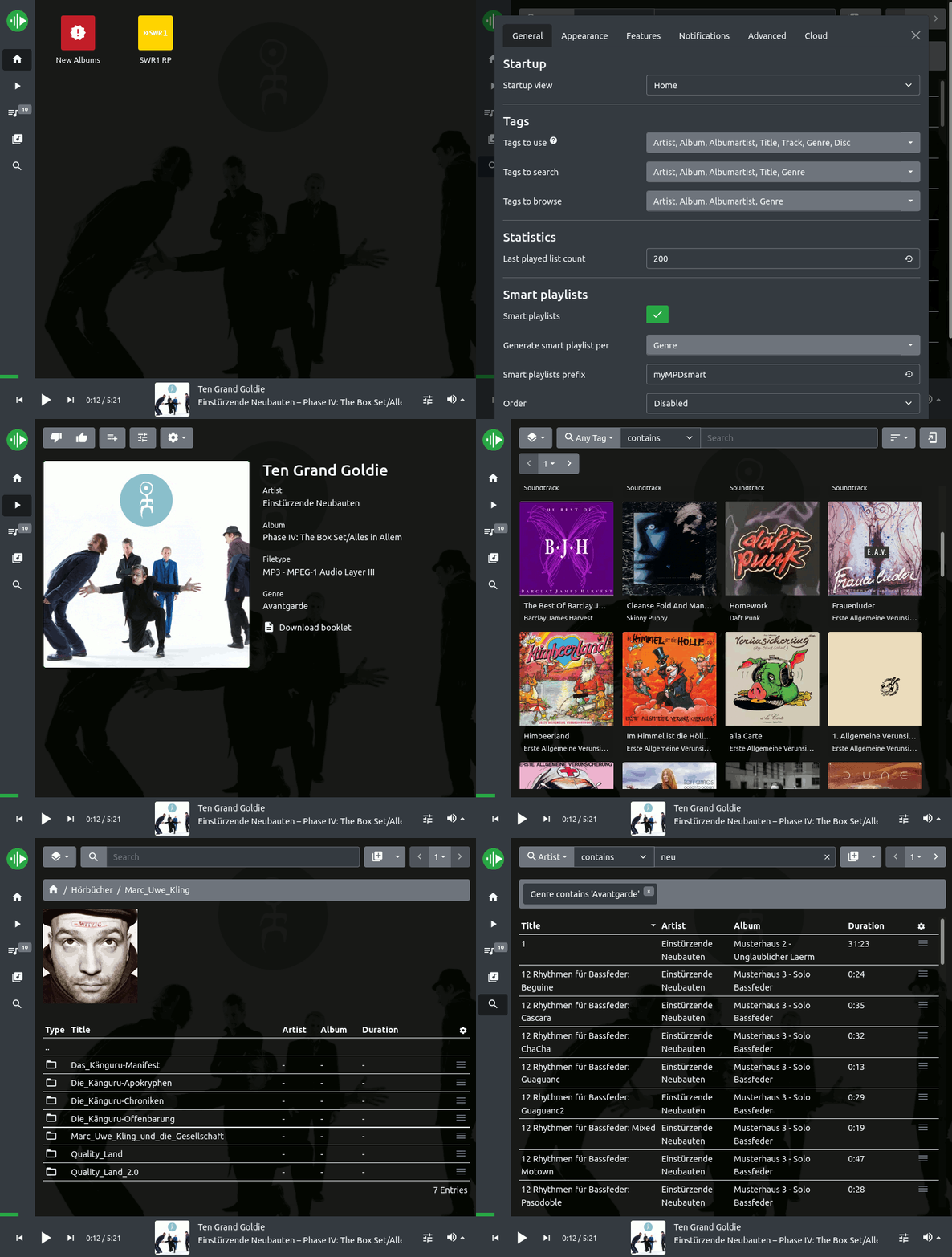
Features
- Concurrent MPD partition support
- Control MPD functions and options
- MPD option presets
- Queue and playlist management
- Browse MPD database by tags or filesystem
- Advanced search
- Jukebox mode
- MPD mount and neighbors support
- Customizable UI
- Home screen with shortcuts and widgets
- Webradio Favorites and WebradioDB
- Smart playlists and saved searches
- MPD sticker support: playback statistics, voting and user defined stickers
- Albumart: embedded and image per folder
- Unsynchronized and synchronized Lyrics
- Local PDF booklet and info.txt support (per album folder)
- Local playback of mpd http stream
- Timers and Triggers
- Lua scripting
- Localized user interface
- Dark and Light theme
- Publishing of mpd and myMPD directories via http
- Progressive Web App enabled
- Support of Media Session API
- ListenBrainz and MusicBrainz integration
- myGPIOd integration
To use all myMPD functions you should use the latest stable MPD version.
Scripts to add functionality
The mympd-scripts repository provides many script to enhance and add features to myMPD.
- Scrobbling to Last.fm, Maloja or ListenBrainz
- Fetch albumart or tagart from fanart.tv and OpenOpus
- Fetch lyrics with LRCLIB
- Import webradios from RadioBrowser
- yt-dlp integration
- Home screen widgets
- and many more
Documentation
For information on installation and configuration, see the myMPD documentation
Support
Please read the documentation before asking for help. Bugs should be reported through issues. For all other question and general feedback use the discussions.
You can follow me at mastodon to get news about myMPD.
Contribution
myMPD is in active development. If you like myMPD, you can help to improve it (no programming skills are required).
- Star this repository to make it more popular.
- Help to improve myMPD.
- Consider donating a coffee to this project.
Copyright
2018-2026 Juergen Mang mail@jcgames.de
myMPD was originally a fork of ympd, but it has evolved into a much more comprehensive MPD client.
Requirements
May require additional configuration. See documentation: https://jcorporation.github.io/myMPD/020-configuration/configuration-files/
Related apps
Explore more like this
Explore allLinks
Details
ghcr.io/jcorporation/mympd/mympd:latestRuntime arguments
- Web UI
http://[IP]:[PORT:8080]/- Network
bridge- Privileged
- false
- Extra Params
--user 1000:1000
Template configuration
Container Port: 8080
- Target
- 8080
- Default
- 8080
- Value
- 8080
Path to the MPD listening socket
- Target
- /run/mpd
- Default
- /run/mpd
- Value
- /run/mpd
Path to the working directory
- Target
- /var/lib/mympd
- Default
- /mnt/user/appdata/mympd/working
- Value
- /mnt/user/appdata/mympd/working
Path to the cache directory
- Target
- /var/cache/mympd
- Default
- /mnt/user/appdata/mympd/cache
- Value
- /mnt/user/appdata/mympd/cache
Path to the music directory
- Target
- /var/lib/mpd/music
Path to the playlist directory
- Target
- /var/lib/mpd/playlists
Umask setting for file permissions
- Target
- UMASK_SET
- Default
- 022
- Value
- 022
Enable SSL for MyMPD
- Target
- MYMPD_SSL
- Default
- false|true
Internal HTTP port for MyMPD. Not recommended to change.
- Target
- MYMPD_HTTP_PORT
- Default
- 8080
- Value
- 8080