
All apps · 0 apps

Musikat
Docker app from grtgbln's Repository
Overview
Readme
View on GitHubMusikat — Navidrome and local downloads
Search Deezer (default, no API key) or Spotify (optional credentials) for tracks and albums, download audio from YouTube with yt-dlp, apply ID3 tags and artwork, then save to your browser downloads or copy into one or more Navidrome music library folders on the server.
Choose the catalog in the web UI (Catalog) or set DEFAULT_METADATA_PROVIDER in .env.
Screenshots
Main Interface
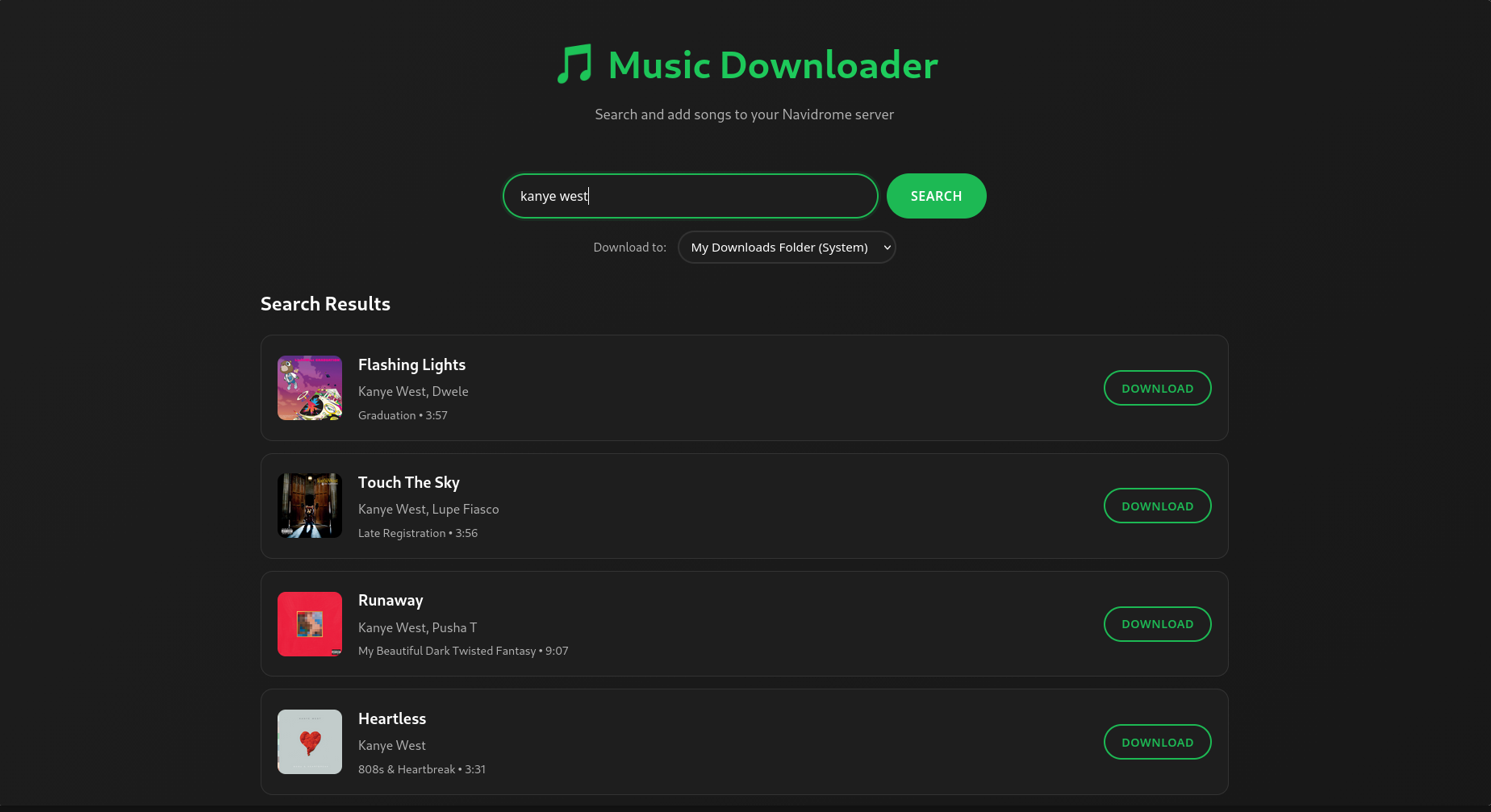
Download Queue with Progress Bars
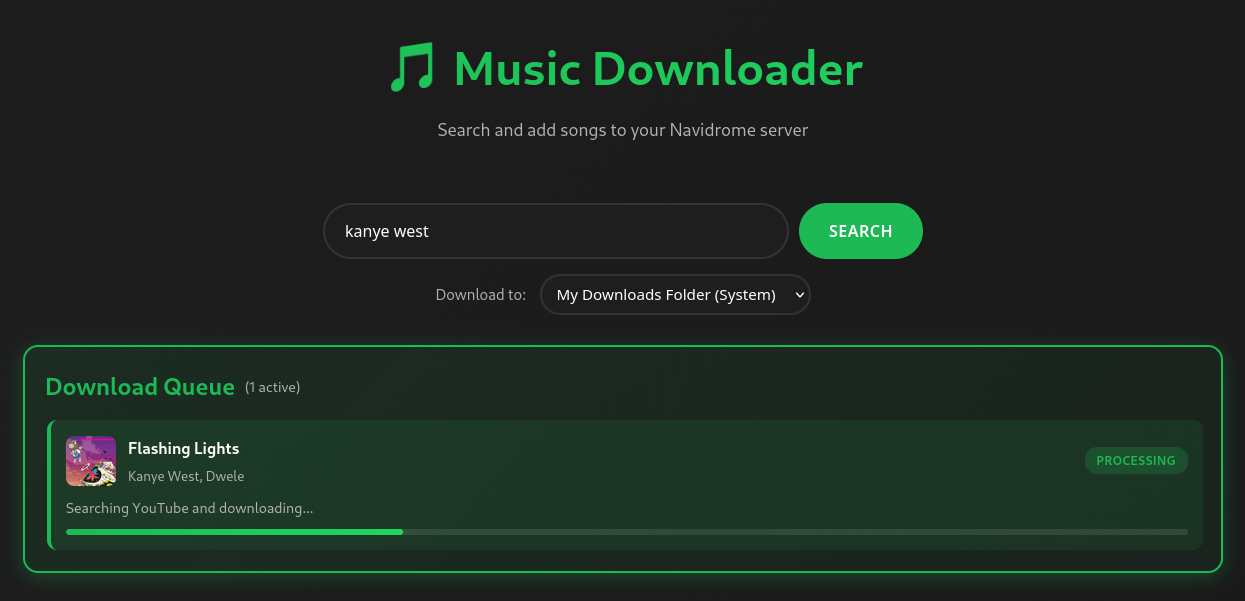
Features
- Search Deezer or Spotify for tracks and albums
- Download from YouTube using catalog metadata; optional YouTube cookies when YouTube blocks automation
- ID3 tagging (artist, album, cover art) via the metadata service
- Download to: local (browser) or any configured Navidrome music root (multiple libraries supported — no need to run separate app instances)
- Web UI with download queue and status polling
- Background library sync (optional): scan Navidrome folders and align “already downloaded” state with the catalog
Architecture
| Layer | Technology |
|---|---|
| Frontend | HTML, CSS, vanilla JavaScript |
| Backend | Python FastAPI |
| Catalog | Deezer (public search) or Spotify Web API (optional) |
| Audio | yt-dlp + FFmpeg |
| Tags | mutagen |
| Server library | Files copied under Navidrome music path(s); optional Navidrome API for scans |
Prerequisites
Docker: Docker and Docker Compose
Manual: Python 3.8+ (3.11+ recommended), FFmpeg on PATH, optional Navidrome instance
Spotify in the UI requires SPOTIFY_CLIENT_ID and SPOTIFY_CLIENT_SECRET in backend/.env.
Installation
Docker Compose (recommended)
git clone https://github.com/soggy8/musikat.git
cd musikat

cp backend/env.example backend/.env
# Edit backend/.env: Navidrome path(s), optional Spotify, DEFAULT_METADATA_PROVIDER

docker-compose up -d
Open http://localhost:8000.
Mount your Navidrome music directory in docker-compose.yml (see DOCKER.md).
Manual install
See SETUP.md.
cd backend
python -m venv venv
source venv/bin/activate   # Windows: venv\Scripts\activate
pip install -r requirements.txt
Install FFmpeg (e.g. sudo apt install ffmpeg on Debian/Ubuntu, brew install ffmpeg on macOS).
Configuration (backend/.env)
Copy backend/env.example to backend/.env and adjust.
Metadata catalog
| Variable | Description |
|---|---|
DEFAULT_METADATA_PROVIDER |
deezer (default) or spotify |
SPOTIFY_CLIENT_ID / SPOTIFY_CLIENT_SECRET |
Required if you use Spotify in the UI |
SPOTIFY_REDIRECT_URI |
OAuth redirect (default http://localhost:8000/callback) |
Navidrome — one or multiple library folders
The app writes files on disk under paths the server is allowed to use. Navidrome should use the same folder(s) as its music library.
| Variable | Description |
|---|---|
NAVIDROME_MUSIC_PATH |
Single absolute path (default in code: /music if unset). Used when NAVIDROME_MUSIC_PATHS is not set. |
NAVIDROME_MUSIC_PATHS |
Optional. Comma- or newline-separated absolute paths. Each appears as a separate Download to target. |
NAVIDROME_MUSIC_LABELS |
Optional. Same order as NAVIDROME_MUSIC_PATHS; labels shown in the UI (defaults to folder basename). |
NAVIDROME_API_URL |
Navidrome base URL (for scans), e.g. http://localhost:4533 |
NAVIDROME_USERNAME / NAVIDROME_PASSWORD |
Optional; for triggering library scans via API |
NAVIDROME_SYNC_ENABLED |
true/false — background scan of library paths to sync “already downloaded” hints (default on) |
NAVIDROME_SYNC_INTERVAL_HOURS |
Between sync runs |
NAVIDROME_SYNC_INITIAL_DELAY_SEC |
Delay before first sync after startup |
Examples
Single folder (typical Docker mount):
NAVIDROME_MUSIC_PATH=/music
Multiple libraries:
NAVIDROME_MUSIC_PATHS=/data/music/rock,/data/music/classical
NAVIDROME_MUSIC_LABELS=Rock,Classical
Downloads and API
| Variable | Description |
|---|---|
DOWNLOAD_DIR |
Server temp/staging for downloads (default ./downloads) |
OUTPUT_FORMAT / AUDIO_QUALITY |
Default encode settings |
YOUTUBE_COOKIES_PATH |
Netscape cookies file for yt-dlp when YouTube blocks requests |
API_HOST / API_PORT |
Bind address |
CORS_ORIGINS |
Comma-separated allowed origins |
Running
cd backend
uvicorn app:app --host 0.0.0.0 --port 8000 --reload
Or python app.py if your entrypoint wraps uvicorn. The UI is served from the same process (no separate frontend server).
Usage
- Open the app in the browser.
- Under Download to, choose My Downloads Folder (System) or a Navidrome path (loaded from
GET /api/navidrome/libraries/ your env). - Pick Catalog (Deezer or Spotify).
- Search tracks or albums, then download. Watch the queue for progress.
- Local: the browser saves the finished file. Navidrome: the server copies the file under the selected music root (Artist/Album layout).
How it works
- Search — Deezer or Spotify returns track/album metadata and IDs.
- Match — YouTube candidates are chosen (with optional confirmation if confidence is low).
- Download — yt-dlp fetches audio; FFmpeg converts if needed.
- Tag — Metadata service writes tags and artwork.
- Deliver — Either serve to the browser or copy into the chosen Navidrome root; optional Navidrome API notification for scanning.
API (selected)
| Method | Path | Notes |
|---|---|---|
| GET | /api/health |
Status, navidrome_path, navidrome_libraries, etc. |
| GET | /api/metadata/providers |
Deezer / Spotify and whether Spotify is configured |
| GET | /api/navidrome/libraries |
{ "libraries": [ { "path", "label" }, ... ] } — roots from env |
| GET | /api/formats |
Audio format and quality defaults |
| POST | /api/search |
Body: query, provider, limit |
| POST | /api/search/albums |
Album search |
| POST | /api/download |
Body includes track_id, location (local | navidrome), optional navidrome_library (absolute path; must match server config), provider, format/quality |
| POST | /api/download/album |
Album download; same location / navidrome_library pattern |
| POST | /api/reverse/download |
YouTube → metadata flow |
| GET | /api/track/{id}/exists |
Duplicate check; supports location and optional navidrome_library |
| GET | /api/download/status/{track_id} |
Job status |
Full behavior is defined in backend/app.py.
Project structure
musikat/
├── backend/
│   ├── app.py
│   ├── config.py
│   ├── requirements.txt
│   ├── env.example
│   ├── static/              # app.js, styles.css
│   ├── templates/           # index.html
│   ├── services/            # deezer, spotify, youtube, metadata, navidrome
│   ├── utils/               # file_handler, job_store, navidrome_library_sync
│   └── tests/
├── images/
├── Dockerfile
├── docker-compose.yml
├── DOCKER.md
├── DEPLOYMENT.md
├── SETUP.md
└── README.md
Troubleshooting
No search results
- Try the other catalog or a more specific query (artist + title).
YouTube errors (“Sign in to confirm you’re not a bot”, 403, etc.)
- Install FFmpeg and ensure it is on
PATH. - Export cookies (Netscape format) and set
YOUTUBE_COOKIES_PATH(see yt-dlp FAQ). Cookies expire; re-export if downloads start failing.
Navidrome: file not appearing or upload fails
- Paths must be writable by the process running Musikat.
- For multiple roots, each path in
NAVIDROME_MUSIC_PATHSmust match what you select in the UI (server validates against the allowlist). - Check
GET /api/navidrome/librariesmatches your Docker mounts and permissions.
CORS
- Add your site origin to
CORS_ORIGINSin.env(required if the browser loads the UI from a different origin than the API, e.g. another port or domain).
Reverse proxy (HTTPS, subpath)
If Musikat is served under a path such as https://example.com/musikat/, nginx must forward requests to the app and ideally send X-Forwarded-Prefix: /musikat so links and env match. The frontend also infers /musikat from the browser URL when that header is missing, so API calls target /musikat/api/... instead of /api/... (which would 404).
Legal
Use for personal use only. Respect copyright and the terms of Deezer, Spotify, YouTube, and your jurisdiction.
License
MIT — see LICENSE.
Contributing
Pull requests are welcome.
More docs
- DOCKER.md — Docker deployment
- DEPLOYMENT.md — production notes
- SETUP.md — manual setup
Media gallery
1 / 2Requirements
Requires a `config.json` file to be mounted at `/app/config.json` before starting the container. See configuration details: https://github.com/soggy8/music-downloader/blob/main/config.json
Requires a number of JSON files to be created on the host system BEFORE the container is started. These files can be created with the `touch` command.
Related apps
Explore more like this
Explore allDetails
ghcr.io/soggy8/musikat:latestRuntime arguments
- Web UI
http://[IP]:[PORT:8000]/- Network
bridge- Privileged
- false
Template configuration
Container Port: 8000
- Target
- 8000
- Default
- 8000
- Value
- 8000
Path to your Navidrome music folder
- Target
- /music
Path to temporary downloads folder
- Target
- /app/downloads
- Default
- /mnt/user/appdata/music_downloader/downloads
- Value
- /mnt/user/appdata/music-downloader/downloads
Path to your YouTube cookies file
- Target
- /app/youtube_cookies.txt
- Default
- /mnt/user/appdata/music_downloader/youtube_cookies.txt
- Value
- /mnt/user/appdata/music-downloader/youtube_cookies.txt
URL to your Navidrome server
- Target
- NAVIDROME_API_URL
- Default
- http://IP_ADDRESS:4533
- Value
- http://IP_ADDRESS:4533
Your Navidrome admin username
- Target
- NAVIDROME_USERNAME
Your Navidrome admin password
- Target
- NAVIDROME_PASSWORD
Periodically scan Navidrome path and mark matching catalog tracks as downloaded
- Target
- NAVIDROME_SYNC_ENABLED
- Default
- false|true
Your Spotify Client ID
- Target
- SPOTIFY_CLIENT_ID
Your Spotify Client Secret
- Target
- SPOTIFY_CLIENT_SECRET
Your Spotify Redirect URI
- Target
- SPOTIFY_REDIRECT_URI
- Default
- http://localhost:8000/callback
- Value
- http://localhost:8000/callback
Desired music format for downloads
- Target
- OUTPUT_FORMAT
- Default
- mp3
- Value
- mp3
Desired audio quality in kbps
- Target
- AUDIO_QUALITY
- Default
- 128
- Value
- 128
Interval in hours for syncing with Navidrome
- Target
- NAVIDROME_SYNC_INTERVAL_HOURS
- Default
- 4
- Value
- 4
Initial delay in seconds before first sync with Navidrome
- Target
- NAVIDROME_SYNC_INITIAL_DELAY_SEC
- Default
- 120
- Value
- 120
Delay in seconds between API calls during Navidrome sync
- Target
- NAVIDROME_SYNC_API_DELAY_SEC
- Default
- 0.12
- Value
- 0.12
Internal host for the web server. Not recommended to change.
- Target
- API_HOST
- Default
- 0.0.0.0
- Value
- 0.0.0.0
Internal port for the web server. Not recommended to change.
- Target
- API_PORT
- Default
- 8000
- Value
- 8000
Internal path to your Navidrome music folder. Not recommended to change.
- Target
- NAVIDROME_MUSIC_PATH
- Default
- /music
- Value
- /music
Internal path to your YouTube cookies file. Not recommended to change.
- Target
- YOUTUBE_COOKIES_PATH
- Default
- /app/youtube_cookies.txt
- Value
- /app/youtube_cookies.txt
Comma-separated list of allowed CORS origins
- Target
- CORS_ORIGINS
- Default
- http://localhost:3000,http://127.0.0.1:3000
- Value
- http://localhost:3000,http://127.0.0.1:3000