
All apps · 0 apps

muse
Docker app from wupasscat's Repository
Overview
Readme
View on GitHub

[!IMPORTANT] Muse is now community-maintained under the
museofficialorganization. For Docker, useghcr.io/museofficial/museas the canonical image source. Docker Hub tags may be published as compatibility mirrors, but GHCR is the supported target for new deployments.
Muse is a highly-opinionated midwestern self-hosted Discord music bot that doesn't suck. It's made for small to medium-sized Discord servers/guilds (think about a group the size of you, your friends, and your friend's friends).
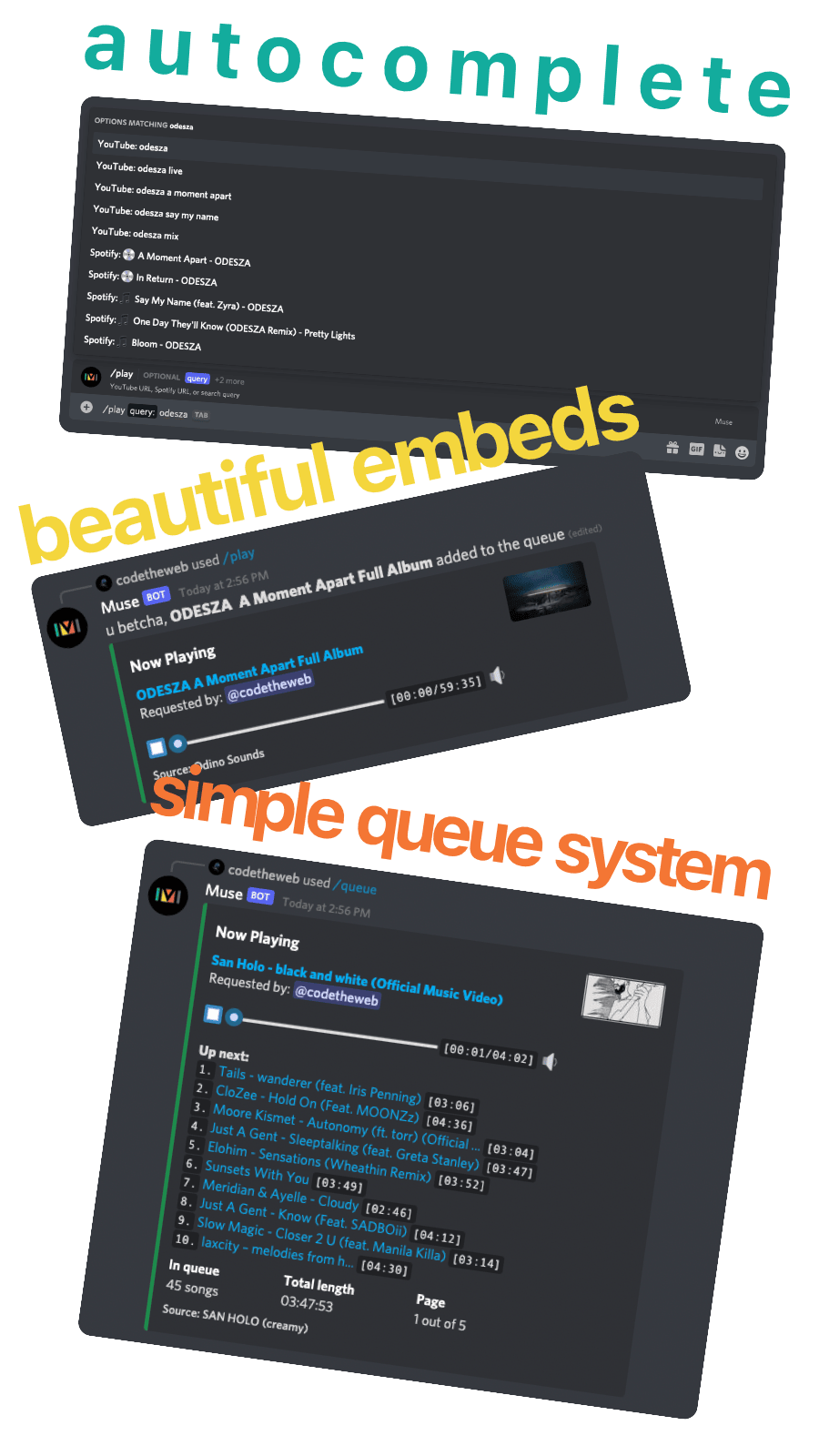
Features
- 🎥 Livestreams
- ☁️ SoundCloud tracks, share links, and playlists
- ⏩ Seeking within a song/video
- 💾 Local caching for better performance
- 📋 No vote-to-skip - this is anarchy, not a democracy
- ↔️ Autoconverts playlists / artists / albums / songs from Spotify
- ⭐ Users can save favorite queries for reuse
- 1️⃣ Muse instance supports multiple guilds
- 🔊 Configurable volume controls, including optional ducking when people speak
- ✍️ Written in TypeScript, easily extendable
- ❤️ Loyal Packers fan
Running
Muse is written in TypeScript. You can either run Muse with Docker (recommended) or directly with Node.js. Both methods require the Discord and YouTube API keys below. Spotify keys are optional and enable Spotify URL conversion:
DISCORD_TOKENcan be acquired here by creating a 'New Application', then going to 'Bot'.SPOTIFY_CLIENT_IDandSPOTIFY_CLIENT_SECRETcan be acquired here with 'Create a Client ID'.YOUTUBE_API_KEYcan be acquired by creating a new project in Google's Developer Console, enabling the YouTube API, and creating an API key under credentials.
Muse will log a URL when run. Open this URL in a browser to invite Muse to your server. Muse will DM the server owner after it's added with setup instructions.
A 64-bit OS is required to run Muse.
Versioning
The master branch acts as the developing / bleeding edge branch and is not guaranteed to be stable.
When running a production instance, I recommend that you use the latest release.
🐳 Docker
There are a variety of image tags available:
:2: versions >= 2.0.0:2.1: versions >= 2.1.0 and < 2.2.0:2.1.1: an exact version specifier:latest: whatever the latest version is:yt-dlp-latest: the latest release rebuilt with the newest availableyt-dlp
(Replace empty config strings with correct values.)
docker run -it -v "$(pwd)/data":/data -e DISCORD_TOKEN='' -e SPOTIFY_CLIENT_ID='' -e SPOTIFY_CLIENT_SECRET='' -e YOUTUBE_API_KEY='' ghcr.io/museofficial/muse:latest
This starts Muse and creates a data directory in your current directory.
You can also store your tokens in an environment file and make it available to your container. By default, the container will look for a /config environment file. You can customize this path with the ENV_FILE environment variable to use with, for example, docker secrets.
Docker Compose:
services:
  muse:
    image: ghcr.io/museofficial/muse:latest
    restart: always
    volumes:
      - ./muse:/data
      # Optional: mount YouTube-only cookies for age-restricted videos.
      # - ./youtube-cookies.txt:/run/secrets/youtube-cookies.txt:ro
    environment:
      - DISCORD_TOKEN=
      - YOUTUBE_API_KEY=
      - SPOTIFY_CLIENT_ID=
      - SPOTIFY_CLIENT_SECRET=
      # - YT_DLP_COOKIES_PATH=/run/secrets/youtube-cookies.txt
If you keep the same DISCORD_TOKEN, reuse the same /data volume, and point your Compose service at a newer image tag, Muse will come back up with the same bot identity and persisted database/cache.
Node.js
Prerequisites:
- Node.js 22.12.0 or newer
- ffmpeg (4.1 or later)
yt-dlpon yourPATH(or setYT_DLP_PATHto its full path)
git clone https://github.com/museofficial/muse.git && cd muse- Copy
.env.exampleto.envand populate with values - I recommend checking out a tagged release with
git checkout v[latest release] yarn install(ornpm i)yarn start(ornpm run start)
Note: if you're on Windows, you may need to manually set the ffmpeg path. See #345 for details.
Local validation
Run the behavior suite locally with:
npm test
⚙️ Additional configuration (advanced)
Cache
By default, Muse limits the total cache size to around 2 GB. If you want to change this, set the environment variable CACHE_LIMIT. For example, CACHE_LIMIT=512MB or CACHE_LIMIT=10GB.
yt-dlp
Muse now uses yt-dlp to resolve playable YouTube media URLs. In Docker, the image already includes it. For direct Node.js installs, either put yt-dlp on your PATH or set YT_DLP_PATH in your environment file.
Muse logs YT_DLP_VERSION on startup. Set YT_DLP_AUTO_UPDATE=true to make Muse try to update the configured yt-dlp installation before connecting to Discord. This works best with the Docker image's bundled virtualenv, or when YT_DLP_PATH points at a virtualenv or standalone yt-dlp executable that Muse can update.
Age-restricted videos require cookies from an age-verified YouTube account. Export a YouTube-only Netscape cookie file using the official yt-dlp guidance, mount it outside /data, and set YT_DLP_COOKIES_PATH to its container path. Treat this file like a password. Muse copies it to a private per-extraction temporary file because yt-dlp updates the cookie jar while it runs, so the mounted source may remain read-only and concurrent guilds do not share a writable cookie file.
Current YouTube extraction also requires a supported JavaScript runtime. The Docker image includes the matching yt-dlp-ejs package and uses its bundled Node.js runtime. Direct installs should install yt-dlp[default] and provide Node.js 22 or newer.
The ghcr.io/museofficial/muse:yt-dlp-latest image is rebuilt on a schedule from the latest Muse release with the newest yt-dlp published to PyPI. Versioned refresh tags are also published as :<muse-version>-yt-dlp-<yt-dlp-version>.
SponsorBlock
Muse can skip non-music segments at the beginning or end of a Youtube music video (Using SponsorBlock). It is disabled by default. If you want to enable it, set the environment variable ENABLE_SPONSORBLOCK=true or uncomment it in your .env.
Being a community project, the server may be down or overloaded. When it happen, Muse will skip requests to SponsorBlock for a few minutes. You can change the skip duration by setting the value of SPONSORBLOCK_TIMEOUT.
Custom Bot Status
In the default state, Muse has the status "Online" and the text "Listening to Music". You can change the status through environment variables:
BOT_STATUS:online(Online)idle(Away)dnd(Do not Disturb)
BOT_ACTIVITY_TYPE:PLAYING(Playing XYZ)LISTENING(Listening to XYZ)WATCHING(Watching XYZ)STREAMING(Streaming XYZ)
BOT_ACTIVITY: the text that follows the activity typeBOT_ACTIVITY_URLIf you useSTREAMINGyou MUST set this variable, otherwise it will not work! Here you write a regular YouTube or Twitch Stream URL.
Examples
Muse is watching a movie and is DND:
BOT_STATUS=dndBOT_ACTIVITY_TYPE=WATCHINGBOT_ACTIVITY=a movie
Muse is streaming Monstercat:
BOT_STATUS=onlineBOT_ACTIVITY_TYPE=STREAMINGBOT_ACTIVITY_URL=https://www.twitch.tv/monstercatBOT_ACTIVITY=Monstercat
Bot-wide commands
If you have Muse running in a lot of guilds (10+) you may want to switch to registering commands bot-wide rather than for each guild. (The downside to this is that command updates can take up to an hour to propagate.) To do this, set the environment variable REGISTER_COMMANDS_ON_BOT to true.
Automatically turn down volume when people speak
You can configure the bot to automatically turn down the volume when people are speaking in the channel using the following commands:
/config set-reduce-vol-when-voice true- Enable automatic volume reduction/config set-reduce-vol-when-voice false- Disable automatic volume reduction/config set-reduce-vol-when-voice-target <volume>- Set the target volume percentage when people speak (0-100, default is 20)
Troubleshooting voice connection timeouts
Muse retries a stalled initial voice handshake up to three times, waiting up to 20 seconds per attempt. Requests are added to the queue only after the connection is ready; a failed join leaves the existing queue intact. A later successful request can still resume songs that were already queued intentionally.
The failure message includes the last voice and network states. OpeningWs means the secure connection to the voice server did not open; check outbound TCP access to the port supplied by Discord, which is not necessarily 443. UdpHandshaking means the voice server was reached but UDP discovery did not finish; check outbound UDP and return traffic through the firewall/NAT. Discord describes both steps in its voice connection documentation.
Keep voice tokens, session IDs, encryption keys, and full protocol/debug payloads out of logs and bug reports. The network-state diagnostic reports only a state name.
Categories
Download Statistics
Total Downloads Over Time
Related apps
Explore more like this
Explore allLinks
Details
codetheweb/museRuntime arguments
- Network
bridge- Shell
sh- Privileged
- false
Template configuration
- Target
- /data
- Default
- /mnt/user/appdata/muse/data
- Value
- /mnt/user/appdata/muse/data
- Target
- DISCORD_TOKEN
- Target
- SPOTIFY_CLIENT_ID
- Target
- SPOTIFY_CLIENT_SECRET
- Target
- YOUTUBE_API_KEY
Set bot status. Can be online, idle, or dnd (do not disturb)
- Target
- BOT_STATUS
- Default
- online|idle|dnd
Set bot activity type. Add your stream URL below if you use STREAMING
- Target
- BOT_ACTIVITY_TYPE
- Default
- |PLAYING|LISTENING|WATCHING|STREAMING
the text that follows the activity type
- Target
- BOT_ACTIVITY
If you set Bot Activity Type to STREAMING, you MUST use this variable. Accepts YouTube or Twitch stream URL
- Target
- BOT_ACTIVITY_URL
- Target
- CACHE_LIMIT
- Default
- 2GB